Is your company building an AI time bomb?
Many businesses are rushing to deploy AI prototypes that look impressive during a demo but hide massive, systemic risks. From “hallucinating” bots that give dangerous advice to customers to catastrophic legal liabilities, simple AI setups can quickly become a corporate nightmare.
If your AI strategy depends on unorganized data and ungoverned workflows, you aren’t just experimenting, you are creating a “data debt” that could bankrupt your project or compromise your company’s reputation. If you want to move beyond these risky experiments and build AI that is efficient, scalable, trusted, and actually works for your business, you need a different approach. Learn how an AI-Enabling Data Platform protects your company while unlocking the true power of high-quality, scalable AI.
The AI-enabling Data Platform – Unlocking high-quality AI Applications
To scale AI effectively, organizations must move beyond unmanaged prototypes toward an AI-Enabling Data Platform that addresses security risks and poor data governance. By transforming fragmented data into governed Feature Marts, this architecture ensures the high-quality, compliant data foundation necessary for reliable AI workflows. This shift ultimately solves the maintenance and liability issues that typically hinder AI return on investment. Learn more in our upcoming webinar on February 17th, 2026!
Moving Beyond the Prototype
It usually starts with a spark of excitement. You build a small AI tool or workflow using a Large Language Model (LLM), and it works! It answers questions, summarizes text, and saves your team hours of manual labor. This is the “honeymoon phase,” where everything feels possible and the technology seems like magic.
But then, you try to scale. You move from a single user to a whole department, or from a small test folder to your entire company database. Suddenly, things get quite complex. The AI starts making mistakes it didn’t make before so you extend your AI workflows with data adjustments and exceptions, and the system starts breaking regularly. The legal team finds out about the project and starts asking difficult questions regarding data privacy and “black box” decision-making.
Does this sound familiar? You may have seen this in your own projects: A demo that looks great in a controlled environment but cannot handle the pressure of real, messy business use, and gets stuck in PoC purgatory. Without a professional foundation, your AI applications quickly change from being a business asset to becoming a massive liability.
Why Your Current AI Setup is Failing
While major LLM models are “trained” generally, they often lack access to the specific “facts” of your business in a way they can understand. This leads to several major threats:
- The “Hallucination” Risk: If the AI isn’t connected to a “Single Source of Facts,” it guesses. It makes up facts about your product features, delivery times, or prices. In a business setting, a wrong answer isn’t just a mistake but a breach of trust that can quickly destroy a customer relationship.
- The Maintenance Nightmare: Without a central data platform, every time your source data structure or business logic changes, you have to manually update every single AI tool and workflow you’ve built that touches this piece of data. This makes long-term maintenance impossible and kills the hoped-for ROI of your new AI application.
- The Legal Challenge: Legal frameworks don’t magically disappear when working with AI. Furthermore, additional frameworks like the EU AI Act are adding new layers of regulatory compliance requirements. If you cannot explain why your AI gave a specific answer or which data it used, you could face massive fines. Using sensitive data without a clear audit trail is a gamble most companies cannot afford.
The Two Traps of Modern AI Development
After the honeymoon phase of the LLM era, companies want to adapt quickly. However, they almost always fall into one of two typical traps. You might recognize these patterns in your own organization:
Trap 1: The “AI Spaghetti” Trap
In the rush to be “AI-First,” many teams use a mix of different AI workflow tools and agents, connecting them piece-by-piece to solve individual problems. While each piece works, the overall system becomes a tangled mess, which I like to call AI Spaghetti.
In this trap, there is no central “brain” or data control. Each agent has its own way of looking at data, leading to zero consistency. If you change a price in your main database, some agents might see it, while others are still using an old PDF they found in a different folder.
This “spaghetti” is impossible to maintain, secure, and scale. You spend 90% of your time fixing broken connections, integrations or calculations instead of creating new value.
The dangerous part is that this doesn’t happen on day one; it builds itself as you add more functionalities and exceptions. Often, these workflows are already in production as they grow, and the only way out is building everything from scratch the right way while maintaining the spaghetti in parallel making the “escape route” quite expensive.
Trap 2: The “Lone Wolf” Liability Trap
To bypass what they see as “slow corporate IT,” some teams or individuals start building their own AI applications and workflows. This is not inherently concerning for basic operational efficiency, but the trap is found when teams go deeper and start building workflows and applications consuming and transforming bigger junks of company data.
These “Lone Wolves” work around IT and expose the company to major risks to quickly “get the job done,” ignoring necessary governance processes. When a Lone Wolf uploads a customer list or a trade secret to a public model, that data might be used to train future versions of the model, making your secrets public property. Furthermore, with zero oversight, legal frameworks like GDPR, internal data sharing protocols, and IT security are often ignored.
The Solution: The AI-Enabling Data Platform
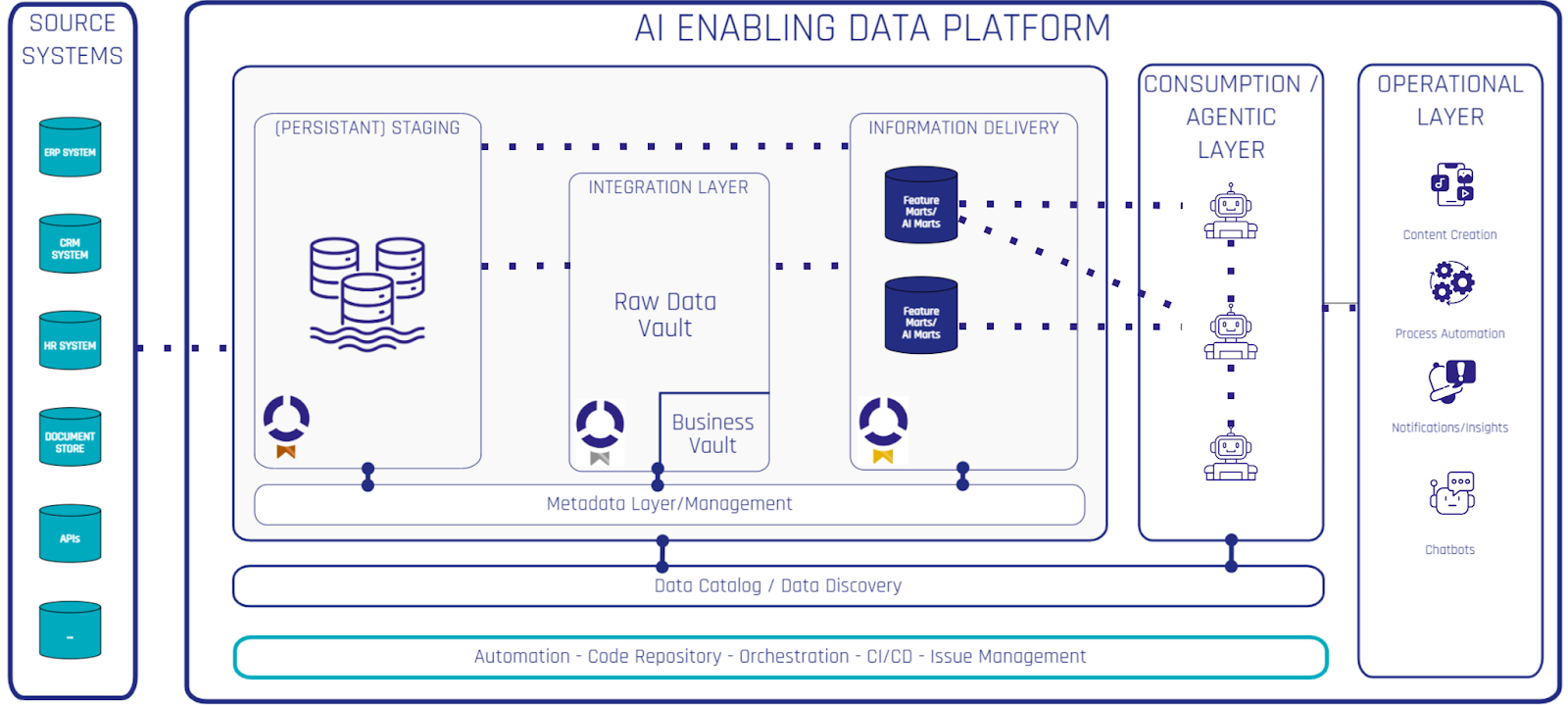
To escape these traps and unlock real sustainable value, you must move away from “messy” setups. The answer is the AI-Enabling Data Platform. This is not just a place to store data. It is a professional system that transforms raw, fragmented information into high-quality “fuel” for AI.
The platform acts as a protective layer between your messy company data (emails, databases, PDFs, spreadsheets) and your AI applications. Its main job is to provide Feature Marts.
What are Feature Marts?
Think of a Feature Mart as a library of trusted information. Instead of asking the AI to search through a giant, messy database, you provide it with specific “Features”, which essentially are data points that have been cleaned, integrated, and approved by your data experts.
For example, instead of the AI trying to guess a customer’s loyalty status from thousands of raw interaction logs, it simply asks the Feature Mart for the “Customer_Loyalty_Score.” The result is instant, accurate, and governed.
How do they fit into our data architecture?
This is aligned with how we provide data to business users for standard reporting and analytics. We don’t throw non-integrated, uncleaned data without descriptions at business users and ask them to find the perfect KPI. This is why the principles behind a quality data platform stay mostly the same. You can simply build Feature Marts on top of your existing data platform. Instead of “Information Marts,” you now add Feature Marts.
You build feature marts on top of your integrated data layer as part of your “Gold Layer” as it is a data asset ready for consumption by your AI applications, workflows and agents. Those are responsible for automating your operations supporting your business in a variety of tasks.
What becomes critical for high-quality results is a semantic layer. Nowadays, definitions for your data, calculations, and meaning can be added in modern data cataloging tools. These are excellent as they can be used by business users as well as data specialists. A well-constructed Feature Mart, combined with descriptive data, is the perfect recipe for high-quality results from your AI layer.
If you are interested in more details about the data architecture, check out my article about Data Fabric architecture here: Data Vault, Data Mesh & Data Fabric Guide
What You Achieve: Quality, Speed, Cost Efficiency and Trust
When you invest in an AI-Enabling Data Platform, you achieve four critical business outcomes:

The Path to Success
- Stop the “Lone Wolves”: Ensure all major AI projects use a central data platform so they stay safe and governed. Which AI usage is allowed outside IT and where guardrails are necessary should be defined in your organization’s AI strategy.
- Stop the “AI Spaghetti”: Simple AI use cases can be achieved with basic workflow tools (e.g., n8n, Zapier) without a dedicated platform. Complex AI use cases building on company data should not and only use workflows tools for orchestration.
- Build Feature Marts: Don’t just give the AI raw data. Turn your important business data into ready-to-use “features” to increase trust, speed, security and governance.
- Focus on Governance: Use the platform to control who (and which AI) can see your data. Audit inputs and outputs to ensure quality stays high.
- Create Cross-functional Teams: The real impact is in automating everyday business processes, which is best achieved through combined teams of data engineers, AI engineers, and business users.
- Assess and Plan: Get an overview of how AI is currently used, where the biggest risks are, and where the biggest opportunities lie. Create a roadmap including team structure, team skills, architecture, processes, governance and security.
If you want to profit from external expertise, read about our Scalefree Review & Assessment service and reach out to us for a customized review fitting your exact needs.
Conclusion: Real Value is Built on Trust
When your AI applications are accurate, safe, and governed, they stop being “risky experiments” and become the engine of your company’s success.
Start by identifying your “Lone Wolves” and bringing them into a governed environment. Look at your most valuable AI use cases and start building the Feature Marts they need to survive in the real world.
What do you think?
Have you seen the “Agentic Spaghetti” trap in your own company? Are you worried about “Lone Wolves” creating legal risks? I would love to hear your experiences and challenges in the comments below or on social media postings (probably only LinkedIn)!