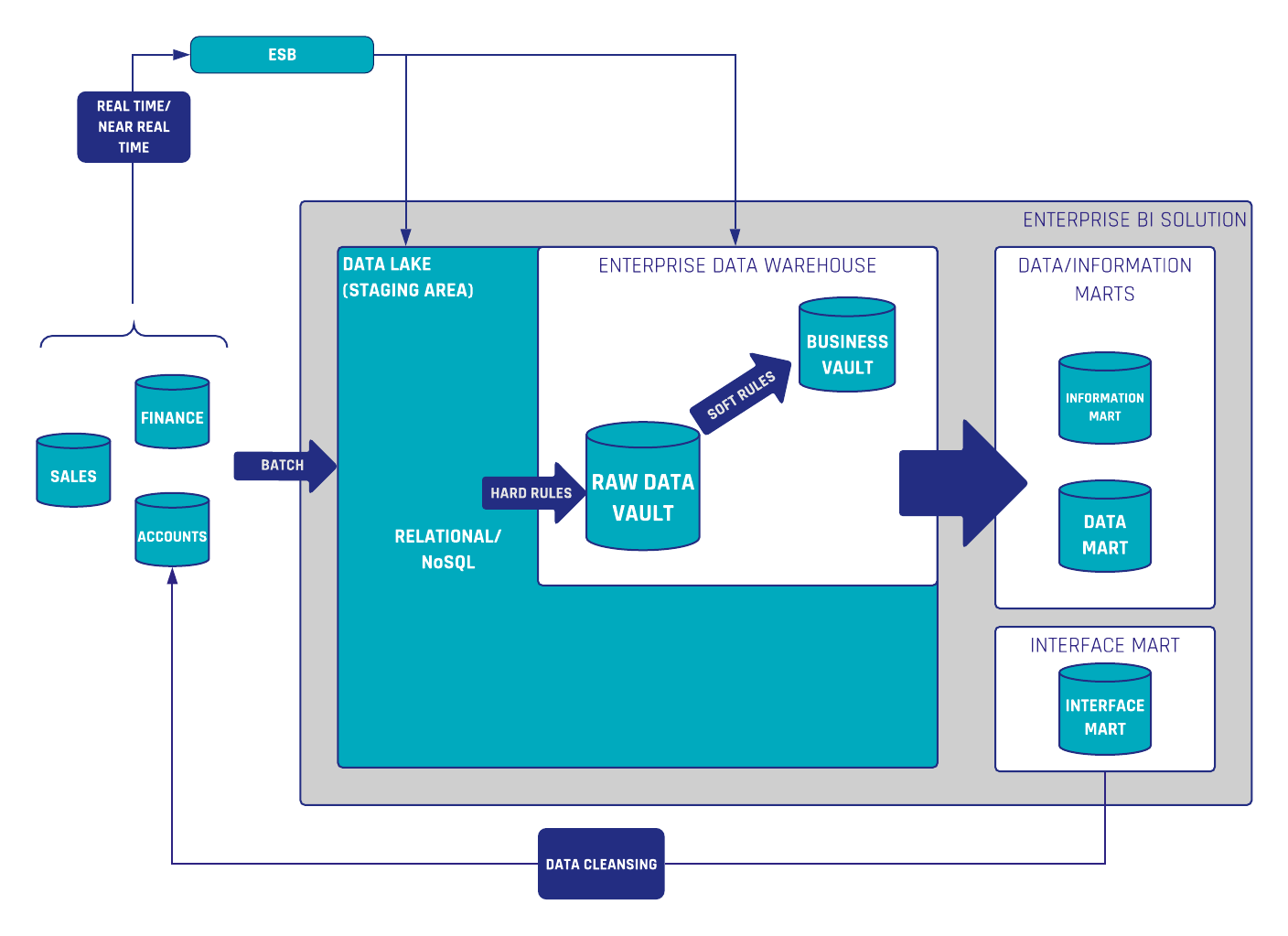
Sicherstellung der Datenqualität
Mangelhafte Datenqualität kann zu ungenauen Erkenntnissen, fehlerhaften Entscheidungen und letztendlich zu Beeinträchtigungen des Geschäftserfolgs führen. Im Zeitalter von Big Data verlassen sich Unternehmen stark auf Data Warehouses, um riesige Informationsmengen zu speichern, zu verwalten und zu analysieren. Die Effektivität eines Data Warehouse hängt jedoch von der Qualität der darin enthaltenen Daten ab. Wie lässt sich eine hohe Datenqualität sicherstellen?
In diesem Blogartikel gehen wir auf die Bedeutung der Datenqualität in einem Enterprise Data Warehouse ein und liefern Ihnen praktische Strategien, um präzise, zuverlässige und qualitativ hochwertige Daten mit Data Vault 2.0 zu gewährleisten.
Vielleicht möchten Sie sich auch die Webinar-Aufzeichnung genau zu diesem Thema ansehen. Sehen Sie sie sich hier kostenlos an!
Sicherstellung der Datenqualität in Ihrem Data Warehouse
In der heutigen datengetriebenen Kultur verlassen sich Unternehmen stark auf ihre Data Warehouses, um fundierte Entscheidungen zu treffen. Die Effektivität eines Data Warehouse hängt jedoch von der Qualität der darin enthaltenen Daten ab. In diesem Artikel gehen wir auf die Bedeutung der Datenqualität ein und stellen praktische Strategien vor, um mit Data Vault 2.0 genaue, zuverlässige und hochwertige Daten zu gewährleisten.
Was sind die Ursachen für schlechte Daten?
Datenqualität bezieht sich auf die Genauigkeit, Vollständigkeit, Konsistenz und Zuverlässigkeit von Daten. Im Kontext eines Data Warehouse ist die Aufrechterhaltung einer hohen Datenqualität entscheidend, um aussagekräftige Erkenntnisse zu gewinnen und fundierte Entscheidungen zu treffen. Verschiedene Faktoren tragen zum Vorhandensein von schlechten oder fehlerhaften Daten bei. Das Erkennen und Verstehen dieser Ursachen ist essenziell für die Implementierung effektiver Strategien zum Datenqualitätsmanagement. Hier sind einige häufige Gründe für schlechte Daten in einem Data Warehouse:
- Unvollständige oder fehlende Quelldaten
- Fehlende Standardisierung
- Probleme bei der Datentransformation
- Mangelhafte Data Governance
- Unzureichende Validierung und Qualitätsprüfungen
- Fehlende Anwenderschulung und mangelndes Bewusstsein
Techniken zur Sicherstellung der Datenqualität
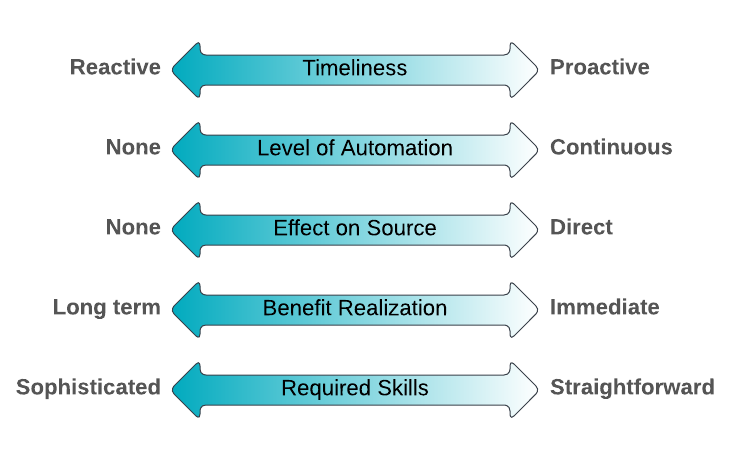
Es gibt eine Vielzahl von Datenqualitätstechniken, und es gibt keine universelle Ideallösung für alle Probleme. Die Schwierigkeit besteht darin, die aktuelle Situation sowie die Stärken und Schwächen der verfügbaren Techniken zu verstehen. Tatsächlich variiert die Effektivität der Techniken je nach Kontext. Eine bestimmte Technik passt in manchen Situationen gut, in anderen weniger. Scott Ambler hat fünf Vergleichsfaktoren entwickelt, mit denen sich die Effektivität einer Datenqualitätstechnik beurteilen lässt. Diese nachfolgend gezeigten Faktoren sollen Ihnen helfen, die passende DQ-Technik für Ihre jeweilige Situation auszuwählen:
Quelle: https://agiledata.org/essays/dataqualitytechniquecomparison.html
- Rechtzeitigkeit (Timeliness): Reagieren Sie auf ein entdecktes DQ-Problem oder wenden Sie die Technik an, um DQ-Probleme proaktiv zu vermeiden oder zu reduzieren?
- Automatisierungsgrad (Level of automation): Inwieweit ist eine Automatisierung möglich? Eine kontinuierliche Technik würde je nach Bedarf automatisch aufgerufen werden.
- Auswirkung auf die Quelle (Effect on source): Hat die Technik Auswirkungen auf die eigentliche Datenquelle?
- Nutzenrealisierung (Benefit realization): Tritt der Nutzen der Qualitätsverbesserung sofort ein oder ist ein langfristiger Nutzen zu erwarten?
- Erforderliche Fähigkeiten (Required skills): Erfordert die Technik anspruchsvolle Fähigkeiten, die erst durch Schulung/Erfahrung erworben werden müssen, oder ist die Technik leicht zu erlernen?
Der Nutzen des Data-Vault-2.0-Ansatzes
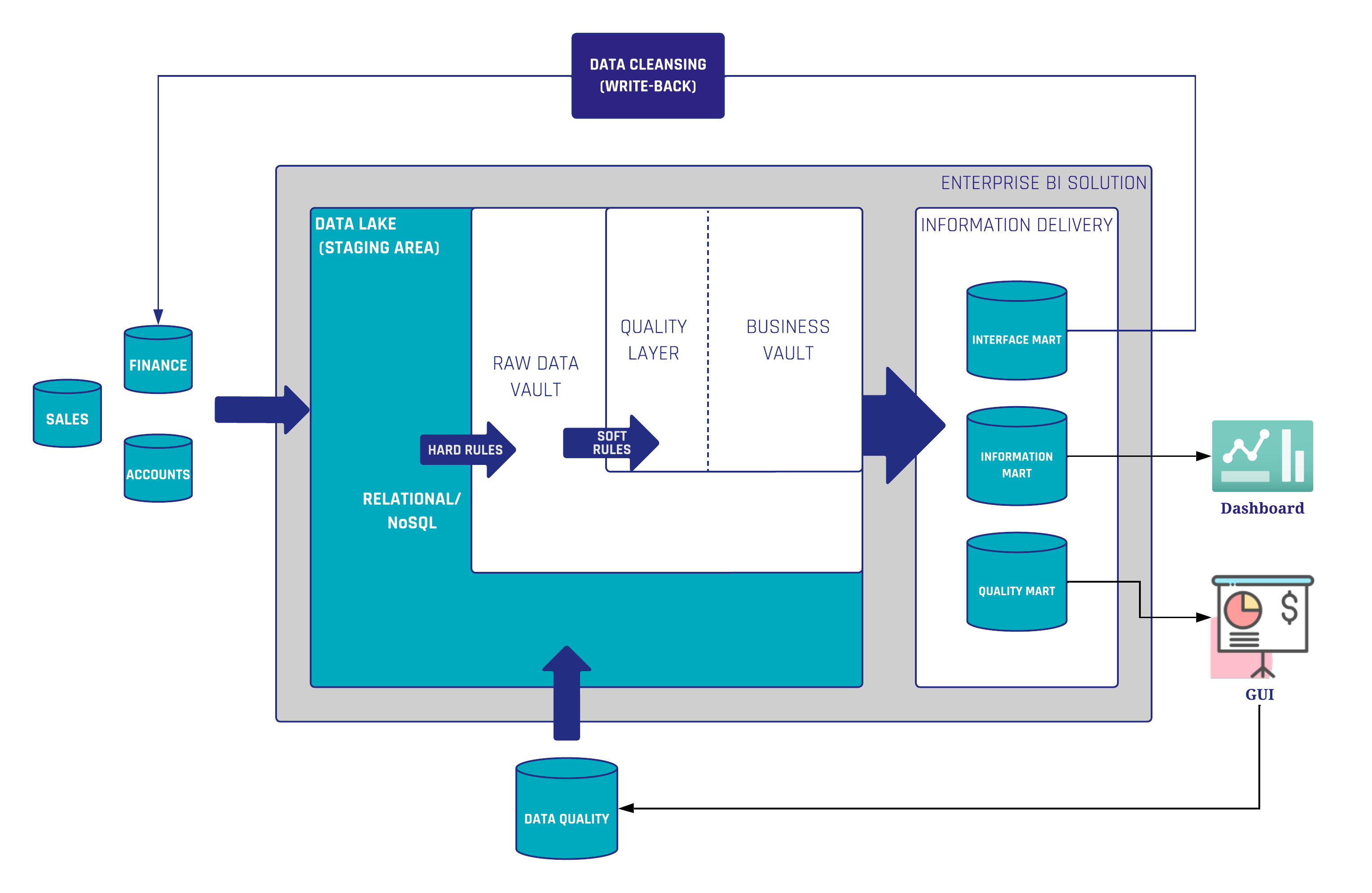
Wenn schlechte Daten erkannt werden, besteht der erste Schritt in einer Ursachenanalyse. Was aber, wenn die schlechten Daten aus dem Quellsystem stammen? Der beste Ansatz wäre, die Fehler direkt im Quellsystem zu beheben. Diese Methode wird jedoch häufig abgelehnt, da sie als zu kostspielig gilt. Da die Quellsysteme nicht im Verantwortungsbereich des Data-Warehouse-Teams liegen, müssen wir einen Weg finden, die fehlerhaften Daten an einer anderen Stelle in unserer Architektur zu bereinigen. In Data Vault 2.0 betrachten wir eine Datenbereinigungsroutine als Business Rule (Soft Rule), wobei diese Regeln im Business Vault implementiert werden.
In der gezeigten Architektur (Abbildung 1) ist ein Quality Layer in den Business Vault integriert, in dem die Datenbereinigungsroutinen ausgeführt werden. Ziel ist es, die bereinigten Daten für nachgelagerte Business-Vault- und Information-Mart-Objekte in hohem Maße wiederverwendbar zu machen. Wenn sich die Datenqualitätsregeln ändern oder neue Erkenntnisse über die Daten gewonnen werden, können die Regeln angepasst werden, ohne dass bisherige Rohdaten neu geladen werden müssen.
Nun stehen die Daten für die Verwendung in jedem Dashboarding- oder Reporting-Tool bereit. Es ist auch möglich, die bereinigten Daten in die Quelle zurückzuschreiben. Zu diesem Zweck werden die Daten einem Interface Mart bereitgestellt, der wiederum die Daten an das Quellsystem selbst zurücksendet. Auf diese Weise können Fachanwender die qualitativ hochwertigen Daten auch in ihren Quellanwendungen nutzen. Beim nächsten Laden der Rohdaten in den Raw Data Vault sind die Daten somit bereits bereinigt.
Der zweite in Abbildung 1 beschriebene Anwendungsfall ist das Monitoring von schlechten Daten durch einen sogenannten Quality Mart. Der Quality Mart ist Teil des Information Delivery Layer und wählt alle fehlerhaften Daten anstelle der bereinigten Daten aus. Darauf aufbauend können Berichte oder grafische Benutzeroberflächen für den Data Steward erstellt werden. Darüber hinaus kann der Data Steward Kommentare zu bestimmten Datensätzen hinterlassen, die nicht als schlechte Daten eingestuft werden sollten oder Ausnahmen von den Regeln darstellen. Diese Benutzeroberfläche speichert alle hinzugefügten Daten (Kommentare, Flags etc.) in einer Datenbank, die wiederum als Quelle für den Data Vault dient. Diese Daten können genutzt werden, um die Business Rules zu erweitern – insbesondere, um Ausnahmen von den Datenbereinigungsregeln herauszufiltern.
Ein weiterer Vorteil von Data Vault 2.0 sind die stark musterbasierten und standardisierten Entitäten. Dies ermöglicht eine einfache und automatisierte Entwicklung technischer Tests. Einmal für jede Data-Vault-Entität erstellt, können diese Tests sowohl auf die Raw-Data-Vault-Entitäten als auch auf die Business-Vault-Entitäten angewendet werden. Dies stellt ein konsistentes und auditierbares Data Warehouse sicher. Lesen Sie diesen Blogartikel, wenn Sie detailliertere Informationen zu technischen Tests in Data Vault benötigen.
Gängige Datenqualitätstechniken
Im letzten Abschnitt haben wir bereits einige Techniken zur Sicherstellung einer hohen Datenqualität in einer Data-Vault-2.0-Architektur beschrieben. Selbstverständlich gibt es eine Reihe weiterer Techniken, die unabhängig davon sind, welcher Modellierungsansatz verwendet wird. Darüber hinaus konzentrieren sich einige Techniken nicht in erster Linie auf die Datenqualität, haben aber dennoch einen positiven Einfluss darauf. Schauen wir uns einige davon im Folgenden genauer an:
- Validierung von Business Rules: An dieser Stelle müssen wir zwischen Datenqualität und Informationsqualität unterscheiden. Datenqualität konzentriert sich auf die intrinsischen Eigenschaften der Daten und adressiert Probleme wie Fehler, Inkonsistenzen und Unvollständigkeit auf granularer Ebene. Informationsqualität ist ein breiteres Konzept, das nicht nur die Qualität einzelner Datenelemente umfasst, sondern auch den Gesamtwert und den Nutzen der aus diesen Daten abgeleiteten Informationen. Darüber hinaus kann das, was für den einen Anwendungsfall nützliche Informationen sind, für einen anderen unzureichend sein. Aus diesem Grund müssen die Fachanwender stark in diesen Prozess eingebunden werden, beispielsweise durch User Acceptance Tests.
- Data Governance umfasst die Definition von Rollen, Verantwortlichkeiten und Rechenschaftspflichten für die Datenqualität, um sicherzustellen, dass Daten als wertvolles Unternehmensgut behandelt werden. Entwickeln Sie Data-Governance-Frameworks einschließlich Datenqualitätsstandards, Data-Stewardship-Verantwortlichkeiten sowie Dokumentationen und setzen Sie diese konsequent um.
- Data Guidance und Standardisierung stellen die Einheitlichkeit von Formaten, Einheiten und Werten über das gesamte Data Warehouse hinweg sicher und reduzieren so das Risiko von Fehlern, die durch unterschiedliche Darstellungen verursacht werden. Etablieren Sie standardisierte Benennungskonventionen, Maßeinheiten, Formatierungsregeln sowie Konventionen für Datensicherheit und Datenschutz und setzen Sie diese konsequent um. Data Vault 2.0 ist in dieser Hinsicht sehr hilfreich, da alle Entitäten stark standardisiert und automatisierbar sind.
- Data Steward: Als Teil der Data-Governance-Praxis ist ein Data Steward eine Überwachungs- und Governance-Rolle innerhalb einer Organisation, die für die Sicherstellung der Qualität und der Zweckmäßigkeit der Unternehmensdaten verantwortlich ist.
- Continuous Integration (CI) ist eine Entwicklungspraxis, bei der Entwickler ihre Arbeit häufig integrieren. Erfolgreiche Tests sollten eine zwingende Voraussetzung für die Einführung neuer Änderungen in Ihre EDW-Codebasis sein. Dies lässt sich durch den Einsatz von DevOps-Tools und die Aktivierung von Continuous Integration in Ihrem Entwicklungslebenszyklus erreichen.
Die Ausführung automatisierter Tests bei jedem Code-Check-in oder -Merge stellt sicher, dass Konsistenzprobleme oder Bugs frühzeitig erkannt und vor dem Go-Live behoben werden. - Ein Review ist eine Peer-Review der Implementierung (Quellcode, Datenmodelle etc.). Die Entwicklung eines starken Review-Prozesses schafft die Grundlage für eine kontinuierliche Verbesserung und sollte Teil des Workflows eines Entwicklungsteams werden, um die Qualität zu steigern und sicherzustellen, dass jeder Codeabschnitt von einem anderen Teammitglied geprüft wurde.
- Anwenderschulung und Bewusstseinsbildung: Schulen Sie Anwender in der Bedeutung der Datenqualität und bieten Sie Trainings zu den notwendigen Themen und Fähigkeiten an. Fördern Sie eine Kultur des Datenqualitätsbewusstseins innerhalb der Organisation, um die proaktive Identifikation und Behebung von Datenqualitätsproblemen zu unterstützen.
Fazit
Es steht außer Frage, dass eine hohe Datenqualität für ein erfolgreiches Data-Warehousing-Projekt unerlässlich ist. Der Weg zu hoher Datenqualität ist keine einmalige Anstrengung, sondern eine kontinuierliche Verpflichtung. Es handelt sich um einen vielschichtigen Prozess, der eine Kombination von Techniken, teamübergreifende Zusammenarbeit und die Förderung einer Kultur der Data Stewardship umfasst.
In diesem Artikel sind wir auf die Ursachen für schlechte Daten eingegangen und haben verschiedene Techniken für den Umgang mit diesen Problemen diskutiert. Genauer gesagt haben wir beschrieben, wie Datenqualitätstechniken innerhalb einer Data-Vault-2.0-Architektur implementiert werden können.
Wenn Sie tiefer in das Thema Datenqualität eintauchen möchten, denken Sie daran, sich die kostenlose Webinar-Aufzeichnung anzusehen.