search
0
All Posts By

Trung Ta

Trung Ta is a Senior BI Consultant at Scalefree with over 7 years of experience in data projects. A Certified Data Vault 2.0 Practitioner, he specializes in data platform automation and leading large scale data teams. His expertise spans Snowflake, dbt, and cloud ecosystems like Azure and AWS.

Data Transformation Implementation

Implement Data Transformations

In today’s data-driven world, organizations need robust, flexible, and scalable solutions to manage and transform their ever-growing volumes of data. Data Vault 2.0 has emerged as a leading methodology for designing enterprise data warehouses that are agile, auditable, and adaptive to change. When paired with powerful automation platforms like WhereScape, it becomes possible to implement these methodologies quickly and efficiently. In this article, we’ll explore where to implement data transformations prior to a Data Vault model in WhereScape and which types of transformations are permitted under Data Vault 2.0.


Understanding Transformation Types in Data Vault

Data Vault categorizes transformations into two primary buckets:

  • Hard Rules: Technical transformations that align data types and formats without altering the underlying meaning of the data.
  • Soft (Business) Rules: Business-driven transformations that may change data meaning, adjust granularity, or apply interpretations to meet business requirements.

Hard Rules

Hard rules are the bedrock of a clean, consistent Raw Data Vault. They consist of simple SQL operations such as CAST, TRIM, normalization, and pre-join operations. These transformations must not change the semantic meaning of the data—they simply ensure that data types and formats are consistent before loading into the Raw Vault.

  • Data Type Alignment: Converting text-based dates or numbers into proper DATE, TIMESTAMP, or numeric types.
  • Data Format Standardization: Trimming whitespace, standardizing phone numbers or currency formats, normalizing text cases.
  • Pre-join: Flattening complex or hierarchical source data by joining child tables to master tables using surrogate keys to obtain real business keys.

Soft Rules

Soft rules—also known as business rules—are applied later in the Data Vault workflow, typically in the Business Vault or downstream data marts. These rules implement business logic such as KPI calculations, trend analyses, or granular rollups. Unlike hard rules, soft rules may change data meaning, shift granularity, or introduce new interpretations.

  • KPI Calculations: Computing metrics like year-to-date sales, customer churn rates, or profit margins.
  • Data Interpretations: Categorizing transaction types, deriving risk scores, or labeling customer segments.
  • Granularity Adjustments: Aggregating daily data to monthly summaries or drilling transaction data down to event-level detail.

Why Apply Hard Rules Before the Raw Vault?

The core principle of Data Vault 2.0 is to keep early layers of your data warehouse as raw and unaltered as possible. By applying only hard rules before the Raw Vault, you:

  • Maintain Auditability: Raw data remains traceable back to its source, preserving lineage.
  • Ensure Reusability: Raw Vault structures can serve multiple downstream use cases without pre-judging reporting requirements.
  • Reduce Dependency: Soft rules—and their business dependencies—are deferred, minimizing changes that ripple through the entire pipeline.

Implementing Hard Rules in WhereScape

WhereScape’s automation capabilities allow you to define and apply hard rules seamlessly within both the 3D Data Model and the RED (Rapid ELT Development) modules. However, best practice is to centralize these transformations in the 3D model, where the metadata-driven approach can manage attribute-level rules efficiently.

1. Define Data-Type and Format Alignments

  1. In the Source Model, import your tables and define primary/foreign key relationships based on your source system metadata.
  2. Switch to the Data Vault Design layer (3D). Select the Hub, Link, or Satellite object and click the attribute you wish to transform.
  3. Under the Data Transformations tab, add a new transformation expression—e.g., CAST(birthdate AS DATE)—ensuring you choose the correct SQL dialect for your target platform.
  4. Specify the Source (schema or source system) if the rule varies by system.

2. Implementing Pre-Joins for Business Keys

When source tables only provide technical or surrogate keys, you can implement a “pre-join” to fetch the real business key before loading into the Raw Vault:

  1. In the Source Model, ensure foreign key relationships are defined (or manually create them by dragging and dropping).
  2. In the Data Vault Design, edit the Link object that originates from the child table (e.g., Orders).
  3. Under Source Mappings, add the parent table (e.g., Shippers) as an additional source entity.
  4. Map the parent’s business key attribute (e.g., CompanyName) to the Link’s business key slot, and move the surrogate ShipperID to a Satellite attribute if desired.
  5. When the model conversion runs, WhereScape will auto-generate the JOIN syntax in the staging area, fetching the business key for the Link’s hash-key computation.

Handling Complex Transformations

While WhereScape allows in-model transformations, it’s prudent to keep hard rules simple to avoid breaking the Raw Vault loading patterns. For more intricate logic—such as multi-step string parsing or nested conditional rules—consider creating dedicated pre-processing views:

  • Create a database view (or staging table) on top of the raw source or staging tables.
  • Implement your complex SQL logic in that view, ensuring it produces standardized output.
  • Point your WhereScape models to these views as the source entities, treating them like any other source table.

Live Demo Walkthrough

In our webinar demo, we used the Northwind sample database in WhereScape 3D to showcase two scenarios:

  1. Birthdate Alignment: Converting the Employee.BirthDate from DATETIME to DATE in the Hub.
    Key Steps: Select Hub_Employee in the Data Vault design, choose BirthDate, and add CAST(BirthDate AS DATE) under Data Transformations.
  2. Pre-Join for Shipper Business Key: Generating a Link_Order_Shipper that uses CompanyName (from Shippers) instead of the surrogate ShipperID.
    Key Steps: In the Link’s Source Mapping, add Shippers as an additional source, map CompanyName to the Link’s business key, and move ShipperID to Satellite.

Upon conversion and deployment:

  • The staging objects automatically featured a JOIN between Orders and Shippers using ShipperIDShipperID.
  • The physical Raw Vault tables contained the correct hash-keys and reference columns for the Link.

Best Practices and Tips

  • Keep Hard Rules Simple: Avoid multi-layer nested SQL. If logic becomes unwieldy, move it to a view.
  • Manage by Source: Use source-specific transformations if you ingest data from multiple systems with differing formats.
  • Document Transformations: Leverage WhereScape’s metadata repository to annotate why each transformation exists.
  • Test Incrementally: Validate each rule in isolation to ensure it doesn’t break downstream Raw Vault loads.
  • Defer Business Logic: Always push soft rules to the Business Vault or reporting layers to maintain Raw Vault purity.

Conclusion

Implementing data transformations in a Data Vault architecture requires a clear separation between technical (hard) rules and business (soft) rules. By applying hard rules—such as data type alignment, format standardization, and pre-joins—prior to loading your Raw Data Vault, you ensure a clean, consistent foundation that remains adaptable to evolving business needs. WhereScape’s 3D and RED modules provide powerful, metadata-driven tools to define these transformations at the model level, automating the generation of staging logic and downstream objects.

With a disciplined approach—keeping hard rules simple, leveraging pre-processing views for complex logic, and deferring business rules to later layers—you’ll build a scalable, auditable, and high-performance Data Vault 2.0 implementation that stands the test of time.

Watch the Video

Modeling Reference Data in Data Vault 2.0 with WhereScape

Understanding the Role of Reference Data

In the world of modern data warehousing, reference data plays a crucial role in maintaining consistency and adding business context. But how should reference or master data be modeled effectively, especially within the framework of Data Vault 2.0 using WhereScape?

This article breaks down best practices and modeling techniques to help data engineers and architects manage reference data in a scalable, maintainable way.


What is Reference Data?

Reference data consists of values that are used to categorize or describe other data within business systems. It typically includes code-to-description mappings that offer meaning to otherwise abstract identifiers.

Unlike business keys, which identify business entities or objects (like customers or products), reference data keys do not directly point to business objects. They simply support them with contextual information.

Examples of Reference Data:

  • ISO codes for countries
  • Official country names
  • Continent or region classifications
  • Currency types or codes

One critical aspect of reference data is that it can change over time. Country names may change, new currencies may be introduced, and existing classifications may be updated. This means that how we model and store this data must account for such changes.

Data Vault 2.0 and Reference Data Modeling

Data Vault 2.0 introduces a methodology designed for agility, auditability, and scalability in enterprise data warehousing. When dealing with reference data in this architecture, the recommended standard involves two main components:

  • Reference Table (Reference Hub)
  • Reference Satellite

Each serves a distinct purpose and helps manage both static and changing attributes efficiently.

The Reference Table (Reference Hub)

The reference table acts similarly to a hub in traditional Data Vault modeling, but with important distinctions:

  • Contains reference codes or keys (e.g., ISO country code)
  • Does not use a hash key – unlike typical hubs
  • May include additional static attributes that do not change over time

This component provides a centralized location for managing consistent lookup values across the enterprise. While it’s technically referred to as a “hub,” it’s specialized for reference data and behaves slightly differently in structure and intent.

The Reference Satellite

Reference satellites extend the reference table to store attributes that may evolve over time. This aligns well with the Data Vault 2.0 philosophy of tracking change history and ensuring auditability.

Characteristics of a Reference Satellite:

  • Includes reference codes or keys to link back to the reference table
  • Stores descriptive attributes that may change over time (e.g., country name updates, new regional classifications)

This design allows data teams to accommodate both historical tracking and the dynamic nature of reference data.

Why Model Reference Data This Way?

There are several strategic and operational advantages to modeling reference data using this structure in Data Vault 2.0:

  1. Separation of concerns: Static and changing data are stored in different layers (table vs. satellite), improving data integrity.
  2. Scalability: Future changes in reference attributes or descriptions are easier to manage and don’t affect historical records.
  3. Auditability: Data Vault’s natural historization supports full lineage and change tracking, which is ideal for regulated industries.
  4. Adaptability: Requirements for historization may evolve over time. Modeling reference data into satellites regardless of current needs ensures readiness for future changes.

Best Practices for Implementation

When implementing this in WhereScape, which automates the Data Vault modeling process, follow these best practices:

1. Always Use a Reference Satellite

Even if you don’t need to historize now, model your reference data in a satellite. Future-proofing your model saves costly rework later.

2. Use Reference Hubs When Multiple Sources Exist

If your organization consumes reference data from multiple systems (e.g., two systems providing different descriptions for the same country code), a reference hub helps consolidate and align these variations around the same key.

3. Avoid Hash Keys in Reference Hubs

Because reference tables don’t represent business objects, there’s no need for a surrogate hash key. Stick with the natural reference code (e.g., “US” for United States) as your unique identifier.

4. Design Satellites for Change

Structure your reference satellites to easily accommodate attributes that may change. Make use of effective date fields to track the history of these changes.

Common Pitfalls to Avoid

  • Modeling reference data as business hubs – this confuses context with core business entities
  • Skipping the satellite – even when attributes are static today, change is inevitable
  • Using hash keys unnecessarily – keep your design clean and minimal in reference structures
  • Ignoring multiple source issues – consolidate differing descriptions with a reference hub

Conclusion

Modeling reference data correctly is a small but critical part of building a reliable, scalable, and auditable Data Vault. By following the recommended structure—a reference table paired with a reference satellite—you create a flexible and future-proof design.

WhereScape users benefit from automation, but understanding these modeling principles ensures you’re applying the tool in a way that aligns with industry best practices and prepares your warehouse for long-term success.

Whether you’re handling ISO country codes or global currency classifications, treat your reference data with the same care you would your core business entities—because it gives those entities their context.

Watch the Video

Multi-Active Satellites vs. Dependent Child Links in Data Vault Modeling

Multi-Active Satellites vs. Dependent Child Links

In the realm of Data Vault modeling, practitioners often encounter scenarios where multiple descriptive entries are valid simultaneously for a single business entity. Two primary modeling techniques address this complexity: Multi-Active Satellites (MAS) and Dependent Child Links. Understanding the distinctions between these approaches is crucial for designing efficient and accurate data warehouses.


Understanding Multi-Active Satellites

A Multi-Active Satellite is designed to store multiple instances of descriptive information related to a parent key, all valid at the same point in time. The parent can be either a Hub or a Link. This structure is particularly useful when an entity can have several concurrent attributes.

For example, consider an insurance policy that offers various coverage details, each with different validity periods. Here, the policy (Hub) is associated with multiple coverages, each represented as a row in the Multi-Active Satellite, capturing the distinct validity periods and coverage amounts.

Defining Dependent Child Links

A Dependent Child Link is a Link entity that includes one or more additional key attributes. Together with the combination of business keys connected by the Link, these attributes uniquely identify incoming data records. This structure is also known as a degenerated link, peg-legged link, non-historized link, or transactional link.

For instance, in an invoicing system, an invoice (Hub) may have multiple line items. Each line item can be uniquely identified by combining the invoice identifier with a line item number, forming a Dependent Child Link.

Modeling Example: Order Line Items

When modeling order line items, there are two valid approaches:

  1. Create a non-historized, Dependent Child Link with a Non-historized Satellite containing the invoice footer details.
  2. Establish a non-historized, Dependent Child Link that includes both the key combination and the invoice footer details.

The choice between these methods depends on the specific requirements of the data model and the nature of the data being captured.

Modeling Example: Insurance Policies

Consider an insurance policy with different effective time windows—a scenario discussed in a previous session. In this case, attributes such as ValidFrom, ValidTo, and Amount are descriptive data attributes related to the business relationship between the Policy and Coverage.

The recommendation is to keep these attributes together in a Multi-Active Satellite on a standard Link between Policy and Coverage. This approach ensures that all relevant information is stored cohesively, allowing for efficient querying and analysis.

Choosing Between Multi-Active Satellites and Dependent Child Links

The decision to use a Multi-Active Satellite or a Dependent Child Link hinges on the specific business scenario:

  • Multi-Active Satellites are ideal when multiple descriptive attributes of an entity are valid simultaneously, and these attributes need to be tracked over time. This structure allows for capturing the history of changes effectively.
  • Dependent Child Links are suitable when there is a need to uniquely identify records through a combination of keys, especially in transactional contexts where multiple related records exist, such as invoice line items.

It’s essential to assess the nature of the data and the business requirements to determine the most appropriate modeling technique.

Conclusion

Both Multi-Active Satellites and Dependent Child Links offer valuable structures in Data Vault modeling, each catering to different scenarios involving multiple concurrent records. By understanding their definitions, applications, and differences, data modelers can make informed decisions to design robust and efficient data warehouses.

Watch the Video

Master Data Governance: Die EU Datenverordnung und was sie für Ihr Unternehmen bedeutet

Webinar-Übersicht

Am 12. September 2025 tritt die neue EU Datenverordnung in Kraft. Sie soll eine faire und innovative Datenwirtschaft gewährleiten. Aber was heißt dies für Ihr Unternehmen in Bezug auf die Data Governance?

In diesem Webinar enträtseln wir Feinheiten der EU-Datenverordnung (Data Act). Was umfasst diese Verordnung und was bedeutet dies für Ihr Unternehmen und Data Governance. Erfahren Sie mehr über die rechtlichen und technischen Verpflichtungen, die sich aus dieser Gesetzgebung ergeben, und erhalten Sie wertvolle Einblicke in die Implementierung konformer Datenplattformen.

Im ersten Teil bietet Dr. Benno Barnitzke, Rechtsanwalt und Spezialist im Bereich IT, Datenschutz und Digitalisierung eine Einführung und Erklärungen in die rechtlichen Rahmenbedingungen dieser Verordnung.

Im zweiten Teil gibt Trung Ta, Profi im Bereich Datenplattformen Tipps und Tricks zu Umsetzung dieser Verordnung.

AUFZEICHNUNG ANSEHEN

Das erwartet Sie

  • Erläuterungen über das kürzlich in Kraft getretene EU-Datengesetz von Rechtsanwalt Dr. Benno Barnitzke
  • Technische Data Governance Empfehlungen und Best Practices, um Data Act umzusetzen
  • Praktische Einblicke in die rechtlichen und technischen Verpflichtungen bei der Implementation von Datenplattformen.

Teilnahme-Details

Datum: June 5th 2024
Uhrzeit: 14:00 – 15:00 CEST
Zu Ihrem Kalender hinzufügen

Agenda

  1. Überblick über das EU Data Act
  2. Pflichten des Dateninhabers (Data Owner)
  3. Durchsetzung
  4. Empfehlungen zur Einhaltung der Rechtsvorschriften
  5. Technische Anforderungen und Herausforderungen
  6. Technische Empfehlungen für Datenplattformen

Zielgruppen

Datenmanagement- & -Compliance-Fachkräfte, Data Product Owners und Technische Rechtsexperten.

Free PDF - Die EU Datenverordnung - Checkliste zur rechtskonformen Umsetzung

MEISTERN SIE HEUTE DIE EU-Datenverordnung!

Bereiten Sie Ihr Unternehmen mit unserer umfassenden Checkliste der 10 wichtigsten Schritte auf die Datenverordnung vor. Erfahren Sie, wie Sie Daten schützen, Verträge überprüfen und Interoperabilität gewährleisten können.

KOSTENLOSE CHECKLISTE ANFORDERN

Implementing Data Vault 2.0 Zero Keys

Implementing Data Vault 2.0 Zero Keys

Learn about Zero Keys, “the other” concept that is oftentimes referenced interchangeably with ghost records, which we discussed in a previous blog post.

Why implement Zero Keys?

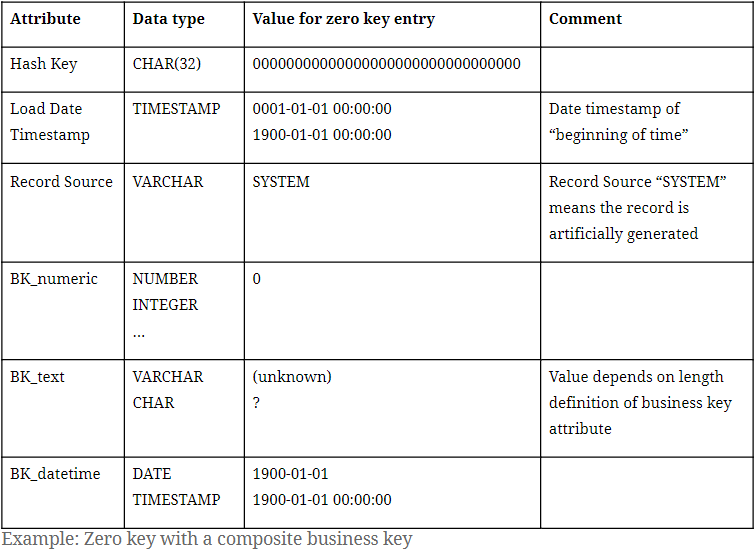
As discussed in the previous part of this series, a ghost record is a dummy record in satellite entities containing default values. Simply put, zero keys are the entry in each hub and link entity that is a counterpart to the satellite’s ghost record containing its hash key. In this manner, the term “zero key” is oftentimes used to describe the ghost record’s hash key, which might show up in other Data Vault entities such as in Point-in-Time (PIT) tables or links. Accompanying the zero hash key is, similar to a ghost record, a default value for the business key . Or, in the case of a composite business key, multiple default values for each of its components.

Zero Key with a composite business key

With the hub and link entry for the zero key in place, each and every entry in its related satellite will then have a parent hash key, avoiding so-called hash key orphans.

What does a Zero Key look like?

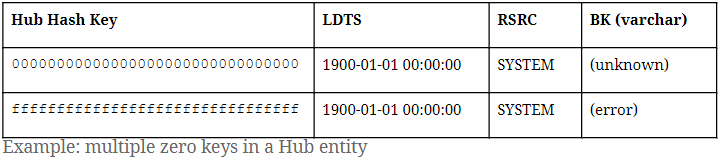
In Data Vault 2.0, it is only required to insert a single ghost record to each satellite entity. However, it is possible to have multiple zero keys in place. At Scalefree internally and in many  of our projects, we distinguish two types of missing objects through different hub zero keys.
Please note the hash algorithm in use is MD5:

  • 00000000000000000000000000000000 (32 times the digit ‘0’) for general “unknown” cases where a business key is missing.
  • ffffffffffffffffffffffffffffffff (32 times the letter ‘f’): a dedicated zero key for “erroneous” cases of missing business keys that show.
Multiple zero keys in a Hub entity

A good example that calls for the “error” zero key is in an erroneous or broken mandatory object relationship in the source. In that case, the zero key ffffffffffffffffffffffffffffffff will be found in the link entity, indicating an unexpectedly absent hub reference. Bear in mind, should you choose to implement the error zero key, it is not required to insert a ghost record with the error zero key as a parent hash key in satellite entities.

As for the zero key in link entities, it is only necessary to have one entry containing the zero hash key as both link hash key and hub reference.

Zero key in a Link entity

It is also important to point out that all examples we provide in this blog series involve the hash algorithm MD5, which outputs 32-hexadecimal-digit sequences. For Data Vault 2.0 projects that adopt other hash algorithms, such as SHA256, simply adjust the length of the zero keys we proposed (“0000…” / “ffff…”) to the desired hash output length.

Conclusion

We hope that this blog post helped to clarify the implementation of zero keys in a Data Vault 2.0 solution and the differences between the concepts of ghost records and zero keys. Feel free to share your experience with implementing these concepts in the comments below!

Implementing Data Vault 2.0 Ghost Records

Ghost records

Implementing Data Vault 2.0 ghost records

During the development of Data Vault, from the first iteration to its latest Data Vault 2.0, we’ve mentioned the two terms “ghost records” and “zero keys” in our literature as well as in our Data Vault 2.0 Boot Camps. And since then, we’ve noticed these concepts oftentimes being referenced interchangeably. 

In this blog entry, we’ll discuss the implementation of ghost records in Data Vault 2.0. Please note, that this article is part one of a multi-part blog series clarifying Ghost Records vs. Zero Keys.


Why implement ghost records?

The concept of ghost records is usually brought up together with the implementation of point-in-time (PIT) tables. PIT tables are used as query assistant objects as part of the Business Vault, in which snapshots of data are created for certain time intervals specified by the data consumers. It’s important to note that these intervals can be daily, weekly, even real-time, etc. Each entry in a PIT table materializes joins from a Data Vault spine object (either a Hub or a Link) to its surrounding Satellite structures to reduce joins while querying against the Data Vault and thus boosting query performance.

In some instances, however, upon joining e.g. a Hub to one of its Satellites, there can be no corresponding Satellite delta for certain snapshots. The reason behind this could be that the business key was not available or unknown by the data source at that given time. 

Ghost records

Reference to a ghost record in a PIT table

To combat this issue, ghost records are added to Satellite entities to virtually fill up gaps in the beginning of the timeline, so that equal joins are made possible in ad-hoc queries against the Raw Vault. Equal joins (a.k.a. equi-joins) are joins that only use equality comparators and are arguably the most efficient/fastest SQL-join type.

What does a ghost record look like?

A ghost record can be understood as a dummy record that contains default values. In the previous iteration of Data Vault (DV1), the solution was to create a ghost record per key per satellite structure. This would still do the job of filling up gaps at the beginning of the timeline. However, this solution didn’t scale well on higher volumes of data. Imagine a hub that contains 10 million business keys and there are three satellites attached to it. Every satellite then contains 10 million ghost records, resulting in 30 million records across all three satellites. In addition, every time a business key is added to the hub, a corresponding ghost record needs to be added to each satellite. The sheer amount of ghost records in this case would defeat the whole purpose of trying to achieve equi-joins, to enable faster queries. 

Thus, since the introduction of DV2.0, it is only required to insert one single ghost record per Satellite structure.

Ghost records

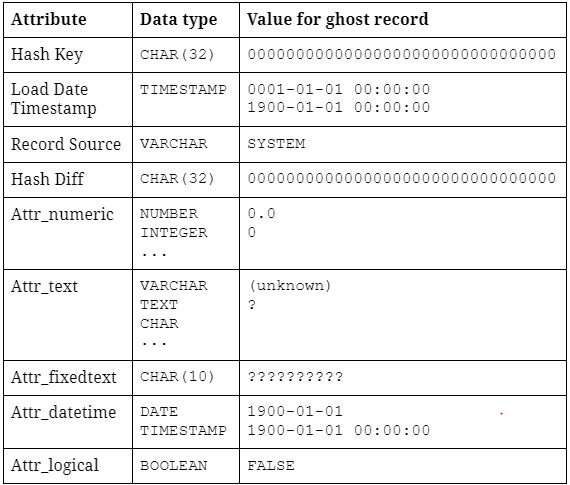
Example: Ghost record with attributes of different data types

The ghost record typically contains a constant hash key 00000000000000000000000000000000 (32 times the character “0”). This hash key is also known as a Zero key – more on Zero keys coming up in the next part of this blog series. Its load timestamp is usually set to the earliest possible timestamp within the DBMS, indicating the “beginning point of time”. The record source “SYSTEM” simply means the record is artificially generated. 

Then, follows a list of default NULL values for every descriptive attribute within the Satellite structure. For each data type, we define a default value for the ghost record. For example, attributes with numeric data types can be filled with (numeric) zero, string attributes can be filled with either “(unknown)” or “?” depending on the length definition of the attribute.

It is recommended that the ghost record is filled with default values, as opposed to filling it with NULL/empty values, since these default values can be used and displayed further downstream. A good example of this can be seen in dimensions, an “(unknown)” string is arguably way more descriptive than a mere NULL value.

How to insert ghost records

There are a couple of ways to insert ghost records into Satellite structures.

The first variation is to insert the ghost records upon object creation as a one-time operation and then forget about it. Simple as that!

Another way is to insert the ghost record during the process of loading Satellites. The loading procedure should start with inserting a ghost record into the target object, if it does not yet exist. Then, the procedure can proceed with loading the Satellite with incoming data as normal. This variation might be viewed as rather excessive. However, it ensures that the ghost record is always available and that it gets inserted back into each Satellite – in case for whatever reason, objects are truncated or the ghost record itself is accidentally deleted, for example during development.

Both variations can be fully automated within your project’s Data Vault automation tool of choice.

Conclusion

We hope that this blog post helps to clarify the implementation of ghost records in a Data Vault 2.0 solution. Coming up next, we’d like to discuss with you “the-other-technical-term” Zero keys and the difference between Ghost records and them – which has been rather confusing to many fellow Data Vault practitioners.

Close Menu