search
0
All Posts By

Damian Hinz

Damian Hinz is a Cloud DevOps Consultant at Scalefree specializing in multi-cloud environments (AWS, Azure, GCP) and Snowflake. Certified in Terraform and AWS, he excels at designing CI/CD pipelines and Zero-Trust security architectures for major clients. Damian combines a B.Sc. in Computer Science with a focus on automation and cloud cost optimization.

Behind the Branches – Navigating Git Workflows in Modern DevOps

A Man Branching with Visual Studio

Branching Strategies

Branching strategies are one of those topics that rarely get much attention until they suddenly become a problem. Whether it’s drowning in merge conflicts, the headache of implementing and synchronizing hotfixes across multiple branches, or a feature freeze caused by insufficient quality assurance, your repository and branching structure can have a major impact on day-to-day development.

But what branching strategies actually exist, and what are their pros and cons? Which approach allows you to deploy changes most quickly? And how can you maintain high software quality despite frequent releases?

In this article, we’ll provide a structured overview of common branching strategies and typical challenges developers face when using them.

Navigating Git Workflows in Modern DevOps

This webinar offers a clear overview of common approaches and how they impact CI/CD, code quality, and maintainability. Beyond theory, we’ll dive into practical challenges and real-world issues teams face every day. Register now for our free webinar on September 16th, 2025!

Watch Webinar Recording

Why Are Branching Strategies Relevant?

Branching models reflect the organization, release culture, and technical maturity of a project. There is no single “correct” strategy that fits every project. Choosing the right one depends heavily on the project’s context. Some of the most important questions to consider when selecting a branching strategy include:

  • Does the team work in fixed sprint or release cycles, or is code deployed continuously?
  • How many developers are working simultaneously on the same codebase?
  • What is the quality of your CI/CD pipeline? Does every change need a manual review, even if the pipeline passes, or can it be deployed automatically?

Depending on the answers to these questions, a simple or more complex branching strategy may be appropriate.

Comparison of Common Strategies

Git Flow

The Git Flow strategy was originally developed for traditional software projects with planned release cycles. Its long-lived main branches are “main” (or “master”) and “dev”.

In addition, it introduces several short-lived branches:

Feature branches

New features are developed in separate feature branches, which are merged into the develop branch once completed.

Hotfix branches

If a critical bug occurs in the production environment (i.e., on the main branch), a hotfix branch is created from main to address the issue. Once the fix is implemented and pushed to the hotfix branch, it is merged into both main and develop to ensure the bug is resolved in both branches.

Release branches

When a release is approaching, a release branch is created from develop, containing all features added since the last release. This branch is then used for final QA testing, bug fixing, and versioning. Once the release is approved, the release branch is merged into both main and develop.


The main advantage of Git Flow is its clear structure. Even in larger teams with many developers and therefore multiple concurrent feature branches, it’s easy to track which version is in what state. The strategy supports parallel development very well due to its structured branching model.

However, the downside is the organizational and technical overhead. The large number of branches and merges can lead to conflicts and divergence over time, especially with long-lived release and hotfix branches. A particular challenge arises when keeping branches in sync. Hotfixes created from main need to be merged back into main and dev, and changes made in release branches, which originate from dev, must eventually be merged into both main and dev, as shown in the diagram. These synchronization steps often introduce additional effort and increase the risk of conflicts or inconsistencies, especially when multiple streams of work are active in parallel.

Additionally, the path a feature must take, from a feature branch to develop, to a release branch, and finally to main, can slow down the deployment process.

While a solid CI/CD pipeline can help automate and streamline parts of this workflow, Git Flow does not rely on automation to function. This makes it especially suitable for teams with more manual QA processes or limited automation infrastructure.

Gitflow branching

GitHub Flow

Compared to Git Flow, the GitHub Flow strategy is significantly leaner. It uses only a single long-lived branch, usually main, and temporary feature branches that are merged via pull requests.

Once all changes on a feature branch are complete and have passed review and various tests, the branch is merged directly into main.

The key advantage of GitHub Flow is its simplicity. There are no separate release or develop branches, and even hotfixes can be handled in short-lived branches. Teams can respond to changes quickly and deploy frequently. This agility is especially effective when supported by a robust CI/CD pipeline. If properly implemented, testing, building, and deployment processes are automated, further improving GitHub Flow’s fast time to market.

Because of its low complexity and minimal coordination overhead, GitHub Flow is also particularly well-suited for smaller teams that value speed and iteration over rigid release planning.

If you’re interested in how such pipelines are structured in practice, our CI/CD pipeline Blog article offers a look at a practical GitHub-based setup using GitHub Actions and dbt. It’s a useful companion piece for understanding the automation layer that supports fast and reliable delivery.

However, this strategy also comes with limitations: it doesn’t support managing multiple parallel versions or complex release planning.

Additionally, it relies heavily on the quality of the CI/CD pipeline.

Trunk based branching

Trunk-Based Development

Trunk-Based Development is quite similar to the GitHub Flow strategy, but there are a few key differences.

While it also relies on a single long-lived branch (the trunk, typically main), commits are either made directly to main or via very short-lived feature branches. These feature branches often exist for only a few hours, and it’s common for changes to be merged into main multiple times a day. The goal is to integrate changes as early as possible to avoid conflicts before they even arise.

Because there are no fixed release cycles in Trunk-Based Development, it’s essential to ensure that incomplete features don’t go live prematurely. Feature flags play a central role here, allowing unfinished functionality to be hidden in the production environment until it’s ready.

As with GitHub Flow, a strong CI/CD pipeline is essential. It acts as the main safeguard for quality assurance and enables rapid deployment to the main branch.

Trunk-Based Development is especially effective for teams that are comfortable with rapid iteration and a high level of automation. While it can be used by smaller teams, it truly shines in larger organizations where multiple teams work in parallel and frequent integration is critical to maintaining momentum and consistency.

The benefits of Trunk-Based Development include extremely fast deployments and minimal risk of merge conflicts due to the short-lived nature of branches and continuous integration.

However, similar to GitHub Flow, this strategy heavily depends on the reliability of the CI/CD pipeline. If your team operates in a highly automated DevOps environment, this approach works smoothly. But if that’s not the case, software quality can suffer significantly. The risk is especially high here, as all changes are deployed directly to the main branch.

Conclusion

All three strategies come with their own strengths and weaknesses.

Git Flow is well-suited for larger projects with fixed release cycles, manual QA, and structured approval processes. It offers stability and clear workflows, but also brings significant technical and organizational overhead, making it a heavyweight option that can slow down development and release cycles due to its complexity and synchronization requirements.

GitHub Flow, by contrast, emphasizes speed and simplicity. It’s an excellent fit for smaller teams working on web or SaaS projects that deploy continuously, thanks to its low complexity and quick turnaround. But it relies on a good CI/CD pipeline. If tests are insufficient, faulty code might get deployed automatically.

Many of these risks can be mitigated with proper pipeline design and DevOps experience within the team, ensuring that automation is not just fast but also reliable.

Trunk-Based Development enables the highest release frequency, but only delivers consistent quality if the necessary technical maturity is in place. This makes it ideal for highly automated environments where teams ship many changes every day.

There are always ways to mitigate or minimize the downsides of any branching strategy. Techniques like blue/green or canary deployments, for example, can help reduce the impact of faulty changes and make rollbacks easier.

Stay tuned, we regularly share practical insights and solutions on topics like CI/CD, DevOps patterns, and deployment strategies.

CI/CD: Practical Insights into Automating Data Vault 2.0 with dbt

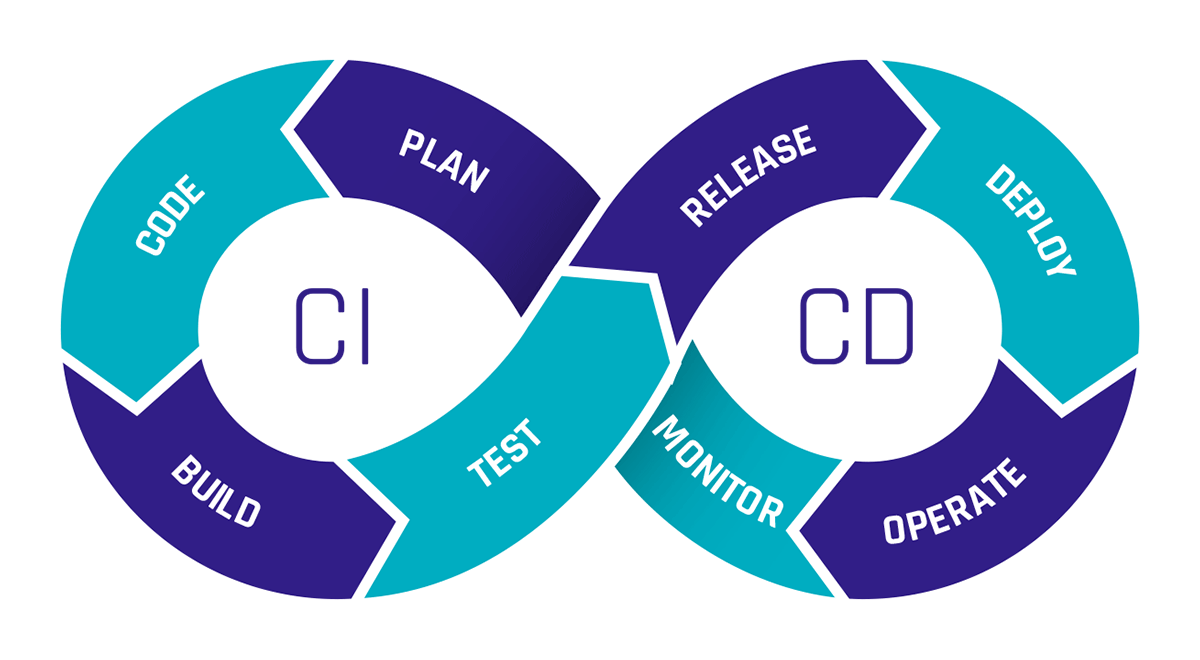
CI/CD Graphic Cycle

CI/CD

CI/CD pipelines are becoming increasingly important for ensuring that software updates can be released cost-effectively while maintaining high quality. But how exactly do CI/CD pipelines work, and how can a project benefit from using one?

This newsletter aims to answer these questions through a practical example of a CI/CD pipeline. The example focuses on a CI/CD pipeline for a GitHub repository that includes a package for implementing Data Vault 2.0 in dbt across various databases. Therefore, this newsletter will also cover the basics of dbt and GitHub Actions.

From Continuous Integration To Data Vaults: A Comprehensive Workflow

This webinar will cover what CI/CD pipelines are and the advantages they offer. We will present parts of the CI/CD pipeline for the public datavault4dbt package to demonstrate how a CI/CD pipeline can be used. The webinar will introduce the key features of GitHub Actions and explain them through examples. This will show how each feature can be utilized in practice and highlight the various possibilities GitHub Actions offers. The webinar aims to explain the benefits of CI/CD pipelines and illustrate what such a pipeline can look like through a practical example.

Watch Webinar Recording

What is CI/CD?

CI stands for Continuous Integration, and CD stands for Continuous Delivery or Continuous Deployment. But what exactly do these terms mean?

Continuous Integration refers to the regular merging of code changes, where automated tests are conducted to detect potential errors early and ensure that the software remains in a functional state.

Continuous Delivery involves making the validated code available in a repository. CI tests should already be conducted in the pipeline for this purpose. It also includes further automation needed to enable rapid deployment, such as creating a production-ready build. The difference between Continuous Delivery and Continuous Deployment is that with Continuous Deployment, the successfully tested software is released directly to production, while Continuous Delivery prepares everything for release without automatically deploying it.

Continuous Deployment allows changes to be implemented quickly through many small releases rather than one large release. However, the tests must be well-configured, as there is no manual gate for transitioning to production.

CI/CD Graphic Cycle

CI/CD pipelines provide immense time savings through automation. The costs of resources needed for manual testing are also lower with CI/CD pipelines, as they can be configured to spin up resources only for testing and then shut them down afterward. Since permanent resources aren’t required, you only pay for the resources needed during the test runtime.

Introduction to dbt

The abbreviation dbt stands for “data build tool.” dbt is a tool that enables data transformation directly within a data warehouse. It uses SQL-based transformations that can be defined, tested, and documented directly in the dbt environment.

This makes dbt an excellent choice for implementing Data Vault 2.0 as dbt can be used to create and manage the hubs, links, and satellites required by Data Vault.

To facilitate this process, we at Scalefree have developed the datavault4dbt package. Datavault4dbt offers many useful features, such as predefined macros for hubs, links, satellites, the staging area, and much more.

For a deeper understanding of dbt or datavault4dbt, feel free to read one of our articles on the topic.

The Capabilities of GitHub Actions

GitHub Actions is a feature of GitHub that allows you to create and execute workflows directly within GitHub repositories. You can define various triggers for workflows, such as pull requests, commits, schedules, manual triggers, and more.

This makes GitHub Actions ideal for building CI/CD pipelines for both private and public repositories. The workflows are divided into multiple jobs, each consisting of several steps. Each job runs on a different virtual machine.

Within these steps, you can define custom tasks or utilize external or internal workflows. This offers the significant advantage of not having to develop everything from scratch in a workflow; instead, you can leverage public workflows created by others.

The seamless integration of Docker also provides numerous possibilities, such as quickly setting up different test environments, which greatly simplifies the creation of a CI/CD pipeline.

GitHub Actions is the key tool in the following example of a CI/CD pipeline.

Practical Example: CI/CD Pipeline for datavault4dbt

For the public repository of the datavault4dbt package, we have built a CI/CD pipeline to ensure that all features continue to function across all supported databases with every pull request (PR). When a PR is submitted by an external user, someone from our developer team must approve the start of the pipeline. In contrast, a PR from an internal user can be automated by adding a specific label to initiate the pipeline.

Once the pipeline is triggered, GitHub Actions automatically starts a separate virtual machine (VM) for each database. Currently, the datavault4dbt package supports AWS Redshift, Microsoft Azure Synapse, Snowflake, Google BigQuery, PostgreSQL, and Exasol, so a total of six VMs will be launched. Since GitHub Actions operates in a serverless manner, these VMs do not need to be manually set up or managed.

The VMs then connect to the required cloud systems. For instance, the VM for Google BigQuery connects to Google Cloud, while the VM for AWS Redshift connects to AWS. Subsequently, the necessary resources for each database are generated, which can be done via API calls or using tools like Terraform.

After the resources are created, additional files required for testing are generated and loaded onto the VM. In our example pipeline, these include files such as profiles.yml,  which contains information needed by dbt to connect to the databases.

Next, a Dockerfile is used on each VM to build an image that automatically installs all dependencies for the respective database. At this stage, Git is also installed on each image so that tests stored in a separate Git repository can be loaded onto the image.

Loading the tests from a repository allows for centralized management of the tests, ensuring any changes are executed for each database during the next pipeline run. Once the images are built, containers are created using these images, where tests are conducted with various parameters. After all tests are completed, the containers are shut down, and by default, the resources on the respective cloud providers are deleted.

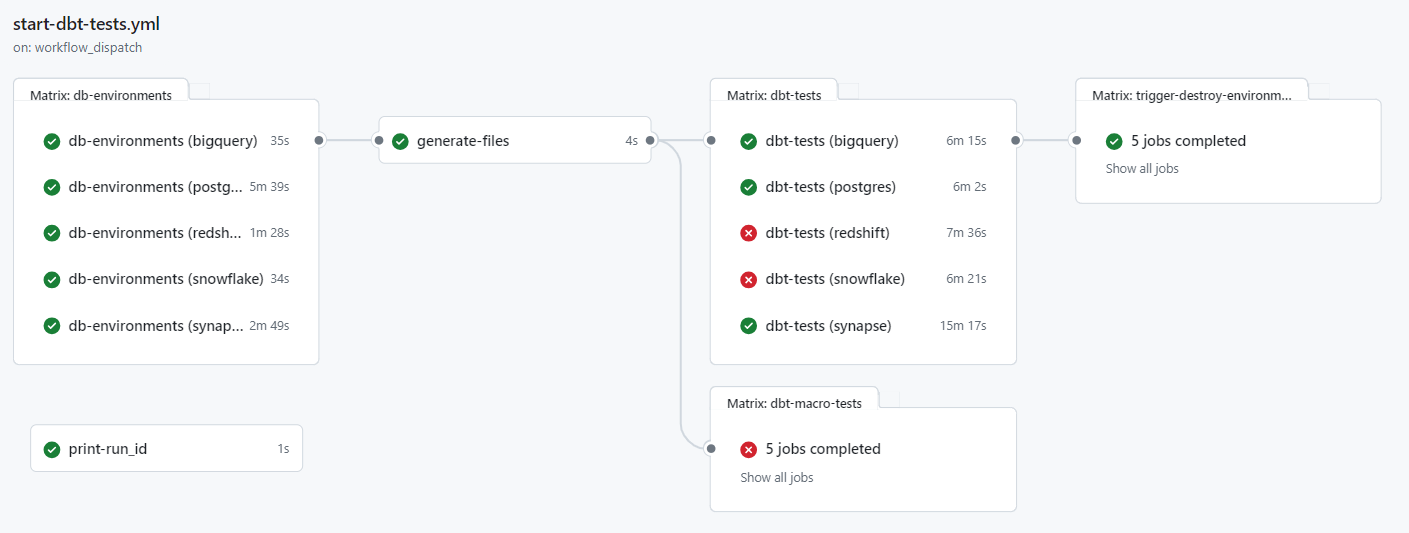
CI/CD graphic dbt tests yml file

The test results are fully visible in GitHub Actions, with successful and failed tests clearly marked.

CI/CD graphic workflow form

If the pipeline is started manually, there is an additional option to specify whether only certain selected databases should be tested and whether the resources on the cloud systems should not be deleted after the tests. This allows developers to examine the data on the databases more closely in case of an error.

This pipeline offers numerous advantages for the development of the datavault4dbt package. It allows testing for errors on any of the supported databases with each change, without spending much time creating test resources. At the same time, it saves costs because all resources run only as long as necessary and are immediately shut down after the tests.

Managing the pipeline is also simplified through GitHub, as all variables and secrets can be stored directly in GitHub, providing a centralized location for everything. Once the pipeline is set up, it can be easily extended to include additional databases that may be supported in the future.

Ultimately, this is just one example of what a CI/CD pipeline can look like. Such pipelines are as diverse as the software for which they are designed. If we have piqued your interest and you have further questions about a possible pipeline for your company, please feel free to contact us.

Conclusion 

This newsletter explores the benefits and workings of CI/CD pipelines in agile software development, illustrated through a practical example involving a GitHub repository and a dbt package for implementing Data Vault 2.0, highlighting tools like GitHub Actions for automation and efficiency in deployment processes.

How Can DataOps Support and Improve Your Data Solution?

CI/CD (Continuous Integration / Continuous Deployment)

Watch the Video

DataOps: Revolutionizing Data Solutions

The modern business landscape is awash with data. From customer interactions to market trends, organizations are constantly collecting and analyzing information to gain insights and make informed decisions. However, managing data effectively can be a significant challenge. Traditional approaches, such as on-premise data solutions, often suffer from limitations like scalability, complexity, and high maintenance costs. Additionally, data quality concerns can lead to inaccurate analytics and insights.

To overcome these challenges, a new methodology called DataOps has emerged. DataOps is a transformative approach that revolutionizes how organizations develop, deploy, and operate their data solutions.


Understanding DataOps

At its core, DataOps is about fostering collaboration, embracing agility, and driving continuous improvement throughout the data lifecycle. It combines the principles of DevOps with data management best practices to create a streamlined and efficient data pipeline.

The term DataOps splits into two key components:

  1. Data Development: Focuses on engineering and evolving the data aspects, or modifying data.
  2. Data Operations: Deals with operating, supporting, and governing the data aspects.

The Benefits of DataOps

DataOps offers a multitude of benefits that can significantly improve the way organizations manage their data:

  1. Overcoming Scalability and Flexibility Limitations: DataOps, combined with cloud-based data platforms, enables dynamic resource provisioning on demand. This eliminates the need for regular hardware upgrades and allows organizations to pay only for what they need.
  2. Improved Collaboration: DataOps methodologies, like continuous delivery, promote collaboration between development, operations, and data teams. This leads to shorter sprint cycles and faster delivery of new features.
  3. Enhanced Data Quality and Governance: Automated testing, data validation, and continuous monitoring ensure data accuracy, consistency, and compliance. Data lineage tracking and role-based access controls further strengthen data quality and trustworthiness.

The Key Principles of DataOps

DataOps is built upon a set of key principles that guide its implementation:

  1. Collaboration: Encourages cross-functional collaboration between data engineers, data scientists, and operations teams.
  2. Automation: Automates repetitive tasks to reduce errors and improve efficiency.
  3. Continuous Improvement: Promotes a culture of continuous learning and improvement through regular feedback and iteration.
  4. Data Quality: Emphasizes the importance of data quality throughout the data lifecycle.
  5. Agility: Enables rapid response to changing business needs and market conditions.

Summary

DataOps is a powerful methodology that enables organizations to overcome the challenges of traditional data management approaches. By embracing collaboration, agility, and continuous improvement, organizations can leverage DataOps to unlock the full potential of their data and gain a competitive edge in the modern business environment.

Benefits of the Shift Left Approach in Agile Software Development

Colleagues working on an Agile Software Development

The Shift Left Methodology

In this article, the Shift Left Approach is introduced as one of the core elements of DevOps methods and a crucial part of Agile Software Development.

The problem with traditional methods is that testing occurs very late in the software development process, leading to significant effort and high costs for fixing errors. The methods of the Shift Left Approach ensure early testing, minimizing both the costs and effort required for error correction while maintaining the quality of the product.

Other than maintenance of the quality of the product, this article will help you understand how the shift-left approach enhances teamwork and collaboration with the team. Similarly, this article focuses on the core aspects of the approach along with its guidelines.


Traditional Methods vs. Shift Left Approach

In traditional software development methods, it is often a problem that tests are placed very late. This behavior can be seen in typical models such as the waterfall model or the V-model. The outcome arises from the sequential nature of the model, with each phase succeeding the previous one. The testing phase is relatively far towards the end of the model, allowing the entire product to be tested in a phase shortly before release.

However, this often leads to problems being recognized only very late, resulting in high effort and associated costs for correcting the issues. The Shift Left Approach offers various guidelines for conducting tests at an early stage, enabling the identification and resolution of problems quickly and cost-effectively.

As depicted in the diagram, testing is shifted to the left, meaning to an earlier stage in development.

Testing is shifted to the left

The fundamental idea is to continuously gather feedback through automated tests as much as possible. This ensures, on the one hand, that the product meets the desired quality standards and, on the other hand, helps to minimize the effort and costs associated with testing.


Shift Left Approach Guidelines

There are no hard and fast rules about the implementation of a Shift Left Approach. However, based on our experience, we have formulated some guidelines suggested by the approach:

  • Collaboration: Different teams, such as developers and Quality Assurance, should work closely and early together, to better address various product requirements and benefit from each other’s expertise.
  • Continuous feedback: Gather feedback from testing and QA throughout the development process, rather than waiting until the end.
  • Automated testing: Automating tests facilitates efficient testing, thereby reducing the time and costs associated with testing.
  • Iterative development: Use an iterative development approach, where small changes are made and tested frequently.
  • Error Prevention: The goal is not only to detect errors but also to take measures to prevent errors early proactively. This can be achieved through training, coding guidelines, and best practices.

Example for Integration of Shift Left Guidelines

Typically, in many companies, different teams are assigned to different tasks in the development pipeline. The development team writes the code for the product, the Quality Assurance team conducts tests and ensures that the product meets the desired quality and the DevOps team attempts to automate and optimize processes for both teams. The Shift Left Approach promotes closer collaboration among these teams.

Testers should be involved early on. When testers are involved in the product planning phase, they can better understand the product’s requirements and design tests accordingly. Additionally, their experience allows them to identify potential issues early on and inform the developers.

Furthermore, testers should have some coding skills. While no one expects them to be experts outside their core competence, if testers can perform minor bug fixes themselves, the development team can focus on more significant issues.

Additionally, developers should consider testability to facilitate quick and straightforward testing for testers, such as using unique IDs for each element and performing some smaller tests themselves. Typical tests that can be done by developers themselves are automated security tests.


Automation of Security Tests

An important type of test are Security Tests. For this purpose, some tools enable automated testing for security risks. Various types of tests can be conducted to examine the product for different errors and vulnerabilities. This could include, for example, a Static Application Security Test, or SAST for short, where source code is checked for vulnerabilities before compilation. Many tools also guide how to address the found issues with minimal effort. These tests can be automated in a way that developers receive independent feedback on their code and can easily address problems.

For instance, the version control tool Github utilizes automation, where with each push, the code is checked for data that poses a security risk. This could include credentials for logging in or authentication keys. If GitHub detects such risks, the developer is automatically alerted to prevent critical information from being exposed to the public.


Conclusion

Overall, this article has demonstrated the core elements of the Shift Left approach and the guidelines it provides. It has shown how late testing can be problematic in traditional software development models and the advantages of incorporating the methods of the Shift Left approach into one’s projects. The results include not only a reduced time investment for a high-quality product but also improved collaboration among individual teams.

However, there are some challenges in restructuring the development pipeline, but the benefits it brings can pay off in the medium term. Scalefrees consultants in the DevOps and Cloud domain are experts in integrating and automating practices such as the Shift Left Approach in their projects and are pleased to assist you.

If you wish to learn more about technical testing, the following article presents various methods to implement tests in a Data Vault-powered EDW.

Watch the Video

Close Menu