search
0
Category

DevOps Knowledge

Behind the Branches – Navigating Git Workflows in Modern DevOps

A Man Branching with Visual Studio

Branching Strategies

Branching strategies are one of those topics that rarely get much attention until they suddenly become a problem. Whether it’s drowning in merge conflicts, the headache of implementing and synchronizing hotfixes across multiple branches, or a feature freeze caused by insufficient quality assurance, your repository and branching structure can have a major impact on day-to-day development.

But what branching strategies actually exist, and what are their pros and cons? Which approach allows you to deploy changes most quickly? And how can you maintain high software quality despite frequent releases?

In this article, we’ll provide a structured overview of common branching strategies and typical challenges developers face when using them.

Navigating Git Workflows in Modern DevOps

This webinar offers a clear overview of common approaches and how they impact CI/CD, code quality, and maintainability. Beyond theory, we’ll dive into practical challenges and real-world issues teams face every day. Register now for our free webinar on September 16th, 2025!

Watch Webinar Recording

Why Are Branching Strategies Relevant?

Branching models reflect the organization, release culture, and technical maturity of a project. There is no single “correct” strategy that fits every project. Choosing the right one depends heavily on the project’s context. Some of the most important questions to consider when selecting a branching strategy include:

  • Does the team work in fixed sprint or release cycles, or is code deployed continuously?
  • How many developers are working simultaneously on the same codebase?
  • What is the quality of your CI/CD pipeline? Does every change need a manual review, even if the pipeline passes, or can it be deployed automatically?

Depending on the answers to these questions, a simple or more complex branching strategy may be appropriate.

Comparison of Common Strategies

Git Flow

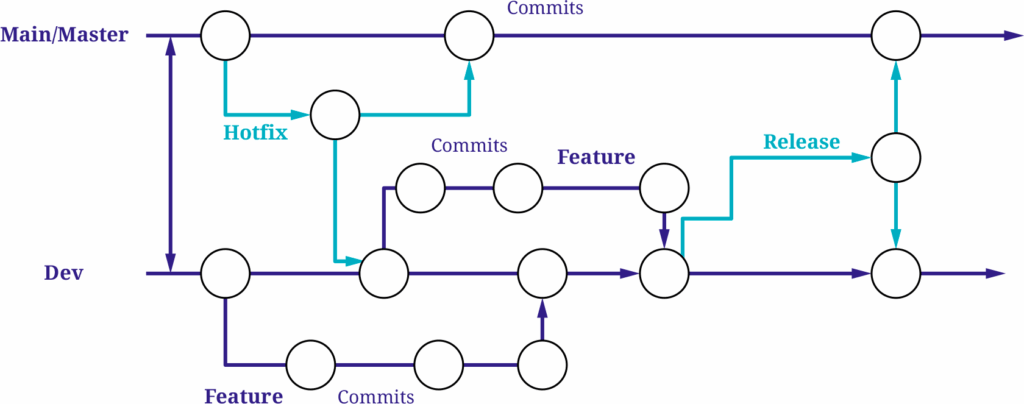
The Git Flow strategy was originally developed for traditional software projects with planned release cycles. Its long-lived main branches are “main” (or “master”) and “dev”.

In addition, it introduces several short-lived branches:

Feature branches

New features are developed in separate feature branches, which are merged into the develop branch once completed.

Hotfix branches

If a critical bug occurs in the production environment (i.e., on the main branch), a hotfix branch is created from main to address the issue. Once the fix is implemented and pushed to the hotfix branch, it is merged into both main and develop to ensure the bug is resolved in both branches.

Release branches

When a release is approaching, a release branch is created from develop, containing all features added since the last release. This branch is then used for final QA testing, bug fixing, and versioning. Once the release is approved, the release branch is merged into both main and develop.


The main advantage of Git Flow is its clear structure. Even in larger teams with many developers and therefore multiple concurrent feature branches, it’s easy to track which version is in what state. The strategy supports parallel development very well due to its structured branching model.

However, the downside is the organizational and technical overhead. The large number of branches and merges can lead to conflicts and divergence over time, especially with long-lived release and hotfix branches. A particular challenge arises when keeping branches in sync. Hotfixes created from main need to be merged back into main and dev, and changes made in release branches, which originate from dev, must eventually be merged into both main and dev, as shown in the diagram. These synchronization steps often introduce additional effort and increase the risk of conflicts or inconsistencies, especially when multiple streams of work are active in parallel.

Additionally, the path a feature must take, from a feature branch to develop, to a release branch, and finally to main, can slow down the deployment process.

While a solid CI/CD pipeline can help automate and streamline parts of this workflow, Git Flow does not rely on automation to function. This makes it especially suitable for teams with more manual QA processes or limited automation infrastructure.
Gitflow branching

GitHub Flow

Compared to Git Flow, the GitHub Flow strategy is significantly leaner. It uses only a single long-lived branch, usually main, and temporary feature branches that are merged via pull requests.

Once all changes on a feature branch are complete and have passed review and various tests, the branch is merged directly into main.

The key advantage of GitHub Flow is its simplicity. There are no separate release or develop branches, and even hotfixes can be handled in short-lived branches. Teams can respond to changes quickly and deploy frequently. This agility is especially effective when supported by a robust CI/CD pipeline. If properly implemented, testing, building, and deployment processes are automated, further improving GitHub Flow’s fast time to market.

Because of its low complexity and minimal coordination overhead, GitHub Flow is also particularly well-suited for smaller teams that value speed and iteration over rigid release planning.

If you’re interested in how such pipelines are structured in practice, our CI/CD pipeline Blog article offers a look at a practical GitHub-based setup using GitHub Actions and dbt. It’s a useful companion piece for understanding the automation layer that supports fast and reliable delivery.

However, this strategy also comes with limitations: it doesn’t support managing multiple parallel versions or complex release planning.

Additionally, it relies heavily on the quality of the CI/CD pipeline.
Trunk based branching

Trunk-Based Development

Trunk-Based Development is quite similar to the GitHub Flow strategy, but there are a few key differences.

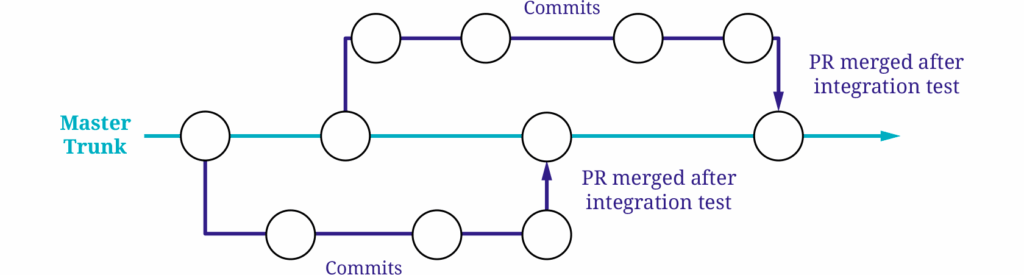
While it also relies on a single long-lived branch (the trunk, typically main), commits are either made directly to main or via very short-lived feature branches. These feature branches often exist for only a few hours, and it’s common for changes to be merged into main multiple times a day. The goal is to integrate changes as early as possible to avoid conflicts before they even arise.

Because there are no fixed release cycles in Trunk-Based Development, it’s essential to ensure that incomplete features don’t go live prematurely. Feature flags play a central role here, allowing unfinished functionality to be hidden in the production environment until it’s ready.

As with GitHub Flow, a strong CI/CD pipeline is essential. It acts as the main safeguard for quality assurance and enables rapid deployment to the main branch.

Trunk-Based Development is especially effective for teams that are comfortable with rapid iteration and a high level of automation. While it can be used by smaller teams, it truly shines in larger organizations where multiple teams work in parallel and frequent integration is critical to maintaining momentum and consistency.

The benefits of Trunk-Based Development include extremely fast deployments and minimal risk of merge conflicts due to the short-lived nature of branches and continuous integration.

However, similar to GitHub Flow, this strategy heavily depends on the reliability of the CI/CD pipeline. If your team operates in a highly automated DevOps environment, this approach works smoothly. But if that’s not the case, software quality can suffer significantly. The risk is especially high here, as all changes are deployed directly to the main branch.

Conclusion

All three strategies come with their own strengths and weaknesses.

Git Flow is well-suited for larger projects with fixed release cycles, manual QA, and structured approval processes. It offers stability and clear workflows, but also brings significant technical and organizational overhead, making it a heavyweight option that can slow down development and release cycles due to its complexity and synchronization requirements.

GitHub Flow, by contrast, emphasizes speed and simplicity. It’s an excellent fit for smaller teams working on web or SaaS projects that deploy continuously, thanks to its low complexity and quick turnaround. But it relies on a good CI/CD pipeline. If tests are insufficient, faulty code might get deployed automatically.

Many of these risks can be mitigated with proper pipeline design and DevOps experience within the team, ensuring that automation is not just fast but also reliable.

Trunk-Based Development enables the highest release frequency, but only delivers consistent quality if the necessary technical maturity is in place. This makes it ideal for highly automated environments where teams ship many changes every day.

There are always ways to mitigate or minimize the downsides of any branching strategy. Techniques like blue/green or canary deployments, for example, can help reduce the impact of faulty changes and make rollbacks easier.

Stay tuned, we regularly share practical insights and solutions on topics like CI/CD, DevOps patterns, and deployment strategies.

Behind the Branches – Navigating Git Workflows in Modern DevOps

A Man Branching with Visual Studio

Branching Strategies

Branching strategies are one of those topics that rarely get much attention until they suddenly become a problem. Whether it’s drowning in merge conflicts, the headache of implementing and synchronizing hotfixes across multiple branches, or a feature freeze caused by insufficient quality assurance, your repository and branching structure can have a major impact on day-to-day development.

But what branching strategies actually exist, and what are their pros and cons? Which approach allows you to deploy changes most quickly? And how can you maintain high software quality despite frequent releases?

In this article, we’ll provide a structured overview of common branching strategies and typical challenges developers face when using them.

Navigating Git Workflows in Modern DevOps

This webinar offers a clear overview of common approaches and how they impact CI/CD, code quality, and maintainability. Beyond theory, we’ll dive into practical challenges and real-world issues teams face every day. Register now for our free webinar on September 16th, 2025!

Watch Webinar Recording

Why Are Branching Strategies Relevant?

Branching models reflect the organization, release culture, and technical maturity of a project. There is no single “correct” strategy that fits every project. Choosing the right one depends heavily on the project’s context. Some of the most important questions to consider when selecting a branching strategy include:

  • Does the team work in fixed sprint or release cycles, or is code deployed continuously?
  • How many developers are working simultaneously on the same codebase?
  • What is the quality of your CI/CD pipeline? Does every change need a manual review, even if the pipeline passes, or can it be deployed automatically?

Depending on the answers to these questions, a simple or more complex branching strategy may be appropriate.

Comparison of Common Strategies

Git Flow

The Git Flow strategy was originally developed for traditional software projects with planned release cycles. Its long-lived main branches are “main” (or “master”) and “dev”.

In addition, it introduces several short-lived branches:

Feature branches

New features are developed in separate feature branches, which are merged into the develop branch once completed.

Hotfix branches

If a critical bug occurs in the production environment (i.e., on the main branch), a hotfix branch is created from main to address the issue. Once the fix is implemented and pushed to the hotfix branch, it is merged into both main and develop to ensure the bug is resolved in both branches.

Release branches

When a release is approaching, a release branch is created from develop, containing all features added since the last release. This branch is then used for final QA testing, bug fixing, and versioning. Once the release is approved, the release branch is merged into both main and develop.


The main advantage of Git Flow is its clear structure. Even in larger teams with many developers and therefore multiple concurrent feature branches, it’s easy to track which version is in what state. The strategy supports parallel development very well due to its structured branching model.

However, the downside is the organizational and technical overhead. The large number of branches and merges can lead to conflicts and divergence over time, especially with long-lived release and hotfix branches. A particular challenge arises when keeping branches in sync. Hotfixes created from main need to be merged back into main and dev, and changes made in release branches, which originate from dev, must eventually be merged into both main and dev, as shown in the diagram. These synchronization steps often introduce additional effort and increase the risk of conflicts or inconsistencies, especially when multiple streams of work are active in parallel.

Additionally, the path a feature must take, from a feature branch to develop, to a release branch, and finally to main, can slow down the deployment process.

While a solid CI/CD pipeline can help automate and streamline parts of this workflow, Git Flow does not rely on automation to function. This makes it especially suitable for teams with more manual QA processes or limited automation infrastructure.

Gitflow branching

GitHub Flow

Compared to Git Flow, the GitHub Flow strategy is significantly leaner. It uses only a single long-lived branch, usually main, and temporary feature branches that are merged via pull requests.

Once all changes on a feature branch are complete and have passed review and various tests, the branch is merged directly into main.

The key advantage of GitHub Flow is its simplicity. There are no separate release or develop branches, and even hotfixes can be handled in short-lived branches. Teams can respond to changes quickly and deploy frequently. This agility is especially effective when supported by a robust CI/CD pipeline. If properly implemented, testing, building, and deployment processes are automated, further improving GitHub Flow’s fast time to market.

Because of its low complexity and minimal coordination overhead, GitHub Flow is also particularly well-suited for smaller teams that value speed and iteration over rigid release planning.

If you’re interested in how such pipelines are structured in practice, our CI/CD pipeline Blog article offers a look at a practical GitHub-based setup using GitHub Actions and dbt. It’s a useful companion piece for understanding the automation layer that supports fast and reliable delivery.

However, this strategy also comes with limitations: it doesn’t support managing multiple parallel versions or complex release planning.

Additionally, it relies heavily on the quality of the CI/CD pipeline.

Trunk based branching

Trunk-Based Development

Trunk-Based Development is quite similar to the GitHub Flow strategy, but there are a few key differences.

While it also relies on a single long-lived branch (the trunk, typically main), commits are either made directly to main or via very short-lived feature branches. These feature branches often exist for only a few hours, and it’s common for changes to be merged into main multiple times a day. The goal is to integrate changes as early as possible to avoid conflicts before they even arise.

Because there are no fixed release cycles in Trunk-Based Development, it’s essential to ensure that incomplete features don’t go live prematurely. Feature flags play a central role here, allowing unfinished functionality to be hidden in the production environment until it’s ready.

As with GitHub Flow, a strong CI/CD pipeline is essential. It acts as the main safeguard for quality assurance and enables rapid deployment to the main branch.

Trunk-Based Development is especially effective for teams that are comfortable with rapid iteration and a high level of automation. While it can be used by smaller teams, it truly shines in larger organizations where multiple teams work in parallel and frequent integration is critical to maintaining momentum and consistency.

The benefits of Trunk-Based Development include extremely fast deployments and minimal risk of merge conflicts due to the short-lived nature of branches and continuous integration.

However, similar to GitHub Flow, this strategy heavily depends on the reliability of the CI/CD pipeline. If your team operates in a highly automated DevOps environment, this approach works smoothly. But if that’s not the case, software quality can suffer significantly. The risk is especially high here, as all changes are deployed directly to the main branch.

Conclusion

All three strategies come with their own strengths and weaknesses.

Git Flow is well-suited for larger projects with fixed release cycles, manual QA, and structured approval processes. It offers stability and clear workflows, but also brings significant technical and organizational overhead, making it a heavyweight option that can slow down development and release cycles due to its complexity and synchronization requirements.

GitHub Flow, by contrast, emphasizes speed and simplicity. It’s an excellent fit for smaller teams working on web or SaaS projects that deploy continuously, thanks to its low complexity and quick turnaround. But it relies on a good CI/CD pipeline. If tests are insufficient, faulty code might get deployed automatically.

Many of these risks can be mitigated with proper pipeline design and DevOps experience within the team, ensuring that automation is not just fast but also reliable.

Trunk-Based Development enables the highest release frequency, but only delivers consistent quality if the necessary technical maturity is in place. This makes it ideal for highly automated environments where teams ship many changes every day.

There are always ways to mitigate or minimize the downsides of any branching strategy. Techniques like blue/green or canary deployments, for example, can help reduce the impact of faulty changes and make rollbacks easier.

Stay tuned, we regularly share practical insights and solutions on topics like CI/CD, DevOps patterns, and deployment strategies.

Pre-Commit: The First Line of Defense in Shift-Left Development

Programmer Working with Virtual Interface for Software Development and Technology

Pre-Commit as a Foundation for Code Quality

In software development, ensuring code quality and minimizing defects early is crucial. The shift-left approach emphasizes detecting and resolving issues as soon as possible, rather than later in development or after deployment. Pre-commit supports this approach by managing multi-language pre-commit hooks, scripts that run automatically before finalizing a commit. These hooks act as a first line of defense, enforcing coding standards, preventing bugs, and enhancing security.

This article examines how the combination of pre-commit and the shift-left approach can enhance development workflows, resulting in more reliable and maintainable software. We will explore the advantages of using pre-commit hooks, their function within the shift-left framework, and offer practical advice for effective implementation. By adopting these practices, teams can improve code quality, accelerate development cycles, and deliver robust software solutions more efficiently.


Understanding Pre-Commit


General Hooks in Versioning Systems

In version control systems like Git, hooks are scripts that are triggered by various events within the repository. These scripts can automate tasks, enforce policies, or improve workflows. Hooks are generally categorized into two types: client-side and server-side. Client-side hooks run on the local machine and can be triggered by operations such as committing or merging changes. Server-side hooks run on the server and can be triggered by events like receiving pushed commits.

local repository with accepted repo

local repository with falty repo


The Role of Pre-Commit Hooks

Among the various types of client-side hooks, pre-commit hooks are particularly significant. These hooks are executed before a commit is finalized. They check for potential issues in the code, such as syntax errors, code style violations, or even security vulnerabilities. By running these checks before the code is committed to the repository, pre-commit hooks ensure that only high-quality code makes it into the version control system.


Pre-Commit Use Cases

Pre-Commit is a versatile tool that can be adapted to various scenarios within the development workflow, offering significant flexibility and control to development teams. One key use case is hosting pre-commit code locally, allowing developers to customize and manage hooks according to their project’s specific requirements. This local hosting ensures that all team members adhere to the same standards without relying on external repositories. Another powerful feature of pre-commit is the ability for users to create custom hooks tailored to their unique needs. These hooks can enforce specific coding standards, run specialized security checks, or automate repetitive tasks, providing a high degree of flexibility. Teams can write these hooks in any language supported by their environment, allowing pre-commit to seamlessly integrate into their workflow.

Furthermore, pre-commit can be integrated into Continuous Integration (CI) pipelines to enhance automation and enforce quality checks across all stages of development. By incorporating pre-commit hooks into the CI process, teams can ensure that code meets quality standards before being merged into the main codebase. This integration helps maintain high standards of code quality and reliability throughout the development lifecycle.


Multi-Language Support in Pre-Commit

One of the key strengths of pre-commit is its support for a wide range of programming languages. This makes it an ideal tool for projects that involve multiple languages or frameworks. For example, in DataOps, it is common to use Terraform for infrastructure provisioning and dbt for data transformation. Pre-commit’s multi-language support allows it to be seamlessly integrated into such diverse development environments, providing consistent quality checks across different languages and tools. This cross-language capability ensures that best practices are enforced and issues are detected regardless of the technologies used in the project.


Example for the Use of Pre-Commit

Pre-Commit operates through the use of a configuration file called pre-commit-config.yaml. This YAML file serves as the central configuration that pre-commit references every time a commit is made. It defines which hooks should be executed and where to fetch them from before finalizing a commit in your Git repository. As an example for such a file with an explanation to the key elements, the following image is provided:

repos:
  - repo: https://github.com/antonbabenko/pre-commit-terraform
    rev: v1.90.0 
    hooks:
      - id: terraform_validate
      - id: terraform_fmt
        args:
          - --args=-recursive
  • repo: Specifies the URL of the repository containing the hooks. In this example, https://github.com/antonbabenko/pre-commit-terraform is the repository from which hooks will be fetched.
  • rev: Indicates the specific revision or version of the repository (v1.90.0 in this case) to use. This ensures consistency in hook behavior across different executions.
  • hooks: Defines a list of hooks to be run from the specified repository. Each hook is identified by its unique id.
  • id: Represents the identifier for each hook. For instance, trailing-whitespace, end-of-file-fixer, and check-yaml are examples of hook IDs that correspond to specific tasks or checks the hooks will perform.
  • args: Specifies additional arguments or options to be passed to the hook command. In the case of terraform_fmt, the args field includes –args=-recursive. This configuration instructs the hook to format Terraform files recursively within the project directory.

This configuration allows you to tailor pre-commit to your project’s needs by specifying which hooks to execute, where to retrieve them from, and how to ensure consistency through defined versions or revisions. Each hook ID corresponds to a particular quality check or task that pre-commit will enforce before allowing a commit to proceed, ensuring higher code quality and adherence to project standards.


Recommended Pre-Commit Repositories for Effective Integration

To kickstart your use of pre-commit effectively, consider leveraging the following repositories tailored for specific programming languages and tools:

  • Terraform Repository: antonbabenko/pre-commit-terraform
    Offers a comprehensive set of hooks for Terraform projects, including validators and formatters to ensure consistent and high-quality code.
  • Dbt (Data Build Tool) Repository: dbt-checkpoint/dbt-checkpoint
    Provides hooks specifically designed for dbt projects, enabling validation and enforcing best practices for SQL-based data transformations.
  • SQL Repository: sqlfluff/sqlfluff
    Offers hooks for SQL linting to ensure syntax correctness, adherence to coding standards, and optimization of query performance.

These repositories offer essential hooks that integrate seamlessly with pre-commit, enabling automated checks to maintain code quality and consistency across Terraform, dbt, and SQL projects. By incorporating these hooks into your workflow, you can streamline development processes and ensure robust software deployments. However these are just suggestions and you are free to use any other hook if it benefits your use case.


Conclusion

Pre-Commit exemplifies the shift-left approach by automating quality checks early in the development cycle, before code is committed. This proactive strategy catches issues like syntax errors, formatting inconsistencies, and security vulnerabilities early, reducing downstream defects.

By using a centralized pre-commit-config.yaml file, Pre-Commit ensures consistent coding standards across teams. It allows developers to focus on coding rather than manual reviews, speeding up software delivery.

Supporting various languages and tools, Pre-Commit can be customized for specific project needs, enhancing code reliability through automated checks. Integrating Pre-Commit improves code quality, efficiency, and promotes continuous improvement, leading to faster time-to-market, lower development costs, and more reliable software.

About the Author

Picture of Moritz Gunkel

Moritz Gunkel

Moritz is an aspiring Consultant in the DevOps department for Scalefree, specializing in cloud engineering, automation, and Infrastructure as Code, with a particular knack for Terraform. While juggling his responsibilities, including pursuing a Bachelor’s degree in Computer Science as a working student, Moritz’s methodical approach has significantly impacted internal operations, earning him recognition and setting the stage for an exciting transition into a full-time consulting role. With a passion for innovation and a commitment to excellence, Moritz is set to continue making a lasting impression in the dynamic world of DevOps.

Pre-Commit: The First Line of Defense in Shift-Left Development

Programmer Working with Virtual Interface for Software Development and Technology

Pre-Commit as a Foundation for Code Quality

In software development, ensuring code quality and minimizing defects early is crucial. The shift-left approach emphasizes detecting and resolving issues as soon as possible, rather than later in development or after deployment. Pre-commit supports this approach by managing multi-language pre-commit hooks, scripts that run automatically before finalizing a commit. These hooks act as a first line of defense, enforcing coding standards, preventing bugs, and enhancing security.

This article examines how the combination of pre-commit and the shift-left approach can enhance development workflows, resulting in more reliable and maintainable software. We will explore the advantages of using pre-commit hooks, their function within the shift-left framework, and offer practical advice for effective implementation. By adopting these practices, teams can improve code quality, accelerate development cycles, and deliver robust software solutions more efficiently.


Understanding Pre-Commit


General Hooks in Versioning Systems

In version control systems like Git, hooks are scripts that are triggered by various events within the repository. These scripts can automate tasks, enforce policies, or improve workflows. Hooks are generally categorized into two types: client-side and server-side. Client-side hooks run on the local machine and can be triggered by operations such as committing or merging changes. Server-side hooks run on the server and can be triggered by events like receiving pushed commits.

local repository with accepted repo

local repository with falty repo


The Role of Pre-Commit Hooks

Among the various types of client-side hooks, pre-commit hooks are particularly significant. These hooks are executed before a commit is finalized. They check for potential issues in the code, such as syntax errors, code style violations, or even security vulnerabilities. By running these checks before the code is committed to the repository, pre-commit hooks ensure that only high-quality code makes it into the version control system.


Pre-Commit Use Cases

Pre-Commit is a versatile tool that can be adapted to various scenarios within the development workflow, offering significant flexibility and control to development teams. One key use case is hosting pre-commit code locally, allowing developers to customize and manage hooks according to their project’s specific requirements. This local hosting ensures that all team members adhere to the same standards without relying on external repositories. Another powerful feature of pre-commit is the ability for users to create custom hooks tailored to their unique needs. These hooks can enforce specific coding standards, run specialized security checks, or automate repetitive tasks, providing a high degree of flexibility. Teams can write these hooks in any language supported by their environment, allowing pre-commit to seamlessly integrate into their workflow.

Furthermore, pre-commit can be integrated into Continuous Integration (CI) pipelines to enhance automation and enforce quality checks across all stages of development. By incorporating pre-commit hooks into the CI process, teams can ensure that code meets quality standards before being merged into the main codebase. This integration helps maintain high standards of code quality and reliability throughout the development lifecycle.


Multi-Language Support in Pre-Commit

One of the key strengths of pre-commit is its support for a wide range of programming languages. This makes it an ideal tool for projects that involve multiple languages or frameworks. For example, in DataOps, it is common to use Terraform for infrastructure provisioning and dbt for data transformation. Pre-commit’s multi-language support allows it to be seamlessly integrated into such diverse development environments, providing consistent quality checks across different languages and tools. This cross-language capability ensures that best practices are enforced and issues are detected regardless of the technologies used in the project.


Example for the Use of Pre-Commit

Pre-Commit operates through the use of a configuration file called pre-commit-config.yaml. This YAML file serves as the central configuration that pre-commit references every time a commit is made. It defines which hooks should be executed and where to fetch them from before finalizing a commit in your Git repository. As an example for such a file with an explanation to the key elements, the following image is provided:

repos:
  - repo: https://github.com/antonbabenko/pre-commit-terraform
    rev: v1.90.0 
    hooks:
      - id: terraform_validate
      - id: terraform_fmt
        args:
          - --args=-recursive
  • repo: Specifies the URL of the repository containing the hooks. In this example, https://github.com/antonbabenko/pre-commit-terraform is the repository from which hooks will be fetched.
  • rev: Indicates the specific revision or version of the repository (v1.90.0 in this case) to use. This ensures consistency in hook behavior across different executions.
  • hooks: Defines a list of hooks to be run from the specified repository. Each hook is identified by its unique id.
  • id: Represents the identifier for each hook. For instance, trailing-whitespace, end-of-file-fixer, and check-yaml are examples of hook IDs that correspond to specific tasks or checks the hooks will perform.
  • args: Specifies additional arguments or options to be passed to the hook command. In the case of terraform_fmt, the args field includes –args=-recursive. This configuration instructs the hook to format Terraform files recursively within the project directory.

This configuration allows you to tailor pre-commit to your project’s needs by specifying which hooks to execute, where to retrieve them from, and how to ensure consistency through defined versions or revisions. Each hook ID corresponds to a particular quality check or task that pre-commit will enforce before allowing a commit to proceed, ensuring higher code quality and adherence to project standards.


Recommended Pre-Commit Repositories for Effective Integration

To kickstart your use of pre-commit effectively, consider leveraging the following repositories tailored for specific programming languages and tools:

  • Terraform Repository: antonbabenko/pre-commit-terraform
    Offers a comprehensive set of hooks for Terraform projects, including validators and formatters to ensure consistent and high-quality code.
  • Dbt (Data Build Tool) Repository: dbt-checkpoint/dbt-checkpoint
    Provides hooks specifically designed for dbt projects, enabling validation and enforcing best practices for SQL-based data transformations.
  • SQL Repository: sqlfluff/sqlfluff
    Offers hooks for SQL linting to ensure syntax correctness, adherence to coding standards, and optimization of query performance.

These repositories offer essential hooks that integrate seamlessly with pre-commit, enabling automated checks to maintain code quality and consistency across Terraform, dbt, and SQL projects. By incorporating these hooks into your workflow, you can streamline development processes and ensure robust software deployments. However these are just suggestions and you are free to use any other hook if it benefits your use case.


Conclusion

Pre-Commit exemplifies the shift-left approach by automating quality checks early in the development cycle, before code is committed. This proactive strategy catches issues like syntax errors, formatting inconsistencies, and security vulnerabilities early, reducing downstream defects.

By using a centralized pre-commit-config.yaml file, Pre-Commit ensures consistent coding standards across teams. It allows developers to focus on coding rather than manual reviews, speeding up software delivery.

Supporting various languages and tools, Pre-Commit can be customized for specific project needs, enhancing code reliability through automated checks. Integrating Pre-Commit improves code quality, efficiency, and promotes continuous improvement, leading to faster time-to-market, lower development costs, and more reliable software.

About the Author

Picture of Moritz Gunkel

Moritz Gunkel

Moritz is an aspiring Consultant in the DevOps department for Scalefree, specializing in cloud engineering, automation, and Infrastructure as Code, with a particular knack for Terraform. While juggling his responsibilities, including pursuing a Bachelor’s degree in Computer Science as a working student, Moritz’s methodical approach has significantly impacted internal operations, earning him recognition and setting the stage for an exciting transition into a full-time consulting role. With a passion for innovation and a commitment to excellence, Moritz is set to continue making a lasting impression in the dynamic world of DevOps.

How Can DataOps Support and Improve Your Data Solution?

CI/CD (Continuous Integration / Continuous Deployment)

Watch the Video

DataOps: Revolutionizing Data Solutions

The modern business landscape is awash with data. From customer interactions to market trends, organizations are constantly collecting and analyzing information to gain insights and make informed decisions. However, managing data effectively can be a significant challenge. Traditional approaches, such as on-premise data solutions, often suffer from limitations like scalability, complexity, and high maintenance costs. Additionally, data quality concerns can lead to inaccurate analytics and insights.

To overcome these challenges, a new methodology called DataOps has emerged. DataOps is a transformative approach that revolutionizes how organizations develop, deploy, and operate their data solutions.


Understanding DataOps

At its core, DataOps is about fostering collaboration, embracing agility, and driving continuous improvement throughout the data lifecycle. It combines the principles of DevOps with data management best practices to create a streamlined and efficient data pipeline.

The term DataOps splits into two key components:

  1. Data Development: Focuses on engineering and evolving the data aspects, or modifying data.
  2. Data Operations: Deals with operating, supporting, and governing the data aspects.

The Benefits of DataOps

DataOps offers a multitude of benefits that can significantly improve the way organizations manage their data:

  1. Overcoming Scalability and Flexibility Limitations: DataOps, combined with cloud-based data platforms, enables dynamic resource provisioning on demand. This eliminates the need for regular hardware upgrades and allows organizations to pay only for what they need.
  2. Improved Collaboration: DataOps methodologies, like continuous delivery, promote collaboration between development, operations, and data teams. This leads to shorter sprint cycles and faster delivery of new features.
  3. Enhanced Data Quality and Governance: Automated testing, data validation, and continuous monitoring ensure data accuracy, consistency, and compliance. Data lineage tracking and role-based access controls further strengthen data quality and trustworthiness.

The Key Principles of DataOps

DataOps is built upon a set of key principles that guide its implementation:

  1. Collaboration: Encourages cross-functional collaboration between data engineers, data scientists, and operations teams.
  2. Automation: Automates repetitive tasks to reduce errors and improve efficiency.
  3. Continuous Improvement: Promotes a culture of continuous learning and improvement through regular feedback and iteration.
  4. Data Quality: Emphasizes the importance of data quality throughout the data lifecycle.
  5. Agility: Enables rapid response to changing business needs and market conditions.

Summary

DataOps is a powerful methodology that enables organizations to overcome the challenges of traditional data management approaches. By embracing collaboration, agility, and continuous improvement, organizations can leverage DataOps to unlock the full potential of their data and gain a competitive edge in the modern business environment.

How Can DataOps Support and Improve Your Data Solution?

CI/CD (Continuous Integration / Continuous Deployment)

Watch the Video

DataOps: Revolutionizing Data Solutions

The modern business landscape is awash with data. From customer interactions to market trends, organizations are constantly collecting and analyzing information to gain insights and make informed decisions. However, managing data effectively can be a significant challenge. Traditional approaches, such as on-premise data solutions, often suffer from limitations like scalability, complexity, and high maintenance costs. Additionally, data quality concerns can lead to inaccurate analytics and insights.

To overcome these challenges, a new methodology called DataOps has emerged. DataOps is a transformative approach that revolutionizes how organizations develop, deploy, and operate their data solutions.


Understanding DataOps

At its core, DataOps is about fostering collaboration, embracing agility, and driving continuous improvement throughout the data lifecycle. It combines the principles of DevOps with data management best practices to create a streamlined and efficient data pipeline.

The term DataOps splits into two key components:

  1. Data Development: Focuses on engineering and evolving the data aspects, or modifying data.
  2. Data Operations: Deals with operating, supporting, and governing the data aspects.

The Benefits of DataOps

DataOps offers a multitude of benefits that can significantly improve the way organizations manage their data:

  1. Overcoming Scalability and Flexibility Limitations: DataOps, combined with cloud-based data platforms, enables dynamic resource provisioning on demand. This eliminates the need for regular hardware upgrades and allows organizations to pay only for what they need.
  2. Improved Collaboration: DataOps methodologies, like continuous delivery, promote collaboration between development, operations, and data teams. This leads to shorter sprint cycles and faster delivery of new features.
  3. Enhanced Data Quality and Governance: Automated testing, data validation, and continuous monitoring ensure data accuracy, consistency, and compliance. Data lineage tracking and role-based access controls further strengthen data quality and trustworthiness.

The Key Principles of DataOps

DataOps is built upon a set of key principles that guide its implementation:

  1. Collaboration: Encourages cross-functional collaboration between data engineers, data scientists, and operations teams.
  2. Automation: Automates repetitive tasks to reduce errors and improve efficiency.
  3. Continuous Improvement: Promotes a culture of continuous learning and improvement through regular feedback and iteration.
  4. Data Quality: Emphasizes the importance of data quality throughout the data lifecycle.
  5. Agility: Enables rapid response to changing business needs and market conditions.

Summary

DataOps is a powerful methodology that enables organizations to overcome the challenges of traditional data management approaches. By embracing collaboration, agility, and continuous improvement, organizations can leverage DataOps to unlock the full potential of their data and gain a competitive edge in the modern business environment.

Benefits of the Shift Left Approach in Agile Software Development

Colleagues working on an Agile Software Development

The Shift Left Methodology

In this article, the Shift Left Approach is introduced as one of the core elements of DevOps methods and a crucial part of Agile Software Development.

The problem with traditional methods is that testing occurs very late in the software development process, leading to significant effort and high costs for fixing errors. The methods of the Shift Left Approach ensure early testing, minimizing both the costs and effort required for error correction while maintaining the quality of the product.

Other than maintenance of the quality of the product, this article will help you understand how the shift-left approach enhances teamwork and collaboration with the team. Similarly, this article focuses on the core aspects of the approach along with its guidelines.


Traditional Methods vs. Shift Left Approach

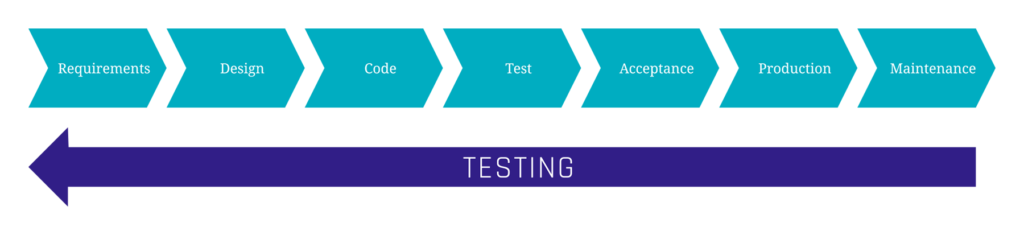
In traditional software development methods, it is often a problem that tests are placed very late. This behavior can be seen in typical models such as the waterfall model or the V-model. The outcome arises from the sequential nature of the model, with each phase succeeding the previous one. The testing phase is relatively far towards the end of the model, allowing the entire product to be tested in a phase shortly before release.

However, this often leads to problems being recognized only very late, resulting in high effort and associated costs for correcting the issues. The Shift Left Approach offers various guidelines for conducting tests at an early stage, enabling the identification and resolution of problems quickly and cost-effectively.

As depicted in the diagram, testing is shifted to the left, meaning to an earlier stage in development.

Testing is shifted to the left

The fundamental idea is to continuously gather feedback through automated tests as much as possible. This ensures, on the one hand, that the product meets the desired quality standards and, on the other hand, helps to minimize the effort and costs associated with testing.


Shift Left Approach Guidelines

There are no hard and fast rules about the implementation of a Shift Left Approach. However, based on our experience, we have formulated some guidelines suggested by the approach:

  • Collaboration: Different teams, such as developers and Quality Assurance, should work closely and early together, to better address various product requirements and benefit from each other’s expertise.
  • Continuous feedback: Gather feedback from testing and QA throughout the development process, rather than waiting until the end.
  • Automated testing: Automating tests facilitates efficient testing, thereby reducing the time and costs associated with testing.
  • Iterative development: Use an iterative development approach, where small changes are made and tested frequently.
  • Error Prevention: The goal is not only to detect errors but also to take measures to prevent errors early proactively. This can be achieved through training, coding guidelines, and best practices.

Example for Integration of Shift Left Guidelines

Typically, in many companies, different teams are assigned to different tasks in the development pipeline. The development team writes the code for the product, the Quality Assurance team conducts tests and ensures that the product meets the desired quality and the DevOps team attempts to automate and optimize processes for both teams. The Shift Left Approach promotes closer collaboration among these teams.

Testers should be involved early on. When testers are involved in the product planning phase, they can better understand the product’s requirements and design tests accordingly. Additionally, their experience allows them to identify potential issues early on and inform the developers.

Furthermore, testers should have some coding skills. While no one expects them to be experts outside their core competence, if testers can perform minor bug fixes themselves, the development team can focus on more significant issues.

Additionally, developers should consider testability to facilitate quick and straightforward testing for testers, such as using unique IDs for each element and performing some smaller tests themselves. Typical tests that can be done by developers themselves are automated security tests.


Automation of Security Tests

An important type of test are Security Tests. For this purpose, some tools enable automated testing for security risks. Various types of tests can be conducted to examine the product for different errors and vulnerabilities. This could include, for example, a Static Application Security Test, or SAST for short, where source code is checked for vulnerabilities before compilation. Many tools also guide how to address the found issues with minimal effort. These tests can be automated in a way that developers receive independent feedback on their code and can easily address problems.

For instance, the version control tool Github utilizes automation, where with each push, the code is checked for data that poses a security risk. This could include credentials for logging in or authentication keys. If GitHub detects such risks, the developer is automatically alerted to prevent critical information from being exposed to the public.


Conclusion

Overall, this article has demonstrated the core elements of the Shift Left approach and the guidelines it provides. It has shown how late testing can be problematic in traditional software development models and the advantages of incorporating the methods of the Shift Left approach into one’s projects. The results include not only a reduced time investment for a high-quality product but also improved collaboration among individual teams.

However, there are some challenges in restructuring the development pipeline, but the benefits it brings can pay off in the medium term. Scalefrees consultants in the DevOps and Cloud domain are experts in integrating and automating practices such as the Shift Left Approach in their projects and are pleased to assist you.

If you wish to learn more about technical testing, the following article presents various methods to implement tests in a Data Vault-powered EDW.

Watch the Video

Benefits of the Shift Left Approach in Agile Software Development

Colleagues working on an Agile Software Development

The Shift Left Methodology

In this article, the Shift Left Approach is introduced as one of the core elements of DevOps methods and a crucial part of Agile Software Development.

The problem with traditional methods is that testing occurs very late in the software development process, leading to significant effort and high costs for fixing errors. The methods of the Shift Left Approach ensure early testing, minimizing both the costs and effort required for error correction while maintaining the quality of the product.

Other than maintenance of the quality of the product, this article will help you understand how the shift-left approach enhances teamwork and collaboration with the team. Similarly, this article focuses on the core aspects of the approach along with its guidelines.


Traditional Methods vs. Shift Left Approach

In traditional software development methods, it is often a problem that tests are placed very late. This behavior can be seen in typical models such as the waterfall model or the V-model. The outcome arises from the sequential nature of the model, with each phase succeeding the previous one. The testing phase is relatively far towards the end of the model, allowing the entire product to be tested in a phase shortly before release.

However, this often leads to problems being recognized only very late, resulting in high effort and associated costs for correcting the issues. The Shift Left Approach offers various guidelines for conducting tests at an early stage, enabling the identification and resolution of problems quickly and cost-effectively.

As depicted in the diagram, testing is shifted to the left, meaning to an earlier stage in development.

Testing is shifted to the left

The fundamental idea is to continuously gather feedback through automated tests as much as possible. This ensures, on the one hand, that the product meets the desired quality standards and, on the other hand, helps to minimize the effort and costs associated with testing.


Shift Left Approach Guidelines

There are no hard and fast rules about the implementation of a Shift Left Approach. However, based on our experience, we have formulated some guidelines suggested by the approach:

  • Collaboration: Different teams, such as developers and Quality Assurance, should work closely and early together, to better address various product requirements and benefit from each other’s expertise.
  • Continuous feedback: Gather feedback from testing and QA throughout the development process, rather than waiting until the end.
  • Automated testing: Automating tests facilitates efficient testing, thereby reducing the time and costs associated with testing.
  • Iterative development: Use an iterative development approach, where small changes are made and tested frequently.
  • Error Prevention: The goal is not only to detect errors but also to take measures to prevent errors early proactively. This can be achieved through training, coding guidelines, and best practices.

Example for Integration of Shift Left Guidelines

Typically, in many companies, different teams are assigned to different tasks in the development pipeline. The development team writes the code for the product, the Quality Assurance team conducts tests and ensures that the product meets the desired quality and the DevOps team attempts to automate and optimize processes for both teams. The Shift Left Approach promotes closer collaboration among these teams.

Testers should be involved early on. When testers are involved in the product planning phase, they can better understand the product’s requirements and design tests accordingly. Additionally, their experience allows them to identify potential issues early on and inform the developers.

Furthermore, testers should have some coding skills. While no one expects them to be experts outside their core competence, if testers can perform minor bug fixes themselves, the development team can focus on more significant issues.

Additionally, developers should consider testability to facilitate quick and straightforward testing for testers, such as using unique IDs for each element and performing some smaller tests themselves. Typical tests that can be done by developers themselves are automated security tests.


Automation of Security Tests

An important type of test are Security Tests. For this purpose, some tools enable automated testing for security risks. Various types of tests can be conducted to examine the product for different errors and vulnerabilities. This could include, for example, a Static Application Security Test, or SAST for short, where source code is checked for vulnerabilities before compilation. Many tools also guide how to address the found issues with minimal effort. These tests can be automated in a way that developers receive independent feedback on their code and can easily address problems.

For instance, the version control tool Github utilizes automation, where with each push, the code is checked for data that poses a security risk. This could include credentials for logging in or authentication keys. If GitHub detects such risks, the developer is automatically alerted to prevent critical information from being exposed to the public.


Conclusion

Overall, this article has demonstrated the core elements of the Shift Left approach and the guidelines it provides. It has shown how late testing can be problematic in traditional software development models and the advantages of incorporating the methods of the Shift Left approach into one’s projects. The results include not only a reduced time investment for a high-quality product but also improved collaboration among individual teams.

However, there are some challenges in restructuring the development pipeline, but the benefits it brings can pay off in the medium term. Scalefrees consultants in the DevOps and Cloud domain are experts in integrating and automating practices such as the Shift Left Approach in their projects and are pleased to assist you.

If you wish to learn more about technical testing, the following article presents various methods to implement tests in a Data Vault-powered EDW.

Watch the Video

Optimizing CI/CD – A Guide to Automated IaC Pipelines with Terraform

TERRAFORM flow

Introduction

In this article, we will talk about how you can improve your CI/CD (Continuous Integration / Continuous Deployment) development by implementing IaC (Infrastructure as Code) and a well structured automated pipeline for error-prone deployments. For IaC, we will specifically use Terraform as the chosen software, since it is the most commonly used cloud-agnostic tool.

CI/CD (Continuous Integration / Continuous Deployment)

When working with cloud, it is most important to always have a good overview of the development of your infrastructure. It can grow rather huge in bigger companies and should be organized. This is where IaC comes in handy. Using software like Terraform lets you isolate parts of your infrastructure into their own representative projects, allowing for much better maintenance.

Not only is IaC helpful for improving development in your company, but it is also essential to secure your deployments with a pipeline that monitors upcoming changes in the project. Nobody wants to deploy changes and accidentally break everything. Error checks are thus mandatory to ensure a safe working environment. In the upcoming parts of this article, we will show you some options on how you can implement a good and safe IaC pipeline for your needs step by step.


How to get started – Terraform

When it comes to developing Infrastructure on cloud providers like AWS, Google Cloud, Azure, and so on, it is always good to have better governance over everything that is currently deployed on these services.

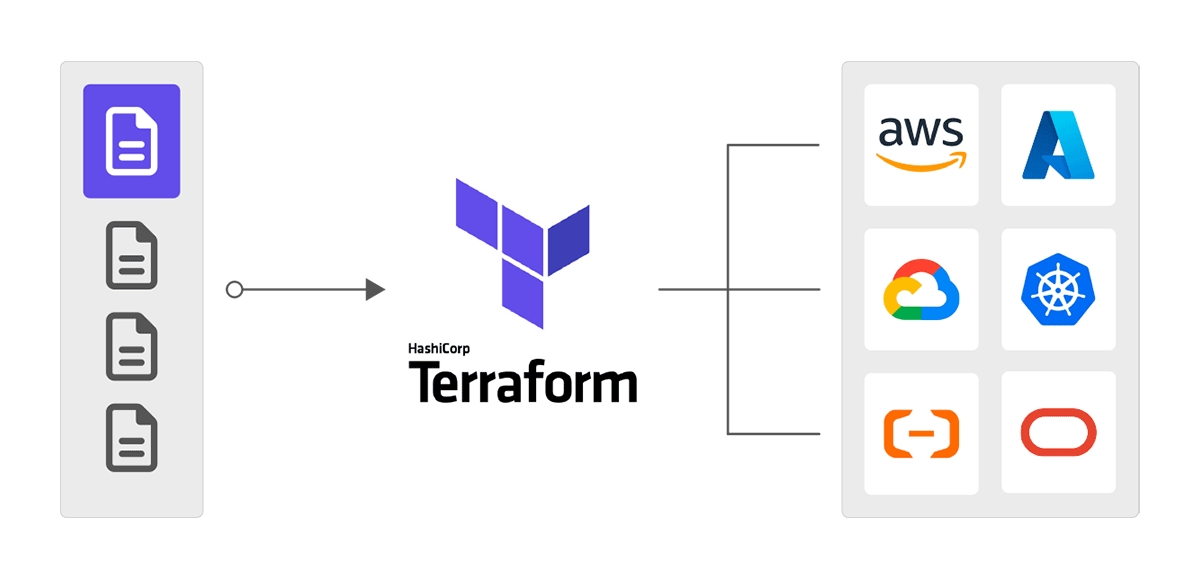
To have such governance, it is important to divide the existing or new infrastructures into different projects. Infrastructure as Code (IaC) involves the management and provisioning of infrastructure using code, as opposed to relying on manual procedures. Introducing Terraform:

TERRAFORM flow

Terraform is one of the biggest IaC software out there and allows for exactly this. Writing your infrastructure inside of a file allows you to fully control every part of your project and also isolates it from everything else on the provider. Deploying new resources, adjusting, or even deleting them can all be done by just changing the code in the file and applying the changes via Terraform itself allowing for great continuous Integration (CI).

Even resources that have been created before the use of IaC can easily be imported to a Terraform file to be managed by it in retrospect. Therefore, Terraform is the ideal starting point for an agile development in your company.

main-tf file flow


Using repositories for automation – Git

Now that all of your infrastructure is managed in Terraform and separated into distinct projects, we can move to the next step. Since usually a DevOps team consists of more than one person, it is mandatory to get your newly created files accessible by the entire team. Therefore, you should move them to a version control system like Git, which usually comes with a lot of features that are also really helpful to set up a proper pipeline automation.

When using an online code repository like Github, you can create so-called “Actions” to instantly deploy changes when pushing a new commit. This ensures a single source of truth for the infrastructures. Even mistakes can be easily fixed by checking previous changes in the files or just by going back to a previous working commit.

Moreover, every deployment will now happen automatically which is exactly what we want to implement. Using this form of automation gives great value to the continuous deployment (CD) part of our pipeline.


Optimizing your automation – Security

We are now at the point where your infrastructures are managed using Terraform and it also has an automated deployment setup in our repository system like the deployment workflow in Github Actions. But we still lack one big point to bring our pipeline to its full potential. This point being security.

Currently, whenever a change gets versioned on your repository, it instantly deploys those changes (as long as there are no errors in the terraform files). Somebody could accidentally remove a resource and commit these changes even though it was not intended, possibly causing crucial problems. This is why we want to secure the process of deploying changes.

Luckily, there are a lot of options for securing your pipeline. In the following part, we will quickly run over some solutions to ensure security in your deployment pipelines environment.


Manual Approval via Repository

We already have your automated deployment workflow on your online code repositories (e.g. Github) which deploys all new committed changes. But many of these systems also support the feature of manual approval. This feature will put a break in between push and deployment and first ask other employees to check over the upcoming changes.

Only if enough people have approved the changes, the deployment continues. An example can be the use of the Github Deployment Protection rules. You can define a specific number of requested reviewers, and the deployment is only executed if this number of reviewers approves it.

Alternatively, you could create your own workflow and set a number of needed approvals in your team inside of the workflows config file.


Software for Best Practices

Working infrastructure can still have security flaws that might have been overlooked by the approvers. For example, you have a server that can easily be approached by the internet even though it is supposed to be private and only accessible by your other infrastructure.

These kinds of problems also are a big threat to the security inside of your pipeline. Luckily there already have been people who are aware of this issue and developed dedicated software to solve this problem.

For developments outside of Terraform, there is the program “pre-commit” which scans for best practices over so-called hooks. These hooks set automated checks and tasks before committing changes. If any of those fail the commit will be aborted until the causing problem is fixed.

When developing with terraform specifically you could use programs like “tfsec” which also checks your written code for best practices. It does not let you deploy changes when there are critical health issues inside of your infrastructure and marks them as errors.


Conclusion

With everything set up you should now have an optimized and secure CI/CD pipeline to work with inside of your DevOps team.

After reading this article you should be able to see the great perks of implementing IaC, automating, versioning and security measures into your CI/CD pipeline.

Even though setting up all these parts can be a little time consuming at start it will get you a much more agile approach to your development in your business.

By using this method you minimize any risks of deployment, secure your deployment workflow, keep a quick delivery in results and thus prevail good team agility.

About the Author

Picture of Moritz Gunkel

Moritz Gunkel

Moritz is an aspiring Consultant in the DevOps department for Scalefree, specializing in cloud engineering, automation, and Infrastructure as Code, with a particular knack for Terraform. While juggling his responsibilities, including pursuing a Bachelor’s degree in Computer Science as a working student, Moritz’s methodical approach has significantly impacted internal operations, earning him recognition and setting the stage for an exciting transition into a full-time consulting role. With a passion for innovation and a commitment to excellence, Moritz is set to continue making a lasting impression in the dynamic world of DevOps.

Optimizing CI/CD – A Guide to Automated IaC Pipelines with Terraform

TERRAFORM flow

Introduction

In this article, we will talk about how you can improve your CI/CD (Continuous Integration / Continuous Deployment) development by implementing IaC (Infrastructure as Code) and a well structured automated pipeline for error-prone deployments. For IaC, we will specifically use Terraform as the chosen software, since it is the most commonly used cloud-agnostic tool.

CI/CD (Continuous Integration / Continuous Deployment)

When working with cloud, it is most important to always have a good overview of the development of your infrastructure. It can grow rather huge in bigger companies and should be organized. This is where IaC comes in handy. Using software like Terraform lets you isolate parts of your infrastructure into their own representative projects, allowing for much better maintenance.

Not only is IaC helpful for improving development in your company, but it is also essential to secure your deployments with a pipeline that monitors upcoming changes in the project. Nobody wants to deploy changes and accidentally break everything. Error checks are thus mandatory to ensure a safe working environment. In the upcoming parts of this article, we will show you some options on how you can implement a good and safe IaC pipeline for your needs step by step.


How to get started – Terraform

When it comes to developing Infrastructure on cloud providers like AWS, Google Cloud, Azure, and so on, it is always good to have better governance over everything that is currently deployed on these services.

To have such governance, it is important to divide the existing or new infrastructures into different projects. Infrastructure as Code (IaC) involves the management and provisioning of infrastructure using code, as opposed to relying on manual procedures. Introducing Terraform:

TERRAFORM flow

Terraform is one of the biggest IaC software out there and allows for exactly this. Writing your infrastructure inside of a file allows you to fully control every part of your project and also isolates it from everything else on the provider. Deploying new resources, adjusting, or even deleting them can all be done by just changing the code in the file and applying the changes via Terraform itself allowing for great continuous Integration (CI).

Even resources that have been created before the use of IaC can easily be imported to a Terraform file to be managed by it in retrospect. Therefore, Terraform is the ideal starting point for an agile development in your company.

main-tf file flow


Using repositories for automation – Git

Now that all of your infrastructure is managed in Terraform and separated into distinct projects, we can move to the next step. Since usually a DevOps team consists of more than one person, it is mandatory to get your newly created files accessible by the entire team. Therefore, you should move them to a version control system like Git, which usually comes with a lot of features that are also really helpful to set up a proper pipeline automation.

When using an online code repository like Github, you can create so-called “Actions” to instantly deploy changes when pushing a new commit. This ensures a single source of truth for the infrastructures. Even mistakes can be easily fixed by checking previous changes in the files or just by going back to a previous working commit.

Moreover, every deployment will now happen automatically which is exactly what we want to implement. Using this form of automation gives great value to the continuous deployment (CD) part of our pipeline.


Optimizing your automation – Security

We are now at the point where your infrastructures are managed using Terraform and it also has an automated deployment setup in our repository system like the deployment workflow in Github Actions. But we still lack one big point to bring our pipeline to its full potential. This point being security.

Currently, whenever a change gets versioned on your repository, it instantly deploys those changes (as long as there are no errors in the terraform files). Somebody could accidentally remove a resource and commit these changes even though it was not intended, possibly causing crucial problems. This is why we want to secure the process of deploying changes.

Luckily, there are a lot of options for securing your pipeline. In the following part, we will quickly run over some solutions to ensure security in your deployment pipelines environment.


Manual Approval via Repository

We already have your automated deployment workflow on your online code repositories (e.g. Github) which deploys all new committed changes. But many of these systems also support the feature of manual approval. This feature will put a break in between push and deployment and first ask other employees to check over the upcoming changes.

Only if enough people have approved the changes, the deployment continues. An example can be the use of the Github Deployment Protection rules. You can define a specific number of requested reviewers, and the deployment is only executed if this number of reviewers approves it.

Alternatively, you could create your own workflow and set a number of needed approvals in your team inside of the workflows config file.


Software for Best Practices

Working infrastructure can still have security flaws that might have been overlooked by the approvers. For example, you have a server that can easily be approached by the internet even though it is supposed to be private and only accessible by your other infrastructure.

These kinds of problems also are a big threat to the security inside of your pipeline. Luckily there already have been people who are aware of this issue and developed dedicated software to solve this problem.

For developments outside of Terraform, there is the program “pre-commit” which scans for best practices over so-called hooks. These hooks set automated checks and tasks before committing changes. If any of those fail the commit will be aborted until the causing problem is fixed.

When developing with terraform specifically you could use programs like “tfsec” which also checks your written code for best practices. It does not let you deploy changes when there are critical health issues inside of your infrastructure and marks them as errors.


Conclusion

With everything set up you should now have an optimized and secure CI/CD pipeline to work with inside of your DevOps team.

After reading this article you should be able to see the great perks of implementing IaC, automating, versioning and security measures into your CI/CD pipeline.

Even though setting up all these parts can be a little time consuming at start it will get you a much more agile approach to your development in your business.

By using this method you minimize any risks of deployment, secure your deployment workflow, keep a quick delivery in results and thus prevail good team agility.

About the Author

Picture of Moritz Gunkel

Moritz Gunkel

Moritz is an aspiring Consultant in the DevOps department for Scalefree, specializing in cloud engineering, automation, and Infrastructure as Code, with a particular knack for Terraform. While juggling his responsibilities, including pursuing a Bachelor’s degree in Computer Science as a working student, Moritz’s methodical approach has significantly impacted internal operations, earning him recognition and setting the stage for an exciting transition into a full-time consulting role. With a passion for innovation and a commitment to excellence, Moritz is set to continue making a lasting impression in the dynamic world of DevOps.

Close Menu