
There’s a persistent narrative in the data engineering community questioning whether Data Vault is a good fit for Databricks. The concern comes from the methodology itself: Data Vault’s normalized structure, built on hubs, links, and satellites, often requires many joins to rebuild a business entity.
In the past, this pattern exposed real limitations in older versions of Apache Spark, the engine Databricks was originally built on. Multi-table joins could trigger heavy network shuffling, memory overhead, and inefficient query planning. MPP (Massively Parallel Processing) databases like Snowflake, built for this type of SQL workload, had fewer of these problems. Over time, this led to a common belief that Databricks wasn’t the right engine for Data Vault.
That belief reflects where Spark was, not where it is. Databricks has changed since then, especially with the introduction of the Photon engine and Serverless SQL, both aimed at join-heavy workloads that depend on good query planning.
At Scalefree, we have already run Data Vault effectively on Databricks at multiple clients. We wanted to measure that experience with a standardized test, using Snowflake as the point of comparison.
Executive Summary
This benchmark evaluates Databricks Serverless SQL (Iceberg format) against Snowflake (Native and Iceberg formats) using a PIT-Bridge Hybrid calculation operating on entry-level warehouse sizes (2X-Small for Databricks vs X-Small for Snowflake). The same query ran across six increasing volume steps, from 23.1 million to 78.0 million rows.
Key Findings
- Planning: Planning time stays flat on both platforms as volume grows. Databricks plans in about 16 to 17 seconds at every volume step, while Snowflake plans in 3 to 7 seconds in both table formats.
- Execution Time: All three configurations follow almost the same growth curve, from about 55-66 seconds at the smallest data volume to about 320 to 324 seconds at the largest volume. Databricks and Snowflake on Iceberg are within 0.3% to 6.4% of each other in five of the six volume steps, and all three configurations finish within 1.3% of each other at the largest volume.
- Spillage: Databricks runs fully in memory through the first 5 volume steps and spills about 13 GB at the largest volume. Snowflake spills from the smallest volume and passes 30 GB at the largest volume in both configurations.
- Total Time: Databricks’ longer planning makes it slower at smaller volumes. From the third volume step onward, the planning overhead becomes a small part of the total, and all three configurations finish within seconds of each other.
- Cost: Results are based on official list pricing (Sept 2026) and depend on the chosen Snowflake tier. Snowflake costs are lower on the Standard tier, whereas Enterprise tiers (applicable to both Iceberg and native format) are on par with Databricks.
In this benchmark, Databricks handled the join-heavy workload as efficiently as Snowflake. Neither platform won outright: Snowflake plans faster, while Databricks closes the runtime gap as volume grows. The results suggest that past concerns about Data Vault on Databricks reflect older Spark versions more than the current platform.
The Goal
Our goal was to conduct an objective benchmark that evaluates how the Databricks engine handles Data Vault complexity, when compared with Snowflake.
To make the test meaningful, we limited the conditions on purpose instead of aiming for a best-case setup. Both platforms ran on entry-level compute, so neither could gain an advantage from extra resources.
We added a third comparison point. Besides testing Databricks and Snowflake on Iceberg, we also ran Snowflake on its native table format. This shows whether Snowflake’s native format gives it a real edge over Iceberg, or whether the query planner matters more than the table format.
This leads to our central research question: Can Databricks Serverless SQL, powered by Photon, handle the complex query planning and execution of a Data Vault PIT-Bridge Hybrid calculation as efficiently as Snowflake, when both use entry-level compute and their default configuration?
In other words, this is a stress test for each platform’s query planner, using a PIT-Bridge Hybrid calculation that has not been optimized.
Setup
To keep the comparison honest, we deliberately gave both platforms as little compute as possible, so neither could make up for a weak query plan with more resources. Both environments run on the smallest warehouse available, forcing each query optimizer to prove itself rather than lean on scale.
The Environments
- Databricks: Serverless SQL Warehouse, size 2X-Small (1 worker node).
- Snowflake: Standard Virtual Warehouse, size X-Small (1 server node).
Note that pricing works different on each platform: Databricks Serverless SQL charges a flat rate (e.g., $3.64/h in eu-west-1), while Snowflake’s price depends on the edition ($2.60/h for Standard, $3.90/h for Enterprise, and $5.20/h for Business Critical in the same region). However, as enterprise pricing can often be outside of the official list pricing, those exact numbers don’t necessarily apply to your organization.
The Three Test Configurations
With compute constrained on both platforms, the next variable to isolate is the storage format. We ran the same query across three configurations:
- Databricks + Iceberg: Reads external Iceberg tables via Unity Catalog (Foreign Catalog), pointing at an AWS Glue and S3 source.
- Snowflake + Iceberg: Reads the same external Iceberg tables via External Volume / Catalog Integration, pointing to the same Glue and S3 source.
- Snowflake + Native: Reads data loaded into Snowflake’s micro-partitions. This is the baseline for Snowflake on its native format.
Dataset
The source data is derived from the TPC-H dataset. The TPC-H dataset is a widely used, industry-standard mock database for evaluating and comparing how fast and efficient an analytics system is. It simulates a wholesale supplier business and contains tables for customers, orders, individual products (line items), inventory (parts), suppliers, and their geographic locations.
To focus the test on complexity rather than throughput alone, we used TPC-H Scale Factor 10 (SF10) as the primary baseline, but sourced Lineitem (6 million rows) and Orders (1.5 million) from SF1. This prevents massive row volumes from turning the benchmark into a pure I/O test instead of evaluating complex join optimization. From SF10, we used Supplier (100,000), Customer (1.5 million), Part (2 million), and Partsupp (8 million). Region (5) and Nation (25) are the same size at every scale factor. Because Orders and Lineitem come from SF1, they only reference the customers, parts, and suppliers that exist at that smaller scale, meaning not all customers have placed an order.
This benchmark deviates from the TPC-H specification; its results are not official TPC-H results. It is not affiliated with or certified by the Transaction Processing Performance Council (TPC). TPC-H is a trademark of the TPC.
Simulating Historical Depth
TPC-H does not natively provide historical changes, so we added a Load Date column and split the dataset into 15 progressive batches, each representing a month of new data, which lets us simulate how a Data Vault is loaded over time:
- Batch 1 (Base Population): Sets the starting point. Every Hub key and the first version of its Satellite get the initial load date.
- Batches 2 to 15 (Progressive Updates): Each batch samples 10-20% of existing records, changes selected descriptive attributes, and inserts them as new rows with a new load date.
- Intra-batch Timestamping: Sampling is done with replacement, meaning a business key can be picked multiple times within the same batch. To preserve realistic ordering, each repeated instance is assigned a distinct day within that month so no two versions of a key share an identical load date.
- Incremental Relationship Growth: Lineitem and PartSupp are loaded incrementally across batches to simulate new relationships forming over time. Both tables reach full size at batch 15.
Data Vault Modelling
From this relational TPC-H baseline, the data was transformed into Data Vault entities, Hubs, Links, and Satellites.
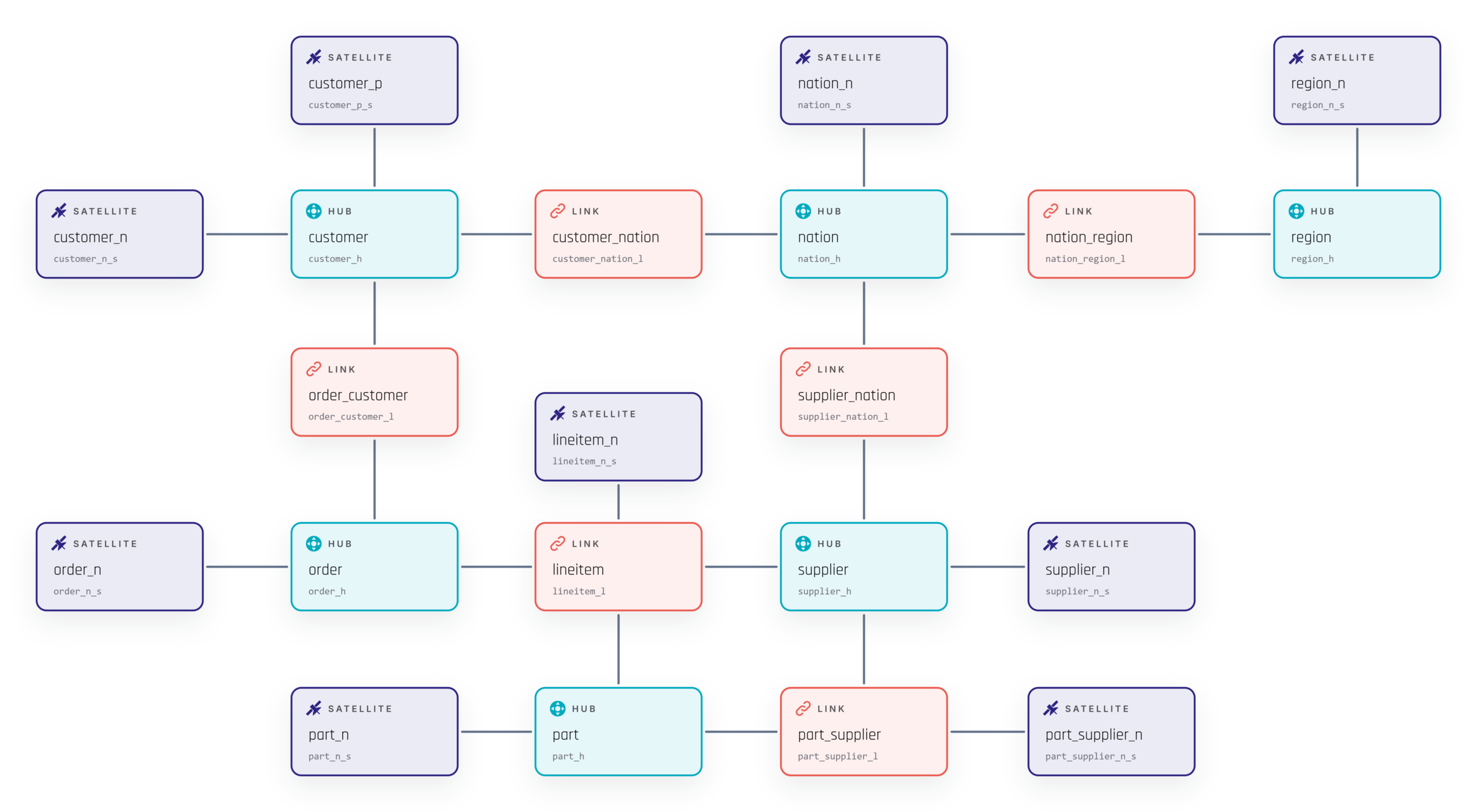
The resulting Raw Data Vault model consists of 6 hubs, 6 links, and 9 satellites. The figure below visualizes the complete model.
Generated with Visual Data Vault, Scalefree’s free web-based Data Vault modeling tool.
This process produced a dataset that mirrors real-world Data Vault behavior with uneven historical depth per key and skewed update patterns. It also gives us a controlled way to stress multi-table join performance without altering the query structure. All relationships in the dataset stay valid once they are loaded, so we did not need effectivity satellites on the Links.
Visual Data Vault App
A free, web-based modeling tool that makes it easy to design and document Data Vault models. Directly in your browser, with no installation required, you can build clear diagrams of hubs, links, satellites, and other Data Vault entities, giving your team a shared visual language for discussing and refining the data warehouse architecture. Whether you’re sketching a first draft, aligning with business stakeholders, or documenting an existing model, Visual Data Vault helps you get from idea to diagram quickly.
The Experiment
Pit-Bridge Hybrid Calculation
The benchmark query is a full PIT-Bridge Hybrid table calculation. It is one of the most demanding workloads in Data Vault, and puts pressure on the query planner more than on the storage layer. We wrote the query this way on purpose, to put as much load as possible on the planner.
The query is built in four distinct steps:
- Generate a Date Spine: Constructs an array of 13 monthly reporting dates representing the points in time for which we reconstruct the business state.
- Cross-Join with the Anchor Hub: Cross-joins the date array against order_h to produce one row per order per reporting date. This is the only cross-join in the query, and it creates the main spine that all other entities join to.
- Traverse the Link Graph: Follows the links from each order to its related customer, line items, parts, suppliers, nations, and regions for each reporting date.
- Left-Join Satellites to the Spine: Joins every Satellite to the spine using the condition ldts <= reporting_date, retaining only the most recent version as of that date via a QUALIFY ROW_NUMBER() window function per Satellite.
From that spine, the query fans out to 10 related entities: order, customer, customer nation, customer region, lineitem, part, supplier, supplier nation, supplier region, and part supplier. Because Lineitem introduces a true one-to-many relationship (an order can contain multiple lineitems, each pointing to its own part and supplier), the fan-out branches as well as widens, which pushes the total join count past 20.
The result is a single query that rebuilds every order at every reporting date using only data that existed on or before that date, ensuring no future information leaks in. To run it, the query planner has to build a large execution graph with many branches: several ranked CTEs, each doing a windowed lookup, all joined into one wide final result. This is the workload that separates an optimizer capable of efficient join ordering and predicate pushdown from one that is not, which is exactly what we set out to measure on entry-level compute.
Scaling The Volume
To evaluate how each configuration scales as historical depth grows, the same PIT-Bridge Hybrid query was executed across six cumulative volume steps: Batch 1, Batches 1 to 3, Batches 1 to 6, Batches 1 to 9, Batches 1 to 12, and Batches 1 to 15. Total row counts across these steps range from 23.1 million at Batch 1 up to 78.0 million at Batch 15.
The reporting spine stayed fixed at 13 monthly dates in every step, so the query structure, join count, and window functions never changed. Two things did change between steps: the amount of history each Satellite had to rank and filter, and the number of relationships, since Lineitem and Part_Supplier are loaded progressively and only reach full size at Batch 15.
We ran each combination of configuration (Databricks + Iceberg, Snowflake + Iceberg, and Snowflake + Native) and volume step three times to account for variance, for a total of 54 official benchmark runs.

What Was Controlled For The Tests
Running the same query 54 times on two platforms only gives useful numbers if every run happens under the same conditions. We used several controls so that the results show query planner behavior and not the effects of caching, warm clusters, or differences in data:
- Cold Start Confirmed: Before each run, the warehouse state was verified as suspended or stopped, so every execution started on cold compute.
- Result Cache Disabled: Result caching was explicitly disabled on both platforms (ALTER SESSION SET USE_CACHED_RESULT = FALSE; on Snowflake; SET use_cached_result = false; on Databricks), so no run could return a previously computed result.
- Three Repetitions (Median Reported): Every combination of configuration and volume step was executed three times. We report the median execution time to reduce the effect of one-off anomalies or short-term variance.
- Data Parity Verified: We compared row counts and ran MINUS queries in both directions to confirm that all three worked on the same data.
Cold starts are not fully identical across platforms. Snowflake’s Cloud Services layer stays active when a warehouse is suspended, so table metadata may already be loaded at the start of a run, which could affect planning time.
With these controls in place, we can attribute differences in the results to query planner efficiency, execution, and storage format.
Benchmark Findings
Planning Time
When we look only at planning time, before any data is scanned, a pattern appears: each platform keeps a steady planning time across all six volume steps, but the two platforms sit at very different levels.
Databricks + Iceberg stays around 16 to 17 seconds of planning time at every volume, from Batch 1 to Batches 1 to 15. Snowflake, on the other hand, plans faster in both configurations, between 3 and 7 seconds throughout, with Snowflake Native and Snowflake Iceberg close to each other at nearly every step.
Looking at the chart, two things stand out. First, planning time on both platforms is essentially flat as volume scales from 23 million to 78 million rows. This makes sense: planning time reflects the cost of analyzing query structure, resolving joins, and building an execution plan, not the cost of scanning data, so it should not scale with row count the way execution time does.
Second, the gap between Databricks and Snowflake is consistent across every step, which points to a structural cause. Both engines have to produce an optimized physical plan, so the difference likely comes from how each one does that work. Neither vendor shares enough internals to say for certain where the extra time goes, but a likely explanation is implementation and architecture. Snowflake’s Cloud Services layer parses and optimizes SQL, then maps the plan directly onto its MPP execution engine. Because Snowflake built the planner and the engine together, no translation layer sits between them. Databricks does the same resolution work through Spark’s Catalyst optimizer, then adds a step: mapping the physical plan nodes to the native operators that Photon supports. As mentioned earlier, metadata access may also play a role.
Execution Time
The first thing that stands out in the execution time chart is how similar the three lines are. Databricks Iceberg, Snowflake Iceberg, and Snowflake Native follow almost the same growth curve from Batch 1 to Batches 1-15. Execution time rises from about 55-66 seconds at the smallest volume to about 320-324 seconds at the largest, in every configuration. The chart shows no large gap between them, so let’s look at the numbers more closely.
Comparing the two engines on the same open table format leaves the engine as the only real variable, since both read identical Iceberg data. On this comparison, the two are very close. In five of the six volume steps, the difference is between 0.3% and 6.4%, small enough to fall within normal run-to-run variance at this scale. The exception is Batches 1-3, where Snowflake Iceberg is 25.9% faster, a gap that stands out from the rest. Databricks is slightly faster in four of the six steps, and at the largest volume, Batches 1-15, the difference is only 0.3%.
Adding Snowflake’s native format gives a third data point, and the pattern is more varied than a simple “native wins” result. At Batch 1, Snowflake Native starts out as the fastest of the three configurations, and it extends that lead at Batches 1-3, where the gap between the fastest and slowest configuration reaches 34.2%. This is the same step where Databricks Iceberg showed its largest gap in the previous comparison.
By Batches 1-6, that lead is gone: all three configurations run within 5.1% of each other. Over the next two steps, Batches 1-9 and Batches 1-12, Databricks Iceberg becomes the fastest configuration, while Snowflake Native becomes the slowest. At the largest volume, Batches 1-15, all three come back together within 1.3% of each other, a three-way tie.
Spillage
Execution times were close across all three configurations, but spillage (data written to disk when a query runs out of memory) shows a large difference. It is one of the most notable results of the benchmark.
Databricks records no spillage in five of the six volume steps. From Batch 1 through Batches 1 to 12, the query runs fully in memory on the 2X-Small warehouse. Snowflake starts spilling at the first batch, and the amount grows with every step, passing 30 GB at Batches 1 to 15. The Iceberg and Native configurations stay close to each other throughout.
Databricks does spill at Batches 1 to 15, but only about 13 GB, less than half of what Snowflake spills at the same step.
Neither vendor publishes the exact RAM of a single node, so we cannot link these differences to specific hardware. The spillage pattern still says something about memory headroom. We chose entry-level compute on purpose to test both query planners under tight limits, and steady spillage at higher volumes shows that this workload has outgrown the smallest tier. In production, a query of this complexity should run on a larger warehouse.
Total Time
The total time gives the full picture of end-to-end query performance. At this level, the main result is that total duration is very similar across all three configurations.
At smaller volumes (Batch 1 and Batches 1 to 3), Databricks Iceberg takes longer overall than both Snowflake configurations. This is where the fixed planning overhead from earlier shows up in the end-to-end result. Execution is still short at these volumes, so Databricks’ extra 10 to 12 seconds of planning makes up a large share of the total runtime.
From Batches 1 to 6 onward, the gap gets much smaller. As data grows and execution takes up most of the total runtime, the fixed planning overhead becomes a smaller part of the overall query time. From Batches 1 to 6 through Batches 1 to 15, all three configurations finish within a few seconds of each other.
In short, Databricks’ longer planning phase has a visible impact at small volumes, but that cost is quickly absorbed as volume grows. At the larger volumes we tested, all three configurations deliver nearly the same end-to-end performance.
Estimated Cost
As noted in the environment setup, Databricks Serverless SQL uses only one rate, while Snowflake’s rate depends on the edition.
The table below applies the listed hourly rates for region eu-west-1 to total query runtimes across each volume step: $3.64/h for Databricks Serverless SQL, $2.60/h for Snowflake Standard Edition, and $3.90/h for Snowflake Enterprise Edition.
Compared to Snowflake Standard Edition ($2.60/h), Databricks costs more at every volume step because of the difference in hourly rate. Against Snowflake Enterprise Edition, the picture changes. Snowflake Enterprise is cheaper at lower volumes (Batch 1 through Batches 1 to 6), and Databricks is cheaper at larger volumes (Batches 1 to 9, Batches 1 to 12, and Batches 1 to 15).
This means cost in this benchmark depends heavily on context. Listed rates do not include enterprise discounts or negotiated commitments. Whether either platform looks more expensive or about the same depends on the organization’s own contract rate.
Conclusion
Back to the central research question: can Databricks Serverless SQL, powered by Photon, handle the complex query planning and execution of a Data Vault PIT-Bridge Hybrid calculation as efficiently as Snowflake, when both are run on entry-level compute using their default configuration? The answer is yes, with some differences in how each platform gets there.
Looking at total time, both platforms perform at a very similar level. At larger volumes, the total runtimes are within a few seconds of each other. In this benchmark, the long-standing view that Data Vault’s join-heavy model is a poor fit for Databricks does not hold up.
The main difference is where each platform spends its processing time. Snowflake’s Cloud Services layer plans quickly, but the warehouse spills to disk from the first batch. Databricks spends more time on planning, likely while Catalyst resolves the query graph and maps operators to Photon, but it executes almost entirely in memory on its constrained compute node until the final volume step. Neither approach removes the overhead; each one places it at a different stage of the query.
Neither engine wins the benchmark outright. Snowflake plans faster and, in its native format, leads at lower volumes. Databricks shows more memory headroom and closes the runtime gap as volume grows. For this join-heavy Data Vault workload, the two platforms are close competitors.
Cost adds another layer. Databricks Serverless SQL uses one rate, while Snowflake’s rate depends on the edition, so the result of a cost comparison changes with the plan used as the baseline. On top of that, organizations often negotiate rates that differ from the list prices. For this reason, public rates are only a starting point, and each organization’s contract terms decide how the two platforms compare in cost.
Taken together, these results suggest that past assumptions about Databricks and Data Vault were based on the limits of older Spark versions. In this test, the gap was not observed. The two engines are not interchangeable, but the question is no longer whether Databricks can run Data Vault workloads. It is which platform’s trade-offs best fit an organization’s technical and financial needs.