search
0
All Posts By

Deniz Polat

Deniz Polat is a Technical Solutions Specialist and BI Consultant at Scalefree with a focus on Data Vault 2.0 and cloud automation. A CDVP2 and certified dbt Analytics Engineer, he has led high impact initiatives for major financial institutions. Deniz combines deep expertise in Microsoft Azure Fabric and Snowflake with a structured Scrum approach to build scalable, automated data platforms.

How to Build Data Vault Satellites in Coalesce.io

Data Vault Satellite in Coalesce.io

Building Data Vault structures can feel complex when you first begin working with them, especially when implementing them inside a modern transformation platform such as Coalesce.io. In today’s article, we will walk through the full lifecycle of creating Satellites, from source data to stage layers, hash key generation, private and non-private satellites, and finally V1 satellites that support historization and Data Vault 2.0 best practices.

This guide is based on a hands-on demo scenario using supplier data. The goal is not only to show you how to technically create satellites in Coalesce.io but also to explain why these steps matter and how they fit into the larger Data Vault methodology.


Why Satellites Matter in Data Vault Modeling

In Data Vault, satellites store descriptive attributes about business entities. They sit alongside hubs and links, extending these structures with the contextual information that typically changes over time. Because descriptive data can evolve—names, addresses, account balances, and other attributes—satellites allow us to capture the full history of changes while keeping hubs and links stable and lean.

A typical Data Vault satellite includes:

  • A hub hash key to tie satellite rows to a business key
  • A hash diff to detect attribute changes
  • Descriptive attributes such as names or phone numbers
  • Load timestamps and record source metadata
  • Optional historization fields such as load end date timestamps and an is_current flag

Coalesce.io makes it easier to generate these components through its Data Vault package. The platform handles much of the boilerplate SQL, letting you focus on modeling rather than syntax.

Understanding the Supplier Data Example

In the example used throughout the demo, our source system provides several fields:

  • Supplier key (a numerical unique identifier)
  • Name
  • Address
  • Nation key (used in links)
  • Phone number
  • Account balance
  • Comments

To keep things realistic, imagine the name and address values contain personal identifiable information. Because Data Vault supports privacy-aware modeling, we split the satellite into:

  • A private satellite for sensitive fields like name and address
  • A non-private satellite containing the remaining descriptive data

Separating data in this way supports compliance, access control, and sensitive-data masking—common requirements in real-world deployments.

Step 1: Building the Stage Layer

Before building satellites, we must create a stage table in Coalesce. The stage prepares the data for Data Vault modeling by generating the hash keys and hash diffs we will need later.

Inside Coalesce, we right-click the supplier source node and select Add Node → Stage. The purpose of this stage is to normalize the structure and add the necessary technical metadata.

What we generate in the stage:

  • Hub Hash Key (HK_Supplier): created from the Supplier Key
  • Hash Diff for Private Satellite: created from Name and Address
  • Hash Diff for Non-Private Satellite: created from Phone, Account Balance, and Comment
  • Load Date Timestamp: represents when the data was loaded
  • Record Source: tracks where the data came from

After saving and creating the stage node, Coalesce generates a view containing all the original source data plus the new hash fields and technical metadata. This prepares us to build the satellites cleanly and consistently.

Step 2: Creating the Private Satellite (V0)

Next, we right-click the stage and add a new node, selecting the V0 Satellite from the Data Vault package. This satellite will contain only the sensitive columns.

Private satellite includes:

  • Hub hash key
  • Private hash diff (Name + Address)
  • Name
  • Address
  • Load Date Timestamp
  • Record Source

We remove the non-private columns and keep only what belongs to the private satellite. After configuring the node properties and Data Vault options, we create and run the satellite.

The private satellite now holds the sensitive data, along with the hash diff that allows Coalesce to detect changes over time.

Step 3: Creating the Non-Private Satellite (V0)

We repeat the process for the second satellite, this time focusing on non-sensitive attributes such as phone number, account balance, and comments.

Non-private satellite includes:

  • Hub hash key
  • Non-private hash diff
  • Phone
  • Account Balance
  • Comments
  • Load Date Timestamp
  • Record Source

Once configured and created, this satellite is also loaded and ready for historization.

Step 4: Creating V1 Satellites for Historization

V0 satellites store the raw history and all versions of descriptive data. To simplify querying, Coalesce supports generating a V1 Satellite, which is a view layered on top of the V0 Satellite.

The V1 Satellite adds:

  • Load End Date Timestamp (LEDT): identifies until when a record was valid
  • Is_Current Flag: marks the latest version of each record

These fields allow analysts to easily filter for the “current” state of descriptive attributes or build temporal reports when needed.

Creating a V1 Satellite is straightforward: right-click the V0 Satellite, add a node, and select the V1 Satellite template. Coalesce automatically generates all required SQL and fields.

After running the V1 satellites for both private and non-private data, you now have a complete Data Vault satellite layer: historized, query-friendly, and fully compliant with Data Vault 2.0 standards.

Why This Matters in Real Data Vault Implementations

This workflow demonstrates the core principles of Data Vault modeling:

  • Separation of concerns: Private data stays protected.
  • Change detection through hash diffs: Efficiently track what changed.
  • Historization: V1 satellites provide easy access to current and historical states.
  • Consistent metadata: Load timestamps and record sources support auditability.

Coalesce automates much of the repetitive work required in Data Vault, enabling teams to produce reliable, scalable models faster and with less manual SQL.

Final Thoughts

Creating Data Vault satellites in Coalesce.io becomes a smooth process once you understand the core concepts: preparing the stage, generating hash keys and hash diffs, organizing attributes into private and non-private structures, and finally adding V1 satellites for historization. With Coalesce’s Data Vault package, this modeling pattern becomes not only repeatable but highly efficient.

If you’re new to Data Vault or want to deepen your understanding of how its components work together, consider reviewing a Data Vault handbook or exploring more Coalesce transformation sessions. Each layer builds on the previous one, ultimately forming a flexible, auditable, and future-proof data warehouse architecture.

Watch the Video

Installing and Managing Packages in Coalesce.io

Coalesce.io Package Management

In this article, we will guide you through managing packages within your Coalesce.io environment. We’ll cover everything from what packages are and why they are essential to the step-by-step process of installing, upgrading, and uninstalling them. By the end, you’ll have a clear understanding of how to leverage Coalesce’s marketplace to expand the capabilities of your data platform and streamline your development workflow.

Your data platform is a powerful tool, and while it comes with a robust set of built-in features, its true power lies in its expandability. This is where the Coalesce.io marketplace comes into play, offering a vast array of packages that can introduce new features and functionalities to your environment. Think of it as a toolkit that you can customize and grow to meet your specific needs, whether you’re implementing a Data Vault, integrating testing frameworks, or leveraging specific Snowflake functions.


Exploring the Coalesce.io Marketplace

Before we jump into the installation process, let’s take a quick look at the marketplace itself. When you open the marketplace, you’ll find different categories of packages designed to serve various purposes. These include:

  • Feature Packages: These can add new functionalities, such as leveraging Snowflake’s dynamic tables or integrating powerful tests for data quality.
  • Base Node Types: These packages introduce new node types that can be used to build your data warehouse, such as the Data Vault for Coalesce.io package, which provides specific nodes for hub, link, and satellite entities.
  • Advanced Deploy Packages: These help in managing and deploying your data pipelines more efficiently.

Each package listing provides key information, including its latest version, supported platforms (e.g., Snowflake, Databricks), release date, and a unique package ID. This ID is crucial for the installation process, as it tells Coalesce.io exactly which package you want to install. The description also offers valuable insights into the package’s features and how to use it, along with links to more detailed resources.

Step-by-Step Guide to Installing a New Package

The process of installing a new package is straightforward and can be done directly from your Coalesce.io environment settings. Here’s how you do it:

  1. Copy the Package ID: First, head to the marketplace, find the package you want to install, and copy its unique package ID. This is your key to the installation.
  2. Navigate to Settings: In your Coalesce.io environment, go to your project settings, and then to ‘packages’. You’ll see an overview of all the packages currently installed in your environment.
  3. Browse and Install: Click on the ‘Browse’ button. Here, you can paste the package ID you copied earlier. Coalesce.io will then fetch all available versions of that package.
  4. Select Version and Alias: Choose the version you want to install. It’s highly recommended to give your new package an alias. An alias is a custom name that helps you easily identify the package, especially if you have multiple versions or a large number of packages installed. For example, naming it Data Vault for Coalesce.io - v2.01 provides a clear distinction from an older version.
  5. Complete Installation: Click ‘Install’. The process might take a few moments. Once complete, Coalesce.io will confirm that the package is installed and provide links to view its new macros and node types.

The use of aliases is a best practice that helps you maintain a clear overview of which package and which version you are using, preventing confusion as your project grows.

Upgrading and Managing Package Versions

Upgrading a package is just as simple as installing a new one. The process is particularly important when a package you are already using receives an update with new features or bug fixes. Here’s the recommended best practice for a smooth upgrade:

  1. Install the New Version: Follow the installation steps outlined above to install the latest version of the package.
  2. Transfer Existing Entities: Go through your existing Coalesce.io entities (nodes) that are using the old package. You will see a clear indication of which package and version is being used. Switch the node type to the new, updated version. This process ensures that your existing workflows benefit from the new features and stability of the latest release.
  3. Review and Deactivate Old Node Types: In the package settings, you can also manage the visibility of node types. If you want to prevent accidentally using an older version, you can simply turn off the node types from the old package. This cleans up your workspace and ensures you are always building with the latest tools.
  4. Uninstall the Old Package: Once all of your entities have been successfully migrated to the new version, you can safely uninstall the old package. Coalesce.io will alert you if any nodes are still using the old version, preventing you from accidentally breaking your project. This is a critical step to keep your environment clean and efficient.

This systematic approach ensures a seamless transition and keeps your project on the cutting edge of Coalesce’s capabilities without any disruption.

Discovering New Macros and Capabilities

Beyond new node types, packages often come with a set of powerful macros. These are reusable snippets of code that can significantly speed up your development process. In your Coalesce.io settings, you can navigate to the ‘macros’ section to see all available macros, including those from your installed packages. This allows you to explore what the package can do under the hood and even integrate some of its functionalities directly into your own custom nodes.

For example, if a package includes macros for data quality checks, you can use these in your own custom SQL queries to ensure data integrity at various stages of your pipeline. This level of extensibility is what makes Coalesce.io such a versatile platform for modern data engineering.

Final Thoughts on Coalesce.io Package Management

In this article, we’ve walked through the entire lifecycle of a package in Coalesce.io. We’ve shown you how to navigate the marketplace, install a new package, and follow a best-practice process for upgrading your project. We also touched upon the importance of managing node types and exploring the powerful macros that come with packages.

The ability to extend and customize your data platform is a key advantage of Coalesce.io. By actively managing your packages, you can ensure that your environment is always up-to-date, efficient, and equipped with the tools you need to tackle any data challenge. Remember, a well-managed environment is the foundation for a successful and scalable data platform.

Watch the Video

Version Control and Deployments: A Comprehensive Guide with coalesce.io

Version Control and Deployments

In today’s fast-paced software development landscape, robust version control and seamless deployment pipelines are not just nice-to-haves—they are essential components of any successful project. From ensuring traceability of every change to enabling cross-functional teams to collaborate without stepping on each other’s toes, version control systems and automated deployments form the backbone of modern DevOps practices. In this article, we’ll explore the core concepts behind version control and deployments, and dive into how coalesce.io—a powerful, Git-native platform—elevates these processes through integrated features and automation.


Why Version Control and Deployments Matter

Whether you’re a solo developer or part of a large organization, the challenges of managing code changes, coordinating releases, and maintaining accountability can quickly become overwhelming. Implementing robust version control and deployment strategies delivers four key benefits:

  • Traceability: Every change is tracked, with a clear audit trail of who did what, when, and why.
  • Collaboration: Multiple contributors can work in parallel on different features or bug fixes without conflict.
  • Accountability: With detailed commit histories and pull request reviews, it’s easy to see ownership and rationale for changes.
  • Automation: Automated testing and deployments reduce manual errors and accelerate release cycles.

Coalesce brings all of these advantages together by embedding Git-based version control and deployment automation directly into its platform, letting teams focus on building reliable data logic rather than wrestling with infrastructure.

General Version Control Concepts with Git

Git has firmly established itself as the industry standard for source code versioning. Its distributed nature allows every developer to have a full copy of the repository history, enabling powerful branching and merging workflows.

  • Branching Model: Use feature branches for development work, separate testing branches for QA, and protected branches (e.g., main or production) for stable releases.
  • Pull Requests: Facilitate code reviews by proposing changes via pull requests (PRs), where teammates can comment, request modifications, and approve merges.
  • Commit Discipline: Write clear, atomic commits that describe what changed and why, improving the readability of the project’s history.
  • Merge Strategies: Choose between fast-forward merges, merge commits, or rebases based on team preferences and release requirements.

These practices enable controlled, transparent workflows that scale with your team’s size and complexity.

Version Control with Git in coalesce.io

Coalesce takes Git integration a step further by making it a first-class citizen of the platform’s UI. Here’s how it works:

  • Native Git-Based Structure: Projects in coalesce.io are structured as Git repositories under the hood, with every node, template, and configuration file stored as code.
  • UI-Driven Branch Management: Create, switch, and merge branches directly within the coalesce.io interface—no command line needed.
  • Automatic Commits: Any structural change you make to data nodes, business logic, or metadata generates a Git commit automatically, ensuring you never lose track of adjustments.
  • External Platform Integration: Connect to GitHub, GitLab, Azure DevOps, or Bitbucket repositories. Coalesce recognizes remote branches, pull requests, and webhooks, enabling full CI/CD pipelines with your preferred tools.

By embedding these capabilities, coalesce.io minimizes context switching and simplifies the learning curve for teams already familiar with Git workflows.

General Deployment Concepts

Deployment is the process of moving code or data logic from development environments into production, ensuring that your latest changes are available to end users or downstream systems. Key deployment concepts include:

  • Environments: Maintain separate environments—such as development, staging, and production—to safely test changes before release.
  • CI/CD Pipelines: Continuous Integration (CI) automates building and testing code upon every commit, while Continuous Deployment (CD) automates the release to target environments.
  • Rollback Strategies: Implement mechanisms to revert to previous stable versions in case of regressions or critical failures.
  • Configuration Management: Ensure environment-specific settings (e.g., database connections, API keys) are managed securely and consistently.

Automating these steps reduces human error, accelerates time-to-market, and provides greater confidence in each release.

Deployment Automation with coalesce.io

Coalesce simplifies deployments by exposing its functionality through a command-line interface (CLI) and a RESTful API. Here are the highlights:

  • Coalesce CLI: Run commands such as coalesce deploy to push the latest node definitions, templates, and configurations to a target environment in one step.
  • API-Driven Pipelines: Integrate coalesce.io into existing CI/CD tools (e.g., Jenkins, GitHub Actions, Azure Pipelines) by calling the Coalesce API to trigger builds and deployments programmatically.
  • Automated Compilation: Before deployment, coalesce.io compiles your logic—validating node dependencies and configurations—to catch errors early in the pipeline.
  • Execution Hooks: Optionally run pre- and post-deployment scripts (e.g., smoke tests, data quality checks) to enforce standards and provide feedback to development teams.

This tight integration between version control and deployments ensures that your Git history is always in sync with what’s running in production.

Best Practices for Version Control and Deployments

To maximize the benefits of these systems, consider the following recommendations:

  • Enforce Branch Protection: Require pull request reviews and passing automated tests before merging into critical branches.
  • Implement Semantic Versioning: Tag releases with meaningful version numbers (e.g., v1.2.0) to track feature sets and bugfixes.
  • Use Feature Toggles: Deploy incomplete features in a disabled state, then enable them via configuration when they’re ready.
  • Monitor and Alert: Integrate observability tools to track deployment health and automatically roll back on critical failures.
  • Document Your Workflow: Maintain clear documentation of branching strategies, deployment steps, and rollback procedures for on‑boarding and audits.

Conclusion

Version control and deployments are foundational to reliable, scalable, and secure software delivery. By leveraging Git’s powerful branching and merge capabilities alongside automated CI/CD pipelines, teams can move faster while maintaining high quality standards. Coalesce advances these practices by integrating version control directly into its platform and providing CLI/API-driven deployment tools that mesh seamlessly with existing workflows. Whether you’re just starting to adopt DevOps principles or looking to streamline your current processes, coalesce.io offers a unified solution for traceability, collaboration, accountability, and automation.

Watch the Video

From Vaults to Value: Scalefree & Coalesce Transforming Data Automation

Data Vault4Coalesce Data Automation Banner

In today’s fast-paced data landscape, staying ahead requires efficient, scalable, and automated processes, especially within complex data warehousing environments. This newsletter explores how a strategic partnership and innovative tooling can revolutionize your approach to Data Vault, enabling you to unlock value faster while managing costs effectively. Dive into the details of how Scalefree and coalesce.io are working together to reshape data automation.

FROM VAULTS TO VALUE: SCALEFREE & Coalesce TRANSFORMING DATA AUTOMATION

Data Vault projects too slow & costly?
Turn your vault into a value driver! Discover how Scalefree & Coalesce transform data automation. Learn about the latest DataVault4coalesce features, new coalesce.io capabilities, and how our partnership helps you save costs and deliver results faster. Register for our free webinar on April 17th, 2025!

Watch Webinar Recording

Unlock Faster Value And Reduce Costs In Your Data Vault Projects

Accelerating Data Vault implementation and maximizing ROI often hits hurdles like development time, maintenance costs, and keeping pace with evolving technologies. Addressing these requires a blend of proven methodology and powerful automation. The strategic partnership between Scalefree (Data Vault experts) and coalesce.io (data transformation platform) tackles these challenges directly.

By combining standardized Data Vault patterns with automated code generation and transformation management, this approach provides a future-proof solution. It significantly reduces manual effort, thereby saving development costs, enabling rapid results, and minimizing risks associated with inconsistencies. Learn the specifics of how this collaboration streamlines processes in our upcoming webinar, “From Vaults to Value: Scalefree & coalesce.io Transforming Data Automation.”

The Power Of Partnership: Expertise Meets Automation

Scalefree brings deep knowledge and best practices in Data Vault 2.0 methodology, while coalesce.io provides a powerful platform for automating data transformations, specifically on Snowflake. Together, this offers a synergy that significantly enhances team agility and reduces the total cost of ownership (TCO) for your data warehouse.

Introducing DataVault4coalesce: Your Accelerator

A key focus is DataVault4coalesce, the specialized package developed by Scalefree. It automates the generation of Data Vault structures and loading patterns within coalesce.io, directly translating into saved development time, reduced potential for errors (risk minimization), and lower maintenance overhead, eliminating common cost drivers in complex projects. The package includes the latest developments and newest components, designed to get you results even faster, even with small budgets.

Latest developments included support for new Data Vault entities, such as Effectivity Satellites and Reference Data. Additionally, the Scalefree team continuously focuses on improving the loading performance of the provided nodes.

Explore The Cutting Edge: What’s New In Coalesce

Beyond the enhancements in the DataVault4coalesce package, the coalesce.io platform itself is also continuously evolving. This section covers exciting new functionalities, including updates designed to enhance development workflows, such as initial AI-assisted features. It also features the implications of initial preview support for Databricks and how Coalesce’s recent acquisition of Castordoc enhances the ecosystem, potentially improving data governance and discovery. Stay ahead of the curve and understand how these advancements contribute to a sustainable and future-proof data strategy.

Looking Ahead: The DataVault4coalesce Roadmap

An outlook on the future roadmap highlights Scalefree and Coalesce’s commitment to continuous innovation, ensuring your data automation capabilities remain best-in-class and aligned with emerging needs.

With Coalesce’s extension to Databricks, Scalefree actively works on providing extensive support for the new data platform. A Datavault4Coaelsce Databricks version is under active development. Future support of more databases is scheduled on the development roadmap to guarantee a great Data Vault experience for all users of coalesce.io, no matter which platform they are on.

Key Benefits & Takeaways

Key takeaways from this newsletter include:

  • Maximizing value through the Scalefree & Coalesce partnership
  • Leveraging DataVault4coalesce for significant time and cost savings on Snowflake
  • Utilizing the latest features in coalesce.io, such as AI assistance and Databricks capabilities
  • Understanding the evolving data automation ecosystem

Transform your data vault projects from complex undertakings into streamlined engines for value creation.

Conclusion

Gaining practical insights into these topics is crucial for leveraging cutting-edge automation for your Data Vault projects. Understanding these advancements is key to optimizing your data strategy, reducing overhead, and achieving faster, more cost-effective results in today’s competitive environment.

Creating Data Vault Hubs: A Step-by-Step Guide

How to Create Data Vault Hubs

Data Vault modeling is a modern approach to data warehousing, providing scalability, flexibility, and adaptability to changing business needs. One of the essential components of this model is the Data Vault Hub. In this guide, we’ll explore why hubs are necessary, how they function, and how to create them efficiently.


How to Build a Data Vault

Before diving into hubs, it’s essential to understand the core components of a Data Vault:

  • Stages: Temporary storage areas where raw data lands before transformation.
  • Hubs: Central entities that store unique business keys.
  • Links: Relationships between hubs that track associations.
  • Satellites: Contextual information stored as historical changes.
  • PITs (Point-in-Time tables): Provide historical snapshots for query optimization.
  • Snapshot Tables: Capture state at a specific time.
  • Non-Historized Links & Satellites: Store non-time-variant attributes.
  • Multi-Active Satellites: Handle multiple active records for a single key.
  • Record Tracking Satellites: Maintain detailed historical tracking of changes.

Key Features of Data Vault Modeling

Data Vault modeling is based on years of best practices and includes:

  • Multi-Batch Processing: Supports scalable and parallelized data loading.
  • Automatic PIT Clean-Up: Uses logarithmic snapshot logic to optimize storage.
  • Virtual Load End-Date: Enables insert-only loads for performance efficiency.
  • Automated Ghost Records: Ensures referential integrity when key references are missing.

Understanding Data Vault Hubs

Hubs are a fundamental building block in Data Vault architecture. They act as an anchor for business keys, ensuring data integrity and consistency across different data sources.

Why Do I Need Hubs in Data Vault?

Hubs provide a single version of the truth by uniquely identifying business entities. Their key benefits include:

  • Ensuring Data Integrity: Every business entity has a unique identifier.
  • Facilitating Scalability: Hubs allow easy integration of new data sources.
  • Tracking Historical Changes: Business keys remain consistent over time.

Key Components of a Data Vault Hub

Each hub contains three key attributes:

  • Hash Keys: A hashed version of the business key to maintain uniqueness.
  • Business Keys & Meaning: Natural identifiers such as customer numbers or product IDs.
  • Load Date & Record Source: Metadata that tracks when and where the data was loaded.

How to Create a Data Vault Hub

Building a Data Vault hub follows a structured process. Here’s how you can do it:

Step 1: Install Datavault4Coalesce

To streamline the creation of hubs, Datavault4Coalesce provides automation tools for modeling and processing. Install and configure it in your environment.

Step 2: Define Business Keys

Identify the key attributes that uniquely define a business entity. These could include customer IDs, order numbers, or product SKUs.

Step 3: Generate Hash Keys

Using a hashing function (such as SHA-256), create unique hash values for each business key. This ensures efficient lookups and storage.

Step 4: Store Metadata

Each hub entry must include a load date and record source to track when and where the data originated.

Step 5: Load Data Efficiently

Implement an insert-only approach to prevent updates from overwriting historical data. Use batch processing for large-scale data ingestion.

Final Thoughts

Data Vault hubs play a crucial role in ensuring consistency and integrity within a modern data warehouse. By leveraging best practices and automation tools like Datavault4Coalesce, businesses can build scalable, future-proof data architectures.

Watch the Video

Implement Data Tests to Enhance Data Quality

Data Quality Testing

In today’s data-driven world, poor data quality can lead to costly mistakes. From misguided strategic decisions to operational inefficiencies and poor customer experiences, the impact of bad data is far-reaching. Issues such as duplicates, data integrity failures, missing values, and inconsistent formats can create significant business challenges.


Why Early Detection Matters

Fixing data quality issues at the source or integration level is cost-effective and minimizes business disruption. In contrast, correcting errors at the business level is expensive and can severely impact operations. Implementing data tests early ensures smooth processes and reliable reporting.

Benefits of Data Testing

  • Trust in Data – Enables confident decision-making and reliable analytics.
  • Process Efficiency – Automates quality checks and reduces manual work.
  • Business Protection – Safeguards reputation and enhances customer satisfaction.
  • Risk Reduction – Provides early warnings and ensures compliance.

Key Data Tests in Coalesce

To maintain high data quality, businesses should test for:

  • Custom business rules
  • Referential integrity
  • Value ranges
  • Uniqueness
  • Data types
  • Missing or null values

By implementing rigorous data tests, organizations can enhance data quality, minimize risks, and drive better business outcomes.

Watch the Video

Get Started with Real-Time Processing in Data Vault 2.0 on Microsoft Azure

Data Vault 2.0 on Microsoft Azure

In this newsletter, you’re going to get an overview of what real-time processing is and what possibilities it can provide your Data Vault 2.0 implementation.

Real-Time Processing with Data Vault 2.0 on Azure

In this webinar, we’ll discuss the new data warehouse requirements for data and explore
Real-Time processing. We’ll cover various Real-Time processing architectures for an initial overview. The second part focuses on Real-Time data architecture with Data Vault 2.0 and includes a brief overview of Microsoft Azure. You’ll also see a Real-Time processing implementation of Data Vault 2.0 in Azure. This webinar is for anyone new to Real-Time Data with Data Vault 2.0 and interested in an overview and implementation in Azure.

Watch Webinar Part 1Watch Webinar Part 2

What to expect

You will learn that real-time processing gives you the ability to create value out of data quicker, have the most up-to-date data in your reporting tools and allow more accurate decisions regarding data.
With that, your company will be able to adapt to changes in the market quicker by seeing developments right away with the most recent data.

Additionally, you can save costs by moving away from batch loading because the peak of computing power normally required for that gets reduced and is more evenly distributed throughout the day. That is especially the case when using cloud environments, because then it’s possible to replace promised environments and contribute the needed computing power perfectly.

The traditional way – batch-loading

Batch loading is a traditional method used to load data into a data warehouse system in large batches, mostly overnight. The data from data sources is delivered up to a certain time in the night to be transformed and loaded into the core data warehouse layer.

This method leads to a peak of data processing overnight, and organizations have to adjust their infrastructure needs to be able to deal with the expected maximum peak of required computing power.

The new way – real-time data

Real-time data is processed and made available immediately as it is generated, instead of being loaded in batches overnight. When using real-time approaches, the loading window is extended to 24 hours. So the overnight peak and its disadvantages are gone.
When using real-time data, it’s always modeled as a non-historized link or as a satellite.

Possible use cases for real-time data are vital monitoring in the healthcare industry, inventory tracking, user behavior on social media or production line monitoring.

Different types of real-time data

There are different types of real-time data based on how frequently the data is loaded and the degree of urgency or immediacy of the data.

Near real-time data refers to data that is loaded in mini-batches at least every fifteen minutes, with the data stored in a cache until it is loaded into the data analytics platform.
Actual real-time data, also called message streaming, involves loading every single message directly into the data analytics platform without any cache.
This type of real-time data is useful when it is important to have data available as soon as it is generated for dashboards or further analytics.

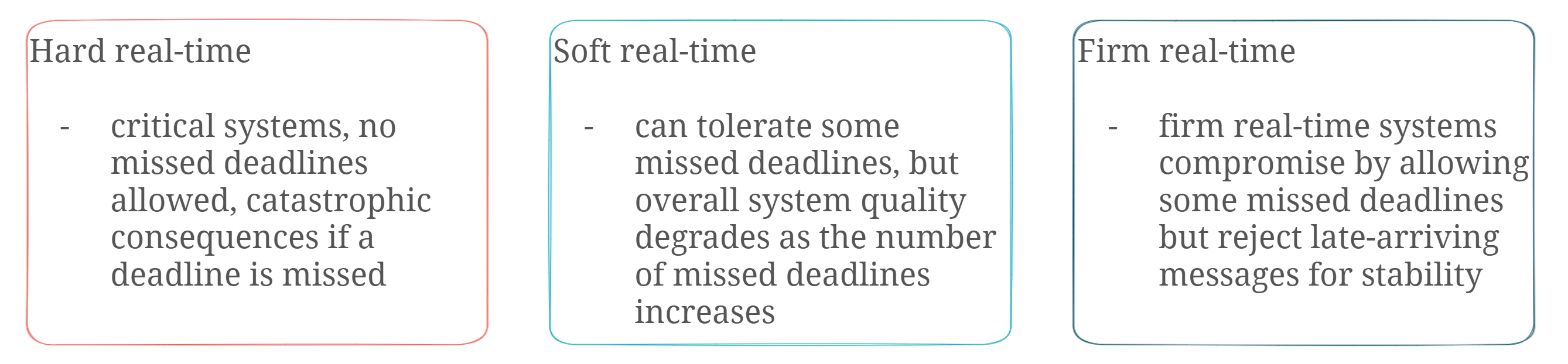
The acceptable processing delay for real-time data is typically defined by the consequences of missing a deadline. Additionally, there are three types of real-time systems: hard real-time, soft real-time, and firm real-time.

Real-time processing types

Implementing real-time processing

So, how do you implement real-time data processing into your data warehouse solution? There are many architectures for that, but we will focus on the Lambda and Data Vault 2.0 architecture.

Generic real-time processing architecture

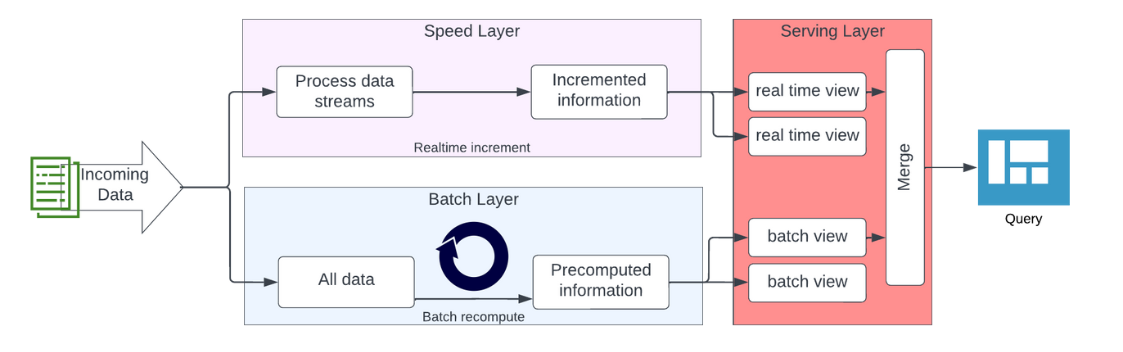
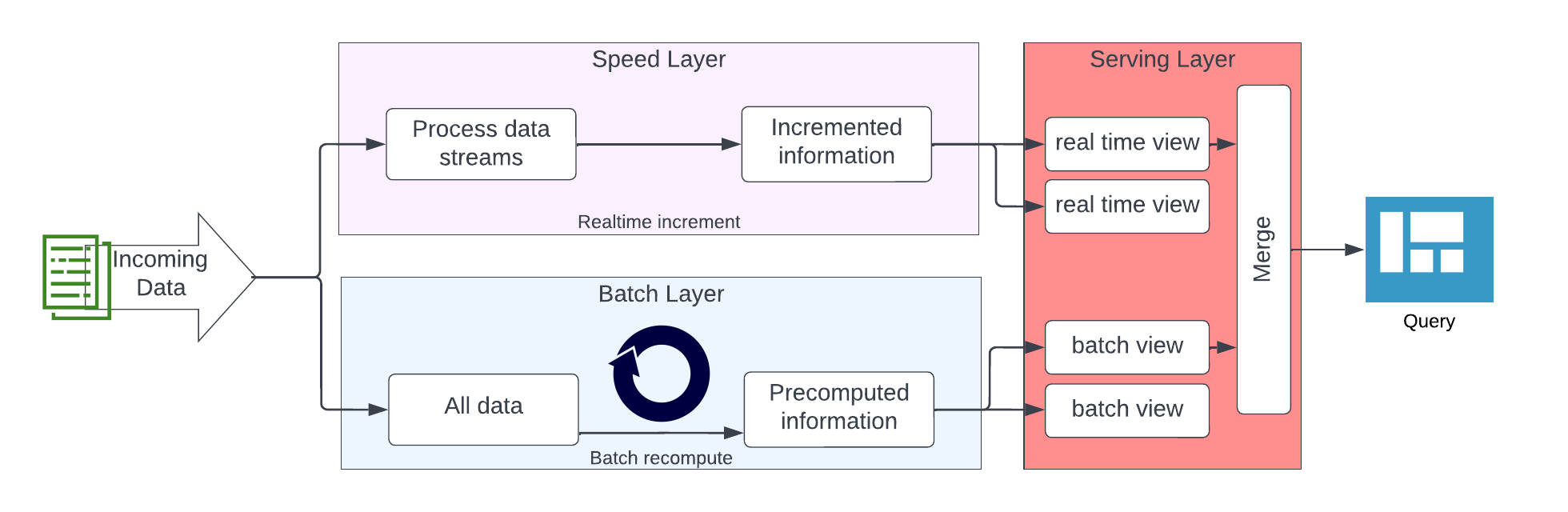
The lambda architecture separates data processing into a speed layer and a batch layer. The speed layer processes real-time messages with a focus on speed and throughput, while the batch layer provides accuracy and completeness by processing high volumes of data in regular batches. The serving layer integrates data from both layers for presentation purposes.

At first, the Data Vault 2.0 architecture seems to be similar to the lambda architecture, but it treats some aspects differently. The lambda architecture has issues from a Data Vault 2.0 perspective, such as implementing a single layer in each data flow and lacking a defined layer for capturing raw, unmodified data for auditing purposes.

The Data Vault 2.0 architecture adds a real-time part called “message streaming” to the existing batch-driven architecture, with multiple layers implemented for capturing and processing real-time data, integrating it with the batch-driven flow at multiple points. Messages are pushed downstream from the publisher to the subscriber, loaded into the Raw Data Vault and forked off into the data lake. But the main process is the push inside the message streaming area. The architecture is able to integrate data from batch feeds or to stream the real-time data directly into the dashboard.

Using Microsoft Azure for real-time processing

Microsoft Azure is a cloud computing platform and set of services offered by Microsoft. It provides a variety of services, including virtual machines, databases, analytics, storage, and networking. These services can be used to create web and mobile applications, run large-scale data processing tasks, store and manage data, host websites and much more.

Microsoft Azure for real-time processing

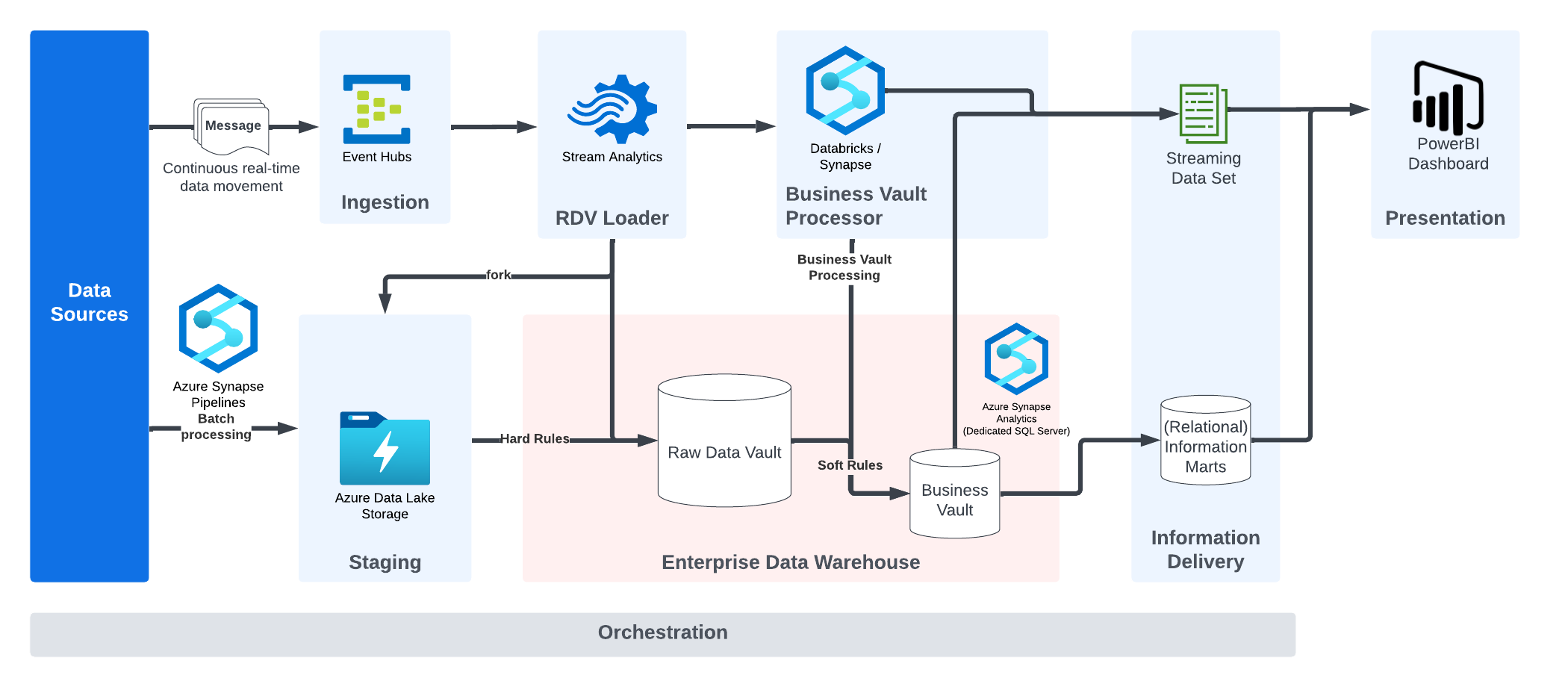
The illustration describes a typical real-time architecture used by Scalefree consultants, which follows the conceptual Data Vault 2.0 architecture.

Data sources deliver data either in batches or real-time. This is loaded into the Azure Data Lake or accepted by the Event Hub beforehand. The Raw Data Vault Loader separates business keys, relationships and descriptive data using Stream Analytics and forwards the message to the Business Vault processor. The Business Vault processor applies transformation and other business rules to produce the target message structure for consumption by the (dashboarding) application. The results can be loaded into physical tables in the Business Vault on Synapse or be delivered in real-time without further materialization in the database. The target message is generated and sent to the real-time information mart layer implemented by a streaming dataset, which is consumed by PowerBI. The cache of the dashboard service will expire quickly, but the Synapse database has all data available for other uses, including strategic, long-term reporting.

Conclusion

In conclusion, real-time data processing offers numerous benefits over traditional batch loading methods, including the ability to create value out of data quicker, have the most up-to-date information in reporting tools, and make more accurate decisions. By adapting to changes in the market quicker, companies can stay ahead of the competition. Moving away from batch loading can also save costs by reducing the peak of computing power required.

As mentioned before, the last illustration shows an architecture that the Scalefree Consultants implemented to make use of real-time data.

Read more on our recently released Microsoft Blog Article.

How is your current experience with real-time data processing?
Are you thinking about kick-starting your Data Vault by also using real-time data?
Or are you already using it and thinking about improving it further?

Let us know your thoughts in the comment section!

Close Menu