
Visual Data Vault
The following article describes how to represent links using a Visual Data Vault example. With the advent of Data Vault 2.0, which adds architecture and process definitions to the Data Vault 1.0 standard, Dan Linstedt standardized the Data Vault symbols used in modeling. Based on these standardized symbols, the Visual Data Vault (VDV) modeling language was developed, which can be used by EDW architects to build Data Vault models.
When our founders wrote the book, they required a visual approach to model the concepts of Data Vault in the book. For this purpose, they developed the graphical modeling language, which focuses on the logical aspects of Data Vault. The Microsoft Visio stencils and a detailed white paper are available on www.visualdatavault.com as a free download.
In this article:
Links in Visual Data Vault
We previously published another newsletter how hubs are modeled in the accounting industry. In this Newsletter we explain the function of standard links and how the modeling in the banking industry works.
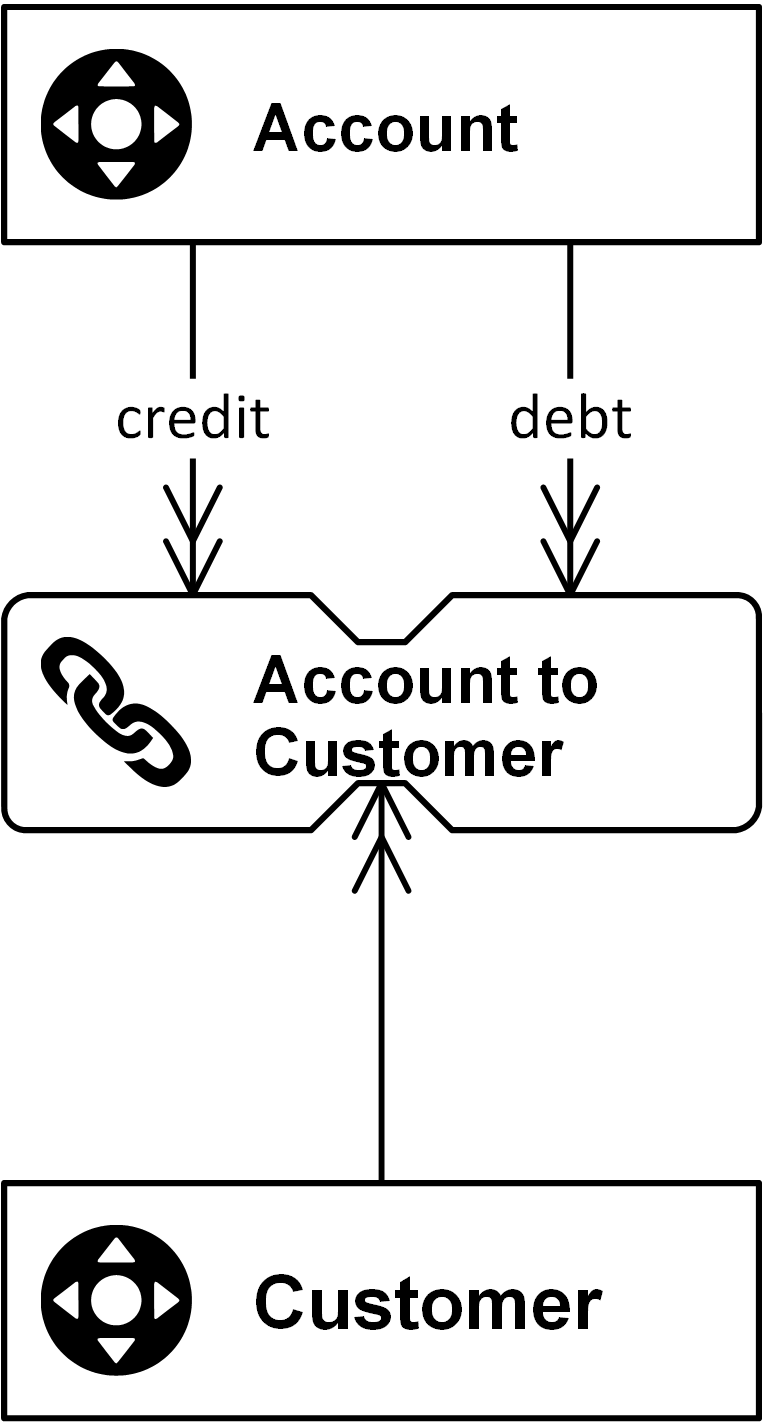
Links connect individual hubs in a Data Vault model and represent either transactions or relationships between business objects. Business objects are connected in business. No business object is entirely separate from other business objects. Instead, they are connected to each other through the operational business processes that use business objects in the execution of their tasks. The image below shows a link that connects two hubs (a standard link has to have at least two connections) as the following diagram shows:
The link in in the image above references two hubs: Account and Customer. The connector (the arrow) should be read as “(the hub) Customer is used by (the link) Account to Customer.” The second reference is a little different because the name of the connection between the Account hub and the link is overwritten by the meaning of a credit or a debt Account. This is necessary in cases where the model requires more meaning or when multiple connections are required to the same hub. The hash keys of each hub, which identify each business object unique by one calculated attribute, are replicated into the link entity by using the same attribute name.
A link represents many-to-many relationships and therefore they provide flexibility because changes to the business rules don’t require re-engineering and the granularity is expressed by the number of referenced hubs and is thus well documented.
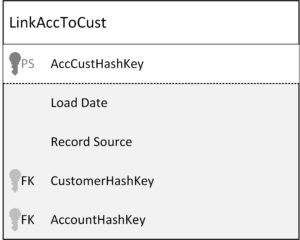
The link contains all hash keys of the related hubs (logical foreign keys), a load date when the relationship arrives the data warehouse for the first time, the record source where the data comes from, and the link hash key (logical primary key) which is calculated from the business keys of the hubs (not from the hash keys – never hash a hash!) and follows an insert-only loading pattern.
Links greatly improve the flexibility of the Data Vault model, because it is easy to add links or modify the relationship type of existing links. It takes less time to respond to changes in the business. To add new functionality, you only need to add new hubs and connect them via links to existing hubs. Usually a standard satellite is attached to the link, which contains the descriptive data of the relationship between the hubs.
Another common kind of link is the Non-Historized Link (also known as Transactional Link) which contains transactions only and does not need a Satellite, what means that the loading pattern is a complete insert-only approach. Read more about the value of NH-Links in an earlier Newsletter this year.
Conclusion
In conclusion, the Visual Data Vault modeling language offers a standardized and effective approach for representing complex relationships and transactions within the banking industry. By connecting business objects through links, it ensures a clear and logical structure that mirrors real-world processes. This methodology not only enhances the clarity of data models but also facilitates efficient data management and retrieval, making it an invaluable tool for enterprise data warehouse architects.
