search
0
Category

dbt related tools

Databricks and dbt: A Practical Approach to Data Vault Implementation

Bronze Silver and Gold layers in the Data Vault Structure

Databricks and dbt

Selecting the appropriate technology stack is a critical factor in the successful delivery of a Data Vault 2 architecture. Two technologies that work effectively together at a large scale data solutions are Databricks and dbt. When combined, they provide a practical way to implement Data Vault models while addressing performance, governance, and auditability requirements.

It can be argued that dbt’s role in a Databricks-based architecture is not always essential, since many of its core capabilities (such as transformation scheduling, lineage tracking, and documentation) can also be implemented using native Databricks features. Understanding the specific role each tool plays helps clarify where they complement each other and where functionality overlaps.


Databricks as the Processing and Storage Platform

Databricks’ Lakehouse architecture combines the scalability of a data lake with the reliability of a warehouse. Its Delta Lake technology offers ACID transactions, schema enforcement, and time travel, enabling precise historical querying, which are relevant aspects when it comes to Data Vault’s historization requirements.

With Unity Catalog, Databricks centralizes metadata management and enforces fine-grained access control, ensuring sensitive attributes are protected without introducing unnecessary satellite splits. This alignment between governance and performance is particularly relevant in Data Vault environments.

dbt as the Transformation and Orchestration Layer

dbt manages and automates SQL-based transformations in a modular and version-controlled manner. In a Data Vault context, dbt enables:

  • The creation of Hubs, Links, and Satellites through templated, reusable models. Here, different packages can be leveraged, like our datavault4dbt package, which is constantly updated to be fully compliant with the most recent Data Vault standards.
  • Integrated testing to validate business keys, relationships, and data quality.
  • Automated documentation that directly reflects the structure and dependencies of the Data Vault.

This structured approach makes transformations transparent and repeatable, supporting the auditability requirements inherent to Data Vault.


Integration in a Data Vault Workflow

When Databricks and dbt are deployed together:

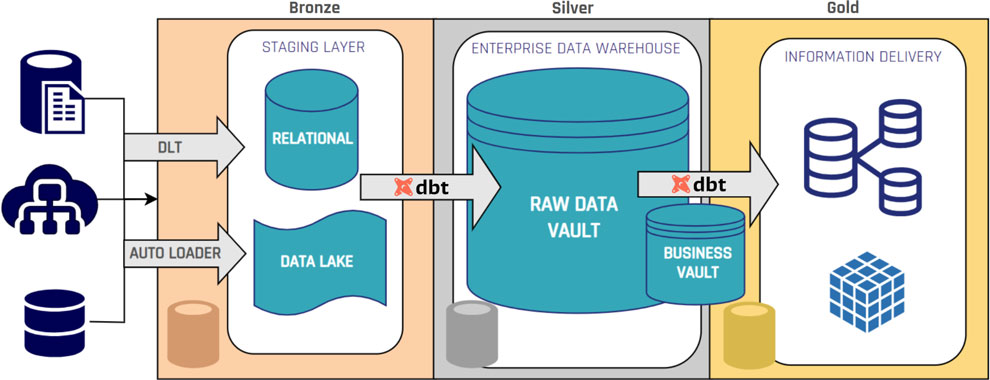
  • Data ingestion occurs in Databricks, storing raw datasets as Delta tables, usually in the Bronze layer.
  • dbt transformations generate Raw Vault entities and Business Vault objects in the Silver layer.
  • Governance and security controls are enforced via Unity Catalog without altering the Data Vault model structure.
Bronze Silver and Gold layers in the Data Vault Structure

This approach preserves Data Vault’s methodological structure while using Databricks’ distributed compute and storage capabilities.

Business Value when combining dbt and Databricks

The combined use of Databricks and dbt offers:

  • Scalable processing of large, complex datasets: Databricks handles enterprise-scale data efficiently, while dbt structures transformations into modular, reusable components.
  • Consistent governance across all layers of the Data Vault: dbt’s lineage and documentation, plus Unity Catalog’s access control, ensure compliance and transparency end to end.
  • Lower operational risk through tested, version-controlled transformations: Git-based versioning and automated tests in dbt reduce errors before execution on Databricks.
  • Improved query performance for information marts and analytics: Delta Lake optimizations and dbt’s pre-aggregated tables with business logic minimize expensive joins.

For organizations building Data Vault on Databricks, dbt strengthens structure and quality while Databricks ensures scalability and performance.

– Ricardo Rodríguez (Scalefree)
Databricks and dbt: A Practical Approach to Data Vault Implementation

Bronze Silver and Gold layers in the Data Vault Structure

Databricks and dbt

Selecting the appropriate technology stack is a critical factor in the successful delivery of a Data Vault 2 architecture. Two technologies that work effectively together at a large scale data solutions are Databricks and dbt. When combined, they provide a practical way to implement Data Vault models while addressing performance, governance, and auditability requirements.

It can be argued that dbt’s role in a Databricks-based architecture is not always essential, since many of its core capabilities (such as transformation scheduling, lineage tracking, and documentation) can also be implemented using native Databricks features. Understanding the specific role each tool plays helps clarify where they complement each other and where functionality overlaps.


Databricks as the Processing and Storage Platform

Databricks’ Lakehouse architecture combines the scalability of a data lake with the reliability of a warehouse. Its Delta Lake technology offers ACID transactions, schema enforcement, and time travel, enabling precise historical querying, which are relevant aspects when it comes to Data Vault’s historization requirements.

With Unity Catalog, Databricks centralizes metadata management and enforces fine-grained access control, ensuring sensitive attributes are protected without introducing unnecessary satellite splits. This alignment between governance and performance is particularly relevant in Data Vault environments.

dbt as the Transformation and Orchestration Layer

dbt manages and automates SQL-based transformations in a modular and version-controlled manner. In a Data Vault context, dbt enables:

  • The creation of Hubs, Links, and Satellites through templated, reusable models. Here, different packages can be leveraged, like our datavault4dbt package, which is constantly updated to be fully compliant with the most recent Data Vault standards.
  • Integrated testing to validate business keys, relationships, and data quality.
  • Automated documentation that directly reflects the structure and dependencies of the Data Vault.

This structured approach makes transformations transparent and repeatable, supporting the auditability requirements inherent to Data Vault.

Integration in a Data Vault Workflow

When Databricks and dbt are deployed together:

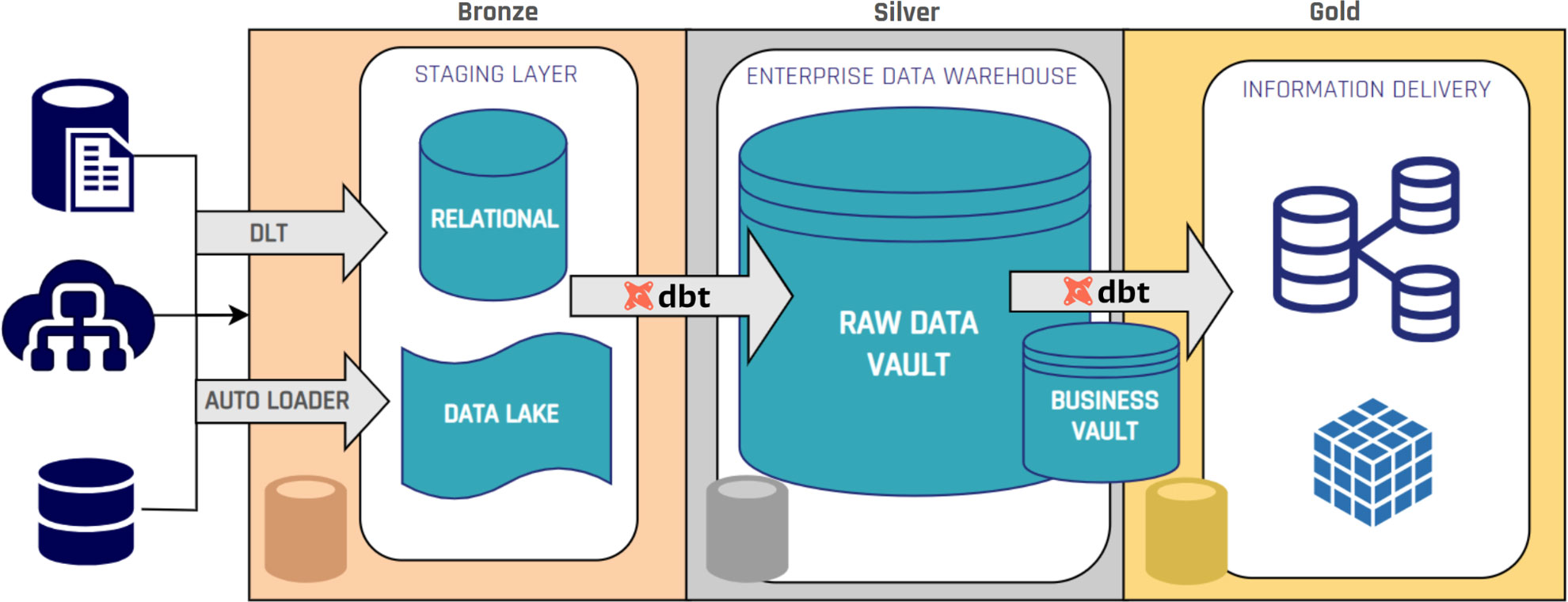
  • Data ingestion occurs in Databricks, storing raw datasets as Delta tables, usually in the Bronze layer.
  • dbt transformations generate Raw Vault entities and Business Vault objects in the Silver layer.
  • Governance and security controls are enforced via Unity Catalog without altering the Data Vault model structure.
Bronze Silver and Gold layers in the Data Vault Structure

This approach preserves Data Vault’s methodological structure while using Databricks’ distributed compute and storage capabilities.

Business Value when combining dbt and Databricks

The combined use of Databricks and dbt offers:

  • Scalable processing of large, complex datasets: Databricks handles enterprise-scale data efficiently, while dbt structures transformations into modular, reusable components.
  • Consistent governance across all layers of the Data Vault: dbt’s lineage and documentation, plus Unity Catalog’s access control, ensure compliance and transparency end to end.
  • Lower operational risk through tested, version-controlled transformations: Git-based versioning and automated tests in dbt reduce errors before execution on Databricks.
  • Improved query performance for information marts and analytics: Delta Lake optimizations and dbt’s pre-aggregated tables with business logic minimize expensive joins.

For organizations building Data Vault on Databricks, dbt strengthens structure and quality while Databricks ensures scalability and performance.

– Ricardo Rodríguez (Scalefree)
Get Started with dbt: A Quick 15-Minute Guide Using Snowflake

Get Started with dbt Using Snowflake

Introduction to dbt

dbt (data build tool) revolutionizes the way teams build and maintain analytics workflows by bringing software‐engineering best practices to SQL‐based data transformations. Instead of ad‐hoc scripts, dbt encourages version control, modular models, testing, documentation, and lineage graphs. In this guide, you’ll learn how to go from zero to your first dbt models—running entirely in the cloud on Snowflake—in under 15 minutes.


Why Choose dbt Cloud + Snowflake?

  • Fully managed: No local install or complex orchestration; dbt Cloud handles hosting.
  • Quick setup: Snowflake’s partner connector spins up a dbt trial, pre-configured with your credentials.
  • Best practices out of the box: Built-in IDE, job scheduling, Git integration, and documentation.
  • Scalable performance: Leverages Snowflake’s compute power for fast model builds.

Prerequisites

  1. A Snowflake trial account (free, 1-minute setup).
  2. A modern browser (Chrome, Firefox) or VS Code for remote development.
  3. Basic familiarity with SQL.

1. Launching dbt Cloud from Snowflake

Once logged into your Snowflake trial, navigate to the Data Products → Partners → Connect pane. Scroll to find the dbt entry and click Connect → Launch. This will automatically:

  • Provision a dbt Cloud trial account
  • Create a new Snowflake database and warehouse
  • Inject Snowflake credentials into your dbt Cloud connection

You’ll land in the dbt Cloud dashboard, ready to start your first project.

2. Exploring the dbt Cloud UI

In dbt Cloud’s left navigation bar you’ll find:

  • Develop: Interactive IDE for coding models, sources, tests, documentation.
  • Deploy: Job definitions, environments, and run history.
  • Documentation: Auto‐generated docs site with lineage graphs.
  • Settings: Account, project, and Git integration.

Click Develop → IDE (hosted in Chrome or connect your VS Code). Let’s initialize our dbt project.

3. Initializing Your dbt Project

  1. In the IDE, open the Version Control pane and click Initialize dbt Project.
  2. Accept the defaults; dbt creates a dbt_project.yml and folder structure (models/, macros/, etc.).
  3. Commit the auto‐generated files in a new Git branch: “initialized dbt project”.

Your Git pane now shows uncommitted files; click Commit & Push to save the project baseline.

4. Defining Your Source Data

dbt doesn’t load data from external systems—you must point it to existing tables. Snowflake’s sample database (SNOWFLAKE_SAMPLE_DATA) contains TPC-H tables you can use.

Create a new YAML file under models/ named sources.yml with:

version: 2

sources:
  - name: tpch
    database: SNOWFLAKE_SAMPLE_DATA
    schema: TPCH_SF1
    tables:
      - name: CUSTOMER
      - name: ORDERS

Save to see the lineage graph update with two new source nodes.

5. Building a Staging Model

Staging models standardize raw tables and prepare them for downstream transformations. In models/, delete the example/ folder and instead:

  1. Create a folder called models/staging/tpch.
  2. In that folder, create stg_tpch_customer.sql:
{{ config(materialized='view') }}

select
  C_CUSTKEY   as customer_key,
  C_NAME      as customer_name,
  C_ACCTBAL   as account_balance,
  C_COMMENT   as comment
from {{ source('tpch', 'CUSTOMER') }}

Notes:

  • The source() macro resolves to the fully qualified table.
  • materialized='view' tells dbt to build a view by default.

Save and click Run → dbt run to build just this model. In seconds you’ll see a view in your Snowflake UI under the dev schema.

6. Creating a Production-Ready Dimension

Dimensions (Gold layer) contain curated, business-ready tables. Let’s filter for customers with positive balances.

  1. Create models/marts/customer_dim.sql:
{{ config(materialized='table') }}

select
  customer_key,
  customer_name,
  account_balance
from {{ ref('stg_tpch_customer') }}
where account_balance > 0

Here, ref() links to another model, ensuring correct build order and clear lineage.

Click Compile to preview generated SQL, then Run → dbt run to create the table in Snowflake.

7. Testing and Documentation

dbt encourages tests to enforce data quality:

  • Add to models/staging/tpch/schema.yml:
version: 2

models:
  - name: stg_tpch_customer
    tests:
      - not_null:
          column_name: customer_key
      - unique:
          column_name: customer_key

Run dbt test to validate your models. Any failures will be reported in the UI.

Generate documentation with dbt docs generate, then preview via dbt docs serve. Explore your project’s lineage graph and column descriptions.

8. Version Control & Deployment

dbt Cloud integrates Git for collaboration. After feature development:

  1. Commit your branch and open a pull request (GitHub, GitLab, Bitbucket).
  2. Merge into main.

In Deploy → Environments, create a production environment. Under Jobs, define a job that runs:

  • dbt seed (if you have local CSV seeds)
  • dbt run
  • dbt test

Schedule the job (e.g., hourly, daily) or trigger it on Git commits. Monitor run history and logs directly in dbt Cloud.

9. Best Practices & Next Steps

  • Modularize models: Break complex logic into smaller models.
  • Document extensively: Use YAML descriptions for sources, models, and columns.
  • Implement CI/CD: Integrate dbt Cloud jobs with your team’s CI pipeline.
  • Leverage analyses: Create analyses/ for ad-hoc queries and charts.
  • Scale with packages: Reuse community packages (e.g., dbt_utils).

For deeper dives, explore the official dbt documentation and the dbt Hub for community packages and best practices.

Watch the Video

Conclusion

In just a few steps, you’ve:

  • Provisioned dbt Cloud via Snowflake
  • Initialized a dbt project with Git
  • Defined raw sources and built staging models
  • Created a production dimension with ref()
  • Tested data quality and generated documentation
  • Set up a CI/CD job for automated deployment

Now you have a repeatable, maintainable analytics pipeline. Keep building new models, add tests, and document as you go—your future self (and team!) will thank you.

Get Started with dbt: A Quick 15-Minute Guide Using Snowflake

Get Started with dbt Using Snowflake

Introduction to dbt

dbt (data build tool) revolutionizes the way teams build and maintain analytics workflows by bringing software‐engineering best practices to SQL‐based data transformations. Instead of ad‐hoc scripts, dbt encourages version control, modular models, testing, documentation, and lineage graphs. In this guide, you’ll learn how to go from zero to your first dbt models—running entirely in the cloud on Snowflake—in under 15 minutes.


Why Choose dbt Cloud + Snowflake?

  • Fully managed: No local install or complex orchestration; dbt Cloud handles hosting.
  • Quick setup: Snowflake’s partner connector spins up a dbt trial, pre-configured with your credentials.
  • Best practices out of the box: Built-in IDE, job scheduling, Git integration, and documentation.
  • Scalable performance: Leverages Snowflake’s compute power for fast model builds.

Prerequisites

  1. A Snowflake trial account (free, 1-minute setup).
  2. A modern browser (Chrome, Firefox) or VS Code for remote development.
  3. Basic familiarity with SQL.

1. Launching dbt Cloud from Snowflake

Once logged into your Snowflake trial, navigate to the Data Products → Partners → Connect pane. Scroll to find the dbt entry and click Connect → Launch. This will automatically:

  • Provision a dbt Cloud trial account
  • Create a new Snowflake database and warehouse
  • Inject Snowflake credentials into your dbt Cloud connection

You’ll land in the dbt Cloud dashboard, ready to start your first project.

2. Exploring the dbt Cloud UI

In dbt Cloud’s left navigation bar you’ll find:

  • Develop: Interactive IDE for coding models, sources, tests, documentation.
  • Deploy: Job definitions, environments, and run history.
  • Documentation: Auto‐generated docs site with lineage graphs.
  • Settings: Account, project, and Git integration.

Click Develop → IDE (hosted in Chrome or connect your VS Code). Let’s initialize our dbt project.

3. Initializing Your dbt Project

  1. In the IDE, open the Version Control pane and click Initialize dbt Project.
  2. Accept the defaults; dbt creates a dbt_project.yml and folder structure (models/, macros/, etc.).
  3. Commit the auto‐generated files in a new Git branch: “initialized dbt project”.

Your Git pane now shows uncommitted files; click Commit & Push to save the project baseline.

4. Defining Your Source Data

dbt doesn’t load data from external systems—you must point it to existing tables. Snowflake’s sample database (SNOWFLAKE_SAMPLE_DATA) contains TPC-H tables you can use.

Create a new YAML file under models/ named sources.yml with:

version: 2

sources:
  - name: tpch
    database: SNOWFLAKE_SAMPLE_DATA
    schema: TPCH_SF1
    tables:
      - name: CUSTOMER
      - name: ORDERS

Save to see the lineage graph update with two new source nodes.

5. Building a Staging Model

Staging models standardize raw tables and prepare them for downstream transformations. In models/, delete the example/ folder and instead:

  1. Create a folder called models/staging/tpch.
  2. In that folder, create stg_tpch_customer.sql:
{{ config(materialized='view') }}

select
  C_CUSTKEY   as customer_key,
  C_NAME      as customer_name,
  C_ACCTBAL   as account_balance,
  C_COMMENT   as comment
from {{ source('tpch', 'CUSTOMER') }}

Notes:

  • The source() macro resolves to the fully qualified table.
  • materialized='view' tells dbt to build a view by default.

Save and click Run → dbt run to build just this model. In seconds you’ll see a view in your Snowflake UI under the dev schema.

6. Creating a Production-Ready Dimension

Dimensions (Gold layer) contain curated, business-ready tables. Let’s filter for customers with positive balances.

  1. Create models/marts/customer_dim.sql:
{{ config(materialized='table') }}

select
  customer_key,
  customer_name,
  account_balance
from {{ ref('stg_tpch_customer') }}
where account_balance > 0

Here, ref() links to another model, ensuring correct build order and clear lineage.

Click Compile to preview generated SQL, then Run → dbt run to create the table in Snowflake.

7. Testing and Documentation

dbt encourages tests to enforce data quality:

  • Add to models/staging/tpch/schema.yml:
version: 2

models:
  - name: stg_tpch_customer
    tests:
      - not_null:
          column_name: customer_key
      - unique:
          column_name: customer_key

Run dbt test to validate your models. Any failures will be reported in the UI.

Generate documentation with dbt docs generate, then preview via dbt docs serve. Explore your project’s lineage graph and column descriptions.

8. Version Control & Deployment

dbt Cloud integrates Git for collaboration. After feature development:

  1. Commit your branch and open a pull request (GitHub, GitLab, Bitbucket).
  2. Merge into main.

In Deploy → Environments, create a production environment. Under Jobs, define a job that runs:

  • dbt seed (if you have local CSV seeds)
  • dbt run
  • dbt test

Schedule the job (e.g., hourly, daily) or trigger it on Git commits. Monitor run history and logs directly in dbt Cloud.

9. Best Practices & Next Steps

  • Modularize models: Break complex logic into smaller models.
  • Document extensively: Use YAML descriptions for sources, models, and columns.
  • Implement CI/CD: Integrate dbt Cloud jobs with your team’s CI pipeline.
  • Leverage analyses: Create analyses/ for ad-hoc queries and charts.
  • Scale with packages: Reuse community packages (e.g., dbt_utils).

For deeper dives, explore the official dbt documentation and the dbt Hub for community packages and best practices.

Watch the Video

Conclusion

In just a few steps, you’ve:

  • Provisioned dbt Cloud via Snowflake
  • Initialized a dbt project with Git
  • Defined raw sources and built staging models
  • Created a production dimension with ref()
  • Tested data quality and generated documentation
  • Set up a CI/CD job for automated deployment

Now you have a repeatable, maintainable analytics pipeline. Keep building new models, add tests, and document as you go—your future self (and team!) will thank you.

Microsoft Fabric as an Enterprise Data Platform

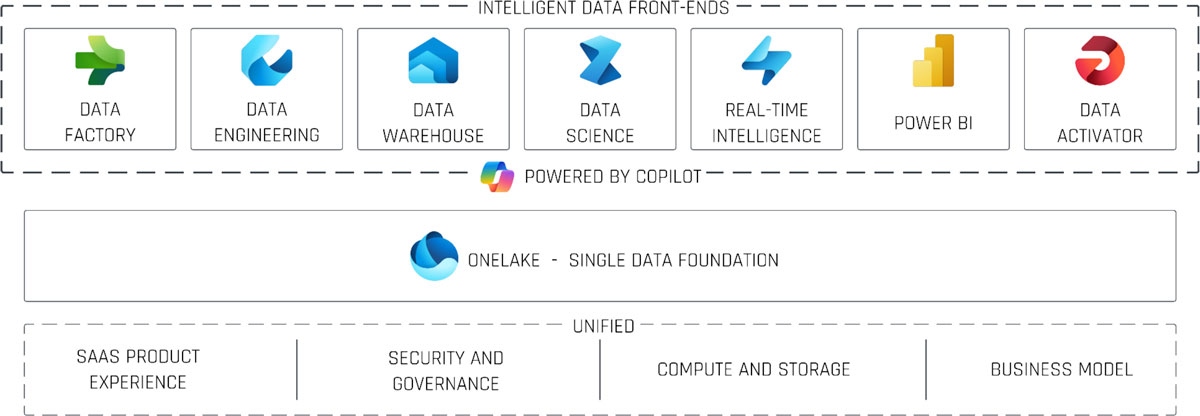
Intelligent Data Front-ends

Introduction to Microsoft Fabric and dbt Cloud

In today’s digital world, organizations need a unified, scalable, and collaborative data platform to power analytics, AI-driven insights, and business intelligence. Enter Microsoft Fabric—a comprehensive, role-based, SaaS-delivered data platform that brings together key Azure services under a single “one lake” foundation with built-in AI capabilities.

In this article, we’ll explore how Microsoft Fabric can serve as your enterprise data platform, how it integrates with data modeling tools like dbt Cloud, and a proven “medallion” reference architecture that takes you from raw data ingestion to business-ready information marts. We’ll also discuss future extensions, practical limitations, and best practices to guide your journey.

Microsoft Fabric as an Enterprise Data Platform

This webinar covers leveraging Microsoft Fabric to implement a modern, end-to-end data platform. You will learn, how the different Fabric services can be combined, to implement a medaillon architecture, supported by Data Vault 2.0 and dbt Cloud. A live demo will show lakehouses, warehouses, and Hub, Links, and Satellites in a real world scenario!

Watch webinar recording

Quick Primer: The Data Vault Methodology

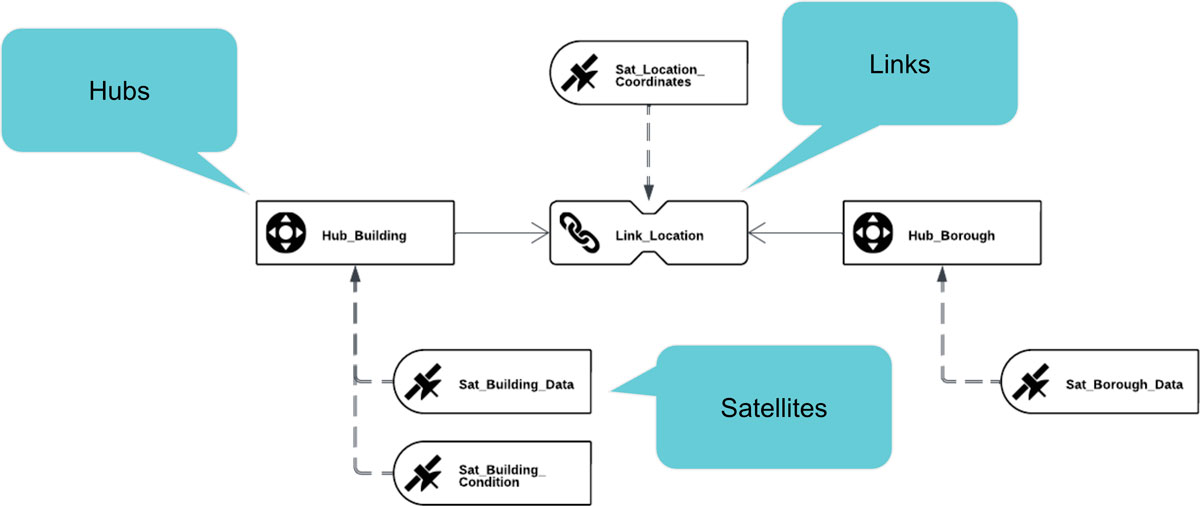
Before diving into Fabric, it’s helpful to understand the Data Vault approach—an architecture pattern that brings agility, auditability, and scalability to your data warehouse. It comprises three core components:

  • Business Keys: Unique identifiers of business objects (e.g., customer number in a CRM).
  • Descriptive Data: Attributes that describe business keys (e.g., customer name, birthdate), which evolve over time.
  • Relationships: Linkages between business keys (e.g., customer–order relationships in a CRM).

By separating these elements into hubs, satellites, and links, Data Vault provides a repeatable, auditable framework for loading and tracing data lineage, perfectly suited for modern cloud platforms.

hubs, links, and satellites

Microsoft Fabric: Core Front-Ends and Services

At its heart, Microsoft Fabric brings together seven role-based “front-end” experiences, but three of them are key to enterprise data engineering and warehousing:

Data Factory

  • Data Flows: Low-code transformations (joins, aggregations, cleansing) via a Power Query-like interface.
  • Data Pipelines: Petabyte-scale ETL/ELT workflows with full control-flow constructs (if/else, loops).

Use case: Ingest raw data from relational, semi-structured, or unstructured sources into your landing zone lakehouse.

Data Engineering

  • Lakehouses: Unified storage for structured/unstructured data in Delta-Parquet format, with SQL endpoints for analytics.
  • Notebooks: Interactive Python, R, or Scala environments for data prep, analysis, and data science exploration.
  • Spark Job Definitions: Batch and streaming ETL jobs on Spark clusters.
  • Data Pipelines: Orchestrated sequences of collection, processing, and transformation steps.

Use case: Land raw data and expose it to data scientists or further transformation processes.

Data Warehouse

  • Warehouses: Relational-style databases with Delta-Parquet storage, instant elastic scale, and full transactional support.
  • Support for cross-warehouse queries and seamless read access to lakehouses.

Use case: Implement Data Vault’s Raw Vault, Business Vault, and Information Marts for BI consumption.

Intelligent Data Front-ends

Workspaces

All Fabric resources live inside workspaces, which group lakehouses, warehouses, notebooks, pipelines, and more. Workspaces enable:z

  • Role-based access control and collaboration
  • Integration with Git for versioning and CI/CD
  • Cross-workspace data access via shortcuts

Integrating dbt Cloud with Microsoft Fabric

dbt Cloud is an industry-leading transformation framework that brings software engineering best practices to your data models: modular SQL, testing, documentation, and CI/CD. In Fabric, dbt Cloud:

  • Connects to a Fabric workspace as a data warehouse endpoint
  • Generates SQL models (SELECT statements), reading from lakehouses or warehouses
  • Executes those models natively on Fabric warehouses

Key benefit: dbt manages your Data Vault layers (hubs, links, satellites, and information marts) with clear lineage, testing, and version control—while Fabric handles execution, storage, and compute elasticity.

Reference Architecture: The Medallion Approach on Fabric

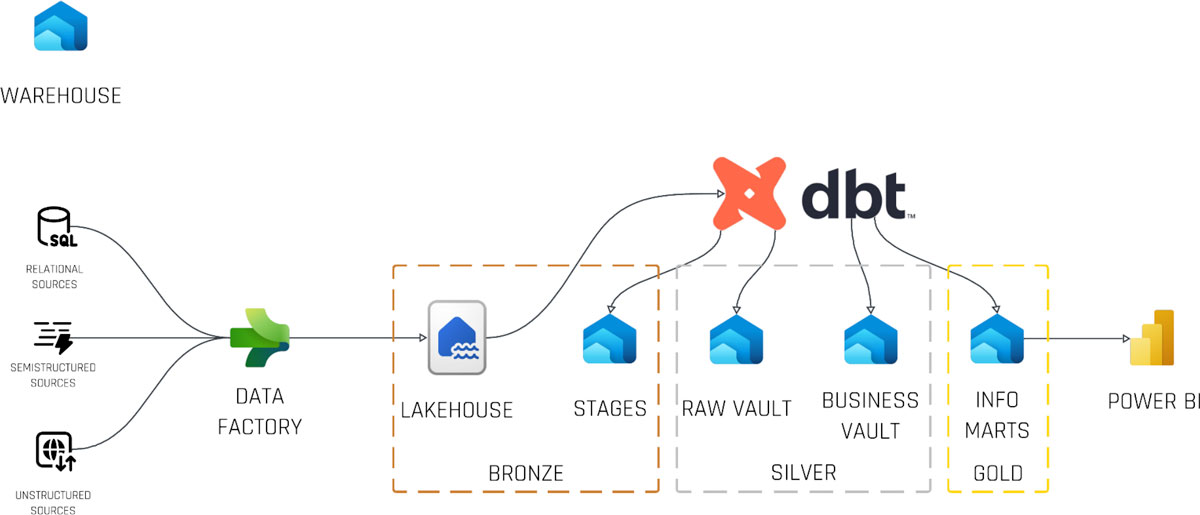
The modern “medallion” architecture separates data into three refinement layers—Bronze (raw), Silver (conformed/business), and Gold (BI-ready). Here’s how it maps onto Fabric:

Bronze (Landing Zone Lakehouse)

Data Factory pipelines copy raw relational, JSON, and unstructured files into a lakehouse. This fully persisted, immutable history remains read-only for most users.

Silver (Raw & Business Vault Warehouses)

  • Raw Vault Warehouse: dbt models generate staging views/tables with hash keys, load dates, and audit metadata.
  • Business Vault Warehouse: dbt builds hubs, links, and satellites based on business keys and relationships.

Gold (Information Mart Warehouse)

Information marts—star or snowflake schemas—are created via dbt models as optimized, query-ready tables for BI tools (Power BI, Tableau, etc.).

Dbt Cloud and Microsoft Fabric - Medaillon

Live Demo Highlights

During our webinar demonstration, we walked through:

  • Setting up a Fabric workspace and viewing lakehouse tables via SQL and the Windows Explorer integration
  • Using a Data Factory pipeline to ingest sample Snowflake data into a landing zone lakehouse
  • Authoring dbt models in dbt Cloud to create staging (hashing, load dates), hub tables, link tables, and satellites
  • Executing dbt runs that generate and run SQL in Fabric warehouses, and previewing results directly in the Fabric UI
  • Accessing all data files and Delta-Parquet tables seamlessly in Windows Explorer for multi-cloud portability

Outlook: Next-Gen Enhancements

Beyond the core implementation, here are exciting ways to evolve your Fabric-dbt platform:

  • Workspace Segmentation & Data Mesh: Create dedicated workspaces for medallion layers or business domains, and stitch multiple dbt projects together with dbt Mesh for a true data mesh design.
  • Real-Time Data Integration: Leverage Fabric’s built-in streaming capabilities to blend real-time feeds into your warehouses alongside batch data.
  • Enhanced Governance & Semantic Layers: Define and enforce semantic models both in dbt and in Fabric (via semantic models) to ensure consistent metrics across all BI tools.
  • Data Science Collaboration: Grant read-only access to bronze lakehouses and empower data scientists to use Fabric notebooks (Python, R, Scala) for ad-hoc analysis and advanced ML experiments.
  • Simplified Migration: Existing dbt projects on on-prem or other cloud warehouses can be repointed to Fabric with minimal code changes—especially when using community macros for Data Vault deployments.

Considerations & Limitations

While Fabric is powerful, be mindful of:

  • Write Support: Lakehouses currently support only SQL writes—transformations must target Fabric warehouses.
  • Shortcut Management: Cross-workspace shortcuts must be manually maintained; frequent schema changes can add overhead.
  • Multiple Overlapping Tools: Data Factory, Data Engineering pipelines, notebooks, and dbt all offer ETL—establish clear standards to avoid confusion.
  • Product Maturity: As a relatively new platform, UI changes and minor bugs may appear; plan for iterative improvements.
  • Capacity Transparency: Compute and storage share capacity; monitor and size your Fabric capacity carefully to meet SLAs.

Conclusion

Microsoft Fabric, coupled with dbt Cloud, delivers an end-to-end Enterprise Data Platform that unifies data ingestion, storage, transformation, and consumption. By applying proven patterns like the medallion architecture and Data Vault methodology, you can build a scalable, collaborative, and governed environment, empowering both data engineers and business users to unlock insights faster.

Ready to take your data platform to the next level? Reach out for a tailored workshop, architecture advisory, or hands-on implementation support.

– Tim Kirschke (Scalefree)

Microsoft Fabric as an Enterprise Data Platform

Intelligent Data Front-ends

Introduction to Microsoft Fabric and dbt Cloud

In today’s digital world, organizations need a unified, scalable, and collaborative data platform to power analytics, AI-driven insights, and business intelligence. Enter Microsoft Fabric—a comprehensive, role-based, SaaS-delivered data platform that brings together key Azure services under a single “one lake” foundation with built-in AI capabilities.

In this article, we’ll explore how Microsoft Fabric can serve as your enterprise data platform, how it integrates with data modeling tools like dbt Cloud, and a proven “medallion” reference architecture that takes you from raw data ingestion to business-ready information marts. We’ll also discuss future extensions, practical limitations, and best practices to guide your journey.

Microsoft Fabric as an Enterprise Data Platform

This webinar covers leveraging Microsoft Fabric to implement a modern, end-to-end data platform. You will learn, how the different Fabric services can be combined, to implement a medaillon architecture, supported by Data Vault 2.0 and dbt Cloud. A live demo will show lakehouses, warehouses, and Hub, Links, and Satellites in a real world scenario!

Watch webinar recording

Quick Primer: The Data Vault Methodology

Before diving into Fabric, it’s helpful to understand the Data Vault approach—an architecture pattern that brings agility, auditability, and scalability to your data warehouse. It comprises three core components:

  • Business Keys: Unique identifiers of business objects (e.g., customer number in a CRM).
  • Descriptive Data: Attributes that describe business keys (e.g., customer name, birthdate), which evolve over time.
  • Relationships: Linkages between business keys (e.g., customer–order relationships in a CRM).

By separating these elements into hubs, satellites, and links, Data Vault provides a repeatable, auditable framework for loading and tracing data lineage, perfectly suited for modern cloud platforms.

hubs, links, and satellites

Microsoft Fabric: Core Front-Ends and Services

At its heart, Microsoft Fabric brings together seven role-based “front-end” experiences, but three of them are key to enterprise data engineering and warehousing:

Data Factory

  • Data Flows: Low-code transformations (joins, aggregations, cleansing) via a Power Query-like interface.
  • Data Pipelines: Petabyte-scale ETL/ELT workflows with full control-flow constructs (if/else, loops).

Use case: Ingest raw data from relational, semi-structured, or unstructured sources into your landing zone lakehouse.

Data Engineering

  • Lakehouses: Unified storage for structured/unstructured data in Delta-Parquet format, with SQL endpoints for analytics.
  • Notebooks: Interactive Python, R, or Scala environments for data prep, analysis, and data science exploration.
  • Spark Job Definitions: Batch and streaming ETL jobs on Spark clusters.
  • Data Pipelines: Orchestrated sequences of collection, processing, and transformation steps.

Use case: Land raw data and expose it to data scientists or further transformation processes.

Data Warehouse

  • Warehouses: Relational-style databases with Delta-Parquet storage, instant elastic scale, and full transactional support.
  • Support for cross-warehouse queries and seamless read access to lakehouses.

Use case: Implement Data Vault’s Raw Vault, Business Vault, and Information Marts for BI consumption.

Intelligent Data Front-ends

Workspaces

All Fabric resources live inside workspaces, which group lakehouses, warehouses, notebooks, pipelines, and more. Workspaces enable:z

  • Role-based access control and collaboration
  • Integration with Git for versioning and CI/CD
  • Cross-workspace data access via shortcuts

Integrating dbt Cloud with Microsoft Fabric

dbt Cloud is an industry-leading transformation framework that brings software engineering best practices to your data models: modular SQL, testing, documentation, and CI/CD. In Fabric, dbt Cloud:

  • Connects to a Fabric workspace as a data warehouse endpoint
  • Generates SQL models (SELECT statements), reading from lakehouses or warehouses
  • Executes those models natively on Fabric warehouses

Key benefit: dbt manages your Data Vault layers (hubs, links, satellites, and information marts) with clear lineage, testing, and version control—while Fabric handles execution, storage, and compute elasticity.

Reference Architecture: The Medallion Approach on Fabric

The modern “medallion” architecture separates data into three refinement layers—Bronze (raw), Silver (conformed/business), and Gold (BI-ready). Here’s how it maps onto Fabric:

Bronze (Landing Zone Lakehouse)

Data Factory pipelines copy raw relational, JSON, and unstructured files into a lakehouse. This fully persisted, immutable history remains read-only for most users.

Silver (Raw & Business Vault Warehouses)

  • Raw Vault Warehouse: dbt models generate staging views/tables with hash keys, load dates, and audit metadata.
  • Business Vault Warehouse: dbt builds hubs, links, and satellites based on business keys and relationships.

Gold (Information Mart Warehouse)

Information marts—star or snowflake schemas—are created via dbt models as optimized, query-ready tables for BI tools (Power BI, Tableau, etc.).

Dbt Cloud and Microsoft Fabric - Medaillon

Live Demo Highlights

During our webinar demonstration, we walked through:

  • Setting up a Fabric workspace and viewing lakehouse tables via SQL and the Windows Explorer integration
  • Using a Data Factory pipeline to ingest sample Snowflake data into a landing zone lakehouse
  • Authoring dbt models in dbt Cloud to create staging (hashing, load dates), hub tables, link tables, and satellites
  • Executing dbt runs that generate and run SQL in Fabric warehouses, and previewing results directly in the Fabric UI
  • Accessing all data files and Delta-Parquet tables seamlessly in Windows Explorer for multi-cloud portability

Outlook: Next-Gen Enhancements

Beyond the core implementation, here are exciting ways to evolve your Fabric-dbt platform:

  • Workspace Segmentation & Data Mesh: Create dedicated workspaces for medallion layers or business domains, and stitch multiple dbt projects together with dbt Mesh for a true data mesh design.
  • Real-Time Data Integration: Leverage Fabric’s built-in streaming capabilities to blend real-time feeds into your warehouses alongside batch data.
  • Enhanced Governance & Semantic Layers: Define and enforce semantic models both in dbt and in Fabric (via semantic models) to ensure consistent metrics across all BI tools.
  • Data Science Collaboration: Grant read-only access to bronze lakehouses and empower data scientists to use Fabric notebooks (Python, R, Scala) for ad-hoc analysis and advanced ML experiments.
  • Simplified Migration: Existing dbt projects on on-prem or other cloud warehouses can be repointed to Fabric with minimal code changes—especially when using community macros for Data Vault deployments.

Considerations & Limitations

While Fabric is powerful, be mindful of:

  • Write Support: Lakehouses currently support only SQL writes—transformations must target Fabric warehouses.
  • Shortcut Management: Cross-workspace shortcuts must be manually maintained; frequent schema changes can add overhead.
  • Multiple Overlapping Tools: Data Factory, Data Engineering pipelines, notebooks, and dbt all offer ETL—establish clear standards to avoid confusion.
  • Product Maturity: As a relatively new platform, UI changes and minor bugs may appear; plan for iterative improvements.
  • Capacity Transparency: Compute and storage share capacity; monitor and size your Fabric capacity carefully to meet SLAs.

Conclusion

Microsoft Fabric, coupled with dbt Cloud, delivers an end-to-end Enterprise Data Platform that unifies data ingestion, storage, transformation, and consumption. By applying proven patterns like the medallion architecture and Data Vault methodology, you can build a scalable, collaborative, and governed environment, empowering both data engineers and business users to unlock insights faster.

Ready to take your data platform to the next level? Reach out for a tailored workshop, architecture advisory, or hands-on implementation support.

– Tim Kirschke (Scalefree)

Close Menu