search
0
Category

Data Tools

Data Governance Made Simple with dbt Platform

Data Contract Data Pipeline

Why governance is important when working with data products

As data analytics grows within a company, it becomes more important to prevent changes in one part of the system from breaking things in another. This is important for reports and dashboards that depend on shared dbt models. To manage this growing complexity, dbt now offers key data governance features like

  • model contracts,
  • model versioning, and
  • access control.

These tools help ensure data remains consistent and reliable as projects scale. By using these features, data teams can work together more smoothly, avoid surprises from model changes, and improve overall data quality and trust across the business.

This article takes a closer look at what these features do, why they matter, and how they can support smoother collaboration and stronger data quality across the business.

Data Governance Made Simple with dbt Platform

Scaling your data projects shouldn’t mean sacrificing reliability. This session will tackle the critical issue of data governance in dbt, showing you how to stop data chaos and prevent upstream changes from breaking downstream models. You’ll learn to implement dbt features like Model Contracts, Versioning, and Access Control with a practical, hands-on demonstration. Register for our free webinar, December 4th, 2025!

Register Me Now
Data Contract Data Pipeline

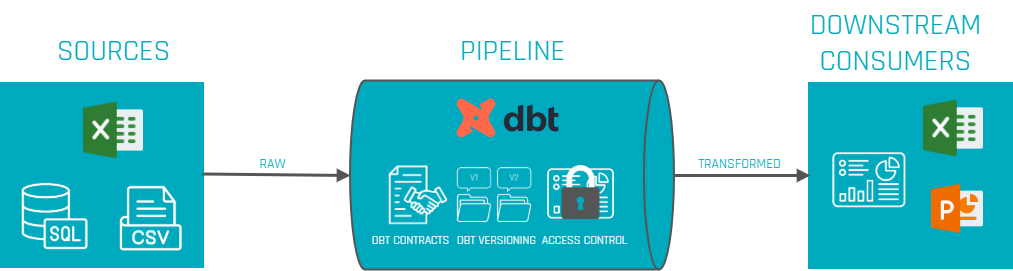
Figure 1: Data contracts act as a safeguard across the entire data pipeline.

Imagine this scenario: A data team has a pipeline to load customer data into a warehouse, and the marketing team relies on it for campaigns. So the downstream consumer, in this case the marketing team, expects fields like customer_name, but an upstream change renames this field to customer_full_name. The marketing team tries to consume this break without anyone immediately noticing. The result? The query would fail since the renamed field is not known to the downstream team. Without a dbt contract, this kind of schema change slips through and causes these downstream failures. When contracts are implemented, however, such a change would trigger an alert or validation error in the pipeline, catching the discrepancy between expected and actual data and preventing the issue.

Data Contracts – Providing Schema Consistency

Data contracts in dbt are a way to ensure what a model is expected to produce. In other words: a contract defines the exact structure of the output table – including which columns are present, what types of data they are or other structural rules. It’s similar to how API contracts work in software: downstream users can count on a consistent format, and if something breaks that expectation, dbt throws an error or a warning during runtime instead of letting flawed data flow further downstream.

With a contract in place, teams can define:

  • Which columns must be present – and block unexpected extras or missing fields.
  • The type of data (e.g. strings, integers, timestamps).
  • Null rules or other constraints, like if a field is allowed to contain null values or can be unique.

These rules are defined in a separate YAML schema file (not directly in the SQL model). For example, a model called orders might have a contract that lists all required columns and their data types, ensuring that every time the model runs, the structure matches what’s been agreed:

models:
- name: orders
  config:
    contract:
      enforced: true
  columns:
    - name: order_id
      data_type: integer
      constraints:
        - type: not_null
    - name: customer_id
      data_type: integer
    - name: order_date
      data_type: date

Once the variable enforced: true (line 5) is set on a model, dbt will validate the output of the SQL before the model is built. It checks that the result includes exactly the expected columns, in the right data types – no extras, no missing fields, no mismatches. If something does not align, dbt throws an error or warning and stops the process before the issue can affect anything downstream. This gives teams a safety net against accidental changes to a model’s structure – whether that’s someone renaming a column, dropping it, or introducing a mismatch in data types.

From a business perspective, this adds a layer of reliability. Teams working with downstream dashboards, reports, or models can rely on a consistent structure without fear that a seemingly small upstream change will quietly break their work. Take the example of a renamed field in a customer model: with a contract in place, that kind of change would’ve been caught during development or CI (Continuous Integration) – before it ever reached production and disrupted reporting. Data contracts bring the discipline of software development (similar to API interface contracts) into analytics work, helping everyone stay aligned on how the data is structured. That is especially valuable in environments where many teams are working from shared models – a clear contract reduces confusion and avoids broken pipelines.

<b>Tip</b>

Not every model needs a contract. It’s good to start with critical, high-impact models (those feeding important dashboards or reports). Applying contracts does add some overhead and rigidity, so dbt’s guidance is to ensure your project is sufficiently mature and the model’s schema is relatively stable before enforcing a contract.

Model Versioning – Managing Change Gracefully

In the previous section it became clear that contracts are able to keep the model’s structure. Even with contracts in place, there are situations where besides the model’s structure, the logic needs to be changed. This could go beyond renaming/removing columns or changes in data types and more into e.g. changing the calculation of columns. On a small team, you could probably just make the change and tell everyone to update their queries. But in a larger organization, that kind of quick shift is risky – one change could break a lot of downstream applications like dashboards or other downstream models.

That’s where model versioning comes in (introduced in dbt v1.5+). Model versions bring structure to model evolution. Instead of forcing immediate changes, versioning allows multiple versions of a model to live side by side, giving teams time to transition.

Here’s how it works:

  1. Create a new version of the model: You start by creating a new version of the model – normally by just duplicating the file with a _v2 suffix – and make your changes there.
  2. In the model’s YAML config file, you declare all existing versions and mark which one is currently latest.
  3. Test the new version: During testing, both versions can be run in production. For testing purposes, consumers can point to a specific version explicitly.
  4. Promote the new version: Once the adjustments are done, the YAML can be updated to make it the latest one.
  5. Deprecate and remove the old version: Eventually, the old version is deprecated. You can even set a deprecation_date so it’s clear when it will be removed for good. But to be clear, the deprecation_date is just an indicator/piece of information during runtime, the model won’t be deactivated automatically after the date passes.

This approach helps teams migrate in a controlled way. Instead of breaking queries over night, there’s a shared window where both old and new versions exist. Teams have time to update at their own pace, and model authors don’t need to hold back on necessary improvements. It’s a clean parallel to versioned APIs – the idea being that a dbt model, once shared, is similiar to a public interface others rely on.

By treating models as versioned products, data teams avoid having broken queries and are able to regain control over how changes are introduced. It makes collaboration safer and more sustainable, especially when many teams depend on shared upstream models. Therefore, model versioning brings real change management to the day to day work with data.

Note: Model versioning is a concept meant for mature datasets that have multiple dependents. If your project is small or models change rapidly in early development, you might not need to formally version every change. At smaller scale, it’s often acceptable that downstream analyses update in lockstep with model changes. But as you “scale up” the number of models, consumers, or even adopt a data mesh approach with multiple projects, versioning becomes indispensable for stability.

Access Control – Modularizing and Securing Your Models

The third pillar of dbt governance is access control for models. In complex organizations, it’s possible that not every data model is meant to be used everywhere by everyone. Some models are intermediate or meant for a specific team, while others are data products meant for wider consumption. To define what data is accessible for who (ref() function), dbt now allows access levels for each model.

To enable this, dbt introduces the concept of groups and access modifiers:

  • Groups: Models can be organized into groups and assign each group an owner. Groups are essentially labels for a set of models that share a logical theme or ownership. This helps turn implicit relationships into explicit boundaries – leading to a clearer model ownership.
  • Access modifiers: Each model can be marked as private , protected , or public to indicate its accessibility to other models.
    • Private: only other models in the same group can reference it. It’s hidden from the rest of the project.
    • Protected: (default) any model within the same project can reference it, but models in other projects cannot. This is how models behaved historically in dbt – accessible project-wide but not exposed to the outside by default.
    • Public: any model, even in other projects (or installed packages), can reference it. This explicitly marks the model as part of a public interface for cross-project use.

By default, models are considered protected for backward compatibility. Using groups and access modifiers together, you can make certain models truly private to a specific team while safely sharing others as needed. For example, a finance team’s intermediate calculation model might be tagged private to finance, so only finance models can use it. If a marketing model tried to ref(‘finance_model’) that was private, dbt would throw an error during parsing, blocking the unauthorized dependency. Meanwhile, a carefully designed model of “Customers” might be marked public so that it can be referenced by models in any project across the company.

Why is this valuable?

It enforces modularity and ownership. Teams can develop models without fear that another team will depend on their internal logic. It prevents the problem, that anything can depend on anything, which becomes hard to manage. Instead, only well defined public models become the integration points between different groups or projects. This kind of access governance improves security (sensitive data can be kept in private models) and maintainability, since changes to a private model won’t ripple out beyond its group.

Governance vs. User Permissions: It’s important to differentiate between model access as described above and user-level permissions. The features that was discussed is about design-time and run-time control of model dependencies in dbt projects. In practice, this is used in conjunction with your data warehouse’s security (and dbt Cloud’s user roles) to ensure only the right people or tools can run or query these models. Model governance is about structuring the project for safe collaboration; it complements (but does not replace) standard data access controls.

Conclusion – Toward Reliable and Scalable Data Projects

In summary, dbt’s governance capabilities like contracts, versioning, and access control provide a framework for reliable, scalable data transformation workflows. They bring proven software engineering principles into the analytics engineering realm:

  • Data contracts ensure that upstream changes don’t unknowingly break downstream models/consumers by enforcing schemas and data integrity rules at build time.
  • Model versioning treats important datasets as stable interfaces, allowing teams to implement improvements without sudden disruptions – enabling change with graceful deprecation instead of chaos.
  • Access control (with groups and private/protected/public models) modularizes your project, so teams can work peacefully within their domain while providing clear interfaces and preventing unintended coupling between projects.

Adopting these practices means fewer hotfixes caused by broken pipelines. As one blog put it, when scaling up dbt or moving towards a multi-team data mesh, these governance features become non-negotiable – they let you treat your data models “like products: stable, predictable, and version-controlled”. In short, they help you scale with confidence.

Finally, it’s important that governance features should be introduced thoughtfully. It’s possible to overengineer too early – adding contracts or strict version control to models that are still rapidly evolving may slow the process down. The best approach is to apply these tools to the most critical and stable parts of your data model, and expand as the project needs grow.
Data Governance Made Simple with dbt Platform

Data Contract Data Pipeline

Why governance is important when working with data products

As data analytics grows within a company, it becomes more important to prevent changes in one part of the system from breaking things in another. This is important for reports and dashboards that depend on shared dbt models. To manage this growing complexity, dbt now offers key data governance features like

  • model contracts,
  • model versioning, and
  • access control.

These tools help ensure data remains consistent and reliable as projects scale. By using these features, data teams can work together more smoothly, avoid surprises from model changes, and improve overall data quality and trust across the business.

This article takes a closer look at what these features do, why they matter, and how they can support smoother collaboration and stronger data quality across the business.

Data Governance Made Simple with dbt Platform

Scaling your data projects shouldn’t mean sacrificing reliability. This session will tackle the critical issue of data governance in dbt, showing you how to stop data chaos and prevent upstream changes from breaking downstream models. You’ll learn to implement dbt features like Model Contracts, Versioning, and Access Control with a practical, hands-on demonstration. Register for our free webinar, December 4th, 2025!

Register Me Now
Data Contract Data Pipeline

Figure 1: Data contracts act as a safeguard across the entire data pipeline.

Imagine this scenario: A data team has a pipeline to load customer data into a warehouse, and the marketing team relies on it for campaigns. So the downstream consumer, in this case the marketing team, expects fields like customer_name, but an upstream change renames this field to customer_full_name. The marketing team tries to consume this break without anyone immediately noticing. The result? The query would fail since the renamed field is not known to the downstream team. Without a dbt contract, this kind of schema change slips through and causes these downstream failures. When contracts are implemented, however, such a change would trigger an alert or validation error in the pipeline, catching the discrepancy between expected and actual data and preventing the issue.

Data Contracts – Providing Schema Consistency

Data contracts in dbt are a way to ensure what a model is expected to produce. In other words: a contract defines the exact structure of the output table – including which columns are present, what types of data they are or other structural rules. It’s similar to how API contracts work in software: downstream users can count on a consistent format, and if something breaks that expectation, dbt throws an error or a warning during runtime instead of letting flawed data flow further downstream.

With a contract in place, teams can define:

  • Which columns must be present – and block unexpected extras or missing fields.
  • The type of data (e.g. strings, integers, timestamps).
  • Null rules or other constraints, like if a field is allowed to contain null values or can be unique.

These rules are defined in a separate YAML schema file (not directly in the SQL model). For example, a model called orders might have a contract that lists all required columns and their data types, ensuring that every time the model runs, the structure matches what’s been agreed:

models:
- name: orders
  config:
    contract:
      enforced: true
  columns:
    - name: order_id
      data_type: integer
      constraints:
        - type: not_null
    - name: customer_id
      data_type: integer
    - name: order_date
      data_type: date

Once the variable enforced: true (line 5) is set on a model, dbt will validate the output of the SQL before the model is built. It checks that the result includes exactly the expected columns, in the right data types – no extras, no missing fields, no mismatches. If something does not align, dbt throws an error or warning and stops the process before the issue can affect anything downstream. This gives teams a safety net against accidental changes to a model’s structure – whether that’s someone renaming a column, dropping it, or introducing a mismatch in data types.

From a business perspective, this adds a layer of reliability. Teams working with downstream dashboards, reports, or models can rely on a consistent structure without fear that a seemingly small upstream change will quietly break their work. Take the example of a renamed field in a customer model: with a contract in place, that kind of change would’ve been caught during development or CI (Continuous Integration) – before it ever reached production and disrupted reporting. Data contracts bring the discipline of software development (similar to API interface contracts) into analytics work, helping everyone stay aligned on how the data is structured. That is especially valuable in environments where many teams are working from shared models – a clear contract reduces confusion and avoids broken pipelines.

Tip

Not every model needs a contract. It’s good to start with critical, high-impact models (those feeding important dashboards or reports). Applying contracts does add some overhead and rigidity, so dbt’s guidance is to ensure your project is sufficiently mature and the model’s schema is relatively stable before enforcing a contract.

Model Versioning – Managing Change Gracefully

In the previous section it became clear that contracts are able to keep the model’s structure. Even with contracts in place, there are situations where besides the model’s structure, the logic needs to be changed. This could go beyond renaming/removing columns or changes in data types and more into e.g. changing the calculation of columns. On a small team, you could probably just make the change and tell everyone to update their queries. But in a larger organization, that kind of quick shift is risky – one change could break a lot of downstream applications like dashboards or other downstream models.

That’s where model versioning comes in (introduced in dbt v1.5+). Model versions bring structure to model evolution. Instead of forcing immediate changes, versioning allows multiple versions of a model to live side by side, giving teams time to transition.

Here’s how it works:

  1. Create a new version of the model: You start by creating a new version of the model – normally by just duplicating the file with a _v2 suffix – and make your changes there.
  2. In the model’s YAML config file, you declare all existing versions and mark which one is currently latest.
  3. Test the new version: During testing, both versions can be run in production. For testing purposes, consumers can point to a specific version explicitly.
  4. Promote the new version: Once the adjustments are done, the YAML can be updated to make it the latest one.
  5. Deprecate and remove the old version: Eventually, the old version is deprecated. You can even set a deprecation_date so it’s clear when it will be removed for good. But to be clear, the deprecation_date is just an indicator/piece of information during runtime, the model won’t be deactivated automatically after the date passes.

This approach helps teams migrate in a controlled way. Instead of breaking queries over night, there’s a shared window where both old and new versions exist. Teams have time to update at their own pace, and model authors don’t need to hold back on necessary improvements. It’s a clean parallel to versioned APIs – the idea being that a dbt model, once shared, is similiar to a public interface others rely on.

By treating models as versioned products, data teams avoid having broken queries and are able to regain control over how changes are introduced. It makes collaboration safer and more sustainable, especially when many teams depend on shared upstream models. Therefore, model versioning brings real change management to the day to day work with data.

Note: Model versioning is a concept meant for mature datasets that have multiple dependents. If your project is small or models change rapidly in early development, you might not need to formally version every change. At smaller scale, it’s often acceptable that downstream analyses update in lockstep with model changes. But as you “scale up” the number of models, consumers, or even adopt a data mesh approach with multiple projects, versioning becomes indispensable for stability.

Access Control – Modularizing and Securing Your Models

The third pillar of dbt governance is access control for models. In complex organizations, it’s possible that not every data model is meant to be used everywhere by everyone. Some models are intermediate or meant for a specific team, while others are data products meant for wider consumption. To define what data is accessible for who (ref() function), dbt now allows access levels for each model.

To enable this, dbt introduces the concept of groups and access modifiers:

  • Groups: Models can be organized into groups and assign each group an owner. Groups are essentially labels for a set of models that share a logical theme or ownership. This helps turn implicit relationships into explicit boundaries – leading to a clearer model ownership.
  • Access modifiers: Each model can be marked as private , protected , or public to indicate its accessibility to other models.
    • Private: only other models in the same group can reference it. It’s hidden from the rest of the project.
    • Protected: (default) any model within the same project can reference it, but models in other projects cannot. This is how models behaved historically in dbt – accessible project-wide but not exposed to the outside by default.
    • Public: any model, even in other projects (or installed packages), can reference it. This explicitly marks the model as part of a public interface for cross-project use.

By default, models are considered protected for backward compatibility. Using groups and access modifiers together, you can make certain models truly private to a specific team while safely sharing others as needed. For example, a finance team’s intermediate calculation model might be tagged private to finance, so only finance models can use it. If a marketing model tried to ref(‘finance_model’) that was private, dbt would throw an error during parsing, blocking the unauthorized dependency. Meanwhile, a carefully designed model of “Customers” might be marked public so that it can be referenced by models in any project across the company.

Why is this valuable?

It enforces modularity and ownership. Teams can develop models without fear that another team will depend on their internal logic. It prevents the problem, that anything can depend on anything, which becomes hard to manage. Instead, only well defined public models become the integration points between different groups or projects. This kind of access governance improves security (sensitive data can be kept in private models) and maintainability, since changes to a private model won’t ripple out beyond its group.

Governance vs. User Permissions: It’s important to differentiate between model access as described above and user-level permissions. The features that was discussed is about design-time and run-time control of model dependencies in dbt projects. In practice, this is used in conjunction with your data warehouse’s security (and dbt Cloud’s user roles) to ensure only the right people or tools can run or query these models. Model governance is about structuring the project for safe collaboration; it complements (but does not replace) standard data access controls.

Conclusion – Toward Reliable and Scalable Data Projects

In summary, dbt’s governance capabilities like contracts, versioning, and access control provide a framework for reliable, scalable data transformation workflows. They bring proven software engineering principles into the analytics engineering realm:

  • Data contracts ensure that upstream changes don’t unknowingly break downstream models/consumers by enforcing schemas and data integrity rules at build time.
  • Model versioning treats important datasets as stable interfaces, allowing teams to implement improvements without sudden disruptions – enabling change with graceful deprecation instead of chaos.
  • Access control (with groups and private/protected/public models) modularizes your project, so teams can work peacefully within their domain while providing clear interfaces and preventing unintended coupling between projects.

Adopting these practices means fewer hotfixes caused by broken pipelines. As one blog put it, when scaling up dbt or moving towards a multi-team data mesh, these governance features become non-negotiable – they let you treat your data models “like products: stable, predictable, and version-controlled”. In short, they help you scale with confidence.

Finally, it’s important that governance features should be introduced thoughtfully. It’s possible to overengineer too early – adding contracts or strict version control to models that are still rapidly evolving may slow the process down. The best approach is to apply these tools to the most critical and stable parts of your data model, and expand as the project needs grow.
Monitoring of a Snowflake Powered EDW

Snowflake Built-In Tools

Introduction to Snowflake

Snowflake established itself as one of the most widely used cloud data platforms, providing a scalable and flexible architecture for building, maintaining, and operating Enterprise Data Warehouses. While it aims to eliminate data silos and simplify the data structure, with billions of queries a day (overall), its elastic computing handles the workload for good performance and a satisfied customer.

However, as organizations rely increasingly on Snowflake, monitoring their solution might be crucial for performance optimization, error and root cause analysis, and cost control. Although Snowflake handles these tasks very well on its own, experience shows some need for human interference when it comes to more complex queries, to increase performance, lowering the runtime without upscaling or scaling out.

This blog article aims to provide general information about and technical insights into Snowflake. Focusing on techniques as well as built-in tools to analyze bottlenecks, we aim to potentially increase performance and therefore decrease unnecessary costs.


Snowflake Built-In Tools

Query History

Starting with Snowflake’s built-in tools, we will dive into its roots and combinations of several metrics.

Monitoring query performance includes several depths of insight, from an overview of the general query history, down to the performance of each individual step within a query.

Snowflake Built-In Tools

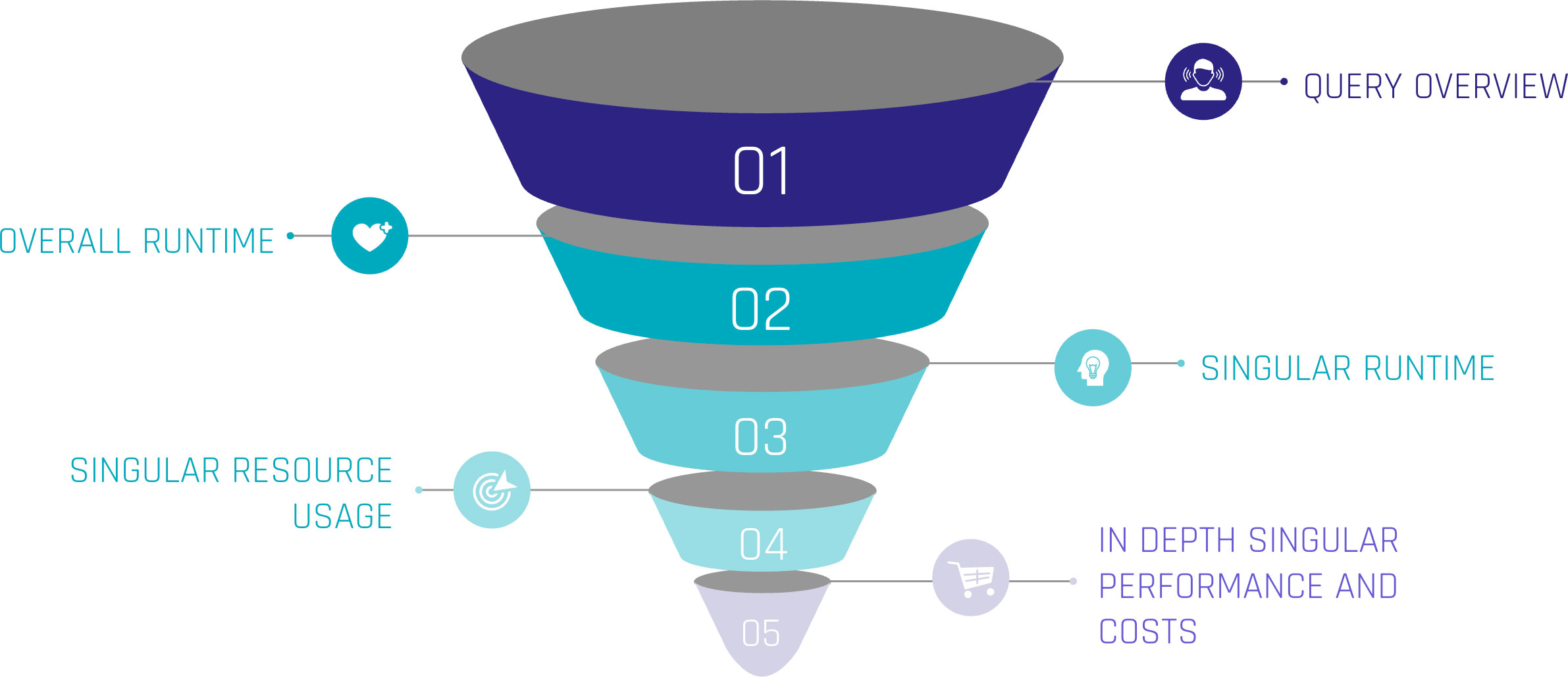
Let’s assume the top level as an overview of our queries. Including metrics such as:

  • Start Time,
  • Total Time,
  • Status and
  • Query Type.

For the first level, we can gain insights when the queries start, how much time they were consuming, whether they succeeded or failed, or even are still running. Lastly, we can see the type of query, such as ‘CREATE TABLE’, ‘INSERT’, or ‘SELECT’. At this level, a brief overview could be created about the traffic within the Warehouse.

When hearing about this, you may be familiar with a built-in tool called ‘Query History’, which tracks this kind of information automatically without the need for user interference. It is easily available within the sections ‘Monitoring’ and ‘Query History’.

Query Profile

Further, it is easily possible to extract more information about the executed queries. Every single query within the ‘Query History’ has a unique identifier and attached metrics. Within the ‘Query History’ section, when choosing a query by simply clicking on it, we gain insights into the single query. These include two main sections.

‘Query Details’ delivers information about the query in general. Including the above-mentioned ‘Start Time’, ‘End Time’, ‘Warehouse Size’, and ‘Duration’, which is divided into ‘Compilation’, ‘Execution’, and further time-consuming steps.

‘Query Profile’ describes the execution plan of the query as a graphical representation. Each step within the query, such as ‘SELECT’, ‘JOIN’, and ‘WHERE CONDITION’ are represented as nodes within the graph. These nodes are operations, triggered by the query. Each fulfilling a task like filtering data, selecting data rows, but also scanning results, and reading data from cache. Snowflake interprets the written SQL and creates a performant execution plan by itself.

Despite that, each node consumes more or less resources, depending on the SQL code itself, the underlying dataset, and the Warehouse configurations. Using the ‘Query Profile’, we can identify the most time-consuming steps in our query, such as false ‘JOINS’, and work around those nodes to identify more performant solutions. Therefore, the ‘Query Profile’ provides detailed information about each node, like processing time, cache scanning, and partition pruning. For further information, check out the Snowflake Documentation.

Custom Monitoring Solution

But when Snowflake already provides a solution, why do we need separate monitoring?

Although already delivered, your requirements may vary from the existing solution. With the built-in tools mentioned above, the possibility to check on each query is given. Additionally, Snowflake may not be the only tool used for data processing. ELT tools like dbt or Coalesce help data engineers improve processes. To include these further metrics from outside Snowflake, a custom monitoring solution, based on Snowflake’s delivered metrics, is needed.

With this in mind, the following section focuses on our own scalable monitoring solution.

Account Usage and Information Schema

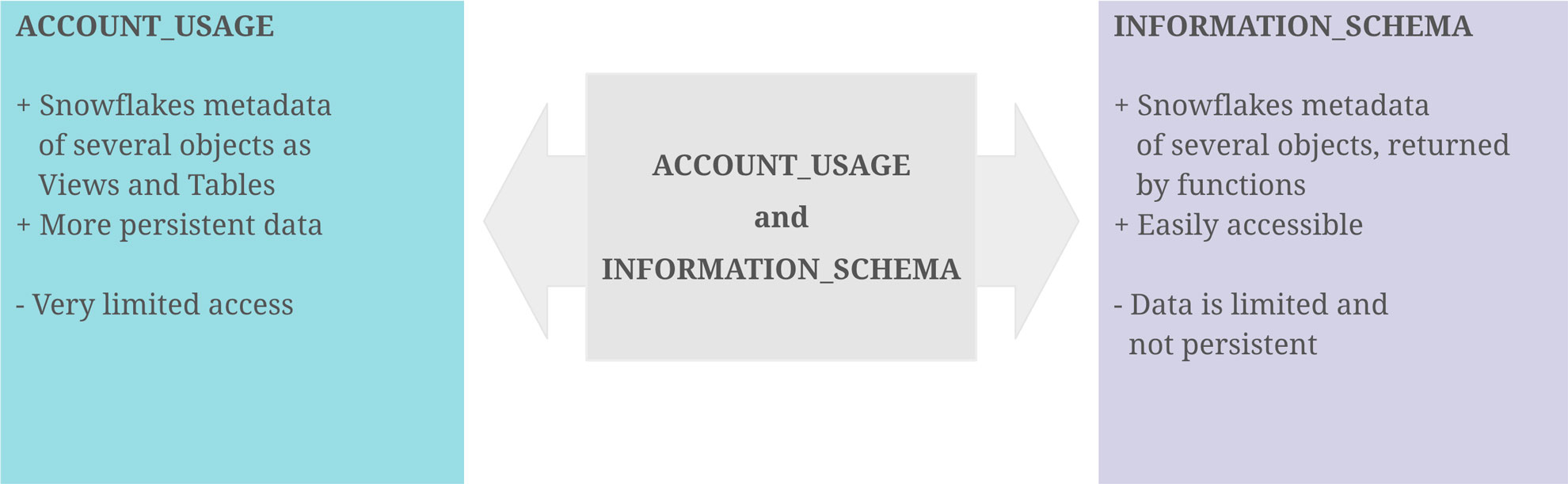
With the idea that the data of the graphical output exists as a table or view, containing all data necessary, it turns out that Snowflake provides us the schemas ‘ACCOUNT_USAGE’ and ‘INFORMATION_SCHEMA’, fulfilling this purpose. They provide similar opportunities for this challenge, although there are some differences.

‘ACCOUNT_USAGE’ provides insights into Snowflake metadata of several objects. This includes ‘QUERY_HISTORY’, which contains the information described in the sections above. The query history is available for all queries within the last 365 days. This enables the loading of metrics entities in the Data Warehouse, making the information readily accessible and persistent for daily, weekly, or monthly processes. The downside is that access to the ‘ACCOUNT_USAGE’ schema is often limited.

The ‘INFORMATION_SCHEMA’ contains a set of system-defined views and tables, providing metadata and information about created objects. Using predefined functions on the ‘INFORMATION_SCHEMA’, metadata can be retrieved, which, on the other hand, is limited to some factors. As this option is more accessible for developers, the focus remains on this option.

Account Usage and Information Schema

Extract Metrics Data

At the beginning, it is crucial to point out the limitations and possibilities of this approach. For the scope of this blog, two functions on the ‘INFORMATION_SCHEMA’ are needed.

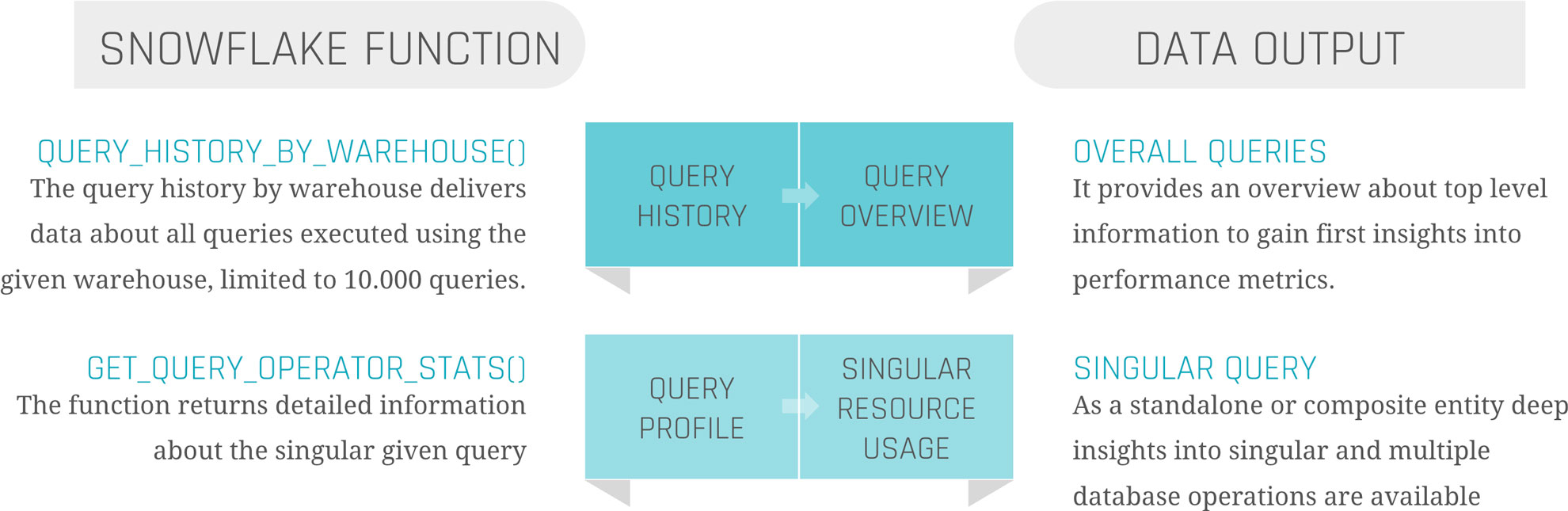
‘QUERY_HISTORY_BY_WAREHOUSE()’ is equal to ‘QUERY_HISTORY’.

‘GET_QUERY_OPERATOR_STATS()’ is the equivalent of ‘QUERY_PROFILE’.

‘QUERY_HISTORY_BY_WAREHOUSE()’ takes four different arguments.

  • ‘WAREHOUSE_NAME’ – The name of the Warehouse executing the queries
  • ‘END_TIME_RANGE_START’ – Time range within the last 7 days, in which the query started running
  • ‘END_TIME_RANGE_END’ – Time range within the last 7 days, in which the query completed running
  • ‘RESULT_LIMIT’ – The number of the maximum returned rows. The default lies by ‘100’, the range by ‘1’ to ‘10.000’

The output is the ‘QUERY_HISTORY’ as a structured table with some extra information. Each query is displayed in one row. Therefore, the metrics are aggregated into one specific query.

The most critical limitation seen here is the ‘RESULT_LIMIT’ and ‘END_TIME_RANGE_*’, as it forces us to retrieve the data before the 7-day retention ends and before 10.000 other queries have been executed. Depending on the size of the Warehouse and the scope of the monitoring range, the extract and load process must be customized.

‘GET_QUERY_OPERATOR_STATS()’ takes one argument.

  • ‘QUERY_ID’ – The unique ID of the executed query.

The output is a structured table of the ‘QUERY_PROFILE’ of one specific query. Each step in the execution plan is displayed as one row, so the output size depends on the complexity of the query itself. Each node is detailed with available metadata, breaking down information from ‘GET_QUERY_OPERATOR_STATS()’ into individual steps. This allows for a deeper analysis of performance metrics, helping to identify any bottlenecks.

As the function is on query-level, it is not done by joining the table outputs of those two functions together to get a satisfactory result. Further steps are needed.

Load Metrics Data

Load Metrics Data

Before filtering, transforming, or joining the data, it is suggested to load the data as it comes into persistent tables.

Snowflake Query History

The first step should be to create the table when calling the function, already combining these two components to avoid missing capture data, columns, or false data types. To keep continuous loading, use your preferred ELT tool to append the process at the end, or set up a scheduled Snowflake Task, considering the limitations mentioned above.

Snowflake Query Profile

This process is more complex. To load the data, it is not sufficient to simply call the function once for the query history. To ensure data integrity and a clear 1:n solution (1 row in the query history, n>0 rows in the query profile), it is needed to iterate through the list of all query IDs inside the query history and run the function for each one of them. Each of the resulting datasets needs to be inserted into the corresponding table.

Information Delivery

Now, as the data is extracted and loaded, the last remaining steps are transforming the data and information delivery. As this strongly depends on the use case, we focus on linking the two metrics tables and creating a standard dashboard inside Snowflake to show the results.

Our two tables ‘snowflake_query_history’ and ‘snowflake_query_profile’ are in a soft relation, where the “QUERY_ID” serves as a unique identifier to link each query from the query history to its query profile. Therefore, joining both tables on the “QUERY_ID” is indispensable. The first decision to be made is whether to keep one row for each query and aggregate the object constructs or to split it up into its individual steps, like within the query profile. For simplicity, we focus on the second option to avoid complex SQL statements for the dashboard. As the SQL statement only includes the ‘SELECT’ and ‘JOIN’ operators, you may choose a view as materialization, instead of a table.

With the possibility of creating dashboards out of Snowflake worksheets, it is relatively easy to integrate simple SQL statements into the dashboard, represented as charts. For some examples, we will take a look at the resulting data.

Query Performance

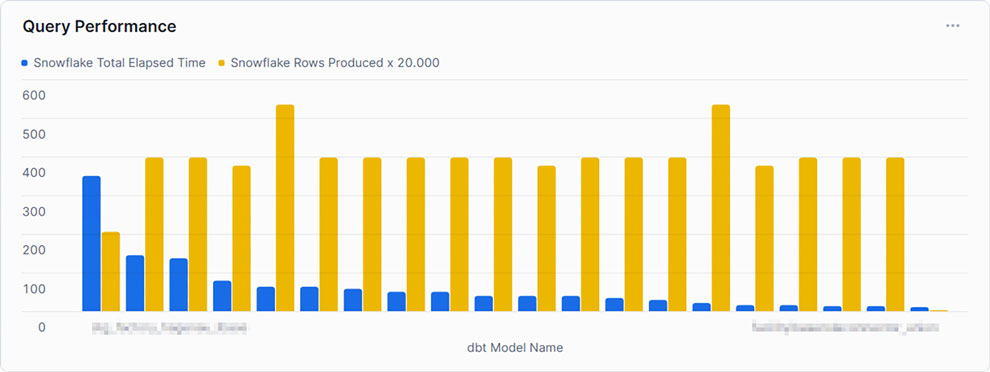
This example shows the top 20 queries by ‘TOTAL_ELAPSED_TIME’, the overall time the query needs to compile, run, waiting time, and other technical steps. As noticed by the chosen x-axis label, Snowflake’s metrics can be combined using other tools, such as dbt. It is set to compare this time against the produced rows to gain some insights into whether the queries can handle much data or not. As can be seen, the query consuming the most time, and therefore credits, does not produce the most rows. At this point, we may be interested in gaining some insights into the query itself.

Query Profile

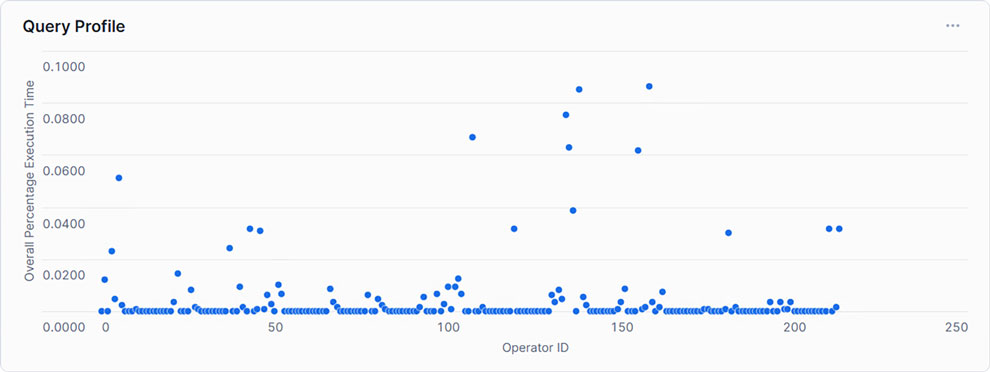
Showing each Operator with its corresponding relative runtime, only a handful exceed 5% of the total execution time. This may indicate that within the SQL statement, only a few steps need to be optimized to create an overall more performant query.

Query Dashboard

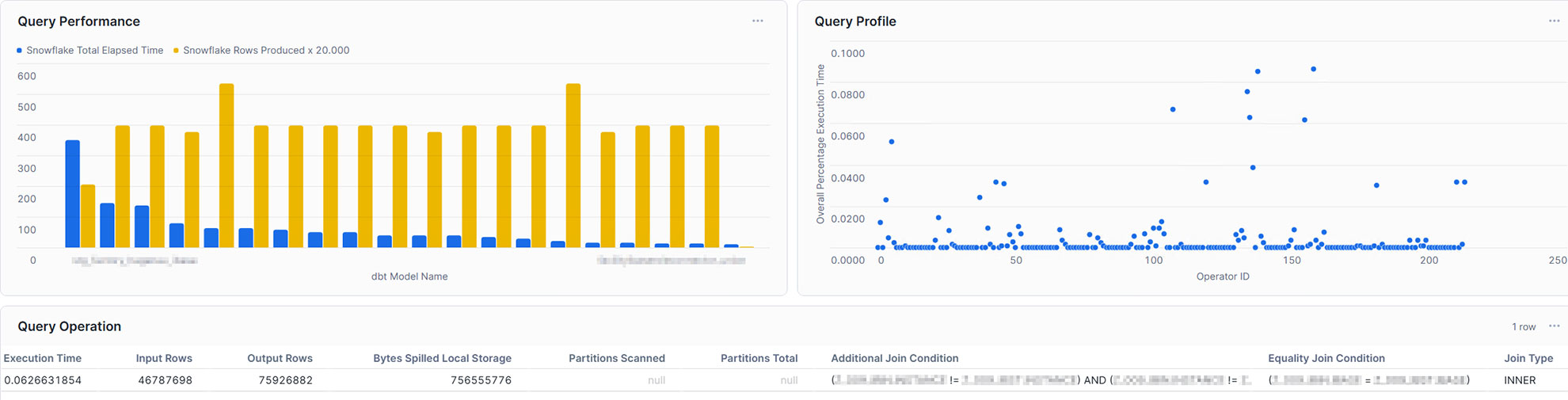
With this in mind, the single query can also be analyzed in the dashboard. For example, you may take into account input rows and output rows, bytes spilled, partitions scanned, and partitions total, or the join condition. Furthermore, you may not only gain insights into your query performance, but also into your table management, such as clustering and partitioning. Additionally, you are also capable of integrating more metrics coming from external sources and linking them directly to Snowflake, making it a powerful monitoring solution.

Conclusion

Snowflake offers a powerful and highly adaptable cloud data platform that meets the demands of modern enterprise data warehousing. However, as data volume and complexity grow, so does the need for proactive monitoring and optimization to ensure continued performance and cost efficiency. By leveraging Snowflake’s built-in tools and implementing strategic performance-enhancing techniques, organizations can address bottlenecks effectively and optimize query performance.

In this article, we addressed the opportunities given through Snowflake’s built-in tools and how to effectively use them. We learned that although these tools are great, to gain a fast and high-level overview, as well as detailed insights at the same time, it is relatively easy to create your own dashboard with the loaded data. Therefore, you are able to analyze and evaluate it, as well as make optimum use of resources to enable high-performance operation without increasing cost by scaling up or scaling out.

Monitoring of a Snowflake Powered EDW

Snowflake Built-In Tools

Introduction to Snowflake

Snowflake established itself as one of the most widely used cloud data platforms, providing a scalable and flexible architecture for building, maintaining, and operating Enterprise Data Warehouses. While it aims to eliminate data silos and simplify the data structure, with billions of queries a day (overall), its elastic computing handles the workload for good performance and a satisfied customer.

However, as organizations rely increasingly on Snowflake, monitoring their solution might be crucial for performance optimization, error and root cause analysis, and cost control. Although Snowflake handles these tasks very well on its own, experience shows some need for human interference when it comes to more complex queries, to increase performance, lowering the runtime without upscaling or scaling out.

This blog article aims to provide general information about and technical insights into Snowflake. Focusing on techniques as well as built-in tools to analyze bottlenecks, we aim to potentially increase performance and therefore decrease unnecessary costs.


Snowflake Built-In Tools

Query History

Starting with Snowflake’s built-in tools, we will dive into its roots and combinations of several metrics.

Monitoring query performance includes several depths of insight, from an overview of the general query history, down to the performance of each individual step within a query.

Snowflake Built-In Tools

Let’s assume the top level as an overview of our queries. Including metrics such as:

  • Start Time,
  • Total Time,
  • Status and
  • Query Type.

For the first level, we can gain insights when the queries start, how much time they were consuming, whether they succeeded or failed, or even are still running. Lastly, we can see the type of query, such as ‘CREATE TABLE’, ‘INSERT’, or ‘SELECT’. At this level, a brief overview could be created about the traffic within the Warehouse.

When hearing about this, you may be familiar with a built-in tool called ‘Query History’, which tracks this kind of information automatically without the need for user interference. It is easily available within the sections ‘Monitoring’ and ‘Query History’.

Query Profile

Further, it is easily possible to extract more information about the executed queries. Every single query within the ‘Query History’ has a unique identifier and attached metrics. Within the ‘Query History’ section, when choosing a query by simply clicking on it, we gain insights into the single query. These include two main sections.

‘Query Details’ delivers information about the query in general. Including the above-mentioned ‘Start Time’, ‘End Time’, ‘Warehouse Size’, and ‘Duration’, which is divided into ‘Compilation’, ‘Execution’, and further time-consuming steps.

‘Query Profile’ describes the execution plan of the query as a graphical representation. Each step within the query, such as ‘SELECT’, ‘JOIN’, and ‘WHERE CONDITION’ are represented as nodes within the graph. These nodes are operations, triggered by the query. Each fulfilling a task like filtering data, selecting data rows, but also scanning results, and reading data from cache. Snowflake interprets the written SQL and creates a performant execution plan by itself.

Despite that, each node consumes more or less resources, depending on the SQL code itself, the underlying dataset, and the Warehouse configurations. Using the ‘Query Profile’, we can identify the most time-consuming steps in our query, such as false ‘JOINS’, and work around those nodes to identify more performant solutions. Therefore, the ‘Query Profile’ provides detailed information about each node, like processing time, cache scanning, and partition pruning. For further information, check out the Snowflake Documentation.

Custom Monitoring Solution

But when Snowflake already provides a solution, why do we need separate monitoring?

Although already delivered, your requirements may vary from the existing solution. With the built-in tools mentioned above, the possibility to check on each query is given. Additionally, Snowflake may not be the only tool used for data processing. ELT tools like dbt or Coalesce help data engineers improve processes. To include these further metrics from outside Snowflake, a custom monitoring solution, based on Snowflake’s delivered metrics, is needed.

With this in mind, the following section focuses on our own scalable monitoring solution.

Account Usage and Information Schema

With the idea that the data of the graphical output exists as a table or view, containing all data necessary, it turns out that Snowflake provides us the schemas ‘ACCOUNT_USAGE’ and ‘INFORMATION_SCHEMA’, fulfilling this purpose. They provide similar opportunities for this challenge, although there are some differences.

‘ACCOUNT_USAGE’ provides insights into Snowflake metadata of several objects. This includes ‘QUERY_HISTORY’, which contains the information described in the sections above. The query history is available for all queries within the last 365 days. This enables the loading of metrics entities in the Data Warehouse, making the information readily accessible and persistent for daily, weekly, or monthly processes. The downside is that access to the ‘ACCOUNT_USAGE’ schema is often limited.

The ‘INFORMATION_SCHEMA’ contains a set of system-defined views and tables, providing metadata and information about created objects. Using predefined functions on the ‘INFORMATION_SCHEMA’, metadata can be retrieved, which, on the other hand, is limited to some factors. As this option is more accessible for developers, the focus remains on this option.

Account Usage and Information Schema

Extract Metrics Data

At the beginning, it is crucial to point out the limitations and possibilities of this approach. For the scope of this blog, two functions on the ‘INFORMATION_SCHEMA’ are needed.

‘QUERY_HISTORY_BY_WAREHOUSE()’ is equal to ‘QUERY_HISTORY’.

‘GET_QUERY_OPERATOR_STATS()’ is the equivalent of ‘QUERY_PROFILE’.

‘QUERY_HISTORY_BY_WAREHOUSE()’ takes four different arguments.

  • ‘WAREHOUSE_NAME’ – The name of the Warehouse executing the queries
  • ‘END_TIME_RANGE_START’ – Time range within the last 7 days, in which the query started running
  • ‘END_TIME_RANGE_END’ – Time range within the last 7 days, in which the query completed running
  • ‘RESULT_LIMIT’ – The number of the maximum returned rows. The default lies by ‘100’, the range by ‘1’ to ‘10.000’

The output is the ‘QUERY_HISTORY’ as a structured table with some extra information. Each query is displayed in one row. Therefore, the metrics are aggregated into one specific query.

The most critical limitation seen here is the ‘RESULT_LIMIT’ and ‘END_TIME_RANGE_*’, as it forces us to retrieve the data before the 7-day retention ends and before 10.000 other queries have been executed. Depending on the size of the Warehouse and the scope of the monitoring range, the extract and load process must be customized.

‘GET_QUERY_OPERATOR_STATS()’ takes one argument.

  • ‘QUERY_ID’ – The unique ID of the executed query.

The output is a structured table of the ‘QUERY_PROFILE’ of one specific query. Each step in the execution plan is displayed as one row, so the output size depends on the complexity of the query itself. Each node is detailed with available metadata, breaking down information from ‘GET_QUERY_OPERATOR_STATS()’ into individual steps. This allows for a deeper analysis of performance metrics, helping to identify any bottlenecks.

As the function is on query-level, it is not done by joining the table outputs of those two functions together to get a satisfactory result. Further steps are needed.

Load Metrics Data

Load Metrics Data

Before filtering, transforming, or joining the data, it is suggested to load the data as it comes into persistent tables.

Snowflake Query History

The first step should be to create the table when calling the function, already combining these two components to avoid missing capture data, columns, or false data types. To keep continuous loading, use your preferred ELT tool to append the process at the end, or set up a scheduled Snowflake Task, considering the limitations mentioned above.

Snowflake Query Profile

This process is more complex. To load the data, it is not sufficient to simply call the function once for the query history. To ensure data integrity and a clear 1:n solution (1 row in the query history, n>0 rows in the query profile), it is needed to iterate through the list of all query IDs inside the query history and run the function for each one of them. Each of the resulting datasets needs to be inserted into the corresponding table.

Information Delivery

Now, as the data is extracted and loaded, the last remaining steps are transforming the data and information delivery. As this strongly depends on the use case, we focus on linking the two metrics tables and creating a standard dashboard inside Snowflake to show the results.

Our two tables ‘snowflake_query_history’ and ‘snowflake_query_profile’ are in a soft relation, where the “QUERY_ID” serves as a unique identifier to link each query from the query history to its query profile. Therefore, joining both tables on the “QUERY_ID” is indispensable. The first decision to be made is whether to keep one row for each query and aggregate the object constructs or to split it up into its individual steps, like within the query profile. For simplicity, we focus on the second option to avoid complex SQL statements for the dashboard. As the SQL statement only includes the ‘SELECT’ and ‘JOIN’ operators, you may choose a view as materialization, instead of a table.

With the possibility of creating dashboards out of Snowflake worksheets, it is relatively easy to integrate simple SQL statements into the dashboard, represented as charts. For some examples, we will take a look at the resulting data.

Query Performance

This example shows the top 20 queries by ‘TOTAL_ELAPSED_TIME’, the overall time the query needs to compile, run, waiting time, and other technical steps. As noticed by the chosen x-axis label, Snowflake’s metrics can be combined using other tools, such as dbt. It is set to compare this time against the produced rows to gain some insights into whether the queries can handle much data or not. As can be seen, the query consuming the most time, and therefore credits, does not produce the most rows. At this point, we may be interested in gaining some insights into the query itself.

Query Profile

Showing each Operator with its corresponding relative runtime, only a handful exceed 5% of the total execution time. This may indicate that within the SQL statement, only a few steps need to be optimized to create an overall more performant query.

Query Dashboard

With this in mind, the single query can also be analyzed in the dashboard. For example, you may take into account input rows and output rows, bytes spilled, partitions scanned, and partitions total, or the join condition. Furthermore, you may not only gain insights into your query performance, but also into your table management, such as clustering and partitioning. Additionally, you are also capable of integrating more metrics coming from external sources and linking them directly to Snowflake, making it a powerful monitoring solution.

Conclusion

Snowflake offers a powerful and highly adaptable cloud data platform that meets the demands of modern enterprise data warehousing. However, as data volume and complexity grow, so does the need for proactive monitoring and optimization to ensure continued performance and cost efficiency. By leveraging Snowflake’s built-in tools and implementing strategic performance-enhancing techniques, organizations can address bottlenecks effectively and optimize query performance.

In this article, we addressed the opportunities given through Snowflake’s built-in tools and how to effectively use them. We learned that although these tools are great, to gain a fast and high-level overview, as well as detailed insights at the same time, it is relatively easy to create your own dashboard with the loaded data. Therefore, you are able to analyze and evaluate it, as well as make optimum use of resources to enable high-performance operation without increasing cost by scaling up or scaling out.

Databricks and dbt: A Practical Approach to Data Vault Implementation

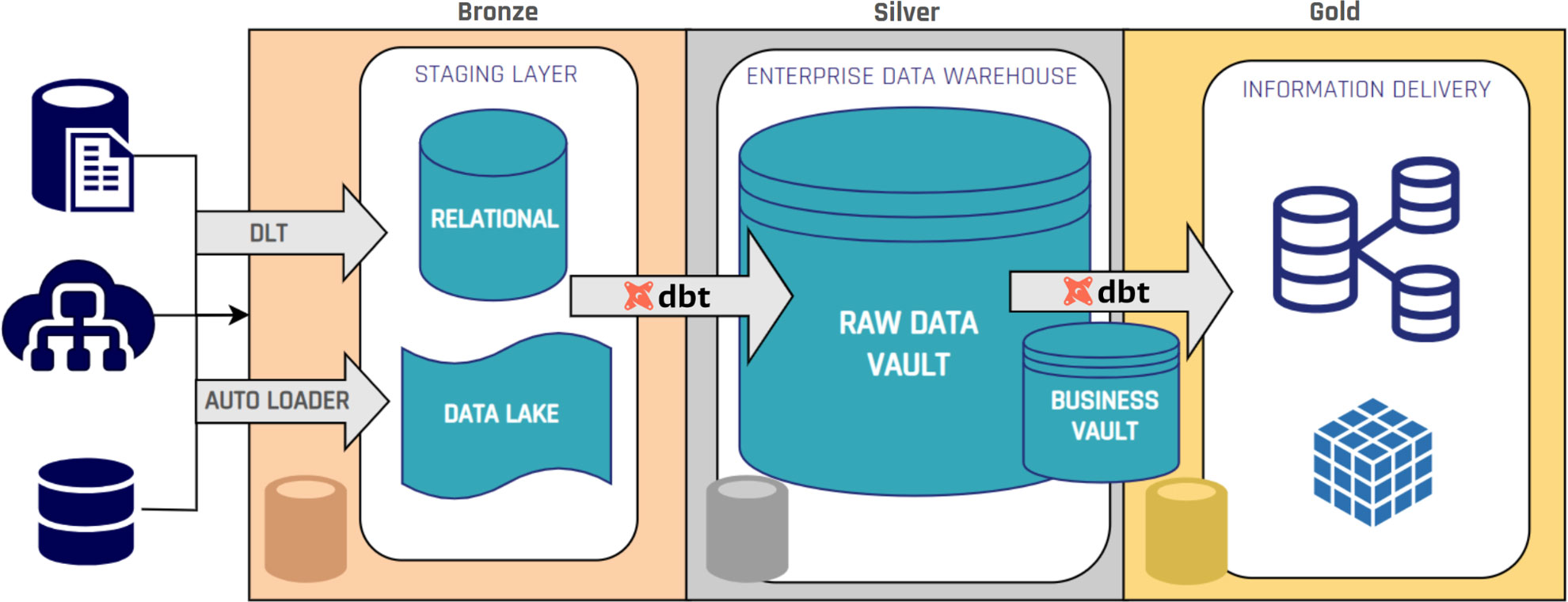
Bronze Silver and Gold layers in the Data Vault Structure

Databricks and dbt

Selecting the appropriate technology stack is a critical factor in the successful delivery of a Data Vault 2 architecture. Two technologies that work effectively together at a large scale data solutions are Databricks and dbt. When combined, they provide a practical way to implement Data Vault models while addressing performance, governance, and auditability requirements.

It can be argued that dbt’s role in a Databricks-based architecture is not always essential, since many of its core capabilities (such as transformation scheduling, lineage tracking, and documentation) can also be implemented using native Databricks features. Understanding the specific role each tool plays helps clarify where they complement each other and where functionality overlaps.


Databricks as the Processing and Storage Platform

Databricks’ Lakehouse architecture combines the scalability of a data lake with the reliability of a warehouse. Its Delta Lake technology offers ACID transactions, schema enforcement, and time travel, enabling precise historical querying, which are relevant aspects when it comes to Data Vault’s historization requirements.

With Unity Catalog, Databricks centralizes metadata management and enforces fine-grained access control, ensuring sensitive attributes are protected without introducing unnecessary satellite splits. This alignment between governance and performance is particularly relevant in Data Vault environments.

dbt as the Transformation and Orchestration Layer

dbt manages and automates SQL-based transformations in a modular and version-controlled manner. In a Data Vault context, dbt enables:

  • The creation of Hubs, Links, and Satellites through templated, reusable models. Here, different packages can be leveraged, like our datavault4dbt package, which is constantly updated to be fully compliant with the most recent Data Vault standards.
  • Integrated testing to validate business keys, relationships, and data quality.
  • Automated documentation that directly reflects the structure and dependencies of the Data Vault.

This structured approach makes transformations transparent and repeatable, supporting the auditability requirements inherent to Data Vault.

Integration in a Data Vault Workflow

When Databricks and dbt are deployed together:

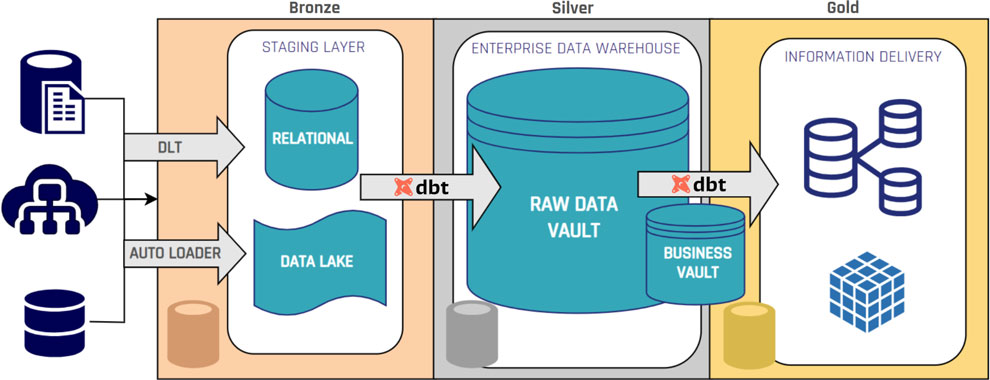
  • Data ingestion occurs in Databricks, storing raw datasets as Delta tables, usually in the Bronze layer.
  • dbt transformations generate Raw Vault entities and Business Vault objects in the Silver layer.
  • Governance and security controls are enforced via Unity Catalog without altering the Data Vault model structure.
Bronze Silver and Gold layers in the Data Vault Structure

This approach preserves Data Vault’s methodological structure while using Databricks’ distributed compute and storage capabilities.

Business Value when combining dbt and Databricks

The combined use of Databricks and dbt offers:

  • Scalable processing of large, complex datasets: Databricks handles enterprise-scale data efficiently, while dbt structures transformations into modular, reusable components.
  • Consistent governance across all layers of the Data Vault: dbt’s lineage and documentation, plus Unity Catalog’s access control, ensure compliance and transparency end to end.
  • Lower operational risk through tested, version-controlled transformations: Git-based versioning and automated tests in dbt reduce errors before execution on Databricks.
  • Improved query performance for information marts and analytics: Delta Lake optimizations and dbt’s pre-aggregated tables with business logic minimize expensive joins.

For organizations building Data Vault on Databricks, dbt strengthens structure and quality while Databricks ensures scalability and performance.

– Ricardo Rodríguez (Scalefree)

Databricks and dbt: A Practical Approach to Data Vault Implementation

Bronze Silver and Gold layers in the Data Vault Structure

Databricks and dbt

Selecting the appropriate technology stack is a critical factor in the successful delivery of a Data Vault 2 architecture. Two technologies that work effectively together at a large scale data solutions are Databricks and dbt. When combined, they provide a practical way to implement Data Vault models while addressing performance, governance, and auditability requirements.

It can be argued that dbt’s role in a Databricks-based architecture is not always essential, since many of its core capabilities (such as transformation scheduling, lineage tracking, and documentation) can also be implemented using native Databricks features. Understanding the specific role each tool plays helps clarify where they complement each other and where functionality overlaps.


Databricks as the Processing and Storage Platform

Databricks’ Lakehouse architecture combines the scalability of a data lake with the reliability of a warehouse. Its Delta Lake technology offers ACID transactions, schema enforcement, and time travel, enabling precise historical querying, which are relevant aspects when it comes to Data Vault’s historization requirements.

With Unity Catalog, Databricks centralizes metadata management and enforces fine-grained access control, ensuring sensitive attributes are protected without introducing unnecessary satellite splits. This alignment between governance and performance is particularly relevant in Data Vault environments.

dbt as the Transformation and Orchestration Layer

dbt manages and automates SQL-based transformations in a modular and version-controlled manner. In a Data Vault context, dbt enables:

  • The creation of Hubs, Links, and Satellites through templated, reusable models. Here, different packages can be leveraged, like our datavault4dbt package, which is constantly updated to be fully compliant with the most recent Data Vault standards.
  • Integrated testing to validate business keys, relationships, and data quality.
  • Automated documentation that directly reflects the structure and dependencies of the Data Vault.

This structured approach makes transformations transparent and repeatable, supporting the auditability requirements inherent to Data Vault.

Integration in a Data Vault Workflow

When Databricks and dbt are deployed together:

  • Data ingestion occurs in Databricks, storing raw datasets as Delta tables, usually in the Bronze layer.
  • dbt transformations generate Raw Vault entities and Business Vault objects in the Silver layer.
  • Governance and security controls are enforced via Unity Catalog without altering the Data Vault model structure.
Bronze Silver and Gold layers in the Data Vault Structure

This approach preserves Data Vault’s methodological structure while using Databricks’ distributed compute and storage capabilities.

Business Value when combining dbt and Databricks

The combined use of Databricks and dbt offers:

  • Scalable processing of large, complex datasets: Databricks handles enterprise-scale data efficiently, while dbt structures transformations into modular, reusable components.
  • Consistent governance across all layers of the Data Vault: dbt’s lineage and documentation, plus Unity Catalog’s access control, ensure compliance and transparency end to end.
  • Lower operational risk through tested, version-controlled transformations: Git-based versioning and automated tests in dbt reduce errors before execution on Databricks.
  • Improved query performance for information marts and analytics: Delta Lake optimizations and dbt’s pre-aggregated tables with business logic minimize expensive joins.

For organizations building Data Vault on Databricks, dbt strengthens structure and quality while Databricks ensures scalability and performance.

– Ricardo Rodríguez (Scalefree)

Get Started with dbt: A Quick 15-Minute Guide Using Snowflake

Get Started with dbt Using Snowflake

Introduction to dbt

dbt (data build tool) revolutionizes the way teams build and maintain analytics workflows by bringing software‐engineering best practices to SQL‐based data transformations. Instead of ad‐hoc scripts, dbt encourages version control, modular models, testing, documentation, and lineage graphs. In this guide, you’ll learn how to go from zero to your first dbt models—running entirely in the cloud on Snowflake—in under 15 minutes.


Why Choose dbt Cloud + Snowflake?

  • Fully managed: No local install or complex orchestration; dbt Cloud handles hosting.
  • Quick setup: Snowflake’s partner connector spins up a dbt trial, pre-configured with your credentials.
  • Best practices out of the box: Built-in IDE, job scheduling, Git integration, and documentation.
  • Scalable performance: Leverages Snowflake’s compute power for fast model builds.

Prerequisites

  1. A Snowflake trial account (free, 1-minute setup).
  2. A modern browser (Chrome, Firefox) or VS Code for remote development.
  3. Basic familiarity with SQL.

1. Launching dbt Cloud from Snowflake

Once logged into your Snowflake trial, navigate to the Data Products → Partners → Connect pane. Scroll to find the dbt entry and click Connect → Launch. This will automatically:

  • Provision a dbt Cloud trial account
  • Create a new Snowflake database and warehouse
  • Inject Snowflake credentials into your dbt Cloud connection

You’ll land in the dbt Cloud dashboard, ready to start your first project.

2. Exploring the dbt Cloud UI

In dbt Cloud’s left navigation bar you’ll find:

  • Develop: Interactive IDE for coding models, sources, tests, documentation.
  • Deploy: Job definitions, environments, and run history.
  • Documentation: Auto‐generated docs site with lineage graphs.
  • Settings: Account, project, and Git integration.

Click Develop → IDE (hosted in Chrome or connect your VS Code). Let’s initialize our dbt project.

3. Initializing Your dbt Project

  1. In the IDE, open the Version Control pane and click Initialize dbt Project.
  2. Accept the defaults; dbt creates a dbt_project.yml and folder structure (models/, macros/, etc.).
  3. Commit the auto‐generated files in a new Git branch: “initialized dbt project”.

Your Git pane now shows uncommitted files; click Commit & Push to save the project baseline.

4. Defining Your Source Data

dbt doesn’t load data from external systems—you must point it to existing tables. Snowflake’s sample database (SNOWFLAKE_SAMPLE_DATA) contains TPC-H tables you can use.

Create a new YAML file under models/ named sources.yml with:

version: 2

sources:
  - name: tpch
    database: SNOWFLAKE_SAMPLE_DATA
    schema: TPCH_SF1
    tables:
      - name: CUSTOMER
      - name: ORDERS

Save to see the lineage graph update with two new source nodes.

5. Building a Staging Model

Staging models standardize raw tables and prepare them for downstream transformations. In models/, delete the example/ folder and instead:

  1. Create a folder called models/staging/tpch.
  2. In that folder, create stg_tpch_customer.sql:
{{ config(materialized='view') }}

select
  C_CUSTKEY   as customer_key,
  C_NAME      as customer_name,
  C_ACCTBAL   as account_balance,
  C_COMMENT   as comment
from {{ source('tpch', 'CUSTOMER') }}

Notes:

  • The source() macro resolves to the fully qualified table.
  • materialized='view' tells dbt to build a view by default.

Save and click Run → dbt run to build just this model. In seconds you’ll see a view in your Snowflake UI under the dev schema.

6. Creating a Production-Ready Dimension

Dimensions (Gold layer) contain curated, business-ready tables. Let’s filter for customers with positive balances.

  1. Create models/marts/customer_dim.sql:
{{ config(materialized='table') }}

select
  customer_key,
  customer_name,
  account_balance
from {{ ref('stg_tpch_customer') }}
where account_balance > 0

Here, ref() links to another model, ensuring correct build order and clear lineage.

Click Compile to preview generated SQL, then Run → dbt run to create the table in Snowflake.

7. Testing and Documentation

dbt encourages tests to enforce data quality:

  • Add to models/staging/tpch/schema.yml:
version: 2

models:
  - name: stg_tpch_customer
    tests:
      - not_null:
          column_name: customer_key
      - unique:
          column_name: customer_key

Run dbt test to validate your models. Any failures will be reported in the UI.

Generate documentation with dbt docs generate, then preview via dbt docs serve. Explore your project’s lineage graph and column descriptions.

8. Version Control & Deployment

dbt Cloud integrates Git for collaboration. After feature development:

  1. Commit your branch and open a pull request (GitHub, GitLab, Bitbucket).
  2. Merge into main.

In Deploy → Environments, create a production environment. Under Jobs, define a job that runs:

  • dbt seed (if you have local CSV seeds)
  • dbt run
  • dbt test

Schedule the job (e.g., hourly, daily) or trigger it on Git commits. Monitor run history and logs directly in dbt Cloud.

9. Best Practices & Next Steps

  • Modularize models: Break complex logic into smaller models.
  • Document extensively: Use YAML descriptions for sources, models, and columns.
  • Implement CI/CD: Integrate dbt Cloud jobs with your team’s CI pipeline.
  • Leverage analyses: Create analyses/ for ad-hoc queries and charts.
  • Scale with packages: Reuse community packages (e.g., dbt_utils).

For deeper dives, explore the official dbt documentation and the dbt Hub for community packages and best practices.

Watch the Video

Conclusion

In just a few steps, you’ve:

  • Provisioned dbt Cloud via Snowflake
  • Initialized a dbt project with Git
  • Defined raw sources and built staging models
  • Created a production dimension with ref()
  • Tested data quality and generated documentation
  • Set up a CI/CD job for automated deployment

Now you have a repeatable, maintainable analytics pipeline. Keep building new models, add tests, and document as you go—your future self (and team!) will thank you.

Get Started with dbt: A Quick 15-Minute Guide Using Snowflake

Get Started with dbt Using Snowflake

Introduction to dbt

dbt (data build tool) revolutionizes the way teams build and maintain analytics workflows by bringing software‐engineering best practices to SQL‐based data transformations. Instead of ad‐hoc scripts, dbt encourages version control, modular models, testing, documentation, and lineage graphs. In this guide, you’ll learn how to go from zero to your first dbt models—running entirely in the cloud on Snowflake—in under 15 minutes.


Why Choose dbt Cloud + Snowflake?

  • Fully managed: No local install or complex orchestration; dbt Cloud handles hosting.
  • Quick setup: Snowflake’s partner connector spins up a dbt trial, pre-configured with your credentials.
  • Best practices out of the box: Built-in IDE, job scheduling, Git integration, and documentation.
  • Scalable performance: Leverages Snowflake’s compute power for fast model builds.

Prerequisites

  1. A Snowflake trial account (free, 1-minute setup).
  2. A modern browser (Chrome, Firefox) or VS Code for remote development.
  3. Basic familiarity with SQL.

1. Launching dbt Cloud from Snowflake

Once logged into your Snowflake trial, navigate to the Data Products → Partners → Connect pane. Scroll to find the dbt entry and click Connect → Launch. This will automatically:

  • Provision a dbt Cloud trial account
  • Create a new Snowflake database and warehouse
  • Inject Snowflake credentials into your dbt Cloud connection

You’ll land in the dbt Cloud dashboard, ready to start your first project.

2. Exploring the dbt Cloud UI

In dbt Cloud’s left navigation bar you’ll find:

  • Develop: Interactive IDE for coding models, sources, tests, documentation.
  • Deploy: Job definitions, environments, and run history.
  • Documentation: Auto‐generated docs site with lineage graphs.
  • Settings: Account, project, and Git integration.

Click Develop → IDE (hosted in Chrome or connect your VS Code). Let’s initialize our dbt project.

3. Initializing Your dbt Project

  1. In the IDE, open the Version Control pane and click Initialize dbt Project.
  2. Accept the defaults; dbt creates a dbt_project.yml and folder structure (models/, macros/, etc.).
  3. Commit the auto‐generated files in a new Git branch: “initialized dbt project”.

Your Git pane now shows uncommitted files; click Commit & Push to save the project baseline.

4. Defining Your Source Data

dbt doesn’t load data from external systems—you must point it to existing tables. Snowflake’s sample database (SNOWFLAKE_SAMPLE_DATA) contains TPC-H tables you can use.

Create a new YAML file under models/ named sources.yml with:

version: 2

sources:
  - name: tpch
    database: SNOWFLAKE_SAMPLE_DATA
    schema: TPCH_SF1
    tables:
      - name: CUSTOMER
      - name: ORDERS

Save to see the lineage graph update with two new source nodes.

5. Building a Staging Model

Staging models standardize raw tables and prepare them for downstream transformations. In models/, delete the example/ folder and instead:

  1. Create a folder called models/staging/tpch.
  2. In that folder, create stg_tpch_customer.sql:
{{ config(materialized='view') }}

select
  C_CUSTKEY   as customer_key,
  C_NAME      as customer_name,
  C_ACCTBAL   as account_balance,
  C_COMMENT   as comment
from {{ source('tpch', 'CUSTOMER') }}

Notes:

  • The source() macro resolves to the fully qualified table.
  • materialized='view' tells dbt to build a view by default.

Save and click Run → dbt run to build just this model. In seconds you’ll see a view in your Snowflake UI under the dev schema.

6. Creating a Production-Ready Dimension

Dimensions (Gold layer) contain curated, business-ready tables. Let’s filter for customers with positive balances.

  1. Create models/marts/customer_dim.sql:
{{ config(materialized='table') }}

select
  customer_key,
  customer_name,
  account_balance
from {{ ref('stg_tpch_customer') }}
where account_balance > 0

Here, ref() links to another model, ensuring correct build order and clear lineage.

Click Compile to preview generated SQL, then Run → dbt run to create the table in Snowflake.

7. Testing and Documentation

dbt encourages tests to enforce data quality:

  • Add to models/staging/tpch/schema.yml:
version: 2

models:
  - name: stg_tpch_customer
    tests:
      - not_null:
          column_name: customer_key
      - unique:
          column_name: customer_key

Run dbt test to validate your models. Any failures will be reported in the UI.

Generate documentation with dbt docs generate, then preview via dbt docs serve. Explore your project’s lineage graph and column descriptions.

8. Version Control & Deployment

dbt Cloud integrates Git for collaboration. After feature development:

  1. Commit your branch and open a pull request (GitHub, GitLab, Bitbucket).
  2. Merge into main.

In Deploy → Environments, create a production environment. Under Jobs, define a job that runs:

  • dbt seed (if you have local CSV seeds)
  • dbt run
  • dbt test

Schedule the job (e.g., hourly, daily) or trigger it on Git commits. Monitor run history and logs directly in dbt Cloud.

9. Best Practices & Next Steps

  • Modularize models: Break complex logic into smaller models.
  • Document extensively: Use YAML descriptions for sources, models, and columns.
  • Implement CI/CD: Integrate dbt Cloud jobs with your team’s CI pipeline.
  • Leverage analyses: Create analyses/ for ad-hoc queries and charts.
  • Scale with packages: Reuse community packages (e.g., dbt_utils).

For deeper dives, explore the official dbt documentation and the dbt Hub for community packages and best practices.

Watch the Video

Conclusion

In just a few steps, you’ve:

  • Provisioned dbt Cloud via Snowflake
  • Initialized a dbt project with Git
  • Defined raw sources and built staging models
  • Created a production dimension with ref()
  • Tested data quality and generated documentation
  • Set up a CI/CD job for automated deployment

Now you have a repeatable, maintainable analytics pipeline. Keep building new models, add tests, and document as you go—your future self (and team!) will thank you.

Data Vault on Databricks: Does It Make Sense?

Data Vault and Medallion Architecture

In this article, we will try to explore the practical considerations of implementing Data Vault on Databricks, by analyzing Databricks’ ecosystem and its alignment with Data Vault’s core principles. We will go over the fundamentals of Databricks’ architecture, its compatibility with Data Vault’s layered approach, and how some of Databricks’ features can be leveraged to simplify, optimize, or even replace certain traditional aspects of a Data Vault implementation.

This article aims to provide a strategic perspective on how Databricks can support Data Vault principles such as historization, scalability, auditability, and modular design. We’ll discuss opportunities, such as using Delta Lake for time travel and schema evolution, and challenges, like the performance trade-offs introduced by Data Vault’s high number of joins.

Bridging EDW and Lakehouse: Implementing Data Vault on Databricks

Join us in this webinar as we explore the process of implementing Data Vault on Databricks. We will go over different integration strategies and potential challenges, as well as technical aspects like data modeling, performance considerations, and data governance. Register for our free webinar, June 17th, 2025!

Watch Webinar Recording

Understanding Data Vault 2.0

Data Vault is traditionally defined as a methodology encompassing implementation practices, an architectural framework, and a data modeling approach for building a business intelligence system. However, this article focuses on the architectural and modeling aspects of Data Vault, as these are most relevant topics for the implementation of Data Vault on Databricks.

The main advantage of adopting Data Vault’s architecture and modeling are:

  • Preservation of Historical Integrity and Auditability.
    • Insert-only historization
    • Reconstruction of data source deliveries
    • Simplified Governance and Compliance
  • Flexible and Scalable Architecture Data Model
    • Modular Data Model (Hub & Spoke)
    • Scalable
    • Decoupling of Hard and Soft Business rules
    • Tool Agnosticism

The Databricks Ecosystem

Databricks is a leading platform for data analytics, offering a unified environment for data processing, machine learning, and collaborative data science. Its lakehouse architecture, built on Apache Spark and Delta Lake, combines the flexibility of data lakes with the structure and performance of data warehouses. This approach allows organizations to store all types of data while enabling efficient SQL-based analytics and AI/ML workloads.

For Data Vault implementation, Databricks can be a practical choice. Delta Lake’s ACID compliance and transaction logs ensure data integrity and enable Time Travel for historical analysis. As we will see next, features like Delta Live Tables and Unity Catalog optimize data ingestion, transformation, and governance, making Databricks a compelling platform for implementing Data Vault.

Databricks and Data Vault: Do they work together?

To assess the combination of Databricks and Data Vault, we need to analyze their common ground: architecture and data modeling. Both are designed to handle large scales of volume and data processing, and a successful integration of both relies on understanding how they can complement each other.

Architectural Compatibility

Databricks, built on Apache Spark and Delta Lake, follows the Medallion Architecture, a layered approach designed to structure and refine data. Their Medallion Architecture provides a best practice for managing data within a lakehouse environment, utilizing a three-layered approach (Bronze, Silver, Gold) to progressively structure and refine data. This approach aligns well with Data Vault’s multi-layered architecture (Staging, Raw Data Vault, Business Vault, Information Marts).

Databricks Data Quality Architecture

Image 1: Databricks’ Medallion architecture

Now looking at Data Vault’s architecture, we see that to some extent it is quite similar to what Databricks proposes: a multi-layer solution composed of a Staging layer, a Raw Data Vault and a Business Vault, followed by the domain-specific information marts. In the image below, we can see an example of a Data Vault architecture.

Data Vault Architecture

Image 2: Data Vault Architecture

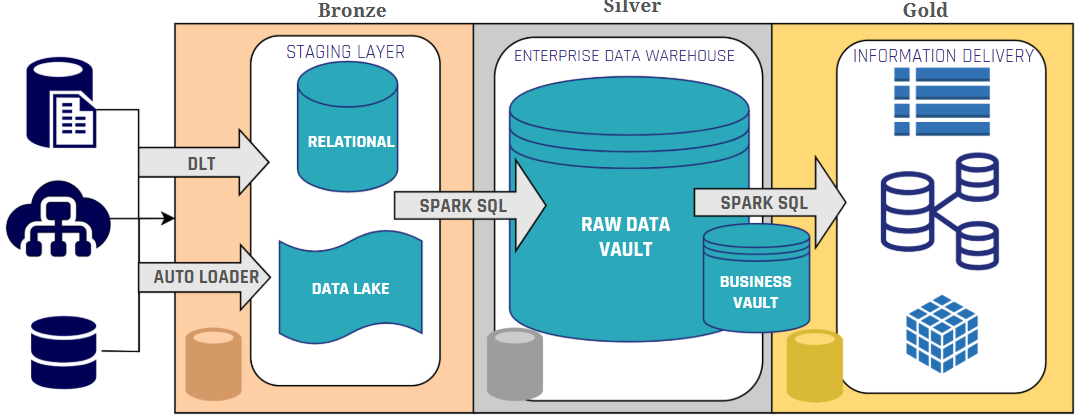
Integrating Data Vault with the Medallion Architecture allows for a synergistic approach, as we can see in image 3.

Data Vault and Medallion Architecture

Image 3: Data Vault and Medallion Architecture

The Bronze layer serves the same purpose as Data Vault’s Staging Area, where raw data is ingested from the different sources and stored in a single place. From then on, the Silver layer will store the Raw Data Vault, source tables will be split into hubs, links, and satellites. Here we can already consider some Databricks’ features, such as schema enforcement for integrity; and also Delta Live Tables and Spark SQL to maintain steady loading processes and automate quality checks. The Business Vault, which derives additional business-relevant data structures, sits between Silver and Gold layers, assisting with the information delivery process.

In the Business Vault, Databricks features such as Z-Ordering and data skipping can optimize performance by organizing data more efficiently. Additionally, Spark SQL can be used for aggregations and transformations supported in PIT and Bridge tables. Finally, in the Gold layer, we can start creating our Information Marts with Flat & Wide structures that improve the performance when querying the information out of the Vault.

Privacy and Security

Databricks’ data governance features included in Unity Catalog can optimize Data Vault implementations by simplifying security and privacy controls. Unity Catalog’s fine-grained access control and data masking capabilities can eliminate the need for satellite splits traditionally used to manage sensitive data. Additionally, the lakehouse architecture enables direct data querying, which facilitates compliance with GDPR and data privacy regulations, particularly for responding to data subject access requests (DSAR) and right-to-be-forgotten requests. These data governance features help to simplify the Data Vault model and reduce the final amount of tables in the Vault.

Historization

While both Data Vault and Databricks offer mechanisms for data historization, relying solely on Delta Lake’s Time Travel for historization in a Data Vault implementation on Databricks might not be the best choice. In Databricks, the VACUUM command can permanently delete older data files, potentially removing historical data needed for auditing, lineage analysis and regulatory compliance. Hence, alternative historization methods should be considered, such as maintaining traditional historization with Data Vault’s modelling insert-only approach, or leveraging Databricks’ Change Data Feed to capture a stream of changes made to Delta Lake tables. This ensures a complete and auditable history, even if older data versions are removed by the VACUUM command.

Performance Considerations

When implementing Data Vault on Databricks, performance optimization requires architectural considerations that comprehend the characteristics of both systems. The modular design of Data Vault can create numerous tables with complex join patterns, which can be challenging in Databricks’ Spark environment, since Delta Lake’s column-based Parquet files can struggle with extensive joins. To address this challenge, practitioners should minimize satellite splits (leveraging Databricks’ native security and privacy features instead), implement virtualization in the Business Vault through views, and utilize Point-in-Time and Bridge tables to precompute historical snapshots that reduce join complexity and aid in achieving the target granularity.

For optimal performance, information marts should adopt Flat & Wide structures that prioritize query speed over storage efficiency (an acceptable trade-off given today’s relatively low storage costs). Additional performance gains can be achieved by strategically applying Delta Lake features like Z-Ordering and data skipping to enhance the information delivery process. The decision between views and fully materialized information marts is also an aspect to consider; while views reduce redundancy and simplify management, materialized marts with denormalized tables provide substantial performance benefits for complex reporting scenarios that would otherwise require resource-intensive joins across multiple Data Vault structures. A balanced approach combining views and materialized views should be based on query complexity, data volume, and update frequency, ensuring that reporting, and analytics workloads remain performant. This way we ensure that a Data Vault implementation on Databricks can maintain both the modeling flexibility of Data Vault and the performance capabilities of the Databricks platform.

Data Vault on Databricks: The Best of both Worlds

Implementing Data Vault on Databricks represents a practical and effective combination that merges Data Vault’s tool-agnostic architecture with Databricks’ technical capabilities. To optimize this integration, organizations should make thoughtful adjustments that create synergies between the modeling methodology and platform, including leveraging Unity Catalog for security and privacy satellite management, combining architectural designs while maintaining historization and data lineage, and virtualizing queries in the downstream layers with Flat & Wide structures with PIT and Bridge tables as underlying elements to enhance performance. This balanced approach allows organizations to improve governance and simplify data management, while preserving the core strengths of both systems.


– Ricardo Rodríguez (Scalefree)

Data Vault on Databricks: Does It Make Sense?

Data Vault and Medallion Architecture

In this article, we will try to explore the practical considerations of implementing Data Vault on Databricks, by analyzing Databricks’ ecosystem and its alignment with Data Vault’s core principles. We will go over the fundamentals of Databricks’ architecture, its compatibility with Data Vault’s layered approach, and how some of Databricks’ features can be leveraged to simplify, optimize, or even replace certain traditional aspects of a Data Vault implementation.

This article aims to provide a strategic perspective on how Databricks can support Data Vault principles such as historization, scalability, auditability, and modular design. We’ll discuss opportunities, such as using Delta Lake for time travel and schema evolution, and challenges, like the performance trade-offs introduced by Data Vault’s high number of joins.

Bridging EDW and Lakehouse: Implementing Data Vault on Databricks

Join us in this webinar as we explore the process of implementing Data Vault on Databricks. We will go over different integration strategies and potential challenges, as well as technical aspects like data modeling, performance considerations, and data governance. Register for our free webinar, June 17th, 2025!

Watch Webinar Recording

Understanding Data Vault 2.0

Data Vault is traditionally defined as a methodology encompassing implementation practices, an architectural framework, and a data modeling approach for building a business intelligence system. However, this article focuses on the architectural and modeling aspects of Data Vault, as these are most relevant topics for the implementation of Data Vault on Databricks.

The main advantage of adopting Data Vault’s architecture and modeling are:

  • Preservation of Historical Integrity and Auditability.
    • Insert-only historization
    • Reconstruction of data source deliveries
    • Simplified Governance and Compliance
  • Flexible and Scalable Architecture Data Model
    • Modular Data Model (Hub & Spoke)
    • Scalable
    • Decoupling of Hard and Soft Business rules
    • Tool Agnosticism

The Databricks Ecosystem

Databricks is a leading platform for data analytics, offering a unified environment for data processing, machine learning, and collaborative data science. Its lakehouse architecture, built on Apache Spark and Delta Lake, combines the flexibility of data lakes with the structure and performance of data warehouses. This approach allows organizations to store all types of data while enabling efficient SQL-based analytics and AI/ML workloads.

For Data Vault implementation, Databricks can be a practical choice. Delta Lake’s ACID compliance and transaction logs ensure data integrity and enable Time Travel for historical analysis. As we will see next, features like Delta Live Tables and Unity Catalog optimize data ingestion, transformation, and governance, making Databricks a compelling platform for implementing Data Vault.

Databricks and Data Vault: Do they work together?

To assess the combination of Databricks and Data Vault, we need to analyze their common ground: architecture and data modeling. Both are designed to handle large scales of volume and data processing, and a successful integration of both relies on understanding how they can complement each other.

Architectural Compatibility

Databricks, built on Apache Spark and Delta Lake, follows the Medallion Architecture, a layered approach designed to structure and refine data. Their Medallion Architecture provides a best practice for managing data within a lakehouse environment, utilizing a three-layered approach (Bronze, Silver, Gold) to progressively structure and refine data. This approach aligns well with Data Vault’s multi-layered architecture (Staging, Raw Data Vault, Business Vault, Information Marts).

Databricks Data Quality Architecture

Image 1: Databricks’ Medallion architecture

Now looking at Data Vault’s architecture, we see that to some extent it is quite similar to what Databricks proposes: a multi-layer solution composed of a Staging layer, a Raw Data Vault and a Business Vault, followed by the domain-specific information marts. In the image below, we can see an example of a Data Vault architecture.

Data Vault Architecture

Image 2: Data Vault Architecture

Integrating Data Vault with the Medallion Architecture allows for a synergistic approach, as we can see in image 3.

Data Vault and Medallion Architecture

Image 3: Data Vault and Medallion Architecture

The Bronze layer serves the same purpose as Data Vault’s Staging Area, where raw data is ingested from the different sources and stored in a single place. From then on, the Silver layer will store the Raw Data Vault, source tables will be split into hubs, links, and satellites. Here we can already consider some Databricks’ features, such as schema enforcement for integrity; and also Delta Live Tables and Spark SQL to maintain steady loading processes and automate quality checks. The Business Vault, which derives additional business-relevant data structures, sits between Silver and Gold layers, assisting with the information delivery process.

In the Business Vault, Databricks features such as Z-Ordering and data skipping can optimize performance by organizing data more efficiently. Additionally, Spark SQL can be used for aggregations and transformations supported in PIT and Bridge tables. Finally, in the Gold layer, we can start creating our Information Marts with Flat & Wide structures that improve the performance when querying the information out of the Vault.

Privacy and Security

Databricks’ data governance features included in Unity Catalog can optimize Data Vault implementations by simplifying security and privacy controls. Unity Catalog’s fine-grained access control and data masking capabilities can eliminate the need for satellite splits traditionally used to manage sensitive data. Additionally, the lakehouse architecture enables direct data querying, which facilitates compliance with GDPR and data privacy regulations, particularly for responding to data subject access requests (DSAR) and right-to-be-forgotten requests. These data governance features help to simplify the Data Vault model and reduce the final amount of tables in the Vault.

Historization

While both Data Vault and Databricks offer mechanisms for data historization, relying solely on Delta Lake’s Time Travel for historization in a Data Vault implementation on Databricks might not be the best choice. In Databricks, the VACUUM command can permanently delete older data files, potentially removing historical data needed for auditing, lineage analysis and regulatory compliance. Hence, alternative historization methods should be considered, such as maintaining traditional historization with Data Vault’s modelling insert-only approach, or leveraging Databricks’ Change Data Feed to capture a stream of changes made to Delta Lake tables. This ensures a complete and auditable history, even if older data versions are removed by the VACUUM command.

Performance Considerations

When implementing Data Vault on Databricks, performance optimization requires architectural considerations that comprehend the characteristics of both systems. The modular design of Data Vault can create numerous tables with complex join patterns, which can be challenging in Databricks’ Spark environment, since Delta Lake’s column-based Parquet files can struggle with extensive joins. To address this challenge, practitioners should minimize satellite splits (leveraging Databricks’ native security and privacy features instead), implement virtualization in the Business Vault through views, and utilize Point-in-Time and Bridge tables to precompute historical snapshots that reduce join complexity and aid in achieving the target granularity.

For optimal performance, information marts should adopt Flat & Wide structures that prioritize query speed over storage efficiency (an acceptable trade-off given today’s relatively low storage costs). Additional performance gains can be achieved by strategically applying Delta Lake features like Z-Ordering and data skipping to enhance the information delivery process. The decision between views and fully materialized information marts is also an aspect to consider; while views reduce redundancy and simplify management, materialized marts with denormalized tables provide substantial performance benefits for complex reporting scenarios that would otherwise require resource-intensive joins across multiple Data Vault structures. A balanced approach combining views and materialized views should be based on query complexity, data volume, and update frequency, ensuring that reporting, and analytics workloads remain performant. This way we ensure that a Data Vault implementation on Databricks can maintain both the modeling flexibility of Data Vault and the performance capabilities of the Databricks platform.

Data Vault on Databricks: The Best of both Worlds

Implementing Data Vault on Databricks represents a practical and effective combination that merges Data Vault’s tool-agnostic architecture with Databricks’ technical capabilities. To optimize this integration, organizations should make thoughtful adjustments that create synergies between the modeling methodology and platform, including leveraging Unity Catalog for security and privacy satellite management, combining architectural designs while maintaining historization and data lineage, and virtualizing queries in the downstream layers with Flat & Wide structures with PIT and Bridge tables as underlying elements to enhance performance. This balanced approach allows organizations to improve governance and simplify data management, while preserving the core strengths of both systems.


– Ricardo Rodríguez (Scalefree)

From Vaults to Value: Scalefree & Coalesce Transforming Data Automation

Data Vault4Coalesce Data Automation Banner

In today’s fast-paced data landscape, staying ahead requires efficient, scalable, and automated processes, especially within complex data warehousing environments. This newsletter explores how a strategic partnership and innovative tooling can revolutionize your approach to Data Vault, enabling you to unlock value faster while managing costs effectively. Dive into the details of how Scalefree and coalesce.io are working together to reshape data automation.

FROM VAULTS TO VALUE: SCALEFREE & Coalesce TRANSFORMING DATA AUTOMATION

Data Vault projects too slow & costly?
Turn your vault into a value driver! Discover how Scalefree & Coalesce transform data automation. Learn about the latest DataVault4coalesce features, new coalesce.io capabilities, and how our partnership helps you save costs and deliver results faster. Register for our free webinar on April 17th, 2025!

Watch Webinar Recording

Unlock Faster Value And Reduce Costs In Your Data Vault Projects

Accelerating Data Vault implementation and maximizing ROI often hits hurdles like development time, maintenance costs, and keeping pace with evolving technologies. Addressing these requires a blend of proven methodology and powerful automation. The strategic partnership between Scalefree (Data Vault experts) and coalesce.io (data transformation platform) tackles these challenges directly.

By combining standardized Data Vault patterns with automated code generation and transformation management, this approach provides a future-proof solution. It significantly reduces manual effort, thereby saving development costs, enabling rapid results, and minimizing risks associated with inconsistencies. Learn the specifics of how this collaboration streamlines processes in our upcoming webinar, “From Vaults to Value: Scalefree & coalesce.io Transforming Data Automation.”

The Power Of Partnership: Expertise Meets Automation

Scalefree brings deep knowledge and best practices in Data Vault 2.0 methodology, while coalesce.io provides a powerful platform for automating data transformations, specifically on Snowflake. Together, this offers a synergy that significantly enhances team agility and reduces the total cost of ownership (TCO) for your data warehouse.

Introducing DataVault4coalesce: Your Accelerator

A key focus is DataVault4coalesce, the specialized package developed by Scalefree. It automates the generation of Data Vault structures and loading patterns within coalesce.io, directly translating into saved development time, reduced potential for errors (risk minimization), and lower maintenance overhead, eliminating common cost drivers in complex projects. The package includes the latest developments and newest components, designed to get you results even faster, even with small budgets.

Latest developments included support for new Data Vault entities, such as Effectivity Satellites and Reference Data. Additionally, the Scalefree team continuously focuses on improving the loading performance of the provided nodes.

Explore The Cutting Edge: What’s New In Coalesce

Beyond the enhancements in the DataVault4coalesce package, the coalesce.io platform itself is also continuously evolving. This section covers exciting new functionalities, including updates designed to enhance development workflows, such as initial AI-assisted features. It also features the implications of initial preview support for Databricks and how Coalesce’s recent acquisition of Castordoc enhances the ecosystem, potentially improving data governance and discovery. Stay ahead of the curve and understand how these advancements contribute to a sustainable and future-proof data strategy.

Looking Ahead: The DataVault4coalesce Roadmap

An outlook on the future roadmap highlights Scalefree and Coalesce’s commitment to continuous innovation, ensuring your data automation capabilities remain best-in-class and aligned with emerging needs.

With Coalesce’s extension to Databricks, Scalefree actively works on providing extensive support for the new data platform. A Datavault4Coaelsce Databricks version is under active development. Future support of more databases is scheduled on the development roadmap to guarantee a great Data Vault experience for all users of coalesce.io, no matter which platform they are on.

Key Benefits & Takeaways

Key takeaways from this newsletter include:

  • Maximizing value through the Scalefree & Coalesce partnership
  • Leveraging DataVault4coalesce for significant time and cost savings on Snowflake
  • Utilizing the latest features in coalesce.io, such as AI assistance and Databricks capabilities
  • Understanding the evolving data automation ecosystem

Transform your data vault projects from complex undertakings into streamlined engines for value creation.

Conclusion

Gaining practical insights into these topics is crucial for leveraging cutting-edge automation for your Data Vault projects. Understanding these advancements is key to optimizing your data strategy, reducing overhead, and achieving faster, more cost-effective results in today’s competitive environment.

From Vaults to Value: Scalefree & Coalesce Transforming Data Automation

Data Vault4Coalesce Data Automation Banner

In today’s fast-paced data landscape, staying ahead requires efficient, scalable, and automated processes, especially within complex data warehousing environments. This newsletter explores how a strategic partnership and innovative tooling can revolutionize your approach to Data Vault, enabling you to unlock value faster while managing costs effectively. Dive into the details of how Scalefree and coalesce.io are working together to reshape data automation.

FROM VAULTS TO VALUE: SCALEFREE & Coalesce TRANSFORMING DATA AUTOMATION

Data Vault projects too slow & costly?
Turn your vault into a value driver! Discover how Scalefree & Coalesce transform data automation. Learn about the latest DataVault4coalesce features, new coalesce.io capabilities, and how our partnership helps you save costs and deliver results faster. Register for our free webinar on April 17th, 2025!

Watch Webinar Recording

Unlock Faster Value And Reduce Costs In Your Data Vault Projects

Accelerating Data Vault implementation and maximizing ROI often hits hurdles like development time, maintenance costs, and keeping pace with evolving technologies. Addressing these requires a blend of proven methodology and powerful automation. The strategic partnership between Scalefree (Data Vault experts) and coalesce.io (data transformation platform) tackles these challenges directly.

By combining standardized Data Vault patterns with automated code generation and transformation management, this approach provides a future-proof solution. It significantly reduces manual effort, thereby saving development costs, enabling rapid results, and minimizing risks associated with inconsistencies. Learn the specifics of how this collaboration streamlines processes in our upcoming webinar, “From Vaults to Value: Scalefree & coalesce.io Transforming Data Automation.”

The Power Of Partnership: Expertise Meets Automation

Scalefree brings deep knowledge and best practices in Data Vault 2.0 methodology, while coalesce.io provides a powerful platform for automating data transformations, specifically on Snowflake. Together, this offers a synergy that significantly enhances team agility and reduces the total cost of ownership (TCO) for your data warehouse.

Introducing DataVault4coalesce: Your Accelerator

A key focus is DataVault4coalesce, the specialized package developed by Scalefree. It automates the generation of Data Vault structures and loading patterns within coalesce.io, directly translating into saved development time, reduced potential for errors (risk minimization), and lower maintenance overhead, eliminating common cost drivers in complex projects. The package includes the latest developments and newest components, designed to get you results even faster, even with small budgets.

Latest developments included support for new Data Vault entities, such as Effectivity Satellites and Reference Data. Additionally, the Scalefree team continuously focuses on improving the loading performance of the provided nodes.

Explore The Cutting Edge: What’s New In Coalesce

Beyond the enhancements in the DataVault4coalesce package, the coalesce.io platform itself is also continuously evolving. This section covers exciting new functionalities, including updates designed to enhance development workflows, such as initial AI-assisted features. It also features the implications of initial preview support for Databricks and how Coalesce’s recent acquisition of Castordoc enhances the ecosystem, potentially improving data governance and discovery. Stay ahead of the curve and understand how these advancements contribute to a sustainable and future-proof data strategy.

Looking Ahead: The DataVault4coalesce Roadmap

An outlook on the future roadmap highlights Scalefree and Coalesce’s commitment to continuous innovation, ensuring your data automation capabilities remain best-in-class and aligned with emerging needs.

With Coalesce’s extension to Databricks, Scalefree actively works on providing extensive support for the new data platform. A Datavault4Coaelsce Databricks version is under active development. Future support of more databases is scheduled on the development roadmap to guarantee a great Data Vault experience for all users of coalesce.io, no matter which platform they are on.

Key Benefits & Takeaways

Key takeaways from this newsletter include:

  • Maximizing value through the Scalefree & Coalesce partnership
  • Leveraging DataVault4coalesce for significant time and cost savings on Snowflake
  • Utilizing the latest features in coalesce.io, such as AI assistance and Databricks capabilities
  • Understanding the evolving data automation ecosystem

Transform your data vault projects from complex undertakings into streamlined engines for value creation.

Conclusion

Gaining practical insights into these topics is crucial for leveraging cutting-edge automation for your Data Vault projects. Understanding these advancements is key to optimizing your data strategy, reducing overhead, and achieving faster, more cost-effective results in today’s competitive environment.

Close Menu