Pre-Commit as a Foundation for Code Quality
In software development, ensuring code quality and minimizing defects early is crucial. The shift-left approach emphasizes detecting and resolving issues as soon as possible, rather than later in development or after deployment. Pre-commit supports this approach by managing multi-language pre-commit hooks, scripts that run automatically before finalizing a commit. These hooks act as a first line of defense, enforcing coding standards, preventing bugs, and enhancing security.
This article examines how the combination of pre-commit and the shift-left approach can enhance development workflows, resulting in more reliable and maintainable software. We will explore the advantages of using pre-commit hooks, their function within the shift-left framework, and offer practical advice for effective implementation. By adopting these practices, teams can improve code quality, accelerate development cycles, and deliver robust software solutions more efficiently.
In this article:
Understanding Pre-Commit
General Hooks in Versioning Systems
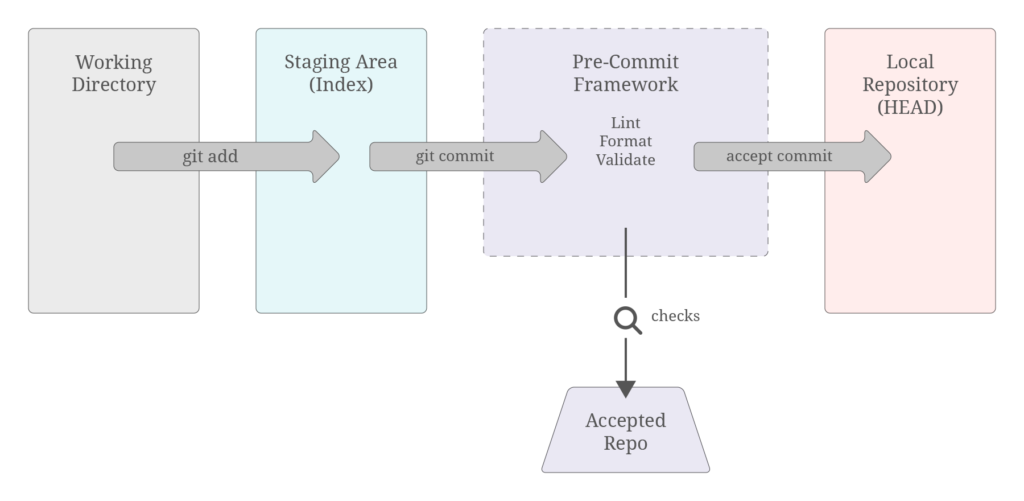
In version control systems like Git, hooks are scripts that are triggered by various events within the repository. These scripts can automate tasks, enforce policies, or improve workflows. Hooks are generally categorized into two types: client-side and server-side. Client-side hooks run on the local machine and can be triggered by operations such as committing or merging changes. Server-side hooks run on the server and can be triggered by events like receiving pushed commits.

The Role of Pre-Commit Hooks
Among the various types of client-side hooks, pre-commit hooks are particularly significant. These hooks are executed before a commit is finalized. They check for potential issues in the code, such as syntax errors, code style violations, or even security vulnerabilities. By running these checks before the code is committed to the repository, pre-commit hooks ensure that only high-quality code makes it into the version control system.
Pre-Commit Use Cases
Pre-Commit is a versatile tool that can be adapted to various scenarios within the development workflow, offering significant flexibility and control to development teams. One key use case is hosting pre-commit code locally, allowing developers to customize and manage hooks according to their project’s specific requirements. This local hosting ensures that all team members adhere to the same standards without relying on external repositories. Another powerful feature of pre-commit is the ability for users to create custom hooks tailored to their unique needs. These hooks can enforce specific coding standards, run specialized security checks, or automate repetitive tasks, providing a high degree of flexibility. Teams can write these hooks in any language supported by their environment, allowing pre-commit to seamlessly integrate into their workflow.
Furthermore, pre-commit can be integrated into Continuous Integration (CI) pipelines to enhance automation and enforce quality checks across all stages of development. By incorporating pre-commit hooks into the CI process, teams can ensure that code meets quality standards before being merged into the main codebase. This integration helps maintain high standards of code quality and reliability throughout the development lifecycle.
Multi-Language Support in Pre-Commit
One of the key strengths of pre-commit is its support for a wide range of programming languages. This makes it an ideal tool for projects that involve multiple languages or frameworks. For example, in DataOps, it is common to use Terraform for infrastructure provisioning and dbt for data transformation. Pre-commit’s multi-language support allows it to be seamlessly integrated into such diverse development environments, providing consistent quality checks across different languages and tools. This cross-language capability ensures that best practices are enforced and issues are detected regardless of the technologies used in the project.
Example for the Use of Pre-Commit
Pre-Commit operates through the use of a configuration file called pre-commit-config.yaml. This YAML file serves as the central configuration that pre-commit references every time a commit is made. It defines which hooks should be executed and where to fetch them from before finalizing a commit in your Git repository. As an example for such a file with an explanation to the key elements, the following image is provided:
repos:
  - repo: https://github.com/antonbabenko/pre-commit-terraform
    rev: v1.90.0
    hooks:
      - id: terraform_validate
      - id: terraform_fmt
        args:
- --args=-recursive- repo: Specifies the URL of the repository containing the hooks. In this example, https://github.com/antonbabenko/pre-commit-terraform is the repository from which hooks will be fetched.
- rev: Indicates the specific revision or version of the repository (v1.90.0 in this case) to use. This ensures consistency in hook behavior across different executions.
- hooks: Defines a list of hooks to be run from the specified repository. Each hook is identified by its unique id.
- id: Represents the identifier for each hook. For instance, trailing-whitespace, end-of-file-fixer, and check-yaml are examples of hook IDs that correspond to specific tasks or checks the hooks will perform.
- args: Specifies additional arguments or options to be passed to the hook command. In the case of terraform_fmt, the args field includes –args=-recursive. This configuration instructs the hook to format Terraform files recursively within the project directory.
This configuration allows you to tailor pre-commit to your project’s needs by specifying which hooks to execute, where to retrieve them from, and how to ensure consistency through defined versions or revisions. Each hook ID corresponds to a particular quality check or task that pre-commit will enforce before allowing a commit to proceed, ensuring higher code quality and adherence to project standards.
Recommended Pre-Commit Repositories for Effective Integration
To kickstart your use of pre-commit effectively, consider leveraging the following repositories tailored for specific programming languages and tools:
- Terraform Repository: antonbabenko/pre-commit-terraform
Offers a comprehensive set of hooks for Terraform projects, including validators and formatters to ensure consistent and high-quality code. - Dbt (Data Build Tool) Repository: dbt-checkpoint/dbt-checkpoint
Provides hooks specifically designed for dbt projects, enabling validation and enforcing best practices for SQL-based data transformations. - SQL Repository: sqlfluff/sqlfluff
Offers hooks for SQL linting to ensure syntax correctness, adherence to coding standards, and optimization of query performance.
These repositories offer essential hooks that integrate seamlessly with pre-commit, enabling automated checks to maintain code quality and consistency across Terraform, dbt, and SQL projects. By incorporating these hooks into your workflow, you can streamline development processes and ensure robust software deployments. However these are just suggestions and you are free to use any other hook if it benefits your use case.
Conclusion
Pre-Commit exemplifies the shift-left approach by automating quality checks early in the development cycle, before code is committed. This proactive strategy catches issues like syntax errors, formatting inconsistencies, and security vulnerabilities early, reducing downstream defects.
By using a centralized pre-commit-config.yaml file, Pre-Commit ensures consistent coding standards across teams. It allows developers to focus on coding rather than manual reviews, speeding up software delivery.
Supporting various languages and tools, Pre-Commit can be customized for specific project needs, enhancing code reliability through automated checks. Integrating Pre-Commit improves code quality, efficiency, and promotes continuous improvement, leading to faster time-to-market, lower development costs, and more reliable software.