
search
0
Scalefree Data Vault Delete and Change Handling Approaches in Data Vault 2.0 Without a Trail

Delete and Change Handling Approaches in Data Vault 2.0

In this article, we will show you how to use counter records for change or delete practices in Data Vault 2.0. In January of this year, we published a piece detailing an approach to handle deletes and business key changes of relationships in Data Vault without having an audit trail in place.
This approach is an alternative to the Driving Key structure, which is part of the Data Vault standards and a valid solution.
However, at times it may be difficult to find the business keys in a relationship which will never change and therefore be used as the anchor keys, Link Driving Key, when querying. The presented method inserts counter records for changed or deleted records, specifically for transactional data, and is a straightforward as well as pragmatic approach. However, the article caused a lot of questions, confusion and disagreements.
That being said, it is the intention of this blogpost to dive deeper into the technical implementation in which we could approve by employing it.


Technical Implementation in Data Vault 2.0

The following table shows a slightly modified target structure of the link from the previous blog post when using counter records in Data Vault 2.0.

In this case, we are focusing on transactions that have been changed by the source system without delivering any audit data about the changes as well as no counter bookings by the source itself.

It is important to note that the link stores the sales positions by referencing the customer and the product. Thus, the Link Hash Key, as well as the Load Date, are the primary keys as we are not able to gather a consistent singular record ID in this case. Being so, the Link Hash Key is calculated by the Customer Business Key, the Product Business Key, the sales price, and the transaction timestamp. 
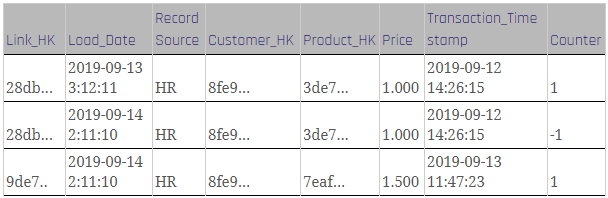
Data Vault 2.0 link with counter record

Figure 1: Link with counter records

To load the link, the following steps are required:

Firstly, insert and check as to whether a counter booking is necessary at all as the former step loads new data from the staging area into the link. Please note that the loading logic in this step is similar to that in the standard link loading process, with some differences:
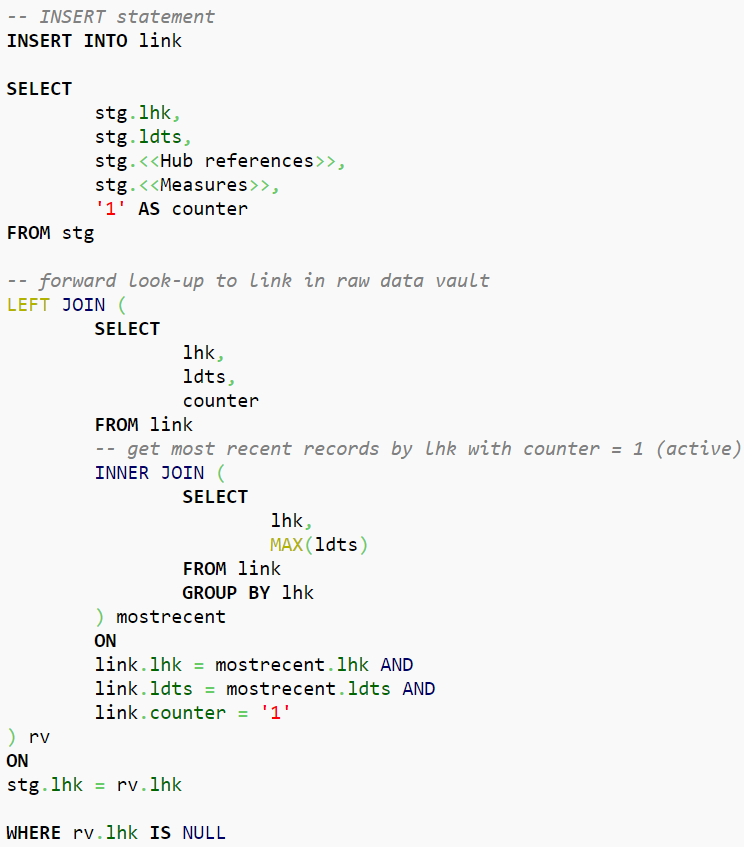
Data Vault 2.0 - Insert logic

Figure 2: Insert Logic

In Data Vault 2.0, the counter record should identify records, the most recent records by Link Hash Key, that exist in the link but don’t exist in the staging area due to deletion or changes made to the record. Thus, query results will be “countered” with a value for “counter” set to -1, which indicates that these records are not able to be found at this stage. Note that in this query we selected the existing record from the link table in the raw vault, however, further note that the record’s time of arrival should be the LDTS of the actual staging batch. Therefore, within the shown statement, the LDTS is a variable with the load date of the staging batch:
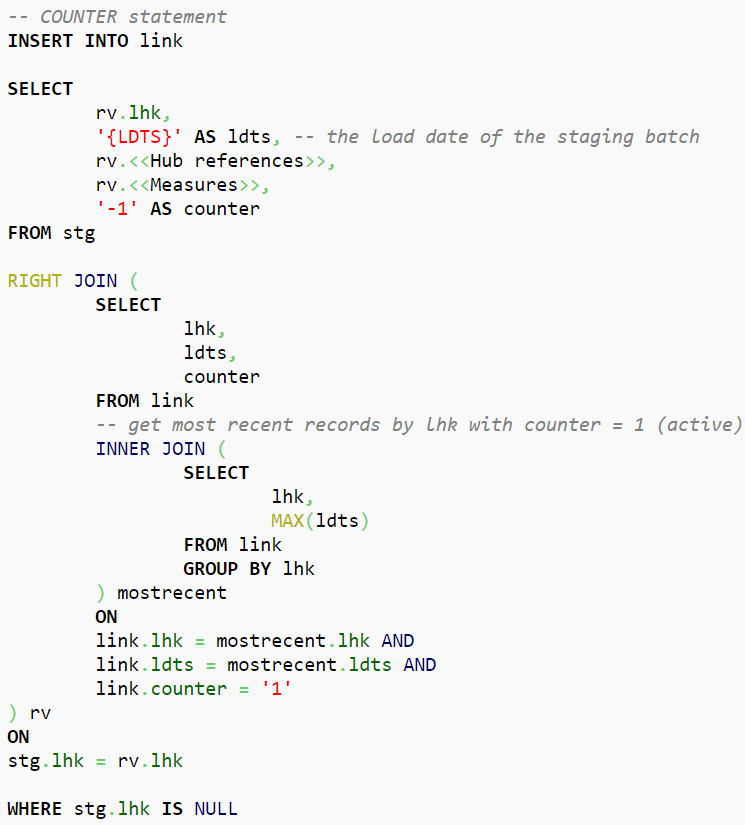
Data Vault 2.0 - Counter logic

Figure 3: Counter Logic

In instances in which it changes back to the original record, the same procedure applies: The current missing value will be countered by the new one inserted again with a new LDTS. 

Conclusion

Thus, we can conclude that this Data Vault approach works well for tables which are a hot-spot for measured values only as well as when changes are possible, although the data represents “transactions” and is to be used when CDC is not available.

Instead of a “get the most recent record per Hash Key (Driving Key)” it is possible to run calculations as well as aggregations directly on one table which results in a better performance in the end stage.

If there are still questions left, please feel free to leave a comment. We are looking forward to an exchange and your thoughts on the topic.

Scalefree Data Vault Delete and Change Handling Approaches in Data Vault 2.0 Without a Trail

Delete and Change Handling Approaches in Data Vault 2.0

In this article, we will show you how to use counter records for change or delete practices in Data Vault 2.0. In January of this year, we published a piece detailing an approach to handle deletes and business key changes of relationships in Data Vault without having an audit trail in place.
This approach is an alternative to the Driving Key structure, which is part of the Data Vault standards and a valid solution.
However, at times it may be difficult to find the business keys in a relationship which will never change and therefore be used as the anchor keys, Link Driving Key, when querying. The presented method inserts counter records for changed or deleted records, specifically for transactional data, and is a straightforward as well as pragmatic approach. However, the article caused a lot of questions, confusion and disagreements.
That being said, it is the intention of this blogpost to dive deeper into the technical implementation in which we could approve by employing it.


Technical Implementation in Data Vault 2.0

The following table shows a slightly modified target structure of the link from the previous blog post when using counter records in Data Vault 2.0.

In this case, we are focusing on transactions that have been changed by the source system without delivering any audit data about the changes as well as no counter bookings by the source itself.

It is important to note that the link stores the sales positions by referencing the customer and the product. Thus, the Link Hash Key, as well as the Load Date, are the primary keys as we are not able to gather a consistent singular record ID in this case. Being so, the Link Hash Key is calculated by the Customer Business Key, the Product Business Key, the sales price, and the transaction timestamp. 

Data Vault 2.0 link with counter record

Figure 1: Link with counter records

To load the link, the following steps are required:

Firstly, insert and check as to whether a counter booking is necessary at all as the former step loads new data from the staging area into the link. Please note that the loading logic in this step is similar to that in the standard link loading process, with some differences:

Data Vault 2.0 - Insert logic

Figure 2: Insert Logic

In Data Vault 2.0, the counter record should identify records, the most recent records by Link Hash Key, that exist in the link but don’t exist in the staging area due to deletion or changes made to the record. Thus, query results will be “countered” with a value for “counter” set to -1, which indicates that these records are not able to be found at this stage. Note that in this query we selected the existing record from the link table in the raw vault, however, further note that the record’s time of arrival should be the LDTS of the actual staging batch. Therefore, within the shown statement, the LDTS is a variable with the load date of the staging batch:

Data Vault 2.0 - Counter logic

Figure 3: Counter Logic

In instances in which it changes back to the original record, the same procedure applies: The current missing value will be countered by the new one inserted again with a new LDTS. 

Conclusion

Thus, we can conclude that this Data Vault approach works well for tables which are a hot-spot for measured values only as well as when changes are possible, although the data represents “transactions” and is to be used when CDC is not available.

Instead of a “get the most recent record per Hash Key (Driving Key)” it is possible to run calculations as well as aggregations directly on one table which results in a better performance in the end stage.

If there are still questions left, please feel free to leave a comment. We are looking forward to an exchange and your thoughts on the topic.

Leave a Reply

Close Menu