

search
0
Scalefree Data Vault Implementing Data Vault 2.0 Zero Keys

Implementing Data Vault 2.0 Zero Keys

Learn about Zero Keys, “the other” concept that is oftentimes referenced interchangeably with ghost records, which we discussed in a previous blog post.

Why implement Zero Keys?

As discussed in the previous part of this series, a ghost record is a dummy record in satellite entities containing default values. Simply put, zero keys are the entry in each hub and link entity that is a counterpart to the satellite’s ghost record containing its hash key. In this manner, the term “zero key” is oftentimes used to describe the ghost record’s hash key, which might show up in other Data Vault entities such as in Point-in-Time (PIT) tables or links. Accompanying the zero hash key is, similar to a ghost record, a default value for the business key . Or, in the case of a composite business key, multiple default values for each of its components.
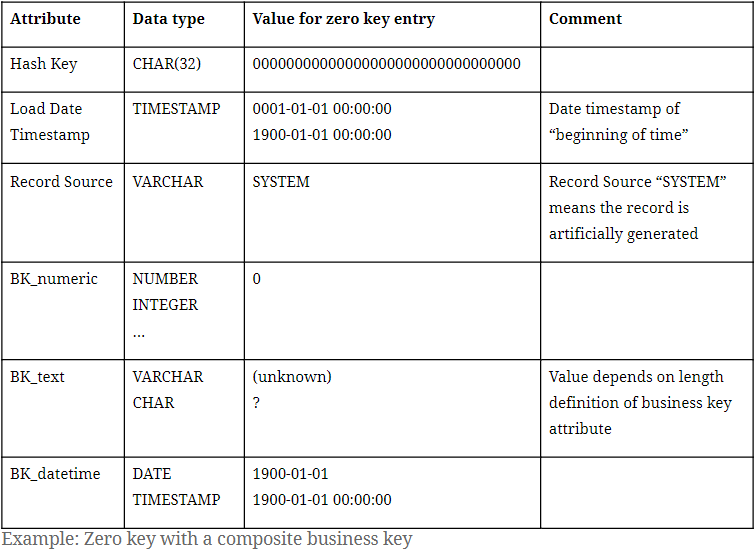
Zero Key with a composite business key

With the hub and link entry for the zero key in place, each and every entry in its related satellite will then have a parent hash key, avoiding so-called hash key orphans.

What does a Zero Key look like?

In Data Vault 2.0, it is only required to insert a single ghost record to each satellite entity. However, it is possible to have multiple zero keys in place. At Scalefree internally and in many  of our projects, we distinguish two types of missing objects through different hub zero keys.
Please note the hash algorithm in use is MD5:

  • 00000000000000000000000000000000 (32 times the digit ‘0’) for general “unknown” cases where a business key is missing.
  • ffffffffffffffffffffffffffffffff (32 times the letter ‘f’): a dedicated zero key for “erroneous” cases of missing business keys that show.
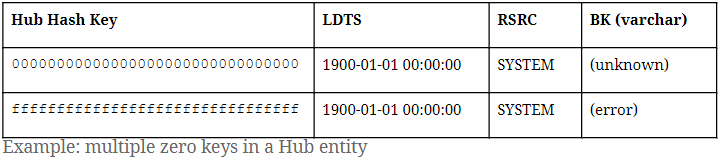
Multiple zero keys in a Hub entity

A good example that calls for the “error” zero key is in an erroneous or broken mandatory object relationship in the source. In that case, the zero key ffffffffffffffffffffffffffffffff will be found in the link entity, indicating an unexpectedly absent hub reference. Bear in mind, should you choose to implement the error zero key, it is not required to insert a ghost record with the error zero key as a parent hash key in satellite entities.

As for the zero key in link entities, it is only necessary to have one entry containing the zero hash key as both link hash key and hub reference.

Zero key in a Link entity

It is also important to point out that all examples we provide in this blog series involve the hash algorithm MD5, which outputs 32-hexadecimal-digit sequences. For Data Vault 2.0 projects that adopt other hash algorithms, such as SHA256, simply adjust the length of the zero keys we proposed (“0000…” / “ffff…”) to the desired hash output length.

Conclusion

We hope that this blog post helped to clarify the implementation of zero keys in a Data Vault 2.0 solution and the differences between the concepts of ghost records and zero keys. Feel free to share your experience with implementing these concepts in the comments below!

– by Trung Ta (Scalefree)

Scalefree Data Vault Implementing Data Vault 2.0 Zero Keys

Implementing Data Vault 2.0 Zero Keys

Learn about Zero Keys, “the other” concept that is oftentimes referenced interchangeably with ghost records, which we discussed in a previous blog post.

Why implement Zero Keys?

As discussed in the previous part of this series, a ghost record is a dummy record in satellite entities containing default values. Simply put, zero keys are the entry in each hub and link entity that is a counterpart to the satellite’s ghost record containing its hash key. In this manner, the term “zero key” is oftentimes used to describe the ghost record’s hash key, which might show up in other Data Vault entities such as in Point-in-Time (PIT) tables or links. Accompanying the zero hash key is, similar to a ghost record, a default value for the business key . Or, in the case of a composite business key, multiple default values for each of its components.

Zero Key with a composite business key

With the hub and link entry for the zero key in place, each and every entry in its related satellite will then have a parent hash key, avoiding so-called hash key orphans.

What does a Zero Key look like?

In Data Vault 2.0, it is only required to insert a single ghost record to each satellite entity. However, it is possible to have multiple zero keys in place. At Scalefree internally and in many  of our projects, we distinguish two types of missing objects through different hub zero keys.
Please note the hash algorithm in use is MD5:

  • 00000000000000000000000000000000 (32 times the digit ‘0’) for general “unknown” cases where a business key is missing.
  • ffffffffffffffffffffffffffffffff (32 times the letter ‘f’): a dedicated zero key for “erroneous” cases of missing business keys that show.
Multiple zero keys in a Hub entity

A good example that calls for the “error” zero key is in an erroneous or broken mandatory object relationship in the source. In that case, the zero key ffffffffffffffffffffffffffffffff will be found in the link entity, indicating an unexpectedly absent hub reference. Bear in mind, should you choose to implement the error zero key, it is not required to insert a ghost record with the error zero key as a parent hash key in satellite entities.

As for the zero key in link entities, it is only necessary to have one entry containing the zero hash key as both link hash key and hub reference.

Zero key in a Link entity

It is also important to point out that all examples we provide in this blog series involve the hash algorithm MD5, which outputs 32-hexadecimal-digit sequences. For Data Vault 2.0 projects that adopt other hash algorithms, such as SHA256, simply adjust the length of the zero keys we proposed (“0000…” / “ffff…”) to the desired hash output length.

The Data Vault Handbook:
Core Concepts and Modern Applications

Build Your Path to a Scalable and Resilient Data Platform

The Data Vault Handbook is an accessible introduction to Data Vault. Designed for data practitioners, this guide provides a clear and cohesive overview of Data Vault principles.

Read it for Free

Conclusion

We hope that this blog post helped to clarify the implementation of zero keys in a Data Vault 2.0 solution and the differences between the concepts of ghost records and zero keys. Feel free to share your experience with implementing these concepts in the comments below!

– by Trung Ta (Scalefree)

Leave a Reply

Close Menu