search
0
Category

Data Modeling

Flow.BI: Generating the Raw Data Vault Using AI and dbt

Flow.Bi architecture Data Warehouse

Raw Data Vault

This question might be as old as the Data Vault: Can it generate the Raw Data Vault using artificial intelligence (AI)? Until recently, the prevailing expectation in the industry was that an AI, if ever existing, might only be able to assist the data modeler, for example, by identifying and suggesting business keys or modeling parts of the model.

The question arises out of need: in the past, data volume and shape have risen exponentially. And there is no sign that it should flatten out in the future. But who should analyze all the data required for today’s data platforms? We already have a shortage of qualified data engineers. And this situation will only become worse in the future because university students don’t rise exponentially.

Generating the Raw Data Vault Using Flow.BI and dbt

We present the integration between datavault4dbt and Flow.BI which is used to generate the Raw Data Vault. Flow.BI is an artificial intelligence capable of defining all the hubs, links, and satellites for enterprise data. This includes determining the business keys and special entity types such as effectivity satellites, hierarchical links, multi-active satellites, non-historized links, and reference tables. The work-sharing is simple: the advanced AI of Flow.BI defines the Raw Data Vault with all required entities, and datavault4dbt generates the code, including CREATE TABLE and INSERT INTO statements for both the model and the Raw Data Vault loading procedures.

Watch Webinar Recording

Exceeding Expectations with Generative AI

With the release of Flow.BI, the expectation that only an assisting AI is possible has been exceeded. Flow.BI is a generative AI that fully “defines” the Raw Data Vault, including:

  • Hubs and their business keys
  • Links, including hierarchical links
  • Satellites, including the satellite splits for privacy, security and rate-of-change
  • Non-historized links and their satellites
  • Effectivity satellites and multi-active satellites
  • Reference hubs and their satellites

Model Structure and Load Definitions

In addition to the model structure, the advanced AI of Flow.BI also defines the load definitions, that is, the definition from where a hub’s business key or satellite’s attribute is loaded. This is later used to generate the INSERT INTO statements.

Because it is all done by the AI, it works at scale and can quickly generate Raw Data Vault models with thousands of entities.
Simplified Modeling with Flow.BI

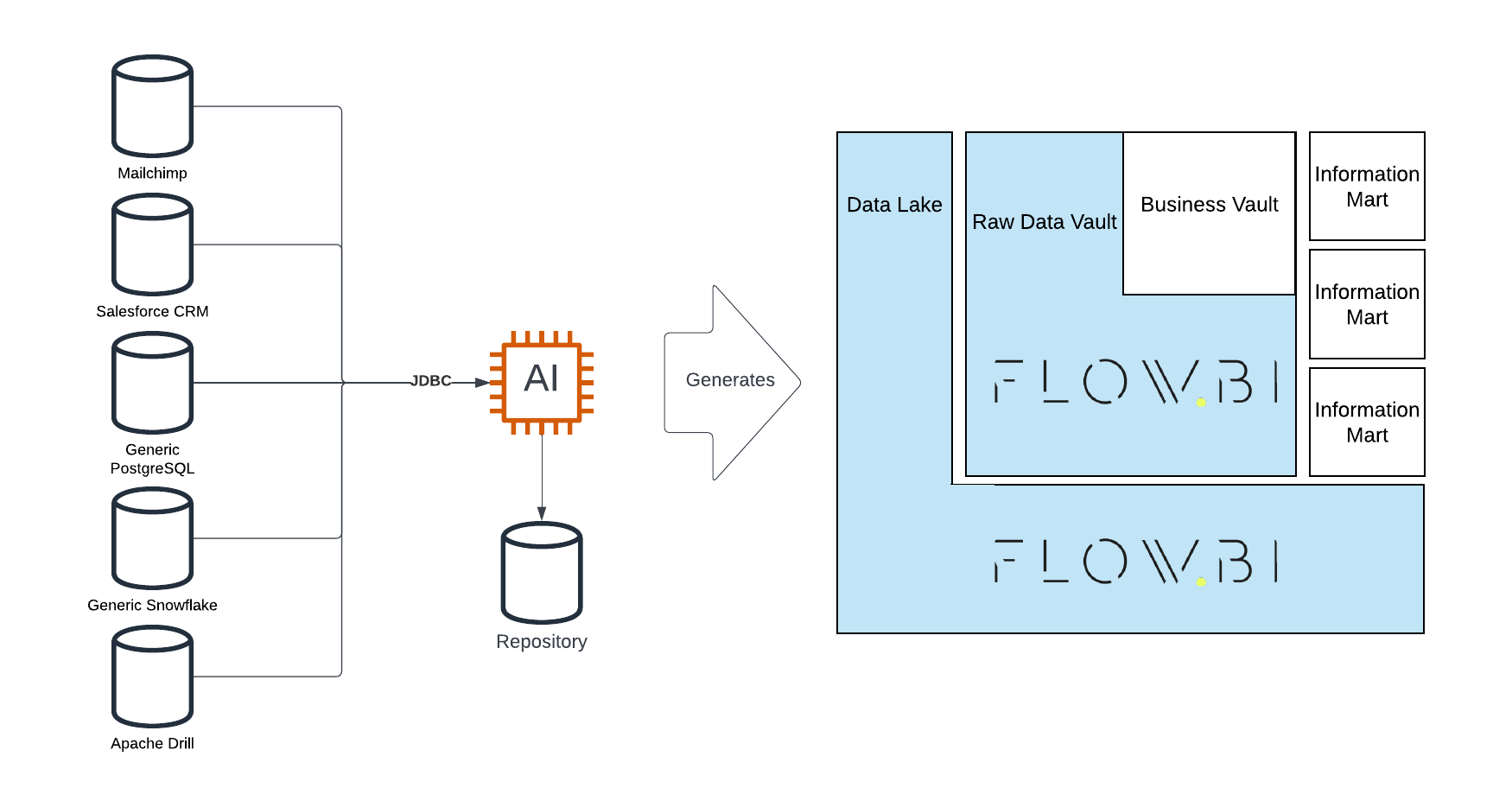
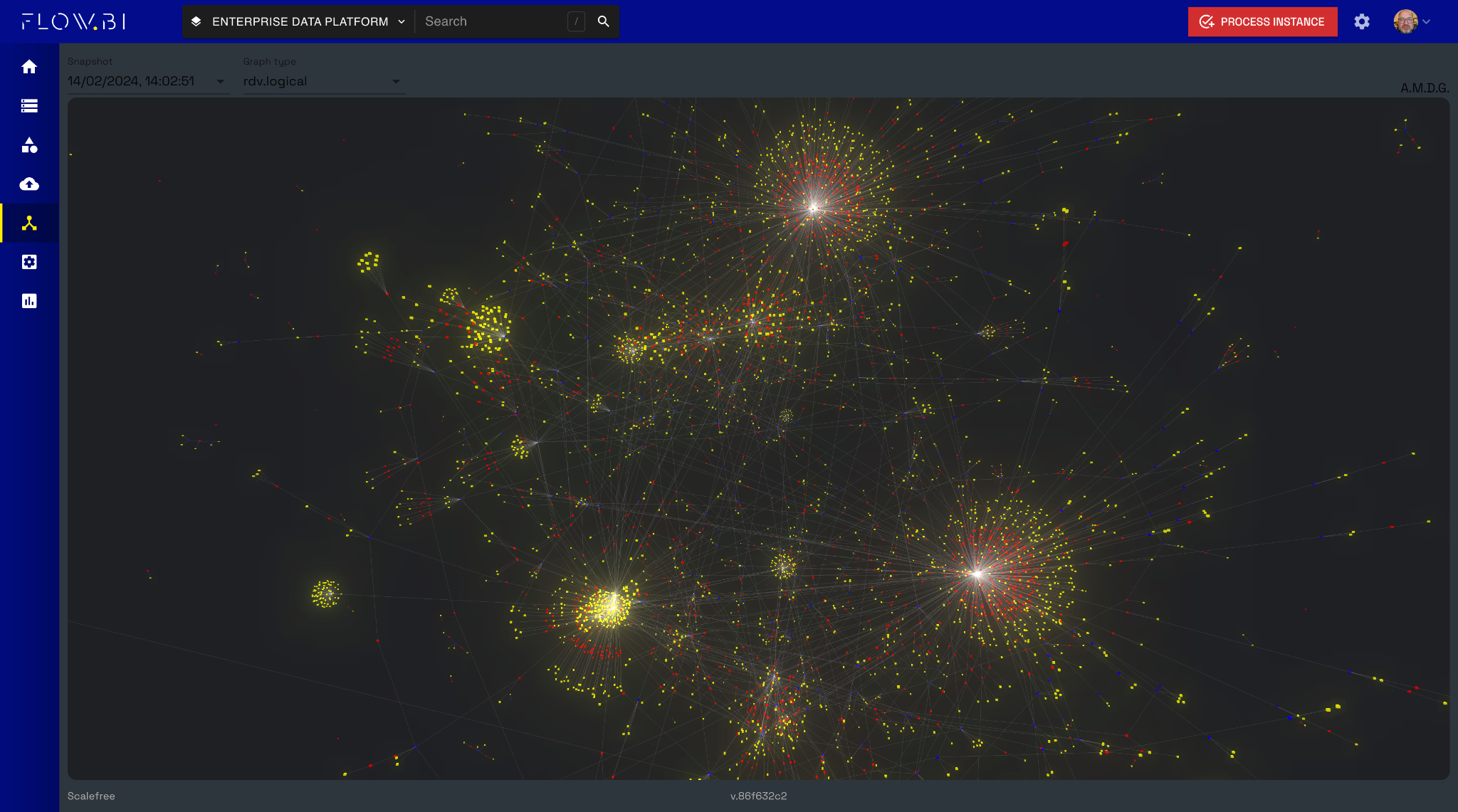
Flow.BI drastically simplifies the modeling approach: all the user has to do is attach data sources to Flow.BI for analysis and profiling, hit the red button and Flow.BI defines at least a valid model. To achieve this, the solution identifies the concepts in the entities of the data sources first and then the business keys for those concepts. Next, it identifies the relationships and processes the descriptive data attributes into satellites. For the last finishing, the integrated natural language generator adds the entities’ documentation, attributes, and load definitions.

Users can improve the target model by adjusting the identified concepts and the rules for privacy, security, and satellite splits. 

A Data-Driven Approach

The model defined by Flow.BI follows a data-driven approach and, therefore, aligns with the teaching of Scalefree’s Data Vault training

In a data-driven approach, the Data Vault model is “modeling the raw data as the business uses it.” That means the focus is clearly on the raw data, but business keys (“as the business is using it”) integrate data across multiple data sources. 

The idea behind this is that business keys are often shared keys that exist in multiple source systems and can, therefore, be used for integration purposes. 

Raw Data Vault vs. Business Logic

Business logic, such as WHERE conditions or conditional logic, has no place in a data-driven Raw Data Vault. The Business Vault aims to extend the Raw Data Vault by business logic. 

Therefore, the defined model doesn’t contain any business logic, which must be added later in the Business Vault. However, the Raw Data Vault model is an integrated enterprise data model that spans all attached data sources.

Metadata for Advanced Data Warehousing

The metadata produced by Flow.BI can be used not only for generating the Raw Data Vault but also for the staging area, either on a relational database or a data lake. 

Flow.BI doesn’t generate the Raw Data Vault alone but defines it. That means it only indicates which hubs, links, and satellites should exist to capture the data from the source systems. But it doesn’t generate the CREATE TABLE and INSERT INTO statements for the physical model. Instead, it relies on tools such as dbt via the datavault4dbt package to generate the code. Flow.BI hands over the metadata of the defined model, and datavault4dbt generates the actual code. 

With this in mind, Flow.BI is a teammate who analyzes and profiles the data sources, knows how to model the Raw Data Vault, and ingests the metadata into dbt’s SQL models.

User Control Over AI Modeling

Flow.BI is imitating the human data modeler. 

But does this mean that the user has lost control over the AI? No. There are many options to influence Flow.BI’s AI to produce a “better” target model. But first, what “better” means should be defined: fewer entities in the target model? Faster queries? Faster loading? Depending on the goals, Flow.BI can be influenced, for example, by the concept classification and how source data is presented to Flow.BI.

Integration with Data Warehouse Automation

Once the metadata for the Raw Data Vault has been defined, it is handed over to the data warehouse automation (DWA) solution. There are many solutions available, but a popular option is dbt. Scalefree has developed the open-source dbt package datavault4dbt, which enjoys growing popularity in the industry. 

To generate SQL models for the dbt package, the integration between Flow.BI and datavault4dbt leverages TurboVault, another open-source package by Scalefree. TurboVault is a graphical user interface that sets up the metadata for a Raw Data Vault to be generated with datavault4dbt.

Once the metadata for the Raw Data Vault has been defined, it is handed over to the data warehouse automation (DWA) solution. There are many solutions available, but a popular option is dbt. Scalefree has developed the open-source dbt package datavault4dbt, which enjoys growing popularity in the industry. 

To generate SQL models for the dbt package, the integration between Flow.BI and datavault4dbt leverages TurboVault, another open-source package by Scalefree. TurboVault is a graphical user interface that sets up the metadata for a Raw Data Vault to be generated with datavault4dbt.

The best option was to ingest Flow.BI’s metadata into TurboVault to leverage its capabilities. Once Flow.BI’s metadata has been loaded into TurboVault, TurboVault generates the SQL models for datavault4dbt, which, in turn, generates the Data Vault entities and the loading procedures.

To facilitate the integration between Flow.BI and TurboVault, Scalefree has now released a dedicated Flow.BI connector that retrieves and transforms the logical data models from Flow.BI and enables the automated generation of your Data Vault.

Value Proposition of Flow.BI

Flow.BI offers many values: first, the price. Defining the model using AI is much more cost-effective than manually setting up the metadata for datavault4dbt. Another problem is that Data Vault experts are a scarce resource and not widely available, especially when quality is an essential factor, which always should be the case when dealing with enterprise data.

Another value of Flow.BI is the agility: instead of defining the Raw Data Vault in months and years, Flow.BI’s advanced AI calculates the Raw Data Vault model within minutes and hours.

This also reduces the project risk: what if the Data Vault experts produce a low-quality (or even invalid) model after years of working and millions of Euros spent? Having another attempt at modeling is often unrealistic.

But with Flow.BI, results are close to immediate; if they are unsatisfactory, the manual alternative is still available.

Therefore, the best option to get started is to contact us for a proof of concept or workshop on Flow.BI.

– Michael Olschimke
Flow.BI: Generating the Raw Data Vault Using AI and dbt

Flow.Bi architecture Data Warehouse

Raw Data Vault

This question might be as old as the Data Vault: Can it generate the Raw Data Vault using artificial intelligence (AI)? Until recently, the prevailing expectation in the industry was that an AI, if ever existing, might only be able to assist the data modeler, for example, by identifying and suggesting business keys or modeling parts of the model.

The question arises out of need: in the past, data volume and shape have risen exponentially. And there is no sign that it should flatten out in the future. But who should analyze all the data required for today’s data platforms? We already have a shortage of qualified data engineers. And this situation will only become worse in the future because university students don’t rise exponentially.

Generating the Raw Data Vault Using Flow.BI and dbt

We present the integration between datavault4dbt and Flow.BI which is used to generate the Raw Data Vault. Flow.BI is an artificial intelligence capable of defining all the hubs, links, and satellites for enterprise data. This includes determining the business keys and special entity types such as effectivity satellites, hierarchical links, multi-active satellites, non-historized links, and reference tables. The work-sharing is simple: the advanced AI of Flow.BI defines the Raw Data Vault with all required entities, and datavault4dbt generates the code, including CREATE TABLE and INSERT INTO statements for both the model and the Raw Data Vault loading procedures.

Watch Webinar Recording

Exceeding Expectations with Generative AI

With the release of Flow.BI, the expectation that only an assisting AI is possible has been exceeded. Flow.BI is a generative AI that fully “defines” the Raw Data Vault, including:

  • Hubs and their business keys
  • Links, including hierarchical links
  • Satellites, including the satellite splits for privacy, security and rate-of-change
  • Non-historized links and their satellites
  • Effectivity satellites and multi-active satellites
  • Reference hubs and their satellites

Model Structure and Load Definitions

In addition to the model structure, the advanced AI of Flow.BI also defines the load definitions, that is, the definition from where a hub’s business key or satellite’s attribute is loaded. This is later used to generate the INSERT INTO statements.

Because it is all done by the AI, it works at scale and can quickly generate Raw Data Vault models with thousands of entities.

Simplified Modeling with Flow.BI

Flow.BI drastically simplifies the modeling approach: all the user has to do is attach data sources to Flow.BI for analysis and profiling, hit the red button and Flow.BI defines at least a valid model. To achieve this, the solution identifies the concepts in the entities of the data sources first and then the business keys for those concepts. Next, it identifies the relationships and processes the descriptive data attributes into satellites. For the last finishing, the integrated natural language generator adds the entities’ documentation, attributes, and load definitions.

Users can improve the target model by adjusting the identified concepts and the rules for privacy, security, and satellite splits. 

A Data-Driven Approach

The model defined by Flow.BI follows a data-driven approach and, therefore, aligns with the teaching of Scalefree’s Data Vault training

In a data-driven approach, the Data Vault model is “modeling the raw data as the business uses it.” That means the focus is clearly on the raw data, but business keys (“as the business is using it”) integrate data across multiple data sources. 

The idea behind this is that business keys are often shared keys that exist in multiple source systems and can, therefore, be used for integration purposes. 

Raw Data Vault vs. Business Logic

Business logic, such as WHERE conditions or conditional logic, has no place in a data-driven Raw Data Vault. The Business Vault aims to extend the Raw Data Vault by business logic. 

Therefore, the defined model doesn’t contain any business logic, which must be added later in the Business Vault. However, the Raw Data Vault model is an integrated enterprise data model that spans all attached data sources.

Metadata for Advanced Data Warehousing

The metadata produced by Flow.BI can be used not only for generating the Raw Data Vault but also for the staging area, either on a relational database or a data lake. 

Flow.BI doesn’t generate the Raw Data Vault alone but defines it. That means it only indicates which hubs, links, and satellites should exist to capture the data from the source systems. But it doesn’t generate the CREATE TABLE and INSERT INTO statements for the physical model. Instead, it relies on tools such as dbt via the datavault4dbt package to generate the code. Flow.BI hands over the metadata of the defined model, and datavault4dbt generates the actual code. 

With this in mind, Flow.BI is a teammate who analyzes and profiles the data sources, knows how to model the Raw Data Vault, and ingests the metadata into dbt’s SQL models.

User Control Over AI Modeling

Flow.BI is imitating the human data modeler. 

But does this mean that the user has lost control over the AI? No. There are many options to influence Flow.BI’s AI to produce a “better” target model. But first, what “better” means should be defined: fewer entities in the target model? Faster queries? Faster loading? Depending on the goals, Flow.BI can be influenced, for example, by the concept classification and how source data is presented to Flow.BI.

Integration with Data Warehouse Automation

Once the metadata for the Raw Data Vault has been defined, it is handed over to the data warehouse automation (DWA) solution. There are many solutions available, but a popular option is dbt. Scalefree has developed the open-source dbt package datavault4dbt, which enjoys growing popularity in the industry. 

To generate SQL models for the dbt package, the integration between Flow.BI and datavault4dbt leverages TurboVault, another open-source package by Scalefree. TurboVault is a graphical user interface that sets up the metadata for a Raw Data Vault to be generated with datavault4dbt.

Once the metadata for the Raw Data Vault has been defined, it is handed over to the data warehouse automation (DWA) solution. There are many solutions available, but a popular option is dbt. Scalefree has developed the open-source dbt package datavault4dbt, which enjoys growing popularity in the industry. 

To generate SQL models for the dbt package, the integration between Flow.BI and datavault4dbt leverages TurboVault, another open-source package by Scalefree. TurboVault is a graphical user interface that sets up the metadata for a Raw Data Vault to be generated with datavault4dbt.

The best option was to ingest Flow.BI’s metadata into TurboVault to leverage its capabilities. Once Flow.BI’s metadata has been loaded into TurboVault, TurboVault generates the SQL models for datavault4dbt, which, in turn, generates the Data Vault entities and the loading procedures.

To facilitate the integration between Flow.BI and TurboVault, Scalefree has now released a dedicated Flow.BI connector that retrieves and transforms the logical data models from Flow.BI and enables the automated generation of your Data Vault.

Value Proposition of Flow.BI

Flow.BI offers many values: first, the price. Defining the model using AI is much more cost-effective than manually setting up the metadata for datavault4dbt. Another problem is that Data Vault experts are a scarce resource and not widely available, especially when quality is an essential factor, which always should be the case when dealing with enterprise data.

Another value of Flow.BI is the agility: instead of defining the Raw Data Vault in months and years, Flow.BI’s advanced AI calculates the Raw Data Vault model within minutes and hours.

This also reduces the project risk: what if the Data Vault experts produce a low-quality (or even invalid) model after years of working and millions of Euros spent? Having another attempt at modeling is often unrealistic.

But with Flow.BI, results are close to immediate; if they are unsatisfactory, the manual alternative is still available.

Therefore, the best option to get started is to contact us for a proof of concept or workshop on Flow.BI.

– Michael Olschimke

AI Act Insight: Ensuring Responsible AI for Your Business

AI Act Business Intelligence Architecture graphic

AI Act

The Artificial Intelligence (AI) Act has been in force since August 1, 2024 and will gradually come into effect over time. As a new legal milestone, the AI Act brings with it requirements for the use of artificial intelligence in companies in order to promote the responsible development and use of artificial intelligence in the EU. But instead of seeing only hurdles in the risk-based approach of the AI-Act, it also opens up a wide range of opportunities for a future-oriented AI strategy for companies.

In our newsletter, we take a first glance at the new legal framework and its significance for your company. We also show how companies can use legal compliance strategically to gain a competitive edge and promote innovative business models.

AI Act Insight: Ensuring Responsible AI for Your Business

The EU’s AI Act is here! Learn how this groundbreaking regulation impacts your business. We’ll break down the risk-based approach to AI systems, focusing on high-risk applications and compliance requirements. Discover practical steps to ensure transparency and leverage tools like AI-Marts for effective AI governance.

Watch Webinar Recording

What is the AI Act and Why Should You Care?

The AI Act aims to make the use of artificial intelligence within the EU safer and more trustworthy by creating clear rules for the development and use of AI systems. The focus here is on the protection of fundamental rights, health, and safety. The legal framework is based on a risk-based approach: AI applications are divided into four different categories, from minimal to unacceptable risks, depending on the potential threat to society. Specifically, the AI Act provides for the following categories:

  1. Unacceptable Risk: AI systems that pose a threat to human rights or safety, such as those used for social scoring or manipulative practices, are prohibited.
  2. High Risk: These systems are heavily regulated and include applications in critical areas such as biometric identification, healthcare, transportation, education, and employment. Businesses using high-risk AI must meet strict compliance standards.
  3. Limited Risk: These systems face fewer restrictions but must still adhere to transparency requirements. For example, chatbots need to inform users that they are interacting with AI.
  4. Minimal or No Risk: The least regulated category includes AI applications such as spam filters or AI-driven video games.

The AI Act is of great importance for companies, as the new requirements not only entail compliance obligations, but also open up opportunities to gain competitive advantages.

By adapting to the legal requirements at an early stage, companies can strengthen trust among customers and partners, minimize risks, and promote innovation responsibly. A sound understanding of regulation enables them to make strategic use of the legal framework and position themselves better in international comparison.

Hence, for businesses operating in or with the EU, compliance with the AI Act will be a decisive factor. Failure to comply could result in significant penalties—up to 7% of the global annual turnover or €35 million, whichever is higher.

As the legislation moves gradually forward, it is recommended that companies, as a first step, review their AI tools and analyze how these systems are classified and regulated under the new framework to implement the necessary obligations.

Comply With the AI Act Today!

Preparing for the AI Act requires a proactive and comprehensive approach. Ensure compliance, mitigate risks, and foster trust in your AI applications.

Get My Free Checklist

From a Data Warehousing perspective: How can an AI-Mart help?

As businesses prepare to comply with the European Union’s AI Act, ensuring that their data and AI systems meet the new regulations is critical. Central to this is the concept of data governance and traceability, especially for AI models classified as high-risk. A modern data warehouse (DWH), particularly one powered by Data Vault 2.0, when combined with a specialized AI-Mart, can provide the technical foundation needed for compliance by managing the data lifecycle, ensuring transparent operations, and logging AI model activities. Data Vault 2.0 offers several advantages for this purpose, including its ability to support agile development, enabling rapid changes in business requirements; ensuring scalability, allowing businesses to handle increasing data volumes seamlessly; and providing strong historical tracking through its architecture, which facilitates easier auditing and compliance verification.

In the context of AI, the AI-Mart is a specialized data mart within a DWH, focused solely on managing AI training data. Its purpose is to provide a structured and compliant environment for storing and curating datasets that will be used to train, validate, and test AI models. Unlike a traditional data mart, the AI-Mart is designed with features tailored for AI, such as enhanced metadata, tracking, and model training documentation.

Key Features of an AI-Mart

  1. Data Curation for AI Training: The AI-Mart stores data specifically curated for training AI models, ensuring that all datasets are clean, unbiased, and high-quality. Built-in data governance rules ensure that only validated data enters the mart. This ensures compliance with the AI Act’s requirements for high-risk AI systems, where data must be trustworthy, accurate, and free of bias.
  2. Metadata and Documentation: The AI-Mart stores metadata about each dataset, including its source, transformations applied, and its use in specific AI models. This metadata is essential for traceability, ensuring that every data point used in an AI model can be traced back to its origin and all changes can be documented.
  3. Data Versioning and Lineage: In AI applications, ensuring that models use up-to-date and reliable data is critical. The AI-Mart supports data versioning, allowing teams to maintain multiple versions of datasets and trace changes over time. Data lineage tracking ensures that the lifecycle of the data—from ingestion to usage in AI models—can be fully traced, providing a comprehensive audit trail required for compliance with the AI Act.

This is why a robust data governance framework is crucial for ensuring compliance with the AI Act. By integrating a data warehouse (DWH) with an AI-Mart, businesses can implement stringent governance measures that ensure the quality and reliability of AI training data. For example, automated validation pipelines within the DWH verify that only data meeting predefined quality standards is used, minimizing errors, biases, and missing information. This is particularly important for high-risk AI applications, such as those in biometric identification or healthcare, where poor data quality could lead to harmful or inaccurate outcomes.

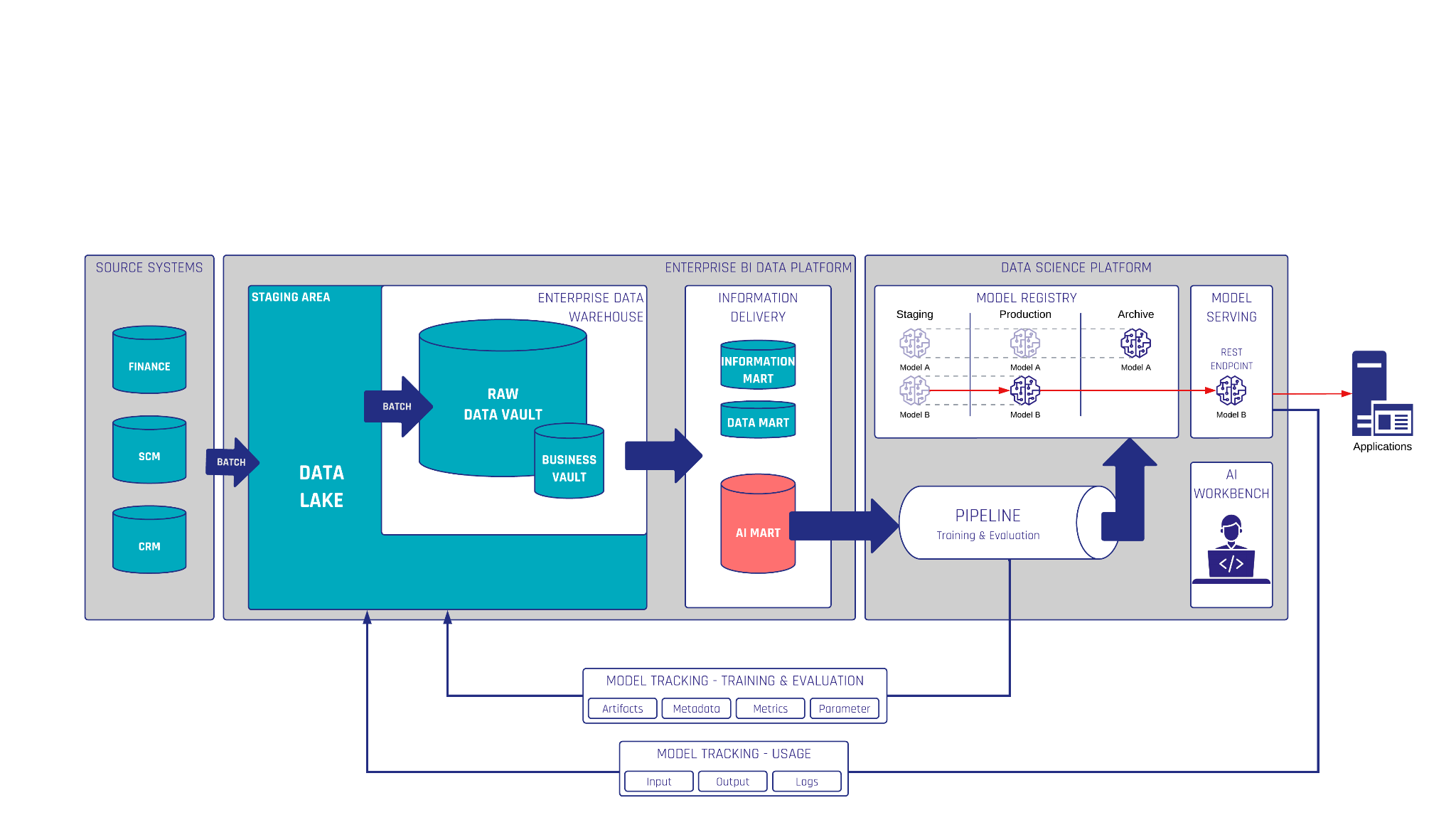
To comply with the AI Act, businesses must ensure traceability in their AI systems by tracking and documenting key stages of the AI process, from data preparation to model usage. Integrating AI model logs into a data warehouse (DWH) plays a crucial role in this, providing a centralized system to monitor and store critical information about how AI models operate and interact with data.

AI Act Business Intelligence Architecture graphic

Logging AI Decisions and Outputs: Each time an AI model processes data, logs should be automatically generated and stored in the DWH. These logs capture essential details, including input data, feature transformations, model parameters, decision thresholds, and output probabilities. By loading these logs into the DWH, businesses create a detailed audit trail of AI activity, ensuring that key aspects of the model’s operations are documented.

Log Aggregation and Storage: Logs from AI models, whether during training or production, can be continuously fed into the DWH as part of the AI-Mart infrastructure. These logs may include:

  • Model training logs: Documenting how the model was trained, the datasets used, and the parameters adjusted during training.
  • Model inference logs: Recording the input data, features generated, and each prediction made by the model.
  • Performance metrics: Storing evaluations like accuracy, precision, and recall, which help track the model’s performance over time and detect any model drift.

By storing these logs in the DWH, businesses can establish detailed records of AI model operations for regulatory purposes.

Querying and Auditing Logs: The DWH’s querying tools allow compliance teams to generate reports that show how models operate, what data was used, and how the AI model has evolved. This simplifies the process of responding to regulatory audits and demonstrates adherence to the AI Act’s requirements.

By combining a DWH with an AI-Mart for AI training data and loading AI model logs into the same infrastructure, businesses can build a comprehensive framework for compliance with the AI Act. This approach supports data governance, ensuring high-quality data for AI models, and ensures traceability, allowing businesses to track and audit every aspect of their AI systems. This not only meets regulatory requirements but also fosters trust and accountability in the use of AI technology.

Upcoming Resources and Events

For more information, contact our team at [email protected].

Final Remarks from the Authors

The AI Act should not only be seen as a regulatory challenge but also as an opportunity for businesses to differentiate themselves by adopting trustworthy and ethical AI practices. As AI continues to evolve, businesses that prioritize compliance, transparency, and human oversight will be better positioned to thrive in the coming years. By taking proactive steps now to ensure compliance, businesses can turn AI regulation into a strategic advantage, building trust with customers, partners, and regulators alike.


– Ulf Mattern (Scalefree) & Dr. Céline Helmschrot (GÖHMANN Rechtsanwälte)

AI Act Insight: Ensuring Responsible AI for Your Business

AI Act Business Intelligence Architecture graphic

AI Act

The Artificial Intelligence (AI) Act has been in force since August 1, 2024 and will gradually come into effect over time. As a new legal milestone, the AI Act brings with it requirements for the use of artificial intelligence in companies in order to promote the responsible development and use of artificial intelligence in the EU. But instead of seeing only hurdles in the risk-based approach of the AI-Act, it also opens up a wide range of opportunities for a future-oriented AI strategy for companies.

In our newsletter, we take a first glance at the new legal framework and its significance for your company. We also show how companies can use legal compliance strategically to gain a competitive edge and promote innovative business models.

AI Act Insight: Ensuring Responsible AI for Your Business

The EU’s AI Act is here! Learn how this groundbreaking regulation impacts your business. We’ll break down the risk-based approach to AI systems, focusing on high-risk applications and compliance requirements. Discover practical steps to ensure transparency and leverage tools like AI-Marts for effective AI governance.

Watch Webinar Recording

What is the AI Act and Why Should You Care?

The AI Act aims to make the use of artificial intelligence within the EU safer and more trustworthy by creating clear rules for the development and use of AI systems. The focus here is on the protection of fundamental rights, health, and safety. The legal framework is based on a risk-based approach: AI applications are divided into four different categories, from minimal to unacceptable risks, depending on the potential threat to society. Specifically, the AI Act provides for the following categories:

  1. Unacceptable Risk: AI systems that pose a threat to human rights or safety, such as those used for social scoring or manipulative practices, are prohibited.
  2. High Risk: These systems are heavily regulated and include applications in critical areas such as biometric identification, healthcare, transportation, education, and employment. Businesses using high-risk AI must meet strict compliance standards.
  3. Limited Risk: These systems face fewer restrictions but must still adhere to transparency requirements. For example, chatbots need to inform users that they are interacting with AI.
  4. Minimal or No Risk: The least regulated category includes AI applications such as spam filters or AI-driven video games.

The AI Act is of great importance for companies, as the new requirements not only entail compliance obligations, but also open up opportunities to gain competitive advantages.

By adapting to the legal requirements at an early stage, companies can strengthen trust among customers and partners, minimize risks, and promote innovation responsibly. A sound understanding of regulation enables them to make strategic use of the legal framework and position themselves better in international comparison.

Hence, for businesses operating in or with the EU, compliance with the AI Act will be a decisive factor. Failure to comply could result in significant penalties—up to 7% of the global annual turnover or €35 million, whichever is higher.

As the legislation moves gradually forward, it is recommended that companies, as a first step, review their AI tools and analyze how these systems are classified and regulated under the new framework to implement the necessary obligations.

Comply With the AI Act Today!

Preparing for the AI Act requires a proactive and comprehensive approach. Ensure compliance, mitigate risks, and foster trust in your AI applications.

Get My Free Checklist

From a Data Warehousing perspective: How can an AI-Mart help?

As businesses prepare to comply with the European Union’s AI Act, ensuring that their data and AI systems meet the new regulations is critical. Central to this is the concept of data governance and traceability, especially for AI models classified as high-risk. A modern data warehouse (DWH), particularly one powered by Data Vault 2.0, when combined with a specialized AI-Mart, can provide the technical foundation needed for compliance by managing the data lifecycle, ensuring transparent operations, and logging AI model activities. Data Vault 2.0 offers several advantages for this purpose, including its ability to support agile development, enabling rapid changes in business requirements; ensuring scalability, allowing businesses to handle increasing data volumes seamlessly; and providing strong historical tracking through its architecture, which facilitates easier auditing and compliance verification.

In the context of AI, the AI-Mart is a specialized data mart within a DWH, focused solely on managing AI training data. Its purpose is to provide a structured and compliant environment for storing and curating datasets that will be used to train, validate, and test AI models. Unlike a traditional data mart, the AI-Mart is designed with features tailored for AI, such as enhanced metadata, tracking, and model training documentation.

Key Features of an AI-Mart

  1. Data Curation for AI Training: The AI-Mart stores data specifically curated for training AI models, ensuring that all datasets are clean, unbiased, and high-quality. Built-in data governance rules ensure that only validated data enters the mart. This ensures compliance with the AI Act’s requirements for high-risk AI systems, where data must be trustworthy, accurate, and free of bias.
  2. Metadata and Documentation: The AI-Mart stores metadata about each dataset, including its source, transformations applied, and its use in specific AI models. This metadata is essential for traceability, ensuring that every data point used in an AI model can be traced back to its origin and all changes can be documented.
  3. Data Versioning and Lineage: In AI applications, ensuring that models use up-to-date and reliable data is critical. The AI-Mart supports data versioning, allowing teams to maintain multiple versions of datasets and trace changes over time. Data lineage tracking ensures that the lifecycle of the data—from ingestion to usage in AI models—can be fully traced, providing a comprehensive audit trail required for compliance with the AI Act.

This is why a robust data governance framework is crucial for ensuring compliance with the AI Act. By integrating a data warehouse (DWH) with an AI-Mart, businesses can implement stringent governance measures that ensure the quality and reliability of AI training data. For example, automated validation pipelines within the DWH verify that only data meeting predefined quality standards is used, minimizing errors, biases, and missing information. This is particularly important for high-risk AI applications, such as those in biometric identification or healthcare, where poor data quality could lead to harmful or inaccurate outcomes.

To comply with the AI Act, businesses must ensure traceability in their AI systems by tracking and documenting key stages of the AI process, from data preparation to model usage. Integrating AI model logs into a data warehouse (DWH) plays a crucial role in this, providing a centralized system to monitor and store critical information about how AI models operate and interact with data.

AI Act Business Intelligence Architecture graphic

Logging AI Decisions and Outputs: Each time an AI model processes data, logs should be automatically generated and stored in the DWH. These logs capture essential details, including input data, feature transformations, model parameters, decision thresholds, and output probabilities. By loading these logs into the DWH, businesses create a detailed audit trail of AI activity, ensuring that key aspects of the model’s operations are documented.

Log Aggregation and Storage: Logs from AI models, whether during training or production, can be continuously fed into the DWH as part of the AI-Mart infrastructure. These logs may include:

  • Model training logs: Documenting how the model was trained, the datasets used, and the parameters adjusted during training.
  • Model inference logs: Recording the input data, features generated, and each prediction made by the model.
  • Performance metrics: Storing evaluations like accuracy, precision, and recall, which help track the model’s performance over time and detect any model drift.

By storing these logs in the DWH, businesses can establish detailed records of AI model operations for regulatory purposes.

Querying and Auditing Logs: The DWH’s querying tools allow compliance teams to generate reports that show how models operate, what data was used, and how the AI model has evolved. This simplifies the process of responding to regulatory audits and demonstrates adherence to the AI Act’s requirements.

By combining a DWH with an AI-Mart for AI training data and loading AI model logs into the same infrastructure, businesses can build a comprehensive framework for compliance with the AI Act. This approach supports data governance, ensuring high-quality data for AI models, and ensures traceability, allowing businesses to track and audit every aspect of their AI systems. This not only meets regulatory requirements but also fosters trust and accountability in the use of AI technology.

Upcoming Resources and Events

For more information, contact our team at [email protected].

Final Remarks from the Authors

The AI Act should not only be seen as a regulatory challenge but also as an opportunity for businesses to differentiate themselves by adopting trustworthy and ethical AI practices. As AI continues to evolve, businesses that prioritize compliance, transparency, and human oversight will be better positioned to thrive in the coming years. By taking proactive steps now to ensure compliance, businesses can turn AI regulation into a strategic advantage, building trust with customers, partners, and regulators alike.


– Ulf Mattern (Scalefree) & Dr. Céline Helmschrot (GÖHMANN Rechtsanwälte)

Satellite Modeling for Any Structural Changes in the Source System

Modeling a Satellite in the instance of any structural changes within the source system

Over time, a source system can change. The question is how to absorb these changes into a Data Vault 2.0 data warehouse, especially when considering the satellites?

It is necessary to find a balance between the reengineering effort and performance when the source table structure changes. To better help those who find structural changes in the source system, this article will present our recommendations, based on our knowledge base,  for various types of changes in a source.

This article describes features embodied in the Data Vault 2.0 model: the foundation of a hub, link, and satellite entities can adjust to changes in the source data easily, thus reducing the cost of reengineering the enterprise data warehouse

New columns in the source system: when any new columns or attributes are added to the source

There are two options for absorbing new attributes from the source into the data warehouse. First, the existing satellite could be modified.
This is a pragmatic approach but requires the modification of existing code.
On the other hand, it is also possible to create a new satellite for the new attribute, or attributes, without modifying the existing satellites. This has the advantage of a zero code impact but requires more joins in an Information Delivery part of the Data Vault.

The first option does not require this join as the new attribute is added to the existing satellite. The best approach is to compare the advantages and disadvantages of both options in the specific situation as it applies to your situation. Automation tools for example usually can handle the alter table statement automatically without manual coding effort but require changes be made in the database.

Removing columns in the source system from source column deletion 

One option is to close the “old” Satellite, i.e. not load it further, as the ETL code is turned off, and create a new satellite which should be loaded. The same approach is used when the underlying data structures from the source are modified in a larger perspective.
Old satellites are turned off, new satellites with the new structure are then loaded.
Another option would be more meaningful if there are only minor changes needed such as the removal of one column. Then “simulating” this column with a NULL value or a value which adds meaning and makes more sense would be more helpful for auditing purposes.

If a new Satellite is created, the end result will be two new columns in the related PIT table (Hash Key + LDTS). 

Closing a satellite and creating a new one is also applicable if there are major changes in the source system, for example a new release version of the source system where columns are deleted, renamed and created. In the instance of small changes, especially when columns disappear, we recommend altering the satellite.

Creating a Virtual Dimension table from a PIT table having multiple satellites

When a new satellite for the new attribute, or attributes, is created by not modifying the existing satellite, a new virtual dimension is required to fetch information from PIT tables using both the satellites accordingly based on the required timestamp.
There are two approaches on how the information can be drawn using both the satellites:

  • The first approach uses a computed Satellite, in which you combine all satellites with the most recent record per Hash Key and the same structure. Though, this might be a complicated query as it depends upon the amount of data and the number of Satellites to join.
  • The second approach is to use a PIT table for all satellites and when querying the data out, for a dimension table for example, you take the record from the leading one, for example using an IIF statement or COALESCE function.

Conclusion

While every situation does require an approach that takes into account the individual nature of the task, the above solutions have proven themselves to be vital when we implement them within our own projects.

We offer these as a way of allowing others to benefit from what our testing, application, and implementation have taught us.

Satellite Modeling for Any Structural Changes in the Source System

Modeling a Satellite in the instance of any structural changes within the source system

Over time, a source system can change. The question is how to absorb these changes into a Data Vault 2.0 data warehouse, especially when considering the satellites?

It is necessary to find a balance between the reengineering effort and performance when the source table structure changes. To better help those who find structural changes in the source system, this article will present our recommendations, based on our knowledge base,  for various types of changes in a source.

This article describes features embodied in the Data Vault 2.0 model: the foundation of a hub, link, and satellite entities can adjust to changes in the source data easily, thus reducing the cost of reengineering the enterprise data warehouse

New columns in the source system: when any new columns or attributes are added to the source

There are two options for absorbing new attributes from the source into the data warehouse. First, the existing satellite could be modified.
This is a pragmatic approach but requires the modification of existing code.
On the other hand, it is also possible to create a new satellite for the new attribute, or attributes, without modifying the existing satellites. This has the advantage of a zero code impact but requires more joins in an Information Delivery part of the Data Vault.

The first option does not require this join as the new attribute is added to the existing satellite. The best approach is to compare the advantages and disadvantages of both options in the specific situation as it applies to your situation. Automation tools for example usually can handle the alter table statement automatically without manual coding effort but require changes be made in the database.

Removing columns in the source system from source column deletion 

One option is to close the “old” Satellite, i.e. not load it further, as the ETL code is turned off, and create a new satellite which should be loaded. The same approach is used when the underlying data structures from the source are modified in a larger perspective.
Old satellites are turned off, new satellites with the new structure are then loaded.
Another option would be more meaningful if there are only minor changes needed such as the removal of one column. Then “simulating” this column with a NULL value or a value which adds meaning and makes more sense would be more helpful for auditing purposes.

If a new Satellite is created, the end result will be two new columns in the related PIT table (Hash Key + LDTS). 

Closing a satellite and creating a new one is also applicable if there are major changes in the source system, for example a new release version of the source system where columns are deleted, renamed and created. In the instance of small changes, especially when columns disappear, we recommend altering the satellite.

Creating a Virtual Dimension table from a PIT table having multiple satellites

When a new satellite for the new attribute, or attributes, is created by not modifying the existing satellite, a new virtual dimension is required to fetch information from PIT tables using both the satellites accordingly based on the required timestamp.
There are two approaches on how the information can be drawn using both the satellites:

  • The first approach uses a computed Satellite, in which you combine all satellites with the most recent record per Hash Key and the same structure. Though, this might be a complicated query as it depends upon the amount of data and the number of Satellites to join.
  • The second approach is to use a PIT table for all satellites and when querying the data out, for a dimension table for example, you take the record from the leading one, for example using an IIF statement or COALESCE function.

Conclusion

While every situation does require an approach that takes into account the individual nature of the task, the above solutions have proven themselves to be vital when we implement them within our own projects.

We offer these as a way of allowing others to benefit from what our testing, application, and implementation have taught us.

Visual Data Vault by Example: Satellites Modeling in the Health Care Industry

Data Vault 2.0 is a concept for data warehousing, invented by Dan Linstedt. It brings many new features that help anyone who is concerned with Business Intelligence entering a new age of data warehousing. Data Vault 2.0 is a Big Data concept that integrates relational data warehousing with unstructured data warehousing in real-time. It is an extensible data model where new data sources are easy to add. When our founders wrote the book, they required a visual approach to model the concepts of Data Vault in the book. For this purpose, they developed the graphical modeling language, which focuses on the logical aspects of Data Vault. The Microsoft Visio stencils and a detailed white paper are available on www.visualdatavault.com as a free download.

This year we already wrote about the modeling of hubs and links in Data Vault 2.0. Now, we want to introduce you the third standard entity, the Satellite.

SATELLITES IN VISUAL DATA VAULT

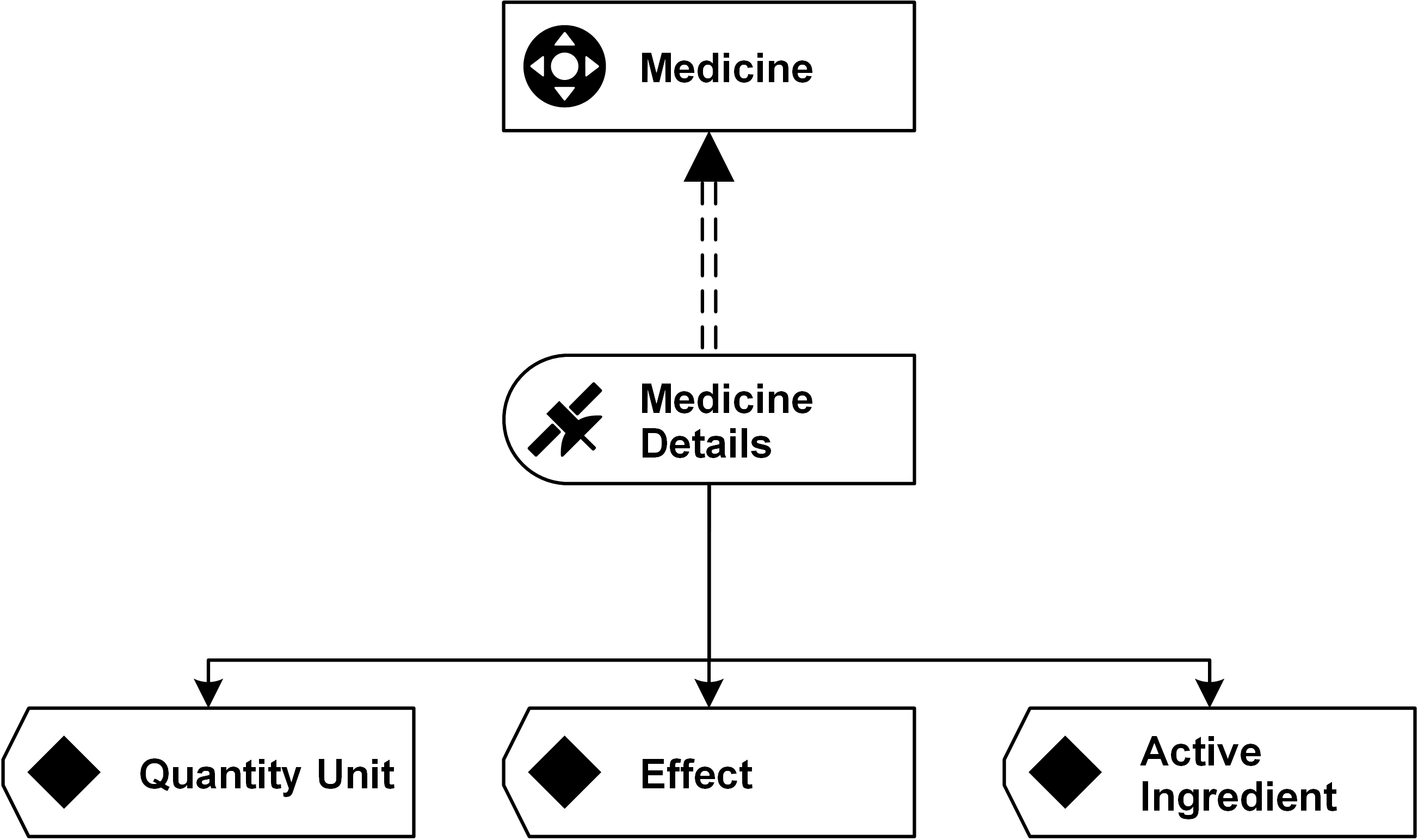
Satellites add descriptive data to hubs and links. Descriptive data is stored in attributes that are added to the satellite. The individual attributes are added to the satellite one at a time. A satellite might be attached to any hub or link. However, it is only possible to attach the satellite to one parent. Continue Reading

Visual Data Vault by Example: Satellites Modeling in the Health Care Industry

Data Vault 2.0 is a concept for data warehousing, invented by Dan Linstedt. It brings many new features that help anyone who is concerned with Business Intelligence entering a new age of data warehousing. Data Vault 2.0 is a Big Data concept that integrates relational data warehousing with unstructured data warehousing in real-time. It is an extensible data model where new data sources are easy to add. When our founders wrote the book, they required a visual approach to model the concepts of Data Vault in the book. For this purpose, they developed the graphical modeling language, which focuses on the logical aspects of Data Vault. The Microsoft Visio stencils and a detailed white paper are available on www.visualdatavault.com as a free download.

This year we already wrote about the modeling of hubs and links in Data Vault 2.0. Now, we want to introduce you the third standard entity, the Satellite.

SATELLITES IN VISUAL DATA VAULT

Satellites add descriptive data to hubs and links. Descriptive data is stored in attributes that are added to the satellite. The individual attributes are added to the satellite one at a time. A satellite might be attached to any hub or link. However, it is only possible to attach the satellite to one parent. Continue Reading

Visual Data Vault by Example: Links Modeling in the Banking Industry

Visual Data Vault example for links

Visual Data Vault

The following article describes how to represent links using a Visual Data Vault example. With the advent of Data Vault 2.0, which adds architecture and process definitions to the Data Vault 1.0 standard, Dan Linstedt standardized the Data Vault symbols used in modeling. Based on these standardized symbols, the Visual Data Vault (VDV) modeling language was developed, which can be used by EDW architects to build Data Vault models.

When our founders wrote the book, they required a visual approach to model the concepts of Data Vault in the book. For this purpose, they developed the graphical modeling language, which focuses on the logical aspects of Data Vault. The Microsoft Visio stencils and a detailed white paper are available on www.visualdatavault.com as a free download.

Links in Visual Data Vault

We previously published another newsletter how hubs are modeled in the accounting industry. In this Newsletter we explain the function of standard links and how the modeling in the banking industry works.

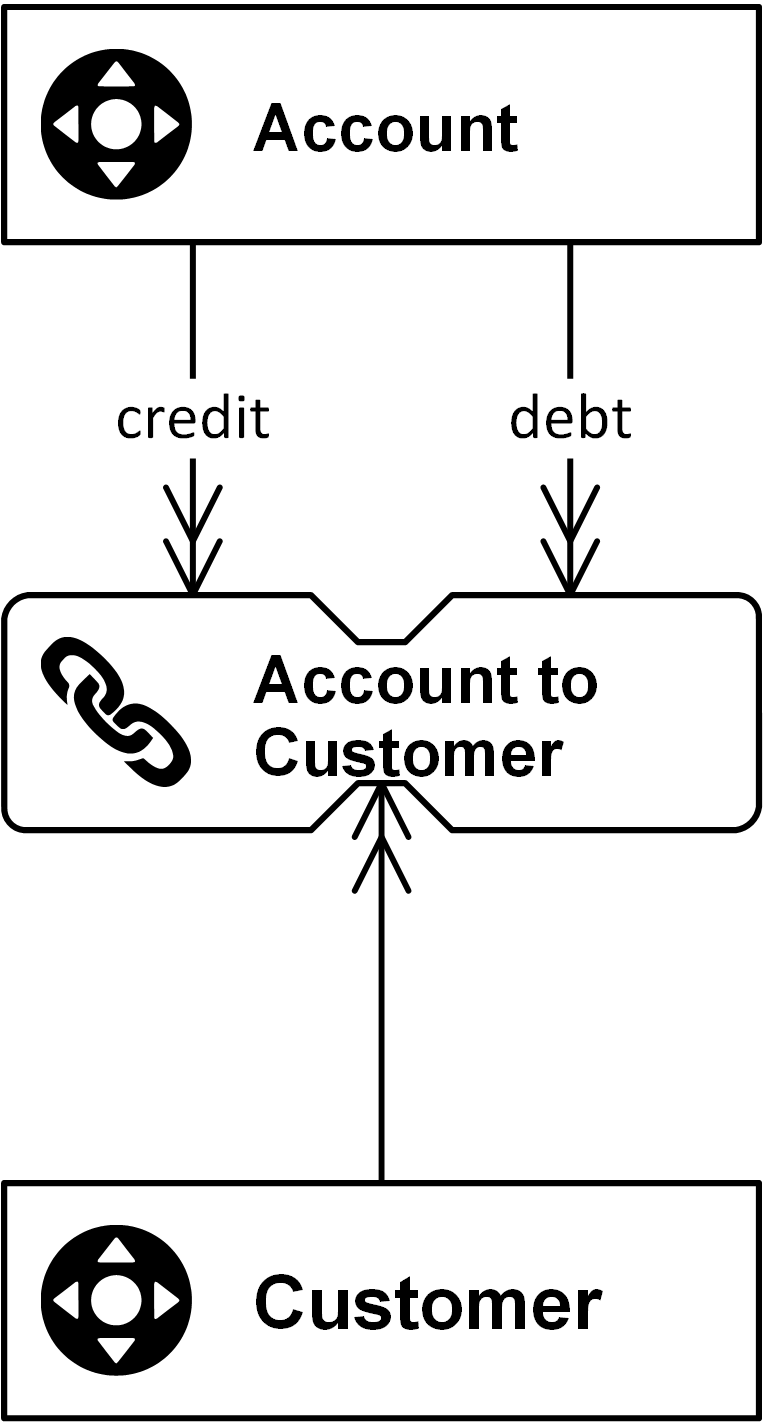
Links connect individual hubs in a Data Vault model and represent either transactions or relationships between business objects. Business objects are connected in business. No business object is entirely separate from other business objects. Instead, they are connected to each other through the operational business processes that use business objects in the execution of their tasks. The image below shows a link that connects two hubs (a standard link has to have at least two connections) as the following diagram shows:

Figure 1: A standard link connects two hubs

The link in in the image above references two hubs: Account and Customer. The connector (the arrow) should be read as “(the hub) Customer is used by (the link) Account to Customer.” The second reference is a little different because the name of the connection between the Account hub and the link is overwritten by the meaning of  a credit or a debt Account. This is necessary in cases where the model requires more meaning or when multiple connections are required to the same hub. The hash keys of each hub, which identify each business object unique by one calculated attribute, are replicated into the link entity by using the same attribute name.

A link represents many-to-many relationships and therefore they provide flexibility because changes to the business rules don’t require re-engineering and the granularity is expressed by the number of referenced hubs and is thus well documented.

Link table example
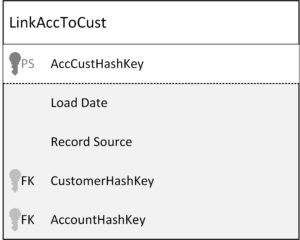
Figure 2: Link table with its attributes

The link contains all hash keys of the related hubs (logical foreign keys), a load date when the relationship arrives the data warehouse for the first time, the record source where the data comes from, and the link hash key (logical primary key) which is calculated from the business keys of the hubs (not from the hash keys – never hash a hash!) and follows an insert-only loading pattern.

Links greatly improve the flexibility of the Data Vault model, because it is easy to add links or modify the relationship type of existing links. It takes less time to respond to changes in the business. To add new functionality, you only need to add new hubs and connect them via links to existing hubs. Usually a standard satellite is attached to the link, which contains the descriptive data of the relationship between the hubs.

Another common kind of link is the Non-Historized Link (also known as Transactional Link) which contains transactions only and does not need a Satellite, what means that the loading pattern is a complete insert-only approach. Read more about the value of NH-Links in an earlier Newsletter this year.

Conclusion

In conclusion, the Visual Data Vault modeling language offers a standardized and effective approach for representing complex relationships and transactions within the banking industry. By connecting business objects through links, it ensures a clear and logical structure that mirrors real-world processes. This methodology not only enhances the clarity of data models but also facilitates efficient data management and retrieval, making it an invaluable tool for enterprise data warehouse architects.

Visual Data Vault by Example: Links Modeling in the Banking Industry

Visual Data Vault example for links

Visual Data Vault

The following article describes how to represent links using a Visual Data Vault example. With the advent of Data Vault 2.0, which adds architecture and process definitions to the Data Vault 1.0 standard, Dan Linstedt standardized the Data Vault symbols used in modeling. Based on these standardized symbols, the Visual Data Vault (VDV) modeling language was developed, which can be used by EDW architects to build Data Vault models.

When our founders wrote the book, they required a visual approach to model the concepts of Data Vault in the book. For this purpose, they developed the graphical modeling language, which focuses on the logical aspects of Data Vault. The Microsoft Visio stencils and a detailed white paper are available on www.visualdatavault.com as a free download.

Links in Visual Data Vault

We previously published another newsletter how hubs are modeled in the accounting industry. In this Newsletter we explain the function of standard links and how the modeling in the banking industry works.

Links connect individual hubs in a Data Vault model and represent either transactions or relationships between business objects. Business objects are connected in business. No business object is entirely separate from other business objects. Instead, they are connected to each other through the operational business processes that use business objects in the execution of their tasks. The image below shows a link that connects two hubs (a standard link has to have at least two connections) as the following diagram shows:

Figure 1: A standard link connects two hubs

The link in in the image above references two hubs: Account and Customer. The connector (the arrow) should be read as “(the hub) Customer is used by (the link) Account to Customer.” The second reference is a little different because the name of the connection between the Account hub and the link is overwritten by the meaning of  a credit or a debt Account. This is necessary in cases where the model requires more meaning or when multiple connections are required to the same hub. The hash keys of each hub, which identify each business object unique by one calculated attribute, are replicated into the link entity by using the same attribute name.

A link represents many-to-many relationships and therefore they provide flexibility because changes to the business rules don’t require re-engineering and the granularity is expressed by the number of referenced hubs and is thus well documented.

Link table example
Figure 2: Link table with its attributes

The link contains all hash keys of the related hubs (logical foreign keys), a load date when the relationship arrives the data warehouse for the first time, the record source where the data comes from, and the link hash key (logical primary key) which is calculated from the business keys of the hubs (not from the hash keys – never hash a hash!) and follows an insert-only loading pattern.

Links greatly improve the flexibility of the Data Vault model, because it is easy to add links or modify the relationship type of existing links. It takes less time to respond to changes in the business. To add new functionality, you only need to add new hubs and connect them via links to existing hubs. Usually a standard satellite is attached to the link, which contains the descriptive data of the relationship between the hubs.

Another common kind of link is the Non-Historized Link (also known as Transactional Link) which contains transactions only and does not need a Satellite, what means that the loading pattern is a complete insert-only approach. Read more about the value of NH-Links in an earlier Newsletter this year.

Conclusion

In conclusion, the Visual Data Vault modeling language offers a standardized and effective approach for representing complex relationships and transactions within the banking industry. By connecting business objects through links, it ensures a clear and logical structure that mirrors real-world processes. This methodology not only enhances the clarity of data models but also facilitates efficient data management and retrieval, making it an invaluable tool for enterprise data warehouse architects.

Data Vault Modeling: Visual Example in the Accounting Industry

Data Vault Modeling of a Hub

Visual Example of a Data Vault Modeling

With the addition of architecture and process definitions in Data Vault 2.0, Dan Linstedt has standardized Data Vault modeling.

Based on these standardized symbols, the Visual Data Vault modeling language was developed, which can be used by Enterprise Data Warehouse architects to build Data Vault models.

The authors of the book “Building a Scalable Data Warehouse”, who are the founders of Scalefree, required a visual approach to model the concepts of Data Vault in the book.

For this purpose, they developed the graphical Data Vault modeling language, which focuses on the logical aspects of Data Vault.

The Microsoft Visio stencils and a detailed white paper are available on www.visualdatavault.com as a free download.

Hubs in Visual Data Vault

Business keys play an important role in every business, because they are referenced by business transactions and relationships between business objects.

Whenever a business identifies and tracks business objects, business keys are used throughout business processes.

This is one of the reasons why Data Vault is based on the business keys. In Data Vault modeling, business keys are stored in hub entities.

The challenge is to identify the business keys that represent a business object uniquely. That can be just one business key, but also a composite key or a smart key.

The first image shows a hub with only one business key attribute:

Data Vault Modeling of a Hub

Here, the attribute Invoice Number is sufficient to identify the invoice. No other attribute is required (such as the invoice year).

In other cases, it is not as easy, as the following diagram shows:

Data Vault Modeling for a Hub

In this Data Vault modeling case, the accountant is identified by a Country Code attribute (such as the ISO2 code) and an Employee Number attribute.

One attribute alone would not be sufficient to identify the accountant: the employee number by itself might be overlapping across all countries and have only a local meaning (employee number 10006 might be used in multiple countries and identify a different accountant in each country).

Therefore, the local key is extended by the country code to uniquely identify the accountant. Be aware, the country code has to be in the source data to make this a valid model in Data Vault (in the end, we do model source data, in the Raw Data Vault, not the desired model of the business).

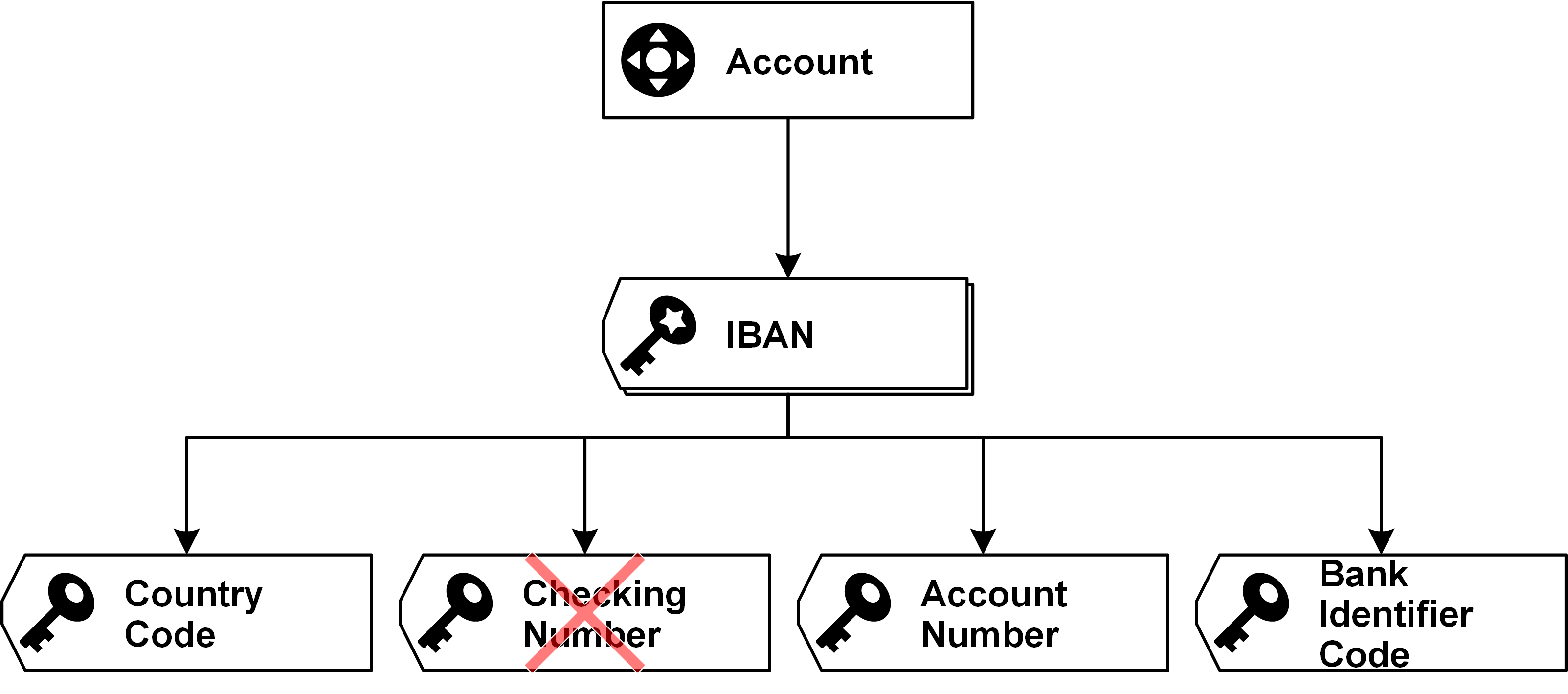
Another example extends this concept into a so-called smart-key:

Data Vault Modeling of a Hub

Here, the IBAN number, which is used to identify banking accounts internationally, consists of 4 physical elements in the number:

  1. Country code
  2. Checking number
  3. Account number
  4. Bank Identifier code

In order to model a smart key (a key that comprises multiple parts or keys), add a smart key to the hub and then add business keys to identify the sections of the smart key.

As you can see from above figure, the logical symbol of a smart key is similar to that of a business key. However, the icons are slightly different and the shape indicates a stack.

In this Data Vault modeling example, each business key is modeled as an individual attribute in the hub entity. The combination identifies a business object in the business. The checking number is actually not modelled, because it contains no business value (except the ability to serve as a technical checksum).

However, you’re not wrong with adding it to the model, too.

Data Vault Modeling: Visual Example in the Accounting Industry

Data Vault Modeling of a Hub

Visual Example of a Data Vault Modeling

With the addition of architecture and process definitions in Data Vault 2.0, Dan Linstedt has standardized Data Vault modeling.

Based on these standardized symbols, the Visual Data Vault modeling language was developed, which can be used by Enterprise Data Warehouse architects to build Data Vault models.

The authors of the book “Building a Scalable Data Warehouse”, who are the founders of Scalefree, required a visual approach to model the concepts of Data Vault in the book.

For this purpose, they developed the graphical Data Vault modeling language, which focuses on the logical aspects of Data Vault.

The Microsoft Visio stencils and a detailed white paper are available on www.visualdatavault.com as a free download.

Hubs in Visual Data Vault

Business keys play an important role in every business, because they are referenced by business transactions and relationships between business objects.

Whenever a business identifies and tracks business objects, business keys are used throughout business processes.

This is one of the reasons why Data Vault is based on the business keys. In Data Vault modeling, business keys are stored in hub entities.

The challenge is to identify the business keys that represent a business object uniquely. That can be just one business key, but also a composite key or a smart key.

The first image shows a hub with only one business key attribute:

Data Vault Modeling of a Hub

Here, the attribute Invoice Number is sufficient to identify the invoice. No other attribute is required (such as the invoice year).

In other cases, it is not as easy, as the following diagram shows:

Data Vault Modeling for a Hub

In this Data Vault modeling case, the accountant is identified by a Country Code attribute (such as the ISO2 code) and an Employee Number attribute.

One attribute alone would not be sufficient to identify the accountant: the employee number by itself might be overlapping across all countries and have only a local meaning (employee number 10006 might be used in multiple countries and identify a different accountant in each country).

Therefore, the local key is extended by the country code to uniquely identify the accountant. Be aware, the country code has to be in the source data to make this a valid model in Data Vault (in the end, we do model source data, in the Raw Data Vault, not the desired model of the business).

Another example extends this concept into a so-called smart-key:

Data Vault Modeling of a Hub

Here, the IBAN number, which is used to identify banking accounts internationally, consists of 4 physical elements in the number:

  1. Country code
  2. Checking number
  3. Account number
  4. Bank Identifier code

In order to model a smart key (a key that comprises multiple parts or keys), add a smart key to the hub and then add business keys to identify the sections of the smart key.

As you can see from above figure, the logical symbol of a smart key is similar to that of a business key. However, the icons are slightly different and the shape indicates a stack.

In this Data Vault modeling example, each business key is modeled as an individual attribute in the hub entity. The combination identifies a business object in the business. The checking number is actually not modelled, because it contains no business value (except the ability to serve as a technical checksum).

However, you’re not wrong with adding it to the model, too.

Close Menu