search
0
Category

dbt blog article

Data Migration – Ensuring Data Accuracy and Compliance During a Migration

Data Migration Great Expectations Diagram Architecture

Data Migration

Data migration is a complex process that requires careful planning and execution. Understanding the data landscape, ensuring minimal downtime, managing stakeholder expectations, and most importantly, maintaining the integrity and security of your data throughout the transition are critical. Failing to address these factors can lead to data loss, corruption, or non-compliance with regulatory standards, which can have significant business implications. In a worst-case scenario, stakeholders may notice data issues before the data team does, decreasing trust in the data and the team. Another potential problem, having to work overtime because of data issues which were not noticed before.

Features embedded within dbt (Data Build Tool) and tools like Great Expectations offer powerful solutions to help organizations manage these risks, ensuring that the data remains reliable and compliant as it moves through the migration process.

Ensuring Data Accuracy and Compliance During a Migration: Leveraging dbt and Great Expectations

This webinar will cover the essential aspects of maintaining data accuracy and compliance throughout the data migration process. We will explore how dbt (Data Build Tool) enables robust data transformation with built-in and custom tests, ensuring data integrity at each stage. Additionally, we will demonstrate how Great Expectations enhances data validation, allowing you to enforce specific rules and expectations, ensuring a smooth and secure migration with minimal risk of errors or inconsistencies.

Watch Webinar Recording

Leveraging dbt for Data Accuracy

A powerful tool for data transformation: dbt enables teams to build, test, and document data pipelines. By utilizing its features, such as tests and contracts, dbt ensures data consistency and accuracy. We’ll explore these capabilities in detail below.

dbt offers two ways to define tests, singular and generic data tests.

  • Singular data tests: Custom SQL query that is written to test a specific condition or logic in the data. It is highly tailored to a particular use case or business logic. In essence, it’s a standalone test where the developer writes custom SQL to check for specific data anomalies or inconsistencies.
  • Generic data tests: Pre-defined and reusable tests that can be applied to multiple models or columns across different datasets.

Examples of Generic Tests:

  • Unique Tests: Ensure that a field in your dataset contains unique values, which is critical for primary key fields
  • Not Null Tests: Validate that a field does not contain any null values
  • Referential Integrity Tests: Checks that foreign key relationships are maintained, ensuring consistency across related tables
  • Accepted values: Useful tests for columns which receive predictable data

Tests can be configured to: either fail (severity: error) or issue a warning (severity: warning). Conditional expressions such as error_if and warn_if can refine this behavior, e.g., triggering a warning only after a certain number of failures.

dbt Contract enforcement

  • Enforces that dbt model schemas adhere to predefined data structures
  • Defines specific columns, data types, and constraints (e.g., not null, unique)
  • Raises errors before materializing the model as a table, allowing identification of schema issues

Pro-tip for data migrations: use incremental models to update only new or modified records, which improves efficiency and avoids full table rebuilds. When enforcing a contract, the “append_new_columns” option is useful as it retains old columns, minimizing issues. The “sync_all_columns” setting is particularly handy for automatically adjusting the schema by adding new columns and removing missing ones, making it ideal for migrations with frequent renaming.

dbt-expectations vs Great Expectations

dbt-expectations integrates data quality tests into dbt, while Great Expectations provides a broader framework for managing data validation across various sources. Together, they enhance data accuracy and reliability.

dbt-expectations

The dbt-expectations package extends dbt’s testing capabilities by providing a collection of pre-built, customizable data quality tests inspired by Great Expectations. This package helps automate and standardize data quality checks across multiple models, ensuring that datasets meet specific expectations before they are used in downstream processes.

Here are some examples of data quality tests you can run using the dbt-expectations repository (we are going to cover more in the webinar):

  • Expect_column_values_to_match_regex: Verifies that all values in a column match a given regular expression pattern
  • Expect_column_median_to_be_between, expect_column_min_to_be_between, expect_column_max_to_be_between: Ensures numeric column values fall within specified ranges
  • Expect_column_pair_values_a_to_be_greater_than_b: Checks that values in one column are greater than values in another

Why Consider Integrating Great Expectations?

With dbt-expectations providing robust testing within a single dbt project, you might wonder why you’d want to integrate Great Expectations. Here’s why:

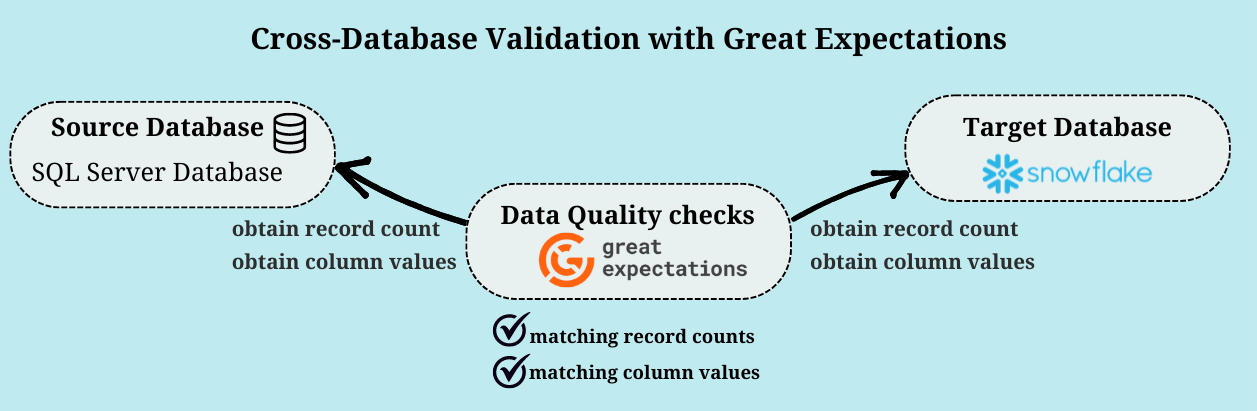
  • Cross-Database Comparisons: dbt-expectations works well within a single SQL-based data warehouse. However, if you need to compare data across different databases (like Snowflake and SQL Server), Great Expectations offers a broader solution.
  • Broader Data Validation: Great Expectations supports multiple data sources, including CSV, Parquet, JSON, APIs, and various SQL databases. It provides a flexible and user-friendly platform to define, manage, and execute data quality tests across diverse sources.
Data Migration Great Expectations Diagram Architecture

Key Features of Great Expectations:

  • Data Profiling: Before starting your migration, use GE to profile your data and set expectations based on its current state.
  • Detailed Validation Reports & Dashboards: GE offers comprehensive reports and visualizations, outputting results in formats like HTML, Slack, JSON, and Data Docs. This enhances transparency and provides deeper insights for both technical and non-technical stakeholders.
  • Customizability and Extensibility: GE allows you to define custom expectations tailored to your data pipeline and integrate with other testing libraries.
  • Version Control & Historical Validation: Track changes in data quality over time with version control, helping to identify trends and recurring issues.
  • Production Monitoring & Integration: Integrate GE with data orchestration tools like Airflow, Prefect, or Dagster to incorporate data quality checks into your broader workflows, including those not managed by dbt.

Integrating Great Expectations with dbt

Great Expectations complements dbt by offering a flexible platform for data validation beyond single-project scenarios. By integrating GE with dbt, you can achieve a more comprehensive approach to data quality, ensuring your migration process is as smooth and reliable as possible.

In the upcoming webinar, we will explore practical examples of dbt tests, dbt-expectations, and Great Expectations validations, so stay tuned!

Data Migration – Ensuring Data Accuracy and Compliance During a Migration

Data Migration Great Expectations Diagram Architecture

Data Migration

Data migration is a complex process that requires careful planning and execution. Understanding the data landscape, ensuring minimal downtime, managing stakeholder expectations, and most importantly, maintaining the integrity and security of your data throughout the transition are critical. Failing to address these factors can lead to data loss, corruption, or non-compliance with regulatory standards, which can have significant business implications. In a worst-case scenario, stakeholders may notice data issues before the data team does, decreasing trust in the data and the team. Another potential problem, having to work overtime because of data issues which were not noticed before.

Features embedded within dbt (Data Build Tool) and tools like Great Expectations offer powerful solutions to help organizations manage these risks, ensuring that the data remains reliable and compliant as it moves through the migration process.

Ensuring Data Accuracy and Compliance During a Migration: Leveraging dbt and Great Expectations

This webinar will cover the essential aspects of maintaining data accuracy and compliance throughout the data migration process. We will explore how dbt (Data Build Tool) enables robust data transformation with built-in and custom tests, ensuring data integrity at each stage. Additionally, we will demonstrate how Great Expectations enhances data validation, allowing you to enforce specific rules and expectations, ensuring a smooth and secure migration with minimal risk of errors or inconsistencies.

Watch Webinar Recording

Leveraging dbt for Data Accuracy

A powerful tool for data transformation: dbt enables teams to build, test, and document data pipelines. By utilizing its features, such as tests and contracts, dbt ensures data consistency and accuracy. We’ll explore these capabilities in detail below.

dbt offers two ways to define tests, singular and generic data tests.

  • Singular data tests: Custom SQL query that is written to test a specific condition or logic in the data. It is highly tailored to a particular use case or business logic. In essence, it’s a standalone test where the developer writes custom SQL to check for specific data anomalies or inconsistencies.
  • Generic data tests: Pre-defined and reusable tests that can be applied to multiple models or columns across different datasets.

Examples of Generic Tests:

  • Unique Tests: Ensure that a field in your dataset contains unique values, which is critical for primary key fields
  • Not Null Tests: Validate that a field does not contain any null values
  • Referential Integrity Tests: Checks that foreign key relationships are maintained, ensuring consistency across related tables
  • Accepted values: Useful tests for columns which receive predictable data

Tests can be configured to: either fail (severity: error) or issue a warning (severity: warning). Conditional expressions such as error_if and warn_if can refine this behavior, e.g., triggering a warning only after a certain number of failures.

dbt Contract enforcement

  • Enforces that dbt model schemas adhere to predefined data structures
  • Defines specific columns, data types, and constraints (e.g., not null, unique)
  • Raises errors before materializing the model as a table, allowing identification of schema issues

Pro-tip for data migrations: use incremental models to update only new or modified records, which improves efficiency and avoids full table rebuilds. When enforcing a contract, the “append_new_columns” option is useful as it retains old columns, minimizing issues. The “sync_all_columns” setting is particularly handy for automatically adjusting the schema by adding new columns and removing missing ones, making it ideal for migrations with frequent renaming.

dbt-expectations vs Great Expectations

dbt-expectations integrates data quality tests into dbt, while Great Expectations provides a broader framework for managing data validation across various sources. Together, they enhance data accuracy and reliability.

dbt-expectations

The dbt-expectations package extends dbt’s testing capabilities by providing a collection of pre-built, customizable data quality tests inspired by Great Expectations. This package helps automate and standardize data quality checks across multiple models, ensuring that datasets meet specific expectations before they are used in downstream processes.

Here are some examples of data quality tests you can run using the dbt-expectations repository (we are going to cover more in the webinar):

  • Expect_column_values_to_match_regex: Verifies that all values in a column match a given regular expression pattern
  • Expect_column_median_to_be_between, expect_column_min_to_be_between, expect_column_max_to_be_between: Ensures numeric column values fall within specified ranges
  • Expect_column_pair_values_a_to_be_greater_than_b: Checks that values in one column are greater than values in another

Why Consider Integrating Great Expectations?

With dbt-expectations providing robust testing within a single dbt project, you might wonder why you’d want to integrate Great Expectations. Here’s why:

  • Cross-Database Comparisons: dbt-expectations works well within a single SQL-based data warehouse. However, if you need to compare data across different databases (like Snowflake and SQL Server), Great Expectations offers a broader solution.
  • Broader Data Validation: Great Expectations supports multiple data sources, including CSV, Parquet, JSON, APIs, and various SQL databases. It provides a flexible and user-friendly platform to define, manage, and execute data quality tests across diverse sources.
Data Migration Great Expectations Diagram Architecture

Key Features of Great Expectations:

  • Data Profiling: Before starting your migration, use GE to profile your data and set expectations based on its current state.
  • Detailed Validation Reports & Dashboards: GE offers comprehensive reports and visualizations, outputting results in formats like HTML, Slack, JSON, and Data Docs. This enhances transparency and provides deeper insights for both technical and non-technical stakeholders.
  • Customizability and Extensibility: GE allows you to define custom expectations tailored to your data pipeline and integrate with other testing libraries.
  • Version Control & Historical Validation: Track changes in data quality over time with version control, helping to identify trends and recurring issues.
  • Production Monitoring & Integration: Integrate GE with data orchestration tools like Airflow, Prefect, or Dagster to incorporate data quality checks into your broader workflows, including those not managed by dbt.

Integrating Great Expectations with dbt

Great Expectations complements dbt by offering a flexible platform for data validation beyond single-project scenarios. By integrating GE with dbt, you can achieve a more comprehensive approach to data quality, ensuring your migration process is as smooth and reliable as possible.

In the upcoming webinar, we will explore practical examples of dbt tests, dbt-expectations, and Great Expectations validations, so stay tuned!

CI/CD: Practical Insights into Automating Data Vault 2.0 with dbt

CI/CD Graphic Cycle

CI/CD

CI/CD pipelines are becoming increasingly important for ensuring that software updates can be released cost-effectively while maintaining high quality. But how exactly do CI/CD pipelines work, and how can a project benefit from using one?

This newsletter aims to answer these questions through a practical example of a CI/CD pipeline. The example focuses on a CI/CD pipeline for a GitHub repository that includes a package for implementing Data Vault 2.0 in dbt across various databases. Therefore, this newsletter will also cover the basics of dbt and GitHub Actions.

From Continuous Integration To Data Vaults: A Comprehensive Workflow

This webinar will cover what CI/CD pipelines are and the advantages they offer. We will present parts of the CI/CD pipeline for the public datavault4dbt package to demonstrate how a CI/CD pipeline can be used. The webinar will introduce the key features of GitHub Actions and explain them through examples. This will show how each feature can be utilized in practice and highlight the various possibilities GitHub Actions offers. The webinar aims to explain the benefits of CI/CD pipelines and illustrate what such a pipeline can look like through a practical example.

Watch Webinar Recording

What is CI/CD?

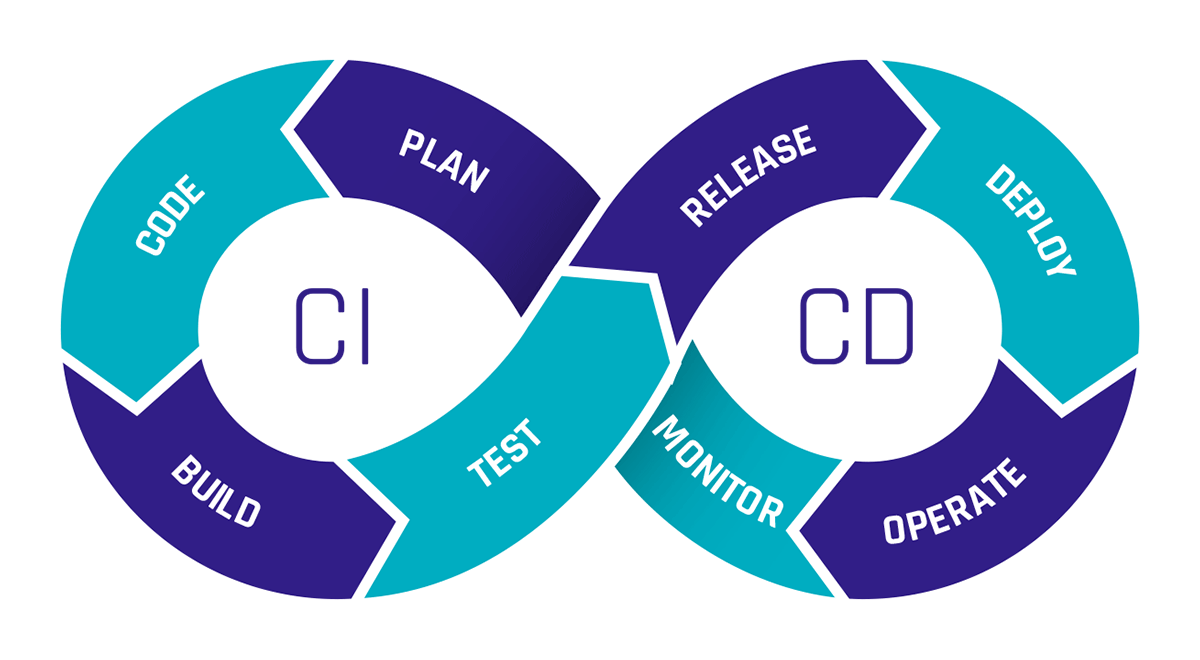
CI stands for Continuous Integration, and CD stands for Continuous Delivery or Continuous Deployment. But what exactly do these terms mean?

Continuous Integration refers to the regular merging of code changes, where automated tests are conducted to detect potential errors early and ensure that the software remains in a functional state.

Continuous Delivery involves making the validated code available in a repository. CI tests should already be conducted in the pipeline for this purpose. It also includes further automation needed to enable rapid deployment, such as creating a production-ready build. The difference between Continuous Delivery and Continuous Deployment is that with Continuous Deployment, the successfully tested software is released directly to production, while Continuous Delivery prepares everything for release without automatically deploying it.

Continuous Deployment allows changes to be implemented quickly through many small releases rather than one large release. However, the tests must be well-configured, as there is no manual gate for transitioning to production.

CI/CD Graphic Cycle

CI/CD pipelines provide immense time savings through automation. The costs of resources needed for manual testing are also lower with CI/CD pipelines, as they can be configured to spin up resources only for testing and then shut them down afterward. Since permanent resources aren’t required, you only pay for the resources needed during the test runtime.

Introduction to dbt

The abbreviation dbt stands for “data build tool.” dbt is a tool that enables data transformation directly within a data warehouse. It uses SQL-based transformations that can be defined, tested, and documented directly in the dbt environment.

This makes dbt an excellent choice for implementing Data Vault 2.0 as dbt can be used to create and manage the hubs, links, and satellites required by Data Vault.

To facilitate this process, we at Scalefree have developed the datavault4dbt package. Datavault4dbt offers many useful features, such as predefined macros for hubs, links, satellites, the staging area, and much more.

For a deeper understanding of dbt or datavault4dbt, feel free to read one of our articles on the topic.

The Capabilities of GitHub Actions

GitHub Actions is a feature of GitHub that allows you to create and execute workflows directly within GitHub repositories. You can define various triggers for workflows, such as pull requests, commits, schedules, manual triggers, and more.

This makes GitHub Actions ideal for building CI/CD pipelines for both private and public repositories. The workflows are divided into multiple jobs, each consisting of several steps. Each job runs on a different virtual machine.

Within these steps, you can define custom tasks or utilize external or internal workflows. This offers the significant advantage of not having to develop everything from scratch in a workflow; instead, you can leverage public workflows created by others.

The seamless integration of Docker also provides numerous possibilities, such as quickly setting up different test environments, which greatly simplifies the creation of a CI/CD pipeline.

GitHub Actions is the key tool in the following example of a CI/CD pipeline.

Practical Example: CI/CD Pipeline for datavault4dbt

For the public repository of the datavault4dbt package, we have built a CI/CD pipeline to ensure that all features continue to function across all supported databases with every pull request (PR). When a PR is submitted by an external user, someone from our developer team must approve the start of the pipeline. In contrast, a PR from an internal user can be automated by adding a specific label to initiate the pipeline.

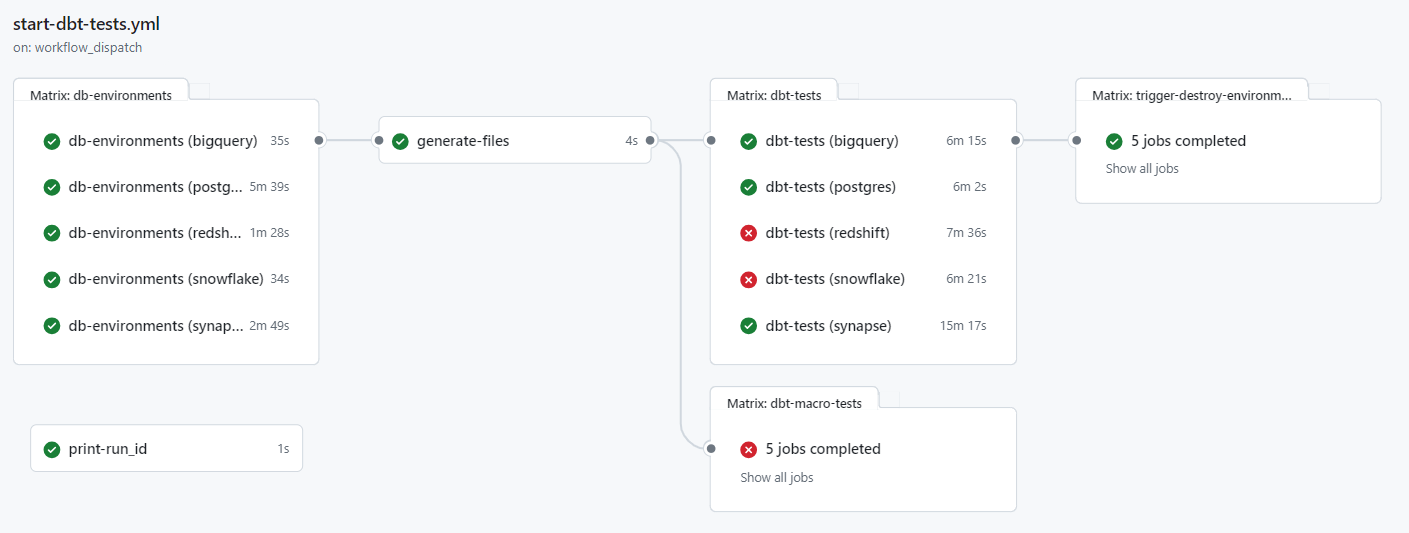
Once the pipeline is triggered, GitHub Actions automatically starts a separate virtual machine (VM) for each database. Currently, the datavault4dbt package supports AWS Redshift, Microsoft Azure Synapse, Snowflake, Google BigQuery, PostgreSQL, and Exasol, so a total of six VMs will be launched. Since GitHub Actions operates in a serverless manner, these VMs do not need to be manually set up or managed.

The VMs then connect to the required cloud systems. For instance, the VM for Google BigQuery connects to Google Cloud, while the VM for AWS Redshift connects to AWS. Subsequently, the necessary resources for each database are generated, which can be done via API calls or using tools like Terraform.

After the resources are created, additional files required for testing are generated and loaded onto the VM. In our example pipeline, these include files such as profiles.yml,  which contains information needed by dbt to connect to the databases.

Next, a Dockerfile is used on each VM to build an image that automatically installs all dependencies for the respective database. At this stage, Git is also installed on each image so that tests stored in a separate Git repository can be loaded onto the image.

Loading the tests from a repository allows for centralized management of the tests, ensuring any changes are executed for each database during the next pipeline run. Once the images are built, containers are created using these images, where tests are conducted with various parameters. After all tests are completed, the containers are shut down, and by default, the resources on the respective cloud providers are deleted.

CI/CD graphic dbt tests yml file

The test results are fully visible in GitHub Actions, with successful and failed tests clearly marked.

CI/CD graphic workflow form

If the pipeline is started manually, there is an additional option to specify whether only certain selected databases should be tested and whether the resources on the cloud systems should not be deleted after the tests. This allows developers to examine the data on the databases more closely in case of an error.

This pipeline offers numerous advantages for the development of the datavault4dbt package. It allows testing for errors on any of the supported databases with each change, without spending much time creating test resources. At the same time, it saves costs because all resources run only as long as necessary and are immediately shut down after the tests.

Managing the pipeline is also simplified through GitHub, as all variables and secrets can be stored directly in GitHub, providing a centralized location for everything. Once the pipeline is set up, it can be easily extended to include additional databases that may be supported in the future.

Ultimately, this is just one example of what a CI/CD pipeline can look like. Such pipelines are as diverse as the software for which they are designed. If we have piqued your interest and you have further questions about a possible pipeline for your company, please feel free to contact us.

Conclusion 

This newsletter explores the benefits and workings of CI/CD pipelines in agile software development, illustrated through a practical example involving a GitHub repository and a dbt package for implementing Data Vault 2.0, highlighting tools like GitHub Actions for automation and efficiency in deployment processes.

CI/CD: Practical Insights into Automating Data Vault 2.0 with dbt

CI/CD Graphic Cycle

CI/CD

CI/CD pipelines are becoming increasingly important for ensuring that software updates can be released cost-effectively while maintaining high quality. But how exactly do CI/CD pipelines work, and how can a project benefit from using one?

This newsletter aims to answer these questions through a practical example of a CI/CD pipeline. The example focuses on a CI/CD pipeline for a GitHub repository that includes a package for implementing Data Vault 2.0 in dbt across various databases. Therefore, this newsletter will also cover the basics of dbt and GitHub Actions.

From Continuous Integration To Data Vaults: A Comprehensive Workflow

This webinar will cover what CI/CD pipelines are and the advantages they offer. We will present parts of the CI/CD pipeline for the public datavault4dbt package to demonstrate how a CI/CD pipeline can be used. The webinar will introduce the key features of GitHub Actions and explain them through examples. This will show how each feature can be utilized in practice and highlight the various possibilities GitHub Actions offers. The webinar aims to explain the benefits of CI/CD pipelines and illustrate what such a pipeline can look like through a practical example.

Watch Webinar Recording

What is CI/CD?

CI stands for Continuous Integration, and CD stands for Continuous Delivery or Continuous Deployment. But what exactly do these terms mean?

Continuous Integration refers to the regular merging of code changes, where automated tests are conducted to detect potential errors early and ensure that the software remains in a functional state.

Continuous Delivery involves making the validated code available in a repository. CI tests should already be conducted in the pipeline for this purpose. It also includes further automation needed to enable rapid deployment, such as creating a production-ready build. The difference between Continuous Delivery and Continuous Deployment is that with Continuous Deployment, the successfully tested software is released directly to production, while Continuous Delivery prepares everything for release without automatically deploying it.

Continuous Deployment allows changes to be implemented quickly through many small releases rather than one large release. However, the tests must be well-configured, as there is no manual gate for transitioning to production.

CI/CD Graphic Cycle

CI/CD pipelines provide immense time savings through automation. The costs of resources needed for manual testing are also lower with CI/CD pipelines, as they can be configured to spin up resources only for testing and then shut them down afterward. Since permanent resources aren’t required, you only pay for the resources needed during the test runtime.

Introduction to dbt

The abbreviation dbt stands for “data build tool.” dbt is a tool that enables data transformation directly within a data warehouse. It uses SQL-based transformations that can be defined, tested, and documented directly in the dbt environment.

This makes dbt an excellent choice for implementing Data Vault 2.0 as dbt can be used to create and manage the hubs, links, and satellites required by Data Vault.

To facilitate this process, we at Scalefree have developed the datavault4dbt package. Datavault4dbt offers many useful features, such as predefined macros for hubs, links, satellites, the staging area, and much more.

For a deeper understanding of dbt or datavault4dbt, feel free to read one of our articles on the topic.

The Capabilities of GitHub Actions

GitHub Actions is a feature of GitHub that allows you to create and execute workflows directly within GitHub repositories. You can define various triggers for workflows, such as pull requests, commits, schedules, manual triggers, and more.

This makes GitHub Actions ideal for building CI/CD pipelines for both private and public repositories. The workflows are divided into multiple jobs, each consisting of several steps. Each job runs on a different virtual machine.

Within these steps, you can define custom tasks or utilize external or internal workflows. This offers the significant advantage of not having to develop everything from scratch in a workflow; instead, you can leverage public workflows created by others.

The seamless integration of Docker also provides numerous possibilities, such as quickly setting up different test environments, which greatly simplifies the creation of a CI/CD pipeline.

GitHub Actions is the key tool in the following example of a CI/CD pipeline.

Practical Example: CI/CD Pipeline for datavault4dbt

For the public repository of the datavault4dbt package, we have built a CI/CD pipeline to ensure that all features continue to function across all supported databases with every pull request (PR). When a PR is submitted by an external user, someone from our developer team must approve the start of the pipeline. In contrast, a PR from an internal user can be automated by adding a specific label to initiate the pipeline.

Once the pipeline is triggered, GitHub Actions automatically starts a separate virtual machine (VM) for each database. Currently, the datavault4dbt package supports AWS Redshift, Microsoft Azure Synapse, Snowflake, Google BigQuery, PostgreSQL, and Exasol, so a total of six VMs will be launched. Since GitHub Actions operates in a serverless manner, these VMs do not need to be manually set up or managed.

The VMs then connect to the required cloud systems. For instance, the VM for Google BigQuery connects to Google Cloud, while the VM for AWS Redshift connects to AWS. Subsequently, the necessary resources for each database are generated, which can be done via API calls or using tools like Terraform.

After the resources are created, additional files required for testing are generated and loaded onto the VM. In our example pipeline, these include files such as profiles.yml,  which contains information needed by dbt to connect to the databases.

Next, a Dockerfile is used on each VM to build an image that automatically installs all dependencies for the respective database. At this stage, Git is also installed on each image so that tests stored in a separate Git repository can be loaded onto the image.

Loading the tests from a repository allows for centralized management of the tests, ensuring any changes are executed for each database during the next pipeline run. Once the images are built, containers are created using these images, where tests are conducted with various parameters. After all tests are completed, the containers are shut down, and by default, the resources on the respective cloud providers are deleted.

CI/CD graphic dbt tests yml file

The test results are fully visible in GitHub Actions, with successful and failed tests clearly marked.

CI/CD graphic workflow form

If the pipeline is started manually, there is an additional option to specify whether only certain selected databases should be tested and whether the resources on the cloud systems should not be deleted after the tests. This allows developers to examine the data on the databases more closely in case of an error.

This pipeline offers numerous advantages for the development of the datavault4dbt package. It allows testing for errors on any of the supported databases with each change, without spending much time creating test resources. At the same time, it saves costs because all resources run only as long as necessary and are immediately shut down after the tests.

Managing the pipeline is also simplified through GitHub, as all variables and secrets can be stored directly in GitHub, providing a centralized location for everything. Once the pipeline is set up, it can be easily extended to include additional databases that may be supported in the future.

Ultimately, this is just one example of what a CI/CD pipeline can look like. Such pipelines are as diverse as the software for which they are designed. If we have piqued your interest and you have further questions about a possible pipeline for your company, please feel free to contact us.

Conclusion 

This newsletter explores the benefits and workings of CI/CD pipelines in agile software development, illustrated through a practical example involving a GitHub repository and a dbt package for implementing Data Vault 2.0, highlighting tools like GitHub Actions for automation and efficiency in deployment processes.

Unify Your Understanding of Data with the dbt Semantic Layer

dbt_semantic_layer_lineage

dbt Semantic Layer

The bigger a corporation gets, the more data is available, and more and more users want to use this data. In a traditional data warehouse (DWH) environment, the DWH typically provides a consumption layer consisting of various information marts, which are then loaded into multiple business intelligence (BI) tools. In there, business users transform and aggregate the data to calculate KPIs and finally make business decisions. 

This, as it turns out, is easier said than done. To derive KPIs out of the data, business users need to have a common understanding of the data provided by the DWH. The information to understand the data is typically hard to find and not accessible in a single place. 

Ultimately, this might lead to multiple departments having different understandings of the same data and deriving different interpretations of the same KPI. Now, it’s very likely that the worst case scenario happens, the trust in your data fades out. This is where a unified semantic layer can help!

From Raw Data To Semantic Layer – With Turbovault And Dbt Cloud

Data Vault is vital for businesses due to its adaptability and scalability in managing dynamic data environments. Its hub-and-spoke architecture ensures traceability and agility, enabling quick adaptation to changing requirements and diverse data sources.

Join our webinar and learn about how to use dbt Cloud with Turbovault and a data modeling tool to implement Data Vault in your organization. Additionally, we will have a look at the dbt Semantic Layer.

Watch Webinar Recording

Components of the dbt Semantic Layer

The dbt Semantic Layer helps simplify the definition and usage of critical business metrics in your dbt project. Metric definitions are centralized to allow consistent self-service usage for all data teams. 

By shifting metric definitions from the BI layer into the modeling layer, business users from different units can be confident that they use the same metric definition, no matter which tool they use. In case a metric definition changes over time, the changes will be applied everywhere it’s used and therefore consistency is enforced. 

To create a unified semantic layer inside your dbt project, the following steps are necessary:

  1. Draft a semantic model
    • To implement a semantic model, a model needs to be drafted first. This should happen via a collaboration between the technical and business teams, to identify core business concepts and how they relate to each other.
  2. Create dbt models that match your semantic model
    • Each object of your semantic model should be turned into a dbt model 1:1. While creating them, put extra work into aligning column names with naming standards and correctly developing the loading logics.
  3. Create new .yml files in the metrics folder
    • Everything related to the dbt Semantic Layer needs to be located in a new folder called “metrics”. In there, .yml files are used to define and configure your semantic models. We recommend creating one .yml file per semantic model.
  4. Define entities
    • In contrast to the name, entities in the semantic model roughly describe columns of semantic models. Entities can be of four different types: Primary, Unique, Foreign, or Natural. Every model needs to have a primary entity, and one entity can be just one column or a SQL expression transforming a column.
  5. Define dimensions
    • A dimension in the dbt Semantic Layer can be seen as different ways to look at your model, i.e., group the data by a specific attribute. Every dimension needs to be tied to a primary entity, which is used for the grouping. A good example is a date column which enables you to group your data by day, month, or year.
  6. Define measures
    • Measures represent aggregations applied to specific columns in your data model. Measures can be used in other measures to calculate more complex ones, and can be defined with various parameters that help create executable SQL code for calculation.
  7. Define metrics
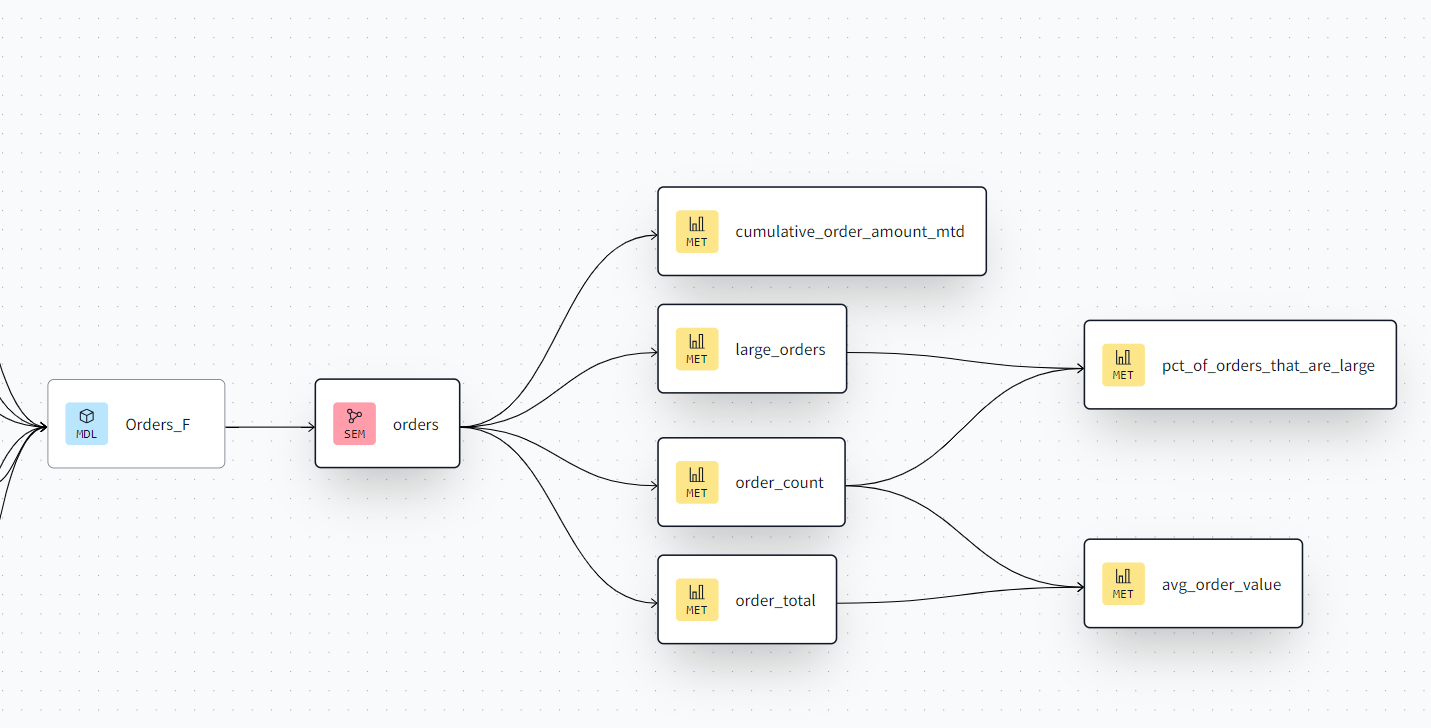
    • Metrics represent the language of the business users. They can be of various types, which represent different kinds of calculations. Some examples include Conversion metrics, Cumulative metrics, Derived metrics, and Ratio metrics. They are always based on measures and represent the last building block of the semantic layer.


This is how the semantic layer is reflected in your dbt lineage:

Consuming the dbt Semantic Layer

Once your dbt project has a semantic layer defined, it can be opened to data consumers. The dbt Semantic Layer allows various BI tools to directly connect to your dbt Cloud project and integrate metrics, measures, and filters directly into the tool of choice.

The following tools are already natively supported: 

  • Tableau
  • Google Sheets
  • Microsoft Excel
  • Hex
  • Klipfolio PowerMetrics
  • Lightdash
  • Mode
  • Push.ai
  • Steep

Other tools can be integrated with custom integrations, as long as they support generic JDBC connections and are compatible with Arrow Flight SQL.

Conclusion

The dbt Semantic Layer can help regain trust in your data warehouse. By moving calculations back from the business users into the data model, a common definition of business KPIs is created. 

Although there is some additional setup required, implementing a semantic layer can highly improve the value generated by your data. Integrating it into the BI tools of your business users even simplifies the way your data is consumed. 

If you want to know more about the dbt Semantic Layer and learn how it fits into a Data Vault 2.0 powered Data Warehouse, make sure to join our next webinar on August 13th!

– Tim Kirschke (Scalefree)

Unify Your Understanding of Data with the dbt Semantic Layer

dbt_semantic_layer_lineage

dbt Semantic Layer

The bigger a corporation gets, the more data is available, and more and more users want to use this data. In a traditional data warehouse (DWH) environment, the DWH typically provides a consumption layer consisting of various information marts, which are then loaded into multiple business intelligence (BI) tools. In there, business users transform and aggregate the data to calculate KPIs and finally make business decisions. 

This, as it turns out, is easier said than done. To derive KPIs out of the data, business users need to have a common understanding of the data provided by the DWH. The information to understand the data is typically hard to find and not accessible in a single place. 

Ultimately, this might lead to multiple departments having different understandings of the same data and deriving different interpretations of the same KPI. Now, it’s very likely that the worst case scenario happens, the trust in your data fades out. This is where a unified semantic layer can help!

From Raw Data To Semantic Layer – With Turbovault And Dbt Cloud

Data Vault is vital for businesses due to its adaptability and scalability in managing dynamic data environments. Its hub-and-spoke architecture ensures traceability and agility, enabling quick adaptation to changing requirements and diverse data sources.

Join our webinar and learn about how to use dbt Cloud with Turbovault and a data modeling tool to implement Data Vault in your organization. Additionally, we will have a look at the dbt Semantic Layer.

Watch Webinar Recording

Components of the dbt Semantic Layer

The dbt Semantic Layer helps simplify the definition and usage of critical business metrics in your dbt project. Metric definitions are centralized to allow consistent self-service usage for all data teams. 

By shifting metric definitions from the BI layer into the modeling layer, business users from different units can be confident that they use the same metric definition, no matter which tool they use. In case a metric definition changes over time, the changes will be applied everywhere it’s used and therefore consistency is enforced. 

To create a unified semantic layer inside your dbt project, the following steps are necessary:

  1. Draft a semantic model
    • To implement a semantic model, a model needs to be drafted first. This should happen via a collaboration between the technical and business teams, to identify core business concepts and how they relate to each other.
  2. Create dbt models that match your semantic model
    • Each object of your semantic model should be turned into a dbt model 1:1. While creating them, put extra work into aligning column names with naming standards and correctly developing the loading logics.
  3. Create new .yml files in the metrics folder
    • Everything related to the dbt Semantic Layer needs to be located in a new folder called “metrics”. In there, .yml files are used to define and configure your semantic models. We recommend creating one .yml file per semantic model.
  4. Define entities
    • In contrast to the name, entities in the semantic model roughly describe columns of semantic models. Entities can be of four different types: Primary, Unique, Foreign, or Natural. Every model needs to have a primary entity, and one entity can be just one column or a SQL expression transforming a column.
  5. Define dimensions
    • A dimension in the dbt Semantic Layer can be seen as different ways to look at your model, i.e., group the data by a specific attribute. Every dimension needs to be tied to a primary entity, which is used for the grouping. A good example is a date column which enables you to group your data by day, month, or year.
  6. Define measures
    • Measures represent aggregations applied to specific columns in your data model. Measures can be used in other measures to calculate more complex ones, and can be defined with various parameters that help create executable SQL code for calculation.
  7. Define metrics
    • Metrics represent the language of the business users. They can be of various types, which represent different kinds of calculations. Some examples include Conversion metrics, Cumulative metrics, Derived metrics, and Ratio metrics. They are always based on measures and represent the last building block of the semantic layer.


This is how the semantic layer is reflected in your dbt lineage:

Consuming the dbt Semantic Layer

Once your dbt project has a semantic layer defined, it can be opened to data consumers. The dbt Semantic Layer allows various BI tools to directly connect to your dbt Cloud project and integrate metrics, measures, and filters directly into the tool of choice.

The following tools are already natively supported: 

  • Tableau
  • Google Sheets
  • Microsoft Excel
  • Hex
  • Klipfolio PowerMetrics
  • Lightdash
  • Mode
  • Push.ai
  • Steep

Other tools can be integrated with custom integrations, as long as they support generic JDBC connections and are compatible with Arrow Flight SQL.

Conclusion

The dbt Semantic Layer can help regain trust in your data warehouse. By moving calculations back from the business users into the data model, a common definition of business KPIs is created. 

Although there is some additional setup required, implementing a semantic layer can highly improve the value generated by your data. Integrating it into the BI tools of your business users even simplifies the way your data is consumed. 

If you want to know more about the dbt Semantic Layer and learn how it fits into a Data Vault 2.0 powered Data Warehouse, make sure to join our next webinar on August 13th!

– Tim Kirschke (Scalefree)

Close Menu