All Posts By

Marc Winkelmann

As Senior Managing Consultant and official CDVP2.1 Instructor since 2020, Marc brings more than ten years of dedicated Data Vault experience to complete end-to-end data platform implementations. His core strength lies in empowering entire data teams to build highly scalable data and AI solutions.

Data Vault Modeling: Visual Example in the Accounting Industry

Data Vault Modeling of a Hub

Visual Example of a Data Vault Modeling

With the addition of architecture and process definitions in Data Vault 2.0, Dan Linstedt has standardized Data Vault modeling.

Based on these standardized symbols, the Visual Data Vault modeling language was developed, which can be used by Enterprise Data Warehouse architects to build Data Vault models.

The authors of the book “Building a Scalable Data Warehouse”, who are the founders of Scalefree, required a visual approach to model the concepts of Data Vault in the book.

For this purpose, they developed the graphical Data Vault modeling language, which focuses on the logical aspects of Data Vault.

The Microsoft Visio stencils and a detailed white paper are available on www.visualdatavault.com as a free download.

Try Visual Data Vault for Free

Hubs in Visual Data Vault

Business keys play an important role in every business, because they are referenced by business transactions and relationships between business objects.

Whenever a business identifies and tracks business objects, business keys are used throughout business processes.

This is one of the reasons why Data Vault is based on the business keys. In Data Vault modeling, business keys are stored in hub entities.

The challenge is to identify the business keys that represent a business object uniquely. That can be just one business key, but also a composite key or a smart key.

The first image shows a hub with only one business key attribute:

Data Vault Modeling of a Hub

Here, the attribute Invoice Number is sufficient to identify the invoice. No other attribute is required (such as the invoice year).

In other cases, it is not as easy, as the following diagram shows:

Data Vault Modeling for a Hub

In this Data Vault modeling case, the accountant is identified by a Country Code attribute (such as the ISO2 code) and an Employee Number attribute.

One attribute alone would not be sufficient to identify the accountant: the employee number by itself might be overlapping across all countries and have only a local meaning (employee number 10006 might be used in multiple countries and identify a different accountant in each country).

Therefore, the local key is extended by the country code to uniquely identify the accountant. Be aware, the country code has to be in the source data to make this a valid model in Data Vault (in the end, we do model source data, in the Raw Data Vault, not the desired model of the business).

Another example extends this concept into a so-called smart-key:

Data Vault Modeling of a Hub

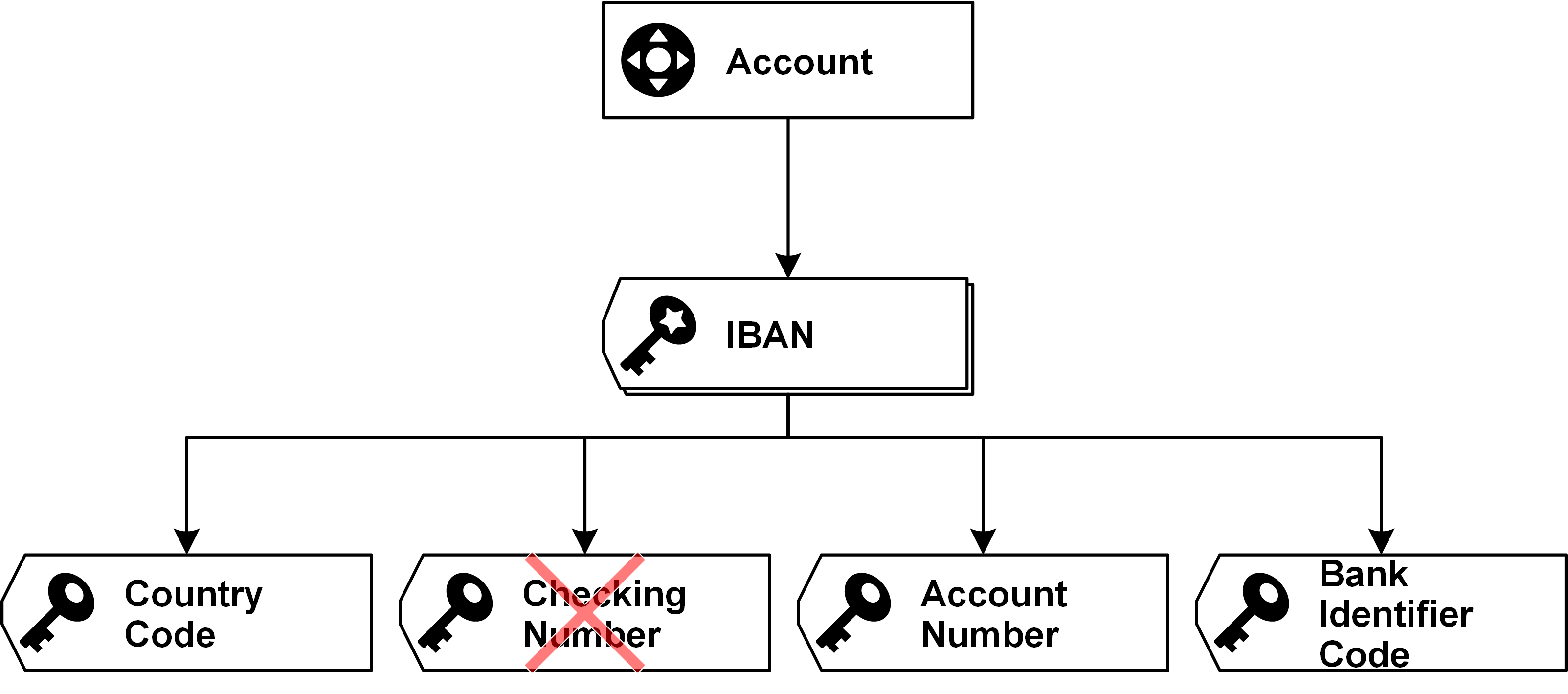
Here, the IBAN number, which is used to identify banking accounts internationally, consists of 4 physical elements in the number:

  1. Country code
  2. Checking number
  3. Account number
  4. Bank Identifier code

In order to model a smart key (a key that comprises multiple parts or keys), add a smart key to the hub and then add business keys to identify the sections of the smart key.

As you can see from above figure, the logical symbol of a smart key is similar to that of a business key. However, the icons are slightly different and the shape indicates a stack.

In this Data Vault modeling example, each business key is modeled as an individual attribute in the hub entity. The combination identifies a business object in the business. The checking number is actually not modelled, because it contains no business value (except the ability to serve as a technical checksum).

However, you’re not wrong with adding it to the model, too.

Hash Keys in Data Vault

Hash Keys in Data Vault 2.0 for MPP

Hash Keys in DV2.0

Data Vault 2.0 introduces hash keys to enhance the traditional Data Vault model, bringing several advantages to data warehousing. Hash keys do not only speed up the loading process; they also ensure that the enterprise data warehouse can span across multiple environments: on-premise databases, Hadoop clusters, and cloud storage.

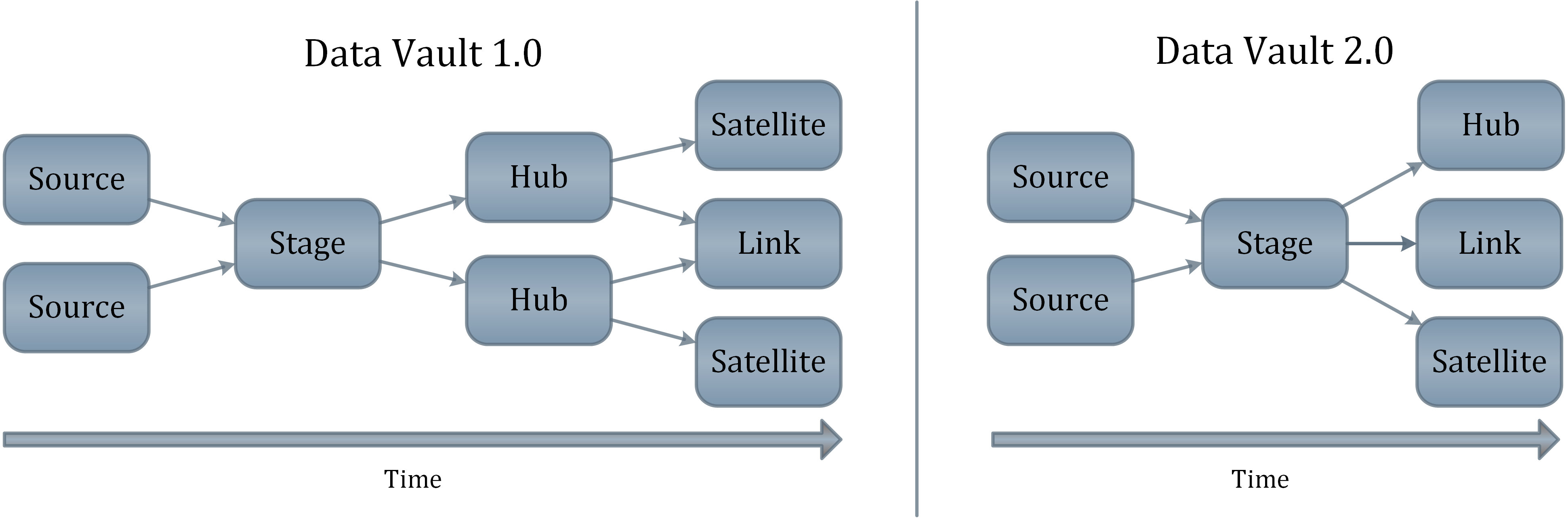
Let’s discuss the performance gain first: to increase the loading procedures, dependencies in the loading process have to be minimized or even eliminated. Back in Data Vault 1.0 sequence numbers were used to identify a business entity and that had to include dependencies during the loading process as a consequence.

These dependencies have slowed down the load process which is especially an issue in real-time-feeds. Hubs had to be loaded first before the load process of the satellites and links could start. The intention is to break these dependencies by using the hash keys instead of sequence numbers as the primary key.

Business Keys vs Hash Keys

In advance, business keys may be a sequence number created by a single source system, e.g. the customer number.

But, business keys can also be a composite key to uniquely identify a business entity, e.g. a flight in the aviation industry is identified by the flight number and the date because the flight number will be reused every day.

In general: a business key is the natural key used by the business to identify a business object.

While using the business keys in Data Vault might be an option, it is actually a slow one, using a lot of storage (even more than hash keys).

Especially in links and their dependent satellites, many composite business keys are required to identify the relationship or transaction/event in a link – and to describe it in the satellite.

This would require a lot of storage and slow down the loading process because not all database engines have the capability to execute efficient joins on variable-length business keys.

On the other hand, we would have too many columns in the link because every business key must be a part of the link.

The issue at this point is that we also have different data types with different lengths in the links. This issue is exaggerated because it is also required to replicate the business keys into their satellites.

To guarantee a consistent join performance, the solution is to combine the business keys into a single column value by using hash functions to calculate a unique representation of a business object.

Massively Parallel Processing (MPP)

Due to the independence during the load process of hubs, links, and satellites, it is possible to do that all in parallel.

Hash Keys in Data Vault 2.0 for MPP

The idea is to use the fact that a hash key is derived from a business key or combination of business keys without the need for a lookup in the parent table.

Therefore, instead of looking up the sequence of a business key in a hub before describing the business key in the satellite, we can just calculate the hash key of the business key.

The (correct) implementation of the hash function ensures that the same semantic business key leads to exactly the same hash key, regardless of the target entity loaded.

Hash Keys to Join Apache™ Hadoop® Data Sets

Without hashing the load to Hadoop® or NoSQL requires a lookup on the hub or link sequence in the relational system before it can insert or attach it’s data.

Hashing instead of sequencing means that we can load in complete 100% parallel operations to all hubs, all links, all satellites, and enrich all Hadoop® or NoSQL based documents in parallel at the same time.

It also then allows to join across multiple heterogeneous platforms – from Teradata Database to ApacheTM Hadoop® for example.

Hash Difference

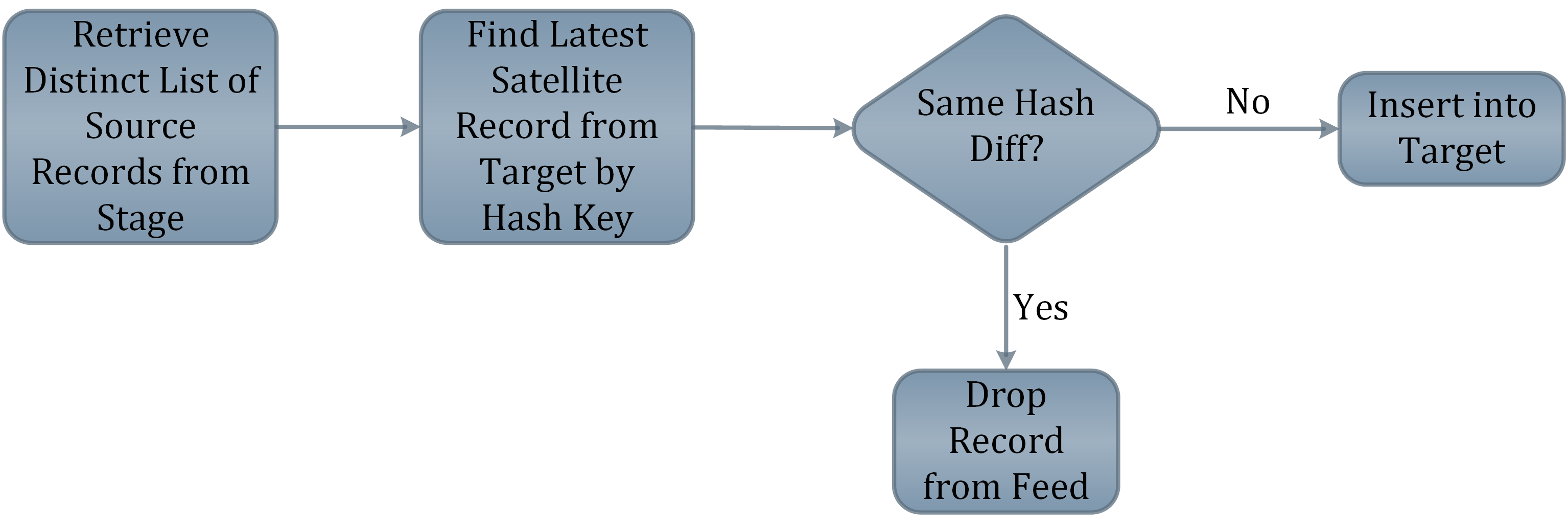
The hash difference column applies to the satellites. The approach is the same as with the business keys, only that here all the descriptive data is hashed.

That reduces the effort during an upload process because just one column has to be looked up. The satellite upload process first examines if the hash key is already in the satellite, and secondly, if there are differences between the hash difference values.

The image above shows the process if the source system sends you a full data delivery.

The point where to hash the values should be on the way into the staging area because at this point there is time to check for “hash collisions”, and handle hashing issues before continuing with the data in the Data Vault.

What Hash Function to Use

There are many hash functions to choose from: MD5, MD6, SHA-1, SHA-2, and some more.

We recommend using the MD5 algorithm with a length of 128 bits in most cases, because it is most ubiquitously available across most platforms, and has a decently low percentage chance of hash collision with an acceptable storage requirement.

An additional advantage hashing brings is that the hashes have the same length and are from the same data type, from which a performance improvement arises.

Furthermore, hash values are generated, so they never get lost and can be recreated.

Collision

Hashing has a very small risk: the collision. That means, two different data will get the same hash value.

But, the risk is very small, for example: In a database with more than one trillion hash values, the probability that you will get a collision is like the odds of a meteor landing on your data center.

Summary

Hash Keys are not mandatory in the Data Vault, but they are highly recommended. The advantages of

  • massively Parallel Processing (MPP),
  • data load performance,
  • consistency and
  • auditability

are indispensable and can not be reached with Sequences or Business Keys.

Hash keys are no silver bullet…but they provide (much) more advantages than they introduce disadvantages (storage).

The Value of Non-Historized Links

How to use non-historized Links

Non-Historized Links in Data Vault 2.0

Non-historized links in Data Vault 2.0 simplify data modeling by focusing on current relationships instead of historical changes. This improves efficiency, reduces complexity, and enhances query performance for more agile analytics.

Introduction to Non-Historized Links

Non-historized links, also known as Transaction Links, are one of the nuts and bolts of the Data Vault 2.0 framework, but how do they work within a model? When Dan Linstedt, co-founder of Scalefree, invented the Data Vault, he had several goals in mind. One of the goals was to load data as fast as possible from the source into a data warehouse model, process it into information, and present it to the business analyst in any desired target structure.

For Data Warehouse automation and simplicity, the Data Vault 2.0 model exists only of three basic entity types:

  1. Hubs: a distinct list of business keys
  2. Links: a distinct list of relationships between business keys
  3. Satellites: descriptive data, that describe the parent (business key or relationship) from a specific context, versioned over time.

Now, as we always teach (and sometimes preach): you can model all enterprise data using these three entity types alone. However, a model using only these entity types would have multiple disadvantages. Many complex joins, storage consumption, ingestion performance, and missed opportunities for virtualization.

The solution? Adding a little more nuts and bolts to the core entity types of the Data Vault to cope with these issues. One of the nuts and bolts is the use of non-historized links, also known as Transaction Links:

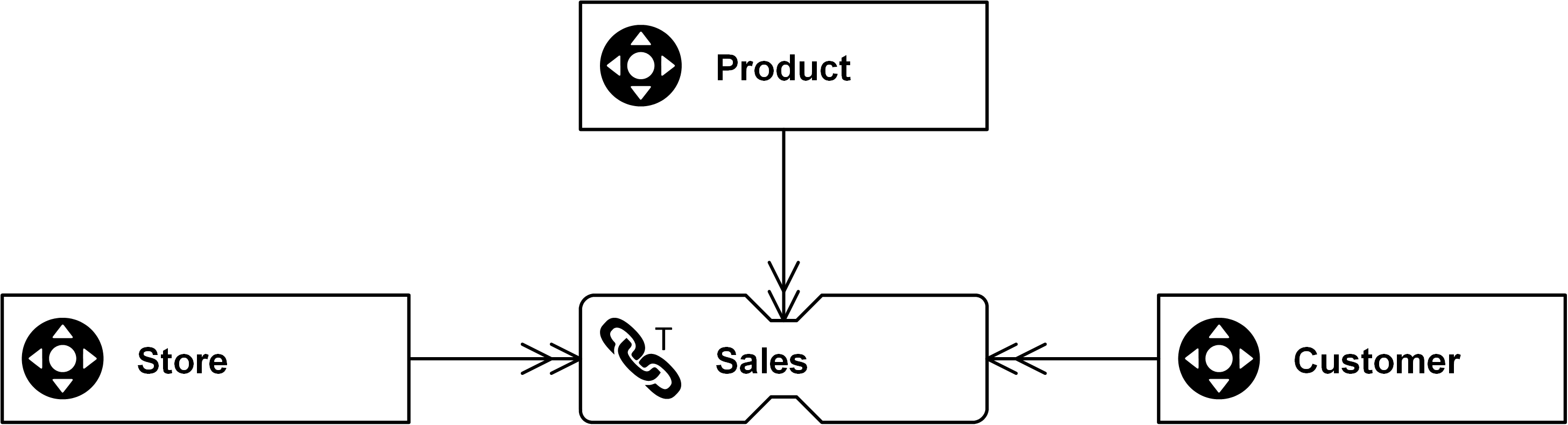
Sales - Non-historized Links

In this example, Sales can be modeled with non-historized links that capture sales transactions of a customer, related to a store. The goal of the non-historized link is to ensure high performance on the way into the data warehouse and on the way out. Don’t forget, that the ultimate goal of data warehousing is to build a data warehouse not just model it. And building a data warehouse involves much more than just the model: it requires people, processes, and technology.

Key Characteristics of Non-Historized Links

So, how do non-historized links meet these goals? Think about your business analysts. What are their goals? In the end, to be honest, they don’t care about a Data Vault model. Instead, they would like to see dimensional models, such as star schema’s and snowflake models or flat-and-wide models for data mining. Or, once in a while, they want to see the ugly-looking tables from the mainframe, sometimes linked, sometimes not, and not a lot of people fully understand the relationships anymore…but for backward compatibility, that’s just great.

Having defined the target, the next question comes into mind: what is the target granularity? For example, in a dimensional model, the target granularity of fact tables often reflects the transactions to be analyzed (think about call records in the telecommunications industry or banking transactions).

Interestingly, this desired target granularity can often be found directly in the source systems. Because a telecommunications provider has an operational system in place that records each phone call. Or a banking application that records every account transaction. These records are typically loaded to the data warehouse without aggregation (at least in Data Vault where we are interested in the finest granularity for auditing and delivery purposes).

And here comes the problem with the standard Data Vault entity types. While they are very simple and patternized, they have one problem. It’s the fact that the standard link “stores a distinct list of relationships”, as stated above. That means the link is only interested in relationships from the source that are unknown to the target link. If a customer walks into a store multiple times and purchases the same product, the relationship between the customer (number), store (number), and product (number) is already known and no additional link entry is added.

As a result, the granularity of the incoming data is changed when loading the target link. If the transaction’s underlying relationship is already known, the transaction would be omitted (and instead captured by a satellite).

The next problem is that the link granularity now differs from the target granularity because the business analyst wanted one record per transaction and not per distinct business key relationship. Another grain shift is required that typically involves joining the satellite of the link to the link itself to recover the original grain.

As we explained in our book “Building a Scalable Data Warehouse with Data Vault 2.0” a grain shift is relatively costly in terms of performance. This is because the operation requires costly GROUP BY statements or LEFT and RIGHT JOINS.

And for what? The end result of both operations often results in the original granularity from the source system. Two expensive grain shifts for nothing sounds like a bad deal.

non-historized Links

And it is.

That is where non-historized links come into play: the link is a simple variation of the standard link with the goal of capturing the source transactions and events at the original granularity.

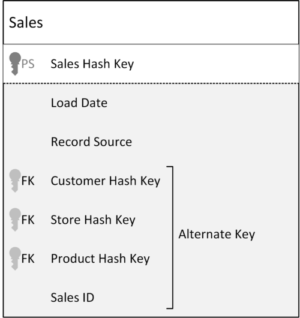
In a standard link, the granularity is defined by the number of hub references in the link. This would not be sufficient to capture multiple transactions that involve the same business keys (e.g., the same customer, store, and product) in the same target link. To resolve the issue, an additional element of the alternate key on the non-historized links is required. Typically a transaction or event ID, such as the call ID or a basket ID in the retail industry (which also can be modeled as its own Hub). In combination with the hub references, the combined business key should be unique per transaction. This way, we can now capture one record in the target link per source record from the operational system.
How to use non-historized Links

Figure: Non-Historized Link with Sales ID as an additional key

One deeper scenario would be, if the same product (in that case the highest granularity) emerges twice in a sale, because of different discounts for example. In that case, the line item number would be an additional key (Dependent Child Key) to make every data set unique.

From a loading perspective, the ingestion process of the incoming data is much improved, because no grain shift is required anymore. All data is loaded directly from the source into the target. As long as the business analyst wants to report exactly on this granularity, it is possible to restructure the non-historized link table into a fact table by using a virtual SQL view on top.
One major point is that non-historized links do not allow edits to the descriptive data, meaning there is never any history issued on the facts (e.g. sensor or machine-generated data). Because the descriptive data cannot change, there is no need to put it in a Satellite, rather descriptive data is kept directly in the non-historized links.

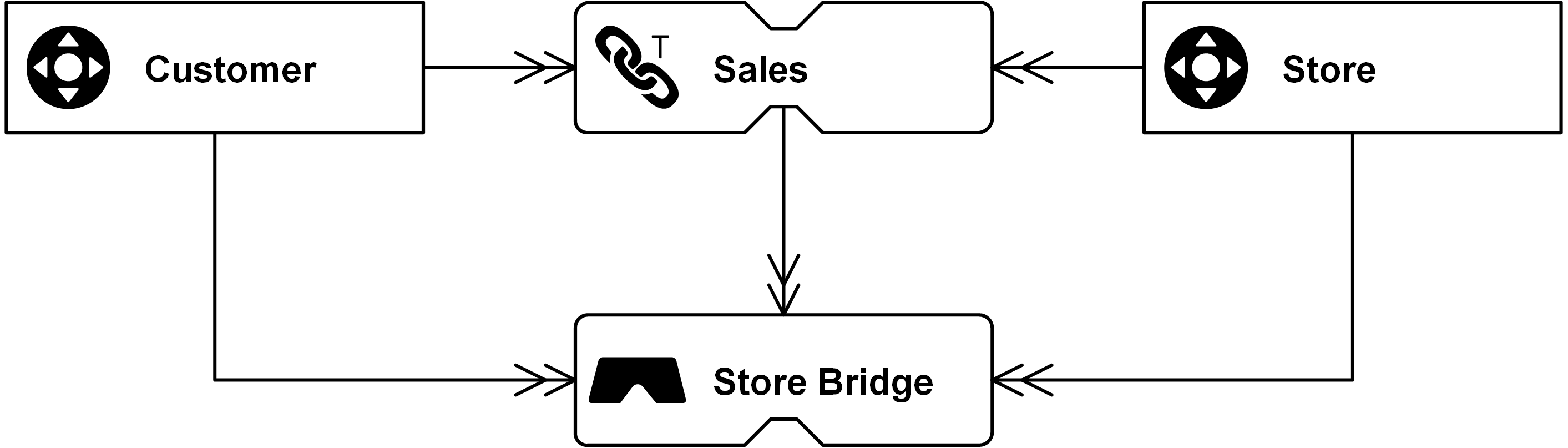
For performance reasons, avoid grain shifts on the way out. If a different target granularity is required, and it is not possible to load this granularity from the source system or from the Data Vault model, consider a bridge table. The purpose of this entity type is to materialize the grain shift while keeping the advantage of customizing the target according to the individual requirements set for the dimensional target.

How to use non-historized Links

Figure: Virtual Bridge Table as Fact Table with GROUP BY Store Hash Key

Conclusion

Non-historized links offer a streamlined approach to Data Vault modeling, optimizing performance and simplifying data structures. By focusing on current relationships rather than historical changes, they enhance efficiency, reduce storage needs, and improve query speed. Incorporating them into your data architecture can lead to a more agile and scalable analytics environment.