All Posts By

Ole Bause

Ole Bause is a BI Consultant at Scalefree with a Master’s in Data Science and extensive experience in cloud native DWH (AWS, GCP, Azure). A Certified Data Vault 2.0 Practitioner (CDVP2) and AWS Solutions Architect, he specializes in building scalable pipelines with dbt and Snowflake.

Introducing Visual Data Vault: A Purpose-Built Canvas for Data Vault Modeling

Visual Data Vault Example

Anyone who has worked on a Data Vault project knows how important a good diagram can be. Hubs, Links, Satellites, and supporting structures show which business concepts matter, how they relate to one another, and where their descriptive history belongs. A clear model can turn a complex discussion into something everyone in the room can follow.

Creating that model is often more difficult than it needs to be. General-purpose diagramming tools can draw the shapes, but they do not understand Data Vault. Colors have to be selected by hand, naming conventions must be remembered, and technical details often end up as free text inside a box. Before long, more time is spent maintaining the diagram than discussing the model itself.

This is the problem we want to solve with Visual Data Vault.

Built by Scalefree, Visual Data Vault is a lightweight, browser-based application for visually designing and documenting Data Vault models. It provides a focused workspace with familiar Data Vault entity types, practical modeling details, and simple ways to save and exchange diagrams. It is also completely free to use, so you can open the editor and start modeling without purchasing a license or subscription.

It also has a deliberately clear scope. Visual Data Vault is a visual modeling tool. It helps you design, discuss, and communicate a Data Vault model, but it does not generate transformation code, deploy database objects, run data pipelines, or build the warehouse on your data platform.
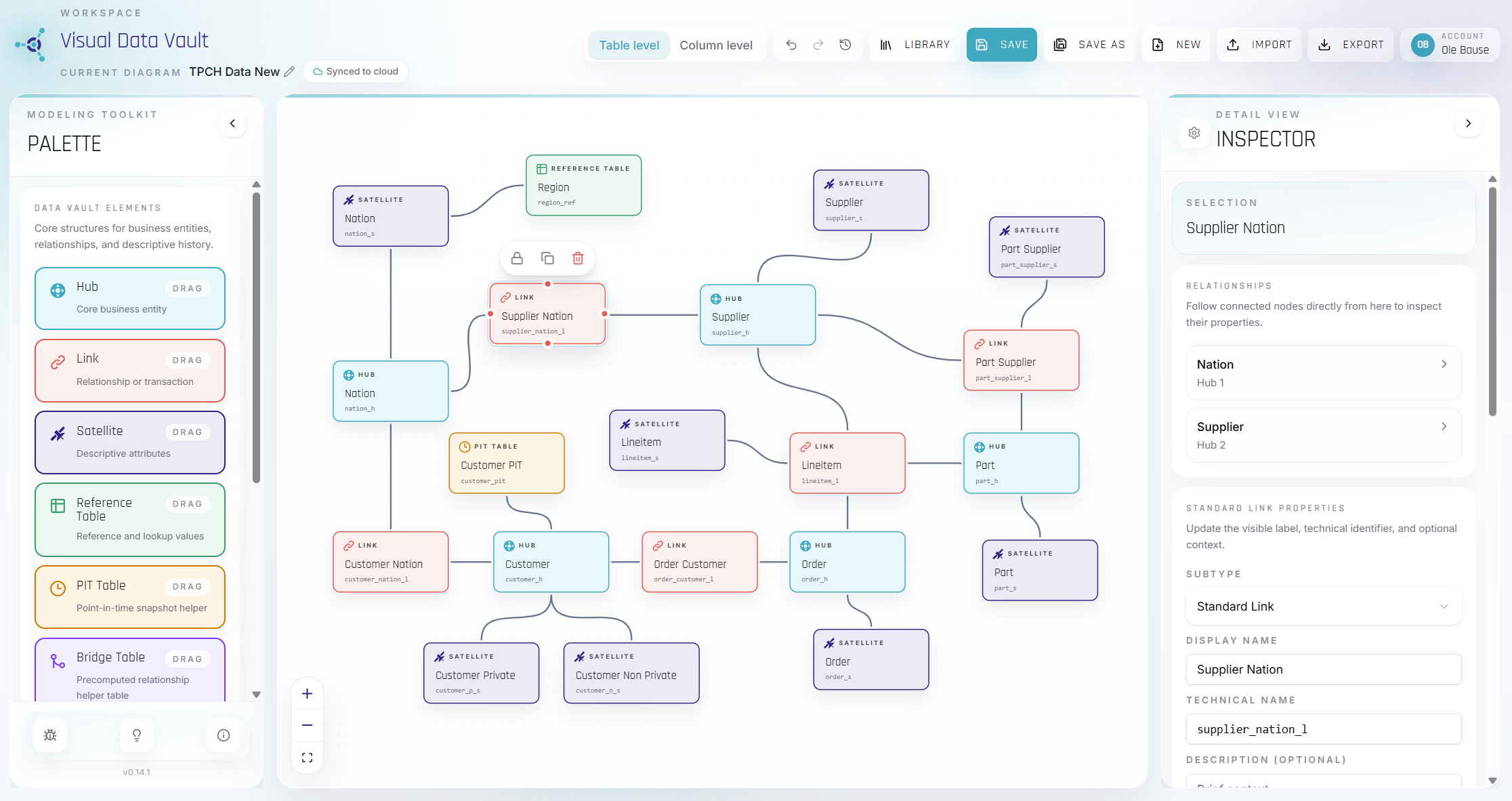
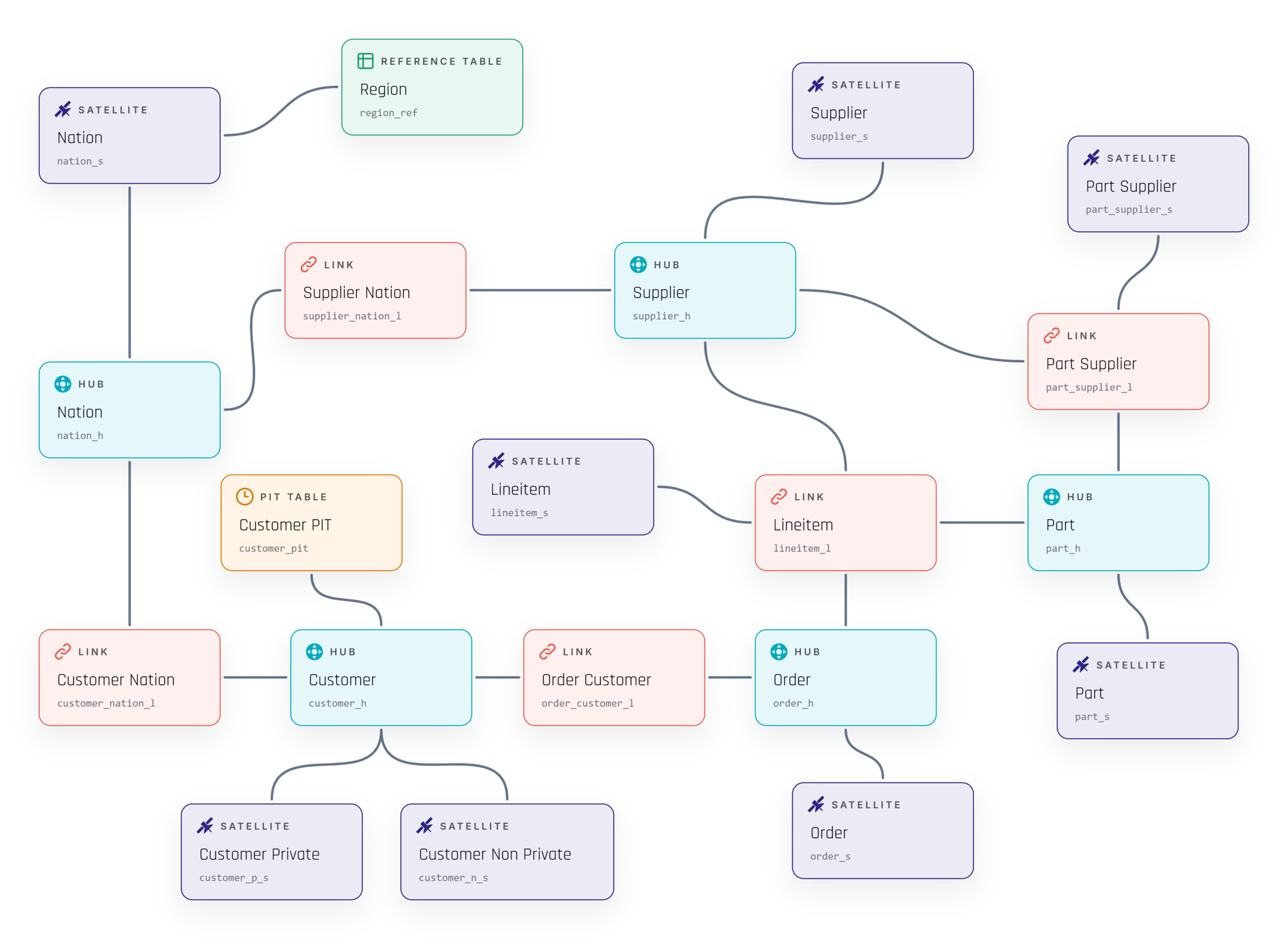
Diagram of a Data Vault model on a UI canvas, showing hubs, links, and satellites (Nation, Region, Supplier, Customer, Order, Part) connected in a network.

A Data Vault model created in a browser with purpose-built entity types and modeling controls.

Model with Data Vault entity types

When you open the editor, you do not start with a collection of generic shapes. The palette contains the Data Vault entities you need, ready to place on the canvas: Hubs, Links, Satellites, Reference Tables, PIT Tables, and Bridge Tables.

More specialized entity types are available as well. You can model Reference Hubs; Non-Historized and Hierarchical Links; and Reference, Multi-Active, Effectivity, Record-Tracking, and Non-Historized Satellites. Each one is visually recognizable, while the diagram as a whole keeps a consistent look.

Of course, real-world diagrams often need some extra context. A source table may need to appear next to the Raw Vault model, a design decision may need a short explanation, or a large subject area may need a visible boundary. For these situations, the editor also includes generic tables, notes, and groups.

The basic workflow feels natural: drag an entity onto the canvas, name it, move it into place, and connect it. From there, alignment assistance and multi-selection help keep the layout tidy. You can copy and paste parts of a model, lock finished entities in place, adjust relationship paths, and use undo or redo while trying out a different design. Local change history gives you another way to return to an earlier point.

The result is an editor that stays out of the way and lets the conversation remain focused on the model.

Visual Data Vault

Entities can be placed and connected without manually recreating Data Vault notation.

Add the detail that makes a model useful

A good Data Vault diagram needs more than correctly colored entities. It should also carry enough information to support the next design discussion.

In Visual Data Vault, each entity can have a readable display name as well as a unique technical table name. Technical names can be created automatically from configurable naming conventions. When a model grows or changes, this helps keep names consistent without turning every edit into a manual cleanup task.

Select an entity and its details appear in the inspector beside the canvas. Depending on the entity type, you can define business or reference keys, review standard technical columns, and add descriptive columns with their data types. Relationships can also have labels and descriptions, making their meaning easier to understand when the diagram is shared with someone else.

Sometimes you want to discuss the architecture without seeing every column. At other times, those columns are exactly what the discussion is about. Visual Data Vault supports both situations through table-level and column-level views. The compact table-level view is well suited to workshops and high-level reviews. Switch to the column-level view when you need to look more closely at keys, metadata, and structure.

The editor also provides basic guidance when entities are connected. Clearly invalid relationships are prevented, which helps catch simple modeling mistakes as they happen. This guidance is there to support the modeler, not to replace architectural judgment or act as a complete validation framework.

blank

Switch from an architectural overview to column-level detail without leaving the canvas and edit column names

Save your work and export it in the format you need

Many models are not finished in a single session. They develop over several workshops, review rounds, and small improvements. Visual Data Vault lets you save diagrams to your account and return to them through the diagram library.

The library makes it easy to find, rename, clone, reopen, or remove a saved diagram. Autosave helps protect changes while you work, so the editor can be used for an evolving design rather than only for a quick sketch.

Of course, a diagram rarely stays inside one application. It may need to become part of a presentation, a technical specification, or another modeling workflow. Visual Data Vault therefore includes four export options, each intended for a different purpose:

  • PNG creates a high-resolution image that can be added directly to presentations, documents, and architecture specifications.
  • PDF captures the diagram as a single-page document that is easy to review, distribute, or archive.
  • JSON preserves the Visual Data Vault diagram in an editable application format. It is the best option for backing up a model or moving it between Visual Data Vault sessions.
  • DBML exports supported tables and relationships for use in compatible external modeling tools.

JSON and DBML can also be imported, making it possible to bring an exported diagram back onto the canvas or use supported DBML structures as the starting point for a new visual model. These import and export features are available as part of the free application.

Before an imported JSON or DBML file replaces the current canvas, the application validates it and shows what can be brought into the model. For DBML, it can report incomplete or unsupported elements and offer repair options for some missing metadata.

There is one important limitation to keep in mind: DBML is an exchange format, not a complete description of Data Vault semantics. It can transfer supported tables and relationships, but it does not preserve every modeling rule, key, constraint, or implementation choice.

Visual Data Vault

Continue saved models later or export them as image, document, JSON, and DBML formats.

A visual modeling tool with a clear scope

Visual Data Vault fits into the part of a project where a model needs to become visible, understandable, and ready for discussion. You might use it to sketch the first version of a Raw Vault, work through relationships during a workshop, prepare for an architecture review, or create a consistent diagram for technical documentation.

Once the visual model is agreed upon, the engineering work still remains. Your chosen implementation and automation tools are responsible for creating tables, building loading patterns, transforming data, testing pipelines, and deploying the solution to the target platform. Visual Data Vault complements those tools; it does not try to replace them.

The same clear boundary applies elsewhere. Visual Data Vault is not a full metadata or lineage platform, and it is not currently a real-time multi-user modeling environment. Its purpose is more direct: make Data Vault diagrams easier to create, enrich, maintain, and exchange.

We believe that focus is useful. Data Vault practitioners should not have to rebuild their modeling language from generic shapes every time they start a diagram. They should be able to open a canvas that already understands the work they want to do.

Create your first model

Visual Data Vault brings Data Vault entity types, technical modeling detail, diagram management, and useful export formats into one browser-based workspace, and it is completely free to use.

Open Visual Data Vault and create your first diagram at no cost. The next time your team discusses a Data Vault design, you will have a clear model everyone can see, review, and understand.


Open Visual Data Vault

Google BigQuery and dbt Cloud Quickstart: Full Setup Guide

Smiling man in a white shirt points to the left at a blue-to-teal gradient background with the text 'BUILD IT' and colorful logo icons to the left.

Get Started with Google BigQuery and dbt Cloud

If you are looking to build a modern, scalable data transformation workflow, combining dbt Cloud with Google BigQuery is one of the most powerful stacks available today. In this guide — based on a hands-on walkthrough video — we cover everything from setting up your Google Cloud project to running your first automated deployment job. Whether you are new to analytics engineering or already familiar with SQL-based transformations, this tutorial will get you productive quickly.


What Is dbt and Why Does It Work So Well with Google BigQuery?

Before diving into the setup steps, it helps to understand what each tool actually does and why they complement each other so naturally.

dbt (data build tool) is an open-source transformation framework that brings software engineering best practices into data teams. With dbt, your SQL code is version-controlled, tested, documented, and executed through scheduled jobs — the same discipline that software engineers apply to application code. You write modular SQL models, dbt compiles them, and the actual query execution happens entirely on your data platform.

Google BigQuery is a fully managed, serverless cloud data warehouse built for large-scale analytics. It handles the storage and compute, scales automatically, and integrates tightly with the broader Google Cloud ecosystem. Critically for this tutorial, BigQuery hosts publicly available datasets you can query immediately — no manual data loading required to get started.

Together, dbt and BigQuery form a clean separation of concerns: dbt manages your transformation logic, documentation, and pipeline orchestration, while BigQuery handles the heavy lifting of storing and querying your data at scale. This makes the combination especially attractive for analytics engineering teams that want speed, reliability, and maintainability.

Step 1: Set Up Your Google Cloud Project and BigQuery Dataset

Everything starts in the Google Cloud Console. If you do not already have a Google Cloud account, you can start for free — Google offers around $300 in credits with no credit card required upfront, which is more than enough for this quickstart.

Once you are in the console, navigate to the Cloud Resource Manager and create a new project. For this demo, a name like bigquery-dbt-quickstart works well. After the project is created, head to the BigQuery console from the main navigation menu.

In BigQuery, you will immediately notice that the terminology differs slightly from traditional databases. Instead of database → schema → table, BigQuery uses project → dataset → table. The concepts map directly, but knowing this terminology prevents confusion when you are configuring dbt later.

Create a new dataset inside your project — call it something like dbt_demo. During creation, you will be asked to set a data location (choose a region that makes sense for your use case, or a multi-region option like US or EU), an optional expiration policy, and an encryption setting. The defaults are fine for a quickstart.

The public tutorial data you will be using lives in a project called dbt-tutorial, under a dataset named jaffle_shop. It contains customer and order tables — exactly what you need to build a meaningful first model.

Step 2: Create a Service Account and Generate a JSON Key

For dbt Cloud to run queries in BigQuery on your behalf, it needs authenticated access. The most straightforward approach for a quickstart is a Google Cloud service account with a JSON key file.

In the Google Cloud console, use the Credentials Wizard under APIs & Services to create a new service account. Name it something like dbt-user. Assign it two roles:

  • BigQuery Data Editor — allows the service account to create and modify tables
  • BigQuery User — allows it to run jobs against the project

Once the service account is created, open it and navigate to the Keys tab. Create a new JSON key. This downloads a file to your local machine — keep it secure and do not commit it to version control. You will upload it to dbt Cloud in the next step.

Note: In a production environment, you would typically use OAuth or Workload Identity Federation rather than a JSON key file. For this quickstart, the service account key is the simplest and most transparent option.

Step 3: Connect dbt Cloud to BigQuery

With your service account key ready, log in to dbt Cloud and create a new project. When prompted to set up a connection, choose BigQuery and upload the JSON key file you just downloaded. dbt Cloud will parse the file and automatically populate your project and credential details.

Set a target name for the connection — something like dbt-demo — and save. For the repository, this demo uses dbt’s managed Git repository, which is the quickest option. In a real production project, you would connect dbt Cloud to your own GitHub, GitLab, or Azure DevOps repository and use pull requests and CI/CD pipelines to manage code changes properly.

Step 4: Initialize Your dbt Project

Open the dbt Cloud Studio (the browser-based IDE). You will see a button in the top-left to initialize your dbt project. Click it — dbt will automatically generate the standard project scaffold, including the dbt_project.yml file and a default folder structure.

The dbt_project.yml file is the configuration file that tells dbt this folder is a dbt project. It is where you set the project name, define global defaults, and configure materialization strategies per folder. Every SQL model you place inside the models/ folder from this point forward can be compiled, tested, documented, version-controlled, and executed against BigQuery automatically.

You will also notice that the initializer creates some example models. Delete the examples/ subfolder inside models/ to start with a clean structure — but be careful not to delete the models/ folder itself.

Once your project structure looks clean, commit the initial files with a message like project initialization and you are ready to start building.

Step 5: Define Your Sources

In dbt, sources are the starting point of every project. They tell dbt where your raw input data lives — which project, dataset, and table — without hardcoding those references directly into each model file. This makes your project far more maintainable: if a source location changes, you update it in one place and every model that uses it automatically picks up the change.

Create a new file in your models/ folder and name it sources.yml. The structure always starts with version: 2 (required for the current dbt YAML schema), followed by a sources: key. Under that, define a source with a name (for example, jaffle_shop), specify the BigQuery project as the database (dbt-tutorial), the dataset (jaffle_shop), and list the individual tables you want to reference — in this case, customers and orders.

After saving the file, the dbt Cloud lineage panel will update to show your newly recognized sources. They will appear as the entry points in your project’s data lineage graph.

Step 6: Build Staging Models

A core best practice in dbt is to never reference raw source tables directly in your business logic models. Instead, you create a thin staging layer — one model per source table — that lightly cleans and standardizes the data. Typical staging transformations include renaming columns to consistent naming conventions, casting data types, and filtering out clearly invalid records.

dbt Cloud makes this step even easier: the lineage view shows a link next to each detected source table that lets you auto-generate a staging model scaffold. Click it, and dbt generates a boilerplate SQL file using Common Table Expressions (CTEs) and the source() macro.

The source() macro is one of the first things that makes dbt feel different from plain SQL. Instead of writing SELECT * FROM dbt-tutorial.jaffle_shop.customers, you write SELECT * FROM {{ source('jaffle_shop', 'customers') }}. dbt compiles this at runtime into the correct fully qualified BigQuery reference, keeping your code clean and location-independent.

In the staging model for customers, rename the id column to customer_id for clarity. Save the file and use the Preview button to verify that dbt can query the data from BigQuery — this confirms your connection and credentials are working correctly.

When you are ready to persist the model, click Build. dbt will create the model in BigQuery under your personal development dataset — a sandboxed schema tied to your dbt Cloud user account. This means you can build and iterate on models freely without touching anything in your production environment.

If you switch back to the BigQuery console at this point, you will find a new dataset named after your dbt username, and inside it, a view representing your staging model. Repeat the same process for the orders source table.

Step 7: Build a Customer Dimension Model

With your staging models in place, you are ready to build a more meaningful transformation: a customer dimension that joins customer data with order history.

Create a new folder inside models/ called marts/ (a common convention for final output models), and inside it create a file called dim_customers.sql.

In this model, instead of the source() macro, you will use the ref() function — the other core dbt macro. Where source() points to raw input tables, ref() points to other dbt models you have already defined. Writing {{ ref('stg_jaffle_shop__customers') }} does two things: it generates the correct BigQuery reference at compile time, and it tells dbt that this model depends on the staging model — building the dependency graph that dbt uses to determine build order, enable lineage tracking, and support documentation.

Build out the model with a few CTEs: one that selects from your customers staging model, one that aggregates order data per customer (first order date, most recent order date, and total order count), and a final CTE that joins the two together. The lineage panel will update to show the full data flow from raw sources through staging into the dimension model — a powerful visualization, especially as your project grows.

Build the model, verify it in BigQuery, then commit your changes and merge to main.

Step 8: Create a Deployment Environment and Schedule a Job

Development work happens in personal dev environments. Production data transformations require a deployment job — a configured, scheduled run that executes your models against your production BigQuery dataset.

In dbt Cloud, navigate to Orchestration → Environments and create a production environment. You will need at minimum one development environment and one production environment. Attach a connection profile to the production environment that points to the dbt_demo dataset you created earlier — this is where production models will be materialized.

Then go to Orchestration → Jobs → Deploy Job and create a new job. Name it something like Production Daily, select your production environment, and configure the run command as dbt build (which compiles, runs, and tests all models in one step). Enable a schedule — for example, daily at 2:00 AM using either the UI scheduler or a cron expression for more precise control.

You can also trigger the job manually to verify it runs successfully. The job run view shows the status of each model — pass, fail, or skip — making it easy to spot and debug issues in production.

What to Learn Next: Data Vault, dbt, and Scalable Analytics Engineering

What you have built in this walkthrough — connecting dbt Cloud to Google BigQuery, defining sources, creating staging and dimension models, and scheduling a deployment job — represents the foundational workflow you will use in every real analytics engineering project.

But this is just the beginning. dbt supports a wide range of advanced features: custom tests, documentation generation, macros and Jinja templating, incremental models for large datasets, snapshots for slowly changing dimensions, and much more.

If you want to go deeper and learn how to combine dbt with structured modeling methodologies, Data Vault 2.0 is the industry standard for building scalable, auditable, and future-proof enterprise data warehouses. At Scalefree, we offer comprehensive Data Vault 2.1 training and certification programs that cover everything from foundational concepts to advanced implementation patterns — including how to integrate dbt into a Data Vault workflow on platforms like BigQuery.

Whether you are just starting your analytics engineering journey or looking to formalize your team’s approach to data modeling, our Data Vault 2.1 certification is the most direct path to building production-grade data platforms with confidence.

Check out our other platform-specific tutorials — including guides for Snowflake — and explore our webinars and training programs to take your data engineering skills to the next level.

Watch the Video

Orchestration of Agentic Workflows

The Shift from Prompts to Autonomous Systems

For years, organizations have focused on mastering “prompt engineering”, the art of writing precise instructions to extract useful outputs from Large Language Models (LLMs). While highly effective for simple, singular tasks, the prompt-based approach has inherent limitations when faced with complex, multi-step business problems.

The next paradigm shift in enterprise AI is the move toward Agentic Workflows.

An “Agent” is more than just an LLM. It is an autonomous or semi-autonomous system that combines reasoning capability (the LLM) with access to tools, memory, and the ability to act on its environment. Instead of answering a question, an agent performs a role, acting as an analyst, a software engineer, or a project manager, handling sequential professional tasks until a goal is achieved.

Orchestration of Agentic Workflows

Master the art of building multi-step autonomous systems by integrating the LangChain ecosystem with powerful tools like Zapier. This session provides a practical roadmap for evolving from simple prompts to sophisticated, coordinated architectures that execute complex professional tasks with ease. Learn more in our upcoming webinar on April 21st, 2026!

Watch Webinar Recording

Why Agents Require Orchestration

The premise of agentic workflows is powerful, but deployment is difficult. In a complex scenario, you may need a system to:

  1. Analyze a business request.
  2. Search a database.
  3. Process results.
  4. Consult a second specialized agent (e.g., a “Coder Agent”).
  5. Revise the plan based on output and finally provide a summary.

Without proper coordination, this series of steps breaks down. The model might hallucinate a tool execution, forget crucial data from step one by step four, or enter an endless loop of unhelpful actions.

Orchestration is the framework that manages this complexity. It is the conductor of the agentic orchestra, defining how different agents, tools, and memory systems interact, ensuring reliability, traceability, and successful execution of the business objective.

Anatomy of an Agentic Stack

To build a reliable orchestrator for autonomous systems, your architecture must unite three fundamental components:

  • Intelligence Layer (The Brain): The reasoning core, usually an LLM, capable of taking input, breaking it into smaller tasks, and evaluating progress.
  • Action Layer (The Tools): A library of external integrations, such as databases, web scrapers, computational engines, and business APIs, that the agent can use to gather real-world data or execute actions.
  • Coordination Layer (The Orchestrator): The logic that manages state, standardizes how agents exchange data, handles errors, and ensures loops are terminated when goals are met.

Tools of the Trade: Navigating the Lang Ecosystem

As organizations move from proof-of-concept to production, the ecosystem of framework tools is rapidly evolving. The “Lang” suite has emerged as a particularly dominant force in defining how agents are built and orchestrated. During our workshop, we will explore several critical tools within this stack:

LangChain

While often used for simple prompt channelling, LangChain’s core contribution to agentic architecture is standardizing integration and chain creation. It provides the interface to connect the LLM to dozens of external systems. Crucially, it allows us to define custom “tools” for the agent. These are specialized, user-created functions that give the agent specific capabilities, such as querying a proprietary data warehouse or executing an internal Python script. By wrapping these functions in LangChain’s tool abstraction, the agent can autonomously decide when and how to invoke them to solve complex problems.

LangGraph

Managing complex agentic workflows required a different mental model: graphs. LangGraph extends LangChain by allowing developers to model agentic flows as stateful graphs (DAGs, or Directed Acyclic Graphs). This is crucial for systems that require robust loops, cyclical processes, and complex state management, ensuring that “Agent A” always knows what state “Agent B” left the system in.

Langfuse

Orchestrating agents is messy, and you need visibility. While not officially developed by the creators of LangChain, Langfuse is an essential open-source operational companion that integrates seamlessly with the ecosystem. It provides a robust platform for debugging, testing, and monitoring agentic systems without vendor lock-in. Langfuse allows teams to “trace” the entire multi-step process, viewing every prompt, tool call, and internal decision, making it possible to identify bottlenecks, reduce costs, and debug failures in production.

Complementary Orchestration Tools

While the Lang ecosystem excels at managing LLM logic, a true enterprise solution often requires integration with generalized orchestration and automation tools (like Zapier or n8n). These tools excel at managing event triggers, parallel processes, and standard API interactions that do not require LLM reasoning, complementing the Lang stack in a complete enterprise architecture.

Final Thoughts

Moving from single prompts to coordinated, agentic systems is a necessary evolutionary step for organizations aiming to unlock true operational efficiency with AI. Mastery of these systems requires shifting your perspective from “engineering a prompt” to “engineering a system.”

Want to see how this works in practice?

This article provides a conceptual blueprint of agentic workflows and the essential role of orchestration. To gain hands-on experience in building these systems, we invite you to join our upcoming webinar on the Orchestration of Agentic Workflows. During the session, we will demonstrate how to build multi-step autonomous systems by integrating these platforms into a single architecture, providing a practical guide for moving from simple prompts to coordinated AI systems that handle professional tasks.

Register for free

Datensouveränität: Die souveräne Datenplattform als Weg zu unabhängigen Daten und sicherer KI

Datensouveränität wird oft als rein politisches Buzzword oder als bloße Compliance-Aufgabe, z. B. im Rahmen der DSGVO und des AI Acts, abgetan. Doch in der Realität ist sie eine harte wirtschaftliche Notwendigkeit. In einer Ära, in der Daten nicht mehr nur in Dashboards visualisiert werden, sondern als Grundlage für automatisierte Geschäftsprozesse und Künstliche Intelligenz dienen, wird die eigene Infrastruktur zum strategischen Flaschenhals.

Wer in dieser Phase die Kontrolle vollständig an externe Technologieunternehmen abtritt, verliert nicht nur Unabhängigkeit, sondern auch Innovationskraft. Sind Daten in geschlossenen Systemen gefangen, bestimmt letztlich der Anbieter, was angebunden werden darf oder welche KI-Modelle genutzt werden können. Der Weg zu echter Datensouveränität beginnt mit der Erkenntnis, dass die bequemen „All-in-One“-Versprechen vieler Cloud-Anbieter einen hohen, oft versteckten Preis haben.

Wie der Kontrollverlust in der Praxis aussieht

Um zu verstehen, wie sich die Datenhoheit zurückgewinnen lässt, muss man zunächst betrachten, wie Unternehmen sie überhaupt verlieren. Dieser Kontrollverlust geschieht selten über Nacht. Vielmehr ist es ein schleichender Prozess, der tief in der Architektur traditioneller und moderner Cloud-Datenplattformen verwurzelt ist.

Fällt die Entscheidung auf eine proprietäre Datenplattform, werden die Rohdaten vollständig an das System des Anbieters übergeben.

Proprietäre Formate

Um die versprochene Performance zu liefern, wandeln geschlossene Plattformen die eingespeisten Daten in herstellereigene, proprietäre Speicherformate um. Ab diesem Moment können diese Daten nur noch von der Compute-Engine (der Rechenleistung) genau dieses einen Anbieters gelesen und verarbeitet werden.

Fehlende Interoperabilität

Soll nun eine neue, innovative Lösung, wie bspw. eine spezialisierte Analyse-Engine oder Reporting Software eines Drittanbieters angebunden oder eine bestimmte (open-source) KI genutzt werden, stehen Unternehmen oft vor einer Wand. Externe Tools können die proprietären Formate nicht nativ lesen oder es wird gar nicht erst eine benötigte Schnittstelle bereitgestellt.

Kostenfalle (“Egress Fees”)

Um die Daten für andere Anwendungen nutzbar zu machen, oder im schlimmsten Fall den Anbieter komplett zu wechseln, müssen sie aufwändig exportiert werden. Hier schlagen die sogenannten „Egress Fees“ (Kosten für den Datenabfluss) massiv zu Buche. Große Cloud-Provider machen den Ingest (das Einspeisen der Daten) oft sehr günstig, bestrafen den Export aber mit hohen Gebühren.

Verlust der Preissetzungsmacht

Sind historische Unternehmensdaten erst einmal in einem geschlossenen System verankert und die Wechselkosten künstlich in die Höhe getrieben, sind Unternehmen künftigen Preissteigerungen und Lizenzänderungen des Anbieters ausgeliefert.

Kurzum: Das Unternehmen trägt zwar weiterhin die volle rechtliche und geschäftliche Verantwortung für seine Daten, hat aber den direkten, physischen Zugriff darauf verloren. Es mietet lediglich den Zugang zum eigenen Wissen.

Stellen Sie sich an diesem Punkt einmal ganz ehrlich die Frage:

Wissen Sie genau, in welchem Format und auf welcher Infrastruktur Ihre Kern-Daten in diesem Moment liegen?
Und noch viel wichtiger: Wie kommen Sie an Ihre Daten, wenn der Zugang über das Portal Ihres Anbieters morgen früh plötzlich nicht mehr funktioniert oder die Preise über Nacht unerwartet diktiert werden?

Das Data Lakehouse und offene Standards als Ausweg

Der technologische Ausweg aus dieser Abhängigkeit führt über eine grundlegende architektonische Neuausrichtung. Die Antwort auf proprietäre Datensilos lautet heute: Data Lakehouse. Dieser Architekturansatz vereint die Flexibilität eines Data Lakes mit der Struktur und Zuverlässigkeit eines klassischen Data Warehouses, jedoch unter einer entscheidenden Prämisse: der konsequenten Trennung von Speicher (Storage) und Rechenleistung (Compute).

Diese Trennung ermöglicht es Unternehmen, ihre Architektur nach dem “Best-of-Breed-Prinzip” aufzubauen:

Eigene Infrastruktur

Anstatt Daten in die Systeme externer Dienstleister zu laden und dort zu “verriegeln”, verbleiben sie im unternehmenseigenen Cloud-Speicher (beispielsweise Amazon S3, Azure Data Lake oder Google Cloud Storage). Das Unternehmen besitzt faktisch und rechtlich den einzigen Schlüssel zu den eigenen Daten.

Offene Datenformate als Fundament

Ein wichtiger Hebel der Datensouveränität ist das Speicherformat. In einem modernen Data Lakehouse werden Daten ausschließlich in quelloffenen Standards wie Apache Iceberg, Hudi oder Delta Lake abgelegt. Diese Formate gehören keinem einzelnen Software-Hersteller und unterliegen keiner proprietären Lizenzierung.

Interoperabilität (“Bring Your Own Engine”)

Da die Unternehmensdaten nun strukturiert und in einem offenen Format im eigenen Speicher liegen, lassen sie sich von unterschiedlichsten Verarbeitungs-Engines (wie Databricks, Trino, Spark etc.) lesen. Der entscheidende Vorteil: Die Daten müssen dafür weder kopiert noch verschoben werden.

Das Resultat dieser Architektur ist echte digitale Souveränität. Wenn ein Software-Anbieter die Preise drastisch erhöht oder technologisch zurückfällt, lässt sich die Compute-Engine austauschen oder parallel durch andere Tools ergänzen. Die wertvolle Datenbasis bleibt davon völlig unberührt.

Keine sichere KI ohne souveräne Datenplattform

Diese architektonische Unabhängigkeit ist nicht nur eine Frage der Kostenkontrolle, sondern eine wichtige Grundvoraussetzung für den produktiven und sicheren Einsatz von Künstlicher Intelligenz. Aktuell herrscht in nahezu jedem Industriesektor der Druck, KI-gestützte Automatisierungen einzuführen. Gleichzeitig wächst die berechtigte Sorge, sensible Geschäftsgeheimnisse an US-amerikanische „Black-Box“-Sprachmodelle abfließen zu lassen oder durch fehlerhafte KI-Antworten (Halluzinationen) geschäftskritische Fehlentscheidungen zu treffen.

Eine unaufgeräumte Datenbasis und geschlossene SaaS-Systeme bremsen KI-Initiativen hier systematisch aus. Ein souveräner KI-Ansatz erfordert andere Vorgehensweisen.

Abfrage statt Einbettung

Viele frühe KI-Versuche scheitern daran, dass Unternehmensdaten direkt in Sprachmodelle eingebettet werden. Dies birgt nicht nur massive Datenschutzrisiken, sondern führt unweigerlich zu gefährlichen Halluzinationen. Ein Large Language Model (LLM) ist primär ein Sprachwerkzeug, keine relationale Datenbank.

Agentic AI auf Open-Source-Basis

Die Lösung liegt im Einsatz sogenannter „Agentic AI“ in Kombination mit quelloffenen Sprachmodellen (Open-Source-LLMs), die lokal und sicher in der eigenen (Cloud-)Umgebung betrieben werden. Die Daten verlassen die unternehmenseigene Infrastruktur zu keinem Zeitpunkt. Noch wichtiger: Die KI wird so konfiguriert, dass sie die Daten nicht auswendig lernt, sondern als intelligenter Agent agiert. Sie nutzt ihr semantisches Kontextverständnis, um bei Bedarf gezielt direkte Abfragen (beispielsweise über SQL) an die offenen Datenformate des Lakehouses zu stellen.

„Talk-to-your-data“ in der Praxis

Durch die direkte Anbindung an die zentrale Datenplattform liefert das System harte, verifizierbare Fakten statt stochastisch berechneter Wahrscheinlichkeiten. Dieser Ansatz ermöglicht völlig neue Geschäftsprozesse: Fachbereiche ohne tiefe Programmier- oder SQL-Kenntnisse können künftig im direkten Dialog mit ihren Daten interagieren. Komplexe Analysen und Reportings lassen sich per natürlicher Sprache automatisieren und verlässlich abfragen.

Damit dieser reibungslose Dialog zwischen Business-User, KI-Agent und Datenplattform jedoch nicht im Chaos endet, muss die KI exakt verstehen, wie die Daten strukturiert sind und welche semantische Bedeutung sie haben. Technologie allein reicht hierfür nicht aus, womit wir beim oft unterschätzten Kernstück der Datensouveränität angelangt sind.

Data Governance: Vom Regelwerk zum strategischen Enabler

Auch bei Datenplattformen bewahrheitet sich immer wieder eine Erkenntnis, die auch in vielen anderen Bereichen eine gewisse Allgemeingültigkeit erreicht hat: Technologie allein ist kein Garant für Erfolg. Ein modernes Data Lakehouse und fortschrittliche Agentic AI laufen ins Leere, wenn die zugrunde liegende Datenqualität mangelhaft ist oder die semantische Bedeutung der Daten unklar bleibt. An diesem Punkt wandelt sich Data Governance von einem oft ungeliebten Kontrollinstrument zu einem echten strategischen Enabler.

Wenn ein KI-Agent eine Benutzereingabe in eine präzise Datenbankabfrage übersetzen soll, benötigt er mehr als nur Zugriff auf Tabellen. Er benötigt Kontext. Ohne ein gepflegtes Business Glossary, klare Metadaten und definierte Verantwortlichkeiten (Data Ownership) ist das Risiko hoch, dass die KI zwar syntaktisch korrekte, aber fachlich falsche Ergebnisse liefert. „Garbage in, garbage out“ gilt im Zeitalter der Künstlichen Intelligenz mehr denn je.

Eine saubere Governance-Struktur löst dieses Problem an der Wurzel:

Zentrale Wahrheit, dezentrale Nutzung

Durch klare Qualitätsregeln und definierte Datenprodukte entsteht ein Fundament des Vertrauens. Fachbereiche können sich darauf verlassen, dass die bereitgestellten Informationen korrekt, aktuell und rechtssicher sind.

Echte Demokratisierung

Erst dieses Vertrauen ermöglicht Self-Service-Analytics. Wenn die Leitplanken der Governance feststehen, können Daten im gesamten Unternehmen demokratisiert und sicher zur Verfügung gestellt werden, ohne dass die IT-Abteilung jeden einzelnen Report manuell freigeben muss. Auch KI-Ergebnisse können so ohne Kopfschmerzen bezüglich Halluzinationen oder rechtliche Bedenken angenommen und weiterverwendet werden.

Compliance als Standard

Mit Blick auf strenge europäische Regulierungen wie die DSGVO oder den AI Act stellt eine integrierte Governance sicher, dass Zugriffsrechte, Anonymisierung und Nachvollziehbarkeit (Data Lineage) von Beginn an in der Architektur verankert sind.

Wer die Verantwortung für seine Daten auf diese Weise intern übernimmt, schafft die zwingende Voraussetzung für Skalierbarkeit.

Wie gelingt die Migration?

Die Vorteile offener Standards und einer souveränen Architektur sind einleuchtend. Dennoch scheuen viele IT-Verantwortliche den Schritt aus dem Vendor-Lock-in, weil sie ein riskantes, jahrelanges IT-Großprojekt befürchten. Doch die Befreiung aus geschlossenen Systemen erfordert keinen riskanten „Big Bang“.

Erfolgreiche Migrationsprojekte in der Praxis beweisen, dass der Wechsel zu einer offenen souveräneren-Architektur agil und inkrementell erfolgen kann:

Use-Case-getriebene Migration

Anstatt das gesamte historische Data Warehouse auf einmal abzulösen, wird die neue, offene Plattform parallel aufgebaut. Die Migration erfolgt anhand priorisierter, geschäftskritischer Anwendungsfälle.

Schneller Return on Investment (ROI)

Indem zunächst diejenigen Datenbereiche migriert werden, die den höchsten sofortigen Mehrwert bieten, zum Beispiel zur Umsetzung neuer Use-Cases, welche zuvor unmöglich schienen, refinanziert sich der Umbau oft schon während der Projektlaufzeit.

Risikominimierung

Dieser schrittweise Ansatz stellt sicher, dass das Tagesgeschäft (Reporting und laufende Analysen) völlig ungestört weiterläuft, während im Hintergrund das zukunftssichere Fundament iterativ wächst.

Der Übergang zu offener Software und herstellerunabhängigen Datenformaten ist somit kein IT-Selbstzweck, sondern eine planbare, risikoarme Investition in die unternehmerische Handlungsfähigkeit.

Souveränität aktiv gestalten

Wahrlich souverän ist nur das Unternehmen, das die Architektur, die Qualität und den Verbleib seiner Daten vollständig kontrolliert und sich dieser Verantwortung bewusst ist. Wenn Sie sich aus der Abhängigkeit lösen, teure Lizenzmodelle hinter sich lassen und eine rechtssichere Basis für Künstliche Intelligenz schaffen wollen, führt der Weg unweigerlich über offene Standards.

Übernehmen Sie wieder die volle Verantwortung für Ihre Daten. Verwandeln Sie Ihre IT-Infrastruktur von einem reinen Kostenfaktor in den entscheidenden Wettbewerbsvorteil Ihrer Branche.

Als Experten für Big Data und die Entwicklung moderner Datenplattformen unterstützt Scalefree europäische Unternehmen dabei, diesen Weg erfolgreich zu gehen. Wir planen und realisieren End-to-End Daten- und KI-Lösungen jeder Skalierung, von der strategischen Architekturberatung bis zur Implementierung, sowie Agentic AI.

Sind Ihre Daten bereit für die Zukunft?

Lassen Sie uns in einem unverbindlichen Gespräch Ihre aktuelle Architektur beleuchten. Erfahren Sie, wie ein maßgeschneidertes Data Lakehouse auf Basis offener Standards Ihre Datensouveränität dauerhaft sichern kann.

Kostenloses Erstgespräch vereinbaren

Predictive Analytics on the Modern Data Platform

Predictive Analytics on the Modern Data Warehouse

From BI to AI: Operationalizing Predictive Analytics where your Data already lives

Traditional Business Intelligence and reporting are incredibly good at telling what happened yesterday. How much revenue was generated last quarter? How many users logged in this week? But while understanding the past is important, today’s businesses need to know what will happen tomorrow.

This is where Predictive Analytics comes in. At its core, predictive analytics simply uses historical data to forecast future outcomes. Instead of asking how many customers canceled last month, predictive analytics asks:

“Which specific customers are most likely to cancel next week?”

Many organizations understand this value and eagerly hire data scientists to build these models. Yet, time and time again, these predictive initiatives fail to make it out of the PoC phase and into daily business operations because of how teams and data architectures are fundamentally structured.

Predictive Analytics on the Modern Data Platform

Learn how to bridge the gap between your data platform and actionable AI by building predictive models directly where your business data lives. This webinar covers practical strategies for transforming warehouse data into features, deploying models, and automating the flow of insights back into your daily operational workflows. Learn more in our upcoming webinar on March 17th, 2026!

Watch Webinar Recording

The Problem: The “Two Silos” of Data

In many companies, Data Engineering and Data Science exist in two entirely different worlds.

Data Engineers and Data Warehouse Developers spend their days building the Modern Data Platform. They carefully extract, clean, conform, and govern data from dozens of sources to create a “Single Source of Truth.” When a business analyst looks at a revenue dashboard, they know they can trust the numbers because the data platform enforces strict business logic.

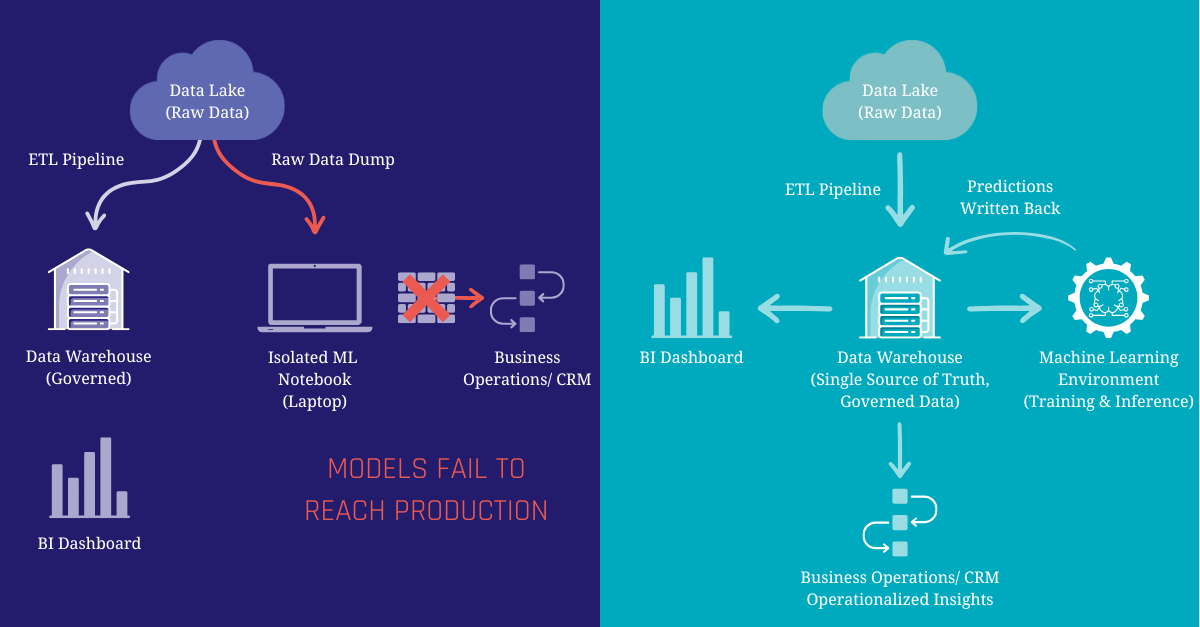
Data Scientists, on the other hand, often work in isolated environments like standalone Jupyter notebooks. Because they need massive amounts of data to train their machine learning models, they often bypass the data platform entirely, pulling raw, unstructured data directly from a data lake.

This disconnect creates some challenges:

  • Duplicated Effort: Data Scientists waste up to 80% of their time cleaning and prepping raw data, work the Data Engineering team has already done in the platform
  • Inconsistent Metrics: Because models are built on raw data, a model’s definition of “Active Customer” might completely contradict the official definition used by the in the data platform
  • The “Wall of Production”: A model might look perfectly accurate on a data scientist’s laptop, but because it relies on disconnected, ungoverned data pipelines, integrating its predictions back into the daily workflows of sales or support teams becomes an IT nightmare
  • Exclusivity: Data analysts are often limited to classic descriptive analytics which slows time-to-insight. The optimal solution is to democratize data science, empowering analysts to implement predictive use cases directly.

The Solution: Bring the Machine Learning to the Data

The fix to this problem requires a fundamental shift in how we think about machine learning architecture. Instead of moving data out of governed systems to feed external ML models, we need to bring the ML workflows more closer to the data.

By positioning the Modern Data Platform as the foundation for predictive analytics, you ensure that every prediction is built on the same trusted, cleansed, and governed business data used for your daily reporting. The Data Platform becomes the Feature Store, a centralized hub where data is prepared once and used everywhere, whether for a BI dashboard or training a predictive model.

Predictive Analytics on the Modern Data Warehouse

When the data platform serves as the single source of truth for both analysts and algorithms, magic happens. Data science teams stop wrestling with raw data pipelines, data engineering teams maintain governance, and the business gets predictions they can actually trust and operationalize.

Two Architecture Approaches

So, how do we actually bring the machine learning to the data? There isn’t a one-size-fits-all answer. Depending on the team’s skillset and the complexity of the models, there are typically one of two foundational patterns adopted:

Pattern 1: In-Warehouse Machine Learning (Democratizing ML)

Modern cloud data platforms have evolved beyond just storing and querying data, many now have machine learning engines built directly into them.

  • How it works: Using standard SQL, Data Analysts and Analytics Engineers can train, evaluate, and deploy models entirely inside the data platform (for example BigQuery ML, Snowflake Cortex or Databricks)
  • The Benefit: This radically democratizes predictive analytics. You don’t need to know Python or manage complex infrastructure to build a model. If you know SQL, you can generate predictions using the exact same tables you use for your BI dashboards
  • The Trade-off: While perfect for standard tasks like regression or classification, you are limited to the specific algorithms supported by the data platform

Pattern 2: The Data Platform as a Feature Store (The Hybrid Approach)

For organizations with dedicated Data Science teams building highly complex or custom models, the data platform takes on a different role: the Feature Store.

  • How it works: Data Scientists continue to work in their preferred external ML platforms (like Vertex AI, Databricks, or other). However, instead of pulling messy data from a data lake, they connect directly to the data platform to pull curated, business-approved data (“features”) for training
  • The Benefit: Data Scientists retain maximum flexibility to use advanced Python libraries and deep learning frameworks, while ensuring the models are trained on governed, accurate data
  • The Trade-off: It requires a bit more orchestration to manage the pipeline between the data platform and the ML platform, and ensuring predictions are accurately written back to the data platform
Architecture Feature Store

Example: Predicting Customer Churn

To understand the benefits of these approaches, let’s look at a classic business challenge: Customer Churn Prevention.

Imagine a SaaS company trying to figure out which customers are likely to cancel their subscriptions. In a siloed environment, predicting this is can be a messy, manual science project. But on a modern data platform, it becomes an automated operational workflow:

  1. The Foundation (Data): Because of the Data Engineering team’s work, the data platform already contains all necessary historical information of the customer. CRM data (company size), financial records (billing history), product logs (login frequency), and Zendesk tickets (recent complaints) are all cleaned, joined, and sitting in governed tables including a full history of changes
  2. The Prediction (Modeling): An analyst uses In-Warehouse ML (Pattern 1) to run a classification model against this historical data. The model identifies the hidden patterns of a churning customer and generates a “Churn Risk Score” between 0 and 100 for every active user
  3. The Operationalization (Action): This is the crucial step. The predictions aren’t left in a notebook. The risk scores are written directly back into a new table in the data platform. Through reverse-ETL, these scores can be automatically synced to the CRM as well as dashboards and reports can easily be built on top of the results.

Conclusion

Predictive analytics shouldn’t be an isolated science experiment. It should be a living, breathing part of your operational reality. By treating your modern data platform as the foundation for your machine learning workflows, you eliminate data silos, empower your analysts, and ensure your predictions are built on the trusted business data that matters most.

It is time to operationalize predictive insights where your business data already lives.

Want to see how this works in practice?

Join our upcoming webinar: Predictive Analytics on the Modern Data Platform. We will explore how to build and run predictive analytics directly on top of your data platform using trusted, governed business data as the foundation. You’ll learn practical patterns for turning warehouse models into features, training and deploying predictions, and integrating results back into reporting and operational workflows. Join me on March 17th.

Register for free

5 Ways of Testing Your Data Pipelines with dbt

Testing Data Pipelines

In today’s data-driven world, the reliability of your analytics depends on the integrity of your data pipelines. Even the most sophisticated transformations can be undermined by bad source data, schema changes, or simple human error. That’s where dbt (data build tool) shines: it provides a framework not only for transforming and modeling your data, but also for validating it at every step. In this article, we’ll explore five essential testing strategies you can implement with dbt to catch issues early, enforce data contracts, and build confidence in your analytics.


1. Custom SQL Tests

What they are: Custom SQL tests allow you to write bespoke SQL queries against your models to enforce complex business rules or edge-case validations. They live alongside your models and execute as part of your dbt test suite.

Why you need them: Out-of-the-box tests cover many common cases, but sometimes you have unique conditions—like “no customer may have more than one active subscription”—that require a tailored query.

-- Example: Ensure no customer has more than one active subscription
SELECT
  customer_id,
  COUNT(*) AS active_sub_count
FROM {{ ref('subscriptions') }}
WHERE status = 'active'
GROUP BY customer_id
HAVING COUNT(*) > 1;

If this query returns any rows, the test will fail, alerting you to a data integrity issue before downstream models consume bad data.

2. Personalized Macros

What they are: Macros in dbt are reusable snippets of SQL or Jinja logic. By building custom macros for your testing patterns, you can enforce consistent checks without repeating verbose SQL.

Why you need them: Many projects share recurring validation needs—like ensuring date fields are never in the future or that monetary amounts are non-negative. A macro lets you encapsulate that logic once and apply it across multiple models.

{% macro expect_dates_in_past(model, column) -%}
SELECT
  *
FROM {{ ref(model) }}
WHERE {{ column }} > current_date
{%- endmacro %}

-- Usage in schema.yml
tests:
  - expect_dates_in_past:
      args:
        model: 'orders'
        column: 'order_date'

With just a few lines in your YAML, you’ve enabled a robust, maintainable check across your entire project.

3. Built-In dbt Data Tests

What they are: dbt ships with four standard data tests: unique, not_null, accepted_values, and relationships. These cover the most frequent requirements for uniqueness, presence, domain constraints, and referential integrity.

Why you need them: They require zero custom SQL. You simply declare your expectations in your model’s .yml file, and dbt will generate and execute the underlying queries.

models:
  - name: users
    columns:
      - name: user_id
        tests:
          - unique
          - not_null

      - name: country_code
        tests:
          - accepted_values:
              values: ['US', 'CA', 'MX']

Within minutes, you’ve added core validation checks to your critical tables, ensuring nulls or duplicates never slip through.

4. Unit Tests

What they are: Unit tests isolate a model’s logic by feeding it controlled input data and verifying that its output matches expected results. In dbt, you can implement unit tests using seed files or temporary models.

Why you need them: When your transformations involve complex calculations—like computing a customer’s lifetime value—you want airtight proof that the logic works under all conditions, including edge cases.

-- seed file: tests/lv_input.csv
customer_id,order_amount
1,100
1,200
2,50
2,75

-- model: tests/lv_test.sql
with input_data as (
  select * from {{ ref('lv_input') }}
),

calculated as (
  select
    customer_id,
    sum(order_amount) as lifetime_value
  from input_data
  group by customer_id
)

select *
from calculated
where
  (customer_id = 1 and lifetime_value = 300)
  or (customer_id = 2 and lifetime_value = 125);

If the calculated results don’t match the hardcoded expectations, the test fails, pinpointing exactly where your logic diverged.

5. dbt Model Contracts

What they are: Model contracts let you define strict schema expectations—column types, required fields, accepted value sets—directly in your schema.yml files. They act as formal agreements between your data producers and consumers.

Why you need them: Without explicit contracts, a subtle change in upstream data can silently break your analytics. Contracts ensure that any structural or type deviations immediately surface as test failures.

models:
  - name: orders
    columns:
      - name: order_id
        data_type: integer
        tests:
          - not_null

      - name: order_amount
        data_type: decimal
        tests:
          - not_null

With contracts in place, if someone accidentally returns order_amount as text or drops a required field, dbt stops execution and flags the violation, protecting downstream dashboards and reports.

Putting It All Together: A Comprehensive Testing Strategy

Testing in dbt is more than an afterthought—it’s a core pillar of a robust analytics engineering workflow. By combining custom SQL tests, personalized macros, built-in data tests, unit tests, and model contracts, you establish multiple layers of defense against data quality issues. Here’s a sample workflow:

  1. YAML Configuration: Start by declaring built-in tests and contracts in your schema.yml for each model.
  2. Custom Tests: Add bespoke SQL tests in tests/ for any project-specific rules.
  3. Macros: Create a macros/ folder with reusable test macros for common patterns.
  4. Unit Tests: Define seed files and test models under tests/unit/ to validate critical transformations.
  5. CI/CD Integration: Hook dbt test into your CI pipeline so that every pull request runs the full suite, ensuring no faulty code or data reaches production.

This layered approach not only catches errors early but also documents your data expectations for new team members and stakeholders.

Conclusion

Ensuring the accuracy, reliability, and trustworthiness of your data requires more than ad-hoc checks—it demands a structured, repeatable testing framework. dbt provides the tools you need, from built-in quick-start tests to fully customized SQL validations and contracts. By implementing these five testing methods, you’ll be well on your way to bulletproofing your data pipelines and empowering stakeholders with confidence in their analytics.

Ready to level up your data quality? Start by adding one new test to your next dbt model, and watch your data reliability soar.

Watch the Video

Unlock the Intelligence Layer: LLMs in Data Warehousing and the Future of Your Data

Natural Language AI Model

“Stop writing complex SQL, start talking to your data?”

This provocative question highlights a growing shift in how we interact with data. For years, getting answers from a Data Warehouse meant writing SQL queries or relying on pre-built dashboards.

For many organizations, their data platforms remain underutilized because accessing insights still requires writing code or navigating complex dashboards. It’s time to go beyond static reports and unlock a true intelligence layer on top of your data warehouse. Recent advances in Large Language Models (LLMs) and Natural Language Processing (NLP) are making data warehouses smarter, faster, and easier to use for everyone. In this article, we’ll explore how LLMs can transform the way you interact with your data – from using plain English queries instead of SQL, to AI-driven discovery of hidden insights, to enriching your data pipelines – and why this shift represents the future of data analytics.

Unlock the Intelligence Layer: LLMs in Data Warehousing and the Future of your Data

Unlock your data warehouse’s full potential! This webinar reveals how Large Language Models and Natural Language Processing are transforming data interaction, empowering everyone to effortlessly translate plain language into SQL, enable AI-driven data discovery, and deliver actionable insights to every stakeholder. Register for our free webinar, August 12th, 2025!

Watch Webinar Recording

From Complex SQL to Conversational Queries

Business users often depend on data engineers or analysts to fetch answers, creating bottlenecks in decision-making. Even data professionals themselves spend considerable time writing and optimizing SQL, rather than interpreting results. What if anyone could simply ask the data warehouse a question in plain language and get the answer? This is the promise of LLMs as an “intelligence layer”, a layer that bridges complex datasets and human comprehension. Advanced LLMs can understand a user’s question or request and generate the appropriate SQL queries on the fly.

This technology (often called Text-to-SQL or Natural-Language-to-SQL or NL2SQL) has rapidly evolved and major technology players have already taken note. For example, Databricks introduced a Natural Language Query feature (LakehouseIQ) to let users ask questions of their Lakehouse, and Snowflake is also exploring LLM-driven query capabilities.

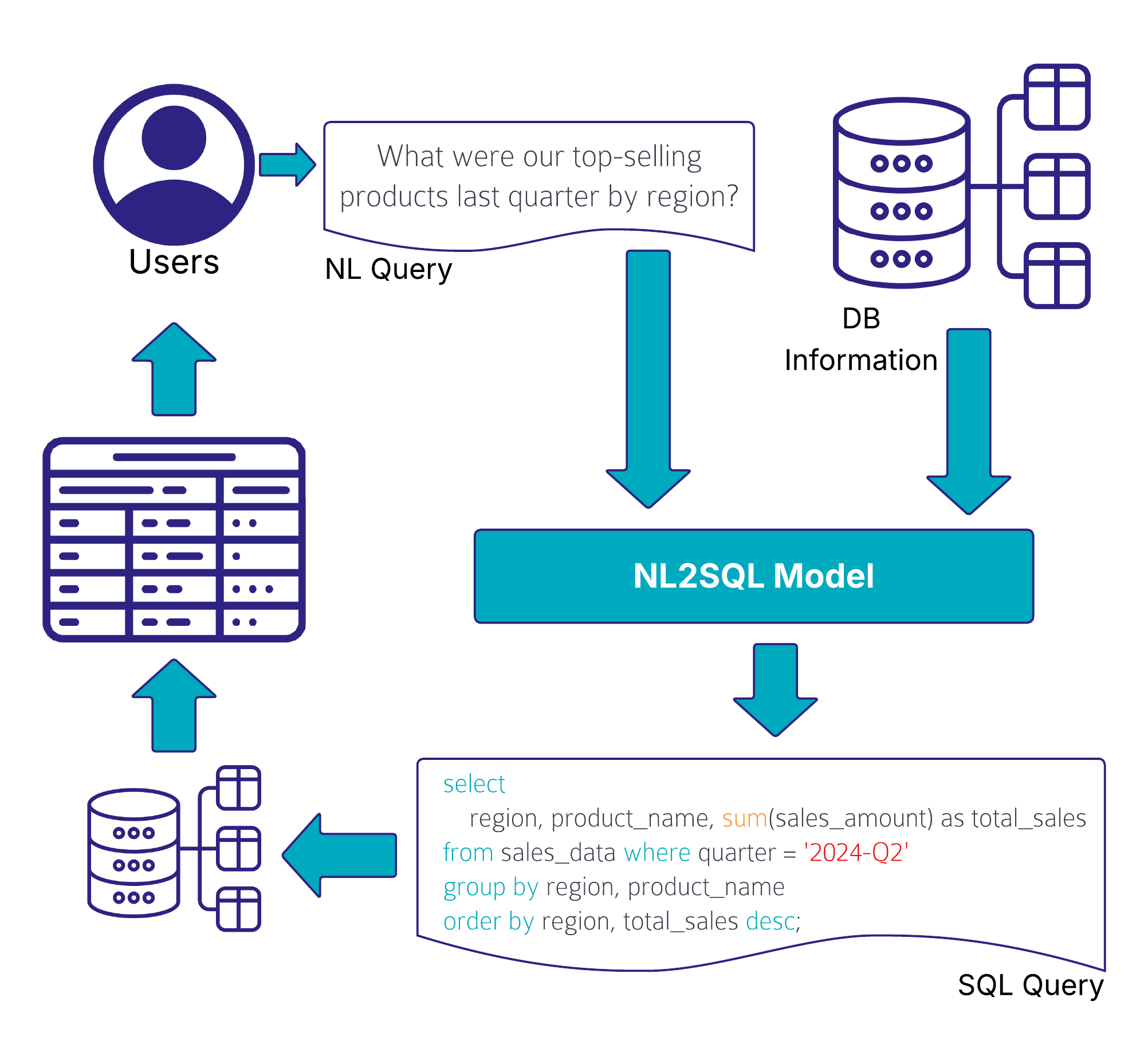
Imagine asking your data warehouse in plain English: “What were our top-selling products last quarter by region?”. This text input is passed into a LLM, often enriched by company-specific data via RAG and then the system translates that into a correct, optimized SQL query that retrieves the answer.

Natural Language AI Model

Of course, translating natural language to SQL at an enterprise scale isn’t trivial. Complex schemas, ambiguous user input, and security considerations mean the LLM has to be both smart and careful. Uber has built such an AI system that works on an enterprise scale level.

Uber’s QueryGPT is an NL2SQL system that uses a multi-step, RAG-based pipeline combining LLMs with retrieval and agent modules. It fetches context via similarity search over a vector database of example queries and schema information for SQL generation. To manage Uber’s vast data ecosystem, QueryGPT employs specialized agents:

  • an Intent Agent classifies requests by business domain
  • a Table Agent suggests tables for the query
  • a Column Prune Agent trims irrelevant columns to reduce prompt length. The LLM then produces the SQL query and an explanation.

This layered design allows QueryGPT to handle large schemas and reliably generate complex multi-table queries. It’s a hybrid architecture where multiple transformer calls specialize in sub-tasks, enabling scalable, accurate NL2SQL as a production service, saving thousands of Uber employees significant time by mid-2024.

AI-Augmented Data Discovery and Insights

Beyond simply fetching results for user queries, LLMs can augment data discovery by revealing insights that users might not have explicitly asked for. Traditional dashboards show you what is happening, but a smart LLM-based system can tell you why it’s happening and highlight patterns you might not notice. This is often called augmented analytics – using AI to automatically find important correlations, trends, outliers, and drivers in your data.

LLMs excel at interpreting data outputs and providing additional context. For example, rather than just displaying a chart or a table, an LLM can generate a written summary pointing out key trends or anomalies. They can explain which metrics are up or down and suggest potential reasons (for instance, detecting that “conversion rates dipped in July, possibly due to seasonality or inventory issues”), enabling quicker and more informed decision-making.

Another area where LLMs can significantly reduce manual effort is in the creation and maintenance of data catalogs. Documenting data models, table structures, and especially individual column descriptions is often time-consuming and easily skipped due to missing resources, despite being crucial for an effective use and accessibility of the data. LLMs can automate large parts of this process by generating descriptions based on data profiling, SQL logic, naming conventions, and metadata.

dbt Cloud has recently released their dbt Copilot AI Agent that supports the developer in various ways, for example by letting the AI analyzing the SQL code and schema metadata to automatically generate model and column descriptions.

LLMs in Your Data Pipeline: Enrichment and Efficiency

LLMs don’t just enhance how users interact with the Data Warehouse; they can also improve the data itself and the efficiency of data engineering processes. In modern ELT (Extract-Load-Transform) pipelines, a lot of time is spent cleaning, enriching, and preparing data for analysis. Here, LLMs offer new tools to automate and augment these steps.

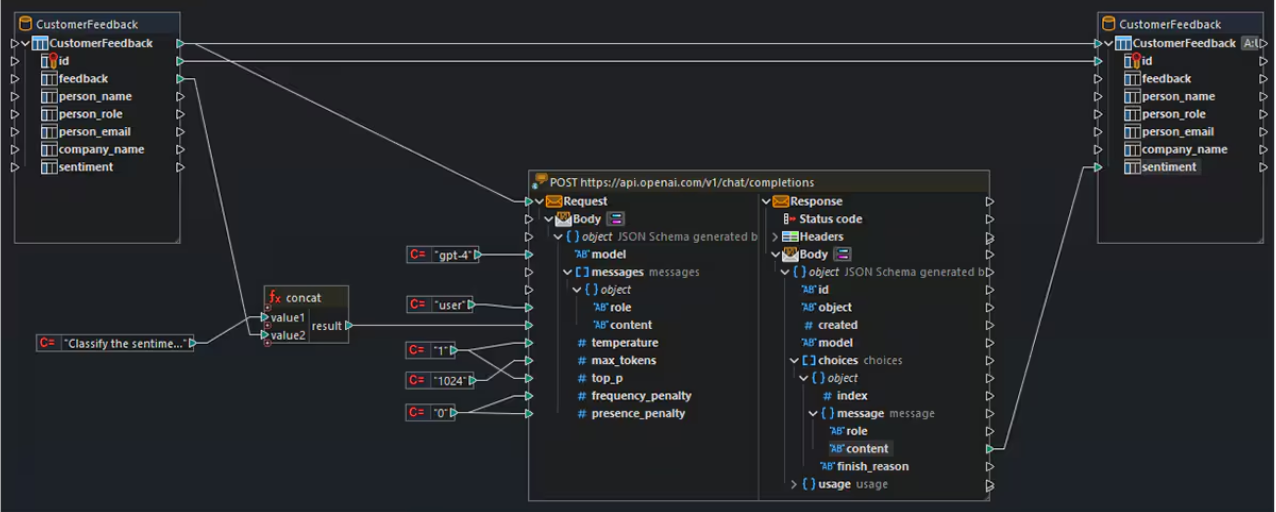
One promising use case is the semantic enrichment of data. Large Language Models have absorbed a vast amount of world knowledge and language patterns, and they can use that to fill gaps or add context to your raw data. For example, imagine you have a dataset of customer feedback where each entry is a text comment. An LLM could automatically classify the sentiment of each comment (positive/negative), extract key themes, or even generate a summary of common issues. In this way, unstructured data becomes structured insights without manual effort. The image below illustrates how an LLM is integrated into a data pipeline: text inputs from a CustomerFeedback table are passed to an OpenAI API endpoint, where the model returns structured sentiment labels that are then stored back in the database.

Large Language Models Sentiment Analysis

In a practical case study, LLMs were used to enrich an academic dataset by inferring missing attributes (like guessing a person’s gender from their name with high accuracy), which outperformed dedicated API services. This showcases how LLMs can bring external knowledge and reasoning to enhance your data.

Another area is metadata enrichment and semantic enrichment of unstructured data. Enterprise data is often filled with cryptic column names and jargon that prevents usability. LLMs can intelligently expand abbreviations and annotate fields with business-friendly descriptions. For instance, an LLM-driven catalog might take a column labeled “CUST_ID” and annotate it as “Customer Identifier, unique ID for each customer record”.

LLMs can also assist in the coding and transformation process itself. Data engineers can leverage LLMs to generate boilerplate code or SQL for transformations, document pipeline logic in plain English, or even detect anomalies and data quality issues through pattern analysis. By automating tedious parts of data preparation and providing AI-generated suggestions, LLMs free up engineers to focus on higher-level architecture and problem-solving.

Conclusion

While the promise of an LLM-powered intelligence layer is exciting, it’s important to approach it with a clear strategy. Successful implementation requires considering a few key challenges and best practices. Data quality and governance are more crucial than ever. If your underlying data is inaccurate or poorly structured, the AI’s answers will be unreliable. As the saying goes, “garbage in, garbage out.”

Ensuring clean, well-organized data (and maintaining a robust data governance program) will help the LLM produce meaningful and correct insights. Additionally, organizations may need to fine-tune or configure their LLMs to understand industry-specific terminology or business context. This reduces the chance of the AI misinterpreting what a user asks or generating an incorrect query.

Privacy and security are another important consideration. If your data includes sensitive information, you must ensure that any AI tool accessing it complies with your security requirements. This might involve using self-hosted models or secure APIs, and setting up proper access controls.

The dream of a self-service analytics experience: “just talk to the data and get answers” is quickly becoming a reality. This evolution may redefine roles (enabling analysts and engineers alike to focus on higher-value tasks) and open up analytics to a wider audience than ever before. It’s an exciting time to be a data professional, but also one that demands staying informed and ready to adapt.

dbt Fusion Explained: The Next Step in dbt’s Evolution

dbt Fusion Engine

As data teams continue to scale and the demand for faster, more reliable analytics grows, the tools we depend on must evolve. Enter dbt Fusion, the latest high‑performance execution engine from dbt Labs that promises to take your dbt workflows to unprecedented speeds. In this post, we’ll dive deep into what dbt Fusion is, explore its key features, discuss supported platforms and migration paths, and help you decide if—and when—you should upgrade. Let’s get started!


Why a New Engine?

dbt (data build tool) has revolutionized how analytics engineers transform and test data directly within the data warehouse. Until now, both dbt Core and dbt Cloud have relied on a Python-based execution engine. While powerful, Python parsing and compilation can become a bottleneck as projects grow to thousands of models. Recognizing this, dbt Labs has developed dbt Fusion from the ground up in Rust, a language known for its speed and memory safety.

Key Benefit: Lightning‑Fast Parsing

One of dbt Fusion’s marquee improvements is its parsing speed. Traditional dbt projects—especially those with tens of thousands of models—could take minutes to parse. With Fusion’s Rust implementation, parsing times drop dramatically, often by up to 30× faster, bringing multi‑minute delays down to mere seconds (or even milliseconds). Faster parsing means quicker iterations, faster CI checks, and more responsive development workflows.

Ahead‑of‑Time Cycle Compilation

Typically, dbt compilation happens right before execution, which means syntax errors or schema mismatches only surface during run time. dbt Fusion introduces ahead‑of‑time cycle compilation, enabling the engine to analyze your SQL and model dependencies intelligently before executing any queries against your warehouse. This pre‑flight check catches errors early, saving compute costs and developer time by preventing failed runs on the warehouse.

Column‑Level Lineage & Data Type Validation

Data governance is becoming ever more critical. With dbt Fusion, you gain column‑level lineage and built‑in data type validation. This fine‑grained visibility ensures that every downstream model inherits accurate metadata. For instance, if you tag a column as “PII” or “Personal Information” at the source model, Fusion will automatically propagate that tag to any downstream models referencing the same column—streamlining compliance and auditability.

Smarter Orchestration & Cost Savings

dbt Cloud users already benefit from intelligent job scheduling, but Fusion takes orchestration to the next level. It can detect unchanged models and skip them, dramatically reducing unnecessary computation. In practice, this means your daily or hourly runs only re‑execute models that truly need it, leading to significant savings on warehousing costs.

Enhanced Developer Experience in VS Code

To complement the core engine improvements, dbt Labs has released an updated VS Code extension tailored for Fusion. Highlights include:

  • Autocomplete for model names, macros, and config blocks
  • Inline SQL preview so you see your compiled SQL before executing
  • Live feedback on syntax or type errors as you code

These enhancements further shrink the feedback loop, allowing analytics engineers to develop with confidence and speed.

Supported Platforms & Future Connectors

At launch (beta stage), dbt Fusion supports:

  • Snowflake
  • Databricks

dbt Labs has confirmed that additional connectors—such as BigQuery and Redshift—are on the roadmap. To stay up to date, subscribe to the official dbt community forums or follow the dbt Twitter account for announcement alerts.

Beta to GA: What to Expect

dbt Fusion is currently in beta, but the pace of innovation is rapid. dbt Labs aims to reach general availability soon. During the beta, you can:

  1. Experiment with your most complex projects to quantify performance gains.
  2. Report issues and help refine features via GitHub or the dbt community channels.
  3. Understand limitations—such as unsupported adapters or edge‑case macros—before rolling out to production.

Migration Paths for dbt Cloud & Core Users

If you’re on dbt Cloud, you don’t need to lift a finger: Fusion will become the default execution engine automatically once GA is reached. Your existing jobs and orchestrations will seamlessly target Fusion under the hood.

For dbt Core users, upgrading is straightforward:

  1. Install the latest dbt-fusion package alongside dbt-core.
  2. Follow the step‑by‑step migration guide on the dbt Labs documentation site.
  3. Run your test suite locally to confirm compatibility.

License & Pricing Considerations

dbt Fusion introduces a new tiered licensing model:

  • Local Development (dbt Core users): Source‑available, free, and fully functional for local builds (with some advanced features behind a paywall).
  • dbt Cloud customers: Fusion is included in paid tiers, unlocking all premium capabilities—such as enterprise connectors, deeper metadata lineage, and priority support.

Review the official pricing page to see which features align with your team’s needs.

Is dbt Fusion Right for You?

If your team regularly works on large-scale dbt projects or you’re chasing every millisecond of performance, dbt Fusion is a game‑changer. Early adopters report 10×–30× faster parsing, near‑instant validation feedback, and lower cloud compute bills thanks to smarter orchestration.

That said, if your project is small or you’re comfortable with existing runtimes, you may choose to wait until GA and additional adapters ship. Either way, Fusion is the future of dbt, and understanding its capabilities now will help you plan your analytics roadmap.

Next Steps

  • Read the dbt Fusion docs to explore detailed benchmarks and feature matrices.
  • Join the beta: enable Fusion in your dev environment and share feedback.
  • Monitor connector announcements to align Fusion with your warehouse of choice.

Watch the Video

DBT Next Chapter with SDF – From SQL Strings to Semantic Insights

Introduction

dbt Labs has recently acquired SDF, a company known for its cutting-edge SQL comprehension technology. This acquisition brings several key benefits, including:

  • Faster dbt project compilation
  • Improved developer experience
  • High-fidelity data lineage tracking

But what does this mean for dbt users? Let’s explore.


Background & Context

dbt simplifies the creation of data models using SQL SELECT statements, making data engineering accessible to anyone familiar with SQL. Historically, however, dbt has treated SQL as mere strings, limiting its ability to understand the deeper meaning behind queries.

The Acquisition Explained

In January 2025, dbt Labs announced the acquisition of SDF. According to dbt Labs’ founder and CEO Tristan Handy:

“We are acquiring SDF to bring SQL comprehension into dbt and usher in a new era of ‘what’s possible’ for analytics: supercharging developer productivity and heightening data quality, all while optimizing data platform costs.”

What is SDF Technology?

Unlike dbt’s traditional approach of treating SQL as text, SDF understands the deeper structure of SQL, recognizing objects, types, syntax, and semantics. It emulates the SQL compilers of various data platforms (e.g., Snowflake, Redshift, BigQuery), allowing developers to:

  • Validate SQL queries before execution
  • Catch breaking changes early
  • Ensure platform compatibility
  • Perform real-time impact analysis
  • Reduce computational costs

What Does “SQL Comprehension” Mean?

SQL comprehension enables dbt to:

  • Identify query components
  • Generate structured artifacts
  • Validate SQL syntax and semantics
  • Predict query outcomes, including column creation and datatype assignments
  • Execute queries efficiently

Impact on dbt

1. Validate: Will My SQL Really Work?

With SDF, dbt can ensure that SQL queries are correct before execution, reducing errors and debugging time.

2. Analyze: Precise Column-Level Lineage

SQL comprehension improves data lineage tracking, leading to:

  • Better debugging workflows
  • Optimized CI builds (only rebuilding models affected by changes)
  • Enhanced metadata propagation (e.g., PII tagging, test descriptions)

3. Optimize: Right Query, Right Place

With a better understanding of SQL, dbt can:

  • Optimize queries for specific engines
  • Identify performance bottlenecks before execution
  • Support query pruning (scanning only relevant data subsets)
  • Optimize DAG execution across multiple platforms

Future Implications

The integration of SDF into dbt is in progress. While it won’t be part of the Apache 2.0 code base, dbt Labs plans to make key SDF capabilities available to all users—both in dbt Core and dbt Cloud.

With SDF, dbt users can look forward to:

  • Faster performance
  • Optimized data platform costs
  • Improved data lineage tracking

All without needing to change existing dbt projects.

Conclusion

The acquisition of SDF marks a significant milestone for dbt, bringing true SQL comprehension into the platform. Developers will benefit from enhanced query validation, real-time impact analysis, and optimized execution strategies. As dbt evolves, its users can expect more powerful, efficient, and cost-effective data transformations.

Watch the Video

Semantic Models and Metrics

Unlocking Analytics with Semantic Models and Metrics

A semantic model is a layer of abstraction that defines business-friendly terms and metrics on top of raw or transformed data. It bridges the gap between data transformations and end-user reporting, ensuring accuracy, consistency, and clarity across analytics tools. By providing a unified way to define and calculate key metrics, semantic models empower businesses with reusability and precision in reporting.


Understanding Semantic Models

Semantic models form the foundation of the dbt Semantic Layer. Configured using YAML files, they correspond to dbt models in your DAG. Each model requires a unique YAML configuration, enabling dynamic and reliable dataset refinement. You can even create multiple semantic models from a single dbt model, provided each has a distinct name.
These models comprise three key components:

  • Entities: Define relationships between semantic models (e.g., IDs).
  • Dimensions: Columns used for slicing, grouping, and filtering data (e.g., timestamps, categories).
  • Measures: Quantitative values aggregated in analyses.

Diving into Metrics

Metrics are calculations representing essential business measures, built from entities, measures, and dimensions. They ensure centralized definitions, reusability across tools, and consistency in analysis. Metrics encapsulate both logic (e.g., aggregations, filters) and context (e.g., time granularity, dimensions).
Types of metrics include:

  • Conversion Metrics: Track events like purchases per user.
  • Cumulative Metrics: Aggregate measures over specified windows.
  • Derived Metrics: Expressions combining multiple metrics.
  • Ratio Metrics: Comparisons of numerator and denominator metrics.
  • Simple Metrics: Directly reference a single measure.

Commanding Metrics with dbt

dbt Cloud CLI provides MetricFlow commands to interact with the semantic layer. For instance, dbt sl query executes queries and validates metrics, while dbt sl list dimensions retrieves dimensions for specific metrics. These tools streamline metric management and ensure robust analytics workflows.

Semantic models and metrics are vital for bridging data transformations and actionable insights. They provide a foundation for scalable, consistent, and reusable analytics frameworks, enabling businesses to thrive in data-driven environments.

Watch the Video

AI in Data Warehousing: Fundamental Principles and Applications

AI in Data Warehousing

AI in Data Warehousing

The ability to efficiently store, manage, and analyze data has become a critical aspect for any organization. The field of Data Warehousing is an integral part of the process by providing structured, centralized storage for large volumes of data and is an important element of business intelligence.
However, the increasing volume and complexity of data is becoming increasingly challenging to manage. That said, AI is already shaping many processes in a wide variety of areas, including data warehousing.

This article explores the basic principles and applications of artificial intelligence and how AI can be integrated into an Enterprise Data Warehouse, by using it to enhance the design and operation of data warehouses, as well as enabling the development of more challenging data science applications like machine learning or predictive analytics.

AI in Data Warehousing: Fundamental Principles and Applications

This webinar delves into the essential principles of Artificial Intelligence (AI) and its transformative role in data warehousing. We explore how AI and Machine Learning (ML) not only enhance the construction and operation of data warehouses but also leverage the vast amounts of data stored within them for developing powerful applications, e.g. for predictive analytics.

You will gain an understanding of the foundational AI technologies driving these advancements and how they intersect with data science and machine learning to optimize data storage, improve decision-making, and unlock new business insights. This webinar provides valuable perspectives on integrating these technologies into your data warehousing practices.

Watch webinar recording

Foundational Principles of AI

Let’s start by categorizing the term artificial intelligence, as well as other terms such as machine learning, deep learning, or generative AI, in order to clarify the context and what exactly is hidden behind these terms. 

Artificial Intelligence is now more of a generic term and represents a broad field. In general, the term AI encompasses techniques that allow computers to emulate human behavior, enabling them to learn, understand language, make decisions, recognize patterns, and solve complex problems in a way that is similar to human intelligence.

AI Graphic

Machine Learning (ML) as a Subset of AI

Machine Learning is a subset of the field of artificial intelligence and, even if less present as a term, one of the most important. Machine Learning uses advanced techniques and algorithms to recognize patterns in large amounts of data, allowing machines to learn and adapt autonomously to make inferences or predictions based on the data. Unlike traditional programming where tasks are executed based on clear and defined instructions, machine learning relies on statistical analysis based on input data to output data values that fall within an expected range. Essentially, machine learning enables computers to learn and interpret data without being explicitly programmed for each individual case.

Deep Learning (DL) – A Deeper Dive into ML

Deep Learning is a more specialized sub-area of machine learning & AI and uses deep neural networks to perform in-depth data processing tasks to recognize complex patterns.

Deep learning uses many layers to extract high-level features from raw data as input, in a sense simulating the way a human brain works.

In this respect, deep learning is particularly strong in processing very large amounts of data, using it to learn complex patterns in order to solve a wide variety of tasks. Well-known examples of this are tasks such as image or voice recognition, which every smartphone is capable of.

Generative AI – The Creative Aspect of Deep Learning

Generative AI is a term that has recently become more widely known, especially due to ChatGPT. Generative AI is a sub-area of deep learning and includes deep learning models that generate new content, such as text, images, code, or even videos, based on data on which they have been trained on. They are able to generate novel outputs without explicit instructions that do not directly replicate the training data. This opens up completely new possibilities such as generating large texts, complex images, or even music.

The Role of AI in Building Data Warehouses

AI is changing everything, including data warehousing. As such, it can help to enhance the efficiency and effectiveness of your data warehouse from the ground up. From the design and structure to the ongoing data management processes, there are many opportunities where AI can help.

AI has the power to address a data warehouse’s biggest challenges: performance, governance, and usability. This is data intelligence and will revolutionize the way you query, manage, govern, and visualize your data.

Enhancing Design and Structure

The architecture of a data warehouse is critical as it needs to support efficient data querying and scalability while maintaining performance. By analyzing usage and query patterns, AI algorithms can suggest the most effective data models and indexing strategies. This not only speeds up the retrieval of information but also ensures more agile data handling when scaling or integrating new data sources.

Automating Data Integration, Cleaning, and Transformation

By letting AI take over low-level tasks, data engineers can focus on higher-level tasks such as designing data models, training machine learning algorithms, and creating data visualizations. For example, The Coca-Cola Company uses AI-powered ETL tools to automate data integration tasks across its global supply chain to optimize sourcing and procurement processes. 

But AI can also support the actual developers in their work, enabling them to work faster and more efficiently. Developers can use AI to debug problems in their code faster by using AI-based code generation and analysis, such as Github Copilot, which completes, refactors, and debugs code in real time directly in the IDE. 

The automation of performance tuning of data warehouse workloads can also be improved with predictive optimizations, which can save a considerable amount of costs.

AI can also scale and automate governance using automated tagging, documentation, and natural language search across all data and assets in an organization.

Right up to the possibility that business users could use natural language to interact with the data, ask questions, and build dashboards, the possibilities are endless and we are only at the very beginning of these developments.

Using a Data Warehouse for AI Applications

The nature of a data warehouse, a structured and centralized repository that aggregates data from multiple sources within an organization, makes it a perfect foundation for building and training AI applications. AI models require large amounts of data with as much variability as possible that are well structured and have a high data quality, which a data warehouse can perfectly provide for an organization to train its own AI model. 

For example, a data warehouse in a retail context might store years of customer purchase history, demographics, and product information. Data that can be used to train AI models to predict future buying trends or recommend products effectively.

Enhancing AI Capabilities with Data Vault

Data Vault 2.0 in particular sets the exact right conditions for training your own AI models by leveraging the structured, reliable data framework that Data Vault 2.0 provides. 

Here’s are some examples how this integration can benefit AI-driven analytics:

  • Improved Data Quality: The organized and auditable structure of Data Vault 2.0 ensures higher data quality and consistency, which is important for training accurate AI models. Clean, well-structured data models reduce the time spent on data preparation and increase the reliability of AI predictions.
  • Enhanced Historical Analysis: The comprehensive historical data captured by Data Vault 2.0 allows AI models to perform more accurate trend analysis and forecasting. This capability is especially valuable in sectors like finance and retail, where understanding long-term trends can significantly impact strategic decisions.
  • Data Reliability and Lineage: Data Vault 2.0’s robust framework ensures data reliability through its unique architecture that captures data from various sources while maintaining its lineage. This means every piece of data in the system can be traced back to its origin, providing transparency and trust in the data used for AI models.

Conclusion

Integrating artificial intelligence (AI) into data warehousing significantly enhances the efficiency and effectiveness of data storage, management, and analysis. By applying AI techniques, organizations can automate data integration, cleaning, and transformation processes, leading to more accurate and timely insights. Furthermore, AI-driven optimization of data warehouse design and structure ensures improved performance and scalability. Embracing AI in data warehousing not only streamlines operations but also empowers businesses to leverage advanced analytics, such as machine learning and predictive analytics, thereby unlocking deeper insights and fostering informed decision-making.