
All Posts By

Ole Bause

Ole Bause is a BI Consultant at Scalefree with a Master’s in Data Science and extensive experience in cloud native DWH (AWS, GCP, Azure). A Certified Data Vault 2.0 Practitioner (CDVP2) and AWS Solutions Architect, he specializes in building scalable pipelines with dbt and Snowflake.

Master Data Governance: Understanding the EU’s Data Act

Data Governance

The EU’s Data Act is on the horizon, promising to reshape how businesses access and utilize data according to Data Governance, particularly industrial data. This legislation aims to foster a competitive data market, drive innovation, and ensure fairness in data sharing.

Key provisions include granting users control over data from connected products, enhancing fairness in data allocation, and safeguarding against unfair contractual terms. Complementing the Data Governance Act, these regulations lay the groundwork for an EU single market for data, positioning Europe as a global leader in the data economy.

Master Data Governance: Understanding the EU’s Data Act

Join us for an insightful webinar where we unravel the intricacies of the EU’s Data Act. Delve into the legal and technical obligations imposed by this landmark legislation and gain valuable insights into implementing compliant data platforms.

Watch Webinar Recording

Understanding the EU Data Act

The Data Act, formulated by the European Union, represents a significant step forward in governing data sharing, access, and utilization within the digital economy. It aims to foster collaboration while upholding principles of fairness, transparency, and compliance with data protection regulations such as the GDPR. This regulatory framework provides guidelines for businesses, public sector entities, and research organizations, ensuring that data-sharing practices align with legal requirements and ethical standards.

Scheduled for enforcement on September 12, 2025, the Data Act mandates adherence to its provisions concerning data-sharing practices, contractual agreements, and operational procedures. Stakeholders must prepare to align their processes with the requirements outlined in the Data Act to maintain compliance and mitigate regulatory risks effectively.

The scope of the Data Act encompasses various stakeholders engaged in data-sharing activities within the European Union. This includes businesses of all sizes, public sector bodies, research organizations, and data processing service providers. Data holders bear the responsibility of ensuring compliance with the Data Act’s directives, promoting fair and non-discriminatory data-sharing practices while safeguarding privacy and intellectual property rights.
Data Governance Free PDF - European Data Act Compliance Checklist - 10 Key Steps

Master The Eu’s Data Act Today!

Ensure your business is ready for the Data Act with our comprehensive 10 Key Steps Compliance Checklist. Learn how to protect data, review contracts, and maintain interoperability.

Get My Free Checklist

Technical Challenges

Addressing technical challenges posed by the Data Act requires robust solutions that guarantee data integrity, security, and accessibility. Leveraging methodologies like Data Vault 2.0 offers a multi-faceted approach to data management, facilitating scalability, real-time capabilities, and efficient data architecture. By decoupling storage from delivery and implementing real-time data capture and processing, organizations can streamline compliance efforts and enhance data governance.

Implementing a Data Vault 2.0-based data platform enables organizations to meet the complex requirements of the Data Act effectively. By establishing a robust architecture for data ingestion, processing, and presentation, businesses can ensure compliance while driving innovation and agility in their data operations.

Data Vault architecture meets the Data Act requirements

Figure: reference architecture for real-time Data Vault solution

Data Vault 2.0 architecture follows a multi-layer approach, consisting of the Staging Layer, the Enterprise Data Warehouse Layer, and the Information Marts Layer. This integrated approach ensures a harmonious synergy between technical and business objectives. In particular, to respond to the Data act requirements, in this case we are including a “message queue” that loads the data from source systems to our enterprise data warehouse “without undue delay,” i.e., real-time, near real-time, or with the delay stipulated by your specific technology and related services.

In leveraging a real-time or near real-time Data Vault 2.0 architecture for your data platform, you’re not just meeting the requirements of the EU Data Act but also laying the foundation for streamlined data management and enhanced data analytics capabilities. By centralizing the processing and preparation of raw data from IoT devices, this architecture ensures that compliance with the Data Act is seamlessly integrated into your data infrastructure.

Additionally, in the Information Mart layer, we can create a specific Interface Mart to cater to security and accessibility requirements. Here, data can be flagged by various criteria such as device or user ID and access level. This enables users to either download the data upon request or visualize it directly through a dedicated app. The data will be as fresh as possible, as the Interface Mart can be generated as views built on top of our Raw Vault, which is updated “without undue delay.”

Moreover, by decoupling the data storage from delivery and employing real-time data capture and processing mechanisms, you’re not only facilitating adherence to regulatory standards but also enabling agile and responsive data analytics. These business rules could be implemented in your Business Vault and downstream layers. Hence, this approach ensures compliance and also sets the stage for harnessing the full potential of your data assets for driving innovation and decision-making across your organization.

Final Remarks

As the enforcement date of the Data Act approaches, it is imperative for organizations to prioritize compliance and adopt proactive strategies for data management. By embracing technologies like Data Vault 2.0 and adhering to agile development methodologies, businesses can navigate the regulatory landscape with confidence, harnessing the synergies between regulatory requirements and technological advancements to drive sustainable growth and innovation.

Check out our webinar recordings as we explore the intersection of the Data Act and Data Vault 2.0, offering insights and practical guidance for navigating the evolving data governance landscape.

Watch here for free: In English or in German
Exploring datavault4dbt: A Practical Series on the dbt Package for Data Vault 2.0 – Vol. 2: Standard Entities in the Raw Vault

Exploring datavault4dbt

In our initial post of this series, we delved into the creation of our staging layer using DataVault4dbt, an open-source package designed for Data Vault 2.0 within dbt. In this installment, we embark on the journey to construct our first standard Data Vault 2.0 model entities in the Raw Vault, including Hubs, Links, and Satellites. As in our previous post, we recommend staying up-to-date with the latest changes and adaptations in the DataVault4dbt package by referring to the project’s GitHub repository Wiki.

Before We Start

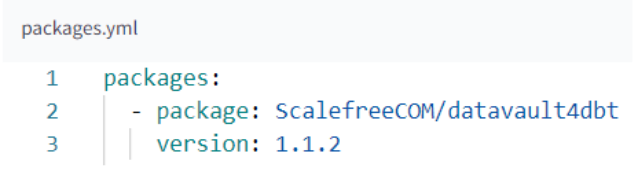
Before we get started, ensure that you have the DataVault4dbt package correctly installed in your packages.yml file and that you’ve executed dbt deps.

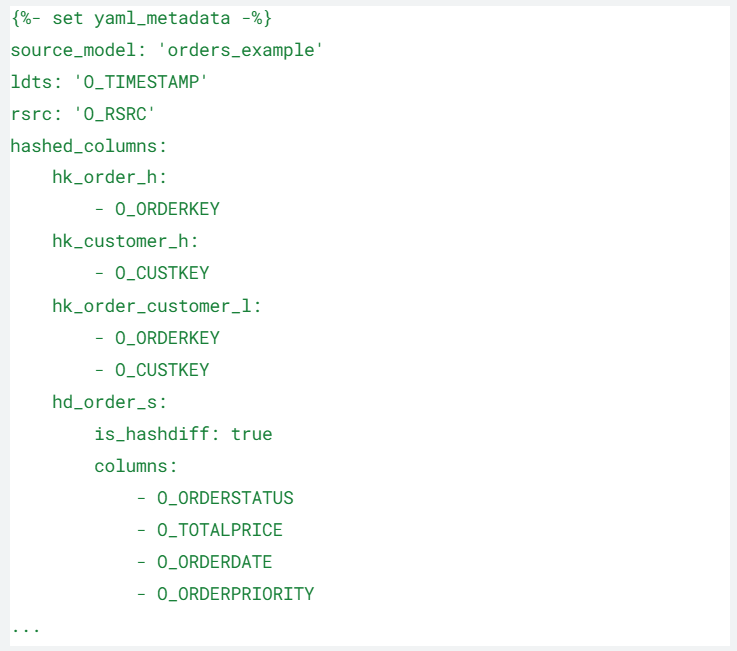
For this tutorial, we’ll be using the TPCH Snowflake Sample Data. Moreover, we assume you’ve already established your staging model, which includes the calculation of hashkeys and hashdiffs. Here’s a snippet from our staging model‘s configuration, which we’ll need later when creating the Raw Vault entities:

stg_orders
Staging layer in datavault4dbt

A. Standard Hub with datavault4dbt

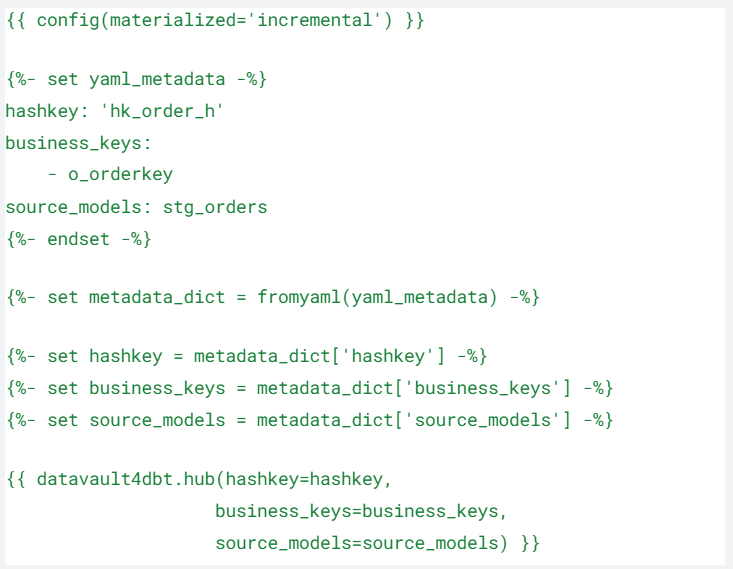
Hubs are constructed based on a unique list of business keys, making their configuration relatively straightforward. In this example, we’ll be creating the Hub for orders:

order_h
Hub in datavault4dbt
  • hashkey: the hashkey name in the staging model
  • business_keys: name of the business key used as input for the previously mentioned hashkey
  • source_models: name of our staging model

B. Standard Link with datavault4dbt

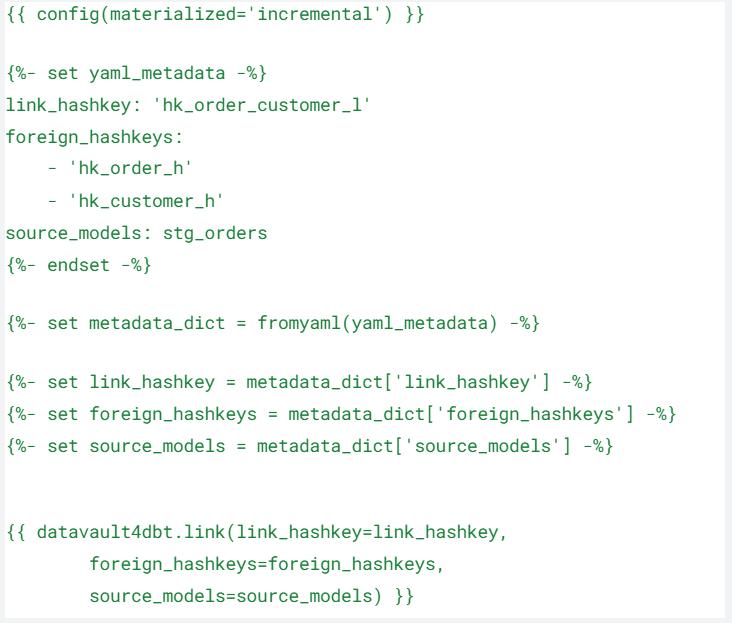
Link models establish connections between business keys. In our case, we’ll create a connection between the previously formed Order Hub and the Customer Hub:

order_customer_1
Link in datavault4dbt
  • link_hashkey: hashkey of the Link, generated using the foreign keys from the Hubs in the staging layer
  • foreign_haskeys: a list of foreign hashkeys to be included in our link
  • source_models: name of our staging model

C. Standard Satellite Version 0 with datavault4dbt

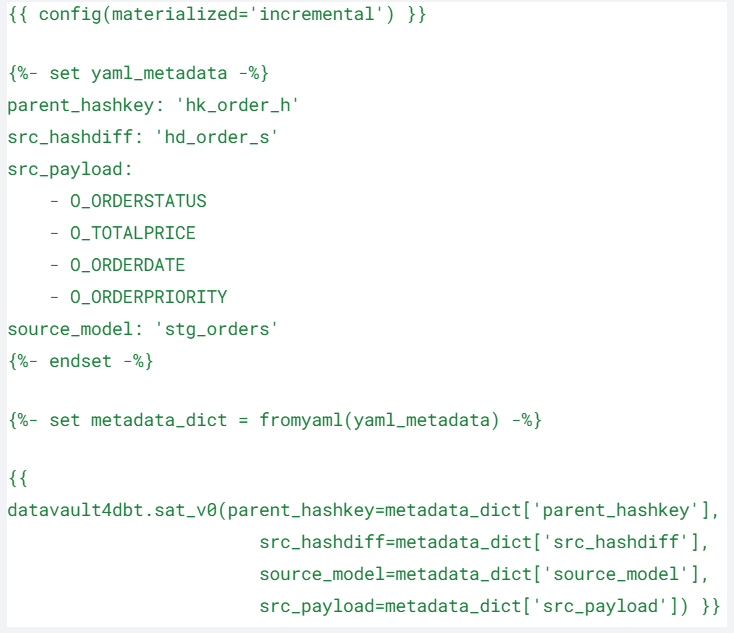
Following Data Vault 2.0 standards, Version 0 Satellites are created as incremental tables. In our example, the Satellite will be connected to the previously generated Order Hub:

order_0s
satellite version 0 in datavault4dbt
  • parent_hashkey: name of the parent entity’s hashkey, in our case, the Order Hub
  • src_hashdiff: hashdiff already calculated on the staging model
  • src_payload: original columns used in the hashdiff calculation
  • source_model: name of our staging model

D. Standard Satellite Version 1 with datavault4dbt

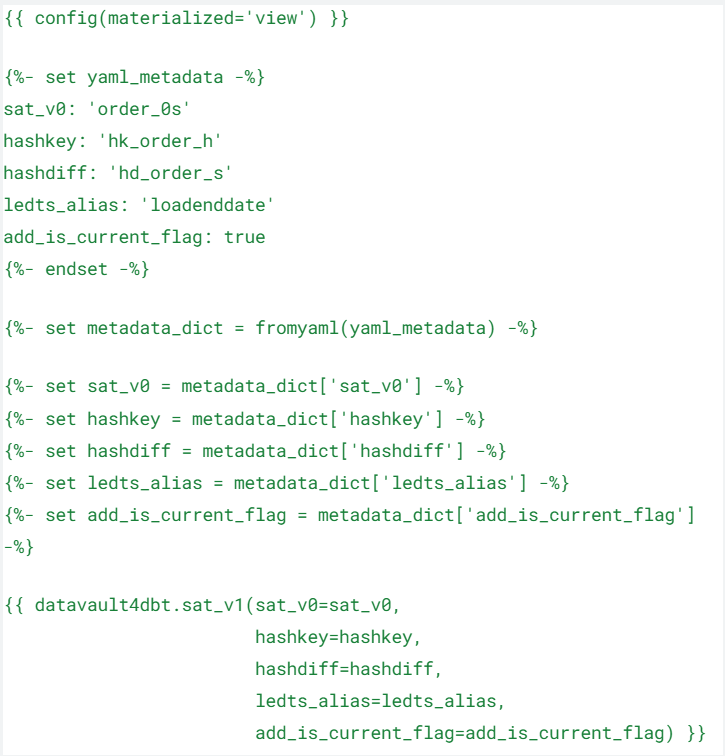
Additionally, the Version 1 Satellite is a virtually generated entity created on top of our Version 0 Satellite. Beyond the materialization type, the main difference with the V0 Satellite is the introduction of a new column for calculating the load end date. The load end date will be useful for us downstream when dealing with PIT tables in the Business Vault.

order_s
satellite version 1 in datavault4dbt
  • sat_v0: name of the related Version 0 Satellite
  • hashkey: hashkey name of the parent entity, in our case, the order Hub
  • hashdiff: hashdiff already calculated on the staging model
  • ledts_alias: name of the load end date column to be generated
  • add_is_current_flag: when true, it generates a new column flagging the last loaded rows based on the load end date

Conclusion

In this journey through the creation of Raw Vault standard entities, we’ve established a strong foundation for our Data Vault 2.0 architecture. By utilizing DataVault4dbt within dbt, we’ve simplified the development of Hubs, Links, and Satellites. These fundamental building blocks are the cornerstone of a robust and scalable data warehousing solution. As we progress in this series, we’ll continue to explore advanced concepts and delve into the intricacies of Data Vault modeling, preparing us to unlock the full potential of our data.

Designing the Business Vault: Key Strategies for Effective Data Organization

DV2.0 Architecture with Business Vault

Designing the Business Vault

Data Vault 2.0 has emerged as a comprehensive framework, offering agility, scalability, and adaptability. At the heart of this framework lies the Business Vault, a critical component for effective data organization and analysis in modern enterprises.

In this article, we will check the key principles and strategies for designing a robust Business Vault within the context of Data Vault 2.0.

Designing the Business Vault: Key Strategies for Effective Data Organization

Join us for an insightful webinar on “How to design the Business Vault?” as we explore the critical role of the Business Vault within the Data Vault 2.0 framework. Discover how the Business Vault serves as a pivotal component for translating raw data into actionable insights, applying soft business rules to streamline end-user structure creation, and ensuring an efficient population of Information Marts.

Watch webinar recording

Understanding Data Vault 2.0

Data Vault 2.0 represents a paradigm shift in data architecture, distinguishing itself from traditional warehousing methods. Its flexibility and scalability make it ideal for organizations navigating the complexities of modern data ecosystems.

Data Vault 2.0 architecture follows a multi-layer approach, consisting of the Staging Layer, the Enterprise Data Warehouse Layer, and the Information Marts Layer. By dividing our data architecture into multiple layers, we can respond to both the needs of the technical teams (i.e., historization, auditability, and data integration) and the requirements of the business users (i.e., quick access to relevant, well-organized information). This integrated approach ensures a harmonious synergy between technical and business objectives.

DV2.0 Architecture with Business Vault

To achieve all these goals, Data Vault 2.0 proposes a subdivision inside the Enterprise Data Warehouse Layer: the Raw Vault and the Business Vault. The Raw Vault will receive and integrate the unaltered data from the source, while the Business Vault will translate the raw data into meaningful insights for informed decision-making.

Importance of Business Vault

The Business Vault serves as a middle ground between the Raw Vault and the Information Mart layers. It is an optional vault, sparsely generated on top of the Raw Vault and normally it is virtualized. Differently from the Raw Vault, in the Business Vault, we will be applying soft business rules, i.e., those rules that change the data.

This layer will be created to serve the business in different ways, such as the generation of query assistance entities or by precomputing calculated fields that later will be used on downstream layers. In other words, the Business Vault will host business-rule changed data and its purpose is to ease the creation of end-user structures.

Key Concepts of a Business Vault

A Business Vault will be modeled following the Data Vault 2.0 design principles. Nevertheless, it won’t necessarily follow the strict auditability requirements of the Raw Vault, as we can drop and recreate the Business Vault entities at any time. With the purpose of serving to populate the Information Mart more easily and efficiently, the entities will be created only if they are necessary for the business. This is also why the Business Vault usually keeps reusable business logic.

The types of entities we can typically find inside a Business Vault could be Point-In-Time (PIT) and Bridge Tables, for query assistance; Computed Satellites or Links, for storing computed data; and Exploration Links, for connecting Hubs that were not previously connected to the Raw Vault. Besides, any other entities that are created on top of the Raw Vault, using business logic and queried by the Information Marts layer, would belong to the Business Vault. For instance, we might need business logic to map instances of the same thing, thus creating a Business Same-as Link.

Conclusion

In data management, Data Vault 2.0 encompasses different aspects such as data modeling, methodology, and architecture. Distinguished by its versatility, this framework places a significant emphasis on agility and adaptability. In this sense, at the core of Data Vault 2.0 architecture lies a pivotal concept, the Business Vault, a key player for efficient data organization and analysis in modern enterprises.

The Business Vault, a flexible optional layer, interprets raw data into actionable insights, applying soft business rules. Its purpose is to streamline end-user structure creation by hosting processed data. Entities are created selectively, keeping reusable business logic. In essence, the Business Vault ensures the efficient population of Information Marts by focusing on business-critical data.

Interested in more? Watch the webinar recording here for free!

Exploring Datavault4DBT: A Practical Series on the DBT Package for Data Vault 2.0 – Vol. 1: The Staging Layer

Exploring DataVault4dbt

Last year Scalefree released DataVault4dbt, a Data Vault 2.0 open-source package for dbt, which includes loading templates for creating and Data Vault 2.0 modeling entities following up-to-date standards and best practices. If you want to read more about the general content of the package and its motivation, you can do so here.

We’re excited to launch a series of insightful posts and webinars, showcasing practical implementations of DataVault4dbt. This will empower you to leverage its full potential in your data warehousing endeavors. Today, we’ll spotlight its application in the staging layer.

Before we start with DataVault4dbt

We will assume some previous knowledge related to Data Vault 2.0 and dbt. Besides, for the following examples, we will be using dbt Cloud IDE connected to Snowflake. For an updated list of supported platforms, check the package’s GitHub repository.

Also, bear in mind that for optimal use of the macros, you must meet a couple of prerequisites:

  • Flat & Wide source data, accessible in your target database
  • A Load Date column signifying the time of arrival in the source data storage
  • A Record Source column detailing the origin of the source data, such as the file location within a Data Lake

In our case, we used and adapted the data from the jaffle_shop example project available on dbt.

Installing DataVault4dbt package on dbt

Installing DataVault4dbt is like installing any other package on your project. You will need to follow two simple steps:

1.Add it to your packages.yml file

DataVault4dbt installation

2. Run dbt deps

DataVault4dbt installation

Using the macro for staging our source data

According to the documentation for the staging layer of DataVault4dbt, this layer primarily focuses on hashing. It also offers functionalities like creating derived columns, conducting prejoins, and adding NULL values for missing columns. Rather than diving deep into the technical aspects of each macro component, which are comprehensively covered in the documentation, let’s dive straight into its application!

A. Basic source information

Identifying the Source Model (source_model):

  • When referencing a source, adopt the dictionary format: ‘source_name’: ‘source_table’.
  • For models within our dbt project, just use the model name: ‘source_table’.

Setting Load Date Timestamp (ldts) & Record Source (rsrc):

  • Both can reference a column from the source table or a more detailed SQL expression.
  • Additionally, for the Record Source, you can use a static string beginning with ‘!’, like ‘!my_source’.

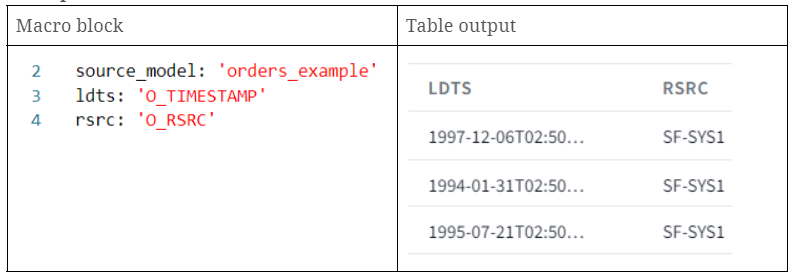
Example

DataVault4dbt: A table with two table blocks.
  • source_model: Calls an already created table on dbt named ‘orders_example’.
  • ldts: Calls a timestamp column from our source model.
  • rsrc: Calls a column which contains a string referring to our record source name.

B. Hashing

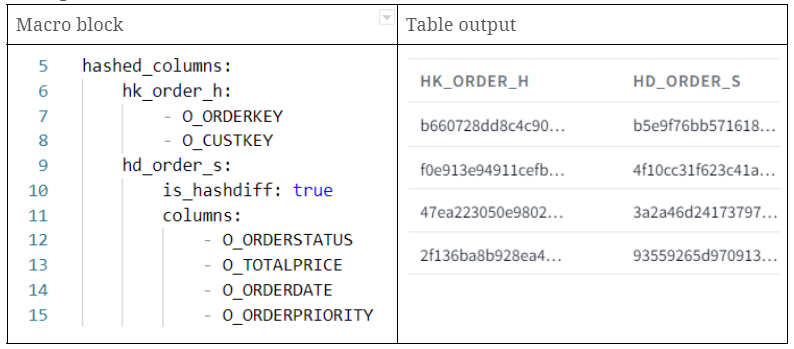
In DataVault4dbt, the hashed_columns parameter outlines how to generate hashkeys and hashdiffs. For each hash column:

  • The key represents the hash column’s name.
  • For Hashkeys, the value is a list of business keys.
  • For Hashdiffs, the value will usually be a list of descriptive attributes.

Example

DataVault4dbt: Screen shot, table, different types of data.
  • hk_order_h: hashkey generated using two columns inputs (O_ORDERKEY and O_CUSTKEY)
  • hd_order_s: hashdiff generated using multiple descriptive attributes

C. Derived columns

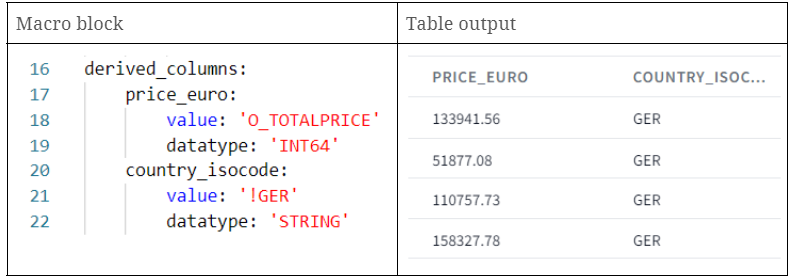
Derived Columns in DataVault4dbt stage models allow users to directly apply specific transformations to data. They act as on-the-fly customizations, enabling immediate adjustments to data within the column itself. Essentially, if data isn’t in the desired format, with DataVault4dbt you can derive a new version right within the column using a specified rule.

When setting the derived_columns parameter, each derived column includes:

  • value: The transformation expression.
  • datatype: The datatype of the column.
  • src_cols_required: Source columns needed for the transformation.

Depending on how you name the derived column and the source columns, you can achieve two outcomes:

  1. If the derived column’s name matches its source column’s name, the original column’s data will be replaced by the transformed data. This effectively means you’re overwriting the original data.
  2. On the other hand, if the derived column’s name is different from its source column’s name, the transformation will result in a brand new column, preserving the original column’s data.

Example

DataVault4dbt: table, prices, items.
  • price_euro: creation of a new column with the same values as the O_TOTALPRICE column.
  • country_isocode: creation of a new column with a static string ‘GER’.

D. Prejoining

Why Prejoin?

In certain scenarios, your source data might not have the ‘Business Key’ which is often a human-readable identifier, such as an email address or username. Instead, it might have a ‘Technical Key’, which could be an internally generated identifier or code. If you need to use the human-readable Business Key in your processing but only have the Technical Key, you would use prejoining to combine your data with another table that maps Technical Keys to Business Keys.

How to Define Prejoins in DataVault4dbt?

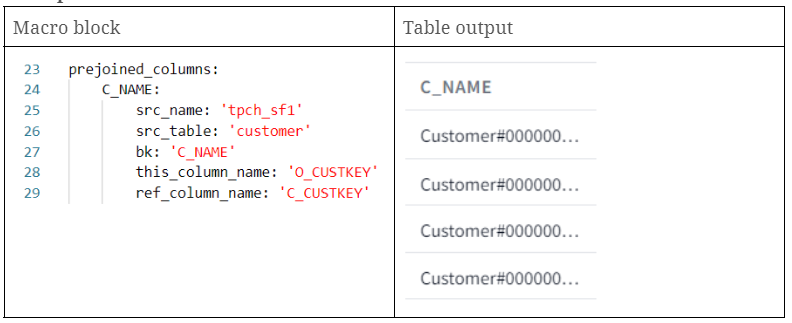
The DataVault4dbt package provides a structured way to define these prejoins (prejoined_columns) using dictionaries.

For every column you’re adding through prejoining, you need to specify a few things:

  • src_name: This is the source of the prejoined data, as defined in a .yml file.
  • src_table: This specifies which table you’re prejoining with, as named in the .yml file.
  • bk: This is the name of the Business Key column in the prejoined table or the column values you are bringing to your table.
  • this_column_name: In your original data, this is the column that matches up with the prejoined table. This is often a Technical Key.
  • ref_column_name: In the prejoined table, this is the column that this_column_name points to. It should match up with the values in this_column_name.

Note that both ‘this_column_name’ and ‘ref_column_name’ can represent either a single column or a list of columns, serving as the basis for constructing the JOIN conditions.

Example

DataVault4dbt example: Table, data.
  • c_name: we brought the column “C_NAME” from the customer source table, joining on orders.o_custkey = customer.c_custkey.

E. Multi active config

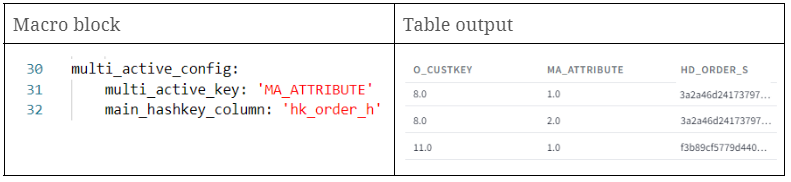
The multi_active_config parameter is used when dealing with source data that contains multiple active records for the same Business Key. Essentially, you need to specify which columns are the multi-active keys and the primary hashkey column.

If your source data doesn’t have a natural multi-active key column, you should create one using functions like row_number in a preceding layer. Then, add the name of this newly created column to the multi-active-key parameter. It’s crucial that the combination of multi-active keys, the main hashkey, and the ldts column be unique in the final satellite output. If you don’t use this setting, the stage is considered to have only single active records.

Example

DataVault4dbt example: Table, types, block.

By setting this parameter, we’ll observe consistent hashdiffs for identical Business Keys, proving beneficial in subsequent layers. If you want to know why, you can check this post.

F. Missing columns

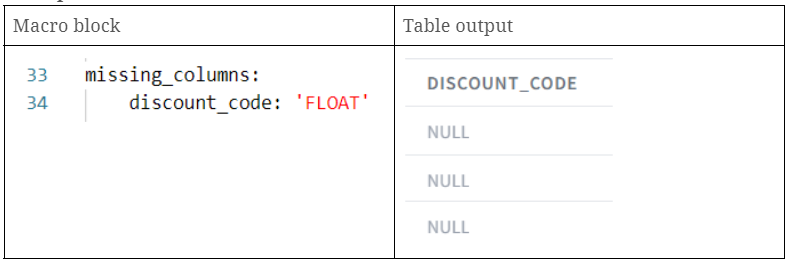
With DataVault4dbt, the missing_columns parameter helps handle scenarios where the source schema changes and some columns no longer exist. Using this parameter, you can create placeholder columns filled with NULL values to replace the missing ones. This ensures that hashdiff calculations and satellite payloads continue to work. Essentially, you provide a dictionary where the column names are the keys and their respective SQL datatypes are the values.

Example

DataVault4dbt example: table, price
  • discount_code: creation of a new discount_code column with NULL values.

Conclusion

Scalefree’s DataVault4dbt package introduces an easy-to-use yet powerful solution for database modeling. In our case, we went through the staging layer macro, which combines best practices with the flexibility to address diverse source data needs. From hashing to on-the-fly column modifications, this Data Vault 2.0 open-source package for dbt streamlines complex processes.

As we continue to explore its potential, we invite you to join our monthly expert session for a deeper dive. Reserve your spot here and stay tuned to the package’s GitHub repository for the latest updates and support.

Mastering Metadata: Data Catalogs in Data Warehousing with Datahub

Mastering Metadata in Data Warehousing

In today’s data-driven world, it is essential to be able to manage and organize large amounts of data in an efficient way. Businesses across all industries are forced to contend with more data than ever before. The introduction and development of an enterprise data warehouse in a company naturally plays a central role, but does not solve a major challenge: How to effectively organize and manage the data, especially metadata, in an Enterprise Data Warehouse? This is where the concept of data catalogs comes into play and where tools like Datahub become essential. 

A data catalog serves as a comprehensive inventory of data assets in an organization, providing context, annotations, and metadata to facilitate the understanding and discovery of data. It’s like a map to your data, helping users navigate the complex data landscape to find the exact data they need.

A data catalog can help users to understand where to find specific data in the data warehouse that fits their needs and to investigate where it came from, as well as how it might be connected to other data. This can greatly simplify tasks like data analysis and reporting, making the data warehouse more accessible and usable for everyone in the organization.

Mastering Metadata: Data Catalogs in Data Warehousing with DataHub

Don’t miss our upcoming webinar about data catalogs! This session will explore in detail the critical role of data catalogs in data warehousing, with an exclusive focus on the powerful tool DataHub. You’ll gain practical insights on enhancing data discovery, metadata management, data lineage, and data governance. Sign up today and transform your data management strategies into a competitive advantage.

Watch webinar recording

Understanding Data Catalogs

What is a Data Catalog?

In general, a data catalog is like a metadata inventory, which consists of organized and structured metadata regarding all data assets in an organization. It is a central place where all this metadata can be stored, combined, and categorized, which makes it a lot easier to discover and understand the corresponding data, for example in a data warehouse. A data catalog also has search functionalities to find specific data from the available indexed datasets. It serves like a single source of truth of your metadata, enabling users to trust the data they’re using for their analyses or business decisions.

Role of a Data Catalog in Data Warehousing

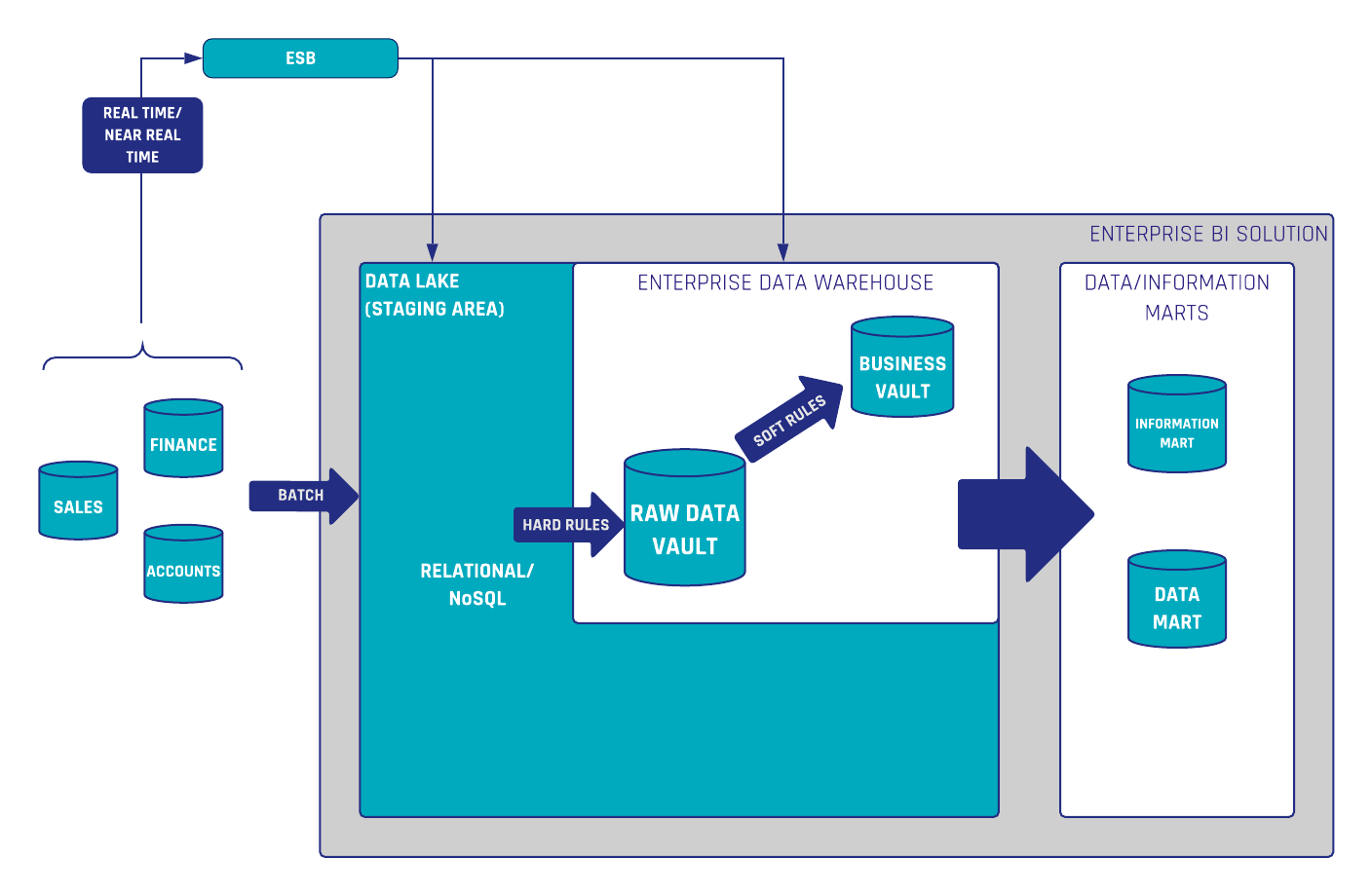
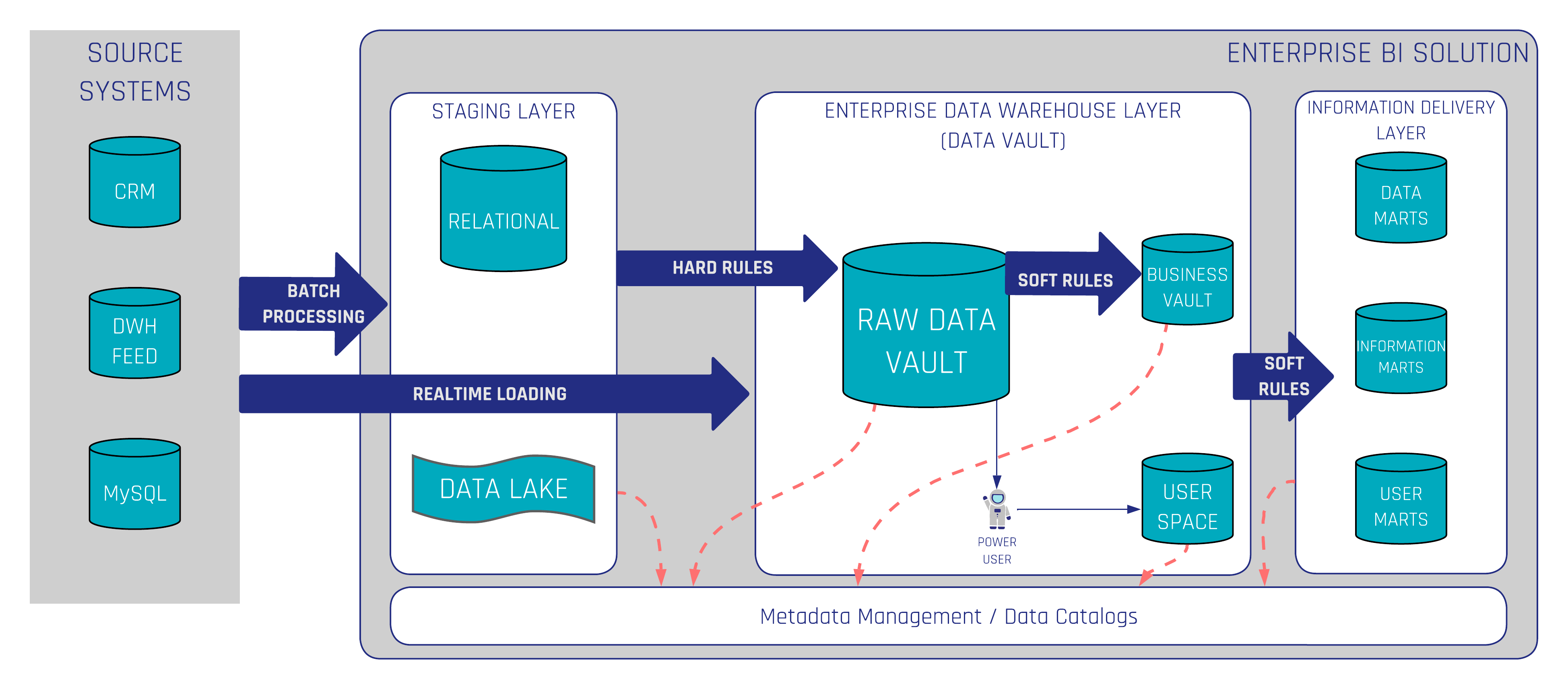
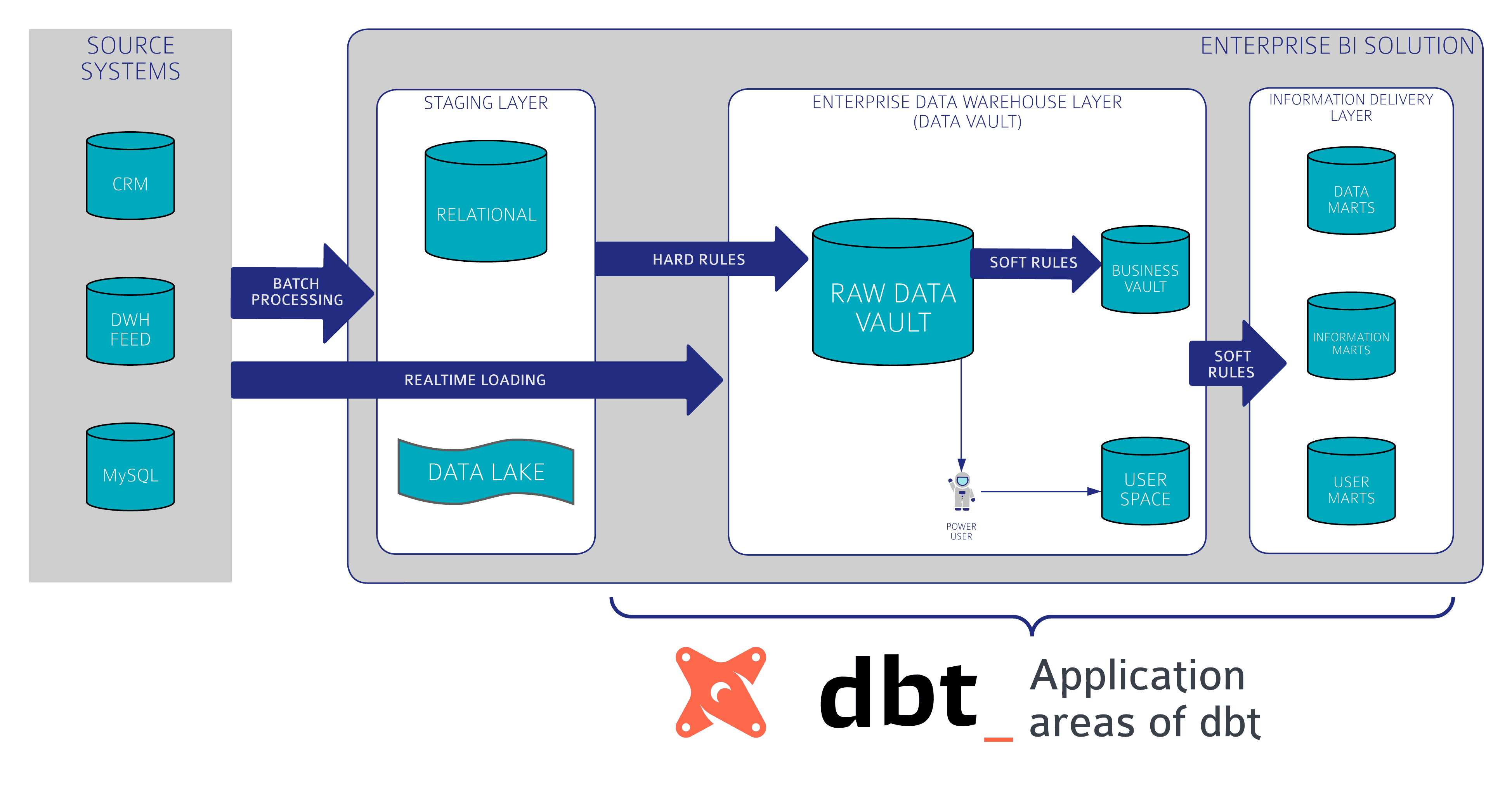
In the context of data warehousing, a data catalog brings a lot of benefits. It provides a way to explore and search all data stored in the data warehouse. Technical users, as well as Business Users, can discover relevant data, understand its context, and ensure it is up-to-date, reliable, and accurate. The following figure shows where data catalogs in data warehousing with Data Vault 2.0 take place. A Data Catalog should cover the entire Enterprise BI Solution. This also applies, for example, to a data lake, if available, and to the information delivery layer.

Data Vault 2.0 General Architecture

Now that we’ve understood what a data catalog is, let’s delve into how each component plays a part in a data catalog and explore how a tool like DataHub can assist organizations in these tasks.

Introduction to DataHub

In the world of data catalogs, DataHub stands out as an increasingly popular choice for many businesses. DataHub is a growing open-source software developed by LinkedIn to address its growing need for a more dynamic and scalable data management tool. It was created in part due to the fact that the existing tools were not sufficient with LinkedIns expanding needs.

As LinkedIn grew, so did its data volume, variety, and velocity. Recognizing the need for a more efficient way to manage its data, LinkedIn built and introduced DataHub in 2020. Open-sourcing DataHub allowed other organizations to benefit from this advanced tool, and it has since been adopted by many businesses looking for a modern, scalable data catalog solution.

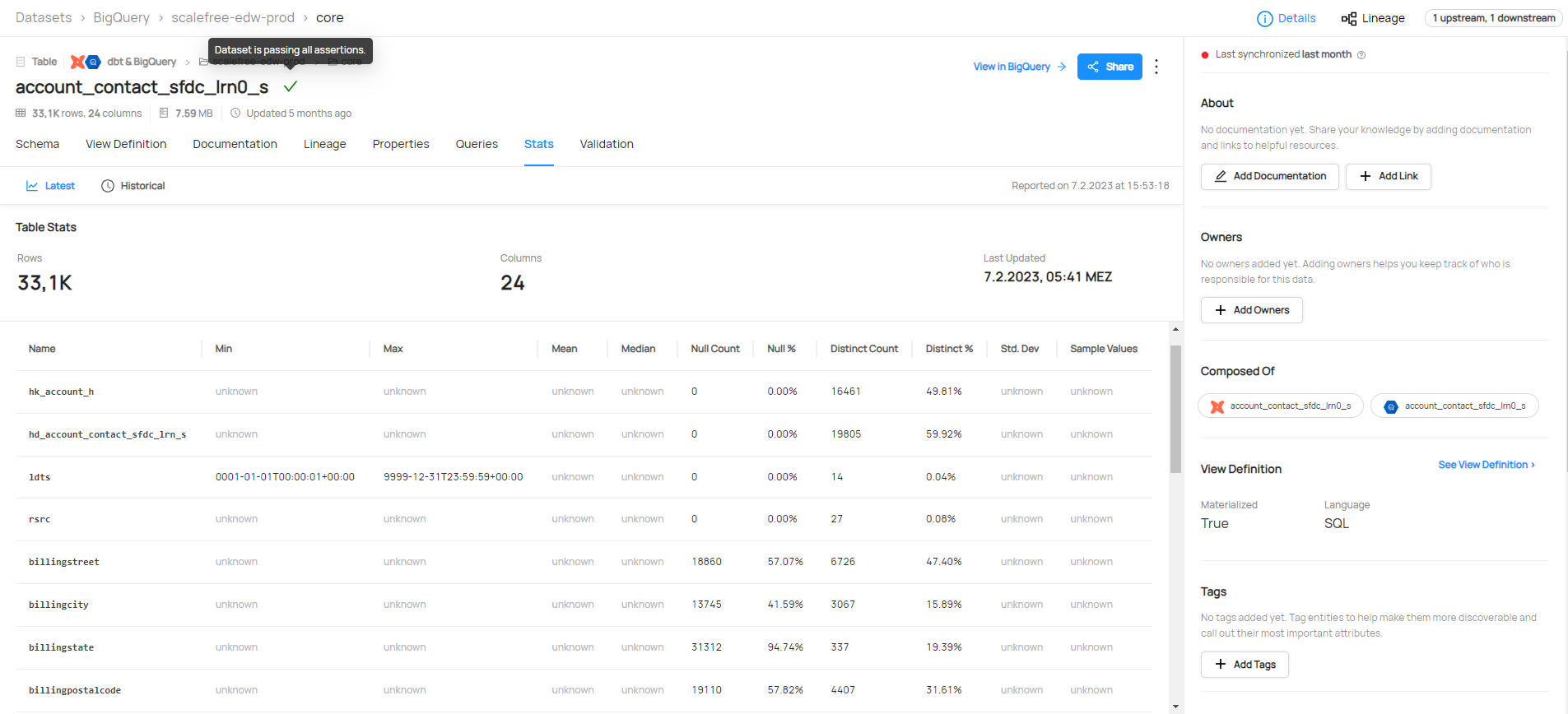
DataHub supports both push-based and pull-based metadata ingestion, including a wide range of integrations for example Airflow, BigQuery, Databricks, dbt, Hive, Kafka, Looker, MSSQL, MongoDB, Oracle, S3, PowerBI, Snowflake, Spark, and much more. You can find a full list here. This gives datahub the ability to combine and show metadata of the same data from multiple sources, for example, a dbt model definition, and if the tests were running successfully, right next to the database schema and stats for all columns.

Datahub statistics

Key Features and Capabilities of DataHub

DataHub, as a metadata platform, goes beyond traditional data catalogs. DataHub offers all important features and capabilities:

1. Scalability: DataHub is designed to handle metadata from thousands of datasets, which makes it a great choice for large organizations.

2. Flexible and Extensible Data Model: The technical data model behind this tool is designed to be customizable and expandable to allow organizations to customize it to their specific business requirements

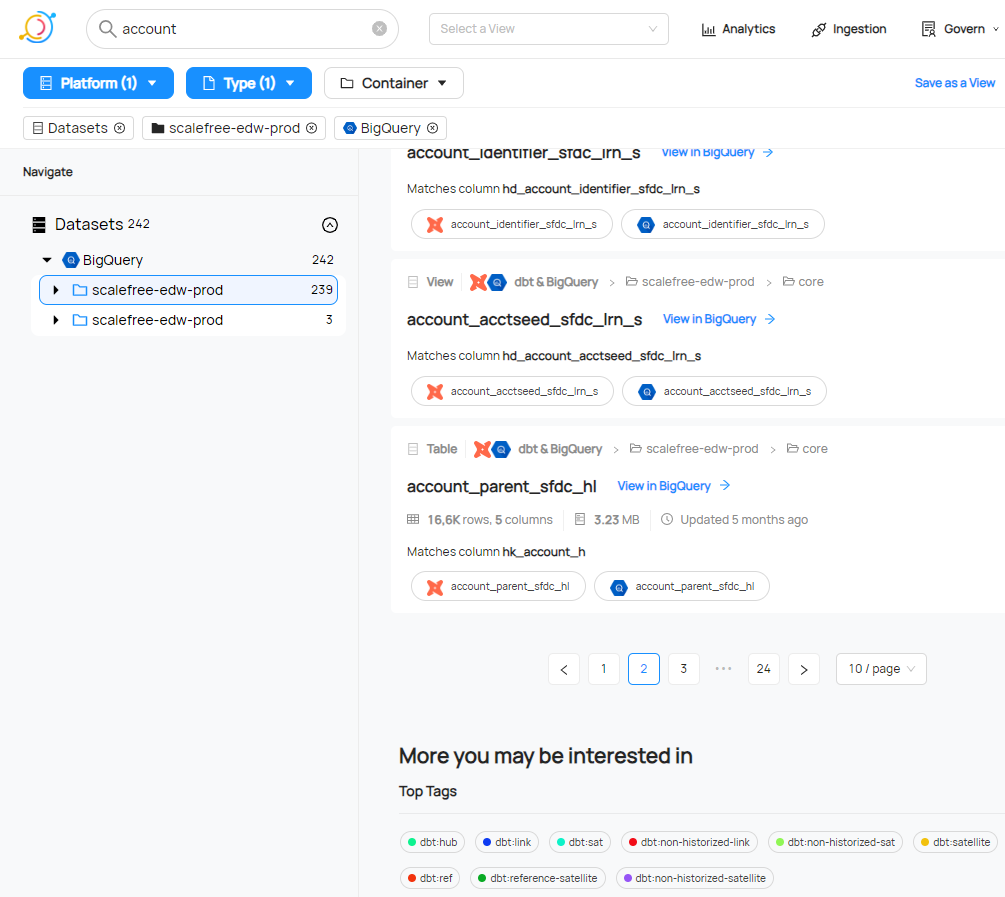
3. Powerful Search and Discovery: Leveraging Elasticsearch, DataHub offers robust search functionality that enables users to discover datasets quickly based on various attributes, such as the data’s origin, schema, and usage.

Datahub capabilities

4. Rich Metadata: Unlike traditional data catalogs, DataHub captures and presents a wide variety of metadata, including data lineage, operational metadata, and business metadata. This gives users a comprehensive understanding of their data.

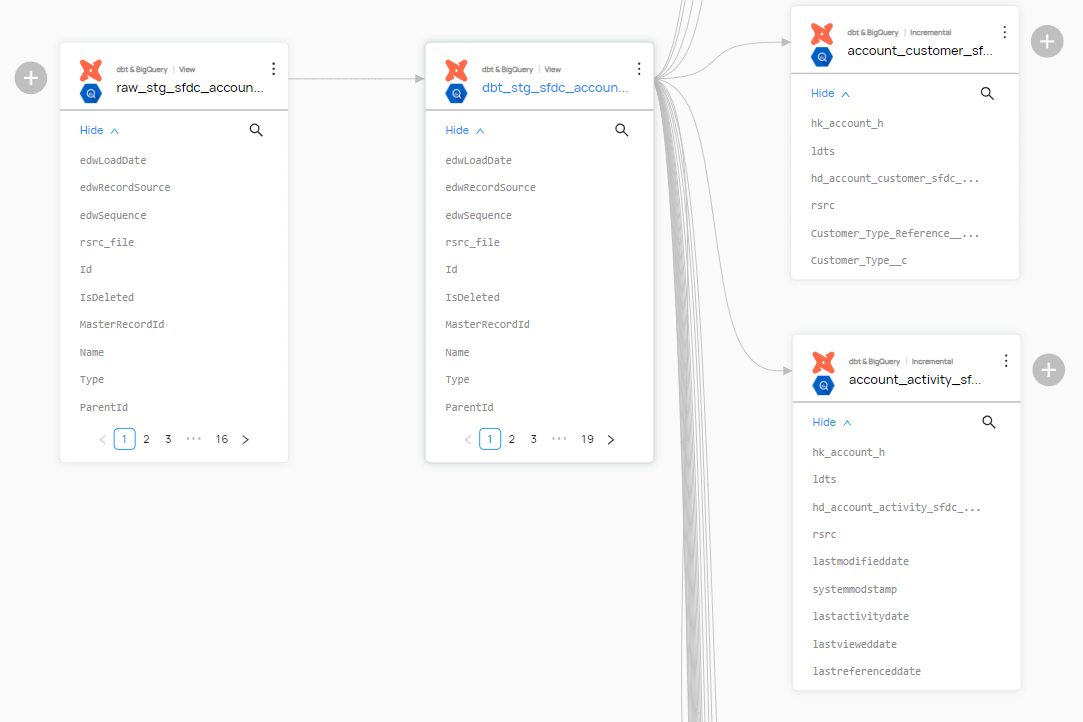
5. Data Lineage and Relationships: DataHub automatically captures and visualizes data lineage, showing how data flows through various systems. It also displays relationships between datasets, allowing users to understand how different data assets interact with each other.

Lineage and Relationships in datahub

Conclusion

Using a data catalog comes with several benefits:

  1. Enhanced Data Discovery: With the search and categorization capabilities of a data catalog, users can quickly find the exact data they need without having to comb through large datasets.
  2. Improved Data Understanding: The metadata in a data catalog provides users with necessary context about the data, making it easier to interpret and use correctly.
  3. Better Compliance and Governance: A data catalog supports data governance initiatives by ensuring data is consistent, accurate, and compliant with relevant regulations.
  4. Increased Trust in Data: By providing transparency into data lineage, a data catalog helps build trust in the data by allowing users to see its history and verify its accuracy and reliability.
  5. Time and Resource Efficiency: By making it easier to locate and understand data, a data catalog can save the company resources, thus speeding up data-driven activities and reducing the burden on data management teams.

In conclusion, DataHub provides a flexible, feature-rich, and all-encompassing option for data catalogs in a data warehousing environment. By providing powerful features for data discovery, metadata management, data lineage, and data governance, it enables businesses to extract maximum value from their data.

If you’re interested in learning more about data catalogs, watch the recording here for free.

Data Vault 2.0 with DBT – Part 2

Data Vault 2.0 with dbt

Data Vault 2.0 with dbt

In the first part of this blog series we introduced you to dbt. Now let’s take a look at how you can implement Data Vault 2.0 with dbt and what advantages this offers. If you don’t know the first part yet, you can read it here.


Dbt Models

dbt provides the ability to create models and generate and execute SQL dynamically out of these models. This allows you to write your data transformations in models using SQL and reusable macros powered by Jinja2 to run your data pipelines in a clean and efficient way. However, the most important part for the Data Vault use case is the ability to define and use those macros.

But first we should clarify how models work in dbt.

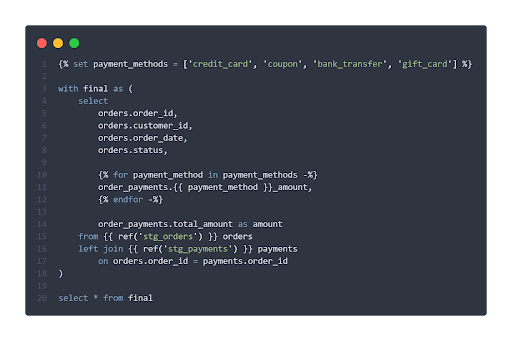
This tool handles the compilation and execution of models written using SQL and the Jinja macro language. Each model consists of exactly one SQL SELECT statement. Jinja code is translated into SQL during compilation.

Data Vault 2.0 with dbt

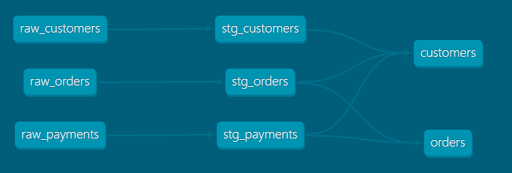
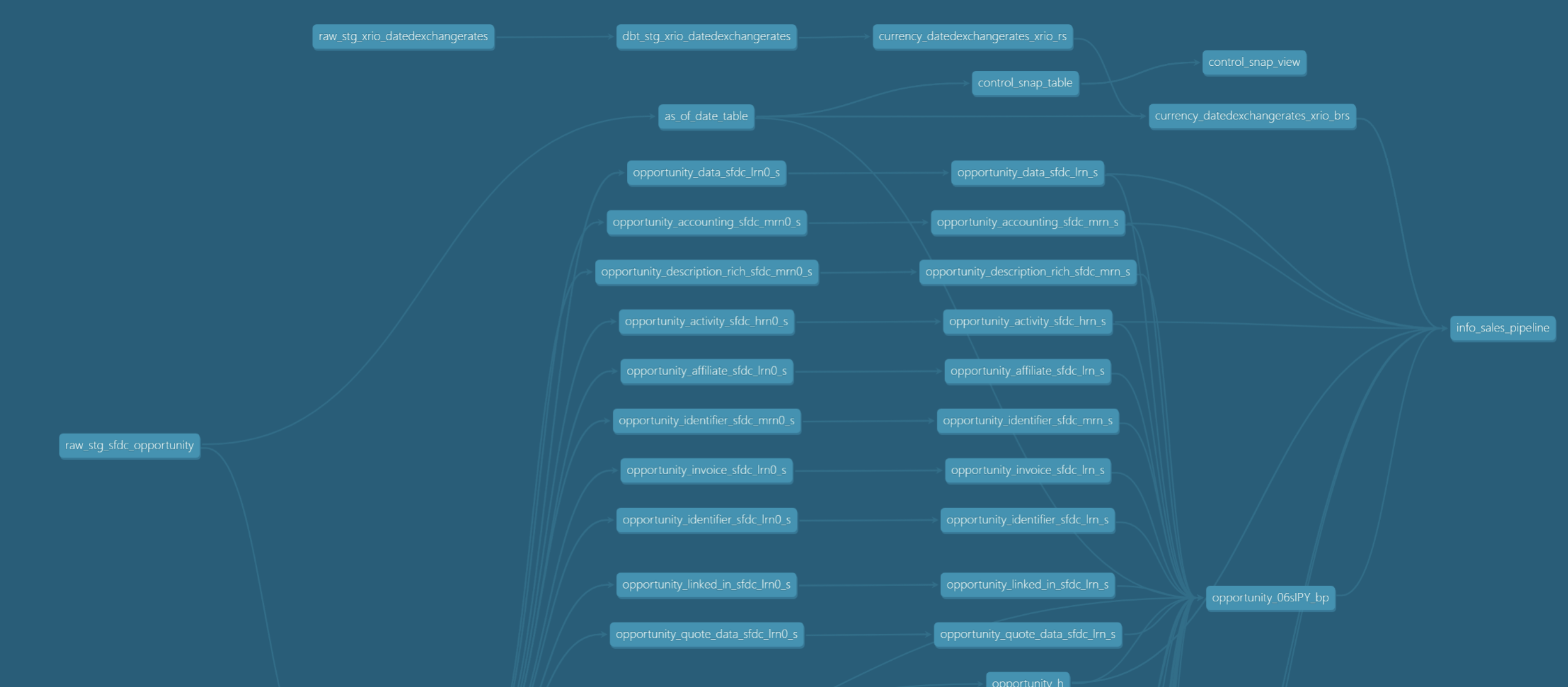
This figure shows a simple model in dbt. A big advantage of Jinja is the possibility to generate sql programmatically, for example with loops and conditions. Also, through the ref() functions, dbt understands the relationships between the models and builds a dependency graph. This ensures that the models are built in the correct order and that the data lineage is documented. A lineage graph may look like this:

Data Vault 2.0 with dbt

The materialization of models can be defined at different configuration levels. This allows fast prototyping with views and switching to materialized tables if necessary for performance reasons.

Data Vault 2.0 and Macros

But how can we implement Data Vault 2.0 with dbt? The most important part for using Data Vault 2.0 is the ability to define and use macros. Macros can be called in models and then generate into that macro additional SQL or even the entire SQL code.

For example, you could create a macro to generate a hub that gets the source/staging model as an input parameter, as well as the specification of the columns for the business key(s), load date and record source. The sql code for the hub is then generated dynamically from this. The advantage of this is that a change to the macro would directly affect each individual hub, which greatly improves maintainability.

At this point, you also gain huge benefits from the active open-source community around dbt. There are many open-source packages with which it can be extended.

There are also already some packages that are perfect for using Data Vault 2.0 with dbt. 

For example, our own open-source package DataVault4dbt, developed and actively maintained here at Scalefree, provides a comprehensive set of dbt macros to translate a Data Vault model “on paper” into actual tables and views—such as Hubs, Links, Satellites, and more. The package is actively used in real-world projects and helps enforce best practices for a modern, audit-friendly Data Vault 2.0 implementation.

To explore all features and macro parameters in detail, check out the documentation.

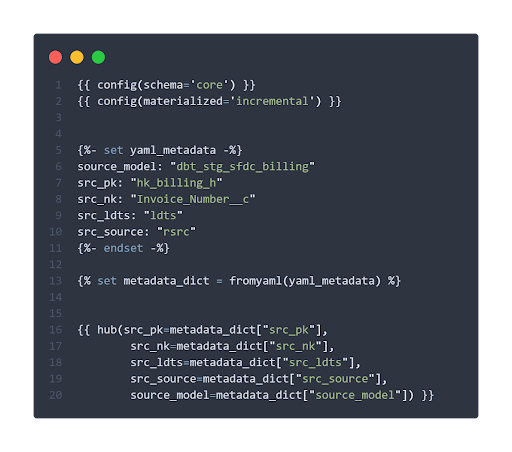
The only thing you need in your model, for example for a hub, is just one macro call:

{%-

hub(src_pk, src_nk, src_ldts, src_source, source_model) 

-%}

With the parameters of the macro call you define the source table where the columns can be found (source_model) and the column names for the hash-key (src_pk), business key(s) (src_nk), load date (src_ldts) and the record source (src_source) column. When the model and the macro(s) defined in the model are executed, the SQL gets compiled and processed on the database system.

The metadata needed can for example be defined in variables with jinja directly in the model:

What you can also see is that this tool provides different options for the materialization. The incremental materialization for example, will load an entity as a table on an incremental basis.

When the model is executed, dbt generates the whole sql out of the macro and decides how the records are loaded. If the hub table does not exist, yet it is created and all records are loaded, if it already exists, the table is loaded incrementally. 

For people who tried or managed to implement a Data Vault with “vanilla” SQL, you will realise that this is a real game-changer. The team can now focus entirely on the Data Vault design itself. Once the metadata is identified, dbt, along with your macros, can take care of the entire logic.

Openly available packages can add basic Data Vault 2.0 principles to dbt and therefore allow users to quick-dive into Data Vault implementation. Dbt’s general openness allows you to adjust all macros, for example, to your company or project specific Data Vault flavor to meet your technical and business requirements. 

It is important to note that many of the currently available dbt packages for implementing Data Vault 2.0 deviate from the official standards in some details. Our own open-source package DataVault4dbt, developed and actively maintained here at Scalefree, addresses this gap by supporting all core Data Vault 2.0 entities and the latest best practices. The package is already used in real-world projects to help ensure a modern and audit-friendly implementation.

Conclusion

Integrating Data Vault 2.0 with dbt streamlines the data warehousing process by leveraging dbt’s capabilities to define models and macros, enabling efficient and dynamic SQL generation. This approach allows teams to focus on Data Vault design, with dbt handling the underlying logic.

Our open-source package DataVault4dbt brings these advantages to real-world projects, offering a reliable and standards-aligned way to build Hubs, Links, Satellites, and more.

Data Vault 2.0 with DBT – Part 1

Data Vault 2.0 with dbt

This article focuses on the benefits of using Data Vault 2.0 with dbt, and the importance of choosing the correct implementation tools. Data is an important asset in the decision-making process. As we have previously discussed in another post, Data Vault 2.0 is the right choice when the goal of an enterprise data warehouse is to have fully historized and integrated data. Additionally, it is also better suited to instances in which data from many source systems needs to be combined. You can find the previous blog post here.

While Data Vault 2.0 focuses on the “what”, there are many options for the “how” of technically translating a Data Vault model into physical tables and views in the enterprise data warehouse, as well as for orchestrating and loading/processing the procedures. And this is where Data Vault 2.0 with dbt creates an effective solution.

About dbt

This data build tool transforms your data directly into your data warehouse. For reference, dbt is the “T” in ELT. Therefore, dbt assumes that data is already loaded into a database from which the current database can query. In contrast, ETL extracts data then transforms it and before loading it into the target. With ELT, the data is not transformed as it moves into the data warehouse. (with transform we mean transformation by soft business rules which would change the meaning of the data. Of course, we have to make sure that the data fits into the target table (data type adjustments, etc.). Here we are talking about “hard rules”.)
Dbt is particularly compatible and useful in cloud DWH solutions such as Snowflake, Azure Synapse Analytics, BigQuery, and Redshift and performs transformations and modeling directly on the database in order to take advantage of the performance of these highly scalable platforms.

How dbt works

Models and SQL statements can be easily created, tested, and managed in dbt itself. A powerful combination of the scripting language, Jinja2, and the all-time classic SQL allows users to build models. The simple interface enables data analysts without engineering know-how to initiate appropriate transformations. Data team workflows become more efficient and cost-effective because of this. Behind this tool sits an open-source community that is constantly and passionately developing the tool. As such, dbt is available both as a free, reduced core version and as a comprehensive and flexible cloud version.

How does Data Vault 2.0 with dbt work?

Part of the Data Vault 2.0 methodology is the model that focuses on how to design the core data warehouse with a scalable solution. The core Data Vault entities are hubs, links ,and satellites. That said, using Data Vault 2.0 with dbt provides the ability to generate Data Vault models and also allows you to write your data transformations using SQL and code-reusable macros powered by Jinja2 to run your data pipelines in a clean and efficient way.

Data Vault 2.0 with dbt

Conclusion

Dbt does not reinvent the wheel, but when it comes to building a new EDW – especially if it is in the clouds – it provides a very helpful basic framework with many important functions for Continuous Integration and Deployment already defined. dbt brings the standards of software development into the world of data transformation. This allows developers to concentrate on the core tasks of data modeling and business logic. Especially, not only for smaller projects, this tool offers a lightweight and extremely affordable alternative to other data warehouse automation solutions.

Meltano Open Source Production Grade Data Integration – Part 2

Meltano result

Meltano Open Source Production Grade Data Integration

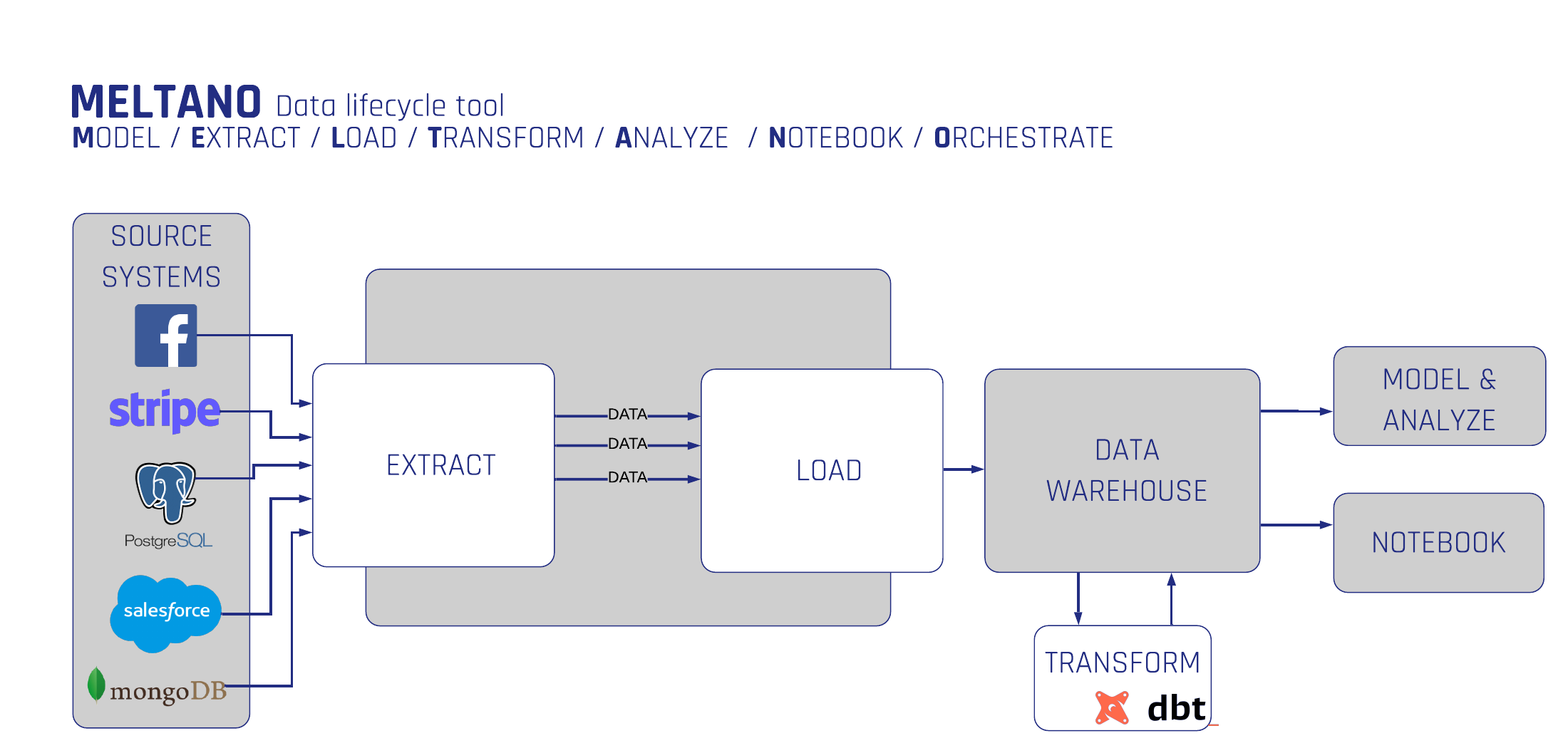
In this article, we delve into the practical application of Meltano, an open-source platform designed for building, running, and orchestrating ELT pipelines. Building upon our previous discussion of Meltano’s architecture, this installment guides you through the process of creating a data integration pipeline, from initializing a project to configuring extractors and loaders, and utilizing the Meltano UI for streamlined management.

Meltano in action

In our last overview, we talked about Meltano and its architecture. Now, we would like to illustrate the ease in which you can use Meltano to create a data integration pipeline.
Before we start, please ensure that you have already installed Meltano on your machine. If you haven’t yet, you can follow Meltano’s official installation guide.

First we will initialize a Meltano project.
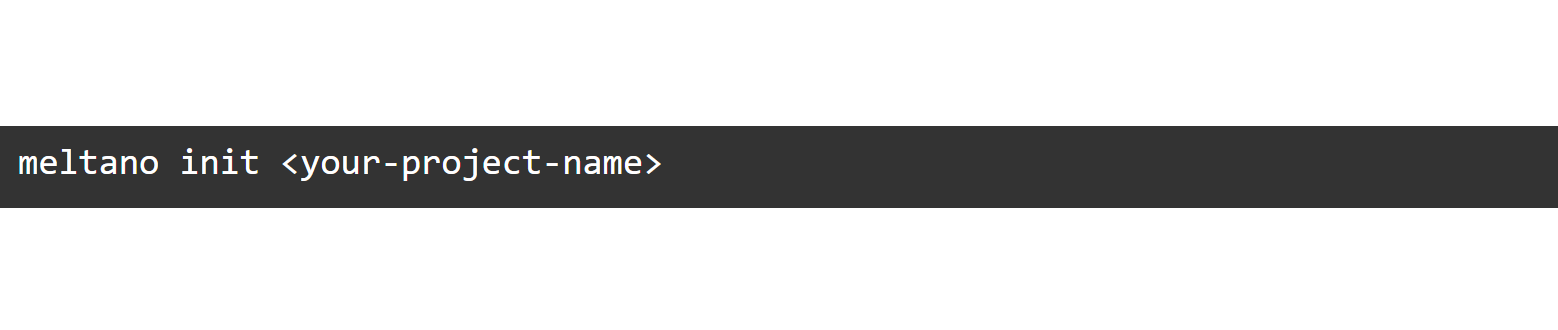
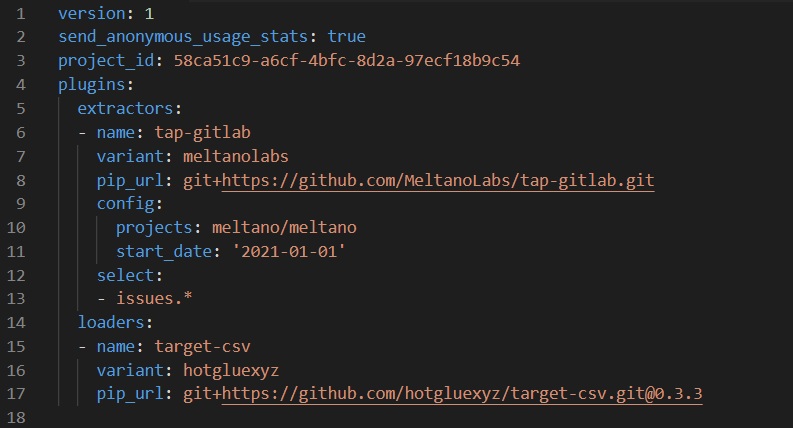
Initialize a new project in a directory of your choice by using  “meltano init”. This will create a new directory with, among other things, your  “meltano.yml” project file.

Meltano

The Meltano project folder

The project folder is the single source of truth for all your data needs. It is a simple directory and version controllable. 

The main part of your project is the meltano.yml project file. This file defines your plugins, pipelines and configuration.

The project and meltano.yml files are manageable using the Meltano CLI and are instantly containerized for Docker/Kubernetes deployment. Though, please note that there are not any defined plugins or pipeline schedules created yet. We will do this in the next step.

Adding an extractor and loader

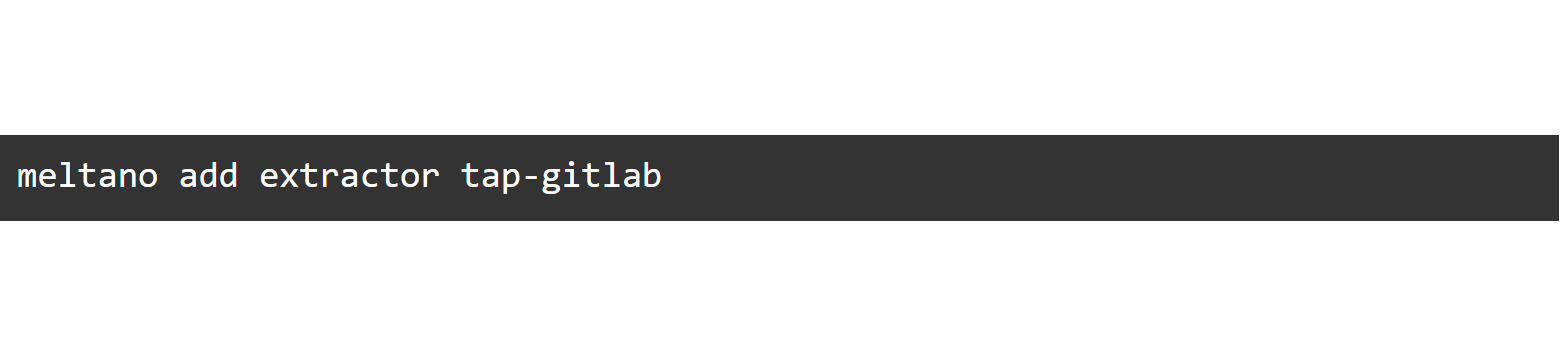
Now, let’s initialize the pipeline’s components. The first plugin you’ll want to add is an extractor which will be responsible for pulling data out of your data source.

To find out if an extractor for your data source is supported out of the box, you can check the Extractors list on MeltanoHub or run  “meltano discover”.

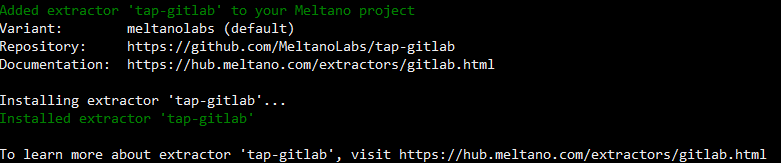
We will use the Tap for Gitlab in this example as we don’t need to create API credentials.

Meltano

Meltano manages setup, configuration and handles invocation.

Meltano

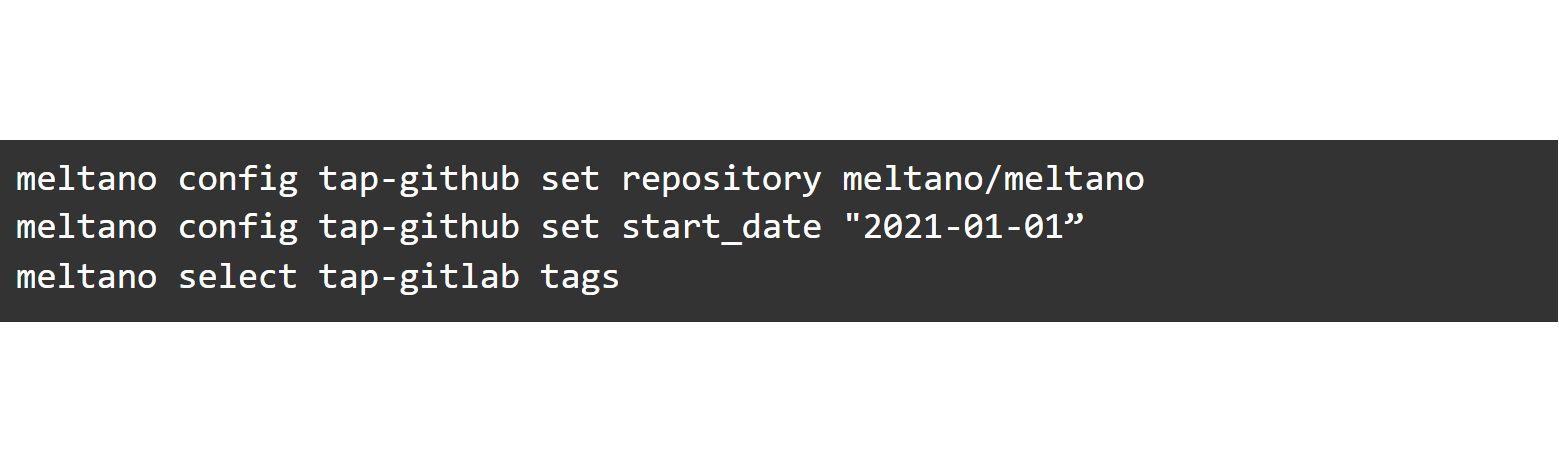
We will configure the extractor to pull the data from the repository meltano/meltano. Additionally, we will define it to only extract data as of 1 January 2021 and to include only data under the “Tags” stream.

Meltano

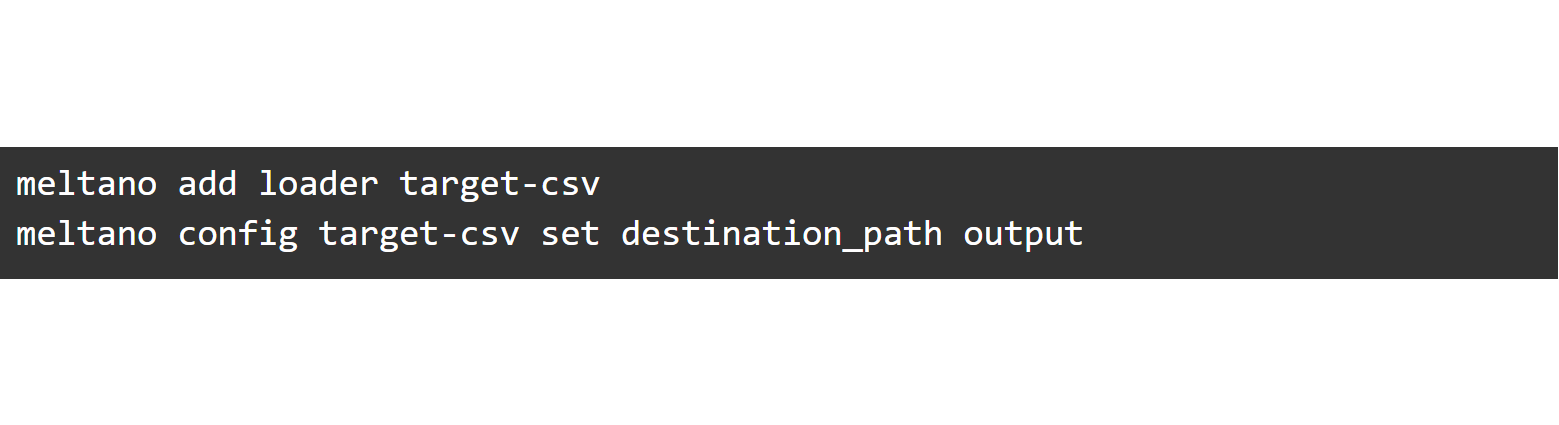
Data selection is way easier than using just Singer! The extractor is now set up. Now, we will add a loader to store the data into a CSV file and define our destination path:

Meltano

Remember that the directory needs to be previously created, as it will not be created automatically. This is what our meltano.yml looks like:

Instead of using the CLI, we can make changes directly in the YAML.

This way, it’s also possible to configure the extractors and loaders in the Meltano UI:

Start the Meltano UI web server using  meltano ui. Unless configured otherwise, the UI will now be available at http://localhost:5000.

Meltano Extractors
Meltano Configuration

Run a pipeline

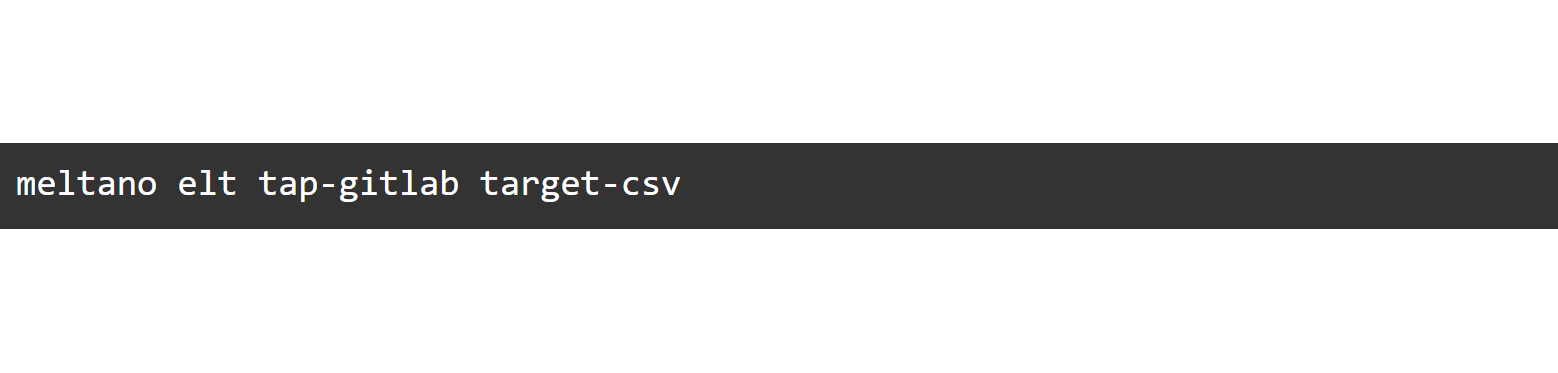
Now it’s time to run a pipeline. To run a one-time pipeline, we can just use the meltano elt command:

Meltano
Pipelines

Result

And we are done! It took us just ten commands to create a data integration pipeline.

Meltano result

Conclusion

It’s clear why Meltano is a great choice for building your data platform: it’s powerful but simple to maintain and its open-source model makes it flexible, budget-friendly and reliable.

Singer Open Source Production Grade Data Integration – Part 1

In our past blog post, we introduced an open source framework for ELT processes called Singer. This framework can be wrapped up using another open source tool which adds more interesting features to Singer including installation, setup of environments, monitoring, scheduling and orchestration. At Scalefree, we moved all of our ELT pipelines into this framework on AWS and are pleased with the results.

Please note, there are a large number of platforms for managing data integration but there is a lack of robust and easy-to-use, free open source solutions. The Meltano project aims to provide a solution to that situation. Meltano is a full-package data integration platform that challenges the most established players in the data space. Meltano is built on top of the best open source tools for data integration and infuses them with DataOps best practices.

Meltano is the easiest way to build, run and orchestrate ELT pipelines made-up of Singer taps, targets and dbt models. It is open source, self-hosted and version controlled as well as containerized.

Meltano’s open source model lets you easily adapt it to your own needs and reduces cost. Continue Reading