search
0
Category

Data Warehouse

Monitoring of a Snowflake Powered EDW

Snowflake Built-In Tools

Introduction to Snowflake

Snowflake established itself as one of the most widely used cloud data platforms, providing a scalable and flexible architecture for building, maintaining, and operating Enterprise Data Warehouses. While it aims to eliminate data silos and simplify the data structure, with billions of queries a day (overall), its elastic computing handles the workload for good performance and a satisfied customer.

However, as organizations rely increasingly on Snowflake, monitoring their solution might be crucial for performance optimization, error and root cause analysis, and cost control. Although Snowflake handles these tasks very well on its own, experience shows some need for human interference when it comes to more complex queries, to increase performance, lowering the runtime without upscaling or scaling out.

This blog article aims to provide general information about and technical insights into Snowflake. Focusing on techniques as well as built-in tools to analyze bottlenecks, we aim to potentially increase performance and therefore decrease unnecessary costs.


Snowflake Built-In Tools

Query History

Starting with Snowflake’s built-in tools, we will dive into its roots and combinations of several metrics.

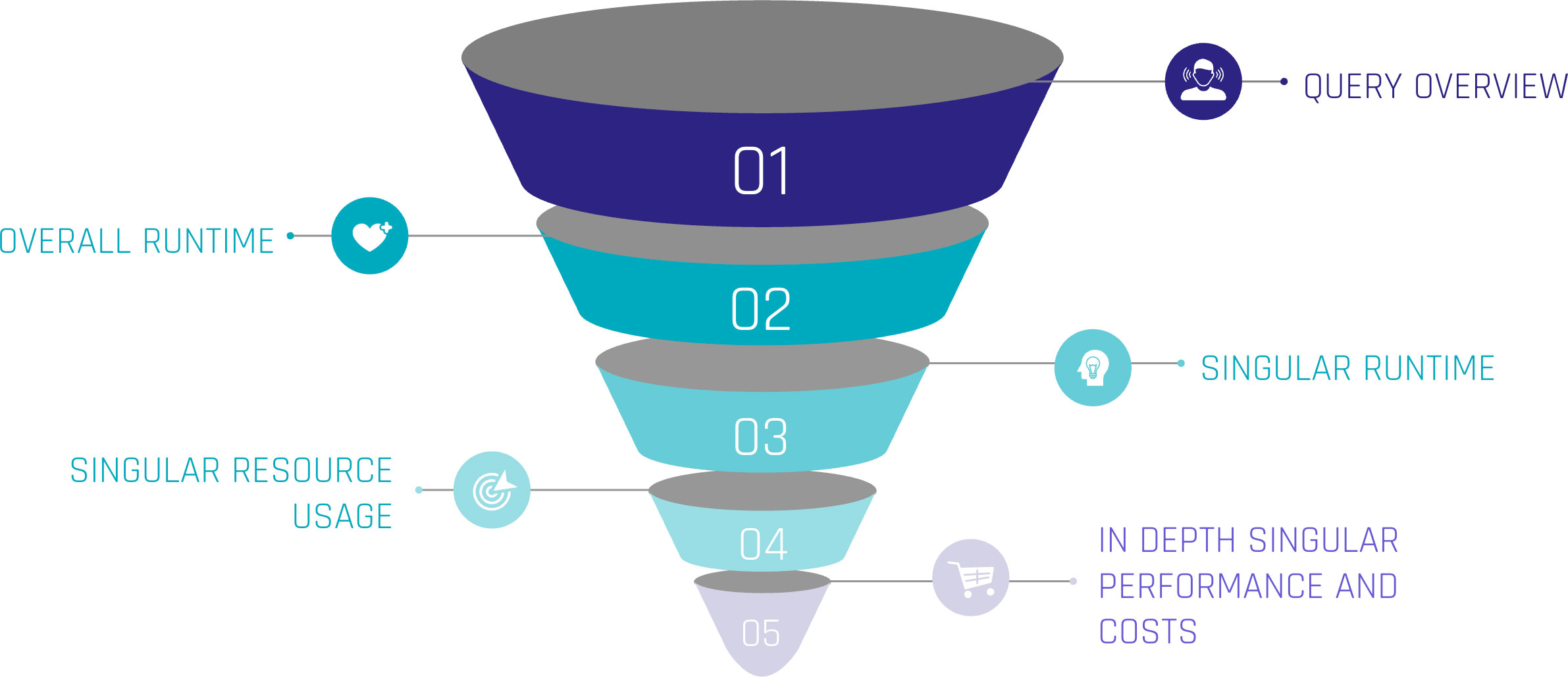
Monitoring query performance includes several depths of insight, from an overview of the general query history, down to the performance of each individual step within a query.

Snowflake Built-In Tools

Let’s assume the top level as an overview of our queries. Including metrics such as:

  • Start Time,
  • Total Time,
  • Status and
  • Query Type.

For the first level, we can gain insights when the queries start, how much time they were consuming, whether they succeeded or failed, or even are still running. Lastly, we can see the type of query, such as ‘CREATE TABLE’, ‘INSERT’, or ‘SELECT’. At this level, a brief overview could be created about the traffic within the Warehouse.

When hearing about this, you may be familiar with a built-in tool called ‘Query History’, which tracks this kind of information automatically without the need for user interference. It is easily available within the sections ‘Monitoring’ and ‘Query History’.

Query Profile

Further, it is easily possible to extract more information about the executed queries. Every single query within the ‘Query History’ has a unique identifier and attached metrics. Within the ‘Query History’ section, when choosing a query by simply clicking on it, we gain insights into the single query. These include two main sections.

‘Query Details’ delivers information about the query in general. Including the above-mentioned ‘Start Time’, ‘End Time’, ‘Warehouse Size’, and ‘Duration’, which is divided into ‘Compilation’, ‘Execution’, and further time-consuming steps.

‘Query Profile’ describes the execution plan of the query as a graphical representation. Each step within the query, such as ‘SELECT’, ‘JOIN’, and ‘WHERE CONDITION’ are represented as nodes within the graph. These nodes are operations, triggered by the query. Each fulfilling a task like filtering data, selecting data rows, but also scanning results, and reading data from cache. Snowflake interprets the written SQL and creates a performant execution plan by itself.

Despite that, each node consumes more or less resources, depending on the SQL code itself, the underlying dataset, and the Warehouse configurations. Using the ‘Query Profile’, we can identify the most time-consuming steps in our query, such as false ‘JOINS’, and work around those nodes to identify more performant solutions. Therefore, the ‘Query Profile’ provides detailed information about each node, like processing time, cache scanning, and partition pruning. For further information, check out the Snowflake Documentation.

Custom Monitoring Solution

But when Snowflake already provides a solution, why do we need separate monitoring?

Although already delivered, your requirements may vary from the existing solution. With the built-in tools mentioned above, the possibility to check on each query is given. Additionally, Snowflake may not be the only tool used for data processing. ELT tools like dbt or Coalesce help data engineers improve processes. To include these further metrics from outside Snowflake, a custom monitoring solution, based on Snowflake’s delivered metrics, is needed.

With this in mind, the following section focuses on our own scalable monitoring solution.

Account Usage and Information Schema

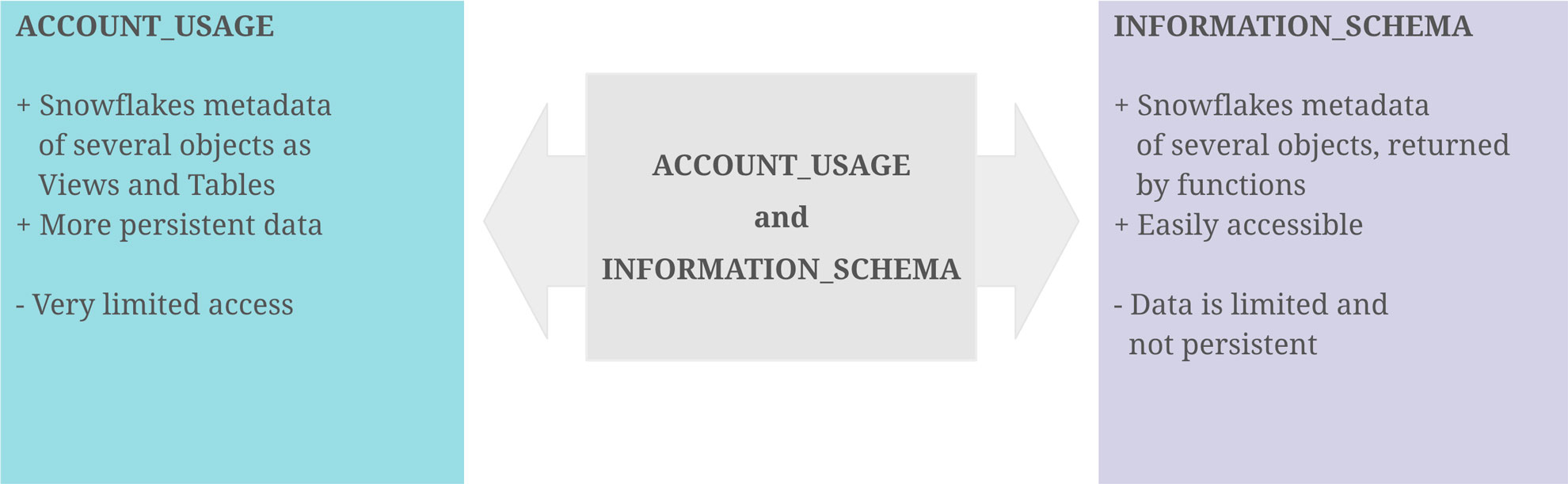
With the idea that the data of the graphical output exists as a table or view, containing all data necessary, it turns out that Snowflake provides us the schemas ‘ACCOUNT_USAGE’ and ‘INFORMATION_SCHEMA’, fulfilling this purpose. They provide similar opportunities for this challenge, although there are some differences.

‘ACCOUNT_USAGE’ provides insights into Snowflake metadata of several objects. This includes ‘QUERY_HISTORY’, which contains the information described in the sections above. The query history is available for all queries within the last 365 days. This enables the loading of metrics entities in the Data Warehouse, making the information readily accessible and persistent for daily, weekly, or monthly processes. The downside is that access to the ‘ACCOUNT_USAGE’ schema is often limited.

The ‘INFORMATION_SCHEMA’ contains a set of system-defined views and tables, providing metadata and information about created objects. Using predefined functions on the ‘INFORMATION_SCHEMA’, metadata can be retrieved, which, on the other hand, is limited to some factors. As this option is more accessible for developers, the focus remains on this option.
Account Usage and Information Schema

Extract Metrics Data

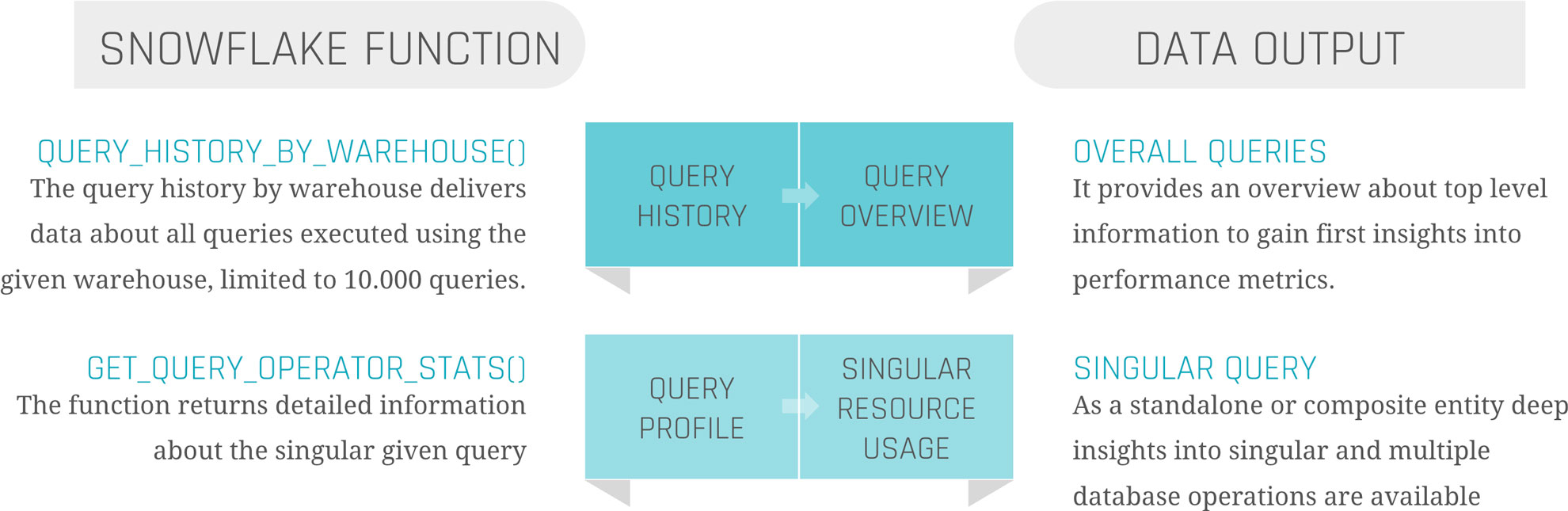
At the beginning, it is crucial to point out the limitations and possibilities of this approach. For the scope of this blog, two functions on the ‘INFORMATION_SCHEMA’ are needed.

‘QUERY_HISTORY_BY_WAREHOUSE()’ is equal to ‘QUERY_HISTORY’.

‘GET_QUERY_OPERATOR_STATS()’ is the equivalent of ‘QUERY_PROFILE’.

‘QUERY_HISTORY_BY_WAREHOUSE()’ takes four different arguments.

  • ‘WAREHOUSE_NAME’ – The name of the Warehouse executing the queries
  • ‘END_TIME_RANGE_START’ – Time range within the last 7 days, in which the query started running
  • ‘END_TIME_RANGE_END’ – Time range within the last 7 days, in which the query completed running
  • ‘RESULT_LIMIT’ – The number of the maximum returned rows. The default lies by ‘100’, the range by ‘1’ to ‘10.000’

The output is the ‘QUERY_HISTORY’ as a structured table with some extra information. Each query is displayed in one row. Therefore, the metrics are aggregated into one specific query.

The most critical limitation seen here is the ‘RESULT_LIMIT’ and ‘END_TIME_RANGE_*’, as it forces us to retrieve the data before the 7-day retention ends and before 10.000 other queries have been executed. Depending on the size of the Warehouse and the scope of the monitoring range, the extract and load process must be customized.

‘GET_QUERY_OPERATOR_STATS()’ takes one argument.

  • ‘QUERY_ID’ – The unique ID of the executed query.

The output is a structured table of the ‘QUERY_PROFILE’ of one specific query. Each step in the execution plan is displayed as one row, so the output size depends on the complexity of the query itself. Each node is detailed with available metadata, breaking down information from ‘GET_QUERY_OPERATOR_STATS()’ into individual steps. This allows for a deeper analysis of performance metrics, helping to identify any bottlenecks.

As the function is on query-level, it is not done by joining the table outputs of those two functions together to get a satisfactory result. Further steps are needed.
Load Metrics Data

Load Metrics Data

Before filtering, transforming, or joining the data, it is suggested to load the data as it comes into persistent tables.

Snowflake Query History

The first step should be to create the table when calling the function, already combining these two components to avoid missing capture data, columns, or false data types. To keep continuous loading, use your preferred ELT tool to append the process at the end, or set up a scheduled Snowflake Task, considering the limitations mentioned above.

Snowflake Query Profile

This process is more complex. To load the data, it is not sufficient to simply call the function once for the query history. To ensure data integrity and a clear 1:n solution (1 row in the query history, n>0 rows in the query profile), it is needed to iterate through the list of all query IDs inside the query history and run the function for each one of them. Each of the resulting datasets needs to be inserted into the corresponding table.

Information Delivery

Now, as the data is extracted and loaded, the last remaining steps are transforming the data and information delivery. As this strongly depends on the use case, we focus on linking the two metrics tables and creating a standard dashboard inside Snowflake to show the results.

Our two tables ‘snowflake_query_history’ and ‘snowflake_query_profile’ are in a soft relation, where the “QUERY_ID” serves as a unique identifier to link each query from the query history to its query profile. Therefore, joining both tables on the “QUERY_ID” is indispensable. The first decision to be made is whether to keep one row for each query and aggregate the object constructs or to split it up into its individual steps, like within the query profile. For simplicity, we focus on the second option to avoid complex SQL statements for the dashboard. As the SQL statement only includes the ‘SELECT’ and ‘JOIN’ operators, you may choose a view as materialization, instead of a table.

With the possibility of creating dashboards out of Snowflake worksheets, it is relatively easy to integrate simple SQL statements into the dashboard, represented as charts. For some examples, we will take a look at the resulting data.
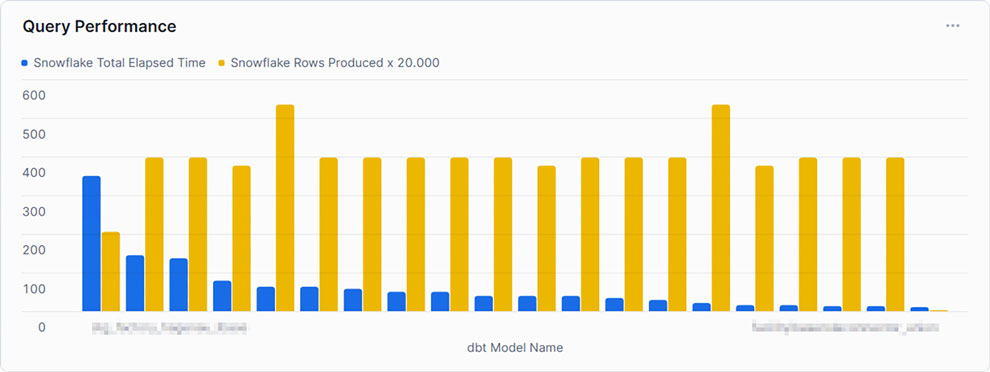
Query Performance

This example shows the top 20 queries by ‘TOTAL_ELAPSED_TIME’, the overall time the query needs to compile, run, waiting time, and other technical steps. As noticed by the chosen x-axis label, Snowflake’s metrics can be combined using other tools, such as dbt. It is set to compare this time against the produced rows to gain some insights into whether the queries can handle much data or not. As can be seen, the query consuming the most time, and therefore credits, does not produce the most rows. At this point, we may be interested in gaining some insights into the query itself.
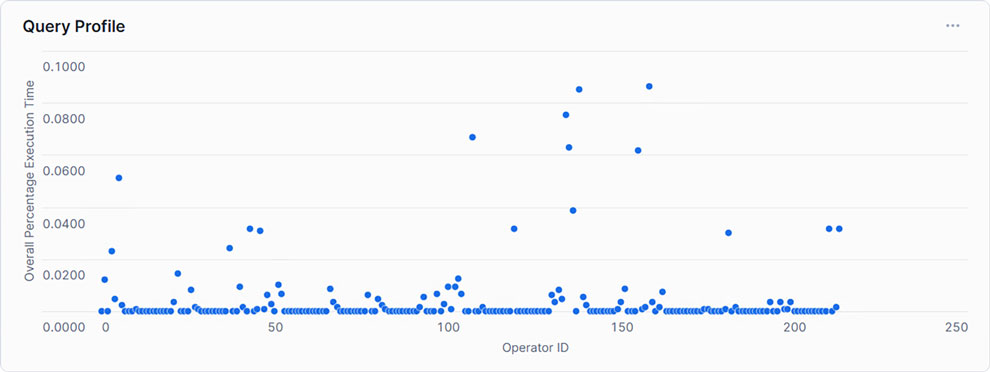
Query Profile

Showing each Operator with its corresponding relative runtime, only a handful exceed 5% of the total execution time. This may indicate that within the SQL statement, only a few steps need to be optimized to create an overall more performant query.
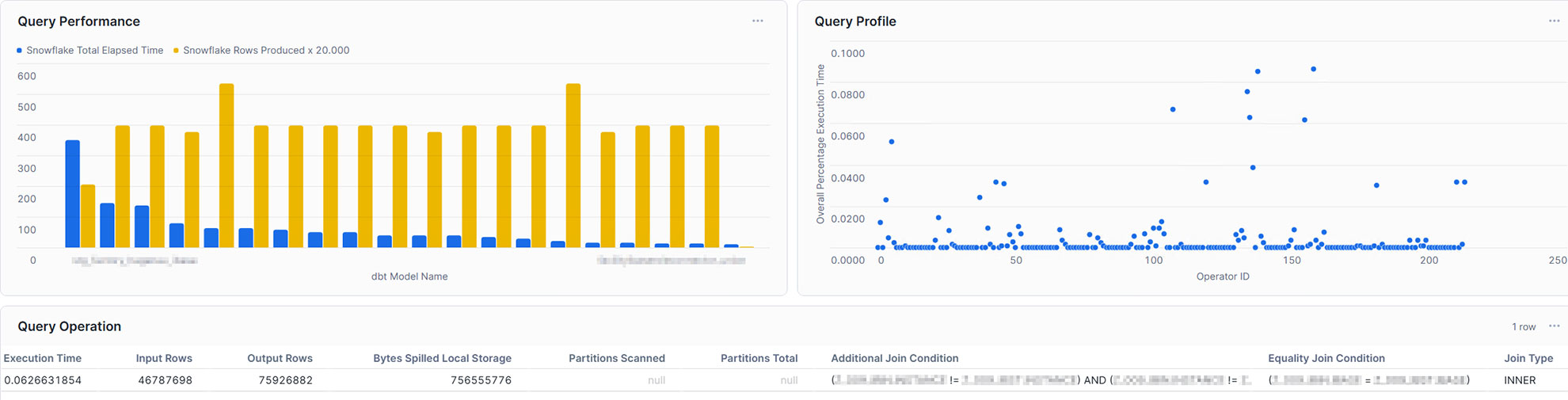
Query Dashboard

With this in mind, the single query can also be analyzed in the dashboard. For example, you may take into account input rows and output rows, bytes spilled, partitions scanned, and partitions total, or the join condition. Furthermore, you may not only gain insights into your query performance, but also into your table management, such as clustering and partitioning. Additionally, you are also capable of integrating more metrics coming from external sources and linking them directly to Snowflake, making it a powerful monitoring solution.

Conclusion

Snowflake offers a powerful and highly adaptable cloud data platform that meets the demands of modern enterprise data warehousing. However, as data volume and complexity grow, so does the need for proactive monitoring and optimization to ensure continued performance and cost efficiency. By leveraging Snowflake’s built-in tools and implementing strategic performance-enhancing techniques, organizations can address bottlenecks effectively and optimize query performance.

In this article, we addressed the opportunities given through Snowflake’s built-in tools and how to effectively use them. We learned that although these tools are great, to gain a fast and high-level overview, as well as detailed insights at the same time, it is relatively easy to create your own dashboard with the loaded data. Therefore, you are able to analyze and evaluate it, as well as make optimum use of resources to enable high-performance operation without increasing cost by scaling up or scaling out.
Monitoring of a Snowflake Powered EDW

Snowflake Built-In Tools

Introduction to Snowflake

Snowflake established itself as one of the most widely used cloud data platforms, providing a scalable and flexible architecture for building, maintaining, and operating Enterprise Data Warehouses. While it aims to eliminate data silos and simplify the data structure, with billions of queries a day (overall), its elastic computing handles the workload for good performance and a satisfied customer.

However, as organizations rely increasingly on Snowflake, monitoring their solution might be crucial for performance optimization, error and root cause analysis, and cost control. Although Snowflake handles these tasks very well on its own, experience shows some need for human interference when it comes to more complex queries, to increase performance, lowering the runtime without upscaling or scaling out.

This blog article aims to provide general information about and technical insights into Snowflake. Focusing on techniques as well as built-in tools to analyze bottlenecks, we aim to potentially increase performance and therefore decrease unnecessary costs.


Snowflake Built-In Tools

Query History

Starting with Snowflake’s built-in tools, we will dive into its roots and combinations of several metrics.

Monitoring query performance includes several depths of insight, from an overview of the general query history, down to the performance of each individual step within a query.

Snowflake Built-In Tools

Let’s assume the top level as an overview of our queries. Including metrics such as:

  • Start Time,
  • Total Time,
  • Status and
  • Query Type.

For the first level, we can gain insights when the queries start, how much time they were consuming, whether they succeeded or failed, or even are still running. Lastly, we can see the type of query, such as ‘CREATE TABLE’, ‘INSERT’, or ‘SELECT’. At this level, a brief overview could be created about the traffic within the Warehouse.

When hearing about this, you may be familiar with a built-in tool called ‘Query History’, which tracks this kind of information automatically without the need for user interference. It is easily available within the sections ‘Monitoring’ and ‘Query History’.

Query Profile

Further, it is easily possible to extract more information about the executed queries. Every single query within the ‘Query History’ has a unique identifier and attached metrics. Within the ‘Query History’ section, when choosing a query by simply clicking on it, we gain insights into the single query. These include two main sections.

‘Query Details’ delivers information about the query in general. Including the above-mentioned ‘Start Time’, ‘End Time’, ‘Warehouse Size’, and ‘Duration’, which is divided into ‘Compilation’, ‘Execution’, and further time-consuming steps.

‘Query Profile’ describes the execution plan of the query as a graphical representation. Each step within the query, such as ‘SELECT’, ‘JOIN’, and ‘WHERE CONDITION’ are represented as nodes within the graph. These nodes are operations, triggered by the query. Each fulfilling a task like filtering data, selecting data rows, but also scanning results, and reading data from cache. Snowflake interprets the written SQL and creates a performant execution plan by itself.

Despite that, each node consumes more or less resources, depending on the SQL code itself, the underlying dataset, and the Warehouse configurations. Using the ‘Query Profile’, we can identify the most time-consuming steps in our query, such as false ‘JOINS’, and work around those nodes to identify more performant solutions. Therefore, the ‘Query Profile’ provides detailed information about each node, like processing time, cache scanning, and partition pruning. For further information, check out the Snowflake Documentation.

Custom Monitoring Solution

But when Snowflake already provides a solution, why do we need separate monitoring?

Although already delivered, your requirements may vary from the existing solution. With the built-in tools mentioned above, the possibility to check on each query is given. Additionally, Snowflake may not be the only tool used for data processing. ELT tools like dbt or Coalesce help data engineers improve processes. To include these further metrics from outside Snowflake, a custom monitoring solution, based on Snowflake’s delivered metrics, is needed.

With this in mind, the following section focuses on our own scalable monitoring solution.

Account Usage and Information Schema

With the idea that the data of the graphical output exists as a table or view, containing all data necessary, it turns out that Snowflake provides us the schemas ‘ACCOUNT_USAGE’ and ‘INFORMATION_SCHEMA’, fulfilling this purpose. They provide similar opportunities for this challenge, although there are some differences.

‘ACCOUNT_USAGE’ provides insights into Snowflake metadata of several objects. This includes ‘QUERY_HISTORY’, which contains the information described in the sections above. The query history is available for all queries within the last 365 days. This enables the loading of metrics entities in the Data Warehouse, making the information readily accessible and persistent for daily, weekly, or monthly processes. The downside is that access to the ‘ACCOUNT_USAGE’ schema is often limited.

The ‘INFORMATION_SCHEMA’ contains a set of system-defined views and tables, providing metadata and information about created objects. Using predefined functions on the ‘INFORMATION_SCHEMA’, metadata can be retrieved, which, on the other hand, is limited to some factors. As this option is more accessible for developers, the focus remains on this option.

Account Usage and Information Schema

Extract Metrics Data

At the beginning, it is crucial to point out the limitations and possibilities of this approach. For the scope of this blog, two functions on the ‘INFORMATION_SCHEMA’ are needed.

‘QUERY_HISTORY_BY_WAREHOUSE()’ is equal to ‘QUERY_HISTORY’.

‘GET_QUERY_OPERATOR_STATS()’ is the equivalent of ‘QUERY_PROFILE’.

‘QUERY_HISTORY_BY_WAREHOUSE()’ takes four different arguments.

  • ‘WAREHOUSE_NAME’ – The name of the Warehouse executing the queries
  • ‘END_TIME_RANGE_START’ – Time range within the last 7 days, in which the query started running
  • ‘END_TIME_RANGE_END’ – Time range within the last 7 days, in which the query completed running
  • ‘RESULT_LIMIT’ – The number of the maximum returned rows. The default lies by ‘100’, the range by ‘1’ to ‘10.000’

The output is the ‘QUERY_HISTORY’ as a structured table with some extra information. Each query is displayed in one row. Therefore, the metrics are aggregated into one specific query.

The most critical limitation seen here is the ‘RESULT_LIMIT’ and ‘END_TIME_RANGE_*’, as it forces us to retrieve the data before the 7-day retention ends and before 10.000 other queries have been executed. Depending on the size of the Warehouse and the scope of the monitoring range, the extract and load process must be customized.

‘GET_QUERY_OPERATOR_STATS()’ takes one argument.

  • ‘QUERY_ID’ – The unique ID of the executed query.

The output is a structured table of the ‘QUERY_PROFILE’ of one specific query. Each step in the execution plan is displayed as one row, so the output size depends on the complexity of the query itself. Each node is detailed with available metadata, breaking down information from ‘GET_QUERY_OPERATOR_STATS()’ into individual steps. This allows for a deeper analysis of performance metrics, helping to identify any bottlenecks.

As the function is on query-level, it is not done by joining the table outputs of those two functions together to get a satisfactory result. Further steps are needed.

Load Metrics Data

Load Metrics Data

Before filtering, transforming, or joining the data, it is suggested to load the data as it comes into persistent tables.

Snowflake Query History

The first step should be to create the table when calling the function, already combining these two components to avoid missing capture data, columns, or false data types. To keep continuous loading, use your preferred ELT tool to append the process at the end, or set up a scheduled Snowflake Task, considering the limitations mentioned above.

Snowflake Query Profile

This process is more complex. To load the data, it is not sufficient to simply call the function once for the query history. To ensure data integrity and a clear 1:n solution (1 row in the query history, n>0 rows in the query profile), it is needed to iterate through the list of all query IDs inside the query history and run the function for each one of them. Each of the resulting datasets needs to be inserted into the corresponding table.

Information Delivery

Now, as the data is extracted and loaded, the last remaining steps are transforming the data and information delivery. As this strongly depends on the use case, we focus on linking the two metrics tables and creating a standard dashboard inside Snowflake to show the results.

Our two tables ‘snowflake_query_history’ and ‘snowflake_query_profile’ are in a soft relation, where the “QUERY_ID” serves as a unique identifier to link each query from the query history to its query profile. Therefore, joining both tables on the “QUERY_ID” is indispensable. The first decision to be made is whether to keep one row for each query and aggregate the object constructs or to split it up into its individual steps, like within the query profile. For simplicity, we focus on the second option to avoid complex SQL statements for the dashboard. As the SQL statement only includes the ‘SELECT’ and ‘JOIN’ operators, you may choose a view as materialization, instead of a table.

With the possibility of creating dashboards out of Snowflake worksheets, it is relatively easy to integrate simple SQL statements into the dashboard, represented as charts. For some examples, we will take a look at the resulting data.

Query Performance

This example shows the top 20 queries by ‘TOTAL_ELAPSED_TIME’, the overall time the query needs to compile, run, waiting time, and other technical steps. As noticed by the chosen x-axis label, Snowflake’s metrics can be combined using other tools, such as dbt. It is set to compare this time against the produced rows to gain some insights into whether the queries can handle much data or not. As can be seen, the query consuming the most time, and therefore credits, does not produce the most rows. At this point, we may be interested in gaining some insights into the query itself.

Query Profile

Showing each Operator with its corresponding relative runtime, only a handful exceed 5% of the total execution time. This may indicate that within the SQL statement, only a few steps need to be optimized to create an overall more performant query.

Query Dashboard

With this in mind, the single query can also be analyzed in the dashboard. For example, you may take into account input rows and output rows, bytes spilled, partitions scanned, and partitions total, or the join condition. Furthermore, you may not only gain insights into your query performance, but also into your table management, such as clustering and partitioning. Additionally, you are also capable of integrating more metrics coming from external sources and linking them directly to Snowflake, making it a powerful monitoring solution.

Conclusion

Snowflake offers a powerful and highly adaptable cloud data platform that meets the demands of modern enterprise data warehousing. However, as data volume and complexity grow, so does the need for proactive monitoring and optimization to ensure continued performance and cost efficiency. By leveraging Snowflake’s built-in tools and implementing strategic performance-enhancing techniques, organizations can address bottlenecks effectively and optimize query performance.

In this article, we addressed the opportunities given through Snowflake’s built-in tools and how to effectively use them. We learned that although these tools are great, to gain a fast and high-level overview, as well as detailed insights at the same time, it is relatively easy to create your own dashboard with the loaded data. Therefore, you are able to analyze and evaluate it, as well as make optimum use of resources to enable high-performance operation without increasing cost by scaling up or scaling out.

Unlock the Intelligence Layer: LLMs in Data Warehousing and the Future of Your Data

Natural Language AI Model

“Stop writing complex SQL, start talking to your data?”

This provocative question highlights a growing shift in how we interact with data. For years, getting answers from a Data Warehouse meant writing SQL queries or relying on pre-built dashboards.

For many organizations, their data platforms remain underutilized because accessing insights still requires writing code or navigating complex dashboards. It’s time to go beyond static reports and unlock a true intelligence layer on top of your data warehouse. Recent advances in Large Language Models (LLMs) and Natural Language Processing (NLP) are making data warehouses smarter, faster, and easier to use for everyone. In this article, we’ll explore how LLMs can transform the way you interact with your data – from using plain English queries instead of SQL, to AI-driven discovery of hidden insights, to enriching your data pipelines – and why this shift represents the future of data analytics.

Unlock the Intelligence Layer: LLMs in Data Warehousing and the Future of your Data

Unlock your data warehouse’s full potential! This webinar reveals how Large Language Models and Natural Language Processing are transforming data interaction, empowering everyone to effortlessly translate plain language into SQL, enable AI-driven data discovery, and deliver actionable insights to every stakeholder. Register for our free webinar, August 12th, 2025!

Watch Webinar Recording

From Complex SQL to Conversational Queries

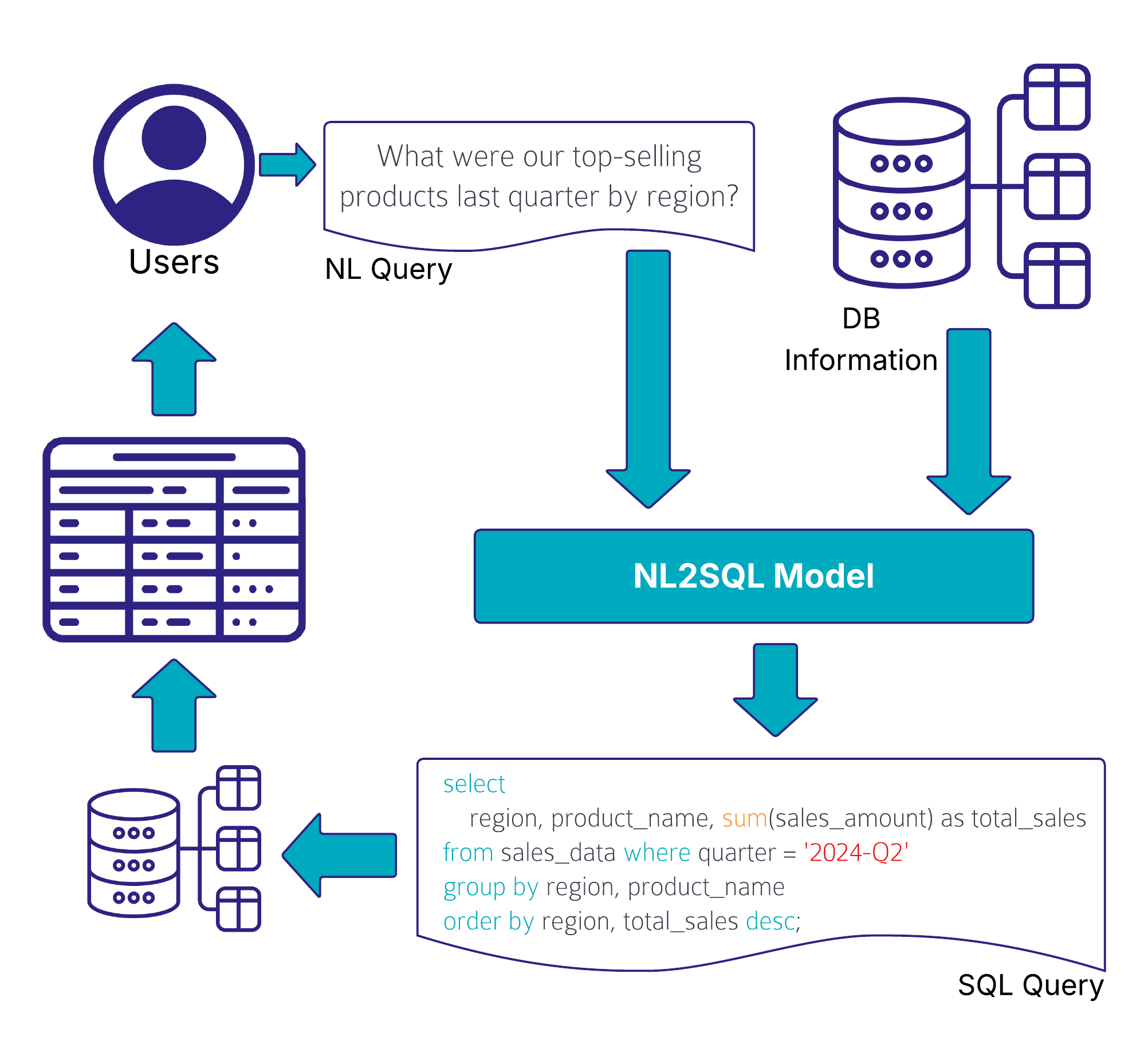
Business users often depend on data engineers or analysts to fetch answers, creating bottlenecks in decision-making. Even data professionals themselves spend considerable time writing and optimizing SQL, rather than interpreting results. What if anyone could simply ask the data warehouse a question in plain language and get the answer? This is the promise of LLMs as an “intelligence layer”, a layer that bridges complex datasets and human comprehension. Advanced LLMs can understand a user’s question or request and generate the appropriate SQL queries on the fly.

This technology (often called Text-to-SQL or Natural-Language-to-SQL or NL2SQL) has rapidly evolved and major technology players have already taken note. For example, Databricks introduced a Natural Language Query feature (LakehouseIQ) to let users ask questions of their Lakehouse, and Snowflake is also exploring LLM-driven query capabilities.

Imagine asking your data warehouse in plain English: “What were our top-selling products last quarter by region?”. This text input is passed into a LLM, often enriched by company-specific data via RAG and then the system translates that into a correct, optimized SQL query that retrieves the answer.

Natural Language AI Model

Of course, translating natural language to SQL at an enterprise scale isn’t trivial. Complex schemas, ambiguous user input, and security considerations mean the LLM has to be both smart and careful. Uber has built such an AI system that works on an enterprise scale level.

Uber’s QueryGPT is an NL2SQL system that uses a multi-step, RAG-based pipeline combining LLMs with retrieval and agent modules. It fetches context via similarity search over a vector database of example queries and schema information for SQL generation. To manage Uber’s vast data ecosystem, QueryGPT employs specialized agents:

  • an Intent Agent classifies requests by business domain
  • a Table Agent suggests tables for the query
  • a Column Prune Agent trims irrelevant columns to reduce prompt length. The LLM then produces the SQL query and an explanation.

This layered design allows QueryGPT to handle large schemas and reliably generate complex multi-table queries. It’s a hybrid architecture where multiple transformer calls specialize in sub-tasks, enabling scalable, accurate NL2SQL as a production service, saving thousands of Uber employees significant time by mid-2024.

AI-Augmented Data Discovery and Insights

Beyond simply fetching results for user queries, LLMs can augment data discovery by revealing insights that users might not have explicitly asked for. Traditional dashboards show you what is happening, but a smart LLM-based system can tell you why it’s happening and highlight patterns you might not notice. This is often called augmented analytics – using AI to automatically find important correlations, trends, outliers, and drivers in your data.

LLMs excel at interpreting data outputs and providing additional context. For example, rather than just displaying a chart or a table, an LLM can generate a written summary pointing out key trends or anomalies. They can explain which metrics are up or down and suggest potential reasons (for instance, detecting that “conversion rates dipped in July, possibly due to seasonality or inventory issues”), enabling quicker and more informed decision-making.

Another area where LLMs can significantly reduce manual effort is in the creation and maintenance of data catalogs. Documenting data models, table structures, and especially individual column descriptions is often time-consuming and easily skipped due to missing resources, despite being crucial for an effective use and accessibility of the data. LLMs can automate large parts of this process by generating descriptions based on data profiling, SQL logic, naming conventions, and metadata.

dbt Cloud has recently released their dbt Copilot AI Agent that supports the developer in various ways, for example by letting the AI analyzing the SQL code and schema metadata to automatically generate model and column descriptions.

LLMs in Your Data Pipeline: Enrichment and Efficiency

LLMs don’t just enhance how users interact with the Data Warehouse; they can also improve the data itself and the efficiency of data engineering processes. In modern ELT (Extract-Load-Transform) pipelines, a lot of time is spent cleaning, enriching, and preparing data for analysis. Here, LLMs offer new tools to automate and augment these steps.

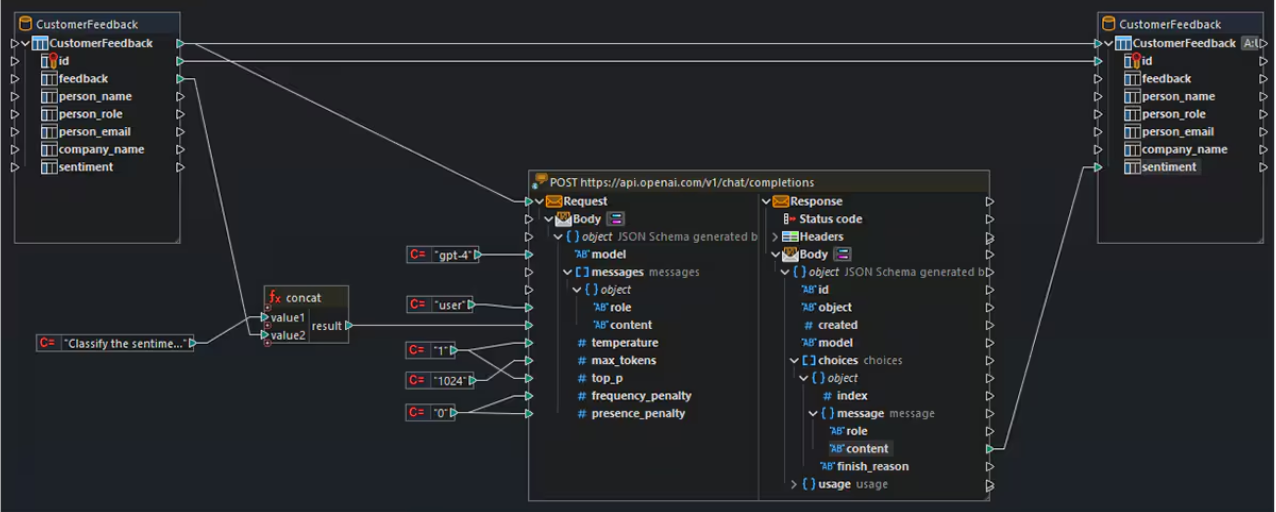
One promising use case is the semantic enrichment of data. Large Language Models have absorbed a vast amount of world knowledge and language patterns, and they can use that to fill gaps or add context to your raw data. For example, imagine you have a dataset of customer feedback where each entry is a text comment. An LLM could automatically classify the sentiment of each comment (positive/negative), extract key themes, or even generate a summary of common issues. In this way, unstructured data becomes structured insights without manual effort. The image below illustrates how an LLM is integrated into a data pipeline: text inputs from a CustomerFeedback table are passed to an OpenAI API endpoint, where the model returns structured sentiment labels that are then stored back in the database.

Large Language Models Sentiment Analysis

In a practical case study, LLMs were used to enrich an academic dataset by inferring missing attributes (like guessing a person’s gender from their name with high accuracy), which outperformed dedicated API services. This showcases how LLMs can bring external knowledge and reasoning to enhance your data.

Another area is metadata enrichment and semantic enrichment of unstructured data. Enterprise data is often filled with cryptic column names and jargon that prevents usability. LLMs can intelligently expand abbreviations and annotate fields with business-friendly descriptions. For instance, an LLM-driven catalog might take a column labeled “CUST_ID” and annotate it as “Customer Identifier, unique ID for each customer record”.

LLMs can also assist in the coding and transformation process itself. Data engineers can leverage LLMs to generate boilerplate code or SQL for transformations, document pipeline logic in plain English, or even detect anomalies and data quality issues through pattern analysis. By automating tedious parts of data preparation and providing AI-generated suggestions, LLMs free up engineers to focus on higher-level architecture and problem-solving.

Conclusion

While the promise of an LLM-powered intelligence layer is exciting, it’s important to approach it with a clear strategy. Successful implementation requires considering a few key challenges and best practices. Data quality and governance are more crucial than ever. If your underlying data is inaccurate or poorly structured, the AI’s answers will be unreliable. As the saying goes, “garbage in, garbage out.”

Ensuring clean, well-organized data (and maintaining a robust data governance program) will help the LLM produce meaningful and correct insights. Additionally, organizations may need to fine-tune or configure their LLMs to understand industry-specific terminology or business context. This reduces the chance of the AI misinterpreting what a user asks or generating an incorrect query.

Privacy and security are another important consideration. If your data includes sensitive information, you must ensure that any AI tool accessing it complies with your security requirements. This might involve using self-hosted models or secure APIs, and setting up proper access controls.

The dream of a self-service analytics experience: “just talk to the data and get answers” is quickly becoming a reality. This evolution may redefine roles (enabling analysts and engineers alike to focus on higher-value tasks) and open up analytics to a wider audience than ever before. It’s an exciting time to be a data professional, but also one that demands staying informed and ready to adapt.

– Ole Bause (Scalefree)

Unlock the Intelligence Layer: LLMs in Data Warehousing and the Future of Your Data

Natural Language AI Model

“Stop writing complex SQL, start talking to your data?”

This provocative question highlights a growing shift in how we interact with data. For years, getting answers from a Data Warehouse meant writing SQL queries or relying on pre-built dashboards.

For many organizations, their data platforms remain underutilized because accessing insights still requires writing code or navigating complex dashboards. It’s time to go beyond static reports and unlock a true intelligence layer on top of your data warehouse. Recent advances in Large Language Models (LLMs) and Natural Language Processing (NLP) are making data warehouses smarter, faster, and easier to use for everyone. In this article, we’ll explore how LLMs can transform the way you interact with your data – from using plain English queries instead of SQL, to AI-driven discovery of hidden insights, to enriching your data pipelines – and why this shift represents the future of data analytics.

Unlock the Intelligence Layer: LLMs in Data Warehousing and the Future of your Data

Unlock your data warehouse’s full potential! This webinar reveals how Large Language Models and Natural Language Processing are transforming data interaction, empowering everyone to effortlessly translate plain language into SQL, enable AI-driven data discovery, and deliver actionable insights to every stakeholder. Register for our free webinar, August 12th, 2025!

Watch Webinar Recording

From Complex SQL to Conversational Queries

Business users often depend on data engineers or analysts to fetch answers, creating bottlenecks in decision-making. Even data professionals themselves spend considerable time writing and optimizing SQL, rather than interpreting results. What if anyone could simply ask the data warehouse a question in plain language and get the answer? This is the promise of LLMs as an “intelligence layer”, a layer that bridges complex datasets and human comprehension. Advanced LLMs can understand a user’s question or request and generate the appropriate SQL queries on the fly.

This technology (often called Text-to-SQL or Natural-Language-to-SQL or NL2SQL) has rapidly evolved and major technology players have already taken note. For example, Databricks introduced a Natural Language Query feature (LakehouseIQ) to let users ask questions of their Lakehouse, and Snowflake is also exploring LLM-driven query capabilities.

Imagine asking your data warehouse in plain English: “What were our top-selling products last quarter by region?”. This text input is passed into a LLM, often enriched by company-specific data via RAG and then the system translates that into a correct, optimized SQL query that retrieves the answer.

Natural Language AI Model

Of course, translating natural language to SQL at an enterprise scale isn’t trivial. Complex schemas, ambiguous user input, and security considerations mean the LLM has to be both smart and careful. Uber has built such an AI system that works on an enterprise scale level.

Uber’s QueryGPT is an NL2SQL system that uses a multi-step, RAG-based pipeline combining LLMs with retrieval and agent modules. It fetches context via similarity search over a vector database of example queries and schema information for SQL generation. To manage Uber’s vast data ecosystem, QueryGPT employs specialized agents:

  • an Intent Agent classifies requests by business domain
  • a Table Agent suggests tables for the query
  • a Column Prune Agent trims irrelevant columns to reduce prompt length. The LLM then produces the SQL query and an explanation.

This layered design allows QueryGPT to handle large schemas and reliably generate complex multi-table queries. It’s a hybrid architecture where multiple transformer calls specialize in sub-tasks, enabling scalable, accurate NL2SQL as a production service, saving thousands of Uber employees significant time by mid-2024.

AI-Augmented Data Discovery and Insights

Beyond simply fetching results for user queries, LLMs can augment data discovery by revealing insights that users might not have explicitly asked for. Traditional dashboards show you what is happening, but a smart LLM-based system can tell you why it’s happening and highlight patterns you might not notice. This is often called augmented analytics – using AI to automatically find important correlations, trends, outliers, and drivers in your data.

LLMs excel at interpreting data outputs and providing additional context. For example, rather than just displaying a chart or a table, an LLM can generate a written summary pointing out key trends or anomalies. They can explain which metrics are up or down and suggest potential reasons (for instance, detecting that “conversion rates dipped in July, possibly due to seasonality or inventory issues”), enabling quicker and more informed decision-making.

Another area where LLMs can significantly reduce manual effort is in the creation and maintenance of data catalogs. Documenting data models, table structures, and especially individual column descriptions is often time-consuming and easily skipped due to missing resources, despite being crucial for an effective use and accessibility of the data. LLMs can automate large parts of this process by generating descriptions based on data profiling, SQL logic, naming conventions, and metadata.

dbt Cloud has recently released their dbt Copilot AI Agent that supports the developer in various ways, for example by letting the AI analyzing the SQL code and schema metadata to automatically generate model and column descriptions.

LLMs in Your Data Pipeline: Enrichment and Efficiency

LLMs don’t just enhance how users interact with the Data Warehouse; they can also improve the data itself and the efficiency of data engineering processes. In modern ELT (Extract-Load-Transform) pipelines, a lot of time is spent cleaning, enriching, and preparing data for analysis. Here, LLMs offer new tools to automate and augment these steps.

One promising use case is the semantic enrichment of data. Large Language Models have absorbed a vast amount of world knowledge and language patterns, and they can use that to fill gaps or add context to your raw data. For example, imagine you have a dataset of customer feedback where each entry is a text comment. An LLM could automatically classify the sentiment of each comment (positive/negative), extract key themes, or even generate a summary of common issues. In this way, unstructured data becomes structured insights without manual effort. The image below illustrates how an LLM is integrated into a data pipeline: text inputs from a CustomerFeedback table are passed to an OpenAI API endpoint, where the model returns structured sentiment labels that are then stored back in the database.

Large Language Models Sentiment Analysis

In a practical case study, LLMs were used to enrich an academic dataset by inferring missing attributes (like guessing a person’s gender from their name with high accuracy), which outperformed dedicated API services. This showcases how LLMs can bring external knowledge and reasoning to enhance your data.

Another area is metadata enrichment and semantic enrichment of unstructured data. Enterprise data is often filled with cryptic column names and jargon that prevents usability. LLMs can intelligently expand abbreviations and annotate fields with business-friendly descriptions. For instance, an LLM-driven catalog might take a column labeled “CUST_ID” and annotate it as “Customer Identifier, unique ID for each customer record”.

LLMs can also assist in the coding and transformation process itself. Data engineers can leverage LLMs to generate boilerplate code or SQL for transformations, document pipeline logic in plain English, or even detect anomalies and data quality issues through pattern analysis. By automating tedious parts of data preparation and providing AI-generated suggestions, LLMs free up engineers to focus on higher-level architecture and problem-solving.

Conclusion

While the promise of an LLM-powered intelligence layer is exciting, it’s important to approach it with a clear strategy. Successful implementation requires considering a few key challenges and best practices. Data quality and governance are more crucial than ever. If your underlying data is inaccurate or poorly structured, the AI’s answers will be unreliable. As the saying goes, “garbage in, garbage out.”

Ensuring clean, well-organized data (and maintaining a robust data governance program) will help the LLM produce meaningful and correct insights. Additionally, organizations may need to fine-tune or configure their LLMs to understand industry-specific terminology or business context. This reduces the chance of the AI misinterpreting what a user asks or generating an incorrect query.

Privacy and security are another important consideration. If your data includes sensitive information, you must ensure that any AI tool accessing it complies with your security requirements. This might involve using self-hosted models or secure APIs, and setting up proper access controls.

The dream of a self-service analytics experience: “just talk to the data and get answers” is quickly becoming a reality. This evolution may redefine roles (enabling analysts and engineers alike to focus on higher-value tasks) and open up analytics to a wider audience than ever before. It’s an exciting time to be a data professional, but also one that demands staying informed and ready to adapt.

– Ole Bause (Scalefree)

10 Essential Skills Your Team Needs to Build an Analytical Data Platform

Analytical data platform team meeting

Build an Analytical Data Platform

Building a modern analytical data platform is more than just choosing the right database or ETL tool. It requires a blend of business insight, data expertise, architecture design, and automation savvy. In this article, we’ll explore ten essential skills your team needs to design, develop, and maintain a robust, scalable, and high-value data platform.


1. Business Understanding

Before diving into any technical work, your team must understand the business domain and the data itself. This doesn’t mean every engineer needs to be a data analyst, but they should know:

  • Which source systems hold the data (CRM, ERP, marketing platforms, etc.)
  • Key business objects (customers, contracts, opportunities) and how they relate
  • Business processes behind the data, like a customer’s lifecycle or sales funnel

By grounding the team in real-world outcomes—such as improving customer retention or reducing churn—engineers stay focused on delivering measurable ROI.

2. Objective Setting & ROI Focus

Clear objectives guide every stage of your platform’s development. Whether your goal is to accelerate financial reporting or enable real-time marketing analytics, defining the desired outcomes:

  • Helps prioritize features and data sources
  • Aligns stakeholders around common metrics
  • Boosts motivation by tying work to tangible business value

Teams that regularly track ROI milestones can adjust scope and resources proactively, ensuring the platform grows in step with organizational goals.

3. Data Understanding & Modeling

A deep dive into your source systems reveals hundreds—even thousands—of tables. Your engineers need to know:

  • Primary and foreign keys connecting entities
  • Relationship cardinalities (one-to-one, one-to-many, many-to-many)
  • Data quality quirks and domain-specific rules

This understanding informs the modeling approach—be it third normal form, star schemas, or Data Vault—ensuring downstream analytics are consistent and reliable.

4. Data Acquisition Techniques

Extracting data from source systems can take many forms:

  • Full daily extracts via CSV or JSON files
  • API calls for near-real-time data feeds
  • Change Data Capture (CDC) for incremental updates

Knowing when to use each approach minimizes data latency, reduces load times, and optimizes storage. CDC, in particular, slashes the volume of data transferred, but requires robust handling to maintain consistency.

5. Structured Architecture: The Medallion Approach

Dumping raw data into a single database is a recipe for chaos. Instead, adopt a layered “medallion” architecture:

  • Bronze Layer (Staging/Landing): Raw data as ingested
  • Silver Layer (Cleansed, Integrated): Unified and harmonized data across systems
  • Gold Layer (Presentation): Curated tables/views for business users and BI tools
Medallion Architecture in an analytical data platform

This separation of concerns simplifies debugging, improves performance, and clarifies responsibilities for each team member.

6. Data Integration & Modeling in the Silver Layer

The silver layer is where the “magic” happens:

  • Integrating disparate systems into a unified view
  • Applying your chosen modeling technique (e.g., star schema, Data Vault)
  • Ensuring referential integrity and consistent business definitions

Investing in a proven modeling framework not only scales with additional data sources but also enables automation and accelerates the onboarding of new subject areas.

7. Temporality & Historical Tracking

Beyond technical timestamps (extract load times), your data has business timelines:

  • Contract start/end dates
  • Customer sign-up and churn events
  • Promotion or campaign effective periods

Implementing snapshot tables, slowly changing dimensions, or time-aware modeling ensures accurate trend analysis, historical comparisons, and auditability.

8. Code Generation & Automation Tools

Hand-coding every pipeline is time-consuming and error-prone. Leverage tools that:

  • Automatically generate ETL/ELT code based on templates
  • Orchestrate complex workflows and dependencies
  • Enforce consistency through standard patterns and conventions

Automation not only speeds up development but also improves data quality by reducing manual interventions.

9. Agile Development & Traceability

Adopting an agile mindset means delivering small, working increments quickly. Apply traceability by:

  • Defining clear targets (e.g., monthly revenue report)
  • Mapping those targets back to specific source tables
  • Focusing on data that directly supports your objectives

This approach prevents “scope creep” and ensures that every pipeline built serves an immediate analytical need.

10. DevOps & Cost Management

Once pipelines are automated, you need:

  • Orchestration frameworks (e.g., Airflow, Dagster) to schedule and monitor jobs
  • CI/CD for data code, including version control and automated testing
  • Cost monitoring tools to track cloud resource usage and optimize performance

Effective DevOps practices guarantee reliability, while cost-awareness keeps your platform sustainable in the cloud era.

  • Data Profiling: DataHub continuously monitors and analyzes data quality, automatically generating profiling metrics that reveal data distributions, identify anomalies, and help maintain high data quality standards. It provides key statistics such as row and column counts, query frequency, top users, and last update timestamps, along with detailed attribute profiling, including value ranges, central tendencies, null and distinct values. The table below shows some examples of these profiling metrics.

Watch the Video

Conclusion

Building an analytical data platform is a multifaceted endeavor. By equipping your team with these ten skills—spanning business understanding, data modeling, architecture design, automation, and DevOps—you’ll lay the foundation for a platform that delivers consistent insights, scales gracefully, and drives real business value.

10 Essential Skills Your Team Needs to Build an Analytical Data Platform

Analytical data platform team meeting

Build an Analytical Data Platform

Building a modern analytical data platform is more than just choosing the right database or ETL tool. It requires a blend of business insight, data expertise, architecture design, and automation savvy. In this article, we’ll explore ten essential skills your team needs to design, develop, and maintain a robust, scalable, and high-value data platform.


1. Business Understanding

Before diving into any technical work, your team must understand the business domain and the data itself. This doesn’t mean every engineer needs to be a data analyst, but they should know:

  • Which source systems hold the data (CRM, ERP, marketing platforms, etc.)
  • Key business objects (customers, contracts, opportunities) and how they relate
  • Business processes behind the data, like a customer’s lifecycle or sales funnel

By grounding the team in real-world outcomes—such as improving customer retention or reducing churn—engineers stay focused on delivering measurable ROI.

2. Objective Setting & ROI Focus

Clear objectives guide every stage of your platform’s development. Whether your goal is to accelerate financial reporting or enable real-time marketing analytics, defining the desired outcomes:

  • Helps prioritize features and data sources
  • Aligns stakeholders around common metrics
  • Boosts motivation by tying work to tangible business value

Teams that regularly track ROI milestones can adjust scope and resources proactively, ensuring the platform grows in step with organizational goals.

3. Data Understanding & Modeling

A deep dive into your source systems reveals hundreds—even thousands—of tables. Your engineers need to know:

  • Primary and foreign keys connecting entities
  • Relationship cardinalities (one-to-one, one-to-many, many-to-many)
  • Data quality quirks and domain-specific rules

This understanding informs the modeling approach—be it third normal form, star schemas, or Data Vault—ensuring downstream analytics are consistent and reliable.

4. Data Acquisition Techniques

Extracting data from source systems can take many forms:

  • Full daily extracts via CSV or JSON files
  • API calls for near-real-time data feeds
  • Change Data Capture (CDC) for incremental updates

Knowing when to use each approach minimizes data latency, reduces load times, and optimizes storage. CDC, in particular, slashes the volume of data transferred, but requires robust handling to maintain consistency.

5. Structured Architecture: The Medallion Approach

Dumping raw data into a single database is a recipe for chaos. Instead, adopt a layered “medallion” architecture:

  • Bronze Layer (Staging/Landing): Raw data as ingested
  • Silver Layer (Cleansed, Integrated): Unified and harmonized data across systems
  • Gold Layer (Presentation): Curated tables/views for business users and BI tools
Medallion Architecture in an analytical data platform

This separation of concerns simplifies debugging, improves performance, and clarifies responsibilities for each team member.

6. Data Integration & Modeling in the Silver Layer

The silver layer is where the “magic” happens:

  • Integrating disparate systems into a unified view
  • Applying your chosen modeling technique (e.g., star schema, Data Vault)
  • Ensuring referential integrity and consistent business definitions

Investing in a proven modeling framework not only scales with additional data sources but also enables automation and accelerates the onboarding of new subject areas.

7. Temporality & Historical Tracking

Beyond technical timestamps (extract load times), your data has business timelines:

  • Contract start/end dates
  • Customer sign-up and churn events
  • Promotion or campaign effective periods

Implementing snapshot tables, slowly changing dimensions, or time-aware modeling ensures accurate trend analysis, historical comparisons, and auditability.

8. Code Generation & Automation Tools

Hand-coding every pipeline is time-consuming and error-prone. Leverage tools that:

  • Automatically generate ETL/ELT code based on templates
  • Orchestrate complex workflows and dependencies
  • Enforce consistency through standard patterns and conventions

Automation not only speeds up development but also improves data quality by reducing manual interventions.

9. Agile Development & Traceability

Adopting an agile mindset means delivering small, working increments quickly. Apply traceability by:

  • Defining clear targets (e.g., monthly revenue report)
  • Mapping those targets back to specific source tables
  • Focusing on data that directly supports your objectives

This approach prevents “scope creep” and ensures that every pipeline built serves an immediate analytical need.

10. DevOps & Cost Management

Once pipelines are automated, you need:

  • Orchestration frameworks (e.g., Airflow, Dagster) to schedule and monitor jobs
  • CI/CD for data code, including version control and automated testing
  • Cost monitoring tools to track cloud resource usage and optimize performance

Effective DevOps practices guarantee reliability, while cost-awareness keeps your platform sustainable in the cloud era.

  • Data Profiling: DataHub continuously monitors and analyzes data quality, automatically generating profiling metrics that reveal data distributions, identify anomalies, and help maintain high data quality standards. It provides key statistics such as row and column counts, query frequency, top users, and last update timestamps, along with detailed attribute profiling, including value ranges, central tendencies, null and distinct values. The table below shows some examples of these profiling metrics.

Watch the Video

Conclusion

Building an analytical data platform is a multifaceted endeavor. By equipping your team with these ten skills—spanning business understanding, data modeling, architecture design, automation, and DevOps—you’ll lay the foundation for a platform that delivers consistent insights, scales gracefully, and drives real business value.

The Important Role of Data Catalogs in Modern Data Warehousing: A Practical Look at Datahub

Data Catalog Architecture

Data Catalogs in Modern Data Warehousing

Modern data architectures are becoming increasingly complex, posing significant challenges for organizations. Data is often scattered across multiple systems, making it difficult to locate, utilize, and preserve its quality. Analysts spend a substantial amount of time searching for relevant information, while businesses struggle to manage data efficiently and comply with regulatory requirements. A structured approach to metadata management is essential to enhance transparency, maintain data quality, and enable efficient data usage.

This article is aimed at data professionals, business users, and IT teams looking to establish or improve structured metadata management. It explores the challenges of fragmented metadata, the role of data catalogs as a central solution, and how they enhance data organization and usability. Additionally, it provides practical insights into structuring a data catalog within a Data Vault 2.0 architecture to support a scalable and comprehensive data strategy.

The Challenge of Fragmented Metadata

In the era of data-driven decision-making, organizations face a fundamental challenge: fragmented and inconsistent metadata. Across different departments, heterogeneous systems, divergent naming conventions, and varying documentation standards lead to a disjointed data landscape. Analysts and data professionals often spend excessive time locating, verifying, and interpreting data—a process that not only reduces efficiency but also increases the risk of errors and misinterpretations.

At the core of this issue lies the absence of a centralized metadata repository. Without a unified source of truth, critical aspects such as data lineage, ownership, and quality remain unclear. This lack of transparency not only complicates regulatory compliance but also erodes trust in data and impedes strategic initiatives. The result is the formation of data silos that prevent organizations from fully leveraging their data assets. As highlighted, this fragmentation leads to wasted time and effort on finding and accessing data, turns data platforms into data swamps, and hinders the development of a common business vocabulary.

What is a Data Catalog?

A data catalog is a centralized, structured repository that organizes and manages metadata across an organization, facilitating efficient data discovery, governance, and collaboration. Much like a well-curated library, a data catalog enables users to locate, understand, and utilize data efficiently by capturing essential metadata and making it easily searchable and accessible. Beyond merely indexing data assets, a data catalog provides critical context, tracks relationships between datasets, and integrates user-driven insights to enhance data usability and governance.

Features of a Data Catalog

A well-implemented data catalog consists of several foundational features that support metadata management, data governance, and user collaboration:

  • Metadata Management: Captures and organizes essential information about datasets, such as source, format, relationships, and usage patterns, ensuring accessibility and usability.
  • Data Discovery: Enables users to locate and access data quickly through intuitive search functions that leverage metadata attributes and contextual tags.
  • Data Lineage: Tracks the lifecycle of data, mapping its journey from origin to consumption. This allows organizations to trace transformations, ensuring data integrity and error resolution.
  • Data Governance: Establishes policies for data availability, usability, integrity, and security. This can include access control, regulatory compliance, and stewardship responsibilities.
  • Business Glossary: Defines business terminology and ensures consistency across the organization, improving communication and reducing misinterpretation of data fields.
  • Data Dictionary: Provides technical documentation on data structures, including schema definitions, data types, and field constraints.
  • Data Profiling: Analyzes datasets to generate statistics on data quality, completeness, distribution, and anomalies. This helps organizations understand their data better and ensures its reliability for analytical and operational use.

Benefits of a Data Catalog

A data catalog enhances data discovery by providing structured metadata, enabling users to efficiently find and access the right datasets. By offering clear definitions, contextual information, and lineage tracking, it improves data comprehension, ensuring that users understand data origins, transformations, and relationships.

Discovering and understanding data sources and their use is a core function of a data catalog. Business users can quickly locate relevant datasets, evaluate their fit, and utilize them effectively. Additionally, users can contribute to the catalog by tagging, documenting, and annotating data sources, fostering collective knowledge and enhancing data usability.

It fosters trust by documenting data quality, provenance, and usage, ensuring that users rely on accurate, well-maintained datasets. Furthermore, by reducing redundancy and streamlining workflows, a data catalog increases operational efficiency, saving time and resources while maximizing the value of an organization’s data assets.

How a Data Catalog Works

A data catalog functions as a dynamic metadata management system, automating the extraction, organization, and indexing of metadata. It seamlessly connects to various data sources, including data platforms, data lakes, ETL pipelines, and BI tools, synchronizing metadata through two primary approaches: pull-based and push-based ingestion.

In the pull-based approach, the data catalog actively queries source systems using APIs, JDBC connectors, or scheduled scans to retrieve metadata. This method allows the catalog to regularly update its metadata repository by fetching information from the source systems. On the other hand, the push-based approach relies on source systems to send real-time metadata updates to the catalog through event-driven mechanisms, webhooks, or message queues. This ensures immediate synchronization of metadata, keeping the catalog up-to-date with any changes in the data landscape.

Once metadata is ingested, the data catalog standardizes and enriches it, ensuring consistency and adding valuable context. This process includes extracting schema details, identifying data ownership, applying classifications, and establishing data lineage. The standardized and enriched metadata is then stored in an indexed repository, enabling fast search, filtering, and lineage tracking. Furthermore, automated tagging, schema change detection, and governance policies are implemented to ensure compliance with security and regulatory requirements.

Integrating a Data Catalog With Data Vault 2.0

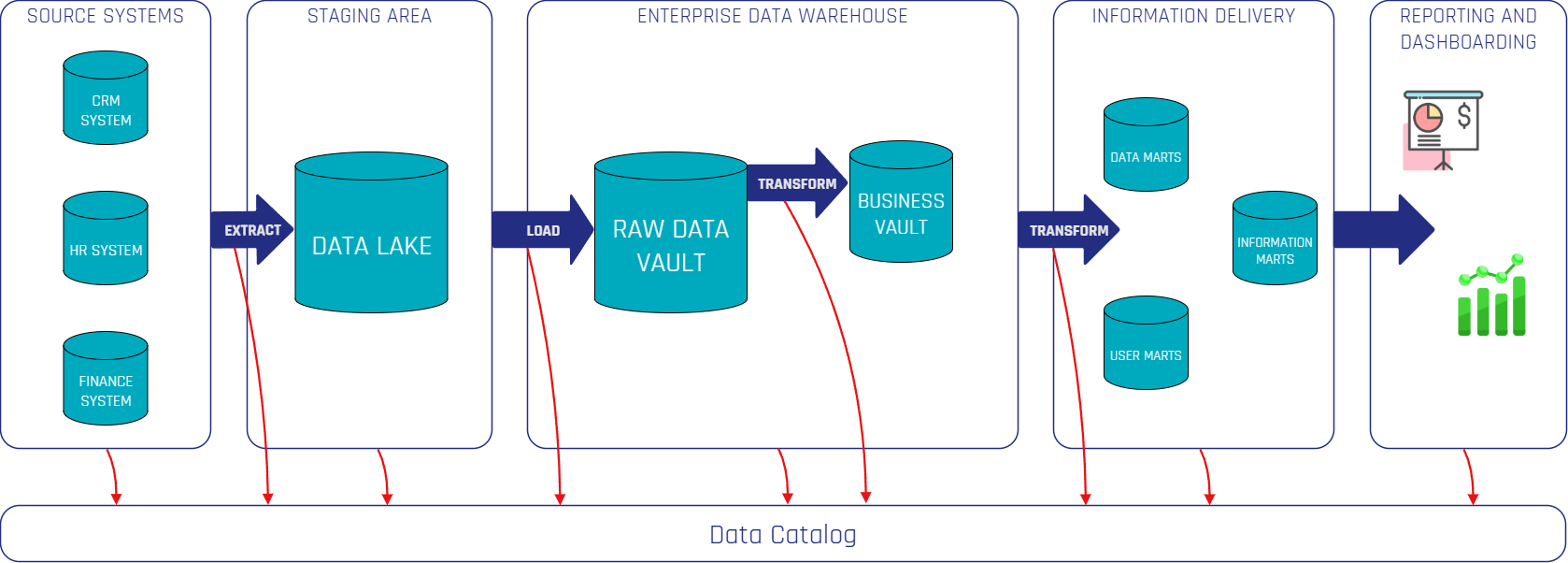
The diagram illustrates how a Data Catalog integrates into a Data Vault 2.0 Architecture. Using various connectors, it extracts metadata from source systems, data platforms, ETL tools, and BI tools through push- or pull-based approaches. The red arrows represent the flow of metadata from these systems into the Data Catalog, ensuring continuous capture and synchronization of metadata. This process guarantees end-to-end visibility, governance, and accessibility, making data assets more reliable and valuable for business users and analysts.

Data Catalog Architecture

Organizations can choose between open-source and commercial solutions. Commercial platforms like Atlan, Alation, and Collibra offer fully managed enterprise solutions with automation and vendor support, while open-source tools such as DataHub, Amundsen, and OpenMetadata provide more customizability and cost efficiency. Many open-source solutions now also offer cloud-based enterprise versions for easier deployment.

Self-hosted deployments are typically hosted on Docker or Kubernetes, giving organizations greater control and security, making them ideal for compliance-heavy environments. Meanwhile, cloud-based solutions offer automatic scaling and lower maintenance overhead, simplifying operations.

A well-integrated Data Catalog should connect seamlessly with data sources, ingest metadata efficiently, and provide structured management and governance. In a Data Vault 2.0 environment, it enhances traceability and transparency, enabling better data-driven decisions and reducing inefficiencies caused by fragmented metadata.

Introduction to DataHub

In this section, we will present an example of a data catalog tool and some of its key features.
DataHub is a leading open-source data catalog developed by LinkedIn to address the challenges of data discovery, governance, and observability in complex data ecosystems. Designed to handle the increasing volume, variety, and velocity of data, DataHub has been adopted by numerous organizations seeking to improve their metadata management practices. It supports both push- and pull-based metadata ingestion, seamlessly integrating with a wide range of data tools and technologies, including dbt, Snowflake, BigQuery, and Airflow.

Key Features of DataHub

DataHub goes beyond the traditional features and benefits of a standard data catalog by offering advanced features that address modern data management challenges. Here are some practical insights on how DataHub solves some of the features of a data catalog:

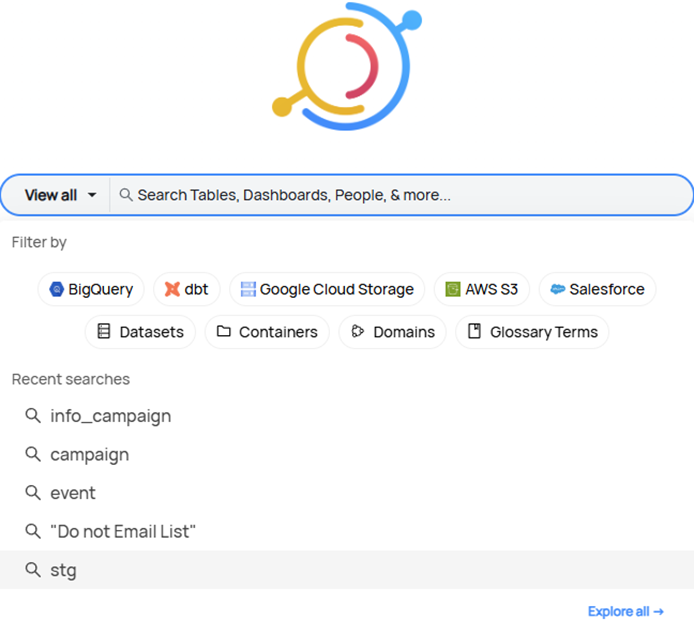
  • Data Discovery: Leveraging advanced search capabilities and detailed metadata, DataHub enables users to quickly locate and understand data assets, facilitating efficient data-driven decision-making across the organization, with a powerful search and filtering mechanism that allows users to refine queries by platform, domain, data type, owner, and specific tags, significantly enhancing the search process.
Internal Data Catalog Screenshot 1

Screenshot of Internal Data Catalog

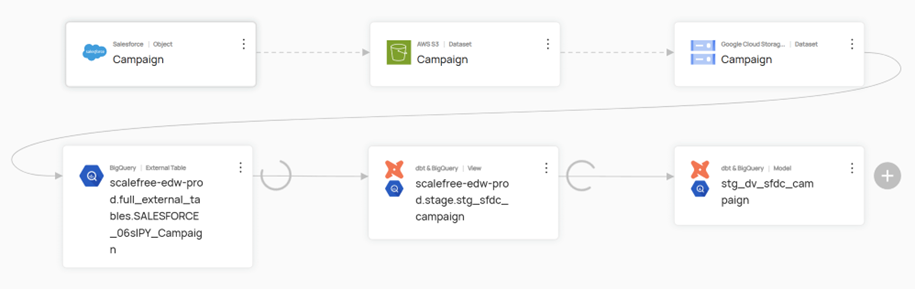
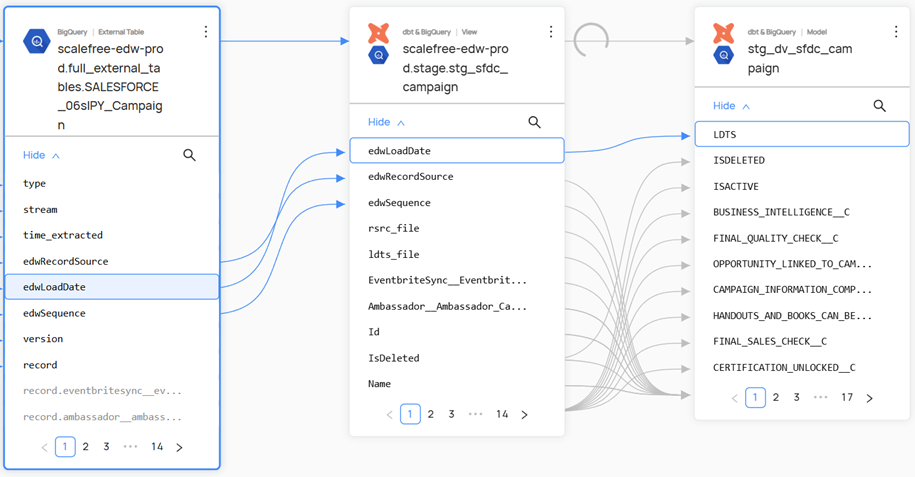
  • Data Lineage: It provides a comprehensive, visual trace of data flow—from origin through various transformations to final consumption—ensuring transparency, simplifying troubleshooting, and supporting compliance efforts. This lineage can extend down to the column level, offering a granular view of how data is transformed and utilized throughout the system.
Internal Data Catalog Screenshot 2
Internal Data Catalog Screenshot 3

Screenshot of Internal Data Catalog

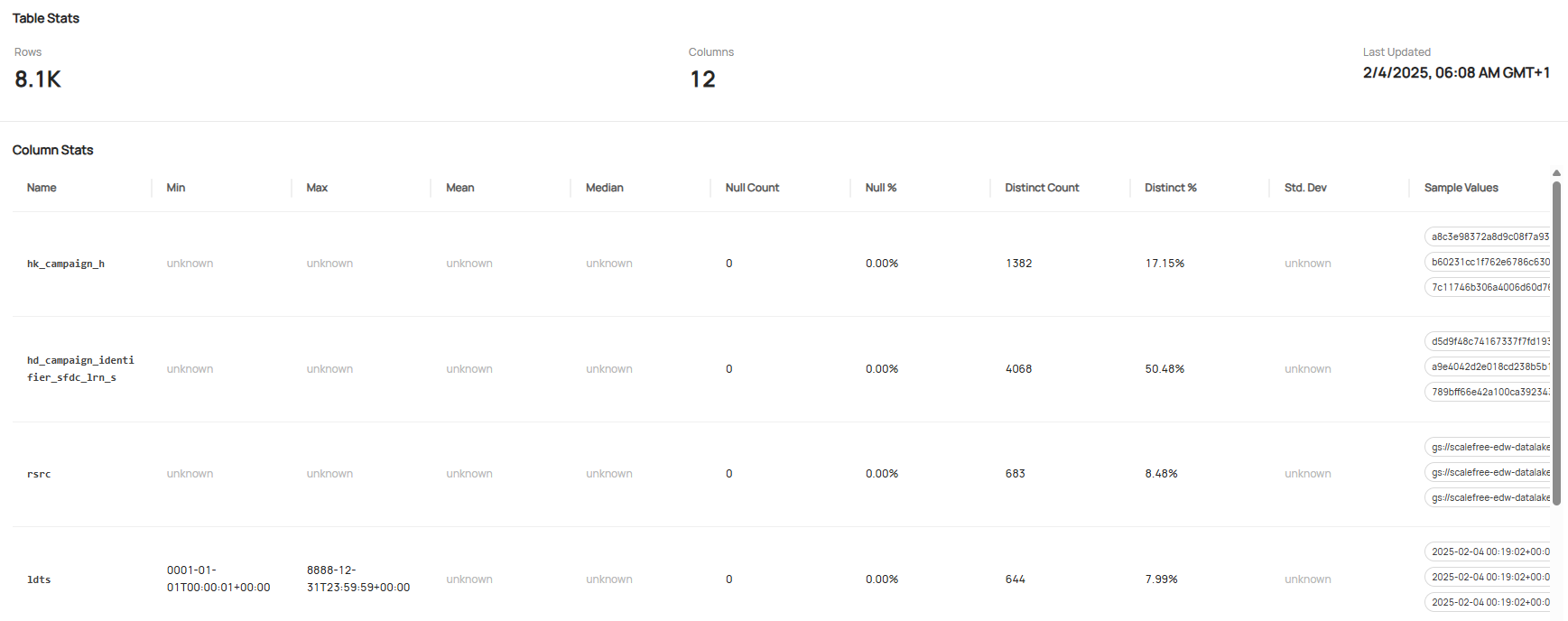
  • Data Profiling: DataHub continuously monitors and analyzes data quality, automatically generating profiling metrics that reveal data distributions, identify anomalies, and help maintain high data quality standards. It provides key statistics such as row and column counts, query frequency, top users, and last update timestamps, along with detailed attribute profiling, including value ranges, central tendencies, null and distinct values. The table below shows some examples of these profiling metrics.
Internal Data Catalog Screenshot 4

Screenshot of Internal Data Catalog

Watch the Video

Conclusion

In an era where data volume and complexity continue to surge, a robust data catalog is no longer optional, it is essential. By centralizing and enriching metadata, catalogs like DataHub turn fragmented datasets into a coherent, trustworthy foundation for analytics, governance, and collaboration. Implemented alongside architectures such as Data Vault, they deliver the transparency, lineage, and quality controls that modern organizations need to unlock real value from their data, quickly, confidently, and at scale.

– Tim Luca Derksen (Scalefree)

The Important Role of Data Catalogs in Modern Data Warehousing: A Practical Look at Datahub

Data Catalog Architecture

Data Catalogs in Modern Data Warehousing

Modern data architectures are becoming increasingly complex, posing significant challenges for organizations. Data is often scattered across multiple systems, making it difficult to locate, utilize, and preserve its quality. Analysts spend a substantial amount of time searching for relevant information, while businesses struggle to manage data efficiently and comply with regulatory requirements. A structured approach to metadata management is essential to enhance transparency, maintain data quality, and enable efficient data usage.

This article is aimed at data professionals, business users, and IT teams looking to establish or improve structured metadata management. It explores the challenges of fragmented metadata, the role of data catalogs as a central solution, and how they enhance data organization and usability. Additionally, it provides practical insights into structuring a data catalog within a Data Vault 2.0 architecture to support a scalable and comprehensive data strategy.

The Challenge of Fragmented Metadata

In the era of data-driven decision-making, organizations face a fundamental challenge: fragmented and inconsistent metadata. Across different departments, heterogeneous systems, divergent naming conventions, and varying documentation standards lead to a disjointed data landscape. Analysts and data professionals often spend excessive time locating, verifying, and interpreting data—a process that not only reduces efficiency but also increases the risk of errors and misinterpretations.

At the core of this issue lies the absence of a centralized metadata repository. Without a unified source of truth, critical aspects such as data lineage, ownership, and quality remain unclear. This lack of transparency not only complicates regulatory compliance but also erodes trust in data and impedes strategic initiatives. The result is the formation of data silos that prevent organizations from fully leveraging their data assets. As highlighted, this fragmentation leads to wasted time and effort on finding and accessing data, turns data platforms into data swamps, and hinders the development of a common business vocabulary.

What is a Data Catalog?

A data catalog is a centralized, structured repository that organizes and manages metadata across an organization, facilitating efficient data discovery, governance, and collaboration. Much like a well-curated library, a data catalog enables users to locate, understand, and utilize data efficiently by capturing essential metadata and making it easily searchable and accessible. Beyond merely indexing data assets, a data catalog provides critical context, tracks relationships between datasets, and integrates user-driven insights to enhance data usability and governance.

Features of a Data Catalog

A well-implemented data catalog consists of several foundational features that support metadata management, data governance, and user collaboration:

  • Metadata Management: Captures and organizes essential information about datasets, such as source, format, relationships, and usage patterns, ensuring accessibility and usability.
  • Data Discovery: Enables users to locate and access data quickly through intuitive search functions that leverage metadata attributes and contextual tags.
  • Data Lineage: Tracks the lifecycle of data, mapping its journey from origin to consumption. This allows organizations to trace transformations, ensuring data integrity and error resolution.
  • Data Governance: Establishes policies for data availability, usability, integrity, and security. This can include access control, regulatory compliance, and stewardship responsibilities.
  • Business Glossary: Defines business terminology and ensures consistency across the organization, improving communication and reducing misinterpretation of data fields.
  • Data Dictionary: Provides technical documentation on data structures, including schema definitions, data types, and field constraints.
  • Data Profiling: Analyzes datasets to generate statistics on data quality, completeness, distribution, and anomalies. This helps organizations understand their data better and ensures its reliability for analytical and operational use.

Benefits of a Data Catalog

A data catalog enhances data discovery by providing structured metadata, enabling users to efficiently find and access the right datasets. By offering clear definitions, contextual information, and lineage tracking, it improves data comprehension, ensuring that users understand data origins, transformations, and relationships.

Discovering and understanding data sources and their use is a core function of a data catalog. Business users can quickly locate relevant datasets, evaluate their fit, and utilize them effectively. Additionally, users can contribute to the catalog by tagging, documenting, and annotating data sources, fostering collective knowledge and enhancing data usability.

It fosters trust by documenting data quality, provenance, and usage, ensuring that users rely on accurate, well-maintained datasets. Furthermore, by reducing redundancy and streamlining workflows, a data catalog increases operational efficiency, saving time and resources while maximizing the value of an organization’s data assets.

How a Data Catalog Works

A data catalog functions as a dynamic metadata management system, automating the extraction, organization, and indexing of metadata. It seamlessly connects to various data sources, including data platforms, data lakes, ETL pipelines, and BI tools, synchronizing metadata through two primary approaches: pull-based and push-based ingestion.

In the pull-based approach, the data catalog actively queries source systems using APIs, JDBC connectors, or scheduled scans to retrieve metadata. This method allows the catalog to regularly update its metadata repository by fetching information from the source systems. On the other hand, the push-based approach relies on source systems to send real-time metadata updates to the catalog through event-driven mechanisms, webhooks, or message queues. This ensures immediate synchronization of metadata, keeping the catalog up-to-date with any changes in the data landscape.

Once metadata is ingested, the data catalog standardizes and enriches it, ensuring consistency and adding valuable context. This process includes extracting schema details, identifying data ownership, applying classifications, and establishing data lineage. The standardized and enriched metadata is then stored in an indexed repository, enabling fast search, filtering, and lineage tracking. Furthermore, automated tagging, schema change detection, and governance policies are implemented to ensure compliance with security and regulatory requirements.

Integrating a Data Catalog With Data Vault 2.0

The diagram illustrates how a Data Catalog integrates into a Data Vault 2.0 Architecture. Using various connectors, it extracts metadata from source systems, data platforms, ETL tools, and BI tools through push- or pull-based approaches. The red arrows represent the flow of metadata from these systems into the Data Catalog, ensuring continuous capture and synchronization of metadata. This process guarantees end-to-end visibility, governance, and accessibility, making data assets more reliable and valuable for business users and analysts.

Data Catalog Architecture

Organizations can choose between open-source and commercial solutions. Commercial platforms like Atlan, Alation, and Collibra offer fully managed enterprise solutions with automation and vendor support, while open-source tools such as DataHub, Amundsen, and OpenMetadata provide more customizability and cost efficiency. Many open-source solutions now also offer cloud-based enterprise versions for easier deployment.

Self-hosted deployments are typically hosted on Docker or Kubernetes, giving organizations greater control and security, making them ideal for compliance-heavy environments. Meanwhile, cloud-based solutions offer automatic scaling and lower maintenance overhead, simplifying operations.

A well-integrated Data Catalog should connect seamlessly with data sources, ingest metadata efficiently, and provide structured management and governance. In a Data Vault 2.0 environment, it enhances traceability and transparency, enabling better data-driven decisions and reducing inefficiencies caused by fragmented metadata.

Introduction to DataHub

In this section, we will present an example of a data catalog tool and some of its key features.
DataHub is a leading open-source data catalog developed by LinkedIn to address the challenges of data discovery, governance, and observability in complex data ecosystems. Designed to handle the increasing volume, variety, and velocity of data, DataHub has been adopted by numerous organizations seeking to improve their metadata management practices. It supports both push- and pull-based metadata ingestion, seamlessly integrating with a wide range of data tools and technologies, including dbt, Snowflake, BigQuery, and Airflow.

Key Features of DataHub

DataHub goes beyond the traditional features and benefits of a standard data catalog by offering advanced features that address modern data management challenges. Here are some practical insights on how DataHub solves some of the features of a data catalog:

  • Data Discovery: Leveraging advanced search capabilities and detailed metadata, DataHub enables users to quickly locate and understand data assets, facilitating efficient data-driven decision-making across the organization, with a powerful search and filtering mechanism that allows users to refine queries by platform, domain, data type, owner, and specific tags, significantly enhancing the search process.
Internal Data Catalog Screenshot 1

Screenshot of Internal Data Catalog

  • Data Lineage: It provides a comprehensive, visual trace of data flow—from origin through various transformations to final consumption—ensuring transparency, simplifying troubleshooting, and supporting compliance efforts. This lineage can extend down to the column level, offering a granular view of how data is transformed and utilized throughout the system.
Internal Data Catalog Screenshot 2
Internal Data Catalog Screenshot 3

Screenshot of Internal Data Catalog

  • Data Profiling: DataHub continuously monitors and analyzes data quality, automatically generating profiling metrics that reveal data distributions, identify anomalies, and help maintain high data quality standards. It provides key statistics such as row and column counts, query frequency, top users, and last update timestamps, along with detailed attribute profiling, including value ranges, central tendencies, null and distinct values. The table below shows some examples of these profiling metrics.
Internal Data Catalog Screenshot 4

Screenshot of Internal Data Catalog

Watch the Video

Conclusion

In an era where data volume and complexity continue to surge, a robust data catalog is no longer optional, it is essential. By centralizing and enriching metadata, catalogs like DataHub turn fragmented datasets into a coherent, trustworthy foundation for analytics, governance, and collaboration. Implemented alongside architectures such as Data Vault, they deliver the transparency, lineage, and quality controls that modern organizations need to unlock real value from their data, quickly, confidently, and at scale.

– Tim Luca Derksen (Scalefree)

Handling Snapshotting via a Timeline other than Load Date

Snapshot Full Load vs. Incremental Load

Snapshotting is a crucial process when managing financial and business data. It involves capturing a static copy of data at a specific point in time, preserving it for future reference, analysis, and reporting. Therefore, snapshotting facilitates data-driven decision-making by providing a reliable historical timeline on given business dates for trend analysis, compliance, forecasting and many more to add value to the reports. This newsletter delves into the details of snapshotting based on business dates, as opposed to system timestamps, and emphasizes its significance in ensuring data accuracy and consistency.

HANDLING SNAPSHOTTING VIA A TIMELINE OTHER THAN LOAD DATE

This webinar delves into the intricacies of business date snapshotting, a vital data warehousing technique that aligns historical data with specific business requirements, contrasting it with load date snapshotting. Join us on April 15th at 11:00 AM CEST to explore this topic in depth.

Watch Webinar Recording

Snapshotting – An Overview

Snapshotting, in essence, is the process of creating a replica of data at a particular moment. In the context of business and finance, aligning snapshots with business dates, rather than system timestamps guarantees that reports and analyses mirror operational timelines, which is crucial for period-end reporting, regulatory compliance, and historical trend analysis.

Key Characteristics of Snapshots

  • Data Integrity and Accuracy: Snapshots capture a complete record of data at a specific point in time; the captured record should be immutable, except for late-arriving data, which we’ll cover later. This historical representation ensures that data remains consistent and reliable for future reference, reporting, and analysis, regardless of any subsequent modifications or deletions.
  • Source of Truth: By preserving data exactly as it existed at a particular moment, snapshots offer a dependable source of truth for auditing, compliance, and regulatory requirements. They enable organizations to track changes over time, identify trends, and make informed decisions based on accurate and historical data.
  • Alignment with Business Operations: Unlike traditional data storage methods that rely on timestamps, snapshots are indexed according to a given schedule e.g. business dates or time (hourly, daily, weekly etc.). This approach ensures that data is organized and accessible in a manner that aligns with business operations and reporting cycles. By accounting for non-operational days, holidays, and designated business cutoffs, snapshots provide a more meaningful and relevant representation of data from a business perspective.

Challenges with Snapshots

  • Handling Late-Arriving Data: Transactions or updates may come in after a snapshot is taken, requiring strategies to manage retroactive changes.
  • Business Date vs. Calendar Date: Aligning snapshots with business dates rather than system timestamps can be complex, especially when dealing with weekends, holidays, or different time zones.
  • Data Consistency Across Systems: Ensuring that all related datasets are captured at the same logical point in time is critical for maintaining consistency in reporting and analysis.
  • Snapshot Frequency and Granularity: Choosing the right balance between full and incremental snapshots affects system performance and usability. Taking too few snapshots may result in data gaps, while excessive snapshots increase processing overhead.

Strategies for Effective Snapshot Management

To effectively manage snapshotting through a timeline that isn’t solely reliant on load date, several key considerations must be addressed:

Snapshot Frequency

  • The frequency with which snapshots are taken should be determined by the specific requirements of the business, including reporting needs, regulatory compliance, and data retention policies.
  • Options for snapshot frequency include daily, weekly, monthly, or even more granular intervals depending on the volatility of the data and the necessity for historical accuracy.
  • It is essential to balance the need for frequent snapshots with the storage and processing overhead they incur.

Business Date Alignment

  • Snapshots should be aligned with business dates rather than system timestamps to ensure consistency and relevance to business operations.
  • This alignment must take into account weekends, holidays, and other non-business days, as well as period-end adjustments and other business-specific calendar considerations.
  • The goal is to capture data that accurately reflects the state of the business at a given point in time from a business perspective.

Snapshot Type

  • The choice between full snapshots and incremental snapshots depends on factors such as storage capacity, processing power, and data retrieval requirements.
  • Full snapshots capture the entire dataset at a specific point in time, while incremental snapshots only store the changes that have occurred since the last snapshot.
  • Incremental snapshots are generally more efficient in terms of storage and processing, but may be more complex to manage and restore.
Snapshot Full Load vs. Incremental Load

Late/ Corrected Data

To ensure data accuracy and historical integrity within a snapshotting system that utilizes a timeline other than load date, a robust mechanism must be implemented to manage late-arriving transactions and data corrections. This is essential to maintain a reliable and consistent representation of the data over time.

Several strategies can be employed to achieve this, including versioning and backdating. Versioning involves maintaining multiple versions of the data, each representing a specific point in time, allowing for easy tracking of changes and rollbacks if necessary. Backdating, on the other hand, involves assigning a timestamp to the data that reflects its actual occurrence time, rather than the time it was loaded into the system. This ensures that the data is placed in its correct historical context.

Furthermore, it is crucial to consider the potential impact of late or corrected data on reporting and analysis. Late-arriving data can distort results and lead to inaccurate conclusions if not handled properly. Similarly, data corrections can invalidate previous analyses and require recalculations. Therefore, appropriate controls and safeguards must be put in place to mitigate these risks. This may include data validation checks, reconciliation processes, and audit trails to track data changes and ensure accountability.

By implementing these measures, organizations can maintain the accuracy, consistency, and reliability of their snapshot data, even in the face of late-arriving transactions and data corrections. This, in turn, enables them to make informed decisions, generate accurate reports, and support effective analysis based on trustworthy historical data.

Additional Considerations

  • Retention Policy: Establish a clear retention policy for snapshots, considering legal, regulatory, and business requirements.
  • Storage and Performance: Evaluate storage options and their impact on system performance, considering scalability and cost.
  • Data Security: Implement appropriate security measures to protect snapshot data from unauthorized access or modification.
  • Disaster Recovery: Include snapshots in disaster recovery plans to ensure business continuity.
  • Metadata Management: Maintain metadata about snapshots, including creation time, business date, and snapshot type, to facilitate management and retrieval.

By carefully considering these factors and implementing a well-designed snapshot management strategy, organizations can effectively leverage snapshots to support business operations, regulatory compliance, and data-driven decision-making.

Conclusion

Snapshotting based on business dates is crucial for data management, especially in business and finance. It provides a reliable basis for reporting, analysis, and decision-making by capturing and structuring data in alignment with business operations. Snapshots also facilitate historical records for compliance and auditing, and enable comparisons between different time periods. However, potential challenges like data duplication and corruption need to be addressed through robust data management practices. In conclusion, snapshotting offers significant benefits, but requires careful management to ensure data accuracy and integrity.


– Tim Hoffmann (Scalefree)

Handling Snapshotting via a Timeline other than Load Date

Snapshot Full Load vs. Incremental Load

Snapshotting is a crucial process when managing financial and business data. It involves capturing a static copy of data at a specific point in time, preserving it for future reference, analysis, and reporting. Therefore, snapshotting facilitates data-driven decision-making by providing a reliable historical timeline on given business dates for trend analysis, compliance, forecasting and many more to add value to the reports. This newsletter delves into the details of snapshotting based on business dates, as opposed to system timestamps, and emphasizes its significance in ensuring data accuracy and consistency.

HANDLING SNAPSHOTTING VIA A TIMELINE OTHER THAN LOAD DATE

This webinar delves into the intricacies of business date snapshotting, a vital data warehousing technique that aligns historical data with specific business requirements, contrasting it with load date snapshotting. Join us on April 15th at 11:00 AM CEST to explore this topic in depth.

Watch Webinar Recording

Snapshotting – An Overview

Snapshotting, in essence, is the process of creating a replica of data at a particular moment. In the context of business and finance, aligning snapshots with business dates, rather than system timestamps guarantees that reports and analyses mirror operational timelines, which is crucial for period-end reporting, regulatory compliance, and historical trend analysis.

Key Characteristics of Snapshots

  • Data Integrity and Accuracy: Snapshots capture a complete record of data at a specific point in time; the captured record should be immutable, except for late-arriving data, which we’ll cover later. This historical representation ensures that data remains consistent and reliable for future reference, reporting, and analysis, regardless of any subsequent modifications or deletions.
  • Source of Truth: By preserving data exactly as it existed at a particular moment, snapshots offer a dependable source of truth for auditing, compliance, and regulatory requirements. They enable organizations to track changes over time, identify trends, and make informed decisions based on accurate and historical data.
  • Alignment with Business Operations: Unlike traditional data storage methods that rely on timestamps, snapshots are indexed according to a given schedule e.g. business dates or time (hourly, daily, weekly etc.). This approach ensures that data is organized and accessible in a manner that aligns with business operations and reporting cycles. By accounting for non-operational days, holidays, and designated business cutoffs, snapshots provide a more meaningful and relevant representation of data from a business perspective.

Challenges with Snapshots

  • Handling Late-Arriving Data: Transactions or updates may come in after a snapshot is taken, requiring strategies to manage retroactive changes.
  • Business Date vs. Calendar Date: Aligning snapshots with business dates rather than system timestamps can be complex, especially when dealing with weekends, holidays, or different time zones.
  • Data Consistency Across Systems: Ensuring that all related datasets are captured at the same logical point in time is critical for maintaining consistency in reporting and analysis.
  • Snapshot Frequency and Granularity: Choosing the right balance between full and incremental snapshots affects system performance and usability. Taking too few snapshots may result in data gaps, while excessive snapshots increase processing overhead.

Strategies for Effective Snapshot Management

To effectively manage snapshotting through a timeline that isn’t solely reliant on load date, several key considerations must be addressed:

Snapshot Frequency

  • The frequency with which snapshots are taken should be determined by the specific requirements of the business, including reporting needs, regulatory compliance, and data retention policies.
  • Options for snapshot frequency include daily, weekly, monthly, or even more granular intervals depending on the volatility of the data and the necessity for historical accuracy.
  • It is essential to balance the need for frequent snapshots with the storage and processing overhead they incur.

Business Date Alignment

  • Snapshots should be aligned with business dates rather than system timestamps to ensure consistency and relevance to business operations.
  • This alignment must take into account weekends, holidays, and other non-business days, as well as period-end adjustments and other business-specific calendar considerations.
  • The goal is to capture data that accurately reflects the state of the business at a given point in time from a business perspective.

Snapshot Type

  • The choice between full snapshots and incremental snapshots depends on factors such as storage capacity, processing power, and data retrieval requirements.
  • Full snapshots capture the entire dataset at a specific point in time, while incremental snapshots only store the changes that have occurred since the last snapshot.
  • Incremental snapshots are generally more efficient in terms of storage and processing, but may be more complex to manage and restore.
Snapshot Full Load vs. Incremental Load

Late/ Corrected Data

To ensure data accuracy and historical integrity within a snapshotting system that utilizes a timeline other than load date, a robust mechanism must be implemented to manage late-arriving transactions and data corrections. This is essential to maintain a reliable and consistent representation of the data over time.

Several strategies can be employed to achieve this, including versioning and backdating. Versioning involves maintaining multiple versions of the data, each representing a specific point in time, allowing for easy tracking of changes and rollbacks if necessary. Backdating, on the other hand, involves assigning a timestamp to the data that reflects its actual occurrence time, rather than the time it was loaded into the system. This ensures that the data is placed in its correct historical context.

Furthermore, it is crucial to consider the potential impact of late or corrected data on reporting and analysis. Late-arriving data can distort results and lead to inaccurate conclusions if not handled properly. Similarly, data corrections can invalidate previous analyses and require recalculations. Therefore, appropriate controls and safeguards must be put in place to mitigate these risks. This may include data validation checks, reconciliation processes, and audit trails to track data changes and ensure accountability.

By implementing these measures, organizations can maintain the accuracy, consistency, and reliability of their snapshot data, even in the face of late-arriving transactions and data corrections. This, in turn, enables them to make informed decisions, generate accurate reports, and support effective analysis based on trustworthy historical data.

Additional Considerations

  • Retention Policy: Establish a clear retention policy for snapshots, considering legal, regulatory, and business requirements.
  • Storage and Performance: Evaluate storage options and their impact on system performance, considering scalability and cost.
  • Data Security: Implement appropriate security measures to protect snapshot data from unauthorized access or modification.
  • Disaster Recovery: Include snapshots in disaster recovery plans to ensure business continuity.
  • Metadata Management: Maintain metadata about snapshots, including creation time, business date, and snapshot type, to facilitate management and retrieval.

By carefully considering these factors and implementing a well-designed snapshot management strategy, organizations can effectively leverage snapshots to support business operations, regulatory compliance, and data-driven decision-making.

Conclusion

Snapshotting based on business dates is crucial for data management, especially in business and finance. It provides a reliable basis for reporting, analysis, and decision-making by capturing and structuring data in alignment with business operations. Snapshots also facilitate historical records for compliance and auditing, and enable comparisons between different time periods. However, potential challenges like data duplication and corruption need to be addressed through robust data management practices. In conclusion, snapshotting offers significant benefits, but requires careful management to ensure data accuracy and integrity.


– Tim Hoffmann (Scalefree)

Real-Time Data Warehousing and Business Intelligence with Data Vault 2.0 and AWS Kinesis

real time data aws

Data is the fuel of the digital economy. However, its true value is realized only when it is processed quickly, reliably, and structured for analysis and reporting. Real-time data streaming enables companies to make data-driven decisions instantly. Data Vault 2.0 combined with AWS Kinesis provides a future-proof solution for efficiently processing and storing large volumes of data in modern data warehousing and BI environments.

Realtime on AWS with Data Vault 2.0

Join our webinar on March 18th, 2025, 11 am CET, and learn how to build a scalable, real-time data architecture on AWS. We’ll cover AWS infrastructure for real-time data, applying Data Vault 2.0 in real-time scenarios, and showcase a live demo with a real-world use case.

Watch Webinar Recording

Why Real-Time Data Streaming for Data Warehousing and BI?

In today’s fast-paced business environment, timely access to accurate data is essential for making informed decisions. Traditional batch processing methods can no longer keep up with the need for real-time insights, often resulting in outdated reports and slow reaction times. Real-time data streaming solves this problem by enabling continuous data integration, allowing companies to analyze and act on fresh data as it arrives. This shift not only improves operational efficiency but also enhances overall business intelligence strategies by ensuring that the most up-to-date information is always available.

Data Vault 2.0 as the Foundation for Real-Time Data Warehousing

As organizations deal with increasing volumes of data from multiple sources, they need a flexible and scalable approach to data modeling. Data Vault 2.0 provides the ideal foundation for real-time data warehousing by offering a structured yet adaptable methodology. Unlike traditional data models, which can be rigid and difficult to modify, Data Vault 2.0 adapts to new requirements quite fast. By leveraging Data Vault 2.0, companies can build a resilient and future-proof data warehouse capable of handling real-time data streams with ease.

AWS Kinesis: Real-Time Data for Your Data Warehouse

Processing real-time data at scale requires a robust infrastructure, and AWS Kinesis is built precisely for this purpose. It enables businesses to collect, process, and analyze real-time data streams, ensuring that data warehouses remain continuously updated. By eliminating data latency, companies can generate insights in real time, leading to faster decision-making and improved operational performance. Furthermore, AWS Kinesis seamlessly integrates with widely used BI systems such as AWS Redshift and Snowflake, making it an essential component for modern data architectures. Its dynamic scaling capabilities provide cost efficiency by adjusting resource consumption based on actual demand. Additionally, Kinesis includes advanced security features, ensuring that sensitive data remains protected while adhering to industry regulations.

Conclusion: Future-Proof BI and Data Warehousing with Real-Time Streaming

Companies that embrace real-time data processing benefit from faster BI analysis, lower costs, and greater scalability. Data Vault 2.0 combined with AWS Kinesis offers a powerful, future-proof solution for modern data warehousing architectures. By enabling seamless integration of real-time data, businesses can react instantly to market changes, optimize their operations, and stay ahead of the competition.

Investing in real-time data streaming is not just about speed, it’s about building a resilient and adaptive data infrastructure that grows with your business. Organizations that leverage these technologies today will gain a significant competitive edge, ensuring long-term success in an increasingly data-driven world. Leverage real-time streaming for BI and maximize the value of your data!

Real-Time Data Warehousing and Business Intelligence with Data Vault 2.0 and AWS Kinesis

real time data aws

Data is the fuel of the digital economy. However, its true value is realized only when it is processed quickly, reliably, and structured for analysis and reporting. Real-time data streaming enables companies to make data-driven decisions instantly. Data Vault 2.0 combined with AWS Kinesis provides a future-proof solution for efficiently processing and storing large volumes of data in modern data warehousing and BI environments.

Realtime on AWS with Data Vault 2.0

Join our webinar on March 18th, 2025, 11 am CET, and learn how to build a scalable, real-time data architecture on AWS. We’ll cover AWS infrastructure for real-time data, applying Data Vault 2.0 in real-time scenarios, and showcase a live demo with a real-world use case.

Watch Webinar Recording

Why Real-Time Data Streaming for Data Warehousing and BI?

In today’s fast-paced business environment, timely access to accurate data is essential for making informed decisions. Traditional batch processing methods can no longer keep up with the need for real-time insights, often resulting in outdated reports and slow reaction times. Real-time data streaming solves this problem by enabling continuous data integration, allowing companies to analyze and act on fresh data as it arrives. This shift not only improves operational efficiency but also enhances overall business intelligence strategies by ensuring that the most up-to-date information is always available.

Data Vault 2.0 as the Foundation for Real-Time Data Warehousing

As organizations deal with increasing volumes of data from multiple sources, they need a flexible and scalable approach to data modeling. Data Vault 2.0 provides the ideal foundation for real-time data warehousing by offering a structured yet adaptable methodology. Unlike traditional data models, which can be rigid and difficult to modify, Data Vault 2.0 adapts to new requirements quite fast. By leveraging Data Vault 2.0, companies can build a resilient and future-proof data warehouse capable of handling real-time data streams with ease.

AWS Kinesis: Real-Time Data for Your Data Warehouse

Processing real-time data at scale requires a robust infrastructure, and AWS Kinesis is built precisely for this purpose. It enables businesses to collect, process, and analyze real-time data streams, ensuring that data warehouses remain continuously updated. By eliminating data latency, companies can generate insights in real time, leading to faster decision-making and improved operational performance. Furthermore, AWS Kinesis seamlessly integrates with widely used BI systems such as AWS Redshift and Snowflake, making it an essential component for modern data architectures. Its dynamic scaling capabilities provide cost efficiency by adjusting resource consumption based on actual demand. Additionally, Kinesis includes advanced security features, ensuring that sensitive data remains protected while adhering to industry regulations.

Conclusion: Future-Proof BI and Data Warehousing with Real-Time Streaming

Companies that embrace real-time data processing benefit from faster BI analysis, lower costs, and greater scalability. Data Vault 2.0 combined with AWS Kinesis offers a powerful, future-proof solution for modern data warehousing architectures. By enabling seamless integration of real-time data, businesses can react instantly to market changes, optimize their operations, and stay ahead of the competition.

Investing in real-time data streaming is not just about speed, it’s about building a resilient and adaptive data infrastructure that grows with your business. Organizations that leverage these technologies today will gain a significant competitive edge, ensuring long-term success in an increasingly data-driven world. Leverage real-time streaming for BI and maximize the value of your data!

Close Menu