search
0

Using PIT and Bridge Tables in Business Vault Entities

Watch the Video

PIT and Bridge Tables

In this blog post, we will answer a commonly asked question regarding PIT and Bridge Tables:

In the Data Vault architecture, is it okay to use/reuse created PIT and Bridge tables in the code of the Business Vault business rules?

The short answer is yes, but let’s dive into the details to understand the rationale and how PIT (Point-In-Time) tables and Bridge tables work in the context of Business Vault entities.


Understanding PIT and Bridge Tables

Before explaining their usage, let’s quickly clarify what PIT and Bridge tables are in the Data Vault architecture:

  • PIT Tables: These provide a snapshot of data for a specific point in time. They help combine deltas and descriptive data to enable calculations or business logic that requires a specific snapshot.
  • Bridge Tables: These are primarily used to resolve many-to-many relationships and improve query performance when dealing with large datasets.

Applying Business Logic in Business Vault

In the Data Vault, data flows from the Raw Data Vault (RDV) to the Business Vault (BV) and finally to the Information Mart (IM). The key difference lies in the granularity of data:

  • Load Date: In the Raw Data Vault, data batches are identified by a load date, which represents when the data was ingested.
  • Snapshot Date: In the Information Mart, data is often presented as snapshots, where each snapshot represents the data at a specific point in time.

Now, the Business Vault sits between the Raw Data Vault and Information Marts. When applying business rules in the BV, there are two major types of granularities to consider:

1. Granularity Based on Incoming Deltas

In this case, business logic is applied to all incoming deltas identified by the load date. For example, cleansing phone numbers is a typical use case where every delta (update) must be processed, even if only the latest version is needed in the end.

The resulting data is stored in a computed Satellite in the Business Vault. The primary key remains the hash key of the parent entity and the load date.

2. Granularity Based on Snapshot Date

Some business logic requires calculations for specific points in time. For example, calculating the lifetime value of a customer:

  • The lifetime value increases when a customer makes a purchase.
  • The lifetime value decreases incrementally if no purchases are made over time.

In this scenario, even when no new delta is coming in, the value must still be recalculated daily. This granularity aligns with the snapshot date, which is already defined in the PIT table. By leveraging the PIT table, you can calculate and store the lifetime value in a computed Satellite with a primary key of the parent hash key and snapshot date.

Reusing PIT Tables

When switching from load date (deltas) to snapshot date (snapshots), PIT tables play a crucial role:

  • PIT tables help join descriptive data from Satellites to provide a snapshot-based view of the data.
  • They allow business rules to be applied to outgoing information granularity (snapshot date).

For example, if you want to calculate a specific measure, such as a customer’s lifetime value, the PIT table provides the granularity needed to compute the values for every day, hour, or minute, depending on your requirements.

Reusing Bridge Tables

Bridge tables can also be reused in Business Vault entities but with one key consideration:

Avoid loading one Bridge Table from another Bridge Table.

Why? Cascading Bridge Tables can lead to sequential dependencies, which hinder parallelization. Parallel processing is essential for performance, especially in high-volume environments. To work around this limitation, use Computed Aggregate Links.

What Is a Computed Aggregate Link?

A Computed Aggregate Link is essentially a Link with pre-computed aggregations. This concept is described in the Data Vault methodology and allows you to reuse aggregations efficiently without chaining Bridge Tables together.

For example, if you want to calculate a new measure based on facts stored in a Bridge Table:

  • Use the Bridge Table as the FROM source for a computed Satellite.
  • Attach the new measure to the Bridge Table as part of the Business Vault entity.

This approach avoids cascading dependencies while allowing you to extend facts or perform complex calculations.

Best Practices Recap for PIT and Bridge Tables

Here are the key takeaways for using PIT and Bridge tables in Business Vault entities:

  • Yes, you can reuse PIT tables: They are commonly used to provide snapshot granularity for computed Satellites.
  • Yes, you can reuse Bridge tables: Use them carefully to avoid cascading dependencies.
  • Use Computed Aggregate Links: When you need to extend a Bridge Table, this is the recommended approach to maintain efficiency and parallelization.
  • Granularity switch: Be mindful of the transition from load date (delta-driven) to snapshot date (snapshot-driven) when applying business logic.

Summary

In summary, PIT and Bridge tables are powerful tools in the Data Vault architecture, especially within the Business Vault. They enable complex business logic, such as snapshot-based calculations, while maintaining efficiency and performance. By adhering to best practices like avoiding cascading Bridge Table loads, you can ensure your implementation remains scalable and robust.

Meet the Speaker

Profile picture of Michael Olschimke

Michael Olschimke

Michael has more than 15 years of experience in Information Technology. During the last eight years he has specialized in Business Intelligence topics such as OLAP, Dimensional Modelling, and Data Mining. Challenge him with your questions!

Building Responsible AI Systems Under the EU AI Act

EU AI Act Responsible Systems

The EU Artificial Intelligence (AI) Act represents a significant step forward in regulating AI technologies across the European Union. Its purpose is to establish a unified legal framework, ensuring human rights protection, safety, and the ethical use of AI, while fostering innovation and accountability. With its phased implementation starting in 2024, the Act brings major changes to how AI systems are designed, deployed, and monitored.


Overview of the EU AI Act

The EU AI Act aims to:

  • Establish a unified legal framework for AI across the EU.
  • Protect human rights and ensure safety.
  • Prohibit harmful and unethical uses of AI.
  • Promote transparency and accountability in AI systems.
  • Foster innovation and technological growth.

Timeline for Implementation

The Act includes specific deadlines for compliance:

  • August 2024: Prohibited AI practices must stop immediately.
  • August 2025: Transparency rules for general-purpose AI, including content labeling, take effect.
  • August 2026: High-risk AI regulations, such as those in healthcare, become enforceable with strict data quality standards.

Why This Matters

AI adoption is growing rapidly, with 42% of organizations utilizing AI in 2023—a 7% increase from 2022. The EU AI Act not only imposes penalties of up to 7% of global turnover for non-compliance but also reflects a societal responsibility to use AI ethically, addressing inequalities and safeguarding future generations.

The Risk-Based Approach

The EU AI Act categorizes AI systems into four risk levels:

  • Unacceptable Risk: Prohibited under Article 5.
  • High Risk: Strict regulation and obligations under Articles 6-51.
  • Limited Risk: Providers regulated under Articles 52a-52e.
  • Minimal Risk: Subject to transparency obligations under Article 52.

Key Principles of Responsible AI

Building responsible AI systems involves adhering to several key principles:

  • Explainability: AI models should be transparent and easy to understand.
  • Bias & Fairness: Detect and mitigate biases to ensure equitable outcomes.
  • Accountability: Define responsibilities for AI outcomes clearly.
  • Data Suitability: Use appropriate, high-quality data in compliance with regulations.
  • Monitoring: Continuously track AI performance to ensure reliability.
  • Transparency: Disclose system functionalities clearly and provide user mechanisms for feedback.
  • Auditability: Maintain detailed logs of algorithms, datasets, and configurations.

Steps to Build Responsible AI Systems

Organizations can prepare for compliance and ethical AI usage through the following steps:

  • Implement scalable AI services.
  • Develop predictive reporting mechanisms.
  • Establish robust governance frameworks.
  • Leverage tools and platforms for AI development.
  • Ensure data suitability and compliance.

AI Marts: Enabling AI Act Compliance

Traditional machine learning workflows without centralized data management can lead to feature inconsistencies, operational complexity, and compliance issues. AI Marts address these challenges by providing:

  • Centralized feature management.
  • Integration of feature engineering into workflows and pipelines.
  • Metadata and version control.
  • Scalable feature serving across targets.
  • Comprehensive logs for governance and auditing.

Benefits: AI Marts enhance data governance and security, serving as a critical step towards compliance with the EU AI Act.

Conclusion

As AI adoption grows, compliance with the EU AI Act is essential for organizations aiming to use AI responsibly. By implementing risk-based strategies, embracing transparency, and leveraging tools like AI Marts, companies can align with regulatory requirements while fostering trust and innovation.

Watch the Video

Meet the Speaker

Picture of Lorenz Kindling

Lorenz Kindling
Senior Consultant

Lorenz is working in Business Intelligence and Enterprise Data Warehousing (EDW) with a focus on data warehouse automation and Data Vault modeling. Since 2021, he has been advising renowned companies in various industries for Scalefree International. Prior to Scalefree, he also worked as a consultant in the field of data analytics. This allowed him to gain a comprehensive overview of data warehousing projects and common issues that arise.

Maintaining the Hash Diff

Watch the Video

The Problem

Adopting a thoughtful approach to Hash Diff calculation can minimize manual maintenance, ensure data consistency, and optimize storage. Our question comes from a project where the source system occasionally delivers new columns for existing tables. When these columns are added to a satellite, the hash difference (hashdiff) calculation changes. As a result, new deltas are generated for all business keys during the next load—even if the actual data hasn’t changed. The manual recalculation of hashdiffs for historical records is time-consuming and prone to errors. Can this be avoided?


Understanding Hash Diff Changes

The hashdiff is a critical component in a Data Vault model, used to detect changes in descriptive attributes. Adding a new column changes the hashdiff logic, potentially creating unnecessary deltas, which consume additional storage and complicate data integrity checks. Let’s break this down:

  • When a new column is introduced, historical records often have NULL values for that column.
  • The updated hashdiff logic incorporates the new column, even if its value doesn’t contribute to meaningful changes.
  • This can result in false positives—new records that aren’t genuinely different.

Potential Solutions

There are several strategies to handle this scenario, each with varying levels of manual effort and maintenance:

1. Recalculating the Hash Diff Manually

One approach is to manually recalculate the hashdiff for all existing records. While effective, this method requires significant effort and is not scalable for large datasets. Additionally, updating historical records can disrupt the auditability of your Data Vault.

2. Minimizing Updates with Targeted Recalculation

A more focused strategy is to update only the current records in the satellite (those with an open-ended load date). These records are actively used for comparisons and would benefit most from updated hashdiffs. While this reduces the number of updates, it still involves manual intervention.

3. Ensuring Hash Diff Consistency Automatically

The most efficient solution is to design the hashdiff calculation to remain consistent, even when structural changes occur:

  • **Add Columns Only at the End:** Ensure new columns are appended to the end of the table structure.
  • **Ignore Trailing Nulls:** Use a function like RTRIM to remove trailing delimiters caused by NULL values. This keeps the hashdiff consistent when new columns are empty for historical records.

This approach eliminates the need for manual updates, provided that all structural changes adhere to these guidelines.

Practical Example

Consider a satellite linked to a company hub, containing records for a company’s name and address. Initially, the hashdiff calculation includes only the company name and address. When a new column, postal code, is added:

  • Historical records will have NULL values for postal code.
  • Using the RTRIM function ensures that the new column does not affect the hashdiff for these records.

This prevents unnecessary deltas, saving storage space and reducing maintenance overhead.

Handling Hash Diff Duplicates

Another question we received involved handling hard duplicates—records that are identical in every aspect, including hashdiff values. The recommended approach is to:

  • Move such duplicates into an Error Mart for auditability.
  • Fix pipeline issues if duplicates are caused by ingestion errors.
  • For soft duplicates (e.g., intraday changes), manipulate the load timestamp by adding microseconds based on sequence IDs to ensure unique records.

Conclusion

By adopting a thoughtful approach to hashdiff calculation, you can minimize manual maintenance, ensure data consistency, and optimize storage in your Data Vault model. Whether you choose to recalculate selectively or implement hashdiff logic that handles changes automatically, the goal is the same: maintain the integrity of your data warehouse while reducing unnecessary effort.

Semantic Models and Metrics

Unlocking Analytics with Semantic Models and Metrics

A semantic model is a layer of abstraction that defines business-friendly terms and metrics on top of raw or transformed data. It bridges the gap between data transformations and end-user reporting, ensuring accuracy, consistency, and clarity across analytics tools. By providing a unified way to define and calculate key metrics, semantic models empower businesses with reusability and precision in reporting.


Understanding Semantic Models

Semantic models form the foundation of the dbt Semantic Layer. Configured using YAML files, they correspond to dbt models in your DAG. Each model requires a unique YAML configuration, enabling dynamic and reliable dataset refinement. You can even create multiple semantic models from a single dbt model, provided each has a distinct name.
These models comprise three key components:

  • Entities: Define relationships between semantic models (e.g., IDs).
  • Dimensions: Columns used for slicing, grouping, and filtering data (e.g., timestamps, categories).
  • Measures: Quantitative values aggregated in analyses.

Diving into Metrics

Metrics are calculations representing essential business measures, built from entities, measures, and dimensions. They ensure centralized definitions, reusability across tools, and consistency in analysis. Metrics encapsulate both logic (e.g., aggregations, filters) and context (e.g., time granularity, dimensions).
Types of metrics include:

  • Conversion Metrics: Track events like purchases per user.
  • Cumulative Metrics: Aggregate measures over specified windows.
  • Derived Metrics: Expressions combining multiple metrics.
  • Ratio Metrics: Comparisons of numerator and denominator metrics.
  • Simple Metrics: Directly reference a single measure.

Commanding Metrics with dbt

dbt Cloud CLI provides MetricFlow commands to interact with the semantic layer. For instance, dbt sl query executes queries and validates metrics, while dbt sl list dimensions retrieves dimensions for specific metrics. These tools streamline metric management and ensure robust analytics workflows.

Semantic models and metrics are vital for bridging data transformations and actionable insights. They provide a foundation for scalable, consistent, and reusable analytics frameworks, enabling businesses to thrive in data-driven environments.

Watch the Video

Delta Lake vs Data Vault

How does Data Vault add value when we have the Delta Lake?

In the world of modern data management, businesses often find themselves navigating a maze of tools, architectures, and methodologies to meet their ever-evolving data needs. Among the popular approaches are Delta Lake and Data Vault. While both have their strengths, it’s important to understand how they complement each other and why Data Vault can be a game-changer even when you’re leveraging Delta Lake.


Understanding Delta Lake

Delta Lake is an open-source storage layer that brings reliability to data lakes. Built on top of Parquet files, it provides ACID transactions, schema enforcement, and the ability to handle incremental data changes. It’s a robust foundation for modern data warehouses and data lakes, especially when using tools like Databricks.
However, Delta Lake primarily focuses on managing data storage and changes. It doesn’t inherently bridge the gap between raw source data and the business-ready reports and dashboards that users demand.

Enter Data Vault: Bridging the Gap

Data Vault is a modeling approach designed to address the disconnect between raw data and user needs. While Delta Lake handles data storage efficiently, Data Vault focuses on the *why* and *how* of transforming that data into actionable insights. Here’s where Data Vault excels:

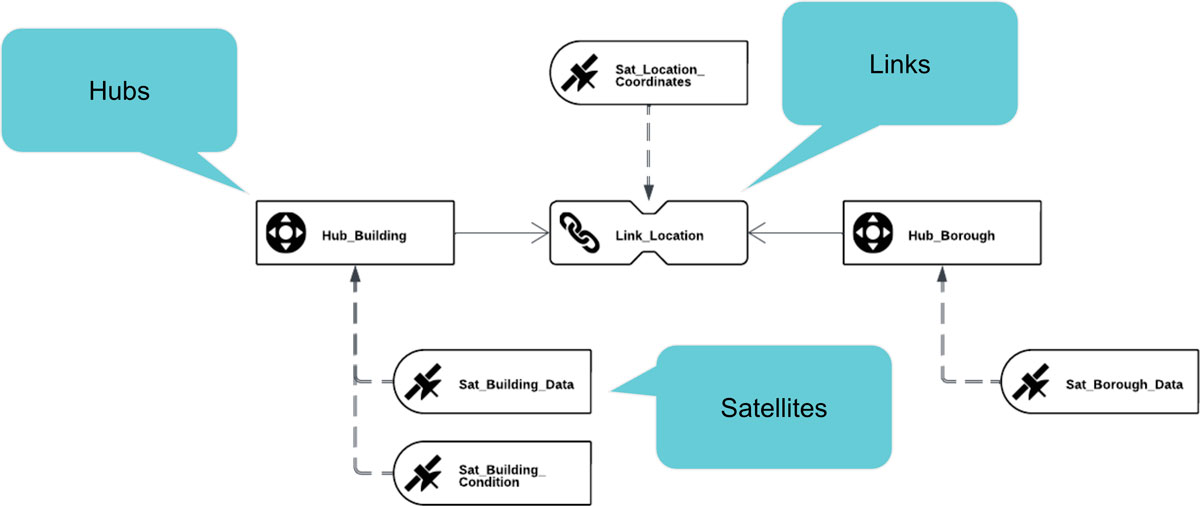
  • Data Modeling: Data Vault organizes data into Hubs, Links, and Satellites, ensuring a flexible and scalable structure. Hubs capture business keys, Links handle relationships, and Satellites store descriptive data.
  • Data Integration: It helps integrate disparate data sources into a unified model that reflects the business context.
  • Change Tracking: While Delta Lake tracks changes at the file or record level, Data Vault optimizes this by capturing deltas more efficiently, especially when splitting data into specialized Satellites.
  • Target-Oriented Design: Data Vault focuses on producing business-ready data models like star schemas, flat tables, or dashboards, rather than being a consumption model itself.

Performance Challenges and Solutions

A frequent criticism of Data Vault on Delta Lake revolves around query performance, particularly due to the columnar storage of Parquet files. Joins can be slow, but this is more a characteristic of the storage mechanism than the modeling technique. Here are some strategies to address this:

  • Denormalization: Flattening data into wide tables eliminates the need for joins, resulting in faster query performance.
  • Materialized Views: Creating materialized Parquet views for end-user consumption ensures high performance without impacting upstream processes.
  • Optimized Storage: Use technologies like Iceberg or Delta tables for Hubs and Links, and consider presenting Satellites as views to minimize storage overhead.
  • Incremental Load: Design systems to handle insert-only incremental loads, reducing the complexity of updates and deletes.

Why Business Users Love Data Vault (Even If They Don’t Know It)

The ultimate goal of any data architecture is to serve business users. Reports, dashboards, and analytics are the end-products they care about. Data Vault excels here by enabling the creation of robust information models that align with user requirements:

  • Flexibility: Business rules can be implemented on top of the Data Vault model to derive the desired target model.
  • Scalability: Large data flows can be broken down into manageable pieces, making the system easier to maintain.
  • Agility: Changes in business requirements can be accommodated without overhauling the entire model.

Delta Lake and Data Vault: Better Together

Rather than viewing Delta Lake and Data Vault as competing approaches, think of them as complementary. Delta Lake provides the foundation for reliable data storage and change tracking, while Data Vault transforms this raw data into meaningful, business-ready formats.
For example, Delta Lake can serve as the staging or landing zone, where raw data is ingested and stored. Data Vault then takes over to model this data into Hubs, Links, and Satellites, preparing it for business consumption. The combination ensures both robust data management and the flexibility to meet diverse analytical needs.

Final Thoughts

Data Vault is a powerful methodology for bridging the gap between raw data and actionable insights. Even in environments that leverage Delta Lake, Data Vault adds value by providing a scalable, user-focused approach to data modeling. By combining the strengths of these two technologies, organizations can achieve both reliability and agility in their data architectures.
As with any tool or methodology, the key is to tailor the implementation to your specific needs, ensuring that both performance and usability are optimized. Whether you’re dealing with Databricks, Parquet, or other tools, Data Vault provides the flexibility and structure to deliver what matters most: business value.

Watch the Video

Meet the Speaker

Profile picture of Michael Olschimke

Michael Olschimke

Michael has more than 15 years of experience in Information Technology. During the last eight years he has specialized in Business Intelligence topics such as OLAP, Dimensional Modelling, and Data Mining. Challenge him with your questions!

Working With Semi-structured Data

Mastering Semi-Structured Data: Key Approaches and Best Practices

Semi-structured data, such as JSON, is increasingly common in modern data ecosystems. But how should you store and handle it? Should you store the data as-is or flatten its structure? Both approaches have unique advantages and limitations, and understanding these can help you make informed decisions based on your use cases.


Key Considerations

  • Expected Data Structure: Is the schema likely to change? Are nested objects (hierarchies) present?
  • Velocity & Size: How large and fast-moving is your data?
  • Database Capabilities: Does your system support efficient queries and manage large datasets?
  • Use Cases: What operations will you perform on the data?

Approach 1: Store Data As-Is

This method involves storing the data in its original format. It’s ideal for flexibility but has limitations:

  • Pros: Quick to ingest, accommodates changing schemas, suitable for unknown operations.
  • Cons: Struggles with large files and nested queries.

Approach 2: Flatten Nested Structures

Flattening the structure simplifies data querying and scalability. However, it also has trade-offs:

  • Pros: Easy querying, no file size constraints, better for fixed schemas.
  • Cons: Complexity in handling hierarchies, loss of schema flexibility.

Data Vault Modeling: A Flexible Solution

Data Vault modeling supports both approaches:

  • Storing As-Is: Store files as non-historized links or satellites, keeping the original file in a single column. Virtual structures can be built on top.
  • Flattening Before Loading: Create standard Data Vault entities while storing the original files in a Data Lake for reference.

Choosing the right strategy depends on your operational needs and database capabilities. By considering these factors, you can efficiently work with semi-structured data while optimizing performance and flexibility.

Watch the Video

Custom Node Types in Coalesce

Custom Node Types in Coalesce: Unlocking Flexibility and Reusability

Nodes are the foundational building blocks in coalesce.io, serving as database objects like tables or views. Each node belongs to a specific type, equipped with a predefined user interface, a create template, and a run template. While coalesce.io provides four standard node types, custom node types allow users to adapt and extend these capabilities for unique requirements.


What Are Custom Node Types?

Custom node types enable users to define reusable database object patterns. By specifying a user interface (UI), Data Definition Language (DDL), and Data Manipulation Language (DML), users can create tailored solutions for patterns such as stages, dimensions, facts, hubs, and links. Parameters and macros make these custom types even more adaptable and reusable.

Why Create Custom Node Types?

Custom node types address two key needs:

  • Custom Needs: Standard node types may not cover specific use cases.
  • Reusability: Custom node types eliminate the redundancy of repeatedly creating similar nodes, saving time and effort.

Key Components of Custom Nodes

Node Definition and UI Configuration

The node definition specifies the UI elements, such as materialization selectors, toggles, dropdowns, and text boxes. These components define how users interact with and configure the custom node.

Create Template

The create template includes SQL logic for generating tables or views. It supports column transformations, comments, clustering keys, and all Snowflake DDL features.

Run Template

The run template defines DML operations, such as inserting data, applying incremental or merge strategies, and performing transformations. These operations are executed exclusively for table-based nodes and utilize all Snowflake DML features.

Get Started with Custom Node Types

Custom node types in coalesce.io empower teams to design reusable, scalable solutions tailored to specific needs. By leveraging their flexibility, you can streamline development, reduce repetitive tasks, and maximize efficiency in your data workflows.

Watch the Video

Meet the Speakers

Profile picture of Tim Kirschke

Tim Kirschke
Senior Consultant

Tim has a Bachelor’s degree in Applied Mathematics and has been working as a BI consultant for Scalefree since the beginning of 2021. He’s an expert in the design and implementation of BI solutions, with focus on the Data Vault 2.0 methodology. His main areas of expertise are dbt, Coalesce, and BigQuery.

Picture of Deniz Polat

Deniz Polat
Consultant

Deniz is working in Business Intelligence and Enterprise Data Warehousing (EDW), supporting Scalefree International since the beginning of 2022. He has a Bachelor’s degree in Business Information Systems. He is a Certified Data Vault 2.0 Practitioner, Scrum Master and Product Owner and has experience in Data Vault modeling, Data Warehouse Automation and Data warehouse transformation with the tools dbt and Coalesce.

CDC, Status Tracking Satellite, and Delta Lake

Watch the Video

Understanding CDC and Status Tracking Satellites in Data Vault

The integration of Change Data Capture (CDC) data into a multi-active satellite and status tracking satellite is a nuanced topic. In a previous session, the focus was primarily on multi-active satellites, leaving the status tracking satellite underexplored. This article will dive deeper into their utility, especially in the context of CDC data.

A status tracking satellite in Data Vault serves a specific purpose: it tracks the appearance, updates, and disappearance of business objects in the source system. However, if CDC data is available, this tracking becomes inherently simpler because CDC already provides explicit information about creates (C), updates (U), and deletes (D). Thus, creating a separate status tracking satellite may not be necessary.

In contrast, when dealing with full extracts (non-CDC data), a status tracking satellite can be invaluable. It enables you to derive creates, updates, and deletes by comparing consecutive extracts, identifying the first appearance (create), differences between records (update), and removal of records (delete). This can be achieved by maintaining a delta check mechanism and creating a robust satellite to store these events.


Handling Multi-Active Data in Status Tracking Satellites

Multi-active data arises when the same business key appears multiple times in the source system, distinguished by another attribute (e.g., customer ID). In these cases, status tracking satellites must accommodate the additional attributes, ensuring that individual records are not incorrectly marked as deleted when only one instance of the multi-active data changes.

For example, consider a scenario where a customer appears twice in the source system with different technical IDs but the same business key. A delete operation on one ID should not remove the customer from the source entirely. To address this, a status tracking satellite should maintain a composite key combining the business key and the multi-active attribute.

This approach ensures that changes are tracked at the appropriate granularity, preserving the integrity of multi-active records. Additionally, adding the CDC information (CUD columns) directly to the main satellite can simplify tracking without requiring a separate status tracking satellite.

Data Vault and Delta Lake: Complementary Approaches

The second question posed is whether Data Vault adds value when Delta Lake is already in use. To address this, it’s essential to understand the distinctions between the two. Delta Lake is a technology, whereas Data Vault is a methodology. While Delta Lake provides a robust framework for handling data in its native form (e.g., JSON, XML) and managing deltas, it does not prescribe how to model or process data for business purposes.

Data Vault, on the other hand, excels in its structured, agile methodology for modeling data. It provides a clear architecture, including hubs, links, and satellites, which organize data effectively for analytics and reporting. This is where Data Vault complements Delta Lake by applying a methodical approach to the data stored in the lake.

In practice, Delta Lake can serve as the persistent staging area (landing zone) in a Data Vault architecture. The metadata and delta tracking capabilities of Delta Lake enhance the efficiency of loading and processing data, while Data Vault ensures that the data is modeled and structured to meet business requirements. This synergy allows organizations to leverage the strengths of both technologies, creating a powerful data ecosystem.

Combining CDC Data with Data Vault and Delta Lake

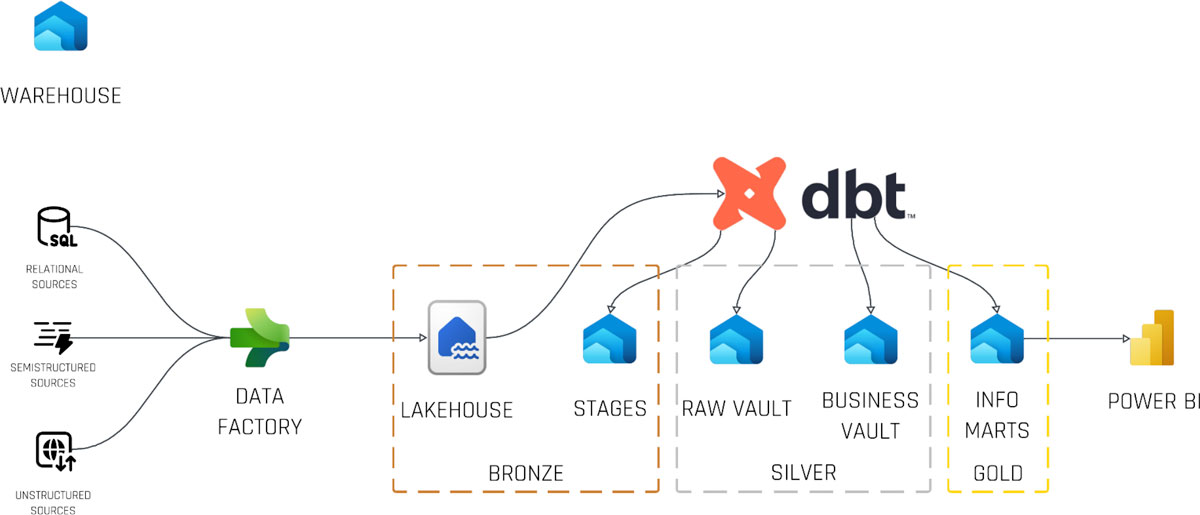
By integrating CDC data, Delta Lake, and Data Vault, organizations can achieve an optimized data architecture. CDC data feeds directly into Delta Lake’s storage layers (bronze, silver, gold), which in turn populate the Data Vault’s hubs, links, and satellites. This integration streamlines data ingestion, transformation, and querying while maintaining flexibility and scalability.

For instance, CDC data can directly populate status tracking satellites or be included in a main satellite for simplicity. Meanwhile, Delta Lake’s metadata features support efficient querying and analysis, enabling the Data Vault layer to focus on applying business logic and producing meaningful insights.

By combining these tools and methodologies, data teams can build robust, agile data platforms that support modern analytics and decision-making needs.

Meet the Speaker

Marc Winkelmann

Marc Winkelmann
Managing Consultant

Marc is working in Business Intelligence and Enterprise Data Warehousing (EDW) with a focus on Data Vault 2.0 implementation and coaching. Since 2016 he is active in consulting and implementation of Data Vault 2.0 solutions with industry leaders in manufacturing, energy supply and facility management sector. In 2020 he became a Data Vault 2.0 Instructor for Scalefree.

Key Factors for Data Vault Automation

Key Factors for Data Vault Automation

We are excited to announce an upcoming webinar, “Key Factors for Data Vault Automation,” where you’ll gain valuable insights into leveraging automation to optimize your data warehousing processes. This session will feature expert speakers who will explore how Datavault Builder can streamline data modeling and significantly enhance your Data Vault implementation.

Automation has become essential in data warehousing, enabling organizations to reduce manual effort, minimize errors, and boost efficiency. Our speakers will share best practices and real-world use cases that demonstrate the transformative power of automation in Data Vault projects. You’ll learn actionable strategies to ensure a smoother, faster, and more reliable data modeling process.

Whether you are new to Data Vault or seeking ways to fine-tune your existing setup, this webinar will provide practical knowledge and tools to help you succeed. Don’t miss this opportunity to discover how to make the most of automation and take your data warehousing efforts to the next level.

Register now to secure your spot and stay ahead in the ever-evolving world of data warehousing!

Webinar Details

  • Date: November 20th 2024
  • Time: 15:00 – 16:00 CET
Watch Webinar Recording

The Need for a Data Warehouse

The Need for a Data Warehouse

In today’s rapidly evolving digital landscape, businesses generate and collect vast amounts of data. However, data alone isn’t enough to ensure success—it’s about how we manage, analyze, and utilize this data. This brings us to a fundamental question: why do we need a data warehouse or Data Vault in our business model?


From Gut Feeling to Data-Driven Decisions

Many organizations, especially mid-sized firms, often rely on gut feelings for decision-making. While experience-based intuition has its place, it also carries a significant risk of error, especially as businesses grow and their operations become more complex. A data warehouse is a game-changer in transforming such organizations into data-driven entities where decisions are made based on facts and analytics rather than instinct alone.

As businesses scale, leaders lose the ability to maintain a complete overview of every operational detail. This is where a systematic approach to organizing, analyzing, and processing data becomes essential. A data warehouse centralizes and standardizes data from multiple sources, making it easier to extract insights and support rational, informed decisions across all levels of the organization.

Enhanced Business Process Automation

With a centralized repository like a data warehouse, businesses can unlock opportunities for automation. Automated processes can access, analyze, and utilize data seamlessly, leading to improved efficiency and accuracy. Whether it’s optimizing workflows or refining customer interactions, having reliable, accessible data is crucial for these systems to function effectively.

Democratizing Data Access

A significant aspect of a data-driven organization is making relevant data accessible to employees across roles. Every employee, from frontline workers to C-suite executives, is expected to make decisions. For these decisions to be effective, they need to be grounded in data.

However, this doesn’t mean unrestricted access. Data warehouses must incorporate robust security measures, such as role-based access, to ensure that employees can access only the data necessary for their responsibilities. This combination of widespread accessibility and stringent security supports a culture of informed decision-making while safeguarding sensitive information.

Do You Need a Data Vault?

When it comes to managing enterprise data, many organizations face additional challenges: integrating multiple source systems, ensuring data security and privacy, and handling real-time and batch processing simultaneously. A Data Vault model offers a comprehensive solution to these challenges by supporting integration, auditability, and adaptability.

While some businesses may start with simpler models, their requirements will inevitably evolve. Laws and industry standards may impose new data privacy mandates, or management may seek to leverage more advanced analytics capabilities. A well-designed Data Vault can accommodate these future needs without requiring a complete overhaul of the existing system.

The Future-Ready Advantage

One of the standout features of a Data Vault is its flexibility. It allows businesses to scale and adapt their data management strategies as they grow. Whether it’s adding new data sources, meeting stricter compliance requirements, or enabling more sophisticated analytics, the Data Vault model supports incremental changes without disrupting existing operations.

This adaptability makes it an invaluable asset for enterprises looking to future-proof their data strategies. While simpler solutions might suffice for today’s needs, they may not hold up against tomorrow’s demands. A Data Vault ensures that businesses are prepared for the inevitable increase in complexity and volume of their data requirements.

Conclusion

Investing in a data warehouse or Data Vault isn’t just about technology—it’s about fostering a culture of informed, data-driven decision-making. From streamlining processes to democratizing data access, these systems provide the foundation for businesses to thrive in an increasingly competitive and data-centric world. Whether you’re just starting your data journey or looking to enhance your existing capabilities, now is the time to prioritize a robust, scalable data solution.

As your business grows, so will your data requirements. A data warehouse or Data Vault not only meets these needs but positions your organization to capitalize on the full potential of its data—today and in the future.

Watch the Video

Meet the Speaker

Profile picture of Michael Olschimke

Michael Olschimke

Michael has more than 15 years of experience in Information Technology. During the last eight years he has specialized in Business Intelligence topics such as OLAP, Dimensional Modelling, and Data Mining. Challenge him with your questions!

Close Menu