search
0

Enterprise Data Transformations with Turbovault and dbt Cloud

Watch Webinar Recording

Webinar Summary

Data Vault is vital for businesses due to its adaptability and scalability in managing dynamic data environments. Its hub-and-spoke architecture ensures traceability and agility, enabling quick adaptation to changing requirements and diverse data sources.

Come and join our upcoming webinar and learn about how to use dbt Cloud with Turbovault and a data modeling tool to implement data vault in your organization.

In this webinar you will

  • Receive a detailed 90-minute “show-and-tell” walkthrough of an end-to-end Data Vault implementation using cutting-edge tools
  • Explore the seamless integration of Ellie.ai, Turbovault4dbt, and Datavault4dbt for enhanced data modeling and automation
  • Understand the practical aspects of implementing a Data Vault without the need for a pre-configured demo environment.

Webinar Details

  • Date: 27th February
  • Time: 14:00 – 15:45 PM CET

Webinar Agenda

  1. Introduction to the Power Trio: dbt Cloud, Turbovault, and Data Modeling Tools
  2. 90-Minute “Show-and-Tell” Walkthrough of an End-to-End Data Vault Implementation
    • Using Ellie.ai for ER Model, Turbovault4dbt for dbt Automation, and Datavault4dbt for DV Model Generation
  3. Insights into Data Vault Implementation in Medium and Large Sized Companies
  4. Q&A Session with Industry Experts

In Partnership With

Speakers

Profile picture of Tim Kirschke

Tim Kirschke
Senior Consultant

Tim has a Bachelor’s degree in Applied Mathematics and has been working as a BI consultant for Scalefree since the beginning of 2021. He’s an expert in the design and implementation of BI solutions, with focus on the Data Vault 2.0 methodology. His main areas of expertise are dbt, Coalesce, and BigQuery.

Sean McIntyre

Sean McIntyre
Senior Solutions Architect

Sean is a Senior Solutions Architect at dbt Labs who works with organizations across Europe, helping them get started with and scaling dbt Cloud with Data Vault. In his last role, he was a Principal Data Engineer who implemented the modern data stack. Originally from Canada, his homebase is now Vienna.

Hash Key and Hash Diff Computation

Watch the Video

In our ongoing series, CEO Michael Olschimke  answers a question from the audience regarding Has Key and Hash Diff computation:

“What is the recommended way for Hashing? In the case of an optional relationship, should we first replace the NULL value with the default value before hashing? What is the reason for this? Should we include the BK of parent (hub/link) in calculation of Hash Diff? The above was mentioned in your book ‘Building a scalable Data Warehouse with Data Vault 2.0’ but other blogs emphasize a loading code for a satellite that compares the latest Hash Diff per Hash Key (even if BK is included in Hash Diff). Is there a specific reason?”

Specifically, the discussion delves into whether it is advisable to replace NULL values with default values before hashing in the context of an optional relationship. The rationale behind this practice and the potential inclusion of the BK of the parent (hub/link) in the calculation of Hash Diff are explored.

This topic was previously highlighted in Michael’s book ‘Building a scalable Data Warehouse with Data Vault 2.0’, but contrasting perspectives from other blogs advocate for a loading code approach for a satellite that considers the latest Hash Diff per Hash Key, even if the BK is included in the Hash Diff.

Michael sheds light on the significance of Hash Key and Hash Diff in this discussion.

Meet the Speaker

Profile picture of Michael Olschimke

Michael Olschimke

Michael has more than 15 years of experience in Information Technology. During the last eight years he has specialized in Business Intelligence topics such as OLAP, Dimensional Modelling, and Data Mining. Challenge him with your questions!

Data Vault in a Data Mesh Approach

Solutions

Data Vault & Data Mesh

Dive into the integration of Data Vault within the context of Data Mesh, the journey into the future of scalable and decentralized data architectures with our Data Vault 2.Go Newsletter, your go-to source for (almost) all things related to the cutting-edge world of data.

In this edition, we’re diving into the integration of Data Vault 2.0 within the context of a Data Mesh approach. Join the journey into the future of scalable and decentralized data architectures.

Data Vault in a Data Mesh approach

This webniar explores the integration of Data Vault within a Data Mesh approach, highlighting the synergy between Data Mesh principles and Data Vault’s scalability, flexibility, resilience, and interoperability. We’re diving into the integration of Data Vault within the context of a Data Mesh approach. A journey into the future of scalable and decentralized data architectures.

Watch webinar recording

Understanding Data Mesh: a quick recap

Before we delve into the role of Data Vault, let’s refresh our memories on what a Data Mesh is. Coined by Zhamak Dehghani, a Data Mesh is an architectural paradigm that aims to address the challenges of scaling data within large organizations. It promotes a decentralized approach to data ownership and access, treating data as a product and establishing domain-oriented, self-serve data infrastructure.

Data Vault in the Mesh: a synergistic alliance

Now, let’s talk about Data Vault. Historically recognized as a robust methodology for building enterprise data warehouses, Data Vault has proven its worth in creating scalable, flexible, and resilient data architectures. However, its integration into a Data Mesh approach adds a new layer of agility and efficiency.

Scalability

Data Mesh emphasizes the need for decentralized data ownership, making it crucial to scale data infrastructure horizontally. Data Vault, with its modular and scalable architecture, aligns seamlessly with this requirement. By breaking down the data warehouse into smaller, manageable components, Data Vault ensures that the system can scale effortlessly as data volume and complexity increase.

Flexibility

In a Data Mesh, each domain or business unit is responsible for its own data products. Data Vault’s adaptability shines here, allowing different teams to model and manage their data independently. This flexibility enables faster development cycles and reduces dependencies on a centralized data team, empowering domain teams to innovate and iterate at their own pace.

Resilience

Data Mesh introduces the concept of data products and services, emphasizing the need for resilience in data architectures. Data Vault, with its focus on capturing and managing historical data changes, plays a crucial role in ensuring the reliability and integrity of data products. This historical record-keeping proves invaluable for auditing, compliance, and understanding the evolution of data over time.

Interoperability

A Data Mesh advocates for a federated data architecture where data products can seamlessly interact with each other. Data Vault’s standardized modeling techniques and well-defined interfaces make it easier for different domains to collaborate and share data while maintaining consistency and coherence across the entire ecosystem.

Data Mesh & Data Vault

Conclusion

The marriage of Data Vault and Data Mesh represents a leap forward in the evolution of data architectures. It combines the proven reliability of Data Vault with the agility and scalability of a decentralized Data Mesh, offering organizations a powerful solution for managing their ever-growing and diverse data landscape.

While the integration of Data Vault into a Data Mesh approach brings numerous benefits, it’s essential to acknowledge potential challenges. Managing the decentralized nature of data ownership, ensuring consistent standards across domains, and providing adequate governance are crucial aspects that require careful consideration.

Make sure to watch the webinar recording to Data Mesh in a Data Vault 2.0 approach to dive even deeper into the knowledge.

– Marc Winkelmann (Scalefree)

PIT and Effectivity Satellites

Watch the Video

In our continuous series, our CEO Michael Olschimke delves into a thought-provoking inquiry posed by a member of our audience:

“Why do numerous illustrations of Point-In-Time (PIT) tables utilize load datetimes instead of applied datetimes from the source, despite the fact that analysts generally aim to restore data for a specific datetime as it existed in the source? Are there instances of PIT table implementations that incorporate both applied datetimes and load datetimes?”

Michael delves into the intricacies of Point-In-Time (PIT) tables, exploring the rationale behind the prevalent use of load datetimes versus applied datetimes in these structures. He addresses the challenges and considerations in designing PIT tables that accurately reflect the state of data as per the source system, while also considering the need for historical restoration based on specific datetimes. Michael provides insights into potential approaches or hybrid models that combine applied datetimes and load datetimes to meet both analytical requirements and data reconstruction needs effectively within PIT table implementations.

Meet the Speaker

Profile picture of Michael Olschimke

Michael Olschimke

Michael has more than 15 years of experience in Information Technology. During the last eight years he has specialized in Business Intelligence topics such as OLAP, Dimensional Modelling, and Data Mining. Challenge him with your questions!

Data Vault Point In Time (PIT) Tables

Watch the Video

In our continuing series, our CEO, Michael Olschimke, delves into a thought-provoking question raised by an audience member regarding Point-In-Time (PIT) tables:

“I’m trying to grasp why the majority of Point-In-Time (PIT) table illustrations do not incorporate tracking satellites to accurately reconstruct the timeline for a business key. For example, I have three snapshots for business key 001 stored in satellite1. This seems inaccurate as the record was deleted from the source. Why does this prevail?”

Michael engages in a detailed discussion on the concepts of Point-In-Time (PIT) and Effectivity Satellites, shedding light on the importance of incorporating tracking satellites for maintaining data integrity and timeline accuracy in data warehousing practices.

Meet the Speaker

Profile picture of Michael Olschimke

Michael Olschimke

Michael has more than 15 years of experience in Information Technology. During the last eight years he has specialized in Business Intelligence topics such as OLAP, Dimensional Modelling, and Data Mining. Challenge him with your questions!

Salesforce Spring ‘24 Update for Data People

Watch the Webinar

Join our webinar, “Salesforce Spring ’24 Update for Data People,” to get a firsthand look at the newest features designed for data enthusiasts. We’ll explore the practical enhancements that make data management more efficient and processes smoother. Stay informed about the latest tools and improvements in Salesforce, tailored specifically for those who work with data.

Watch Webinar Recording

Dependent Child Links with Status Tracking

Watch the Video

In our ongoing series, CEO Michael Olschimke addresses a viewer’s inquiry regarding dependent child links with status tracking:

“I have a source with multiple records for one BK. I model this as a hub and a satellite with a dependent child key. As a status tracking satellite only tracks the parent key hub; how can I track the deletes of the records with the dependent child?”

The viewer presents a challenge tied to a source containing multiple records for a single Business Key (BK). Their current modeling involves a hub and a satellite with a dependent child key. However, they are grappling with how to effectively track the deletions of records associated with the dependent child, especially when a status tracking satellite typically tracks only the parent key hub.

Michael engages with this query, shedding light on strategies and best practices related to Dependent Child Links in the context of Data Vault modeling. He offers insights into addressing the specific scenario described by the viewer, providing practical guidance on tracking deletions in situations where dependent child keys are involved.

This episode serves as a valuable resource for Data Vault practitioners grappling with similar challenges in their modeling endeavors. Michael’s expertise provides clarity on how to navigate the intricacies of tracking deletions effectively within the Data Vault framework.

Meet the Speaker

Profile picture of Michael Olschimke

Michael Olschimke

Michael has more than 15 years of experience in Information Technology. During the last eight years he has specialized in Business Intelligence topics such as OLAP, Dimensional Modelling, and Data Mining. Challenge him with your questions!

Ensuring Data Quality in Your Data Warehouse

Data quality in a data warehouse

Ensuring Data Quality

Poor data quality can lead to inaccurate insights, flawed decision-making, and ultimately, compromised business success. In the era of big data, organizations rely heavily on data warehouses to store, manage, and analyze vast amounts of information. However, the effectiveness of a data warehouse depends on the quality of the data it contains. How can high-quality data be ensured?

In this blog article, we will dive into the significance of data quality in an enterprise data warehouse and provide practical strategies to ensure accurate, reliable, and high-quality data with Data Vault 2.0.

You also might want check out the webinar recording about this exact topic. Watch it here for free!

Ensuring Data quality in your data warehouse

In today’s data-driven culture, organizations rely heavily on their data warehouses to make informed decisions. However, the effectiveness of a data warehouse depends on the quality of the data it contains. In this presentation, we will dive into the significance of data quality and provide practical strategies to ensure accurate, reliable, and high-quality data with Data Vault 2.0.

Watch webinar recording

What are the reasons for bad data?

Data quality refers to the accuracy, completeness, consistency, and reliability of data. In the context of a data warehouse, maintaining high data quality is crucial to derive meaningful insights and make informed decisions. Several factors contribute to the presence of poor or bad data. Identifying and understanding these reasons is essential for implementing effective data quality management strategies. Here are some common reasons for bad data in a data warehouse:

  • Incomplete or missing source data
  • Lack of standardizations
  • Data transformation issues
  • Poor data governance
  • Insufficient validation and quality checks
  • Lack of user training and awareness

Data quality techniques

A variety of data quality techniques exist and there is no single best option for all issues. The difficulty lies in understanding the current situation and in understanding the strengths and weaknesses of the techniques available. In fact, the effectiveness of the techniques varies depending on the context. A given technique fits well in some situations and poorly in others. Scott Ambler developed five comparison factors appropriate to consider the effectiveness of a data quality technique. These factors, that are shown below, are intended to help you choose the right DQ technique for the situation you face:

Data Quality graphic technique comparison for a data warehouse

Source: https://agiledata.org/essays/dataqualitytechniquecomparison.html

  • Timeliness: Are you reacting to a discovered DQ issue or are you applying it to proactively avoid or reduce DQ issues?
  • Level of automation: To what extent is automation possible? A continuous technique would be automatically invoked as appropriate.
  • Effect on source: Does the technique have any effect on the actual data source?
  • Benefit realization: Will the benefit of the quality improvement be immediate or is a long-term benefit to be expected?
  • Required skills: Does the technique require demanding skills that may need to be gained through training/experience or is the technique easy to learn?

The benefit of the Data Vault 2.0 approach

When bad data is detected, the first thing to do is perform a root cause analysis. What if the bad data originates from the source? The best approach would be to fix the errors directly in the source system. However, this method is often rejected as it is considered to be costly. Since the sources are out of the scope of a data warehousing team, we need to find a way to clean the bad data somewhere in our architecture. In Data Vault 2.0, we consider a data cleansing routine as a business rule (soft rule) whereby those rules are implemented in the Business Vault.

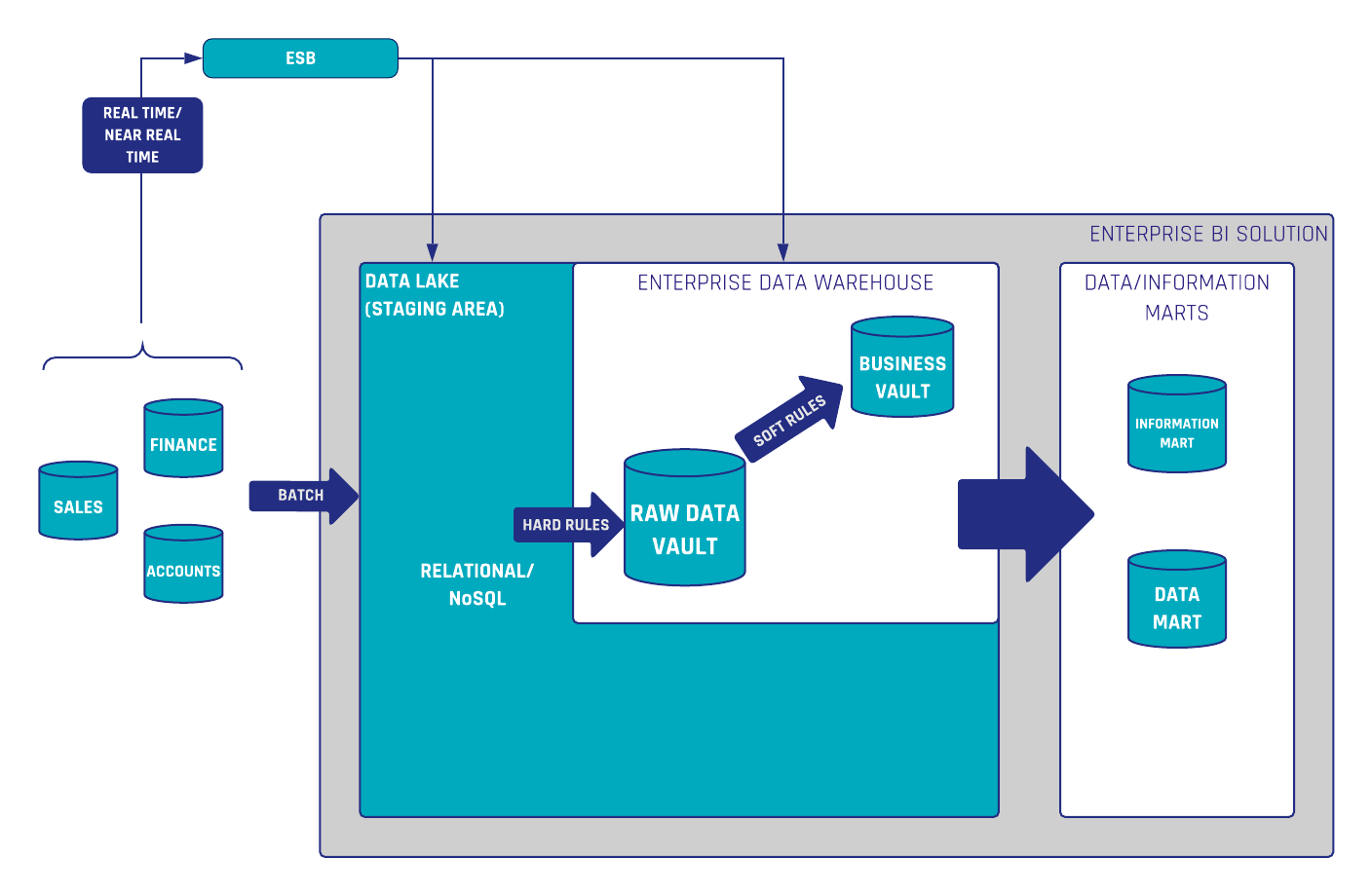
In the shown architecture (Figure 1) there is a Quality Layer integrated into the Business Vault where the data cleansing routines are performed. The purpose is to make the cleansed data highly reusable for downstream business vault and information mart objects. If the data quality rules change, or new knowledge regarding the data is obtained, it is possible to adjust the rules without having to reload any previous raw data.

Now, the data is ready for use in any dashboarding or reporting tool. It is also possible to write the cleansed data back to the source. For this purpose, the data is provided to an Interface Mart which in turn sends the data back to the source system itself. In this way, business users can utilize the high-quality data inside their source applications as well. The next time when loading the raw data into the Raw Data Vault, the data is already cleansed.

Data quality in a data warehouse

The second use case described in Figure 1 is the monitoring of bad data by a so-called quality mart. The quality mart is part of the information delivery layer and selects all the bad data instead of the cleansed data. Based on this, reports or graphical user interfaces can be created for the data steward. In addition, the data steward can leave comments on certain records that should not be considered bad data or are exceptions to the rules. This user interface stores all added data (comments, flags, etc.) in a database, which in turn serves as a source for the Data Vault. This data can be used to extend the business rules. In particular, to filter out the exceptions to the data cleansing rules.

Another advantage of Data Vault 2.0 are the high pattern-based and standardized entities. This enables a simple and automated development of technical tests. Once created for each Data Vault entity, these tests can be applied to both the Raw Data Vault entities and the Business Vault entities. This ensures a consistent and auditable data warehouse. Check out this blog article, if you need more in-depth information regarding technical tests in Data Vault.

Common data quality techniques

In the last section, we have already described a few techniques for ensuring high data quality in a Data Vault 2.0 architecture. Of course, there are a number of other techniques that are independent of which modeling approach is used. In addition, some techniques do not focus primarily on data quality, but they still have a positive influence on it. Let’s have a closer look on some of them below:

  • Validation of business rules: At this point, we have to distinguish between data quality and information quality. Data quality focuses on the intrinsic characteristics of the data, addressing issues such as errors, inconsistencies, and completeness at the granular level. Information quality is a broader concept that encompasses not only the quality of individual data elements but also the overall value and usefulness of the information derived from those data. Beyond that, what is useful information for one business case may not be sufficient for another. For this reason, the business users must be heavily involved in this process, for example through user acceptance tests.

  • Data Governance involves defining roles, responsibilities, and accountability for data quality, ensuring that data is treated as a valuable organizational asset. Develop and enforce data governance frameworks, including data quality standards, stewardship responsibilities, and documentation.

  • Data Guidance and Standardization ensures uniformity in formats, units, and values across the data warehouse, reducing the risk of errors caused by variations in data representation. Establish and enforce standardized naming conventions, units of measure, formatting rules, and data security/privacy conventions. Moreover, Data Vault 2.0 is very helpful in this regard, as all entities are highly standardized and automatable.

  • Data Steward: As part of the Data Governance practice, a data steward is an oversight/governance role within an organization and is responsible for ensuring the quality and fitness for purpose of the organization’s data.

  • Continuous Integration (CI) is a development practice where developers integrate their work frequently. Successful tests should be an obligatory condition for introducing any new change to your EDW code base. That is achievable by using DevOp tools and enabling continuous integration in your development lifecycle. Running automated tests each time code is checked or merged ensures that any data consistency issues or bugs are detected early and fixed before they are put into production.

  • A Review is a peer review of the implementation (source code, data models etc.). Developing a strong review process sets a foundation for continuous improvement and should become part of a development team’s workflow to improve quality and ensure that every piece of code has been looked at by another team member.

  • User training and Awareness: Educate users on the importance of data quality and provide training on the necessary topics and skills. Foster a culture of data quality awareness within the organization to encourage proactive identification and resolution of data quality issues.

Conclusion

There is no question that high data quality is essential for a successful data warehousing project. The process towards high data quality is not a one-time effort but an ongoing commitment. It is a multifaceted process that involves a combination of techniques, collaboration across teams, and fostering a culture of data stewardship.

In this article, we have addressed the causes of bad data and discussed various techniques for dealing with these issues. More accurately, we described how to implement data quality techniques within a Data Vault 2.0 architecture.

If you want to dive deeper into Data Quality then remember to watch the free webinar recording.

Data Mining in the Data Vault Architecture

Watch the Video

In our ongoing series, CEO Michael Olschimke addresses a viewer’s question:

“We have a data mining model to be applied during information delivery. Where does it fit in the Data Vault 2.0 architecture?”

The viewer inquires about integrating a data mining model into the Data Vault 2.0 architecture specifically for information delivery. They seek guidance on where this data mining aspect fits within the broader Data Vault framework.

Michael delves into the topic of Data Mining in the context of Data Vault 2.0. He provides insights into the strategic placement of data mining models within the architecture, emphasizing their role in enhancing information delivery processes. Michael’s response sheds light on how organizations can effectively leverage data mining techniques to extract valuable insights while adhering to the principles of the Data Vault methodology.

This episode serves as a valuable resource for those navigating the intersection of data mining and Data Vault 2.0, offering practical guidance on seamlessly integrating data mining models into the architecture.

Meet the Speaker

Profile picture of Michael Olschimke

Michael Olschimke

Michael has more than 15 years of experience in Information Technology. During the last eight years he has specialized in Business Intelligence topics such as OLAP, Dimensional Modelling, and Data Mining. Challenge him with your questions!

Data Vault Naming Conventions

Watch the Video

In our continuous series, CEO Michael Olschimke addresses a viewer’s question reading naming conventions in Data Vault:

“What naming conventions do you recommend for the Data Vault model?”

The viewer seeks advice on the recommended naming conventions for structuring the Data Vault model. Recognizing the significance of clear and standardized naming in data modeling, the question focuses on eliciting practical insights and guidelines.

Michael shares his expertise on effective naming conventions tailored for Data Vault models. He emphasizes the importance of consistency, clarity, and meaningful names to enhance the comprehensibility and maintainability of the Data Vault structure. By providing practical recommendations, Michael aids viewers in establishing robust naming conventions aligned with best practices in Data Vault modeling.

This episode serves as a valuable resource for data professionals aiming to optimize their Data Vault models through well-defined and organized naming conventions.

Meet the Speaker

Profile picture of Michael Olschimke

Michael Olschimke

Michael has more than 15 years of experience in Information Technology. During the last eight years he has specialized in Business Intelligence topics such as OLAP, Dimensional Modelling, and Data Mining. Challenge him with your questions!

Agile Data Warehousing: Addressing the Hard Problems

Watch the Webinar

The world moves at a rapid pace, and your organization must be able to respond to changing conditions. Your data warehouse (DW) team is being asked to help end users answer new questions to gain new insights.

These requests are coming in at an increasing pace and are increasingly complex. Your team(s) need to adopt an agile data warehousing strategy, but are struggling to address common challenges when trying to do so.

In this session Scott Ambler addresses a series of difficult questions that DW practitioners need answers to if they are to learn how to work in a work in an agile manner

Watch Webinar Recording

Modelling the Date Dimension in Data Vault

Watch the Video

In our continuous series, CEO Michael Olschimke delves into a question from the audience about how to model the date dimension in Data Vault:

“In many data sources we get data with a DATE data type. In some cases we want to use a Time-Dimension for this fields. How would you model this in Data Vault:

  •  As Time-Hub in Raw Vault and referencing that Hub in a Link?
  • As Time-Reference Table and then joining that in the IM? Should the Time Dimension hold a Hash Key as Dimension Key for that, or the Business Key (date)?
  • Or both options?”

The viewer raises a pertinent query regarding the modeling of DATE data types from various sources within the Data Vault modeling framework. The focus is on incorporating a Time-Dimension for these date fields, presenting multiple options for consideration.

Michael explores potential solutions, shedding light on two prominent strategies:

Time-Hub in Raw Vault: Creating a dedicated Time-Hub in the Raw Vault and referencing it in a Link. This approach involves establishing a distinct hub for time-related data, providing a structured foundation for subsequent processing.

Time-Reference Table in Information Mart (IM): Alternatively, considering a Time-Reference Table in the IM and joining it as needed. The discussion delves into the nuances of choosing between a Hash Key and Business Key (date) for the Time Dimension, offering insights into the implications of each choice.

Michael’s insights provide valuable guidance for navigating the complexities of modeling date dimensions within the Data Vault paradigm. By weighing the pros and cons of different approaches, viewers gain a deeper understanding of how to effectively integrate time-related data into their Data Vault architecture.

Meet the Speaker

Profile picture of Michael Olschimke

Michael Olschimke

Michael has more than 15 years of experience in Information Technology. During the last eight years he has specialized in Business Intelligence topics such as OLAP, Dimensional Modelling, and Data Mining. Challenge him with your questions!

Close Menu