search
0

Typical Mistakes in Agile Approaches and How to Avoid Them

Watch the Webinar

In our webinar ‘Typical Mistakes in Agile Approaches’ we’ll explore the world of Agile Project Management, introducing Scrum as a powerful framework.

We’ll dive into the Data Vault 2.0 methodology for data integration in DWHs. Additionally, we’ll also discuss common mistakes when transitioning from Waterfall to agile approaches, including challenges specific to Data Vault and Scrum, offering practical guidance.

Join us to uncover common pitfalls and mistakes encountered in Agile Project Management and how to avoid them.

Watch Webinar Recording

Webinar Agenda

1. Get started with project management
2. Let’s get to know Scrum and agile project management and where are the pitfalls?
3. How does agile project management fits Data Vault 2.0?
4. How to avoid the Pitfall of not delivering business value

Seamless Agile Project Management in the BI Landscape

Agile project management has gained significant popularity in the corporate world due to its emphasis on collaboration, customer feedback, and continuous development. This approach has found its way into Business Intelligence (BI) projects, yet many companies still encounter common challenges or struggle to fully embrace agile methodologies.

A critical aspect of agile project management in BI involves effective collaboration among different teams. In today’s fast-paced business environment, projects often necessitate contributions from multiple departments or teams with diverse skill sets.
However, communication gaps, conflicting priorities, and differences in work styles can pose significant obstacles to smooth coordination and project success. Overcoming these challenges requires fostering open communication channels, establishing clear protocols for inter-team interactions, and cultivating a culture of mutual respect and understanding.

In the context of Data Vault and BI projects, several touchpoints demand collaboration from various departments or teams. For instance, gathering background information about the data source, ensuring privacy compliance, and obtaining well-defined user requirements are all critical components. Implementing well-defined processes, where everyone understands their responsibilities, can streamline these tasks. For example, ensuring privacy tagging precedes the implementation of the Raw Data Vault to ensure accurate Satellite splits. Additionally, clear requirements from users or reporting teams, in the form of User Stories or Question Stories, are fundamental for smooth project execution. In the following, you can visualize a high level example of an Development process of an Dashboard in a typical BI Project and the different Teams/People needed.

blank

Another common issue in BI projects is the excessive focus on technical aspects. Teams often dedicate significant time to building the entire technological infrastructure, neglecting the timely delivery of business value. At Scalefree, we advocate prioritizing business value from the project’s outset. We endorse the tracer bullet approach as an effective method, contingent on well-defined requirements. These issues are just a few examples of the challenges often faced in BI projects.


If you’re unfamiliar with the tracer bullet approach, don’t worry. We’ll dive into this topic and more in our webinar, “Typical Mistakes in Agile Approaches”. We also will take a look at Scrum and the Data Vault 2.0 methodology and uncover common mistakes in agile Project Management and learn how to avoid them. Watch the recording here for free!

OUR NEW MONTHLY EXPERT SESSION

To address the growing interest and challenges in agile project management, Scalefree is introducing “Insight Agile Projects,” a monthly expert session designed to address questions, share insights, and enhance collective knowledge in agile project management. Join us every 2nd Thursday of the month to gain valuable insights from our experienced project management experts, covering a range of topics including requirements analysis, effort estimation processes, stakeholder and people management, and their integration with the Data Vault 2.0 methodology.

Don’t miss the opportunity to enhance your project management proficiency with our expert guidance. Mark your calendars for the upcoming webinar and join our monthly expert sessions to gain invaluable insights into agile project management.


– Lorenz Kindling (Scalefree)

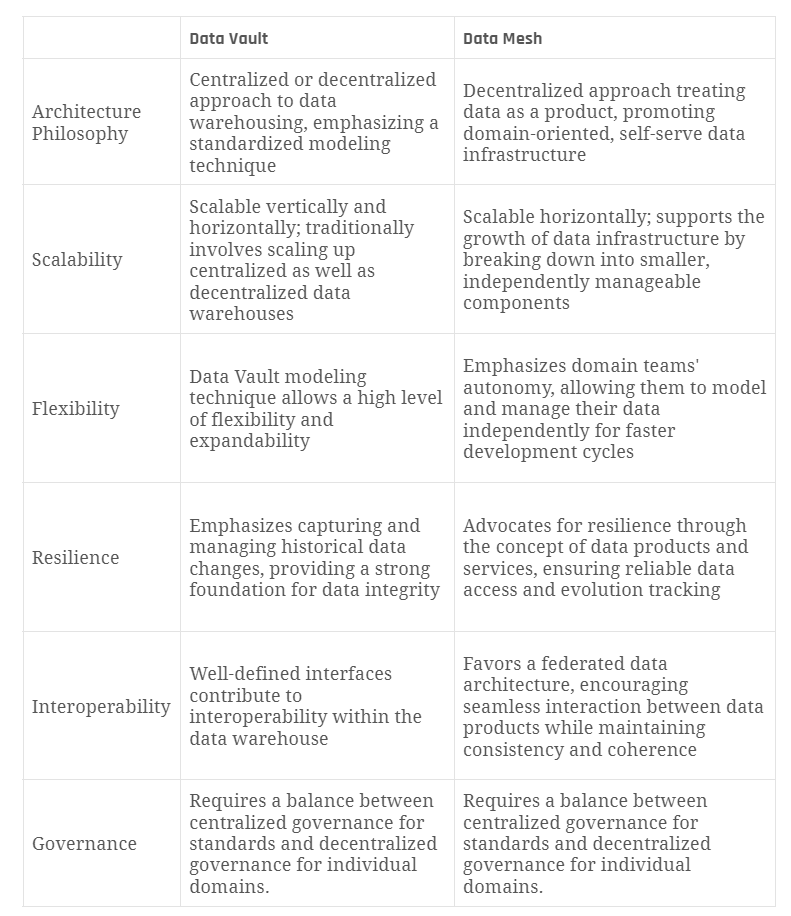
Data Mesh & Data Vault: Raw Data vs. Information

Watch the Video

In the ongoing Data Vault Friday series, our CEO, Michael Olschimke, addresses a pertinent question raised by the audience, focusing on the intersection of Data Mesh and Data Vault methodologies.

“In a data mesh/federation approach, can you share the raw data vault or the business vault across the enterprise or does the share only happen in the information mart? I believe it may happen some raw vault tables of a data domain to be joined with a raw vault of another data domain.”

Michael delves into the intricacies of Data Mesh and Data Vault methodologies, shedding light on the dynamics of sharing data across different domains within an enterprise. He provides insights into the scenarios where sharing may occur, discussing the potential of joining Raw Vault tables from disparate data domains. This elucidation aims to guide practitioners in navigating the nuances of data sharing in a federated environment.

Meet the Speaker

Profile picture of Michael Olschimke

Michael Olschimke

Michael has more than 15 years of experience in Information Technology. During the last eight years he has specialized in Business Intelligence topics such as OLAP, Dimensional Modelling, and Data Mining. Challenge him with your questions!

Reference Hubs and Effectivity Satellites in Data Vault

Watch the Video

In the ongoing Data Vault Friday series, our CEO, Michael Olschimke, delves into two insightful questions raised by our audience about Reference Hubs and Effectivity Satellites.

“Should the Satellite hang from the Master Hub or Link? Our preference was to hang from the Hub as it kept the model simple and also to keep the CDC straightforward. Another reason we are leaning toward this is, that the descriptive columns belong to the Master Hub so it would be ideal to keep it as a satellite under the hub.”

“Now with the link, if there is any change in the relationship between the Master Hub Column to the Reference Hub Column in the link we would like to capture it. And it is via effectivity satellites. If we have One Master Hub column and a lot of the Reference Hubs columns do we end up in a lot of Effectivity Satellites? Or just one effectivity satellite as the driving key is the Master Hub column?”

Michael provides insights into these considerations regarding Reference Hubs and Effectivity Satellites, offering guidance on the optimal structuring of Satellites and managing Effectivity in Link relationships.

Meet the Speaker

Profile picture of Michael Olschimke

Michael Olschimke

Michael has more than 15 years of experience in Information Technology. During the last eight years he has specialized in Business Intelligence topics such as OLAP, Dimensional Modelling, and Data Mining. Challenge him with your questions!

Natural Key vs. Technical ID in Data Vault

Watch the Video

In our continuous exploration of Data Vault concepts during the Data Vault Friday series, our CEO, Michael Olschimke, takes on a thought-provoking question from a member of our audience regarding natural keys.

“Can a work order ID or recommendation ID be considered a natural business key even though there is no business ‘meaning’ to these ids? or should I use the text description of the recommendation as the business key? The work order would have to be a composite key made up of details and a date for the work order which at that point seems like just using the ID makes more sense.”

Michael addresses the nuanced concept of Natural Key and Technical ID in the context of work order and recommendation IDs. The discussion provides valuable insights into making informed decisions about choosing business keys in scenarios where the identifiers lack inherent business meaning.

Meet the Speaker

Profile picture of Michael Olschimke

Michael Olschimke

Michael has more than 15 years of experience in Information Technology. During the last eight years he has specialized in Business Intelligence topics such as OLAP, Dimensional Modelling, and Data Mining. Challenge him with your questions!

Snackable Data Insights: Analytics Meets Salesforce Data Cloud

Watch the Webinar

What are we going to do with all that data? Something you might ask yourself when you are checking the current size of your data lake or data warehouse.

In our webinar, we will explore together how we can make use of our data residing in Snowflake using Salesforce Data Cloud or Tableau. Extract value from your data now!

Join us to learn more about the newest analytics tools inside the Salesforce ecosystem and how you can use them in your data architecture.

Watch Webinar Recording

Webinar Agenda

1. Recap DDL ’23
2. Ask the Right Questions
3. Issues
4. (New) Tools

Meet the Speaker

Picture of Markus Lewandowski

Markus Lewandowski

Markus Lewandowski is a Consultant at Scalefree, who has over 6 Years experience in Salesforce development and administration. While also being a Certified Data Vault 2.0 Practitioner (CDVP2™) he is taking a hybrid role as a Salesforce Specialist and DV 2.0 Practitioner. His main competences are Salesforce Process Automation, Application Integration and Data Management.

HL7 FHIR resources in Data Vault

Watch the Video

In our continuous exploration of Data Vault concepts during the Data Vault Friday series, our CEO, Michael Olschimke, takes on a compelling question posed by a member of our audience.

“How would you model data that is transmitted as HL7 FHIR resources in Data Vault?”

Michael delves into the intricacies of handling HL7 FHIR resources within the Data Vault framework. This session is a valuable resource for those seeking insights into the effective modeling of healthcare data encoded in HL7 FHIR resources.

Meet the Speaker

Profile picture of Michael Olschimke

Michael Olschimke

Michael has more than 15 years of experience in Information Technology. During the last eight years he has specialized in Business Intelligence topics such as OLAP, Dimensional Modelling, and Data Mining. Challenge him with your questions!

Business Satellites in Data Vault

Watch the Video

In the latest segment of our Data Vault Friday series, our esteemed CEO, Michael Olschimke, delves into a question brought forward by a member of our audience.

“What are business satellites?”

Michael passionately explores the concept of business satellites in a dedicated session, offering in-depth insights and valuable perspectives on their significance within the Data Vault methodology. This engaging discussion is geared towards enhancing your understanding of business satellites and their role in the broader context of Data Vault architecture.

Meet the Speaker

Profile picture of Michael Olschimke

Michael Olschimke

Michael has more than 15 years of experience in Information Technology. During the last eight years he has specialized in Business Intelligence topics such as OLAP, Dimensional Modelling, and Data Mining. Challenge him with your questions!

Data Vault Referential Integrity

Watch the Video

In the latest installment of our Data Vault Friday series, our accomplished Managing Consultant, Marc Finger, addresses a pertinent question posed by a member of our audience.

“How is referential integrity handled in DV 2.0?”

Marc provides comprehensive insights into the intricacies of maintaining referential integrity within the Data Vault 2.0 framework. He explores the nuances and best practices associated with ensuring a robust and reliable structure that upholds the integrity of relationships within the Data Vault architecture.

Meet the Speaker

Marc Winkelmann

Marc Finger

Marc is working in Business Intelligence and Enterprise Data Warehousing (EDW) with a focus on Data Vault 2.0 implementation and coaching. Since 2016 he is active in consulting and implementation of Data Vault 2.0 solutions with industry leaders in manufacturing, energy supply and facility management sector. In 2020 he became a Data Vault 2.0 Instructor for Scalefree.

Technical Tests of a Data Vault Powered EDW

Data Vault Powered EDW

In this newsletter, we’ll discuss and make an overview of different methods and approaches when performing technical tests of a Data Vault-powered EDW.

The testing approaches described below are aimed to ensure the integrity, reliability, accuracy, consistency, and auditability of the data loaded into your Data Vault entities as well as the information marts built on top of them. All to ensure that it is safe for your business to make decisions based on that data.

Technical Tests and Monitoring of a Data Vault powered EDW

In this webinar, our experts will a give you an overview of different methods and approaches of technical testing and monitoring of a Data Vault powered EDW. The testing approached to be discussed are suitable for different layers of your EDW solution, starting from extracting data from sources to the landing zone/staging area (Extract and Load) and ending with information marts used by end users in their BI reports. The main focus of our webinar though is testing the Data Vault 2.0 entities in the Raw Vault and Business Vault layers. The monitoring focuses on providing insights into the performance of your EDW. Starting with the modeling approach of the metrics vault and metrics marts, the areas of the source data of these entities will be covered. This data captured provides information about the process execution of your ELT processes, as well as error information. By inspecting the error marts, you can track your errors, find the root cause or boost your performance by taking performance metrics into account.

Watch Webinar Part 1Watch Webinar Part 2

What to expect

You will receive an overview of testing approaches suitable for different layers of your EDW solution starting from extracting data from sources to the landing zone/staging area (Extract and Load) and ending with information marts used by end users in their BI reports. Additionally, we will discuss test automation and its importance for continuous integration of your Data Vault-based EDW. That stated, the main focus of this newsletter though is testing the Data Vault entities in the Raw Vault and Business Vault layers.

Testing Data Extraction Process

Regardless of where the data extraction takes place – data source, persistent staging, transient staging – the main goal of testing at this phase is to prove that there is no leakage while transporting or staging the data. Comparing the input data and the target data ensures that the data has not been accidentally or maliciously erased, added, or modified due to any issues in the extraction process.
Checksums, hash totals, and record counts shall be used to ensure the data has not been modified:

  • Ensure that checksums over the source dataset and the target staging table are equal
  • Ensure that the numerical sum of one or more fields in a source dataset (aka hash total) matches the sum of the respective columns in the target table. Such sum may include data not normally used in calculations (e.g., numeric ID values, account numbers, etc.)
  • Make sure the row count between the source and the target staging table matches

Testing Data Vault

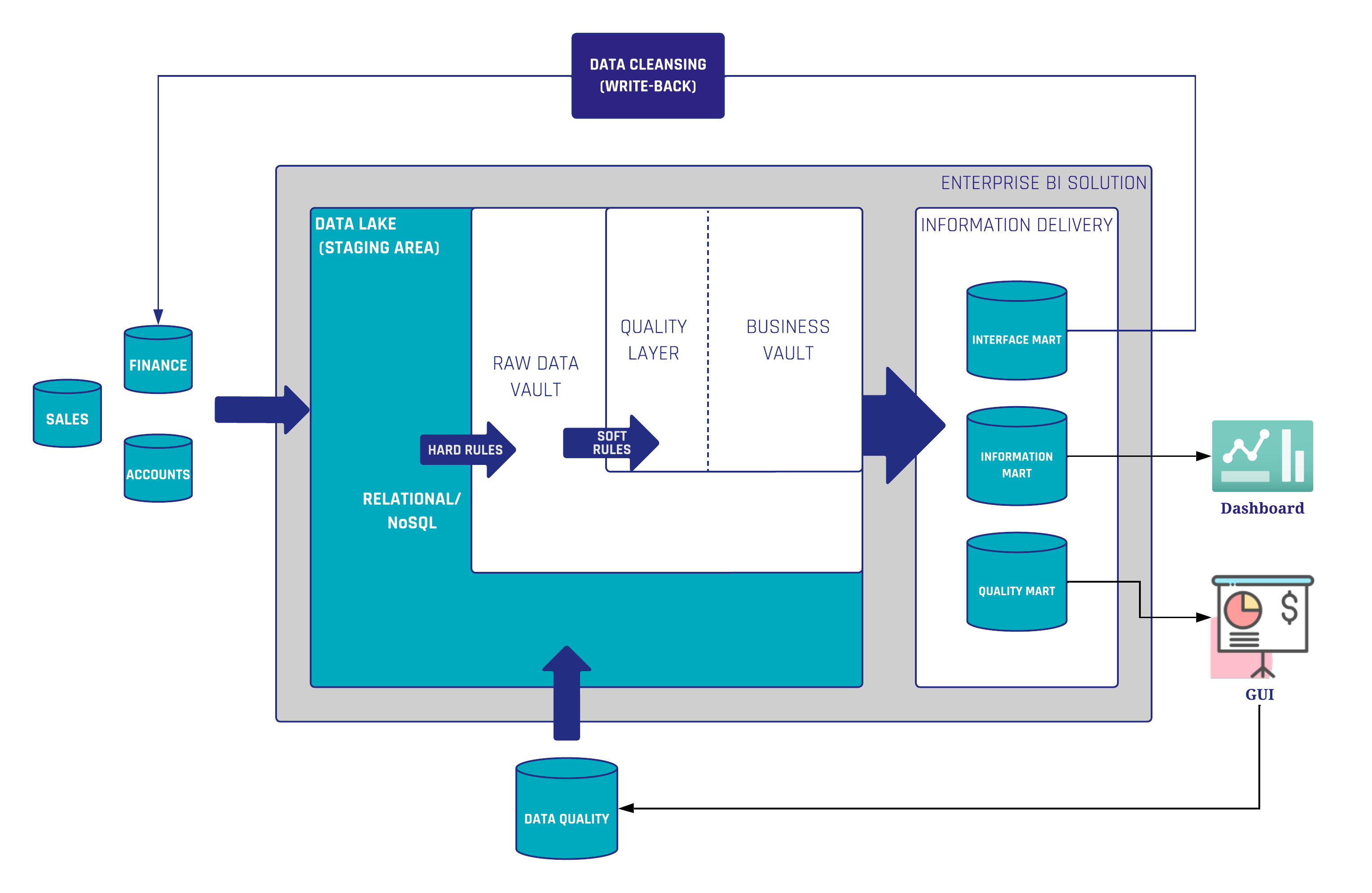
The core part of your Data Vault-powered EDW solution is a Raw Data Vault which contains raw and unfiltered data from your source systems that has been broken apart and loaded into hubs, links, satellites, and other Data Vault-specific entities based on business keys. This is the first point in the data pipeline in which the data lands in the Data Vault-modeled entities . Thus, specific tests are required to ensure consistency and auditability of the data after the Raw Data Vault is populated. The below test approaches are valid for Business Vault entities as well.

Testing Hubs

Hubs store business keys by separating them from the rest of the model. A hub is created for every business object. It contains a unique list of keys representing a business object that have the same semantic meaning and granularity. The business objects residing in a hub are then referenced from other Data Vault entities through hash keys calculated during the staging phase.

As such, the following tests are necessary to perform on hubs to ensure their consistency:
For a hub with a single business key, tests should ensure that:

  • A hub contains a unique list of business keys (primary key (PK) test)
  • A business key column contains no NULL or empty values (except when business key is composite)

If a hub has a composite business key, ensure that:

  • The combination of the values in the business key columns are unique (PK test)
  • Business key columns don’t contain NULL or empty values all at once

The validity of the latter point also depends on the nature of the business objects itself. It can also be that NULLs or empty values are not allowed in any of the business key columns.

For the both kinds of hubs, ensure that:

  • Hash key column contains:
    • Unique list of values (PK test)
    • No NULLs or empty values

Testing Links

A typical link defines relationships between business objects by storing unique combinations of hash keys of the connected hubs. The primary key of the link or link hash key uniquely identifies such a combination. Thus, link tests should check that:

  • The combination of connected hub references (hub hash keys) is unique (PK test)
  • Every hub hash key value exists in the referenced hub
  • Hub references do not contain NULLs or empty values

Regarding the last bullet point, note that the NULLs and empty values in hub references, as well as in hash key columns of other Data Vault entities, are replaced with zero keys.
For transactional (non-historized) data, transactional key columns should be included into the uniqueness tests in addition to columns with hub hash keys. Make sure that transactional keys are populated as well. Such transactional keys are usually not hashed since, as a rule, no hubs for transactions are created.
And, as for hubs, make sure that the link hash key column contains unique values and there are no NULLs and empty values.

Testing Satellites

Satellites store descriptive information (attributes) for business objects (residing in hubs) or relationships between business objects (residing in links). One satellite references either one hub or one link. Since descriptive information for business objects and relationships between them may change over time, a load date timestamp of a satellite record is added to the primary key of a satellite.

With the above said, tests for a satellite should make sure that:

  • The combination of a hub/link reference (the Hash Key) and the load date timestamp of a record is unique (PK test)
  • Every hub or link hash key value exists in the referenced hub or link
  • Hub or link references do not contain NULL or empty values

Multi-active satellites contain multiple active records at the same time. Thus, additional key columns (for example, Type Code, Sequence, etc.) are needed to uniquely identify a record. These additional key columns have to be part of the unique test of a multi-active satellite. Additionally, they should be tested for the absence of NULL and empty values.
The approach for testing a non-historized satellite also differs a bit from testing its standard sibling. A non-historized satellite is a special entity type that contains descriptive attributes for every corresponding record in a non-historized link. A primary key of a non-historized satellite is a link hash key. Thus, there is no need to include a load date timestamp into the primary key check. For a non-historized satellite, additionally make sure that it has a 1:1 relationship with the corresponding non-historized link. Record counts in both entities should match exactly.

Testing Other Data Vault Entities

There are other special entity types in Data Vault worth mentioning in regards to testing:

  • Reference hubs and reference satellites: Testing approaches are similar to standard hubs and satellites. The only difference is there are no hash keys and business keys are used directly.
  • Record source tracking satellites: A column representing a static source name is added to the primary key test.
  • PIT Table (Business Vault):
    • PK test – combination of the hub/link hash key and the snapshot date timestamp columns is unique
    • For every satellite reference, check that the pair of hub/link hash keys and the load date timestamp exists in the referenced satellite
    • Hub/link reference does not contain NULL or empty values
  • Bridge Table (Business Vault):
    • PK test – combination of a base link hash key and snapshot date timestamp columns is unique
    • For every hub and link reference, check that a pair of hub/link hash key exists in the referenced hub or link

General Tests for all Data Vault Entities

There are some tests applicable for all Data Vault entities.
Make sure that all Data Vault entities:

  • Contain zero keys instead of NULL keys
  • Have records source columns that are populated and correspond to the defined pattern (e.g., regex). For example, check if it contains the file path where the name of the top level folder represents the name of the source system and the file name includes the timestamp of the data extraction
  • Don’t have NULL values in their load (snapshot) date timestamp columns

Testing Source Marts

The Source Mart is one of the facets of the Information Mart concept in the Data Vault. It is a virtualized model on top of the Raw Data Vault with the aim of replicating the original source structures. It is great for ad-hoc reporting and offers higher value for many data scientists and power users and can also be used to test consistency and auditability of the loading process into a Data Vault-powered EDW.

Source mart objects are intended to look the same as the respective source tables (including columns names). If you have source marts implemented in your EDW, make sure to compare them against the respective source tables in the staging area after the data loading process. Values and row counts of source structures should match exactly against the respective source mart objects. In the Data Vault community, this kind of test is also known as a “Jedi-Test”.

It is relatively easy to automate such comparison and make it a part of the loading process.

Testing Hash Key and Hash Diff Calculations

Hash keys in Data Vault allows business keys to be integrated in a deterministic way from multiple sources in parallel. They are the glue that binds different Data Vault entities together.

Hash diffs, on the other hand, apply to the satellites and help identify differences in descriptive attributes during the data loading process.

It is important to introduce unit tests for hash key and hash diff calculations used in your EDW, to make sure the hashed values are calculated in accordance with the hashing standards defined. Read more about requirements and templates for hashing here. Test cases for such unit tests should cover as many combinations of different data types and values (e.g. NULL and empty values) as possible, to ensure that they are calculated consistently.

In case your EDW exists on different DBMS platforms (e.g. during migration process or data security regulations), the above test cases can be used to make sure that your hash calculations are platform agnostic, meaning that they produce the same result on different platforms. There is a common use case, when a link in an on-premise DBMS platform references a hub that was already migrated to a Cloud platform. Such unit tests can be run on both platforms to ensure consistency of hashing during a migration.

Testing Business Rules

Unlike the hard rules that do not alter or interrupt the contents of the data, maintaining auditability, soft or business rules enforce the business requirements that are stated by the business users. Examples of business rules can include:

  • Concatenation (last name and first name)
  • Standardizing phone numbers
  • Computing total sales (aggregation)
  • Coalescing, etc.

Apart from the relatively simple examples listed above, there might also be some more complex business rules involving sophisticated calculations, data transformations, and complex joins. Depending on the use case, the results of applying such rules usually end up in the Business Vault (i.e. a Business Satellite) and later in the Information Mart layer where they are consumed by the business users. Thus, testing business rules is an important part of the information delivery process.

Business rules are usually also a subject of unit testing that must be done continuously during the development and CI process. To perform such a unit test, we need some expected values, in the best case provided by the business, i.e., an expected net sales value for a defined product or a set of products in a specific shop on a named day based on the real data. The net sales calculation from our Business Vault is then tested against the given expected result.

Test Automation and Continuous Integration

All of the above described tests should be automated as much as possible and run by EDW developers during the development process. Successful tests should be an obligatory condition for introducing any new change to your EDW code base. That is achievable by using DevOps tools and enabling continuous integration (CI) in your DWH development lifecycle. Running automated tests each time code is checked or merged ensures that any data consistency issues or bugs are detected early and fixed before they are put into production. As a rule, a separate test (or CI) environment is created for the purpose of running automated tests.

Here are some general recommendations for creating and running a test environment:

  • Create the CI environment as similar as possible to the production environment
  • Create test source databases and source files derived from real data
  • The test source files and source databases should be small so tests can run quickly
  • The test source files and source databases should also be static so that the expected results are known in advance
  • Test full load and incremental load patterns since the logic of both patterns is different in most of the cases
  • Run tests not only against the changes to be merged but also against all the downstream dependencies, or even the whole loading process in general to prevent regressions.

Conclusion

In this newsletter, we provided an overview of different methods and approaches for the process of technical testing a Data Vault powered EDW.

We covered testing of different stages of the EDW load including extraction of the data from data sources, loading Data Vault entities, and information delivery process, though primary focus was placed upon loading Data Vault entities.

We also covered unit testing hash key & hash diff calculations.

It is important to make sure that your hashing solution is platform/tool agnostic, especially during the migration process.

We also learned that testing business rules is a key part of the information delivery process since they interpret the data and define what business users see in their reports. We highlighted the importance of unit testing the business rules and cooperation with the business in respect to defining test cases and expected results.

Furthermore, we also stressed the significance of test automation during the development phase as well as for enabling continuous integration and provided recommendations for creating and running a test environment.

We go even deeper into this topic in our webinar. Make sure to watch the recording for free!

Wie Integriere Ich Meine Office-Welt in Salesforce

Watch the Webinar

Entdecken Sie in unserem Webinar, wie Sie Ihre Office-Welt und alle dazugehörigen Abteilungen eines Unternehmens in die Salesforce-Umgebung integrieren können.

Lernen Sie, welche Abteilung sich mit welcher Salesforce-Cloud abbilden lässt und wie dadurch die Zusammenarbeit, Kommunikation und Geschäftsprozesse optimiert werden können.

Verpassen Sie nicht die Gelegenheit, Ihre Effizienz zu steigern und Ihre Vertriebsaktivitäten zu optimieren.

Registrieren Sie sich jetzt für wertvolle Einblicke und praxiserprobte Ratschläge.

Watch Webinar Recording

Webinar Agenda

1. Salesforce Clouds
2. DocuSign
3. Kollaboration
4. E-mail
5. Mowi

Close Menu