In this article, we will show you how to use counter records for change or delete practices in Data Vault 2.0. In January of this year, we published a piece detailing an approach to handle deletes and business key changes of relationships in Data Vault without having an audit trail in place.
This approach is an alternative to the Driving Key structure, which is part of the Data Vault standards and a valid solution.
However, at times it may be difficult to find the business keys in a relationship which will never change and therefore be used as the anchor keys, Link Driving Key, when querying. The presented method inserts counter records for changed or deleted records, specifically for transactional data, and is a straightforward as well as pragmatic approach. However, the article caused a lot of questions, confusion and disagreements.
That being said, it is the intention of this blogpost to dive deeper into the technical implementation in which we could approve by employing it.
In this article:
The following table shows a slightly modified target structure of the link from the previous blog post when using counter records in Data Vault 2.0.
In this case, we are focusing on transactions that have been changed by the source system without delivering any audit data about the changes as well as no counter bookings by the source itself.
It is important to note that the link stores the sales positions by referencing the customer and the product. Thus, the Link Hash Key, as well as the Load Date, are the primary keys as we are not able to gather a consistent singular record ID in this case. Being so, the Link Hash Key is calculated by the Customer Business Key, the Product Business Key, the sales price, and the transaction timestamp.
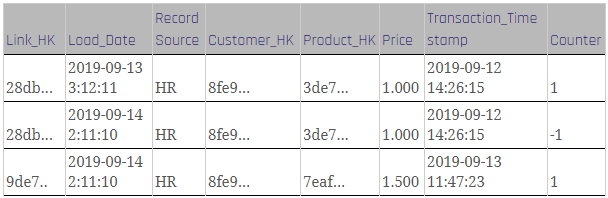
Figure 1: Link with counter records
To load the link, the following steps are required:
Firstly, insert and check as to whether a counter booking is necessary at all as the former step loads new data from the staging area into the link. Please note that the loading logic in this step is similar to that in the standard link loading process, with some differences:
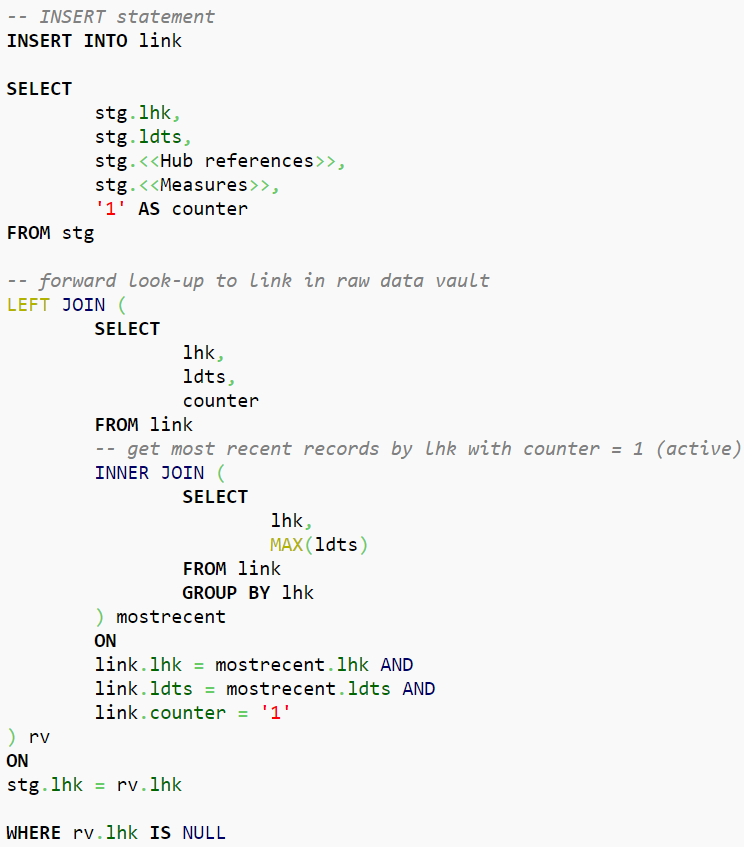
Figure 2: Insert Logic
In Data Vault 2.0, the counter record should identify records, the most recent records by Link Hash Key, that exist in the link but don’t exist in the staging area due to deletion or changes made to the record. Thus, query results will be “countered” with a value for “counter” set to -1, which indicates that these records are not able to be found at this stage. Note that in this query we selected the existing record from the link table in the raw vault, however, further note that the record’s time of arrival should be the LDTS of the actual staging batch. Therefore, within the shown statement, the LDTS is a variable with the load date of the staging batch:
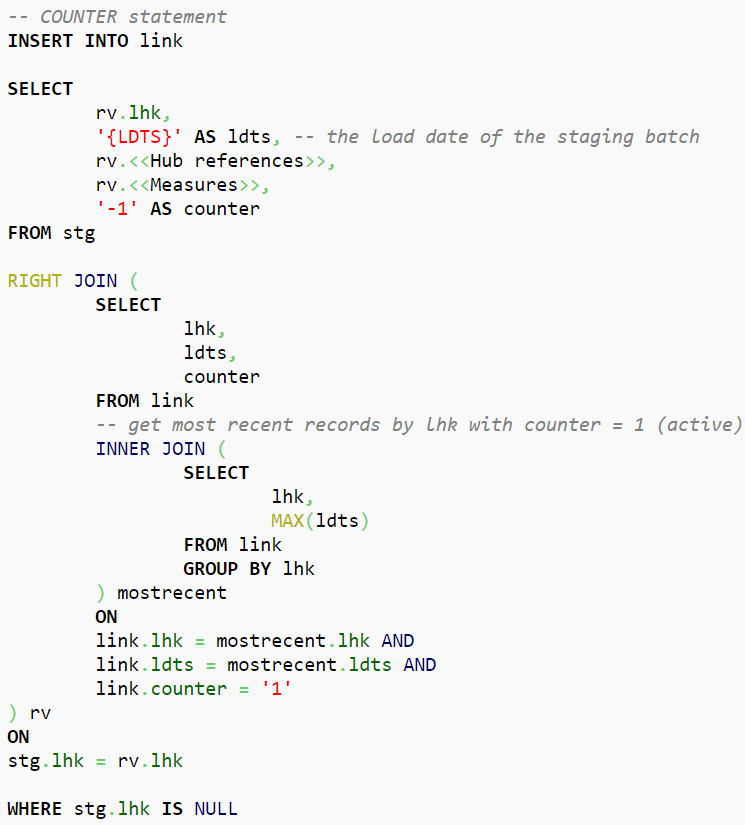
Figure 3: Counter Logic
In instances in which it changes back to the original record, the same procedure applies: The current missing value will be countered by the new one inserted again with a new LDTS.
Thus, we can conclude that this Data Vault approach works well for tables which are a hot-spot for measured values only as well as when changes are possible, although the data represents “transactions” and is to be used when CDC is not available.
Instead of a “get the most recent record per Hash Key (Driving Key)” it is possible to run calculations as well as aggregations directly on one table which results in a better performance in the end stage.
If there are still questions left, please feel free to leave a comment. We are looking forward to an exchange and your thoughts on the topic.

There are many Data Warehousing challenges that Organizations and Data Warehousing Teams are struggling with. In this short one-hour webinar, we will talk about some major challenges and how you can overcome them with Data Vault 2.0.
1. Achieving and maintaining agility
2. Maintaining or migrating legacy DWH systems
3. Security and privacy (GDPR)
4. Big data
5. Adapting to changing requirements
6. Auditability and data lineage
7. Self-service BI
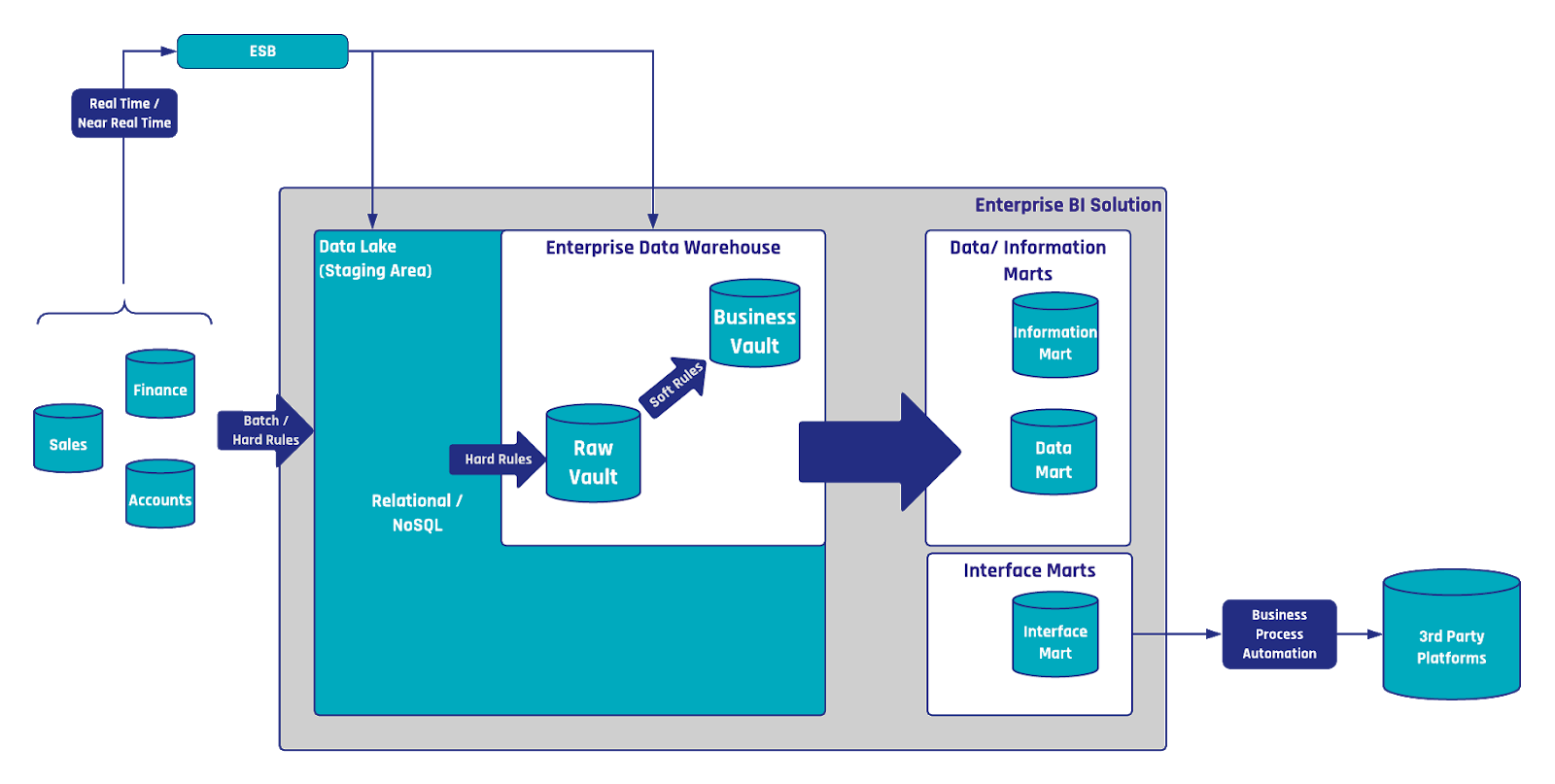
The Enterprise Data Warehouse (EDW) is no longer limited to reporting and dashboarding; it is a powerful tool for driving business process automation and operational efficiency. Building on earlier discussions in our Data Vault Use Cases series, this article explores how Data Vault 2.0 facilitates seamless integration with automation frameworks and external interfaces to enhance knowledge management, streamline operations, and reduce manual workload. From leveraging interface marts to trigger automated processes to enriching documentation systems with dynamic updates, we uncover the transformative potential of the EDW in modern business environments.
Reporting and dashboarding have become the standards in business when it comes to identifying KPIs and other measurements. As such, Enterprise Data Warehouses have emerged to support the reporting process. Though, due to the large quantity and variety of data, a demand has developed for a method of utilizing this existing data in a manner in which it can add additional business value towards a company’s needs. Data Vault 2.0 offers a wide range of methods to provide decision support beyond standard reporting as well as critical information regarding the future. To see for yourself, join us as we present different approaches and solutions as to fully leverage the potential of your data.
In this article:
We previously explored how the EDW can help to improve data quality by implementing data cleansing rules.
This can be applied by write-back operations that affect the source systems directly. Though this was only one example of how to add more value to the EDW.
The scalability and flexibility of Data Vault 2.0 offers a whole variety of use cases that can be realized, e.g. to optimize and automate operational processes, predict the future, push data back to operational systems as a new input or trigger events outside the data warehouse, to name a few.
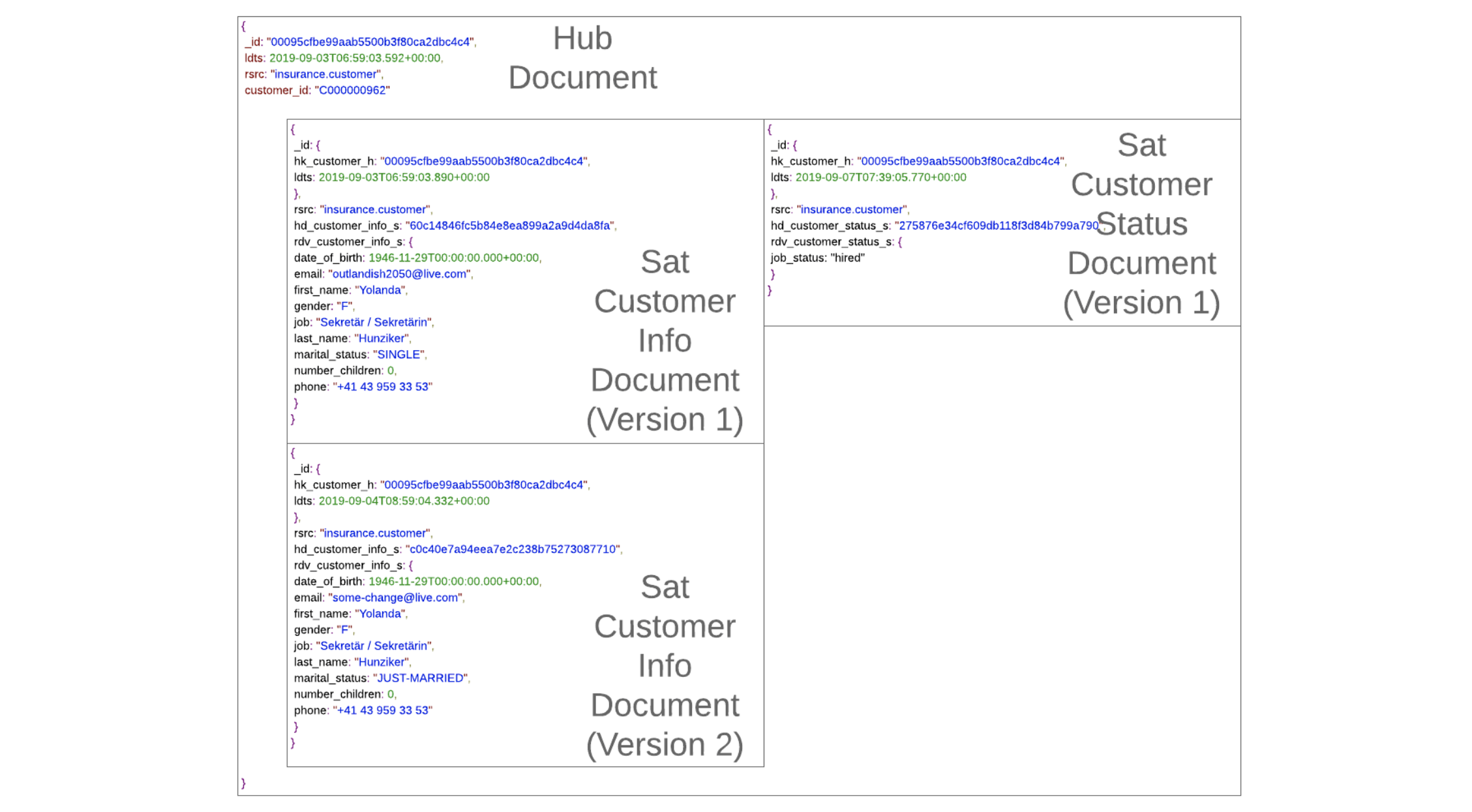
As to capture the descriptive data, which in this case is the describing factor of the business keys, satellite entities are used in Data Vault. As both business keys and relationships between business keys can be described by user data, satellites may be attached to hub as well as link entities as such:
Consider this situation in which a sample data set, involving an insurance company, concerning customers signing car and home insurance policies as well as filing claims, each respectively. Though before moving forward with the example, it is important to note that there are relationships between the involved business keys, that of the customer number, the policy identifiers, and the claims.
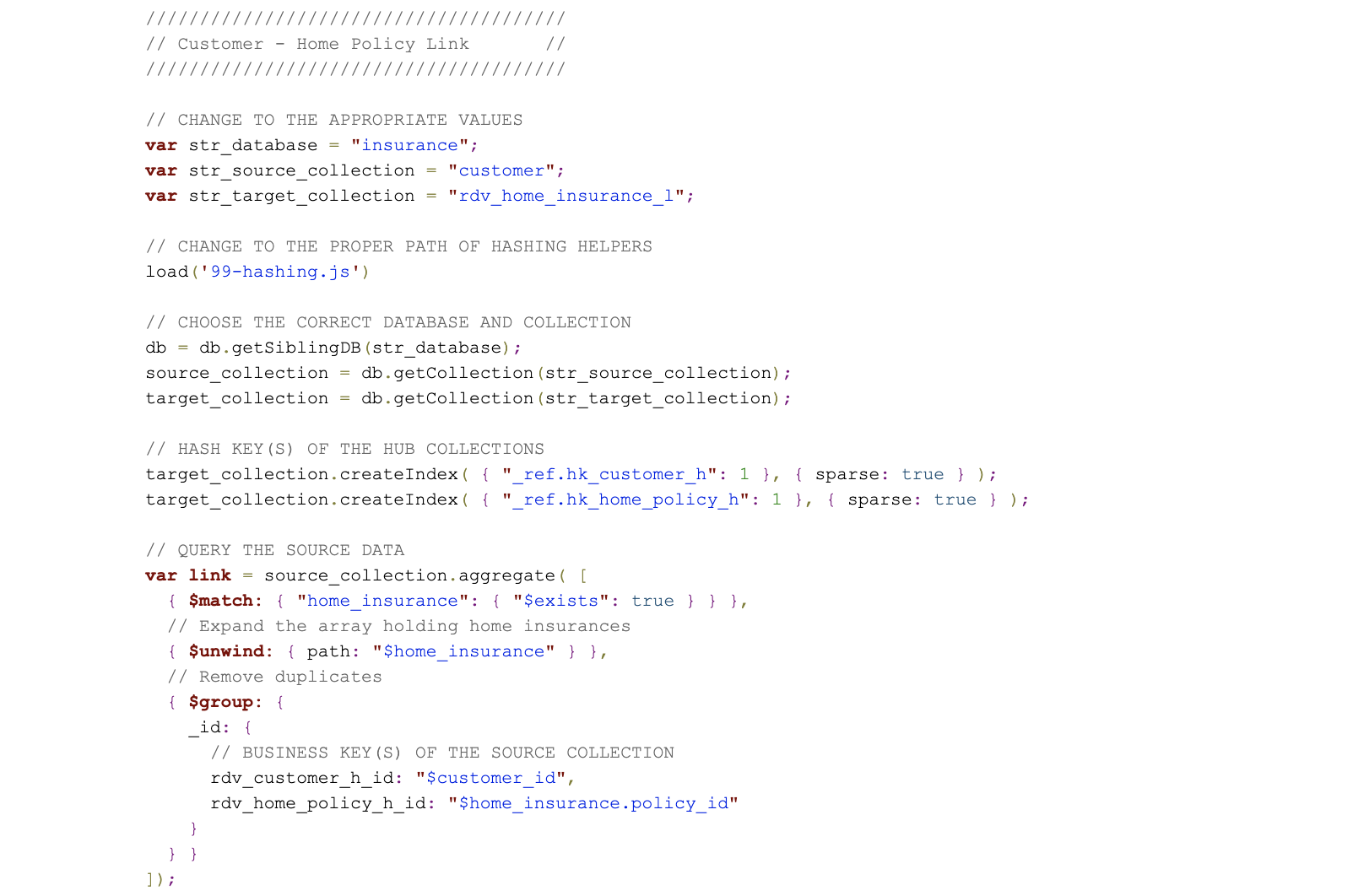
These relationships are captured by Data Vault link entities and just like hubs, they contain a distinct list of records, as such, they contain no duplicates in terms of stored data. Thus, both will form the skeleton of Data Vault and later be described by descriptive user data stored in satellites.
Both systems should be technically integrated, which means if a new customer signs up for a home insurance policy, the customer’s data should be synchronized into the car insurance policy system as well and kept in sync at all times. Thus, when the customer relocates, the new address is updated within both systems.
Though in reality, it often doesn’t go quite as one would expect, as, first of all, both systems are usually not well integrated or simply not integrated at all. Adding to the complexity, in some worst-case scenarios, data is manually copied from one system to the next and updates are not applied to all datasets in a consistent fashion but only to some, leading to inconsistent, contradicting source datasets. The same situation applies often to data sets after mergers and acquisitions are made within an organization.
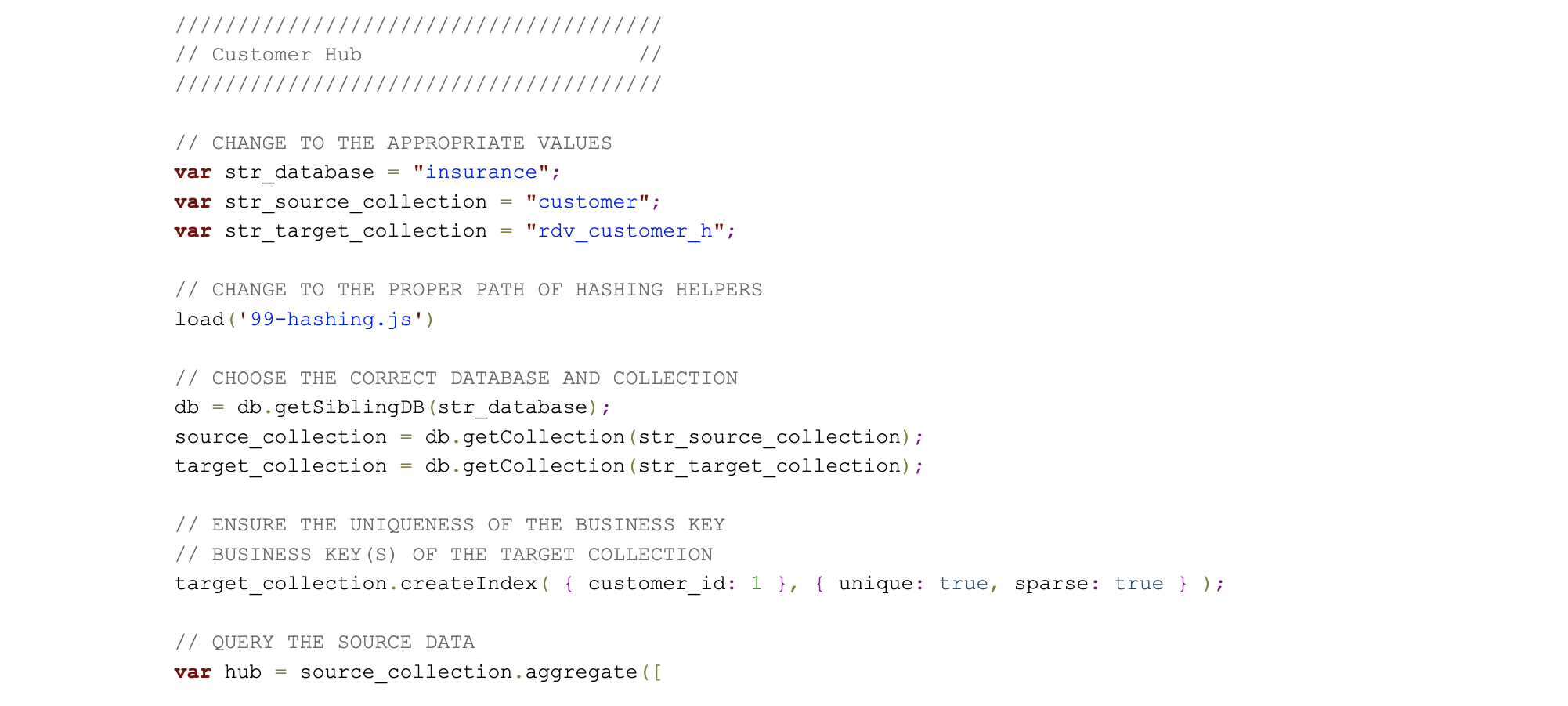
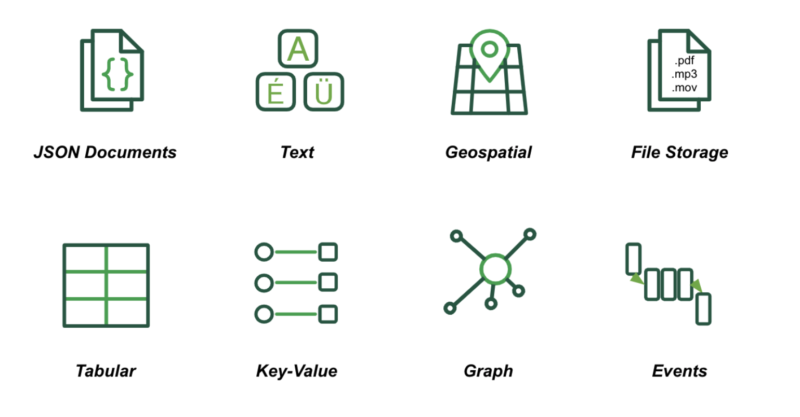
In contrast to the tables used by relational databases, MongoDB uses a JSON-based document data model. Thus, documents are a more natural way to represent data as a single structure with related data embedded as sub-documents and arrays collapses what is otherwise separated into parent-child tables linked by foreign keys in a relational database. You can model data in any way that your application demands – from rich, hierarchical documents through to flat, table-like structures, simple key-value pairs, text, geospatial data, and the nodes as well as edges used in graph processing.
Another challenge is the data itself, regardless of its structure.
In many, if not most, cases, the source data doesn’t meet the information requirements of the user regarding its content. In many cases, the data needs cleansing and transformation before it can be presented to the user.
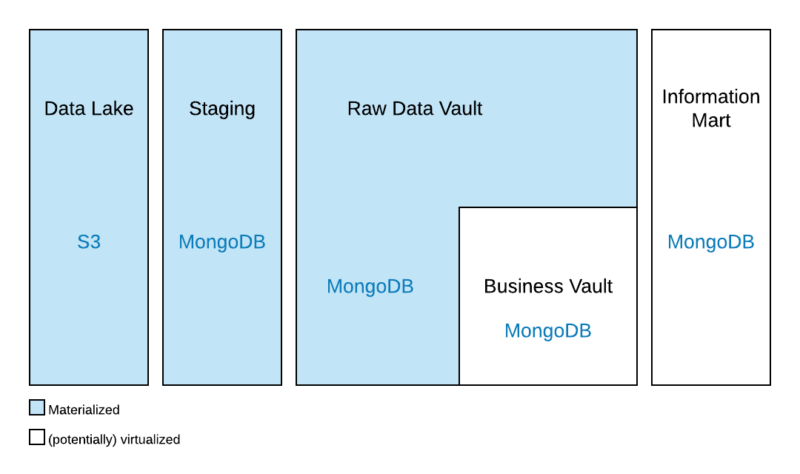
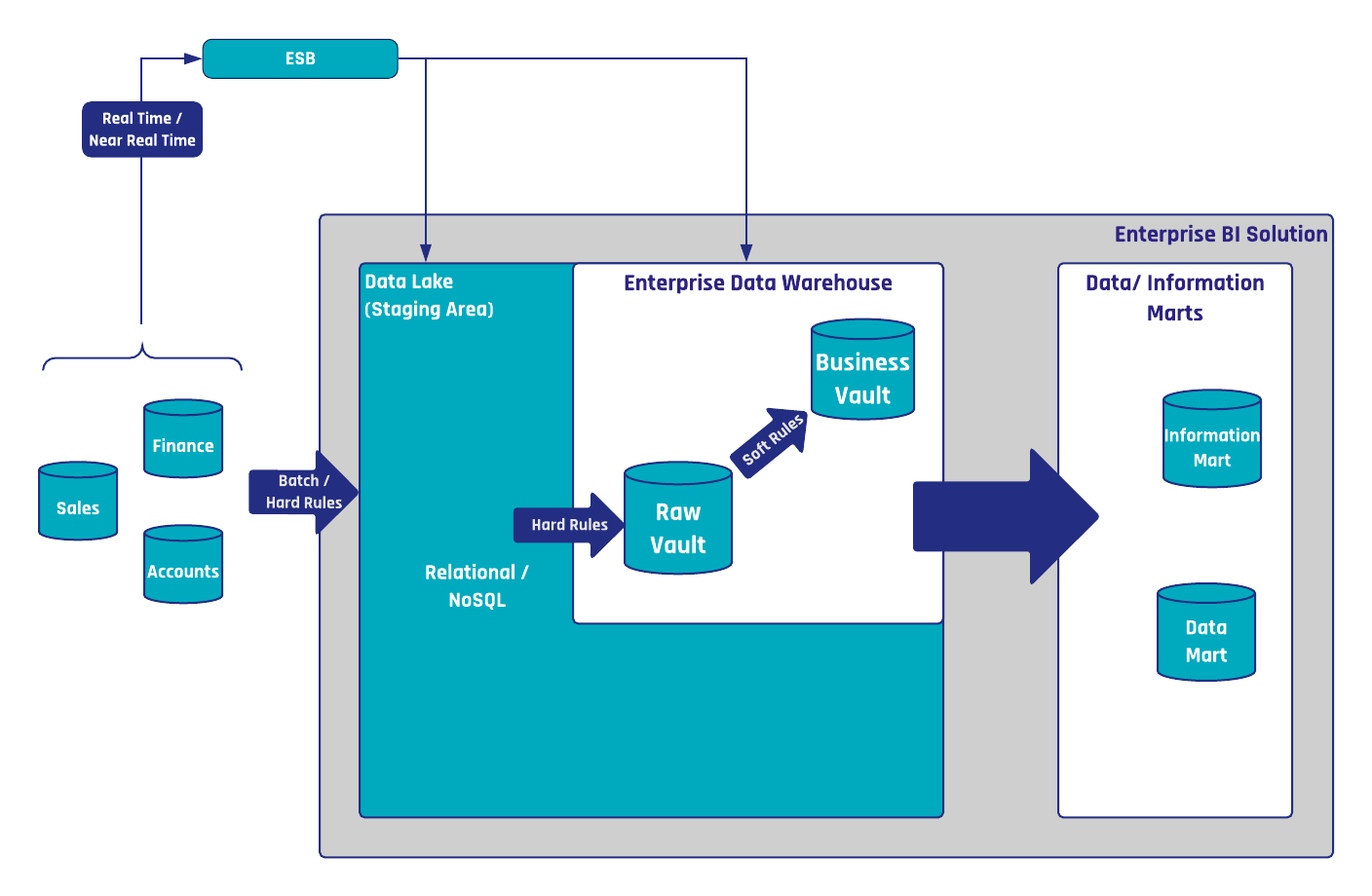
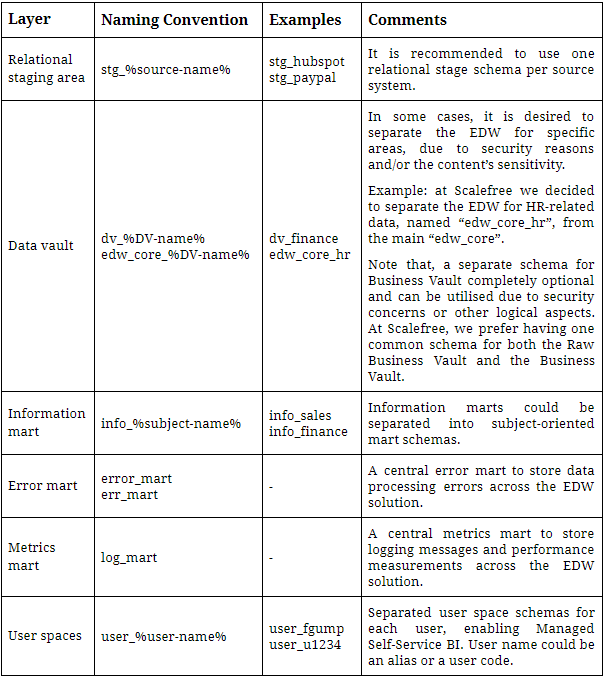
Instead of just loading the data into a MongoDB collection and wrangling it until it fits the needs of the end user, the Data Vault 2.0 architecture proposes an approach that allows data as well as business rules, which are used for data cleansing in addition to transformation, to be re-used by many users. To achieve this, it is made up of a multi-layered architecture that contains the following layers:
Typical challenges include issues such as the integration of mainframe data with real-time IoT messages and hierarchical documents.
One of such issues being that enterprise data is not clean and might have contradicting characteristics as well as interpretations. This poses a challenge for many processes such as when integrating customers from multiple source systems.
Though, data cleansing could be considered as a solution to this problem. However, what if different data cleansing rules should be applied to the incoming data set? For example, because the basic assumption for “a single version of the truth” doesn’t exist in most enterprises. While one department might have a clear understanding of how the incoming data should be cleansed, another department, or an external party, might have another understanding.
The organization of data within a data lake can significantly impact downstream accessibility. While offloading data into the data lake is a straightforward process, the real challenge arises in efficiently retrieving this data. The efficiency of data retrieval becomes crucial for tasks such as the incremental or initial Enterprise Data Warehouse (EDW) load and for data science practitioners conducting independent queries. In practice, the ease of accessing data downstream depends on how well the data is organized within the data lake. A well-organized structure facilitates smoother retrieval processes, empowering both EDW loads and the independent querying needs of data scientists.
To all those that have been a part of the Scalefree journey up until this point,
We’d first and foremost like to thank you for all the contributions you have made in helping us build Scalefree into the firm it is today. All of your contributions and business have allowed us to create a success story beyond what was first imagined and for that we offer our gratitude.
That said, a recent development here at Scalefree has presented the company with the opportunity to offer unprecedented, on-site access to the man that helped make all of this possible, the inventor of Data Vault 2.0, Dan Linstedt.
© 2026 Scalefree International GmbH
Imprint | Privacy Policy | Terms and Conditions
You are currently viewing a placeholder content from OpenStreetMap. To access the actual content, click the button below. Please note that doing so will share data with third-party providers.
More InformationYou are currently viewing a placeholder content from Google Maps. To access the actual content, click the button below. Please note that doing so will share data with third-party providers.
More InformationYou are currently viewing a placeholder content from reCAPTCHA. To access the actual content, click the button below. Please note that doing so will share data with third-party providers.
More Information