
search
0

Supersetting in Data Vault

Watch the Video

In our ongoing Data Vault Friday series, our CEO Michael Olschimke engages with a thoughtful inquiry from our audience.

“Dear Scalefree team, we receive data from the source for multiple company forms (like HoldingCompany, JointVenture), and we want to know if it’s recommended to save them in different entities (e.g., HoldingCompany_h/s, JointVenture_h/s) or one big entity (Company_h/s).

If we split them, we will have for each company form (e.g., Holding Company) about 10 links; If we store everything in one Company entity, we may face the situation that different company forms have different master data in the future, besides, it violates the Data Vault 2.0 rule that we should save the data as delivered by the source.”

In this insightful video, Michael delves into the strategic considerations of applying sub-setting and super-setting in the context of Data Vault 2.0. The question prompts a discussion on where to employ these techniques and the potential exceptions that might arise from the default strategy.

Michael provides practical insights and recommendations for effectively handling diverse company forms within the Data Vault framework, ensuring compliance with Data Vault 2.0 principles while addressing the complexities of master data variations.

Reference Table Vs. Reference Hub in Data Vault

Watch the Video

In this week’s Data Vault Friday, our CEO Michael Olschimke addresses an intriguing question from our audience regarding the difference between a Reference Table and a Reference Hub.

“If I need to historize the reference table, I can use the Satellite pattern. Ok, I have now a Reference Satellite table. But what about the Reference Hub table? Is it effective to create a table with just one column?”

In this informative video, Michael explores the concept of historizing reference tables within Scalefree‘s Data Vault 2.0 projects. The question specifically focuses on the efficiency and effectiveness of creating a Reference Hub table with just one column.

Michael shares insights into the considerations and scenarios where creating a Reference Hub table with a single column can be a viable and effective approach. The discussion provides practical guidance for handling reference tables within the Data Vault 2.0 methodology.

Calculating Hash Keys in Business Vault

Watch the Video

In our ongoing Data Vault Friday series, our CEO Michael Olschimke delves into a thought-provoking question from our audience.

“When calculating hash_key in links in Business Vault, it sometimes can be quite expensive to join all hubs to get the business keys, etc. In many cases, we keep those hash_keys to keep the standards only. And even for any case where you may need to build a satellite for that link, that means you would have the same granularity. So is it still a no-go to generate the link hash_key from the hub hash_keys to prevent expensive joins in some cases? If so, what do you suggest?”

In this insightful video, Michael addresses the considerations and challenges related to calculating hash keys in links within the Business Vault. The question prompts a discussion on the trade-offs between keeping hash keys for standards and the potential expense of joins, especially when dealing with multiple hubs.

Michael shares his expertise on hashing practices in Data Vault 2.0 links, offering recommendations and considerations to optimize the balance between standards and performance in the Business Vault.

Top 10 Salesforce Features – 2023 (German)

Watch the Webinar

Entdecke die neuesten Entwicklungen für Salesforce mit dem Spring ’23 Update! Unser Team hat die Release-Notes genau durchgearbeitet, um dir die besten neuen Funktionen vorzustellen, die jetzt in deiner Organisation verfügbar sind. Komm an Bord und erfahre, wie du diese Tools nutzen kannst, um deine Arbeitsabläufe zu optimieren und deine Effizienz zu steigern. Nutze die Chance, um dein Wissen über Salesforce zu erweitern und deine Fähigkeiten nachhaltig zu verbessern.

Watch Webinar Recording

Webinar Agenda

1. Top 10 bis 4
2. Top 3 im Detail
3. Ausblick und Q & A

Speed Up Your Data Vault 2.0 Implementation with Turbovault4DBT

TurboVault4dbt Logo

TurboVault4dbt

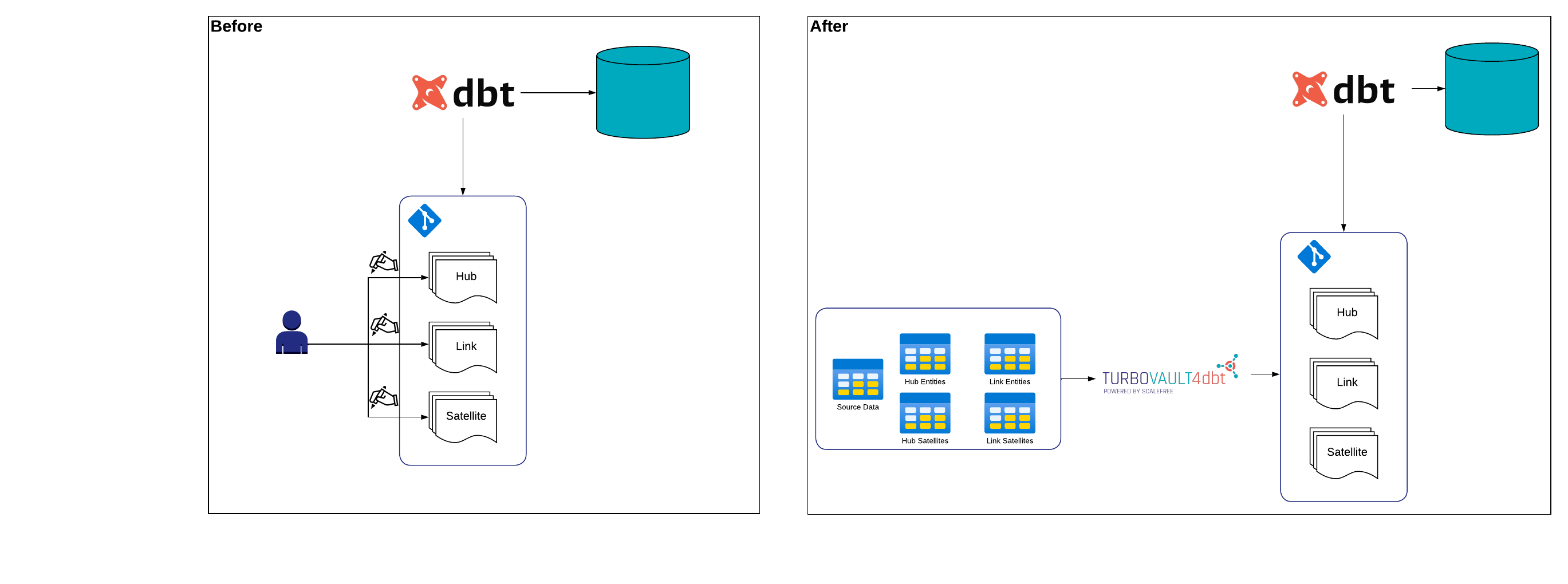
Scalefree released TurboVault4dbt, an open-source package to automate model generation using DataVault4dbt-compatible templates based on your sources’ metadata.

TurboVault4dbt currently supports metadata input from Excel, GoogleSheets, BigQuery, and Snowflake and helps your business with:

  • Speeding up the development process, reducing development costs, and producing faster results
  • Encouraging users to analyze and understand their source data

Speed up Your Data Vault 2.0 Implementation – with TurboVault4dbt

This webinar delves into TurboVault4dbt, an open-source tool by Scalefree that speeds up Data Vault 2.0 implementation. It automates dbt model creation using your source metadata, saving time and costs while encouraging better data analysis.

TurboVault4dbt works with metadata inputs like Excel, Google Sheets, BigQuery, and Snowflake, generating models for hubs, links, and satellites automatically. Just set up your metadata tables, connect the tool, and watch it do the heavy lifting!

Watch webinar recording

‘Isn’t every model kind of the same?’

Datavault4dbt is the result of years of experience in creating and loading Data Vault 2.0 solutions forged into a fully auditable solution for your Data Vault 2.0 powered Data Warehouse using dbt.

But every developer who has worked with the package or has created dbt models for the Raw Vault must have come across one nuisance:

Creating a new dbt model for a table means taking the already existing template and providing it with specific metadata for that table. Doing this over and over again can be quite a chore. This is why we created TurboVault4dbt to automate and speed up this process.

From CTRL+C AND CTRL+V to a simple mouse-click

How many times has everyone pressed CTRL+C then CTRL+V and corrected a few lines of code when creating new dbt-models for the raw vault?

Instead of trying to figure out what the names of your tables and business keys are or what hashing order you want your Hashkey to be generated in, TurboVault4dbt will do all of that for you. All TurboVault4dbt needs is a metadata input where you capture the structure of your data warehouse.

TurboVault4dbt

TurboVault4dbt currently requires a structure of five metadata tables:

  • Hub Entities: This table stores metadata information about your Hubs,
    e.g. (Hub Name, Business Keys, Column Sort Order for Hashing, etc.)
  • Link Entities: This table stores metadata information about your Links,
    e.g. (Link Name, Referenced Hubs, Pre-Join Columns, etc.)
  • Hub Satellites: This table stores metadata information about your Hub Satellites,
    e.g. (Satellite Name, Referenced Hub, Column Definition, etc.)
  • Link Satellites: This table stores metadata information about your Hub Satellites,
    e.g. (Satellite Name, Referenced Link, Column Definition, etc.)
  • Source Data: This table stores metadata information about your Sources,
    e.g. (Source System, Source Object, Source Schema, etc.)

By capturing the metadata in those five tables above, TurboVault4dbt can extract necessary information and generate every model that is based on a selected source but also, as a user, encourage you to analyze and understand your data.

Conclusion: Lean back, relax and let TurboVault4bdt take over!

Create and fill your metadata tables, connect them to TurboVault4dbt, and enjoy your free time for another cup of coffee. Give it a try, or give us your feedback by visiting TurboVault4dbt on GitHub!

Stay updated on TurboVault4dbt through our marketing channels as great features lie ahead!

PIT Table Structure in Data Vault

Watch the Video

In our continuous Data Vault Friday series, our CEO Michael Olschimke engages with an insightful question from our audience.

“Is it possible to add business keys and/or descriptive attributes to a Point-in-Time (PIT) table to improve performance when filtering or joining data in the information mart?”

In this concise yet informative video, Michael delves into the consideration of enhancing the performance of filtering or joining data in the Information Mart by incorporating business keys and descriptive attributes into a PIT table. The question prompts a discussion on the circumstances and scenarios where denormalizing these elements into a PIT table may be beneficial.

Michael shares practical insights and considerations, providing clarity on when and how the inclusion of business keys and descriptive attributes in a PIT table can contribute to improved performance in data retrieval and analysis within the Information Mart.

Bridge Table and Zero Code Impact in Data Vault

Watch the Video

In our ongoing Data Vault Friday series, our CEO Michael Olschimke addresses a pertinent question from our audience.

“We are currently implementing a bridge table over a series of sprints. The table prepares a fact entity with many measure values that are added sprint by sprint. Some measures are based on other measures in the bridge table. Our issue is that the code to load the bridge table is already complex due to the many measures. It exceeds 800+ lines of code and requires constant reengineering when additional measures are added. Is there a more agile approach with less, maybe zero change impact on the existing code?”

In this insightful video, Michael explores strategies for building a bridge table in an agile and incremental fashion. The question prompts a discussion on addressing the complexity of the loading code and finding approaches that minimize change impact, ensuring a more flexible and adaptive development process.

The video offers practical insights and recommendations for streamlining the implementation of a bridge table, enhancing agility, and reducing the challenges associated with code maintenance in evolving data models.

Boost ROI of Data Infrastructure with Automation

Watch the Webinar

Generating returns from a modern data infrastructure is tough. First, creating a central repository for easy data access requires much upfront, traditionally manual work to set up data ingestion, mapping, metadata management, etc. Changes in sources, tech stack, and taxonomies require more work. Or someone new comes on board and proposes building an entirely new model to answer the same business question. Typically, all this pushes the data team to take shortcuts to regain lost time, creating technical debt. In this webinar, we’ll explain how automation done right, following Data Vault 2.0 standards, will not only cut manual work but solve problems of agility, uncertainty, and output quality, to ultimately provide the return you expect. Learn about what can go wrong — and how to get it right.

Watch Webinar Recording

Webinar Agenda

1. Common pitfalls in data management.
2. How the problems were solved in the past: what worked and what didn’t
3. How Data Vault methodology combined with automation brings new solutions…
4. … And how this will save you time, and money.

Zero Key Concepts in Data Vault

Watch the Video

In our ongoing Data Vault Friday series, our trainer Marc Finger delves into an intriguing question posed by the audience.

“In Hubs, we add two ghost records: one with 0s (unknown/zero key) and another with f’s (sometimes called error key). In the loading of the stage, in which cases should we replace the generated hash key with the error key instead, and how? Right now, if the Business Key (BK) or combination of BKs is null, we are always replacing it with the zero key. My question is in which cases should we use the ffff key instead.”

In this informative video, Marc explores the usage and value of zero keys when loading links within the Data Vault framework. The question prompts a discussion on the considerations and scenarios where replacing the generated hash key with the error key, represented by ‘ffff,’ is beneficial.

The video provides practical insights and recommendations for optimizing the handling of ghost records and error keys, contributing to a more robust and efficient Data Vault implementation.

Realtime Architecture in Data Vault

Watch the Video

In our continuous Data Vault Friday series, our CEO Michael Olschimke addresses a thoughtful question from our audience.

“What additional steps are there in a Real-Time loading pattern on top of the batch loading pattern?”

In this concise yet informative video, Michael focuses on the nuances of incorporating real-time loading patterns into the Data Vault 2.0 architecture. The question prompts a discussion about the specific steps that distinguish real-time loading from the traditional batch loading pattern.

Michael shares insights into the additional considerations and steps required to ensure the effectiveness of real-time data integration. The discussion provides valuable guidance for those looking to enhance their understanding of real-time loading within the context of the Data Vault 2.0 framework.

How to Get Data Out of Data Vault

Watch the Webinar

Data Vault is a very flexible model when it’s about creating a scalable data warehouse design. This is due to splitting the data into 3 basic entities: keys, relationships, and descriptive data. But, the result is also a bigger model with more entities than in a 3rd normal form (3NF) or star schema model. A common complaint is that it is difficult and inefficient to query the data from the Data Vault.
In this Webinar we will show you the opposite and what’s needed to accomplish this.

Watch Webinar Recording

Webinar Agenda

1. Data → Information → Business Value
2. Requirement gathering
3. PITs and bridges
4. Information marts

Realtime Delta Application in Data Vault

Watch the Video

In our ongoing Data Vault Friday series, our CEO Michael Olschimke tackles a compelling question from our audience.

“From one of our source systems, we receive customer information in real-time messages. These messages are set up in a way that they always contain the business key(s) to identify the customer and the attribute(s) that have been entered, changed, or set to null.

For example, the first message includes customer creation with various attributes, including an email address and, of course, a Business Key. A second message later might include the Business Key, a new email address, and a new attribute (e.g., birthplace) that did not exist in the previous one.

We have a list of attributes that the end user is interested in, in our Information Mart, specifically in the Customer dimension. How would you manage this in the Data Vault architecture?”

In this enlightening video, Michael begins by discussing the design often encountered in such scenarios, highlighting areas for potential improvement. He then shares his insights on how to efficiently manage the message stream within the Data Vault 2.0 model. The discussion touches on optimizing the design for better usability in the Information Mart while maintaining the integrity and efficiency of the Data Vault architecture.

Close Menu