search
0
All Posts By

Marc Winkelmann

Marc Winkelmann is a Senior Managing Consultant and Certified Data Vault 2.1 Trainer at Scalefree with over 8 years of BI experience. A Snowflake SnowPro Advanced Data Engineer and dbt Certified Developer, he specializes in cloud migrations (AWS, Azure, Snowflake) and enterprise data strategy. Marc holds a Master’s in BI & Analytics and is an expert in coaching teams through complex data transformations.

PII Business Keys: Best Practices for Artificial Hubs and Satellites

PII Business Keys

In modern data architecture, handling Personally Identifiable Information (PII) is a crucial aspect of maintaining data privacy and integrity. One common challenge in Data Vault modeling is determining how to properly load artificial hubs when using PII fields as business keys. In this article, we explore different approaches and best practices to handle this scenario effectively.


Understanding the Loading Process for Artificial Hubs

When an artificial hub is created using a PII-based business key, a key question arises: should we load one UUID per person, or should we generate multiple UUIDs for each version or change? Additionally, how do we manage this in the ETL process?

Solution 1: Using the Technical ID as the Business Key

One approach is to integrate data using the technical ID (e.g., employee ID from a CRM system) instead of the PII-based business key. This method ensures that the actual PII data remains in the satellite, making deletions easier while maintaining integrity in data integration.

Solution 2: Storing Both Technical and Business Keys in the Hub

Another option is to load both the technical ID and the PII-based business key into the same hub. A same-as-link can be used to create a mapping between the two, allowing flexibility in identifying records while ensuring that the satellites reference the technical ID for consistency.

Solution 3: Separating Technical and Business Keys into Two Hubs

For greater flexibility, technical IDs and business keys can be stored in separate hubs with a linking mechanism. While this approach introduces additional complexity, it provides a structured way to manage mappings between different keys while keeping PII data separate.

Managing UUIDs in the ETL Process

If the source system does not provide a technical ID, an artificial UUID must be generated. This requires maintaining a lookup table in the staging layer to map each business key to a UUID. This mapping must be handled efficiently in the ETL process to ensure consistency across data loads.

Handling PII Deletions

When a delete request is received, it is essential to remove PII data while preserving relationships in the data model. Using the technical ID ensures that descriptive information remains, while direct identifiers are removed. Additionally, solutions like Delta Lake or Iceberg tables can help manage deletions effectively in a data lake environment.

Conclusion

Choosing the right approach for handling PII-based business keys depends on the specific use case and integration requirements. Using a technical ID simplifies integration but may not always be feasible. The same-as-link approach provides a balanced solution, while separate hubs offer greater flexibility at the cost of added complexity. Ultimately, a well-structured ETL process is key to ensuring data integrity and compliance with privacy regulations.

Watch the Video

Salesforce Account Engagement and Domain Management

Domain Management in Salesforce Pardot

Domain Management Within Salesforce Account Engagement

In this video guide, we explore the essential components of domain management within Salesforce Account Engagement, highlighting their critical roles and why they are vital for your email marketing strategy.

Additionally, the guide underscores the significance of mastering three key aspects: (1) email sending domains, (2) tracker domains, and (3) tracking code. By understanding and implementing these elements, you can significantly enhance your email deliverability, security, and overall campaign performance.

This guide is designed for Salesforce marketers, administrators, and key users who are working or planning to work with Salesforce Account Engagement to optimize their domain management practices.

Domain Management in Account Engagement

Domain management in Salesforce Account Engagement involves the configuration and maintenance of domains used for email marketing and tracking purposes.

This includes authenticating email sending domains to ensure emails are properly delivered and not flagged as spam, setting up custom tracker domains to maintain brand consistency and improve deliverability, and managing tracking codes to accurately monitor and analyze user interactions.

Effective domain management enhances email security, optimizes deliverability rates, and ensures a professional and trustworthy user experience.

Key Takeaways

Discover the compelling reasons behind adopting four essential best practices for domain management in Salesforce Account Engagement. These practices, detailed in the video, play a critical role in enhancing email deliverability, security, and brand consistency.

By understanding and implementing these practices, users can optimize their email marketing strategy for sustained success:

    1. Align Return Path with Mail-from Address
    2. Enable HTTPS for Tracker Domains
    3. Monitor Domain Reputation
    4. Use Custom Tracking Domains for Brand Consistency

Target Audience

Designed for Salesforce marketers, administrators, and users, this guide encourages the effective management of domains within Salesforce Account Engagement.

By highlighting the importance of key practices, the video aims to provide a deeper understanding of why mastering domain management is crucial for achieving optimal email deliverability, security, and campaign performance within the Salesforce environment.

Watch the Video

CDC, Status Tracking Satellite, and Delta Lake

Watch the Video

Understanding CDC and Status Tracking Satellites in Data Vault

The integration of Change Data Capture (CDC) data into a multi-active satellite and status tracking satellite is a nuanced topic. In a previous session, the focus was primarily on multi-active satellites, leaving the status tracking satellite underexplored. This article will dive deeper into their utility, especially in the context of CDC data.

A status tracking satellite in Data Vault serves a specific purpose: it tracks the appearance, updates, and disappearance of business objects in the source system. However, if CDC data is available, this tracking becomes inherently simpler because CDC already provides explicit information about creates (C), updates (U), and deletes (D). Thus, creating a separate status tracking satellite may not be necessary.

In contrast, when dealing with full extracts (non-CDC data), a status tracking satellite can be invaluable. It enables you to derive creates, updates, and deletes by comparing consecutive extracts, identifying the first appearance (create), differences between records (update), and removal of records (delete). This can be achieved by maintaining a delta check mechanism and creating a robust satellite to store these events.


Handling Multi-Active Data in Status Tracking Satellites

Multi-active data arises when the same business key appears multiple times in the source system, distinguished by another attribute (e.g., customer ID). In these cases, status tracking satellites must accommodate the additional attributes, ensuring that individual records are not incorrectly marked as deleted when only one instance of the multi-active data changes.

For example, consider a scenario where a customer appears twice in the source system with different technical IDs but the same business key. A delete operation on one ID should not remove the customer from the source entirely. To address this, a status tracking satellite should maintain a composite key combining the business key and the multi-active attribute.

This approach ensures that changes are tracked at the appropriate granularity, preserving the integrity of multi-active records. Additionally, adding the CDC information (CUD columns) directly to the main satellite can simplify tracking without requiring a separate status tracking satellite.

Data Vault and Delta Lake: Complementary Approaches

The second question posed is whether Data Vault adds value when Delta Lake is already in use. To address this, it’s essential to understand the distinctions between the two. Delta Lake is a technology, whereas Data Vault is a methodology. While Delta Lake provides a robust framework for handling data in its native form (e.g., JSON, XML) and managing deltas, it does not prescribe how to model or process data for business purposes.

Data Vault, on the other hand, excels in its structured, agile methodology for modeling data. It provides a clear architecture, including hubs, links, and satellites, which organize data effectively for analytics and reporting. This is where Data Vault complements Delta Lake by applying a methodical approach to the data stored in the lake.

In practice, Delta Lake can serve as the persistent staging area (landing zone) in a Data Vault architecture. The metadata and delta tracking capabilities of Delta Lake enhance the efficiency of loading and processing data, while Data Vault ensures that the data is modeled and structured to meet business requirements. This synergy allows organizations to leverage the strengths of both technologies, creating a powerful data ecosystem.

Combining CDC Data with Data Vault and Delta Lake

By integrating CDC data, Delta Lake, and Data Vault, organizations can achieve an optimized data architecture. CDC data feeds directly into Delta Lake’s storage layers (bronze, silver, gold), which in turn populate the Data Vault’s hubs, links, and satellites. This integration streamlines data ingestion, transformation, and querying while maintaining flexibility and scalability.

For instance, CDC data can directly populate status tracking satellites or be included in a main satellite for simplicity. Meanwhile, Delta Lake’s metadata features support efficient querying and analysis, enabling the Data Vault layer to focus on applying business logic and producing meaningful insights.

By combining these tools and methodologies, data teams can build robust, agile data platforms that support modern analytics and decision-making needs.

Snapshot Based Bridge Table on Link and Effectivity Satellite

Watch the Video

Snapshot Based Bridge Table on Link and Effectivity Satellite

Welcome to another edition of Data Vault Friday! Today, we’re diving into the concept of a snapshot-based bridge table, particularly focusing on its application in scenarios with links and effectivity satellites. This approach helps us handle complex relationships between business objects over time, managing changes in relationships, and retaining a complete historical view. In this article, we will explore solutions to three main questions:

  • How to handle a missing relationship on day 2 compared to day 1
  • How to manage changed relationships from day 1 to day 2 for the same key
  • How to include a business object (A3) on day 2 when it lacks a relationship to any object in B


Understanding the Data Vault Modeling Example

In our example, we have two sources, each representing a different business object (A and B). Business object A is represented as a static dataset, while business object B shows dynamic relationships to A over three days. Each day brings changes in the relationships, with some entries disappearing or shifting. Our task is to capture these changes effectively in a snapshot bridge table.

Examining the Relationship Changes

Let’s walk through the changes observed over three days:

  • Day 1: B1 is related to A1, B2 to A2, and B3 to A3.
  • Day 2: The relationships change. B1 is now related to A2, B2 to A1, and B3 disappears.
  • Day 3: No further changes occur compared to Day 2.

Our objective is to document these relationships using an Effectivity Satellite and a Bridge Table, enabling us to query the state of relationships as they existed on each day.

Creating the Link and Effectivity Satellite

The first step in capturing these relationships is to create a Link table that holds a distinct list of relationships between business objects. Links should not have additional metadata, such as validity dates, as this can complicate data retrieval and reduce performance. In our example, the Link table captures each unique combination of A and B keys but does not record their start or end dates.

Next, we create an Effectivity Satellite. This table extends the Link by recording each relationship’s start and end timestamps, as well as an “is_active” flag to indicate the current status of each relationship. Using this table, we can track when a relationship starts, changes, or ends. Let’s examine how this works:

  • Day 1 entries: All relationships (B1-A1, B2-A2, B3-A3) are marked as active.
  • Day 2 entries: New relationships (B1-A2 and B2-A1) are added and marked active, while previous relationships (B1-A1 and B2-A2) are marked inactive. B3-A3 is removed entirely.

Building the Snapshot-Based Bridge Table

With the Effectivity Satellite in place, we can now create a Bridge Table that snapshots the active relationships for each day. This table provides a point-in-time view of the relationships as they existed on a particular day. Let’s look at how the Bridge Table is created:

Day 1 Snapshot

The Day 1 snapshot reflects the initial relationships, pulling all active records from the Effectivity Satellite. At this stage, B1-A1, B2-A2, and B3-A3 are all active.

Day 2 Snapshot

In the Day 2 snapshot, only the relationships B1-A2 and B2-A1 remain active, while B3-A3 is removed. By applying a filter to include only active entries, the snapshot accurately represents the relationships on Day 2.

Day 3 Snapshot

Day 3’s snapshot is identical to Day 2, as no additional changes were made. The active relationships B1-A2 and B2-A1 remain unchanged.

This process ensures we have a clear audit trail of relationship changes and deletions. Each day’s snapshot represents the state of relationships at that point in time, without introducing redundant data.

Handling Missing Data and Reinstating Relationships

One critical feature of the Effectivity Satellite is the ability to manage reinstated relationships. For instance, if B1-A1’s relationship is reestablished on Day 4, we add new rows in the Effectivity Satellite, marking the previous active combination (B1-A2) as inactive and reactivating B1-A1. This dynamic structure makes it easy to adjust for relationships that appear, disappear, and reappear over time.

Incorporating A3 in the Bridge Table on Day 2

A common challenge is how to incorporate business objects like A3 on Day 2, despite having no relationship in B on that day. In Data Vault, this is often addressed in downstream queries or report joins rather than in the Bridge Table itself.

By starting with object A and performing a left join to the Bridge Table, you will include all records from A (even if they don’t appear in B). This ensures that unlinked objects are included in the results, with their B relationships shown as null, or as a placeholder if desired.

Preventing Cartesian Products and Other Best Practices

When using a Bridge Table, it’s essential to avoid unexpected Cartesian products, which can inflate data during aggregation. Always check the cardinality of relationships between objects (e.g., one-to-one or many-to-many) to ensure joins occur only on necessary keys. The driving key, which anchors the relationships in the Link Table, should be the primary focus, especially in cases of many-to-many relationships.

This method ensures accuracy and performance when aggregating data and avoids inflated results in reporting.

Conclusion

Snapshot-based bridge tables are powerful tools in Data Vault modeling for handling changing relationships and tracking historical snapshots. By carefully structuring Links, Effectivity Satellites, and Bridge Tables, we create a robust, auditable trail of data changes over time. As we’ve discussed, this approach allows us to accommodate missing data, reinstate relationships, and prevent data inflation, ensuring reliable, performant data models.

If you’d like further assistance with templates for bridge tables or Effectivity Satellites, feel free to reach out to me. I hope this discussion has provided clarity on using bridge tables in Data Vault. Join us again for more Data Vault insights, and feel free to submit your questions!


Multi-Active Satellites & Dependent Child Keys

Watch the Video

Understanding Multi-Active Satellites and Dependent Child Keys in Data Vault

Multi-Active satellites and dependent child keys provide solutions for storing data with complex granularities in Data Vault models. Data Vault is known for its highly structured enterprise data warehousing approach, built on Hubs, Links, and Satellites to capture data lineage, maintain historical accuracy, and ensure scalability. However, specific data scenarios, such as handling different data granularities, often lead to questions on multi-active satellites and dependent child keys. This article breaks down these concepts and clarifies their differences and use cases in a Data Vault environment.


What is a Multi-Active Satellite?

A multi-active satellite is designed to manage multiple records for a single business object that are active simultaneously. This scenario arises when a business object, like a customer, can have several active data entries at the same time. For example, a customer could have multiple addresses (home and work), both of which are valid at the same time.

In a typical satellite structure, a business key (e.g., customer ID) combined with a load date timestamp defines the primary key. However, in cases of multiple active records, this primary key is insufficient because it won’t uniquely identify each active instance. Instead, an additional attribute, such as an address type (home or work), is added to the primary key to differentiate each record. This approach allows the satellite to track multiple entries for the same business key without duplicating data and helps capture finer details in the data warehouse.

Example of a Multi-Active Satellite

Let’s say our source system has a customer with ID C123 who has two active addresses: one for home and one for work. In a standard satellite, we might have one record per business key. But in a multi-active satellite, we store both addresses simultaneously by using an additional identifier (e.g., “address type”) in the primary key:

  • Customer ID: C123
  • Load Date: Timestamp of data load
  • Additional Identifier: Address type (e.g., home, work)

This approach allows multiple entries for a single business object (in this case, customer C123) while maintaining unique records in the satellite table.

What is a Dependent Child Key?

A dependent child key is used to manage relationships between multiple business objects at a finer granularity level than a standard Data Vault link would allow. Dependent child keys are typically applied in links where we need to track multiple occurrences of a relationship between business objects, such as an order and its line items.

Consider an order containing multiple line items, where each item references a product. Here, the dependent child key (like line item number) uniquely identifies each relationship instance, as it provides additional detail beyond just the order and product identifiers. This allows multiple rows in the link for the same business objects while maintaining unique records.

Example of a Dependent Child Key

Imagine we have an order O123 for a customer C123, which includes two line items for the same product but with different prices or quantities:

  • Order ID: O123
  • Customer ID: C123
  • Product ID: P123
  • Dependent Child Key: Line item number (e.g., 1, 2)

In this case, we create unique rows for each line item, where the line item number differentiates each record. This approach ensures that each entry is stored and tracked individually.

Key Differences Between Multi-Active Satellites and Dependent Child Keys

Although multi-active satellites and dependent child keys both enable handling of finer data granularity, they serve different purposes and are used in distinct contexts:

  1. Multi-Active Satellites
    Applied within a single business object to handle multiple active records at the same time. The additional identifier helps capture simultaneous entries for the same object in a satellite.
  2. Dependent Child Keys
    Used in links between multiple business objects, where the additional key captures the finer detail of each relationship instance, such as line items in an order.

When to Use Each Approach: Multi-Active Satellites & Dependent Child

The choice between using a multi-active satellite or a dependent child key depends on the data granularity and relationships in your data model:

  • Use Multi-Active Satellites when handling multiple active records for a single business object, where each entry is related only to the primary business key (e.g., customer with multiple addresses).
  • Use Dependent Child Keys when tracking detailed relationships between different business objects that require additional identifiers to maintain uniqueness (e.g., order and line items).

Summary

Multi-active satellites and dependent child keys are helpful for storing data with complex granularities in Data Vault models. While multi-active satellites allow multiple simultaneous records for a single business object, dependent child keys enable unique identification of complex relationships in links. Both approaches maintain Data Vault’s principles of scalability and data integrity by preserving unique records and enabling detailed tracking of business data.

In short:

  • Multi-Active Satellite: For multiple records active simultaneously within a single business object.
  • Dependent Child Key: For relationships across multiple business objects that need finer detail, typically in links.

Meet the Speaker

Loading CDC Data into Multi-Active Satellites and Status Tracking Satellites

Watch the Video

Mastering CDC Data in Data Vault 2.0

Change Data Capture (CDC) is a powerful mechanism for tracking changes in source systems. However, when the primary key in your source system differs from the business key used in your Data Vault hub, you may encounter challenges in loading data into multi-active satellites. This article explores various strategies for handling CDC data in such scenarios, offering practical solutions to ensure accurate and efficient data loading.


Understanding the Challenge

In many source systems, the primary key is a technical identifier unknown to the business. Instead, the business key represents the meaningful identifier for a business object. In a typical scenario, the relationship between the primary key and the business key is one-to-one. However, in some cases, multiple records can be active for the same business key on the same date, resulting in multi-activity.

This situation arises when the primary key is unique at a given point in time, but the business key is not. For instance, you might have multiple customer IDs in your source system (primary keys) referring to the same customer (business key).


Solution 1: Verify Multi-Activity

Before diving into complex solutions, it’s crucial to verify whether the data is genuinely multi-active. In some cases, the appearance of multi-activity might be due to records being deleted and recreated with the same business key, resulting in different primary keys.

To check this, analyze the CDC data and other technical columns in the source system to determine the order of events. If a sequence of delete and create operations is detected, you may not be dealing with true multi-activity.


Solution 2: Create a Multi-Active Satellite with Delta Checking

If the data is genuinely multi-active, the most straightforward approach is to create a multi-active satellite. Perform delta checks on the combination of the business key and the multi-active attribute (e.g., customer ID). This ensures that only changes within specific multi-active groups are loaded into the satellite.

However, this approach necessitates a specialized point-in-time (PIT) table, as the CDC data provides changes at the finest granularity (row level). You’ll need to consider both the load date timestamp and the multi-active attribute when querying the satellite to retrieve the most recent delta.


Solution 3: Remodel with Satellites on Links

Another option is to remodel your Data Vault structure by placing the satellite on the link. In this approach, the multi-active attribute becomes a dependent child key in the link, and a standard satellite is created on this link. This simplifies the handling of multi-activity within the link itself.

However, it’s important to note that the satellite in this case describes the relationship between the customer and other components, rather than directly describing the business object hub. Evaluate whether this modeling change aligns with your downstream querying requirements.


Solution 4: Use the Primary Key as a Technical Hub

As a last resort, you can use the primary key from the source system as a technical hub. This involves creating a hub for the primary key values (e.g., customer IDs) and linking it to the real customer hub using a same-as link. While not the preferred method, this can be a workaround in situations where other solutions are not feasible.


Additional Considerations

  • CDC Data vs. Full Extracts: When dealing with full data extracts, even if only a part of the multi-active component changes, it’s best practice to insert the full block of data with the newest load date timestamp. This simplifies downstream processes and eliminates the need for a specialized PIT table.
  • Non-History Links: If the CDC data represents transactional events and is analyzed as such, consider loading it into non-history links instead of satellites. This approach aligns with the transactional nature of the data and facilitates aggregations and trend analysis.

Conclusion

Handling CDC data in Data Vault 2.0 when dealing with multi-active satellites requires a careful assessment of your specific use case and data characteristics. The solutions presented in this article offer various approaches to tackle this challenge, each with its own advantages and trade-offs. By understanding these strategies and selecting the most appropriate one, you can ensure accurate and efficient data loading in your Data Vault environment.

Data Vault in a Data Mesh Approach

Solutions

Data Vault & Data Mesh

Dive into the integration of Data Vault within the context of Data Mesh, the journey into the future of scalable and decentralized data architectures with our Data Vault 2.Go Newsletter, your go-to source for (almost) all things related to the cutting-edge world of data.

In this edition, we’re diving into the integration of Data Vault 2.0 within the context of a Data Mesh approach. Join the journey into the future of scalable and decentralized data architectures.

Data Vault in a Data Mesh approach

This webniar explores the integration of Data Vault within a Data Mesh approach, highlighting the synergy between Data Mesh principles and Data Vault’s scalability, flexibility, resilience, and interoperability. We’re diving into the integration of Data Vault within the context of a Data Mesh approach. A journey into the future of scalable and decentralized data architectures.

Watch webinar recording

Understanding Data Mesh: a quick recap

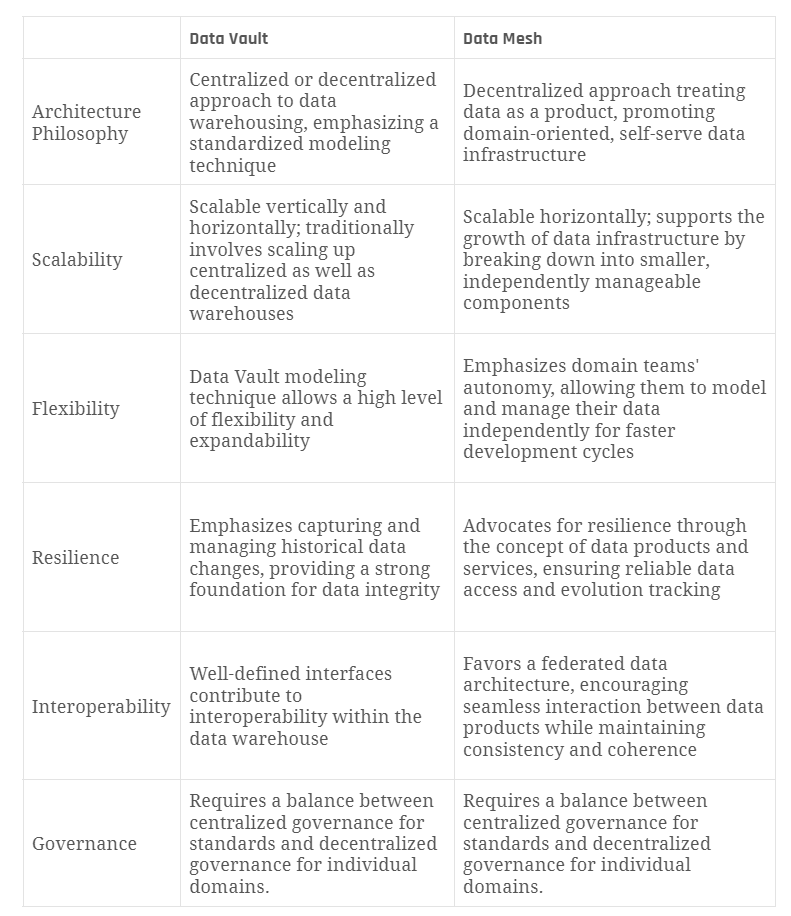
Before we delve into the role of Data Vault, let’s refresh our memories on what a Data Mesh is. Coined by Zhamak Dehghani, a Data Mesh is an architectural paradigm that aims to address the challenges of scaling data within large organizations. It promotes a decentralized approach to data ownership and access, treating data as a product and establishing domain-oriented, self-serve data infrastructure.

Data Vault in the Mesh: a synergistic alliance

Now, let’s talk about Data Vault. Historically recognized as a robust methodology for building enterprise data warehouses, Data Vault has proven its worth in creating scalable, flexible, and resilient data architectures. However, its integration into a Data Mesh approach adds a new layer of agility and efficiency.

Scalability

Data Mesh emphasizes the need for decentralized data ownership, making it crucial to scale data infrastructure horizontally. Data Vault, with its modular and scalable architecture, aligns seamlessly with this requirement. By breaking down the data warehouse into smaller, manageable components, Data Vault ensures that the system can scale effortlessly as data volume and complexity increase.

Flexibility

In a Data Mesh, each domain or business unit is responsible for its own data products. Data Vault’s adaptability shines here, allowing different teams to model and manage their data independently. This flexibility enables faster development cycles and reduces dependencies on a centralized data team, empowering domain teams to innovate and iterate at their own pace.

Resilience

Data Mesh introduces the concept of data products and services, emphasizing the need for resilience in data architectures. Data Vault, with its focus on capturing and managing historical data changes, plays a crucial role in ensuring the reliability and integrity of data products. This historical record-keeping proves invaluable for auditing, compliance, and understanding the evolution of data over time.

Interoperability

A Data Mesh advocates for a federated data architecture where data products can seamlessly interact with each other. Data Vault’s standardized modeling techniques and well-defined interfaces make it easier for different domains to collaborate and share data while maintaining consistency and coherence across the entire ecosystem.

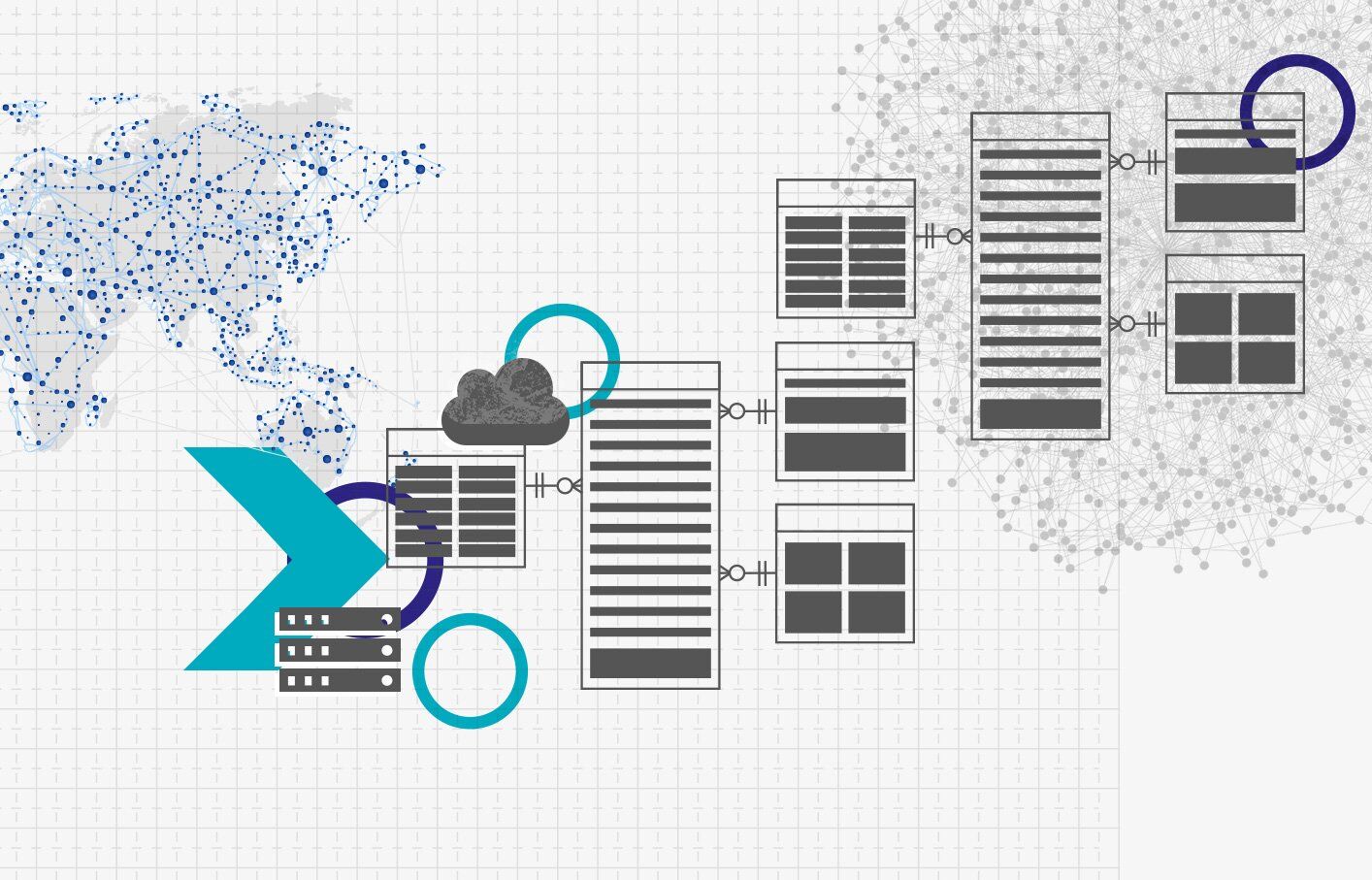
Data Mesh & Data Vault

Conclusion

The marriage of Data Vault and Data Mesh represents a leap forward in the evolution of data architectures. It combines the proven reliability of Data Vault with the agility and scalability of a decentralized Data Mesh, offering organizations a powerful solution for managing their ever-growing and diverse data landscape.

While the integration of Data Vault into a Data Mesh approach brings numerous benefits, it’s essential to acknowledge potential challenges. Managing the decentralized nature of data ownership, ensuring consistent standards across domains, and providing adequate governance are crucial aspects that require careful consideration.

Make sure to watch the webinar recording to Data Mesh in a Data Vault 2.0 approach to dive even deeper into the knowledge.

Data Vault Referential Integrity

Watch the Video

In the latest installment of our Data Vault Friday series, our accomplished Managing Consultant, Marc Finger, addresses a pertinent question posed by a member of our audience.

“How is referential integrity handled in DV 2.0?”

Marc provides comprehensive insights into the intricacies of maintaining referential integrity within the Data Vault 2.0 framework. He explores the nuances and best practices associated with ensuring a robust and reliable structure that upholds the integrity of relationships within the Data Vault architecture.

Extending Satellites in Data Vault

Watch the Video

In our continuous Data Vault Friday series, our skilled trainer, Marc Finger, delves into a question posed by an audience member.

“Changes in the source system (new column/s): New row in an existing Satellite or new Satellite?”

Marc provides valuable insights into handling changes in the source system, specifically when encountering the addition of new columns. The question revolves around whether it’s more appropriate to introduce a new row in an existing Satellite or create an entirely new Satellite to accommodate these changes.

Through a clear and concise discussion, Marc elucidates the considerations and factors that influence the decision-making process. He explores the implications of both options, emphasizing the importance of aligning the chosen approach with the specific requirements and goals of the Data Vault model.

The trainer guides the audience through the thought process involved in making this decision, providing practical tips and best practices. By the end of the episode, viewers gain a deeper understanding of how to navigate the challenges associated with changes in the source system within the context of Data Vault methodology.

Data Vault 2.0 with Hadoop and Hive/Spark

Hadoop and Hive/Spark in Data Vault 2.0

In this article, you’ll receive an overview of what Hadoop and Hive is and why they can be used as an alternative to traditional databases.

Data Vault 2.0 with Hadoop and Hive/Spark

This webinar delves into the ins and outs of Hadoop and Hive, including what they are and how they communicate. The second part of the presentation focuses on a Data Vault 2.0 example architecture using batch loading, providing participants with insights into how a sample can look like to provide value in real-world scenarios. Whether you are a seasoned data professional or just starting out, this webinar is an invaluable resource for anyone seeking to learn more about Hadoop. So if you are looking to expand your knowledge of these technologies and explore their potential in the world of data analytics, this webinar is not to be missed.

Watch webinar recording

Hadoop

Hadoop is used to process and analyze large volumes of data efficiently by distributing the workload across a cluster of commodity hardware, enabling parallel processing and providing fault tolerance through its distributed file system and resource management framework.

HDFS – Hadoop Distributed File System

HDFS is a distributed file system that provides reliable and scalable storage for big data. It breaks large files into blocks and distributes them across a cluster of commodity hardware. HDFS ensures data reliability and availability through data replication.

Yet Another Resource Negotiator – YARN

YARN provides a flexible, scalable resource management framework for Hadoop, enabling a variety of applications and workloads to coexist and efficiently utilize the cluster’s resources. It abstracts the underlying infrastructure and allows for the dynamic allocation of resources based on application requirements.

MapReduce – MR

MapReduce is a programming model and processing framework for distributed data processing in Hadoop. It allows for parallel processing of large datasets by dividing the workload into maps, reducing tasks. Map tasks process data in parallel and the output is combined and reduced to produce the final result.

Hadoop Common

Hadoop Common provides libraries, utilities, and infrastructure support for the other components of Hadoop. It includes common utilities, authentication mechanisms, and interfaces that are used by various Hadoop modules.

What is the benefit?

Scalability
Hadoop enables the storage and processing of massive amounts of data by scaling horizontally across a cluster of commodity hardware. It can handle petabytes of data without sacrificing performance.

Distributed Computing
Hadoop distributes data and processing tasks across multiple nodes in a cluster, allowing for parallel processing and faster data analysis. This distributed computing model enables efficient utilization of resources and enables high-performance data processing.

Fault Tolerance
Hadoop provides fault tolerance by replicating data across multiple nodes in the cluster. If a node fails, data can still be accessed from other replicas, ensuring data reliability and availability.

Cost-Effectiveness
Hadoop is designed to run on inexpensive commodity hardware, making it a cost-effective solution for storing and processing large volumes of data. It eliminates the need for expensive specialized hardware.

Flexibility and Extensibility
Hadoop’s modular architecture allows for integration with various tools and frameworks within the Hadoop ecosystem, providing flexibility and extensibility. It supports a wide range of data processing tasks, including batch processing, real-time processing, machine learning, and more.

Data Locality
Hadoop’s distributed file system, HDFS, aims to bring the computation closer to the data. By processing data where it is stored, Hadoop minimizes data movement across the network, reducing latency and improving overall performance.

Ecosystem and Community
Hadoop has a rich ecosystem with a wide range of tools, libraries, and frameworks that extend its functionality for different use cases. It also has a large and active community of users, developers, and contributors, providing support, resources, and continuous improvement.

These benefits make Hadoop a powerful, popular solution for handling big data, enabling organizations to efficiently store, process, and gain insights from vast amounts of structured and unstructured data. The whole ecosystem can also run on-premise, which can make it a good alternative if ‘cloud’ is not an option.

HIVE

Hive is a data warehouse infrastructure built on top of Hadoop that provides a high-level SQL-like query language called HiveQL for querying and analyzing large datasets.

What are the components?

Data Storage
Hive leverages Hadoop Distributed File System (HDFS) as its underlying storage system. It stores data in HDFS in a distributed and fault-tolerant manner, allowing for scalable, reliable data storage.

Schema Definition
Hive allows users to define a schema for their data using a language called Hive Data Definition Language, like DDL. This allows users to define tables, partitions, columns, data types, and other metadata associated with the data.

Query Optimization
Hive optimizes queries by performing query planning and optimization techniques. It aims to generate efficient query execution plans to minimize data movement, optimize resource utilization, and improve query performance.

Hive Metastore
Hive maintains a metadata repository called the Hive Metastore. It stores information about the tables, partitions, schemas, and other metadata associated with the data stored in HDFS. The metastore allows for efficient metadata management and retrieval during query processing.

Extensibility
Hive offers extensibility through User-Defined Functions (UDFs), User-Defined Aggregations (UDAs), and User-Defined Table Functions (UDTFs). These allow users to define custom logic and operations in programming languages like Java, Python, or other supported languages.

Integration with other tools
Hive integrates with various other tools and frameworks in the Hadoop ecosystem. For example, it can work alongside Apache Spark, Apache Pig, Apache HBase, and other components to provide a complete data processing and analytics solution.

Partitioning and Bucketing
Hive supports data partitioning and bucketing, allowing users to organize and store data in a structured manner. Partitioning involves dividing data into logical partitions based on specific criteria, while bucketing involves dividing data into equally sized buckets based on hash values.

SerDe
Hive uses a serialization/deserialization framework called SerDe (Serializer/Deserializer) to read and write data in different formats, such as CSV, JSON, Avro, and more. Users can specify the appropriate SerDe for their data format to ensure proper data processing.

Overall, Hive simplifies data querying and analysis on Hadoop by providing a familiar SQL-like interface. It abstracts the complexity of writing low-level MapReduce or Tez jobs and provides a declarative and user-friendly approach to interact with large-scale data stored in Hadoop.

Conclusion

Hadoop is a robust and feature-rich environment that can be challenging to manage. However, its numerous advantages make it a compelling choice, depending on the user’s needs and the available in-house expertise. If you’re interested in learning more about it, watch the following recording.

Quick Guide of a Data Vault 2.0 Implementation

Data Vault 2.0 Architecture

Data Vault 2.0 Implementation

Data Vault 2.0 is often assumed to be only a modeling technique, but it encompasses much more than that. Not only that, but it is a whole BI solution composed of agile methodology, architecture, implementation, and modeling.

So why start using Data Vault?

  • Data Vault 2.0 allows you to build automated loading processes/patterns and generate models very easily
  • Platform independence
  • Auditability 
  • Scalability
  • Supports ELT instead of ETL processes

Now that we answered the why, you may be wondering what steps are needed to implement Data Vault 2.0 in your project.

It depends on a lot of factors like your business case, the architecture you want to have in place, how your sources are loaded, the sprint timeline of your project, etc.

Walk-through of a Data Vault 2.0 Implementation

It can be a bit overwhelming for beginners to start using Data Vault 2.0 and how and where to implement it. In this webinar, a very basic guide will be provided showing the steps needed for making a Data Vault 2.0 implementation based on a business requirement from scratch. This will be done with a demonstrated example, and it starts from the gathering of some sample requirements to the finished delivered product.

Watch Webinar Part 1Watch Webinar Part 2

Data Vault 2.0 feature by feature architecture

One thing is for sure: the architecture should be built vertically, not horizontally. This means not layer by layer but feature by feature. 

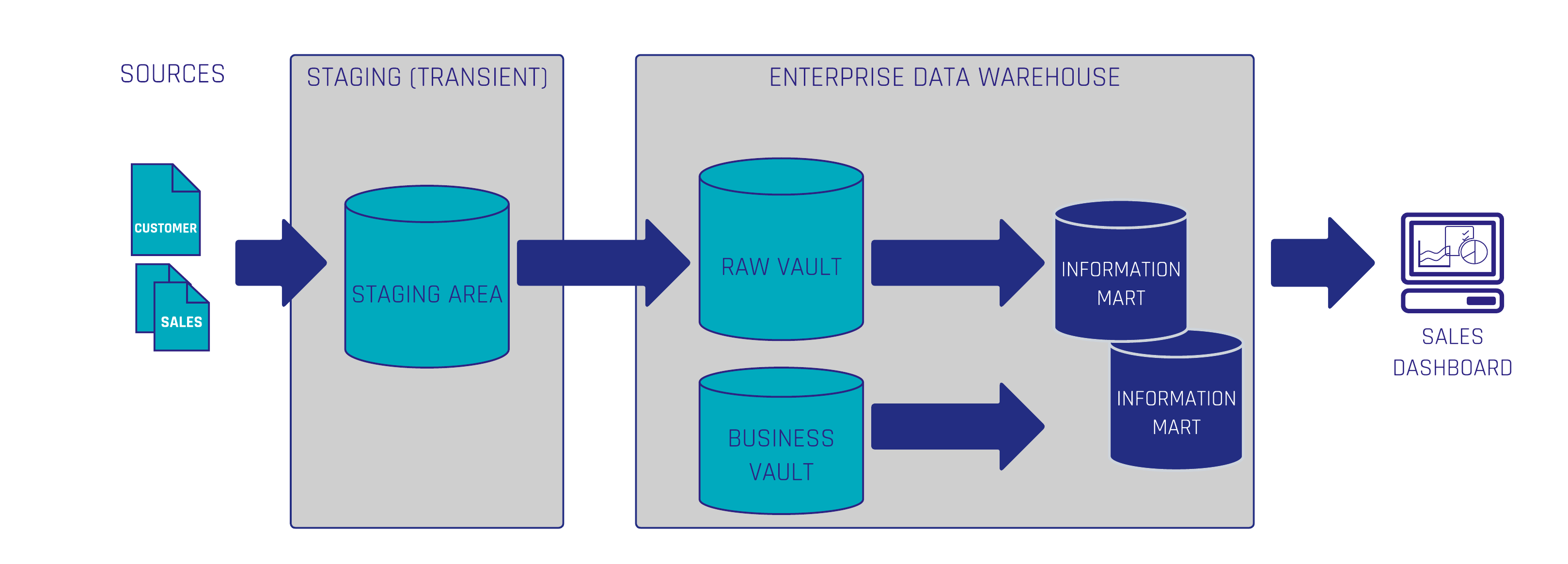
A common approach here is the Tracer Bullet approach. Based on business value, which is defined by a report, a dashboard, or an information mart, the source data needs to be identified, modeled, and loaded through all layers of the architecture. 

For example, let’s say the business request was to build a dashboard to analyze the company’s sales:

1. Extract

First thing, we need to extract the data from the source systems and load the data as it is somewhere. In this example, we put it in a Transient Staging Area but you could choose a persistent one in a Data Lake as well.

2. Transform

Next, you should apply some hard rules if necessary, be careful with this as you do not want to make business calculations here, using a transformation tool. There are a lot of different data warehouse automation tools that you can choose from: dbt, Coalesce, WhereScape, etc.

Data Vault 2.0 Architecture

3. Load

Load your Raw Stage into the Raw Vault.

4. Model Business requirements

Model the Data Vault entities needed for the business requirement to be fulfilled. If we have some Sales transactions and customers data, for example, we will model a Non-historized Link, also known as Transactional Link, and a Customer Hub, along with any additional Satellites for holding the Customer descriptive data that we want to see in the Sales Dashboard in the end.

5. Apply Business Logic

Next, we need some calculations and aggregations to be performed, so we will build some business logic on top of the raw entities, loading it into the business vault.

6. Build an Information Mart

Now, we could directly use the data stored in the Raw and Business Vault into charts/dashboards, but we want to structure the data, so it can be easily read and fetched by business users, so we will build an information mart with a star schema model with a fact table and dimensions.

7. Visualize Data

To build the Sales Dashboard in a BI visualization tool like PowerBI or Tableau, we now fetch directly from the star schema in the information mart, which has all the information we need, using a connection to my data warehouse in our database.

Data Vault 2.0 offers an agile, scalable, and flexible approach to Data Warehousing Automation. As demonstrated in the example, we only modeled the Data Vault tables that were necessary for accomplishing the handed task of building a Sales dashboard. This way you can scale up your business by demand, so you don’t have to figure out and map out the whole enterprise in one go. 

The answer to how to implement Data Vault 2.0 can be translated into a simple phrase: Focus on business value!

If you would like to see an explanation of this step-by-step implementation with some demonstration of actual data using dbt as the chosen transformation tool, check out the webinar recording.

Conclusion

Implementing Data Vault 2.0 involves a structured approach that begins with extracting data from source systems into a staging area, followed by minimal necessary transformations, and loading into the Raw Vault. Subsequently, business requirements guide the modeling of Data Vault entities, application of business logic, construction of information marts, and data visualization. This feature-by-feature methodology ensures scalability and flexibility, allowing organizations to focus on delivering business value incrementally. By aligning development efforts with specific business needs, enterprises can efficiently build and expand their data warehousing solutions.

Speed Up Your Data Vault 2.0 Implementation with Turbovault4DBT

TurboVault4dbt Logo

TurboVault4dbt

Scalefree released TurboVault4dbt, an open-source package to automate model generation using DataVault4dbt-compatible templates based on your sources’ metadata.

TurboVault4dbt currently supports metadata input from Excel, GoogleSheets, BigQuery, and Snowflake and helps your business with:

  • Speeding up the development process, reducing development costs, and producing faster results
  • Encouraging users to analyze and understand their source data

Speed up Your Data Vault 2.0 Implementation – with TurboVault4dbt

This webinar delves into TurboVault4dbt, an open-source tool by Scalefree that speeds up Data Vault 2.0 implementation. It automates dbt model creation using your source metadata, saving time and costs while encouraging better data analysis.

TurboVault4dbt works with metadata inputs like Excel, Google Sheets, BigQuery, and Snowflake, generating models for hubs, links, and satellites automatically. Just set up your metadata tables, connect the tool, and watch it do the heavy lifting!

Watch webinar recording

‘Isn’t every model kind of the same?’

Datavault4dbt is the result of years of experience in creating and loading Data Vault 2.0 solutions forged into a fully auditable solution for your Data Vault 2.0 powered Data Warehouse using dbt.

But every developer who has worked with the package or has created dbt models for the Raw Vault must have come across one nuisance:

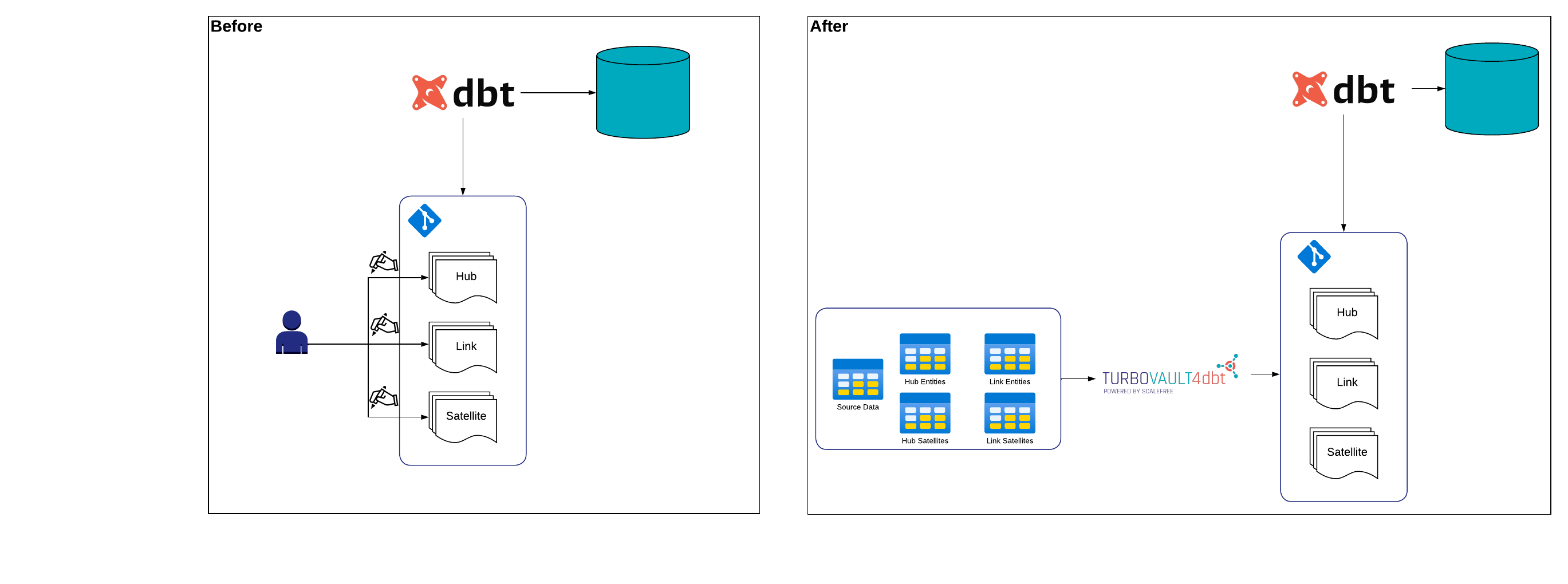
Creating a new dbt model for a table means taking the already existing template and providing it with specific metadata for that table. Doing this over and over again can be quite a chore. This is why we created TurboVault4dbt to automate and speed up this process.

From CTRL+C AND CTRL+V to a simple mouse-click

How many times has everyone pressed CTRL+C then CTRL+V and corrected a few lines of code when creating new dbt-models for the raw vault?

Instead of trying to figure out what the names of your tables and business keys are or what hashing order you want your Hashkey to be generated in, TurboVault4dbt will do all of that for you. All TurboVault4dbt needs is a metadata input where you capture the structure of your data warehouse.

TurboVault4dbt

TurboVault4dbt currently requires a structure of five metadata tables:

  • Hub Entities: This table stores metadata information about your Hubs,
    e.g. (Hub Name, Business Keys, Column Sort Order for Hashing, etc.)
  • Link Entities: This table stores metadata information about your Links,
    e.g. (Link Name, Referenced Hubs, Pre-Join Columns, etc.)
  • Hub Satellites: This table stores metadata information about your Hub Satellites,
    e.g. (Satellite Name, Referenced Hub, Column Definition, etc.)
  • Link Satellites: This table stores metadata information about your Hub Satellites,
    e.g. (Satellite Name, Referenced Link, Column Definition, etc.)
  • Source Data: This table stores metadata information about your Sources,
    e.g. (Source System, Source Object, Source Schema, etc.)

By capturing the metadata in those five tables above, TurboVault4dbt can extract necessary information and generate every model that is based on a selected source but also, as a user, encourage you to analyze and understand your data.

Conclusion: Lean back, relax and let TurboVault4bdt take over!

Create and fill your metadata tables, connect them to TurboVault4dbt, and enjoy your free time for another cup of coffee. Give it a try, or give us your feedback by visiting TurboVault4dbt on GitHub!

Stay updated on TurboVault4dbt through our marketing channels as great features lie ahead!

Close Menu