search
0
All Posts By

Marc Winkelmann

Marc Winkelmann is a Senior Managing Consultant and Certified Data Vault 2.1 Trainer at Scalefree with over 8 years of BI experience. A Snowflake SnowPro Advanced Data Engineer and dbt Certified Developer, he specializes in cloud migrations (AWS, Azure, Snowflake) and enterprise data strategy. Marc holds a Master’s in BI & Analytics and is an expert in coaching teams through complex data transformations.

Zero Key Concepts in Data Vault

Watch the Video

In our ongoing Data Vault Friday series, our trainer Marc Finger delves into an intriguing question posed by the audience.

“In Hubs, we add two ghost records: one with 0s (unknown/zero key) and another with f’s (sometimes called error key). In the loading of the stage, in which cases should we replace the generated hash key with the error key instead, and how? Right now, if the Business Key (BK) or combination of BKs is null, we are always replacing it with the zero key. My question is in which cases should we use the ffff key instead.”

In this informative video, Marc explores the usage and value of zero keys when loading links within the Data Vault framework. The question prompts a discussion on the considerations and scenarios where replacing the generated hash key with the error key, represented by ‘ffff,’ is beneficial.

The video provides practical insights and recommendations for optimizing the handling of ghost records and error keys, contributing to a more robust and efficient Data Vault implementation.

How to Get Data Out of Data Vault

Watch the Webinar

Data Vault is a very flexible model when it’s about creating a scalable data warehouse design. This is due to splitting the data into 3 basic entities: keys, relationships, and descriptive data. But, the result is also a bigger model with more entities than in a 3rd normal form (3NF) or star schema model. A common complaint is that it is difficult and inefficient to query the data from the Data Vault.
In this Webinar we will show you the opposite and what’s needed to accomplish this.

Watch Webinar Recording

Webinar Agenda

1. Data → Information → Business Value
2. Requirement gathering
3. PITs and bridges
4. Information marts

How to Successfully Manage Data Vault 2.0 Using dbt

Watch the Webinar

More and more companies are making the big step towards a modern data architecture. As they deal with the components, they can’t actually stumble upon dbt and Data Vault. Among a lot of features “automation” is one, that they have totally in common. So why not combine these worlds?

Hear firsthand from dbt Labs and Scalefree how to successfully manage Data Vault 2.0 using dbt!

Highlights

– Learn how dbt will move your data platform to the next level and how the dbt Cloud product will simplify your code development and project management.

– Is dbt x Data Vault the right fit for your company? We will talk about the considerations you should make when starting your project.

Watch Webinar Recording

Webinar Agenda

1. Dbt Snapshots
2. Dbt Incremental Models
3. Incremental Satellites in Data Vault
4. Conclusion

What’s New in Data Vault?

Data Vault 2.0

Attendees of our Data Vault 2.0 trainings often ask us what the difference between the book “Building a Scalable Data Warehouse with Data Vault 2.0” and our current consulting practice is. To give a definitive answer, at least for now, we have written this article.

What’s new in Data Vault?

This webinar  discusses recent updates in Data Vault 2.0 practices since the publication of the book “Building a Scalable Data Warehouse with Data Vault 2.0.” The key changes include the virtualization of the Load End Date using window functions to enhance efficiency, the adoption of hybrid architectures that integrate data lakes for staging purposes, and the shift of business timelines into the dimensional model for greater flexibility. Additionally, there’s an emphasis on using Snapshot Date Timestamps in Business Vault satellites to simplify business rule development. The article clarifies that these updates are considered enhancements within the existing Data Vault 2.0 framework, referred to as “Data Vault 2.0.1,” rather than constituting a new version like Data Vault 3.0.

Watch webinar recording

Data Vault 3.0?

First of all, there is no Data Vault 3.0. We like to refer to the version of Data Vault that we teach and apply in our consulting practice, as “Data Vault 2.0.1”. Therefore, there are only slight differences to the version we used in the book. Some of these changes look big, but they don’t really modify the underlying concept and that is what matters regarding version changes. So, based on the concept, we only see minor changes or enhancements. However, they might have some larger impact on the actual implementation, but that is only due to technology changes.

How to Fit Data Vault 2.0 Between Two Covers

On top of the minor changes to the concept, there is also another factor at play here: when writing the book, we had to scope the book to make it fit between the covers as the publisher had a page limit (which we actually exceeded a bit). Therefore, we did not apply all Data Vault 2.0 concepts in the book: for example, real-time concepts are not covered by the book, and we did not use a data lake or cloud computing in our examples. Instead we only briefly covered these concepts for completeness but focused on on-premise technology which was more used in actual projects back then. In 2012, cloud computing was already available and widely used, but it was easier to tailor the book to more readers by the use of on-premise technologies.

With that in mind, what has changed since the book came out? 

Removal of Load End Date

The most obvious change is the removal of the Load End Date. Well, in our actual projects, we don’t completely remove it from the Data Vault 2.0 model, we just virtualize it by removing the Load End Date from the underlying satellite table and virtually calculating it in a view on top of the satellite table using a window function (typically LEAD, but LAG is also possible). This way we can get rid of the update procedure to maintain the Load End Date (the so-called end-dating process) while preserving the query patterns downstream. Keep in mind that it might also be more efficient to use the window function when loading PIT tables or satellites, and therefore the query layer is actually only for power users when they query the Data Vault model directly. 

That’s actually not an update: even in 2012 (and before) we used these approaches but they didn’t work on SQL Server 2014, which was used in the book as the analytical window function required for this approach is ways too slow. However, it improved in 2016. To get rid of the Load End Date in such scenarios where the window function is too slow or just don’t exist, a new solution has emerged: the use of a snapshot partition in the PIT table. The end of all times is used in the PIT table to refer to the latest delta in each satellite for the delta check. Once the PIT table is available, it can also be used to produce SCD Type 1 dimensions (without history) and therefore the need for the Load End Date (or a fast replacement as described above) only exists in loading.

Hybrid Architecture

The next obvious change is the use of a hybrid architecture where a data lake is used for staging purposes. In the book, we focused on the on-premise Microsoft SQL Server stack that didn’t include a distributed file system. We already recommended to clients to use a data lake for staging purposes, in an architecture we called the “hybrid architecture.” Back then, only a few followed the advice, but today most clients use the hybrid architecture for their data warehouse. We actually consider a relational staging area an anti-pattern and do not recommend it anymore to clients (with some exceptions). 

Multi Temporal Data Vault 2.0

The book describes a temporal PIT (TPIT) for building multi-temporal solutions. While the pattern is still valid and relatively flexible compared to other solutions, today we typically move the business timelines into the dimensional model for highest flexibility. This is discussed in more detail in the Multi-Temporal Data Vault 2.0 class. TPITs are less flexible but have higher performance.

Snapshot Date

Satellites in the Business Vault might use a Snapshot Date Timestamp instead of a Load Date Timestamp. The idea is that, as a general practice, a Business Vault entity should always reuse an existing granularity. It just becomes much easier to develop Business Vault solutions. With the Snapshot date in the primary key of the satellite, this becomes much easier for business rules on the outgoing information granularitiy. This is discussed in more detail in the Data Vault 2.0 Information Delivery class

Conclusion

And finally, we also made some mistakes. We are willing (not happy) to admit it in our errata page for the book – this link is directly from our internal Wiki and we promise to keep it updated (however, we didn’t receive additional reports lately).

Aggregate Measures Using Bridge Tables in Data Vault

Watch the Video

In our ongoing Data Vault Friday series, our knowledgeable trainer, Marc Finger, dives into a pertinent question raised by our audience regarding aggregate measures in Data Vault:

“How and where to aggregate measures from transactional system on a business date considering late arriving messages?”

In this informative video, Marc addresses the intricacies of aggregating measure values within bridge tables. The audience is treated to a comprehensive discussion on the techniques and considerations involved in efficiently handling aggregate measures in the context of bridge tables.

Marc provides valuable insights and practical tips, offering clarity on how to navigate the challenges associated with aggregating measures while utilizing bridge tables in your data architecture.

Multi-Temporality in Data Vault 2.0 – Part 2: A Practical Example

An abstract illustration features a large clock in the center with connected circuitry-like lines. Icons of a calendar and a smaller clock are in the background. Two large arrows pointing outward appear on both sides, and the backdrop has splashes of blue and gray.

Multi-Temporality

This article explores managing multi-temporality in Data Vault 2.0 using a travel industry scenario. It highlights how operational and business intelligence systems handle data differently and demonstrates how Data Vault 2.0 supports comprehensive historical tracking and multi-temporal analysis.

Multi-temporality in Data Vault 2.0

You may have heard about Bi-temporal data already. But usually, there are more than just two timelines in your data which complicate your work. You usually find multiple timestamps and dates from different perspectives in your data sets, which create multiple opportunities on “how to look at your data” from a time perspective. But, you should also be able to handle this beast of a time machine. Did you know that Data Vault 2.0 is able to handle Multi-temporal data? How does this influence your work and how can you take advantage of it? Join this webinar to learn how Data Vault 2.0 can help you master multi-temporality.

Watch webinar recording

Multi-Temporal Example from the Travel Industry

In one of our previous blog posts, we gave an insight into the basics of multi-temporality in Data Vault 2.0. This article will give you a short practical example of the topic. When you book your holidays, you might change something after the initial booking: the duration, the flight departure location, the hotel, the start and/or end date of your journey or might just book some extras. From an operational perspective, these changes are not a problem to deal with, and the expectations are not high. The data set for your journey will be updated in the source systems’ database, and only the most recent data is shown in the graphical user interface. The employee might see some logs in the history part, if they exist. That’s usually enough to keep the operational part working. In the business intelligence world, the way to deal with data is a bit different. There, we want to see everything. Each time a record in the source system is updated, we catch all the changes and store them in a separate database. This means that we introduce a new timeline which provides us new opportunities but also comes with new challenges. Let’s have a look into some example data sets of a source system over time:

Day 1: Initial booking of a holiday trip

Day 2: Correction of the start and end date and a small price adjustment

Day 3: Correction of the start and end date and a small price adjustment

When you have a look into the source system today, you will see that booking B4711 is cancelled, or maybe it is completely gone, and B4712 is the active one (ID = 2, created on day 3). From an analytical perspective you might have some more questions you want to have answered.
For example:

  • What was the estimated revenue for July, looking from February?
  • What was the estimated revenue for July, looking from March?
  • Which dates do I need to use to answer the two questions above?
  • In which month do we have the most bookings for the next summer season?
  • Can we reproduce a report we created some months ago?
  • What if some business dates change? What affects my reports in the past?
  • Where can we prepare the data to answer all these questions? In the data warehouse? In the front-end BI tool? Or somewhere else?

In our webinar “Multi-Temporality in Data Vault 2.0” we will provide you answers to all these questions by using Data Vault entities.

If you are interested to see some more use cases related to multi-temporality: we offer a 2-day class especially for this topic: “Multi-Temporal Data Vault 2.0 Class”.

Conclusion

Incorporating multi-temporality into Data Vault 2.0, as demonstrated through the travel industry example, allows organizations to effectively capture and analyze data changes over multiple timelines. This approach not only preserves historical accuracy but also enables comprehensive insights into business processes. By leveraging Data Vault 2.0’s capabilities, businesses can address complex temporal questions, such as estimating revenue forecasts from different points in time and reproducing past reports with precision. This methodology ensures a robust framework for managing evolving data landscapes and supports informed decision-making.

Why Should I Use Data Vault 2.0?

Data Lineage with Data Vault 2.0

Why Data Vault 2.0?

This blog article discusses some features where Data Vault 2.0 can shine and why you should use it. As a database developer, administrator or user, you probably have already heard of Data Vault. But with an existing database solution in mind, you might come to the question of why you should use Data Vault in your enterprise data warehouse

Reason 1: Supporting multiple source systems and frequently changing relationships

Data Vault 2.0 provides the most benefits when your data comes from many source systems or has constantly changing relationships. 

Data Vault 2.0 works well for multi-source systems or those that have constantly changing relationships.

The reason why it works well for these systems is its ability to make adding attributes simple. If there is a change to one source system, that change does not need to show up within all source systems. Similarly, you can limit the number of places changes are made, as attributes are stored separately from structural data in satellites.

Additionally, it is easier to account for new and changing relationships by closing off one link and creating another. You don’t have to change the historical data to account for a new relationship or update an existing schema. You only need to account for the changes going forward. This brings enormous flexibility and scalability into your enterprise data warehouse.

Reason 2: Easily track and audit your data with Data Vault 2.0

In a modern data environment, the data runs through various different stops. To still provide continuous data quality, it must always be clear where data has come from. 

Data Lineage with Data Vault 2.0

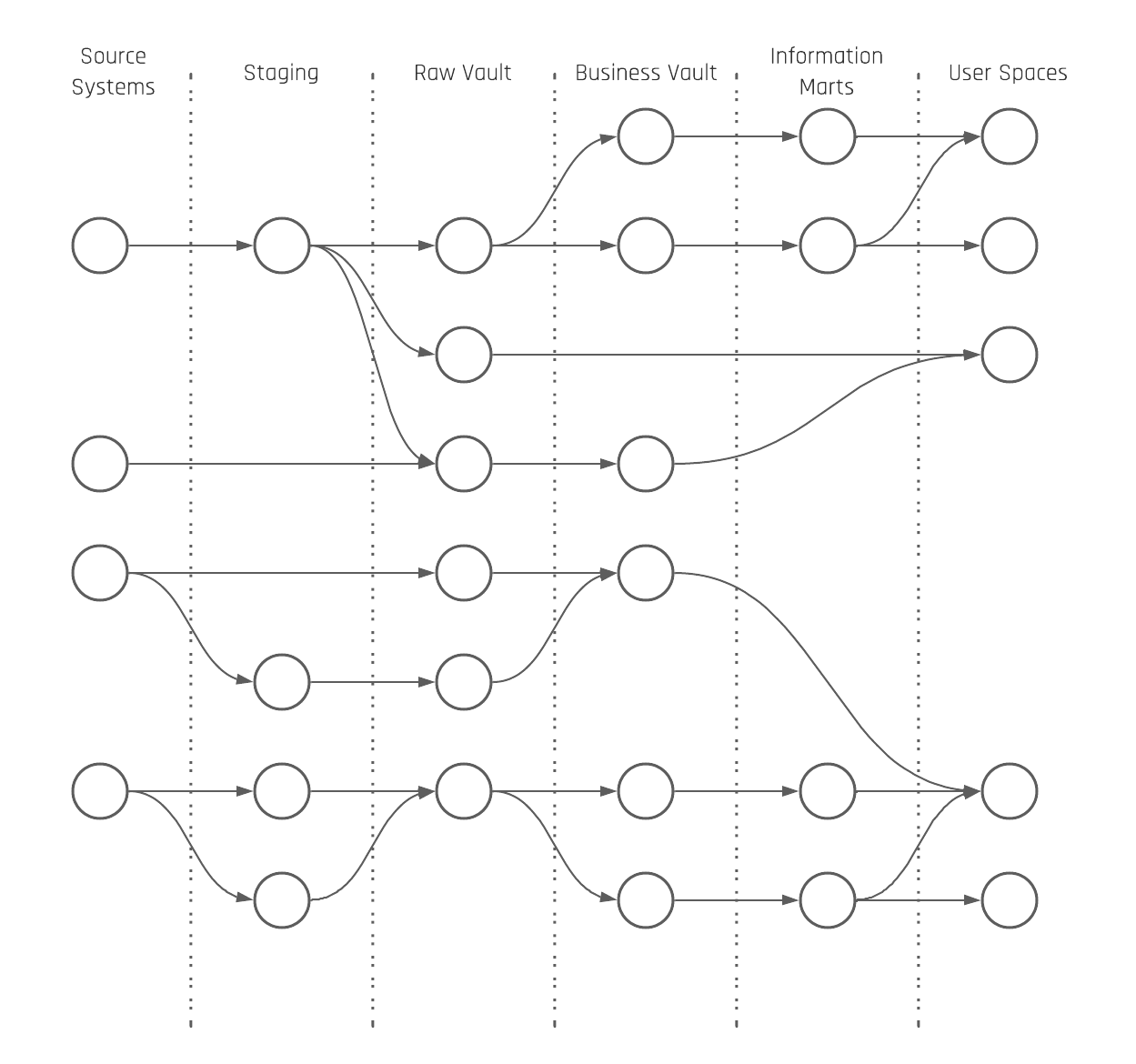
Figure 1: Data Lineage

Given the need to be able to easily track and audit data, Data Vault has made it easier to do so. It does so by inherently enabling auditing, as load times and record sources are required for every row. It also tracks all historical changes as satellites, including the load time as part of the primary key.
When an attribute is updated, a new record is created.
All of this auditing enables you to easily provide auditability for both regulatory and data governance purposes. And because you store all of your history, you can access data from any point in time.

Reason 3: Load data from multiple source systems more quickly with Data Vault 2.0

Data Vault enables quicker data loading simply because a number of tables can be loaded at the same time in parallel. The model decreases dependencies between tables during the load process and simplifies the ingestion process by leveraging inserts only, which load quicker than upserts or merges. This also leads to less complexity.

Conclusion

Data Vault 2.0 is designed to integrate data from several source systems and may over perform in some situations.

In summary, if you have a small to medium-sized analytics requirement, with a small team of architects, designers, and engineers delivering a solution with data sourced from a few systems, then Data Vault may be inappropriate for your need.

If, however, you have a large project with many source systems leading to an enormous data integration challenge, then Data Vault can potentially add massive value to the project.

Multi-Temporality in Data Vault 2.0 – Part 1

An abstract illustration features a large clock in the center with connected circuitry-like lines. Icons of a calendar and a smaller clock are in the background. Two large arrows pointing outward appear on both sides, and the backdrop has splashes of blue and gray.

Multi-Temporality in Data Vault 2.0

The following article gives an overview of the theoretical understanding of Multi-Temporality in a data warehouse.

Multi-temporality in Data Vault 2.0

You may have heard about Bi-temporal data already. But usually, there are more than just two timelines in your data which complicate your work. You usually find multiple timestamps and dates from different perspectives in your data sets, which create multiple opportunities on “how to look at your data” from a time perspective. But, you should also be able to handle this beast of a time machine. Did you know that Data Vault 2.0 is able to handle Multi-temporal data? How does this influence your work and how can you take advantage of it? Join this webinar to learn how Data Vault 2.0 can help you master multi-temporality.

Watch webinar recording

What is “Multi-Temporality” in a Data Warehouse?

Before we start talking about multi-temporality, let’s define the term bi-temporality first, given, a common misconception is that Data Vault 2.0 is only bi-temporal (which is wrong):

“Bitemporal Modeling is a specific case of Temporal database information modeling technique designed to handle historical data along two different timelines. This makes it possible to rewind the information to “as it actually was” in combination with “as it was recorded” at some point in time.” (According to Wikipedia)

Bi-temporality just addresses two timelines, which are commonly referred to as “System Time” (the technical timeline) and “Valid Time” (the business timeline). Data Vault Satellites, Point-in-Time tables (PIT), and Bridge tables are able to address multiple active timelines in the same record. Let’s categorise just some of them:

  • Source Driven times
    • Created time
    • Updated time
    • Deleted time
  • System times
    • CDC time
    • Message event time
  • Business times
    • any times that represent when something happened or will happen in the “real world” like a purchase or sell timestamp.
  • Time spans
    • can be technical, can be business-driven
    • Contract start and end dates/times
    • Technical valid from and valid to dates/timestamps
  • Enterprise Data Warehouse (EDW)
    • Load date timestamp (set in the first layer of the EDW during the insert)
    • Timestamp when a record is written in the table

All of these dates and timestamps could be found in just one record in a Satellite table. This allows us to look at the data from multiple time perspectives. Therefore, the Data Vault Model accounts for multi-temporality and not just bi-temporality.

The Load Date Timestamp with Multi-Temporality

One requirement to realize multi-temporality on the data is that the Load Date Timestamp is used for loading data into Satellites when doing the delta check. Only the Load Date Timestamp can provide us with a consistent, gapless, and non-overlapping time which is under our control. This allows us to have an unrestricted view of the multi-timelines in Satellites.

All other timestamps are not qualified. First, they would restrict the number of possible perspectives on the data to a single instance. Additionally, they can have gaps, and overlappings, be NULL, and are not controlled by the Enterprise Data Warehouse teams.

In short: We will never get rid of the Load Date Timestamp which is set during the insert in the first layer of the Enterprise Data Warehouse architecture and pushed through all the layers as far as possible (think of aggregates in the Business Vault over multiple Load Date Timestamps).

3 Different Perspectives on Data

The core Data Vault is differentiated into the Raw Data Vault (RDV) and the Business Vault (BV). The reason is to split soft business rules from hard business rules as soft business rules can change the content of the data. The result is that the number of possible perspectives on the raw data is reduced when soft business rules are applied early in the loading architecture. The same rules have to be applied to timelines. Timeline-driven business perspectives on raw data happen earliest in the Business Vault. 

There are basically three different perspectives related to timelines in the data warehouse: A data warehouse perspective, a business perspective, and an information delivery perspective. 

The data warehouse perspective relates to the Load Date Timestamp to have a consistent incremental integration of the data into the Raw Data Vault and Business Vault.  

The business perspective relates to all dates and timestamps which are delivered by the source system. Also, the technical fields are counted in the same way as the created, updated, or deleted date/timestamp from the source system. Everything that is part of the payload is handled as descriptive data during the Raw Data Vault loading.
Now, different queries can create all possible views of the raw data; for example, aggregates based on the most recent record per Business Key and grouped by a sales date.

The information delivery perspective relies on a snapshot to “freeze” all the data as it was active at a point in time. That said, the interpretation of what “active” means can be different.

To address this, multiple perspectives can be created. That’s also the reason why we talk about the single version of the facts in the Raw Data Vault and multiple versions of the truth in the Business Vault (different perspectives on raw data = different truths from different standpoints).

This could, for example, be an hourly, daily, weekly, monthly, or yearly snapshot or timespan. The Data Vault entities that are used here are the PIT and Bridge tables. The current delta of master data like customer data in a Satellite can be “frozen” based on a daily snapshot in a PIT table. Also, transactional data kept in a Non-Historized Link can be attached to an hourly snapshot in a Bridge table.

How that exactly looks will be shown in the next part of the multi-temporal newsletter series. To enhance your understanding of these data perspectives, you can also explore our Multi-Temporal Data Vault class. 

Conclusion

Incorporating multi-temporality into Data Vault 2.0 enables organizations to manage and analyze data across various timelines, providing a comprehensive view of historical changes from multiple perspectives. This approach enhances the ability to track and understand data evolution, leading to more informed decision-making and improved data governance. By effectively handling multiple temporal aspects, Data Vault 2.0 ensures a robust and flexible framework for capturing the complexities of time-variant data.

Using Multi-Active Satellites the Correct Way – Part 2

Data Vault 2.0 Training FAQ - Customized Class

Multi-Active Satellites in Data Vault 2.0

In our first post about multi-active satellites, we briefly explained different implementations that can be used to solve multi-activity. Now, we’re going to go into more detail regarding the advantages and disadvantages of these approaches having delta checks on or off.


Short Summary of Multi-Active Satellites

Multi-active satellites allow you to implement multi-active records per business key in Data Vault 2.0. To illustrate the need for the solution, let’s look at the common occurrence of a source system that doesn’t provide the needed metadata such as when working with XML files.

One solution to the above is to create a multi-active satellite by adding a subsequence number per business key. This accounts for any instance in which there is no multi-active attribute delivered by the source itself. Regarding phone numbers, this information could be a tag for a business, home, or mobile phone number. Another possibility is to create an extra hub for the multi-active attribute. However, since it doesn’t present a real business object, the first solution can be more effective.

Delta Check OFF

There are two ways to insert new records into a multi-active satellite – having delta checks active or inactive. With delta checks turned off, all records of a business key are inserted into the satellite from your source delivery.

The advantage of that is that loads are faster and have a consistent load date timestamp to the parent hash key, independent of the multi-active attribute.

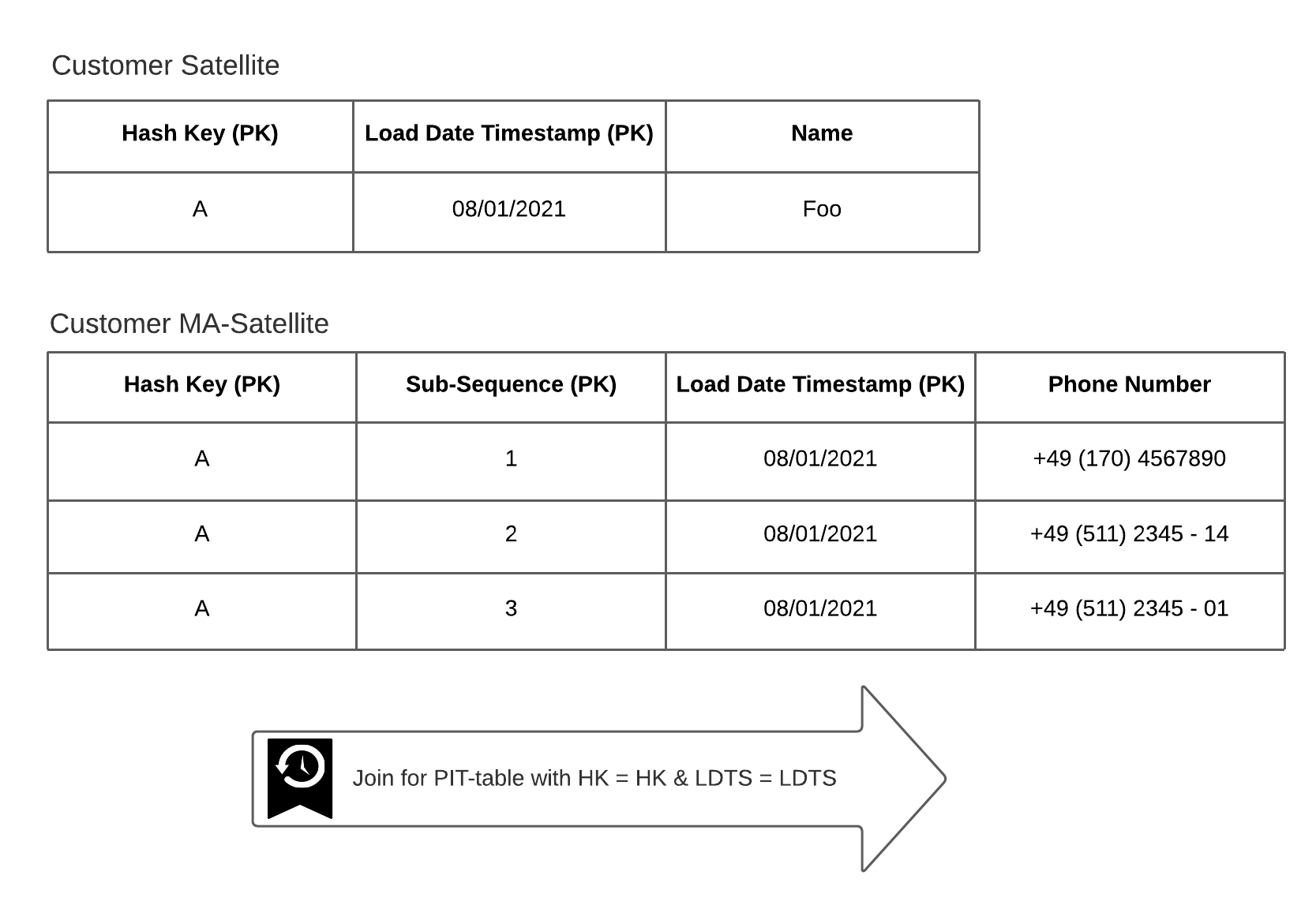
Later on, it simplifies the query based on the multi-active data (see Figure 1). As a critical drawback, the ingested amount of data can increase strongly if full data loads are received.

In this case, you should partition your data by the load date timestamp. 

Multi-active satellites

Figure 1: Joining records using one PIT-table when having one LDTS for all active records per key.

Delta Check ON

To reduce the amount of data simply use delta checks. Doing so, you match the incoming data with the latest LDTS per hash key.
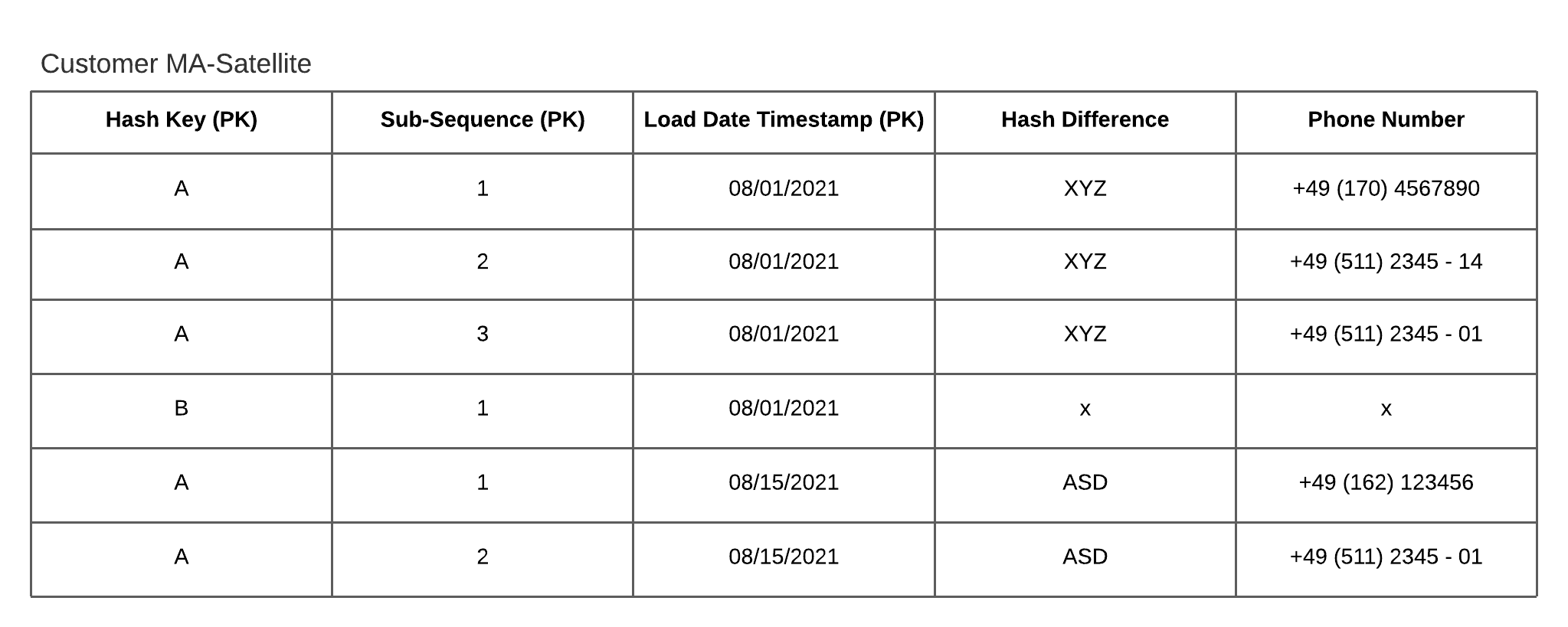
Note that a useful function to leverage the delta check is LISTAGG(). This function transforms values from a group of rows into a list of values. As a result, you are able to create a hash difference of multi-active attributes per business key (see figure 2).

Multi-active satellites

Figure 2 – Multi-row hash difference using the LISTAGG()-function

If new data arrives, it can be compared by the multi-row hash difference. Using it, a high proportion of data can be ignored. When a delta is detected, all records are inserted per hash key even if the content of the data for only one subsequence is changed. The result is that you get a consistent load date timestamp per hash key. Additionally, a delta is going to be noticed when the order of records changes as well. This approach is a trade-off to reduce the amount of records while still having a consistent load date timestamp per hash key so that only one PIT table is necessary.

Using Type Codes

Another method to address multi-activity is to use types of the attributes, granted they exist, as explained in the previous post.
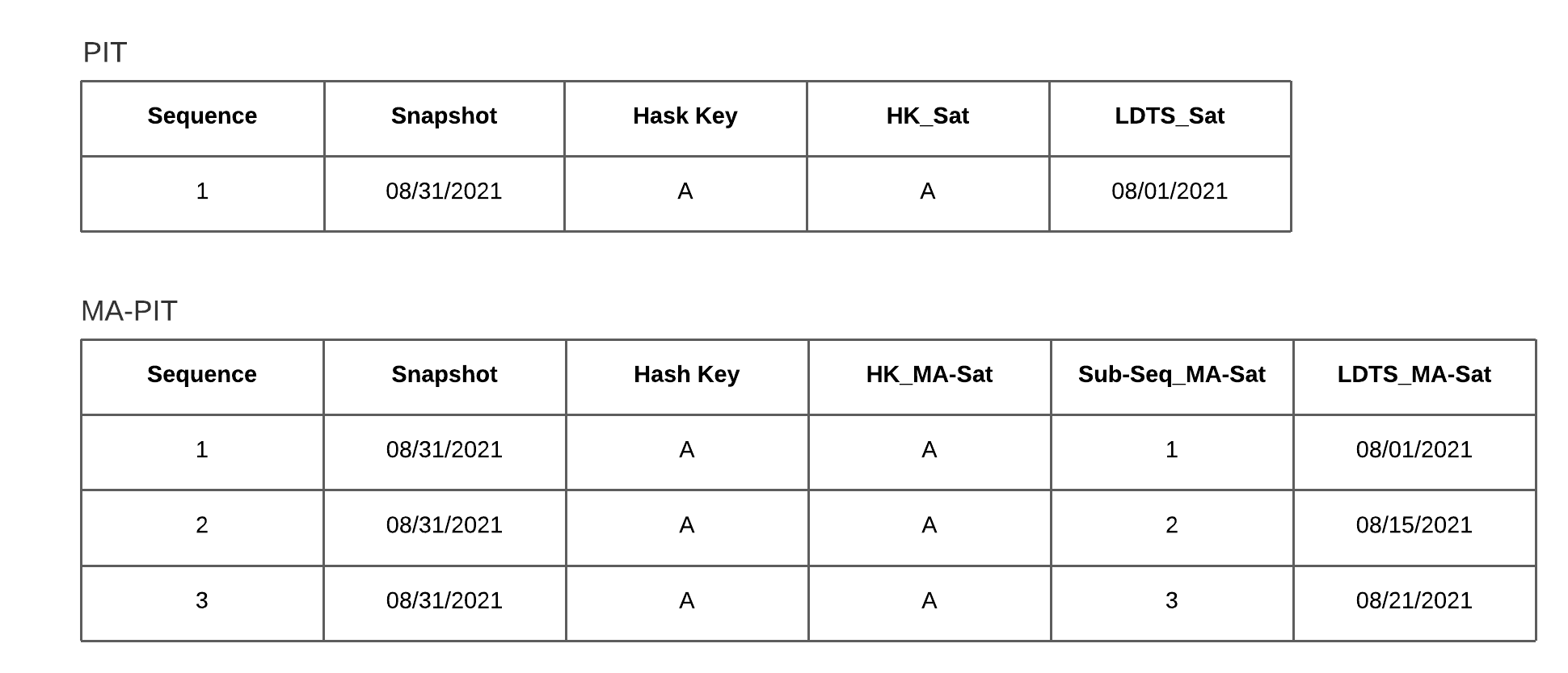
If you have type codes in place, you’re able to compare row by row and load only this specific data. But consequently, you get different LDTS per multi-active attribute. Using PIT-tables in the business vault, you’ll therefore need an extra multi-active PIT-table. This scenario is shown in figure 3.

Multi-active satellites

Figure 3 – The need for an MA-PIT having different LDTS of active records per key

If you can pivot the multi-active column into multiple columns, one column per characteristic, you won’t need to consider any of the above advantages or disadvantages. In this case, you turn the satellite into a standard satellite. Related to our example with the phone numbers, you would create a couple of new columns per phone type.
This solution is applicable if you can be certain that the characteristics of the phone types will not change in the future. Otherwise, you will have to reengineer your process to catch all the data you have delivered!

Conclusion

In our second post regarding  multi-active satellites, we explored the backgrounds behind the different methods. You can use this information to implement your own multi-active solution depending on your present data.
Though, note that it’s often recommended limiting the loading data. For this purpose, the LISTAGG()-function becomes useful. Using a solution with potentially different LDST, remember to consider them when querying the data.

Using Multi-Active Satellites the Correct Way – Part 1

Multi-Active Satellites in Data Vault 2.0

With multi-active satellites, you’re able to store multiple active records for one business key. Depending on how the data arrives from your source, there are different ways to implement multi-activity in Data Vault 2.0. In this post, we’ll explain your options for modeling. 

What are Multi-Active Satellites?

Multi-active satellites are similar to standard satellites and their structure. As said before, they store multiple active records per key at a point in time. This exact structure depends on the use case though.
See the example Data Vault model in Figure 1.

Continue Reading

Effort Estimation in Data Vault 2.0 Projects

Effort Estimation in Data Vault 2.0 Projects

In Data Vault 2.0 projects, we recommend estimating the effort by applying a Function Point Analysis (FPA), but there are many options available when choosing a method to estimate the necessary effort within agile IT projects. In this article, you will learn why FPA is a good choice and why you should consider using this method in your own Data Vault 2.0 projects.

Good Old Planning Poker for Effort Estimation

Probably the best known method for estimating work in agile projects is Planning Poker. Within the process, so-called story points, based upon the Fibonacci sequence (0, 0.5, 1, 2, 3, 5, 8, 13, 20, 40 and 100), are used to estimate the effort of a given task. To begin the process, the entire development team sits together as each member simultaneously assigns story points to each user story that they feel are appropriate. If the story points match, the final estimate is made. Alternatively, if a consensus cannot be reached the effort is discussed until a decision is made. 

However, it’s important to note that this technique involves a lot of effort as a result of either too many tasks or too many team members.  So the question is: Does Planning Poker work for Data Vault projects? The short answer is “it makes little sense”. Since in Data Vault 2.0 the functional requirements are broken down into small items, there are numerous tasks that all have to be discussed and evaluated. In addition, the subtasks in Data Vault 2.0 are standardized artifacts, such as Hub, Link, and Satellite. In principle, these artifacts always represent the same effort.

Why does Function Point Analysis suit it so well?

This is where FPA comes into play and the reason why it is widely used in agile software projects. The idea is that software consists of the following characteristics, which represent the Function Point Types:

  • External inputs (EI) → data entering the system
  • External outputs (EO), external inquiries EQ → data leaving the system one way or another
  • Internal logical files (ILF) → data manufactured and stored within the system
  • External interface files (EIF) → data maintained outside the system but necessary to perform the task

With FPA, you break the functionality into smaller items for better analysis. As mentioned, this is already done in Data Vault 2.0 projects due to the standardized artifacts. This is the reason why FPA is very suitable for Data Vault projects.

How to apply FPA in Data Vault 2.0

Hence, to make good use of FPA in the Data Vault 2.0 methodology, the functional characteristics of software, external inputs, external outputs, external inquiries, internal logical files, and external interface files, must be adapted to reflect Data Vault projects. The following functional characteristics of data warehouses built with Data Vault are defined as:

  • Stage load (EI)
  • Hub load (ILF)
  • Link load (ILF)
  • Satellite load (ILF)
  • Dimension load (ILF)
  • Fact load (ILF)
  • Report build (EO)

Please note that there are also other functional components that can be defined, like Business Vault entities, Point-in-time tables, and so on. Once you have defined these components, you should create a table that maps them to function points. Function points are used to quantify the amount of business functionality an element provides to a user. In general, it is recommended to add a complexity factor first:

Complexity Factor Person Hours per Function Point
Easy 0.1
Moderate 0.2
Difficult 0.7

Then use the complexity factors and the assigned function points per component to calculate the estimated hours needed to add the respective functionality. Here is a short example of how the mapping table could look like for you:

Component Complexity Factor Estimated Function Points Estimated Total Hours
Hub Load Easy 2 0.2
Dimension Load Difficult 3 2.1
Report Build Difficult 5 3.5

The goal of estimation is to standardize the development of operational information systems by making the effort more predictable. This is due to the fact that when you use a systematic approach to estimate the needed effort to add components, it is possible to compare the estimated values with the actual values once the functionality is delivered. When both values are compared, your team can learn from these previous estimates and improve their future estimates by adjusting the function points per component. Also, keep in mind that your developers will gain experience over time or might lose experience due to replacement.

Conclusion

I hope this first glimpse into FPA helps you understand the basic value it can provide your team in Data Vault 2.0 projects. You can have a more in-depth look at how to apply FPA in Data Vault 2.0 projects by reading the book “Building a Scalable Data Warehouse with Data Vault 2.0” by Michael Olschimke and Dan Lindstedt.

Organization of Information Requirements

Just a Recommendation…how we Organize our Information Requirements


Information is required by business users throughout the industry. However, as part of our consulting engagements, we also encounter a lack of proper description as to what the business user actually needs. 

So, we want to use this article to present the way we structure our information requirements internally at Scalefree as well as the way we do so for many of our customers.

What about User Stories?

We all know user stories from Scrum and many business intelligence projects.
Their structure is typically something that looks like:

As a <type of user>, I want <some goal> so that <some reason>.

The following example represents a typical user story we would receive in a project:

As a <marketing user>, I want <to have an overview report with the number of leads from a marketing channel> so that <I can adjust the marketing budget accordingly>.

Now, what should we do with this user story?
Many details are missing, and yes, we all know about product backlog refinement. The problem is that the user story is just not sufficient enough within business intelligence efforts and some structure might be of help.

Information Requirements

Developers in enterprise data warehousing and business intelligence need much more detail than just the user story. On the other hand, the user story is a good starting point for the information requirement. So, it can be treated as a typical introduction. The overall structure looks like this:
Continue Reading

Close Menu