search
0
All Posts By

Marc Winkelmann

Marc Winkelmann is a Senior Managing Consultant and Certified Data Vault 2.1 Trainer at Scalefree with over 8 years of BI experience. A Snowflake SnowPro Advanced Data Engineer and dbt Certified Developer, he specializes in cloud migrations (AWS, Azure, Snowflake) and enterprise data strategy. Marc holds a Master’s in BI & Analytics and is an expert in coaching teams through complex data transformations.

About Information Marts in Data Vault 2.0 – Part 1

Information Marts in Data Vault 2.0

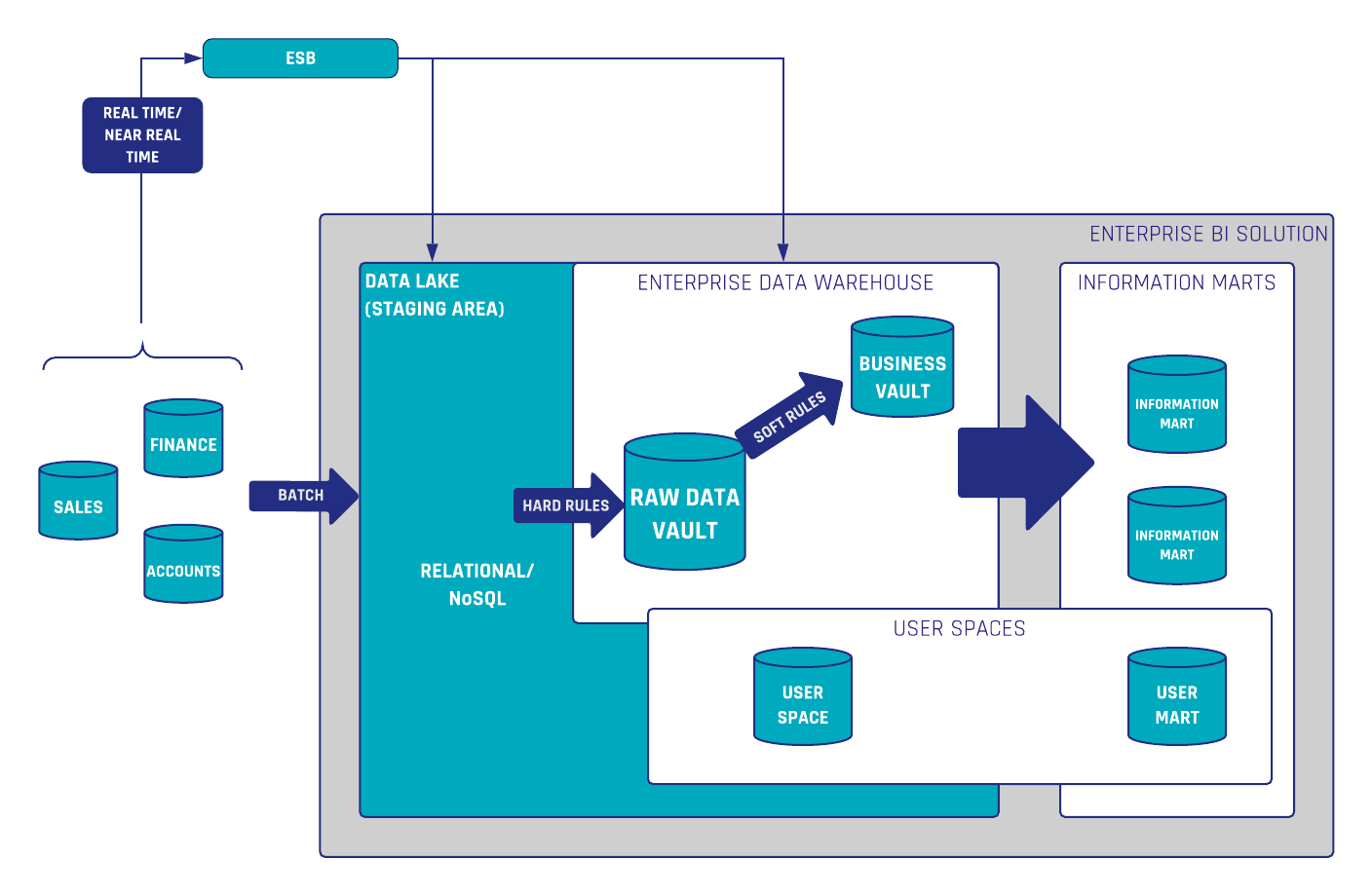
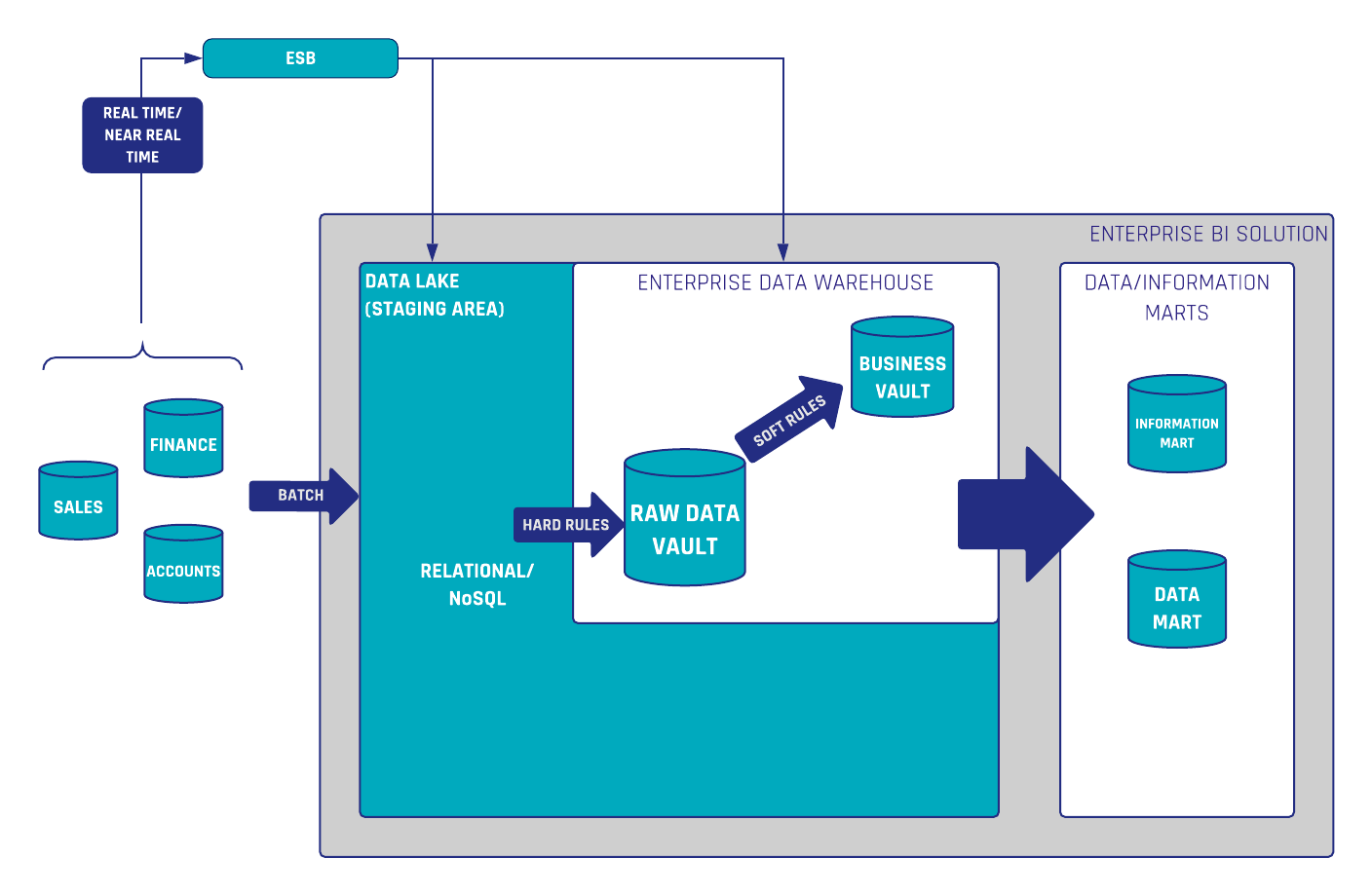
In the Data Vault 2.0 architecture, information marts are used to deliver information to the end-users. Conceptually, an information mart follows the same definition as a data mart in legacy data warehousing. However, in legacy data warehousing, a data mart is used to deliver useful information, not raw data. This is why the data mart has been renamed in Data Vault 2.0 to better reflect the use case.


Introduction to Information Marts

However, the definition of information marts has more facets. In the book “Building a Scalable Data Warehouse with Data Vault 2.0” we present three types of marts:

  • Information marts: used to deliver information to business users, typically via dashboards and reports.
  • Metrics Mart: used in conjunction with a Metrics Vault, which captures EDW log data in a Data Vault model. The Metrics Mart is derived from the Metrics Vault to present the metrics in order to analyze performance bottlenecks or resource consumption of power users and data scientists in managed self-service BI solutions.
  • Error Mart: stores those records that typically fail a hard rule when loading the data into the enterprise data warehouse.

Information Marts for Consulting

In addition to these “classical” information marts, we use additional ones in our consulting practice:

  • Interface Mart: this is more or less an information mart, however, the information is not delivered to a human being, e.g. via a dashboard or report. Instead, it is delivered to a subsequent application or, as a write-back, to the source system (for example when using the enterprise data warehouse for data cleansing).
  • Quality Mart: the quality mart is again an information mart, but instead of cleansing bad data, it is used to report bad data. Essentially, it turns the business logic used to cleanse bad data upside down: only bad data (well and ugly data sometimes) is delivered to the end-user, the data steward. This is often done in conjunction with data cleansing frontends where the data steward can either correct source data or comment and tag the exceptions.
  • Source Mart: again an information mart, but this time not using one of the popular schemas, such as star schemas, snowflake schemas, or fully denormalized schemas. Instead, the information mart uses the data model of the source application, similar to an operational data store (ODS) schema. However, the Source Mart is not a copy of the data, it is a virtualized model on top of the Data Vault model, reflecting the original structures. It is great for ad-hoc reporting and of great value for many data scientists and power users.

This concludes our list of information marts. We have used them successfully in projects for our clients to better communicate the actual application of the information marts in their organization.

Conclusion

Information marts in Data Vault 2.0 are essential for delivering processed data to end-users through reports and dashboards. Variants like Metrics Marts and Error Marts enhance performance analysis and data quality management. Additionally, specialized marts such as Interface, Quality, and Source Marts cater to specific business needs, ensuring flexible and efficient data delivery.

Granularities of Business Vault Entities

The Business Vault is the layer in the Data Vault 2.0 architecture where business logic is implemented to transform, cleanse and modify the data.

The book “Building a Scalable Data Warehouse with Data Vault 2.0” by Scalefree’s founders Dan Linstedt and Michael Olschimke and the Data Vault 2.0 Boot Camp shows how to implement such business logic using various Business Vault entities, such as computed satellites.

However, it is worth to note that this is only half the story, half the knowledge. The book shows computed satellites (and other entities) with a load date in the primary key of the computed satellite. Such satellites are great for capturing the results from business logic that is applied on the incoming deltas. However, there are two different types of granularities for business logic in the Business Vault: Continue Reading

Data Warehousing and Why We Need It

Data Warehousing

A data warehouse is a subject oriented, nonvolatile, integrated, time variant collection of data to support management’s decisions
Inmon, W. H. (2005). Building the Data Warehouse. Indianapolis, Ind.: Wiley.

Data Warehousing provides the infrastructure needed to run Business Intelligence effectively. Its purpose is to integrate data from different data sources and to provide a historicised database. Through a DWH, consistent and reliable reporting can be ensured. A standardized view of the data can prevent interpretation errors, improved data quality and leads to better decision-making. Furthermore, the historization of data offers additional analysis possibilities and leads to (complete) auditability. 

Data Warehousing – Why we need it

This webinar delves into how a data warehouse integrates data from various sources to support business intelligence by providing a centralized, historical database. This integration ensures consistent and reliable reporting, improves data quality, and facilitates better decision-making. Additionally, maintaining historical data enables comprehensive analysis and complete auditability.

Watch webinar recording

Why do we need Data Warehousing?

“Why do we need data warehousing for reporting, we have excel sheets?!”

Yes, excel is a great tool… to use and lose control over  your data as well as your reports.

You can report directly from a data source but you are massively limited in functionality and governance. Furthermore, you can only generate reports from one source system and don’t have a delta-driven history of your data. By creating reports directly from the source system and storing them on a local pc you lose track of which user pulled the data, as well as at what time, to build the report. Thus, the reports are no longer reliable. To prevent this, data warehousing comes into play.

Let’s imagine our goal is to build a sales revenue dashboard based on a timeline, a customer group, your products and regions. Without a DWH you have to collect all data manually from all necessary source systems. This data is most likely a mix of structured, unstructured and semi structured data. The challenge then becomes how to prepare and visualise the data in addition to creating an easily repeatable method of doing so. This is very time-consuming and can be very costly.
By the time all data is collected and prepared, the data may already be out of date causing the need to start again. 

With a DWH, all data is collected at one single point. The Data is aligned to the business (integrated & subject-oriented) with standardised definitions e.g. of KPI’s so that every report interprets the data equally. The access to the DWH is  read only (non-volatile), once loaded you can’t change the data (auditable). This leads to a complete historization of the data (time variant). With all data available, the needs of the users can be satisfied (structured data, integrated by business terms). For business users, there is also the option of using Self-Service BI.

What about a Data Lake?

As the “data lake” was introduced a couple of years ago, there was the assumption that it would replace a data warehouse.
A data lake is a great environment when used as a first landing zone for your data in your IT infrastructure but it does not “integrate” the data as a data warehouse does.
A data lake can be used to process the data further downstream into your data warehouse and an information delivery area. Structure becomes very important at this point so that your data lake doesn’t turn into a data dump and you are always able to query the data you need in an easy way.

To this end, you must create an architectural design dependent upon how you process the data from your data lake into your data warehouse. This could also happen in a completely virtualized way, depending on the amount of data as well as respectively the performance necessary to process the data towards the point of the end-users.

A data lake is also a good place for data scientists to gain access to the data as soon as possible, even if it is the native format. For end users who are working with structural data for reporting, dashboarding and analysis purposes, a structured, integrated, well-performing and easy-to-access data warehouse is necessary to fulfil their requirements. They expect the data in a prepared information mart, like a star schema or a flat and wide table.

Conclusion: If you want to use a data lake, think about how you need and process the data on the way out so that you can create a suitable structure for it. If you don’t need your data integrated, subject-oriented and time-variant, then you may be fine with a data lake only. But if you need all these great properties, you definitely need a data warehouse.

How does Data Warehousing work?

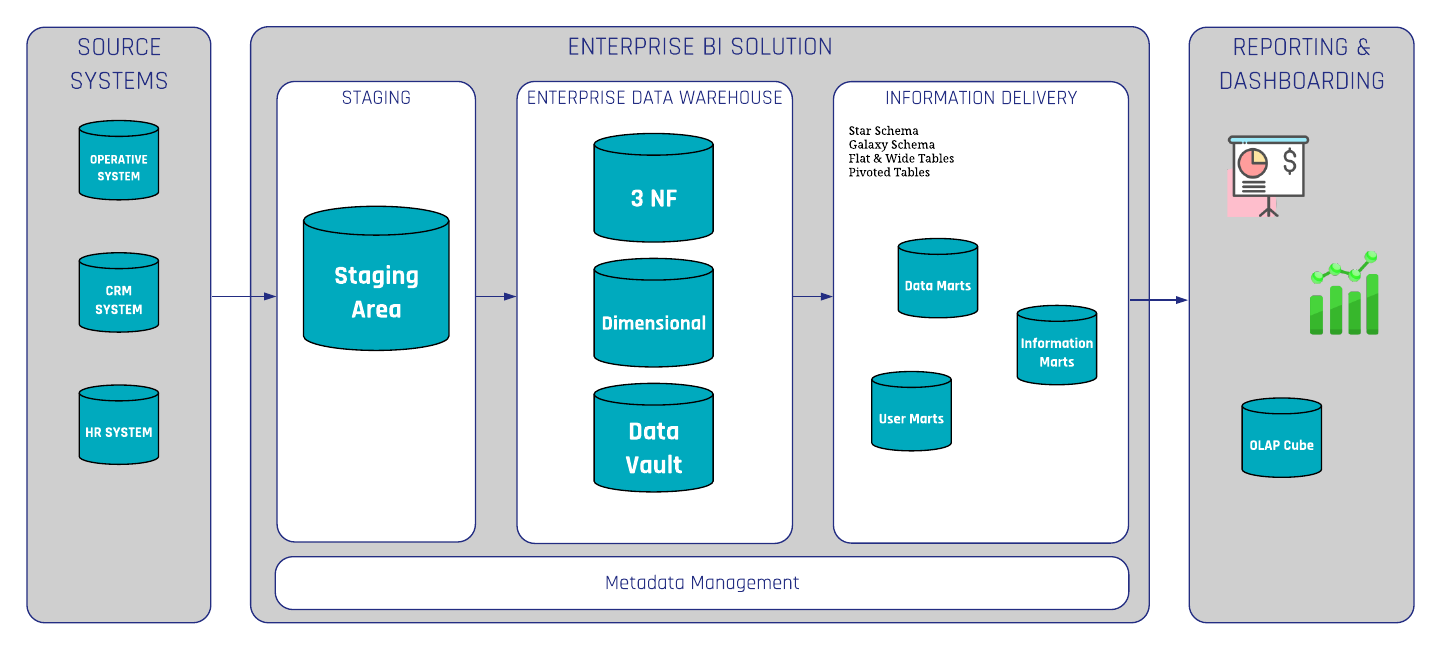
It starts with the ETL process (extract, transform, and load) in which the data is extracted from the source system into your  technical environment / (DWH infrastructure)  called the “Staging Area”. After extracting all data from the source system, you integrate your data into a subject oriented structure. The result is an Enterprise Data Warehouse (EDW) which provides data and information about how the end user needs it.

There are several modeling techniques available to build a data warehouse. 3NF (third normal form) was invented by Bill Inmon and is also known as the top-down approach. Alternatively, Dimensional Modeling by Kimball is more aligned to the business processes (bottom-up approach). Data Vault 2.0  is a hybrid between 3NF and dimensional modeling invented by Dan Linstedt. At Scalefree, we specialize in Data Vault 2.0 modeling.

Data Warehousing Reference Architecture

Conclusion

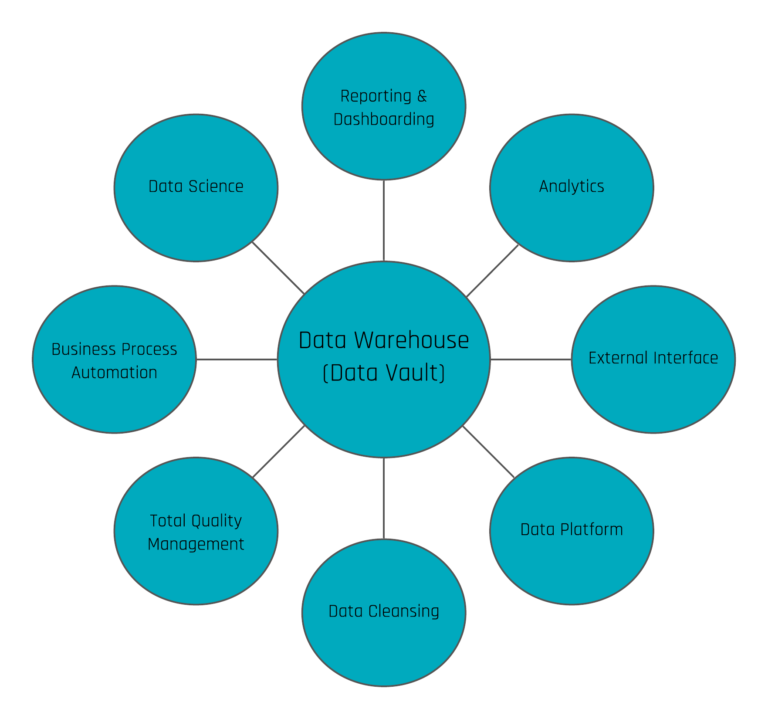
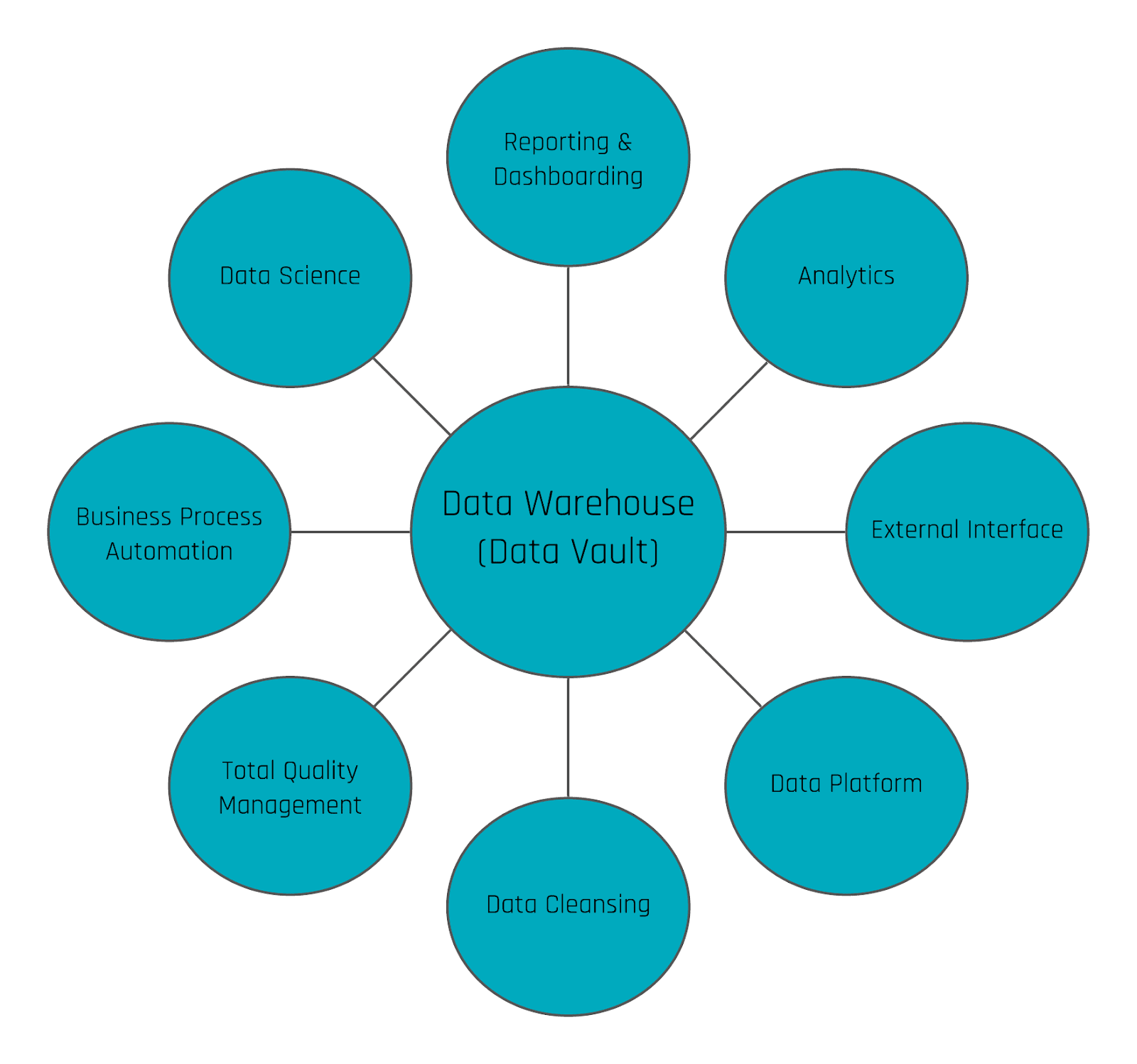
When only utilizing this single aspect of an EDW, users are missing opportunities to take advantage of their data by limiting the EDW to such basic use cases. A variety of use cases can be realized by using the data warehouse, e.g. to optimize and automate operational processes, predict the future, push data back to operational systems as a new input or to trigger events outside the data warehouse, to simply explore but a few new opportunities available.

Data Warehousing Use cases

Data Vault 2.0 Use Cases

Data warehousing is ideal for centrally storing all internal and external data sources. The standardization of structured, unstructured, and semi-structured data enables faster and more reliable reporting. Historization allows additional reports and past reports can be reconstructed at any time. With the flexibility of Data Vault 2.0, organizations can apply new capabilities, which go beyond just standard reporting and dashboarding.

If you want to learn more about Data Vault 2.0 Use Cases and the latest technologies from the market, we offer a broad range of free knowledge on our blog/newsletter and webinars. Feel free to sign up for regular updates.

Handling Validation of Relationships in Data Vault 2.0

Validation of relationships in Data Vault 2.0

Validation of Relationships in Data Vault 2.0

There are different ways of handling validation of relationships from source systems depending on how the data is delivered, (full-extract or CDC), and the way a delete is delivered by the source system, such as a soft delete or hard delete. In Data Vault 2.0, we differentiate data by keys, relationships, and descriptions.

That said, an often underestimated point is the handling and the validation of relationships in Data Vault 2.0.
In the following blog article, we explain what to consider and how to deal with it. 


Deletes in Data Vault 2.0 

First, let us explain the different kinds of deletes in source systems:

  1. Hard delete – A record is hard deleted in the source system and no longer appears in the system.
  2. Soft delete – The deleted record still exists in the source systems database and is flagged as deleted.

Secondly, let’s explore  how we find the data in the staging area:

  1. Full extract – This can be the current status of the source system or a delta/incremental extract.
  2. CDC (Change Data Capture) – Only new, updated, or deleted records to load data in an incremental/delta way.

To keep the following explanation as simple as possible, our assumption is that we want to mark relationships as deleted as soon as we get the deleted information, even if there is no audit trail from the source system (data aging is another topic).

Delete Detection and Validation of Relationships in Data Vault 2.0

Delete detection for business keys, or Hubs, is straightforward.  Soft deletes are handled as descriptive attributes in the Satellite directly and do not take into account whether the data arrives from a full extract or CDC. For hard deletes in the source system, we have to distinguish between full-extract and CDC.
Here we introduce the Effectivity Satellite. In the case of:

  1. Full-extract – Perform a lookup back into the staging area to check whether the business key still exists. If not, add a record with the deleted information (i.e. a flag and a date) into the Effectivity Satellite. 
  2. CDC – We receive “Delete” information which is a new entry in the Effectivity Satellite.

Delete detection of relationships needs a bit more attention and is often forgotten. With a full extract, we can follow the same approach as followed for business keys: Just check whether or not the Link Hash Key exists in the current staging load and insert a new entry accordingly into the Effectivity Satellite.

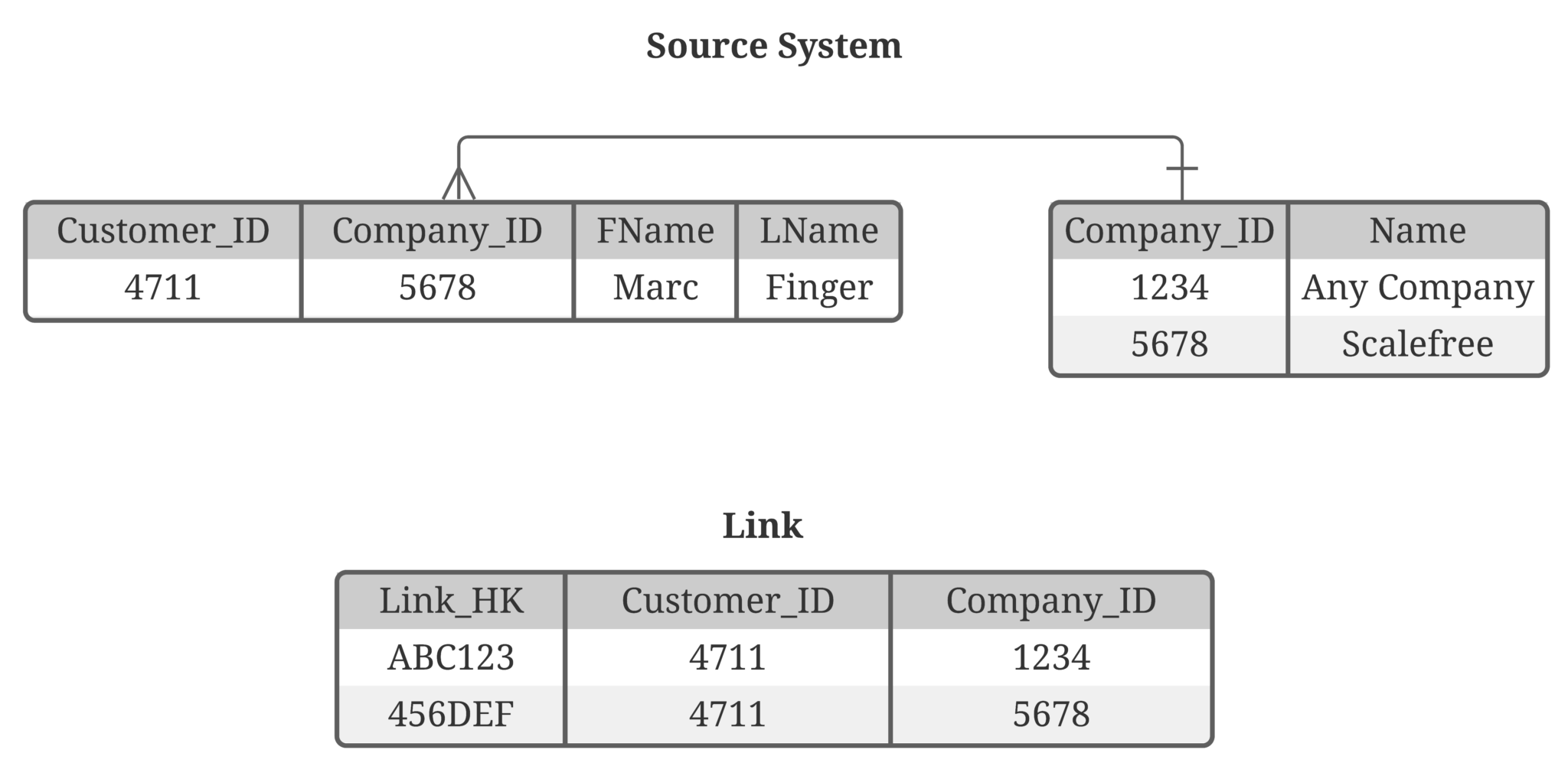
But nowadays, CDC is becoming more common. Though, as CDC delivers deltas only, the challenge now is to identify relationships that no longer exist. The example below shows a relationship between the business objects customer and company. This is a 1:n relationship:

Validation of relationships in Data Vault 2.0

Image 1: Tables Customer and Company

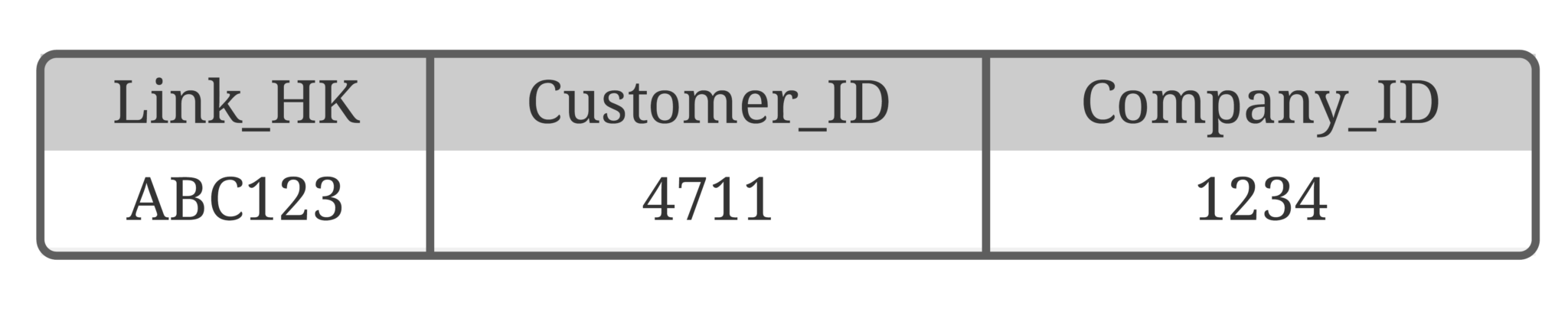
The Link table in Data Vault looks like this:

Validation of relationships in Data Vault 2.0

Table 1: Customer Link

For better readability and simplification, we present the business keys instead of hash keys and don’t show system fields like the load date timestamp and record source.

So far so good, but what happens when the customer is starting to work for another company? This will result in a new record in the Link. The CDC mechanism will provide us the data as an update of the customer table.

Validation of relationships in Data Vault 2.0

Image 2: Source tables and Link after company change

From where do we get the information that Customer 4711 no longer works for Company 1234 and where is that information stored? We need to soft-delete the old link entry in the data warehouse to make the data consistent again. At the moment, it looks like the customer works for both companies as both links are currently active. 

There are two possible ways:

  1. You get the “from” and the “to” in your audit trail and you identify a difference for the company_id.
    If that is the case, create 2 new entries in the Effectivity Satellite, one marks the old one (from) as deleted and the other one marks the new one (to) as not deleted. It is necessary to insert new relationships as “not deleted” that you can activate and deactivate Hash Keys forth and back.
    Think about what happens when customer 4711 works for company 1234 again.
  2. In case you don’t have the “from” and “to”, you either have to load the CDC data into a persistent staging area, where you keep the full history of data delivered by CDC, or a source replica, where you create a mirror of the of the source system by feeding it with the CDC data whereby you perform hard updates when an “Updated” comes from the CDC and hard deletes when a “Delete” comes from the CDC.
    When using the source replica, you can follow the same approach as stated before when getting full loads: join into the replica and figure out whether the Hash Key still exists or not.
    The biggest disadvantage here is that you have to scan more data, which means more IO. When using a persistent staging area, you can figure out a change in a relationship by using the window function lead() where you partition by the technical ID, Customer_ID in this case, and order by the load date timestamp.
    As soon as the Link Hash Key is different, the relationship is changed and the old one no longer exists.

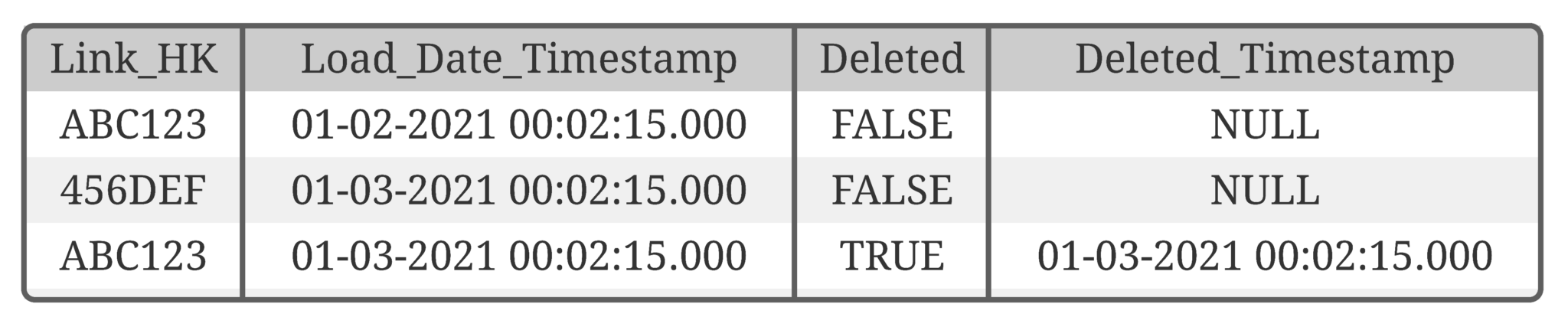
The result is the following Effectivity Satellite (logical):

Validation of relationships in Data Vault 2.0

Table 2: Effectivity Satellite on the Link

Conclusion

We covered two major points in this article. The first one is that in Data Vault 2.0, we extract relationship information from the source tables and thus we have to pay more attention to the validation of those.
The second point is that the way you get the data (delta by CDC or full-extract) brings you different opportunities regarding the way to load the data. When you are dealing with a huge amount of data, CDC is definitely the way to go. In addition to that, with the CDC mechanism you will get all updates from the source, and you can easier load data in (near) real time.

Accelerate Your Data Vault with Snowflake

Watch the Webinar

Data Vault and Snowflake in combination are constituting flexible and scalable Enterprise Data Warehouse solutions.

Attendees will get insights about building and loading a GDPR-compliant Data Lake (AWS) and Data Vault model. The loading and querying processes have a great scalability within Snowflake.

The webinar includes a live demo from Snowflake showing Data Ingestion, Variant Data Types, and Data Sharing opportunities.

Watch Webinar Recording

Webinar Agenda

1. Intro
2. Accelerate your Data Vault with Snowflake (Scalefree)
3. Snowflake Demo (Snowflake)

Write Backs in the Enterprise Data Warehouse Architecture

Managed Self Service BI and write backs

The Data Vault 2.0 Layers

This issue covers write backs into the enterprise data warehouse and how the Data Vault 2.0 architecture can facilitate it. Many people already know the three layer architecture of data warehouses which is used in Data Vault 2.0. The first layer represents the staging area which holds the raw data from the source systems. The enterprise data warehouse layer, which in this case contains a Data Vault 2.0 model and the third layer with the Information Marts, which deliver the information in various structures (Star Schemas, Snowflake Schemas etc.).

DV2.0 Architecture and write backs

Figure 1. Data Vault 2.0 Architecture

This architecture provides possibilities and benefits for data write backs. Two possibilities are writing back data into the enterprise data warehouse and into the source systems. This issue covers the write back into the enterprise data warehouse, while an upcoming article will cover the write back into the source systems.

Continue Reading

Data Vault Use Cases Beyond Classical Reporting – Part 3

Data Vault use cases for reporting

New Possibilities with Data Vault 2.0

Data Vault 2.0 empowers organizations to go beyond traditional reporting by unlocking new avenues for scalability, automation, and data-driven decision-making. From cleansing data and automating business processes to enabling advanced data science techniques like machine learning and predictive analytics, Data Vault 2.0 provides a flexible framework for modern data challenges. In this article, we explore how Data Vault 2.0 integrates data science to optimize operational processes, predict outcomes, and enhance enterprise data warehouses, ensuring a competitive edge in today’s data-driven landscape.

Going beyond standard reporting

Reporting and dashboarding have become the standards in business when it comes to identifying KPIs and other measurements. As such, Enterprise Data Warehouses have emerged to support the reporting process. Though, due to the large quantity and variety of data, a demand has developed for a method of utilizing this existing data in a manner in which it can add additional business value towards a company’s needs. Data Vault 2.0 offers a wide range of methods to provide decision support beyond standard reporting as well as critical information regarding the future. To see for yourself, join us as we present different approaches and solutions as to fully leverage the potential of your data.

Watch webinar recording

Going beyond standard reporting

As we have shown in previous issues, Data Vault 2.0 enables individuals to implement reporting beyond the traditional methods.
In the first part, we demonstrated how to perform data cleansing in Data Vault 2.0.
And the second use case showed how to implement business process automation using Interface Marts.

The scalability and flexibility of Data Vault 2.0 offers a whole variety of use cases that can be realized, e.g. to optimize as well as automate operational processes, predict the future, push data back to operational systems as a new input or trigger events outside the data warehouse, to name a few. Continue Reading

Satellite Modeling for Any Structural Changes in the Source System

Modeling a Satellite in the instance of any structural changes within the source system

Over time, a source system can change. The question is how to absorb these changes into a Data Vault 2.0 data warehouse, especially when considering the satellites?

It is necessary to find a balance between the reengineering effort and performance when the source table structure changes. To better help those who find structural changes in the source system, this article will present our recommendations, based on our knowledge base,  for various types of changes in a source.

This article describes features embodied in the Data Vault 2.0 model: the foundation of a hub, link, and satellite entities can adjust to changes in the source data easily, thus reducing the cost of reengineering the enterprise data warehouse

New columns in the source system: when any new columns or attributes are added to the source

There are two options for absorbing new attributes from the source into the data warehouse. First, the existing satellite could be modified.
This is a pragmatic approach but requires the modification of existing code.
On the other hand, it is also possible to create a new satellite for the new attribute, or attributes, without modifying the existing satellites. This has the advantage of a zero code impact but requires more joins in an Information Delivery part of the Data Vault.

The first option does not require this join as the new attribute is added to the existing satellite. The best approach is to compare the advantages and disadvantages of both options in the specific situation as it applies to your situation. Automation tools for example usually can handle the alter table statement automatically without manual coding effort but require changes be made in the database.

Removing columns in the source system from source column deletion 

One option is to close the “old” Satellite, i.e. not load it further, as the ETL code is turned off, and create a new satellite which should be loaded. The same approach is used when the underlying data structures from the source are modified in a larger perspective.
Old satellites are turned off, new satellites with the new structure are then loaded.
Another option would be more meaningful if there are only minor changes needed such as the removal of one column. Then “simulating” this column with a NULL value or a value which adds meaning and makes more sense would be more helpful for auditing purposes.

If a new Satellite is created, the end result will be two new columns in the related PIT table (Hash Key + LDTS). 

Closing a satellite and creating a new one is also applicable if there are major changes in the source system, for example a new release version of the source system where columns are deleted, renamed and created. In the instance of small changes, especially when columns disappear, we recommend altering the satellite.

Creating a Virtual Dimension table from a PIT table having multiple satellites

When a new satellite for the new attribute, or attributes, is created by not modifying the existing satellite, a new virtual dimension is required to fetch information from PIT tables using both the satellites accordingly based on the required timestamp.
There are two approaches on how the information can be drawn using both the satellites:

  • The first approach uses a computed Satellite, in which you combine all satellites with the most recent record per Hash Key and the same structure. Though, this might be a complicated query as it depends upon the amount of data and the number of Satellites to join.
  • The second approach is to use a PIT table for all satellites and when querying the data out, for a dimension table for example, you take the record from the leading one, for example using an IIF statement or COALESCE function.

Conclusion

While every situation does require an approach that takes into account the individual nature of the task, the above solutions have proven themselves to be vital when we implement them within our own projects.

We offer these as a way of allowing others to benefit from what our testing, application, and implementation have taught us.

Splitting a Satellite Entity Based on the Source Data

Satellite split by source system

Splitting a Satellite Entity

Satellite splitting criteria plays a vital role in a satellite’s structure. Being such, it is not recommended that the entirety of descriptive data related to a business key should be stored in a single satellite structure. Instead, raw data should preferably be split by certain criteria.


Criteria for splitting a Satellite

In general, we have defined the following types of satellite splits:

  1. Splitting by source system
  2. Splitting by rate of change

Additionally, we have defined two more types of splits as mentioned below:

  1. Splitting by level of security and by the level of privacy
  2. Business-driven split

A satellite split by source system is strongly recommended to prevent two issues when loading the data into the enterprise data warehouse: first, if two different source systems with different relational structures should be loaded into the same satellite entity, a transformation of the structure might be required. However, structural transformation requires business logic sooner or later and that should be deferred to the information delivery stage to support fully-auditable environments as well as the application of multiple business perspectives. Continue Reading

Delete and Change Handling Approaches in Data Vault 2.0 Without a Trail

Data Vault 2.0 - Insert logic

Delete and Change Handling Approaches in Data Vault 2.0

In this article, we will show you how to use counter records for change or delete practices in Data Vault 2.0. In January of this year, we published a piece detailing an approach to handle deletes and business key changes of relationships in Data Vault without having an audit trail in place.
This approach is an alternative to the Driving Key structure, which is part of the Data Vault standards and a valid solution.
However, at times it may be difficult to find the business keys in a relationship which will never change and therefore be used as the anchor keys, Link Driving Key, when querying. The presented method inserts counter records for changed or deleted records, specifically for transactional data, and is a straightforward as well as pragmatic approach. However, the article caused a lot of questions, confusion and disagreements.
That being said, it is the intention of this blogpost to dive deeper into the technical implementation in which we could approve by employing it.


Technical Implementation in Data Vault 2.0

The following table shows a slightly modified target structure of the link from the previous blog post when using counter records in Data Vault 2.0.

In this case, we are focusing on transactions that have been changed by the source system without delivering any audit data about the changes as well as no counter bookings by the source itself.

It is important to note that the link stores the sales positions by referencing the customer and the product. Thus, the Link Hash Key, as well as the Load Date, are the primary keys as we are not able to gather a consistent singular record ID in this case. Being so, the Link Hash Key is calculated by the Customer Business Key, the Product Business Key, the sales price, and the transaction timestamp. 

Data Vault 2.0 link with counter record

Figure 1: Link with counter records

To load the link, the following steps are required:

Firstly, insert and check as to whether a counter booking is necessary at all as the former step loads new data from the staging area into the link. Please note that the loading logic in this step is similar to that in the standard link loading process, with some differences:

Data Vault 2.0 - Insert logic

Figure 2: Insert Logic

In Data Vault 2.0, the counter record should identify records, the most recent records by Link Hash Key, that exist in the link but don’t exist in the staging area due to deletion or changes made to the record. Thus, query results will be “countered” with a value for “counter” set to -1, which indicates that these records are not able to be found at this stage. Note that in this query we selected the existing record from the link table in the raw vault, however, further note that the record’s time of arrival should be the LDTS of the actual staging batch. Therefore, within the shown statement, the LDTS is a variable with the load date of the staging batch:

Data Vault 2.0 - Counter logic

Figure 3: Counter Logic

In instances in which it changes back to the original record, the same procedure applies: The current missing value will be countered by the new one inserted again with a new LDTS. 

Conclusion

Thus, we can conclude that this Data Vault approach works well for tables which are a hot-spot for measured values only as well as when changes are possible, although the data represents “transactions” and is to be used when CDC is not available.

Instead of a “get the most recent record per Hash Key (Driving Key)” it is possible to run calculations as well as aggregations directly on one table which results in a better performance in the end stage.

If there are still questions left, please feel free to leave a comment. We are looking forward to an exchange and your thoughts on the topic.

Overcoming Data Warehousing Challenges with Data Vault 2.0

Watch the Webinar

There are many Data Warehousing challenges that Organizations and Data Warehousing Teams are struggling with. In this short one-hour webinar, we will talk about some major challenges and how you can overcome them with Data Vault 2.0.

Watch Webinar Recording

Webinar Agenda

1. Achieving and maintaining agility
2. Maintaining or migrating legacy DWH systems
3. Security and privacy (GDPR)
4. Big data
5. Adapting to changing requirements
6. Auditability and data lineage
7. Self-service BI

Data Vault Use Cases Beyond Classical Reporting – Part 2

The Role of the Enterprise Data Warehouse

The Enterprise Data Warehouse (EDW) is no longer limited to reporting and dashboarding; it is a powerful tool for driving business process automation and operational efficiency. Building on earlier discussions in our Data Vault Use Cases series, this article explores how Data Vault 2.0 facilitates seamless integration with automation frameworks and external interfaces to enhance knowledge management, streamline operations, and reduce manual workload. From leveraging interface marts to trigger automated processes to enriching documentation systems with dynamic updates, we uncover the transformative potential of the EDW in modern business environments.

Going beyond standard reporting

Reporting and dashboarding have become the standards in business when it comes to identifying KPIs and other measurements. As such, Enterprise Data Warehouses have emerged to support the reporting process. Though, due to the large quantity and variety of data, a demand has developed for a method of utilizing this existing data in a manner in which it can add additional business value towards a company’s needs. Data Vault 2.0 offers a wide range of methods to provide decision support beyond standard reporting as well as critical information regarding the future. To see for yourself, join us as we present different approaches and solutions as to fully leverage the potential of your data.

Watch webinar recording

More Than Reporting and Dashboarding

As we first introduced within the first part of the Data Vault Use Cases article series, the Enterprise Data Warehouse (EDW) can do more than just simple reporting and dashboarding. 

We previously explored how the EDW can help to improve data quality by implementing data cleansing rules. 

This can be applied by write-back operations that affect the source systems directly. Though this was only one example of how to add more value to the EDW.
The scalability and flexibility of Data Vault 2.0 offers a whole variety of use cases that can be realized, e.g. to optimize and automate operational processes, predict the future, push data back to operational systems as a new input or trigger events outside the data warehouse, to name a few.

Continue Reading

Close Menu