search
0

Running Modern ETL-Processes with Framework-Based Tools – Part 2

Managed Self Service BI image

In the last blog post, we introduced Singer, the open-source framework, as a powerful tool for ETL processes. This time, we’d like to discuss how you can implement the framework in your own projects.

How to start working with Singer

Starting a test run is rather simple. First, you need to create a python environment,  for which step-by-step instructions to do so are available online. 

As soon as you’ve done that, it’s time to create your first virtual environment inside python.
Please note before beginning that it’s a best practice to create and use an individual virtual environment for every tap and target. This avoids any conflicts between module requirements for the different modules. 

The next step is to install the tap and target you’ve chosen into their corresponding virtual environment. This installation can be performed very easily using a pip install command. This example command installs the tap-salesforce to the load data from your Salesforce account:
Continue Reading

Running Modern ETL-Processes with Framework-Based Tools – Part 1

Data Vault 2.0 Information Delivery Class

A big part of every Enterprise Datawarehouse are ETL- or ELT-processes.
In both abbreviations, the letters stand for the same words, only the order in which each process is done changes.
To brush-up on those processes, “E” stands for extraction, “T” for transformation and “L” is for loading.

That said, rather than dive into the benefits of each,  we would like to present a powerful open-source framework to execute the processes instead.

Why use a framework?

Rather than developing individual solutions per source system, using standardized frameworks provides a wide variety of benefits. The main of which we have already mentioned, standardization.
Another benefit, using the same concept for extracting data from different source systems allows your system to become more auditable and reliable.
And when taking into consideration the varied benefits between frameworks, other potential upsides become available as well. Continue Reading

Was Machen BI-Berater:innen? Skills & Tasks

Watch the Webinar

Was macht ein Berater eigentlich? Es gibt viele Vorurteile und Mythen, die sich um den klassischen BI Berater ranken, aber stimmen sie auch?

In diesem Webinar lernt ihr wie der Job eines BI Beraters in der Praxis aussieht. Wir zeigen einen kompletten Werdegang vom Werkstudenten bis zum Senior Berater.

Watch Webinar Recording

Webinar Agenda

1. Kurzvorstellung Scalefree
2. Was machen Berater:innen?
3. Interview Werkstudent
4. Mein Weg als Berater
5. Interview Senior Beraterin

Meet the Speakers

male profile picture placeholder

Obaidellah Al-Haddad

Obaidellah ist seit 2019 für Scalefree tätig und unterstützt unsere Experten und Kunden in verschiedenen Projekten. Sein Fokus liegt dabei auf dem Data Warehousing Automation Scripting. Er hat seinen Bachelor-Abschluss in Wirtschaftsinformatik gemacht.

Picture of Tobias Triphan

Tobias Triphan

Tobias ist seit 2020 für Scalefree tätig und unterstützt in den Bereichen internes Data Warehouse und Vendor-Management. Er hat seinen Bachelor-Abschluss in Staatswissenschaften und Wirtschaftsinformatik gemacht. Seine Kernkompetenzen liegen im Data Vault 2.0 und in der agilen Softwareentwicklung.

blank

Suhita Dutta

Suhita ist eine Senior-Beraterin für DWH (Data Warehouse) und Business Intelligence bei Scalefree. Mit 13 Jahren Erfahrung hatte sie die Möglichkeit, Organisationen in verschiedenen Branchen auf ihrem Datenweg zu unterstützen, insbesondere in der Finanzdienstleistungsbranche. Sie ist eine zertifizierte DV2.0-Praktikerin mit Schwerpunkt auf Agilem Data Warehousing, DW-Automatisierung und EDW-Architektur.

Implementing Data Vault 2.0 Zero Keys

Implementing Data Vault 2.0 Zero Keys

Learn about Zero Keys, “the other” concept that is oftentimes referenced interchangeably with ghost records, which we discussed in a previous blog post.

Why implement Zero Keys?

As discussed in the previous part of this series, a ghost record is a dummy record in satellite entities containing default values. Simply put, zero keys are the entry in each hub and link entity that is a counterpart to the satellite’s ghost record containing its hash key. In this manner, the term “zero key” is oftentimes used to describe the ghost record’s hash key, which might show up in other Data Vault entities such as in Point-in-Time (PIT) tables or links. Accompanying the zero hash key is, similar to a ghost record, a default value for the business key . Or, in the case of a composite business key, multiple default values for each of its components.

Zero Key with a composite business key

With the hub and link entry for the zero key in place, each and every entry in its related satellite will then have a parent hash key, avoiding so-called hash key orphans.

What does a Zero Key look like?

In Data Vault 2.0, it is only required to insert a single ghost record to each satellite entity. However, it is possible to have multiple zero keys in place. At Scalefree internally and in many  of our projects, we distinguish two types of missing objects through different hub zero keys.
Please note the hash algorithm in use is MD5:

  • 00000000000000000000000000000000 (32 times the digit ‘0’) for general “unknown” cases where a business key is missing.
  • ffffffffffffffffffffffffffffffff (32 times the letter ‘f’): a dedicated zero key for “erroneous” cases of missing business keys that show.
Multiple zero keys in a Hub entity

A good example that calls for the “error” zero key is in an erroneous or broken mandatory object relationship in the source. In that case, the zero key ffffffffffffffffffffffffffffffff will be found in the link entity, indicating an unexpectedly absent hub reference. Bear in mind, should you choose to implement the error zero key, it is not required to insert a ghost record with the error zero key as a parent hash key in satellite entities.

As for the zero key in link entities, it is only necessary to have one entry containing the zero hash key as both link hash key and hub reference.

Zero key in a Link entity

It is also important to point out that all examples we provide in this blog series involve the hash algorithm MD5, which outputs 32-hexadecimal-digit sequences. For Data Vault 2.0 projects that adopt other hash algorithms, such as SHA256, simply adjust the length of the zero keys we proposed (“0000…” / “ffff…”) to the desired hash output length.

Conclusion

We hope that this blog post helped to clarify the implementation of zero keys in a Data Vault 2.0 solution and the differences between the concepts of ghost records and zero keys. Feel free to share your experience with implementing these concepts in the comments below!

– by Trung Ta (Scalefree)

Effort Estimation in Data Vault 2.0 Projects

Effort Estimation in Data Vault 2.0 Projects

In Data Vault 2.0 projects, we recommend estimating the effort by applying a Function Point Analysis (FPA), but there are many options available when choosing a method to estimate the necessary effort within agile IT projects. In this article, you will learn why FPA is a good choice and why you should consider using this method in your own Data Vault 2.0 projects.

Good Old Planning Poker for Effort Estimation

Probably the best known method for estimating work in agile projects is Planning Poker. Within the process, so-called story points, based upon the Fibonacci sequence (0, 0.5, 1, 2, 3, 5, 8, 13, 20, 40 and 100), are used to estimate the effort of a given task. To begin the process, the entire development team sits together as each member simultaneously assigns story points to each user story that they feel are appropriate. If the story points match, the final estimate is made. Alternatively, if a consensus cannot be reached the effort is discussed until a decision is made. 

However, it’s important to note that this technique involves a lot of effort as a result of either too many tasks or too many team members.  So the question is: Does Planning Poker work for Data Vault projects? The short answer is “it makes little sense”. Since in Data Vault 2.0 the functional requirements are broken down into small items, there are numerous tasks that all have to be discussed and evaluated. In addition, the subtasks in Data Vault 2.0 are standardized artifacts, such as Hub, Link, and Satellite. In principle, these artifacts always represent the same effort.

Why does Function Point Analysis suit it so well?

This is where FPA comes into play and the reason why it is widely used in agile software projects. The idea is that software consists of the following characteristics, which represent the Function Point Types:

  • External inputs (EI) → data entering the system
  • External outputs (EO), external inquiries EQ → data leaving the system one way or another
  • Internal logical files (ILF) → data manufactured and stored within the system
  • External interface files (EIF) → data maintained outside the system but necessary to perform the task

With FPA, you break the functionality into smaller items for better analysis. As mentioned, this is already done in Data Vault 2.0 projects due to the standardized artifacts. This is the reason why FPA is very suitable for Data Vault projects.

How to apply FPA in Data Vault 2.0

Hence, to make good use of FPA in the Data Vault 2.0 methodology, the functional characteristics of software, external inputs, external outputs, external inquiries, internal logical files, and external interface files, must be adapted to reflect Data Vault projects. The following functional characteristics of data warehouses built with Data Vault are defined as:

  • Stage load (EI)
  • Hub load (ILF)
  • Link load (ILF)
  • Satellite load (ILF)
  • Dimension load (ILF)
  • Fact load (ILF)
  • Report build (EO)

Please note that there are also other functional components that can be defined, like Business Vault entities, Point-in-time tables, and so on. Once you have defined these components, you should create a table that maps them to function points. Function points are used to quantify the amount of business functionality an element provides to a user. In general, it is recommended to add a complexity factor first:

Complexity Factor Person Hours per Function Point
Easy 0.1
Moderate 0.2
Difficult 0.7

Then use the complexity factors and the assigned function points per component to calculate the estimated hours needed to add the respective functionality. Here is a short example of how the mapping table could look like for you:

Component Complexity Factor Estimated Function Points Estimated Total Hours
Hub Load Easy 2 0.2
Dimension Load Difficult 3 2.1
Report Build Difficult 5 3.5

The goal of estimation is to standardize the development of operational information systems by making the effort more predictable. This is due to the fact that when you use a systematic approach to estimate the needed effort to add components, it is possible to compare the estimated values with the actual values once the functionality is delivered. When both values are compared, your team can learn from these previous estimates and improve their future estimates by adjusting the function points per component. Also, keep in mind that your developers will gain experience over time or might lose experience due to replacement.

Conclusion

I hope this first glimpse into FPA helps you understand the basic value it can provide your team in Data Vault 2.0 projects. You can have a more in-depth look at how to apply FPA in Data Vault 2.0 projects by reading the book “Building a Scalable Data Warehouse with Data Vault 2.0” by Michael Olschimke and Dan Lindstedt.

– Simon Kutsche (Scalefree)

Implementing Data Vault 2.0 Ghost Records

Ghost records

Implementing Data Vault 2.0 ghost records

During the development of Data Vault, from the first iteration to its latest Data Vault 2.0, we’ve mentioned the two terms “ghost records” and “zero keys” in our literature as well as in our Data Vault 2.0 Boot Camps. And since then, we’ve noticed these concepts oftentimes being referenced interchangeably. 

In this blog entry, we’ll discuss the implementation of ghost records in Data Vault 2.0. Please note, that this article is part one of a multi-part blog series clarifying Ghost Records vs. Zero Keys.


Why implement ghost records?

The concept of ghost records is usually brought up together with the implementation of point-in-time (PIT) tables. PIT tables are used as query assistant objects as part of the Business Vault, in which snapshots of data are created for certain time intervals specified by the data consumers. It’s important to note that these intervals can be daily, weekly, even real-time, etc. Each entry in a PIT table materializes joins from a Data Vault spine object (either a Hub or a Link) to its surrounding Satellite structures to reduce joins while querying against the Data Vault and thus boosting query performance.

In some instances, however, upon joining e.g. a Hub to one of its Satellites, there can be no corresponding Satellite delta for certain snapshots. The reason behind this could be that the business key was not available or unknown by the data source at that given time. 

Ghost records

Reference to a ghost record in a PIT table

To combat this issue, ghost records are added to Satellite entities to virtually fill up gaps in the beginning of the timeline, so that equal joins are made possible in ad-hoc queries against the Raw Vault. Equal joins (a.k.a. equi-joins) are joins that only use equality comparators and are arguably the most efficient/fastest SQL-join type.

What does a ghost record look like?

A ghost record can be understood as a dummy record that contains default values. In the previous iteration of Data Vault (DV1), the solution was to create a ghost record per key per satellite structure. This would still do the job of filling up gaps at the beginning of the timeline. However, this solution didn’t scale well on higher volumes of data. Imagine a hub that contains 10 million business keys and there are three satellites attached to it. Every satellite then contains 10 million ghost records, resulting in 30 million records across all three satellites. In addition, every time a business key is added to the hub, a corresponding ghost record needs to be added to each satellite. The sheer amount of ghost records in this case would defeat the whole purpose of trying to achieve equi-joins, to enable faster queries. 

Thus, since the introduction of DV2.0, it is only required to insert one single ghost record per Satellite structure.

Ghost records

Example: Ghost record with attributes of different data types

The ghost record typically contains a constant hash key 00000000000000000000000000000000 (32 times the character “0”). This hash key is also known as a Zero key – more on Zero keys coming up in the next part of this blog series. Its load timestamp is usually set to the earliest possible timestamp within the DBMS, indicating the “beginning point of time”. The record source “SYSTEM” simply means the record is artificially generated. 

Then, follows a list of default NULL values for every descriptive attribute within the Satellite structure. For each data type, we define a default value for the ghost record. For example, attributes with numeric data types can be filled with (numeric) zero, string attributes can be filled with either “(unknown)” or “?” depending on the length definition of the attribute.

It is recommended that the ghost record is filled with default values, as opposed to filling it with NULL/empty values, since these default values can be used and displayed further downstream. A good example of this can be seen in dimensions, an “(unknown)” string is arguably way more descriptive than a mere NULL value.

How to insert ghost records

There are a couple of ways to insert ghost records into Satellite structures.

The first variation is to insert the ghost records upon object creation as a one-time operation and then forget about it. Simple as that!

Another way is to insert the ghost record during the process of loading Satellites. The loading procedure should start with inserting a ghost record into the target object, if it does not yet exist. Then, the procedure can proceed with loading the Satellite with incoming data as normal. This variation might be viewed as rather excessive. However, it ensures that the ghost record is always available and that it gets inserted back into each Satellite – in case for whatever reason, objects are truncated or the ghost record itself is accidentally deleted, for example during development.

Both variations can be fully automated within your project’s Data Vault automation tool of choice.

Conclusion

We hope that this blog post helps to clarify the implementation of ghost records in a Data Vault 2.0 solution. Coming up next, we’d like to discuss with you “the-other-technical-term” Zero keys and the difference between Ghost records and them – which has been rather confusing to many fellow Data Vault practitioners.

Feel free to share this blog post with your colleagues and make sure to leave a comment on how your project implements ghost records!

-by Trung Ta (Scalefree)

Data-Driven Decision Making – For Power Users and Data Scientists

Watch the Webinar

In this webinar, Michael Olschimke, the CEO of Scalefree, presents how to gain additional advantage from the enterprise data warehouse by making the solution available to power users and data scientists.

No one likes to wait! If you have to wait too long for data or information, you will find another way to get what you need. This will end up in different inconsistent data warehouse “solutions” in your company.

To avoid this, an agile approach with managed Self-Service BI is essential to keep a good relationship with Power Users (e.g. Data Scientists) and to build a governed enterprise BI solution for better decision-making. In this webinar, Michael Olschimke will talk about approaches, best practices, and experiences.

Watch Webinar Recording

Webinar Agenda

1. About Data-Driven Organizations
2. Creating a Data-Driven Strategy
3. Making Data Available throughout the Enterprise

Meet the Speaker

Profile picture of Michael Olschimke

Michael Olschimke

Michael has more than 15 years of experience in Information Technology. During the last eight years he has specialized in Business Intelligence topics such as OLAP, Dimensional Modelling, and Data Mining. Challenge him with your questions!

Organization of Information Requirements

Just a Recommendation…how we Organize our Information Requirements


Information is required by business users throughout the industry. However, as part of our consulting engagements, we also encounter a lack of proper description as to what the business user actually needs. 

So, we want to use this article to present the way we structure our information requirements internally at Scalefree as well as the way we do so for many of our customers.

What about User Stories?

We all know user stories from Scrum and many business intelligence projects.
Their structure is typically something that looks like:

As a <type of user>, I want <some goal> so that <some reason>.

The following example represents a typical user story we would receive in a project:

As a <marketing user>, I want <to have an overview report with the number of leads from a marketing channel> so that <I can adjust the marketing budget accordingly>.

Now, what should we do with this user story?
Many details are missing, and yes, we all know about product backlog refinement. The problem is that the user story is just not sufficient enough within business intelligence efforts and some structure might be of help.

Information Requirements

Developers in enterprise data warehousing and business intelligence need much more detail than just the user story. On the other hand, the user story is a good starting point for the information requirement. So, it can be treated as a typical introduction. The overall structure looks like this:
Continue Reading

About Information Marts in Data Vault 2.0 – Part 1

Information Marts in Data Vault 2.0

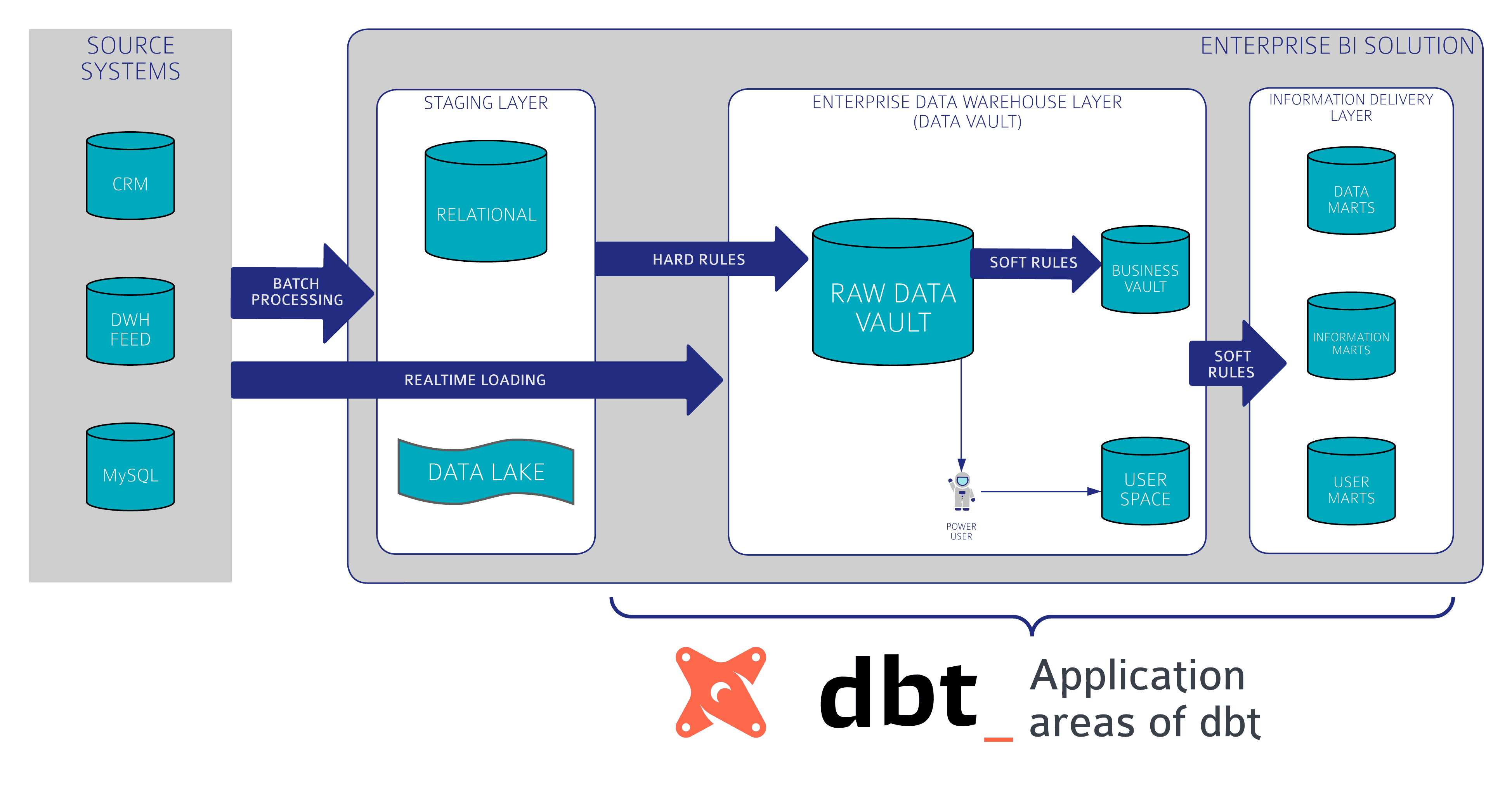
In the Data Vault 2.0 architecture, information marts are used to deliver information to the end-users. Conceptually, an information mart follows the same definition as a data mart in legacy data warehousing. However, in legacy data warehousing, a data mart is used to deliver useful information, not raw data. This is why the data mart has been renamed in Data Vault 2.0 to better reflect the use case.


Introduction to Information Marts

However, the definition of information marts has more facets. In the book “Building a Scalable Data Warehouse with Data Vault 2.0” we present three types of marts:

  • Information marts: used to deliver information to business users, typically via dashboards and reports.
  • Metrics Mart: used in conjunction with a Metrics Vault, which captures EDW log data in a Data Vault model. The Metrics Mart is derived from the Metrics Vault to present the metrics in order to analyze performance bottlenecks or resource consumption of power users and data scientists in managed self-service BI solutions.
  • Error Mart: stores those records that typically fail a hard rule when loading the data into the enterprise data warehouse.

Information Marts for Consulting

In addition to these “classical” information marts, we use additional ones in our consulting practice:

  • Interface Mart: this is more or less an information mart, however, the information is not delivered to a human being, e.g. via a dashboard or report. Instead, it is delivered to a subsequent application or, as a write-back, to the source system (for example when using the enterprise data warehouse for data cleansing).
  • Quality Mart: the quality mart is again an information mart, but instead of cleansing bad data, it is used to report bad data. Essentially, it turns the business logic used to cleanse bad data upside down: only bad data (well and ugly data sometimes) is delivered to the end-user, the data steward. This is often done in conjunction with data cleansing frontends where the data steward can either correct source data or comment and tag the exceptions.
  • Source Mart: again an information mart, but this time not using one of the popular schemas, such as star schemas, snowflake schemas, or fully denormalized schemas. Instead, the information mart uses the data model of the source application, similar to an operational data store (ODS) schema. However, the Source Mart is not a copy of the data, it is a virtualized model on top of the Data Vault model, reflecting the original structures. It is great for ad-hoc reporting and of great value for many data scientists and power users.

This concludes our list of information marts. We have used them successfully in projects for our clients to better communicate the actual application of the information marts in their organization.

Conclusion

Information marts in Data Vault 2.0 are essential for delivering processed data to end-users through reports and dashboards. Variants like Metrics Marts and Error Marts enhance performance analysis and data quality management. Additionally, specialized marts such as Interface, Quality, and Source Marts cater to specific business needs, ensuring flexible and efficient data delivery.

Close Menu